Module @aws-mdaa/bedrock-builder-l3-construct - v1.9.0
Construct Overview
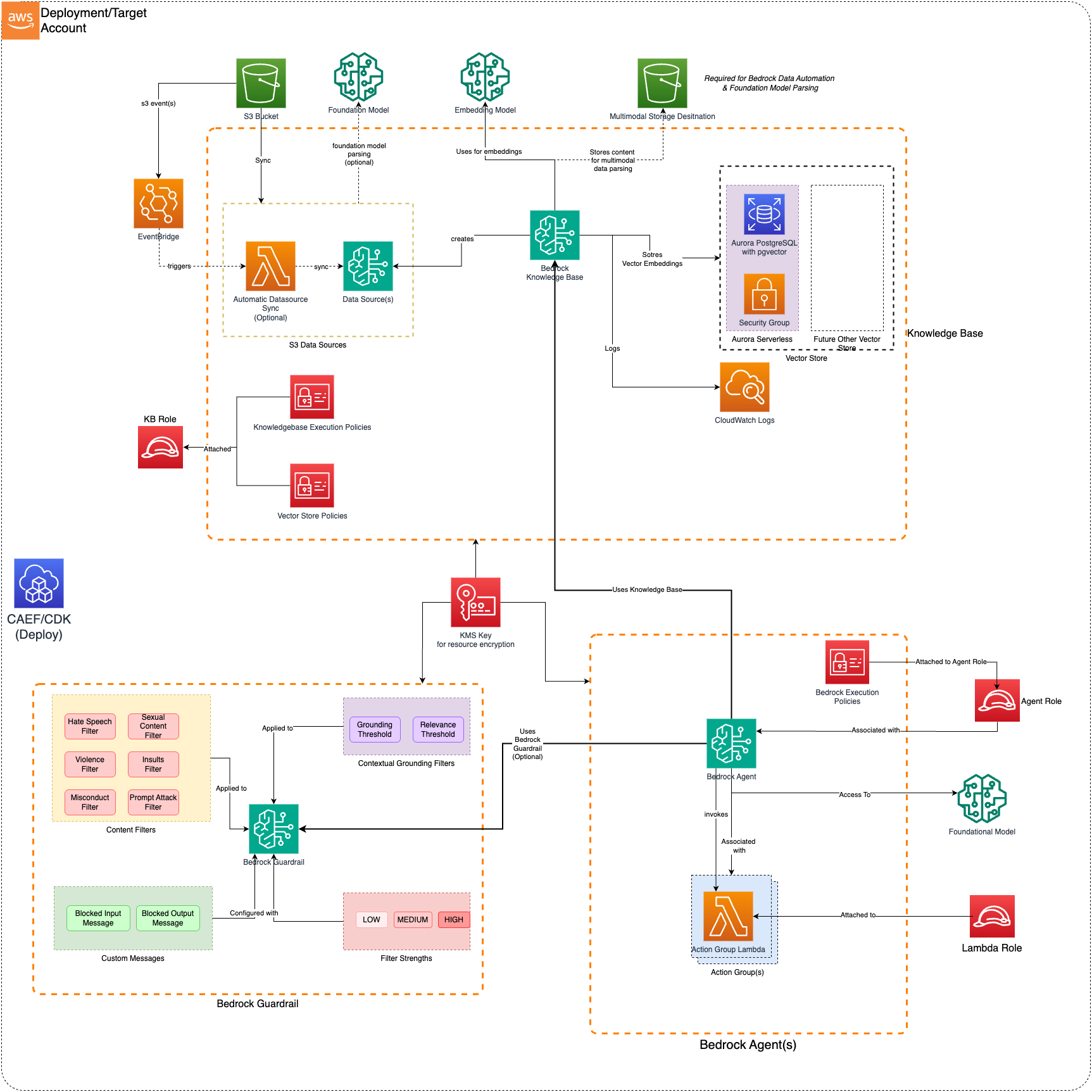
The Bedrock Builder CDK L3 construct is used to configure and deploy a secure Bedrock Builder and associated resources.
Deployed Resources
-
Bedrock Builder: Deploys Amazon Bedrock Component(s) to streamline workflows and/or automate repetitive tasks using Foundational Models
-
Bedrock Execution Policies: For Knowledge Bases, the construct creates consolidated IAM policies per execution role:
- Vector Store Policy: Permissions for Aurora PostgreSQL (rds-data, secretsmanager) or OpenSearch Serverless (aoss:APIAccessAll)
- Foundation Model Policy: Permissions to invoke embedding and parsing models (bedrock:InvokeModel)
- Data Sync Policy: Permissions for data source synchronization (bedrock:StartIngestionJob, GetIngestionJob, ListIngestionJobs)
Policies are consolidated per role - multiple KBs sharing the same role share the same 3 policies to avoid hitting the AWS limit of 10 managed policies per role.
-
Bedrock Execution Role: Execution policies are attached to the KB execution role. This role should have Bedrock Service as a Trusted Principal.
-
Bedrock KMS Key: Encrypt Bedrock resources with the KMS Key. One will be generated if a KMS key is not provided as part of Configuration
-
Lambdas: (Optional) Allows you to generate Lambda Layer, Lambda Function or both, which can be associated with Agent Action Group. (Refer: MDAA DataOps-LambdaFunctions)
- Lambda Layers - Lambda layers which can be used in Lambda functions (inside or outside of this config).
- Lambda Functions - Lambda function(s) for Agent Action Group(s)
-
May be optionally VPC bound with configurable VPC, Subnet, and Security Group Parameters
-
Can use an existing security group (from Project, for instance), or create a new security group per function
-
If creating a per-function security group:
- All egress allowed by default (configurable)
- No ingress allowed (not configurable)
-
-
Action Group(s): Create Agent Action group for Bedrock Agent. It allows you to either use an existing Lambda function (by providing its ARN directly) or create a new one as part of the agent configuration. The
generated-function:prefix tells the system to use the Lambda that was created from the configuration rather than looking for an existing function ARN -
Bedrock Guardrail: (Optional) If Bedrock Guardrail is mentioned in the configuration, the Agent will be associated with Bedrock Guardrail.
Bedrock execution policy will also be updated to allow
ApplyGuardrailpermission on the providedGuardrailID -
OpenSearch Serverless VPC Endpoints: For OpenSearch Serverless vector stores, the construct automatically creates VPC endpoints for secure connectivity. If you already have an existing VPC endpoint for OpenSearch Serverless in your VPC, you can provide the endpoint ID and security group ID in the vector store configuration to reuse it instead of creating a new one. This prevents deployment failures when a VPC endpoint already exists.
-
AgentCore Harness(es): (Optional) Deploys one or more
AWS::BedrockAgentCore::Harnessresources - a declarative agent loop (model + system prompt + tools). Configured via the top-levelharnessesmap, independently ofagents.- A harness's
guardrail.idandtools[].agentCoreGateway.gatewayArnmay reference a guardrail or gateway defined elsewhere in the same module via aconfig:<name>reference (resolved to the live guardrail id/version or gateway ARN), or a literal id/ARN. - Covers model and sampling config, execution role, guardrails, session lifecycle and cost caps,
inline_functionandagentcore_gatewaytools, VPC networking, and context truncation - see@aws-mdaa/bedrock-agentcore-harness-l3-constructfor the full configuration surface.
- A harness's
-
Harness VPC Endpoints: (Optional) Deploys the interface and gateway VPC endpoints of each set in the top-level
vpcEndpointsmap, each with its own security group, via@aws-mdaa/vpc-endpoint-l3-construct. Which endpoints exist is derived from the harnesses referencing the set; the set states only which VPC it serves and how each endpoint is reached. See Harness VPC endpoints for the config surface and what is rejected at synth.
Configuration
Using Existing OpenSearch Serverless VPC Endpoints
If you already have an OpenSearch Serverless VPC endpoint in your VPC, you can configure the vector store to use it instead of creating a new one. This is useful when:
- You have an existing VPC endpoint that you want to reuse across multiple deployments
- You want to avoid deployment failures caused by attempting to create duplicate VPC endpoints
- You need to manage VPC endpoints separately from your Bedrock deployment
To use an existing VPC endpoint, add the ossVpce property with vpceId and securityGroupId to your OpenSearch Serverless vector store configuration:
vectorStores:
my-vector-store:
vectorStoreType: OPENSEARCH_SERVERLESS
vpcId: 'vpc-1234567890abcdef0'
subnetIds:
- 'subnet-1234567890abcdef0'
- 'subnet-0987654321fedcba0'
standbyReplicas: ENABLED
# Provide existing VPC endpoint details to reuse instead of creating new
ossVpce:
vpceId: 'vpce-1234567890abcdef0'
securityGroupId: 'sg-1234567890abcdef0'
Important Notes:
- The
ossVpceconfiguration is only applicable to OpenSearch Serverless vector stores (not Aurora Serverless) - Both
vpceIdandsecurityGroupIdmust be provided together withinossVpce - If multiple OpenSearch Serverless vector stores use the same VPC, they must all use the same existing VPC endpoint configuration or all create a new one
- The existing VPC endpoint must be configured for OpenSearch Serverless service
- The security group must allow appropriate network access for your use case
To get started, see the sample configurations.
Classes
Interfaces
- BedrockBuilderL3ConstructProps
- BuilderGatewayProps
- GatewayConfigProps
- GatewayInterceptorConfigurationsProperty
- GatewayTargetProps
- HarnessConfigProps
- LambdaFunctionProps
- NamedAgentProps
- NamedGatewayProps
- NamedGatewayTargetProps
- NamedGuardrailProps
- NamedHarnessProps
- NamedKnowledgeBaseProps
- NamedVectorStoreProps
- NamedVpcEndpointSetProps
- S3ImageLayerEndpointProps
- VpcEndpointProps
- VpcEndpointSetProps