Demonstrates the usage of the Jobs library.
This demo provides a simple example on using the Jobs library and working with AWS IoT Jobs.
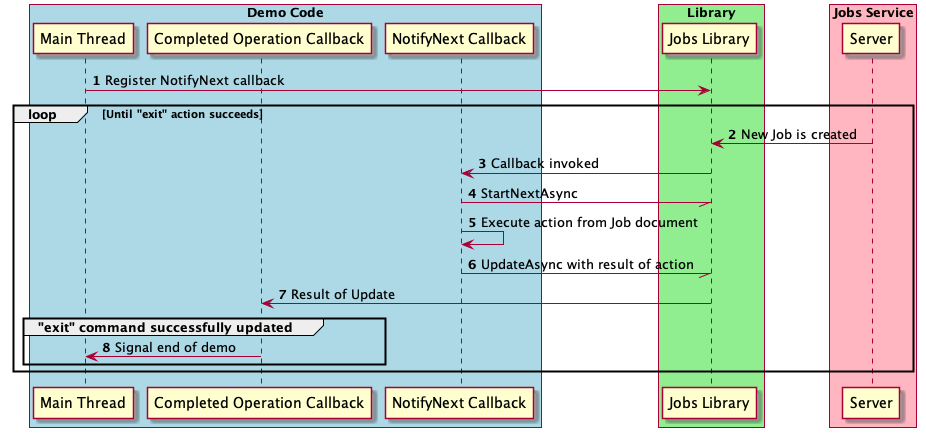
The Jobs demo establishes an MQTT connection and registers a Jobs NotifyNext callback. It then waits for new Jobs. When a Job arrives, the demo parses the Job document and takes action based on the document content.
Demo Setup
How to set up Jobs for the Jobs demo.
Because the Jobs MQTT API does not support creating Jobs, you must create Jobs for the demo separately. We recommend using AWS CLI to create Jobs.
- Create a user for AWS CLI. See steps 1 and 2 of Additional Travis CI setup for Jobs and Provisioning system tests for more information.
- Build and run the demo as described here.
- When the following message appears, you may begin creating Jobs for the demo. /*-----------------------------------------------------------*/The Jobs demo is now ready to accept Jobs.Jobs may be created using the AWS IoT console or AWS CLI.See the following link for more information.https://docs.aws.amazon.com/cli/latest/reference/iot/create-job.htmlThis demo expects Job documents to have an "action" JSON key.The following actions are currently supported:- printLogs a message to the local console. The Job document must also contain a "message".For example: { "action": "print", "message": "Hello world!"} will cause"Hello world!" to be printed on the console.- publishPublishes a message to an MQTT topic. The Job document must also contain a "message" and "topic".For example: { "action": "publish", "topic": "demo/jobs", "message": "Hello world!"} will cause"Hello world!" to be published to the topic "demo/jobs".- exitExits the demo program. This program will run until { "action": "exit" } is received./*-----------------------------------------------------------*/
The supported actions are described above. As an example, the command to create a "publish" Job with AWS CLI is below. Replace UniqueId with a Job ID that is unique, and ThingARN with the ARN of the target Thing.
This will cause the Jobs demo to publish the message Hello world! on the topic jobsdemo/1. You may view this message by subscribing to the topic in AWS IoT Console.
When the demo finishes with a Job, it will mark the Jobs as complete. Note that completed Jobs are not automatically removed from the AWS IoT Console. The following command can be used to remove completed Jobs. Replace UniqueId with the Job ID.
Demo Structure
The Jobs demo uses the asynchronous API of the Jobs library. Most of the demo is run from the NotifyNext callback.
- Note
- Messages from the Jobs service (which are sent at MQTT QoS 1) may be received multiple times. The Jobs NotifyNext callback must be able to handle duplicated Job documents.