Customer managed rules
Prerequisites
This section assumes familiarity with Prerequisites and fundamentals and Firewall policy configuration. Review those topics first if you are new to AWS Network Firewall.
Customer managed stateful rules are the core of AWS Network Firewall's inspection capability, using the Suricata engine for connection-aware deep packet inspection at layers 3-7 with support for TLS SNI matching, HTTP header inspection, protocol detection, URL category matching, JA3/JA4 fingerprinting, and GeoIP filtering.
Read this page before jumping to Sample Suricata rules. The concepts here (especially the flow: keyword, Suricata rule types, and rule group organization) are essential context for understanding why the sample rules are written the way they are.
Do not use stateless rules
Best practice
Set the stateless engine's default actions to "Forward to stateful rule groups" and do not configure any stateless rules. Perform all filtering in the stateful engine.
The stateless rule engine inspects each packet in isolation without regard to connection state or traffic direction. It is somewhat similar to a VPC network ACL in that both are stateless packet filters, though the stateless engine scales to far more rules, exposes packet-level options like TCP flags, and is more flexible in how you express sources and destinations. What it shares with a network ACL is the part that matters here: no connection context. It is also significantly more expensive than a network ACL, because Network Firewall charges per GB of traffic processed. The stateless engine cannot log traffic, which makes troubleshooting difficult when rules are misconfigured.
Common misconfiguration
Creating a broad stateless pass rule (such as pass on all TCP traffic) without realizing the stateless engine is optional. Because the stateless engine evaluates before the stateful engine, this pass rule allows all matching traffic through before the stateful engine ever sees it. The stateful rules then never fire, and because the stateless engine does not log, there is no indication of why. This creates a difficult troubleshooting situation that is entirely avoidable by not using stateless rules.
The stateful engine provides everything the stateless engine does plus return traffic handling, deep packet inspection, logging, and the reject action. While some customers do have legitimate use cases for the stateless engine, these are rare. For the vast majority of deployments, all filtering should happen in the stateful engine.
Use custom Suricata rules
Network Firewall supports three stateful rule formats, but all three are converted to Suricata rules under the hood:
- Custom Suricata rules (recommended) - You write the raw Suricata rule syntax directly
- Domain list rules - A UI abstraction that generates Suricata domain filtering rules
- Standard stateful rule builder - A UI abstraction that generates Suricata rules from form inputs
The domain list rules and standard stateful rule builder are just interfaces that produce Suricata rules. They limit you to whatever the UI experience supports. By using the custom Suricata rulestring option, you get access to the full range of Suricata capabilities that the console UI may not yet expose, and you are able to easily import and export rules in text format in case you ever need to adjust the rule group capacity.
Best practice
Write custom Suricata rules directly. This gives you full control over rule behavior, custom log messages, custom Signature IDs (SIDs) for log analysis, and the ability to easily copy, paste, back up, and move rules between rule groups.
Suricata rule syntax can seem intimidating at first if you have never worked with it. With the resources available (the Sample Suricata rules page in this guide, the Suricata Rule Generator tool, and the official AWS documentation examples), it is more approachable than it initially appears. Customers who invest time in learning the syntax early consistently report that reading raw Suricata rules becomes more intuitive than navigating console-built rules over time. See Writing rules with Suricata Rule Generator below for an open-source tool that automates many of the best practices on this page, including the ability to automatically convert UI-generated rules into Suricata rules.
A significant operational advantage of custom Suricata rules is portability. Since they are plain text, you can copy them into version control, move them between rule groups, and include them in infrastructure-as-code templates. Most customers store their Suricata rules in a git repository and manage all rule and policy changes through version-controlled pull requests. This provides an audit trail of who changed what rule and when, the ability to roll back to a known-good configuration, and peer review of firewall policy changes before they are deployed. Rules built through the standard stateful rule builder are stored as structured objects. When managing rules through IaC (CloudFormation, Terraform, CDK), the plain text Suricata format integrates naturally into your templates. If you create rules manually in the console, the standard stateful rule builder's structured format makes it painful to migrate rules between rule groups or export them for backup. It is surprisingly more intuitive to read the raw Suricata rules after you get some familiarity with it, rather than trying to parse a console-built rule in the UI or in IaC output.
Always use the flow: keyword on all TCP or IP protocol rules
Best practice
Add flow: to every stateful rule where the protocol field in the rule (field 2) is either tcp or ip. This single keyword prevents the most common class of rule conflicts in Network Firewall deployments. Most often customers find that flow:to_server; is the most appropriate, but flow:established; or flow:to_server, established; are good options to consider too.
Why the flow: keyword matters
When Suricata parses a rule, it assigns it an internal rule type based on the protocol field and keywords present. The type determines whether the action applies to a single packet or to the entire flow.
A rule with tcp, udp, or ip in the protocol field and no flow: keyword is classified as SIG_TYPE_IPONLY. Suricata evaluates it on the first packet of a flow (for example, the TCP SYN), locks in the action for the entire connection, and stops inspecting it. All subsequent packets — including application-layer data — are handled by the firewall's state table without being evaluated against any other rules. This is the source of most rule ordering problems in Network Firewall.
Adding flow: converts the rule to SIG_TYPE_PKT, which is evaluated per-packet. The flow continues to be inspected, application-layer rules can still fire in priority order, and you have explicit control over directionality.
Which rules need a flow: keyword
Add flow: to any rule whose protocol field is tcp, udp, or ip and that matches only on addresses and ports. Without it, Suricata classifies the rule as SIG_TYPE_IPONLY and locks in the action on the first packet before any application-layer data is present.
# Correct: flow:to_server makes this SIG_TYPE_PKT
pass tcp $HOME_NET any -> any 80 (flow:to_server; sid:22222;)
Rules with an application-layer protocol field (tls, http, ssh, dns, etc.) or an application-layer buffer keyword (tls.sni, http.host) do not need flow: — they cannot match until app-layer data is available, so they never trigger on the initial SYN. Adding flow:to_server to them is harmless and common for consistency.
Common misconfiguration
When customers report that their firewall is "processing rules out of order" or that higher-priority rules are being skipped, the cause is almost always a rule without flow: that is matching on the SYN packet and passing the entire flow before application-layer rules can inspect it. Adding flow:to_server; to the rule fixes this in every case we have seen.
Example: application-layer rules never fire
Without flow:to_server, a TCP pass rule matches on the SYN packet and passes the entire flow. Application-layer rules higher in the ruleset never see the traffic:
# BAD - DO NOT USE
# Rule 1: intends to block HTTP traffic to baddomain.com
reject http $HOME_NET any -> any 80 (http.host; content:"baddomain.com"; sid:1;)

# Rule 2: allows all TCP port 80 (SIG_TYPE_IPONLY rule - matches on SYN, stops inspecting)
pass tcp $HOME_NET any -> any 80 (sid:2;)
In this example, Rule 2 matches the first TCP SYN packet (before any HTTP data exists) and passes the entire flow. Rule 1 never evaluates because the flow is already in the state table as allowed. The customer sees that strict rule ordering "isn't working" because a lower-priority rule is taking precedence.
The fix:
# GOOD
# Rule 1: blocks HTTP traffic to baddomain.com (unchanged - no flow: needed)
reject http $HOME_NET any -> any 80 (http.host; content:"baddomain.com"; sid:1;)

# Rule 2: allows TCP port 80 (SIG_TYPE_PKT rule - continues inspecting)
pass tcp $HOME_NET any -> any 80 (flow:to_server; sid:2;)
Only Rule 2 changes. With flow:to_server, Rule 2 becomes a SIG_TYPE_PKT rule. Suricata continues to inspect the flow, and when the HTTP request arrives with "baddomain.com" in the host header, Rule 1 fires and blocks it.
See Troubleshooting rules in Network Firewall for more information.
Pass rules end inspection for the rest of the stream
Adding flow: fixes rule ordering, but it does not change a more fundamental property of the pass action: once a pass rule matches, Suricata stops inspecting the rest of that TCP stream. Subsequent payload on the same connection is not evaluated against your other rules, including AWS managed threat signatures, even if that payload is malicious. This is by design in Suricata, not a Network Firewall limitation.
The practical consequence is that a broadly scoped pass rule is not just permissive access, it is a blind spot. A rule like pass tcp $HOME_NET any -> any 443 (flow:to_server, established; sid:1;) allows every HTTPS destination and also removes IPS inspection from every one of those connections.
Best practice
Scope pass rules as narrowly as the use case allows. Prefer application-layer pass rules that match a specific domain (tls.sni, http.host) over broad pass tcp rules on a port, so that the allow decision is tied to a destination you intended rather than to the port number. Where you must allow a broad range, place your AWS managed threat signature rule groups at a higher priority so they evaluate before the pass rule.
For the underlying Suricata behavior, see Ignoring traffic: pass rules and this Suricata forum discussion.
Consolidate into few rule groups
Network Firewall has limits around how many rules and rule groups you can attach to a firewall policy. A firewall policy supports a maximum of 20 stateful rule groups, and that limit is shared between your custom rule groups and AWS managed rule groups. The total stateful rule capacity defaults to 30,000 across all rule groups referenced by a policy, and any single rule group is capped at 30,000 capacity. Both are default quotas that you can request an increase for through Service Quotas. A rule group also has a 2 MB maximum size limit on its Suricata rules string, which is not adjustable.
Best practice
Use as few custom rule groups as possible, ideally just one. This maximizes the number of AWS managed rule groups you can attach (the 20 stateful rule group limit is shared between custom and managed) and makes it much easier to read your custom ruleset from top to bottom for troubleshooting.
Understanding and calculating capacity
Capacity is the number of rules you expect the rule group to hold over its lifetime. It is pre-allocated when the rule group is created, and it is fixed. You cannot increase the capacity of an existing rule group. If an update would exceed the group's capacity, the API rejects it, and you need to create a new rule group with a larger capacity and move your rules into it.
How capacity is consumed depends on the rule group type. For the official reference, see Setting rule group capacity in AWS Network Firewall.
Suricata compatible IPS rules and standard stateful rules
Each rule consumes exactly 1 capacity unit, regardless of how complex the rule is. A rule with several content matches, a PCRE, and multiple flowbits still costs 1. This is what the AWS documentation means when it says to estimate a stateful rule group's capacity as "the number of rules that you expect to have in it during its lifetime": the rule count is the capacity, with no multiplier for rule complexity.
Domain list rule groups
The first domain consumes 2 capacity for HTTP or 1 for HTTPS, or 3 if both protocols are selected. Every domain after the first consumes 1 capacity per protocol. Note that strict order domain list rule groups do not automatically create the drop rules behind the scenes, so you configure the drop established default action on the firewall policy yourself. See Default actions.
For example, a domain list rule group with 20 domains, a rule action of allow, and both HTTP and HTTPS selected:
Stateless rule groups
Stateless capacity is calculated differently: the capacity of a single rule is the product of the number of specifications in each of its match settings. A rule specifying 2 protocols, 3 sources, and 5 destinations costs 2 x 3 x 5 = 30. The capacity documentation linked above has the full calculation and worked examples.
Verifying the capacity you need
You do not have to calculate capacity by hand. There are three ways to get the exact number:
- Dry run the create call. Call
CreateRuleGroupwithDryRunset totrue. Network Firewall evaluates the request and returns what the rule group would consume, without creating anything. ReadConsumedCapacityfrom the response. This is the most reliable method and the one to use in a pipeline. Pass a generous--capacityvalue for the dry run so the request is not rejected before it reports back.
- Read the error message. If you attempt to create a rule group with insufficient capacity, the error tells you the required value directly:
An error occurred (InvalidRequestException) when calling the CreateRuleGroup operation:
StatefulRules capacity exceeded, parameter: [67], context: RulesSource.StatefulRules
In this example the rule set needs at least 67 capacity units.
- Describe an existing rule group. The
ConsumedCapacityfield shows how much of an existing rule group's capacity is in use.
Best practice
Determine the capacity you need with a DryRun create call, then set the actual capacity well above it. If you are consolidating all custom rules into one group, set the capacity to whatever remains after accounting for your managed rule groups. Capacity you do not use costs nothing.
Planning for growth
If you are building a domain allowlist that may grow over time, plan for the 2 MB rule group byte limit as well as the capacity limit. A practical approach is to cap each rule group at approximately 7,500 domain rules, leaving headroom for per-rule comments and future growth.
If your domain list is approaching a rule group's capacity, consider a PCRE rule that matches many domains in a single rule instead of splitting across multiple rule groups. One PCRE rule costs 1 capacity unit no matter how many domains it covers. See Allow multiple domains in a single rule for the pattern and its trade-offs.
Signature IDs (SIDs)
Every Suricata rule requires a Signature ID (SID), which is a unique numeric identifier for that rule. The SID is included in every alert log entry generated by that rule, making it your primary key for identifying which rule fired on a given traffic flow. SIDs are defined with the sid: keyword:
When you see an alert in your logs, the SID tells you which rule matched. Alert log events also include an aws_metadata.resource_arn field identifying the rule group the rule came from, so a SID that is reused across two different rule groups is still unambiguous in the logs. Combine descriptive msg: fields with a SID numbering convention that makes rules easy to find in your ruleset. See Rule hit count for how SIDs and rule group ARNs are used together to report per-rule traffic matches.
Domain filtering
Domain-based filtering on TLS SNI and HTTP host headers is one of the most common and effective use cases for Network Firewall. It allows you to control which domains your workloads communicate with without managing IP-based rules for services behind CDNs or with frequently changing IPs.
Best practice
Implement a domain allowlist for egress traffic: explicitly allow only the domains your workloads need, and block everything else by default. This is an extremely common configuration we recommend because it flips the security model from trying to identify and block all bad destinations on the internet (an impossible task) to only allowing known-good domains your workloads actually need access to, blocking everything else by default, dramatically reducing the risk surface.
Network Firewall inspects domain information from two sources:
- TLS SNI - The Server Name Indication field in the TLS Client Hello (matched with the
tls.snikeyword) - HTTP Host Header - The Host header in plaintext HTTP requests (matched with the
http.hostkeyword)
Domain-based rules match regardless of the destination port, depending on how you write the rule. The sample rules in this guide use any for the destination port, so they match TLS or HTTP traffic on any port. Domain-based rules also work regardless of whether the underlying connection uses IPv4 or IPv6, which is a significant advantage over IP-based filtering in dual-stack environments.
For complete domain filtering rule examples (exact match, wildcard subdomain matching with dotprefix, PCRE for multiple domains in a single rule, and HTTP/HTTPS variants), see Sample Suricata rules.
SNI manipulation and when to consider TLS inspection
TLS SNI filtering is a common industry standard, but it has a known limitation: if a client system is compromised, it could craft TLS requests with a legitimate domain in the SNI field while connecting to a different (malicious) IP address. In practice, most customers accept this risk because a domain allowlist already dramatically reduces the attack surface. An unauthorized party must not only compromise the workload but also know which specific domains are on the allowlist.
For organizations that cannot accept this risk, enabling TLS inspection (decryption) eliminates this concern. When TLS is decrypted, the firewall validates that the SNI matches the certificate presented by the server. Mismatches are blocked automatically.
Log allowed traffic
Pass rules in Suricata allow traffic without generating a log entry. If you need visibility into which traffic is being allowed (not just what is being blocked), you must explicitly enable logging on pass rules.
Best practice
Add the alert; keyword to any pass rule that you want to log. This is the simplest approach and keeps your ruleset compact.
# Pass rule with logging enabled via alert; keyword
pass tls $HOME_NET any -> any any (alert; msg:"allowed *.amazonaws.com"; tls.sni; dotprefix; content:".amazonaws.com"; nocase; endswith; flow:to_server; sid:100001;)
The alert; keyword causes the pass rule to generate a log entry, and the log shows a verdict.action of pass, accurately reflecting what the firewall did with the traffic.
Logging pass rules is also what makes them visible in rule hit count. Hit counters increment only when a rule match produces an alert log entry, so a pass rule without alert; never appears in the Top Rule Hits view no matter how much traffic it allows.
IP set references
For rules that need to reference large or frequently changing sets of IP addresses, use IP set references linked to managed prefix lists. IP set references use the @ prefix and allow you to update the IP list without modifying or redeploying your rule groups.
Best practice
Use IP set references linked to prefix lists for any IP-based rules where the target addresses change over time (partner IPs, SaaS provider ranges, internal service endpoints). This decouples your rule definitions from the specific IPs they reference.
pass tls @partnercidrs any -> $HOME_NET 443 (msg:"Allow partner ingress on TLS/443"; flow:to_server; sid:202608211;)
Associate a customer-managed or AWS-managed prefix list with a rule group's IP set reference. When the prefix list is updated, the firewall rules automatically reflect the new entries.
Limits:
- Maximum of 5 IP set references per stateful rule group
- Maximum of 1,000 entries per prefix list
- With 20 rule groups x 5 references x 1,000 entries = up to 100,000 CIDRs supported
The container attribute association feature also uses IP sets to dynamically reference container workload IPs, but the 5 IP set reference limit per rule group does not apply to container association IP sets. This means you can use IP set references for your manually managed prefix lists without worrying about conflicting with container attribute associations.
For configuration details, see IP set references in rule groups.
Writing rules with Suricata Rule Generator
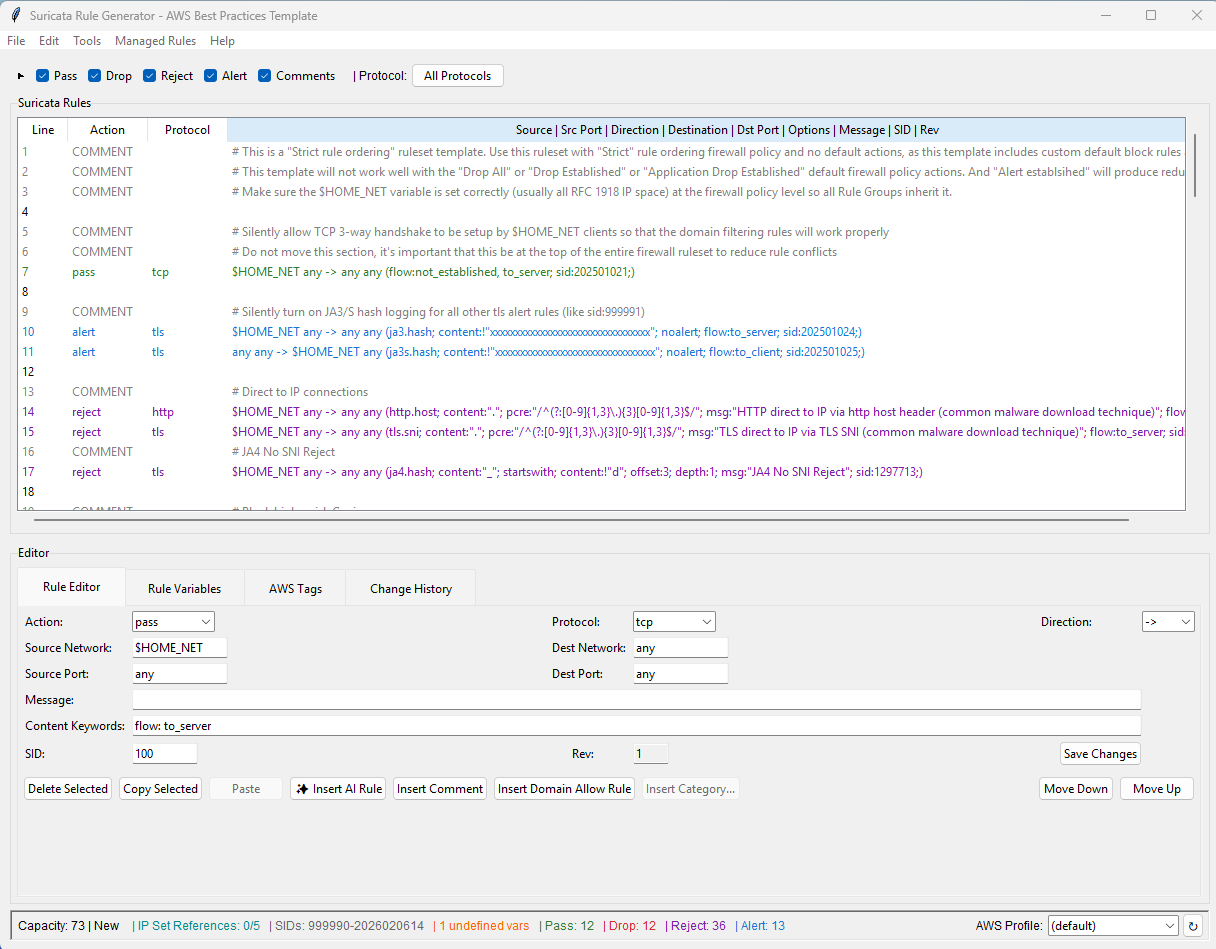
Writing custom Suricata rules correctly requires attention to many details: proper flow: keyword placement, unique SIDs, valid protocol/action combinations, consistent formatting, and revision tracking. The Suricata Rule Generator for AWS Network Firewall is an open-source GUI application designed to handle these concerns automatically, so you can focus on what to filter rather than getting the syntax right.
What the tool does for you
- Automatic
flow:keyword - The tool appliesflow:to_serveron rules where appropriate as you write them, preventing the most common rule conflict in Network Firewall deployments (the SIG_TYPE_IPONLY vs application-layer rule interaction described above) - Real-time syntax validation - Only allows supported actions (
pass,drop,reject,alert), supported protocols, valid network/port formats, and properly structured rule options. Errors are flagged before you save. - Automatic SID management - Suggests the next available SID for new rules, prevents duplicate SIDs within a rule group, and provides bulk SID renumbering when reorganizing rules
- Automatic revision tracking - The
revkeyword auto-increments when rule fields change, giving you built-in version history per rule - Color-coded rule table - Rules are visually organized by action type (green for pass, red for drop, purple for reject, blue for alert, grey for comments), making it easy to scan a large ruleset and understand its structure at a glance
- Content keyword auto-complete - Protocol-aware suggestions for Suricata keywords (
tls.sni,http.host,ja3.hash,aws_domain_category, etc.) as you build rule options - Rule conflict analysis - Detects when rules shadow or conflict with other rules in your ruleset before you deploy, identifying security bypasses and unreachable rules
- Infrastructure export - Export your rules directly to AWS Network Firewall, Terraform, or CloudFormation with proper capacity calculation, variable mapping, and strict rule ordering configured automatically
Beyond rule authoring
The tool also provides capabilities covered in other sections of this guide:
- Bulk domain import with automatic consolidation for building domain allowlists
- Managed Rule Group Generator for creating filtered, auto-updating rule groups from AWS managed threat signatures
- CloudWatch Rule Usage Analysis for identifying unused and overly-broad rules in production
- Traffic Cost Analyzer for understanding where your firewall data processing costs are coming from
- AI Rule Assistant for generating rules from plain English descriptions using Amazon Bedrock
- Import standard stateful rule groups created in the AWS console directly to custom Suricata rules
For installation instructions, documentation, and the complete feature set, see the Suricata Rule Generator GitHub repository.
What to read next
- Sample Suricata rules - Complete rules template and individual rule examples by use case
- AWS Managed Rules - AWS Managed Rule Groups for threat detection
- Logging and monitoring - Analyzing what your rules are doing