AWS Security Agent
Introduction
Welcome to the AWS Security Agent Best Practices Guide. The purpose of this guide is to provide prescriptive guidance for using AWS Security Agent on-demand penetration testing to discover and validate exploitable vulnerabilities in your web applications and APIs. This guide is designed to provide value whether you are running your first penetration test against a single application or scaling continuous, context-aware testing across your entire application portfolio.
This guide focuses on the on-demand penetration testing capability of AWS Security Agent. AWS Security Agent also provides design security reviews, code security reviews, and threat modeling, which are referenced where relevant but are not the primary focus here.
AWS Security Agent is now part of AWS Continuum. Product and console naming may evolve as these capabilities converge. Always confirm current terminology against the AWS Security Agent User Guide.
How to use this guide
This guide is geared towards security practitioners, application security (AppSec) teams, and development teams who are responsible for validating application security before and after deployment. The best practices are organized into categories for easier consumption. Each category begins with a brief overview, followed by detailed guidance for implementing the recommendation. The topics do not need to be read in a particular order:
- What is AWS Security Agent penetration testing?
- What are the benefits of AWS Security Agent penetration testing?
- Position it alongside your existing tools
- Getting started * Region availability * First-time setup * Organizing work with agent spaces
- Enabling penetration testing * Validating domain ownership * Testing private applications with a VPC * Logging test activity to CloudWatch * Storing test credentials * Setting up IAM policies for administrators and users * Scoping the service role with least privilege
- Providing application context
- Configuring a penetration test * Defining scope with target and accessible URLs * Limiting blast radius with out-of-scope paths * Working with a WAF in front of the application * Configuring authenticated testing * Selecting risk types
- Operationalizing findings * Reviewing validated findings * Working with non-deterministic results * Providing feedback to improve accuracy * Remediating and retesting * Exporting reports * Integrating with CI/CD and existing tooling
- Testing safely and responsibly
- Security and data protection considerations
- Cost considerations
- Resources
What is AWS Security Agent penetration testing?
AWS Security Agent is a frontier agent that proactively secures your applications throughout the development lifecycle. Its on-demand penetration testing capability deploys specialized AI agents that discover, validate, and report security vulnerabilities in web applications and APIs through tailored, multi-step testing scenarios.
Unlike traditional scanners that generate findings without validation, AWS Security Agent attempts to exploit potential vulnerabilities with targeted payloads and exploit chains to confirm they are legitimate, exploitable security risks. It combines static application security testing (SAST), dynamic application security testing (DAST), and penetration testing into a single context-aware agent. The agent ingests design documents, architecture diagrams, infrastructure-as-code, source code, API specifications, and threat models to understand how your application was designed, built, and deployed, then identifies how individual vulnerabilities connect into higher-severity exploit chains.
AWS Security Agent tests against the OWASP Top 10 for web applications as well as application-specific business logic flaws, and operates across AWS, other cloud providers, and on-premises environments. For a full description of the service, see the AWS Security Agent product page and the general availability announcement.
The following diagram shows the building blocks of a penetration test. Agent spaces, application context in Amazon S3, test credentials in AWS Secrets Manager or a Lambda credential vendor, CloudWatch logging, and the IAM service role all reside in a security-team AWS Account, while the test agents run in an AWS service-managed account (backed by Amazon Bedrock) and reach your target — hosted on AWS, another cloud, or on-premises — over the public internet once you have verified domain ownership.
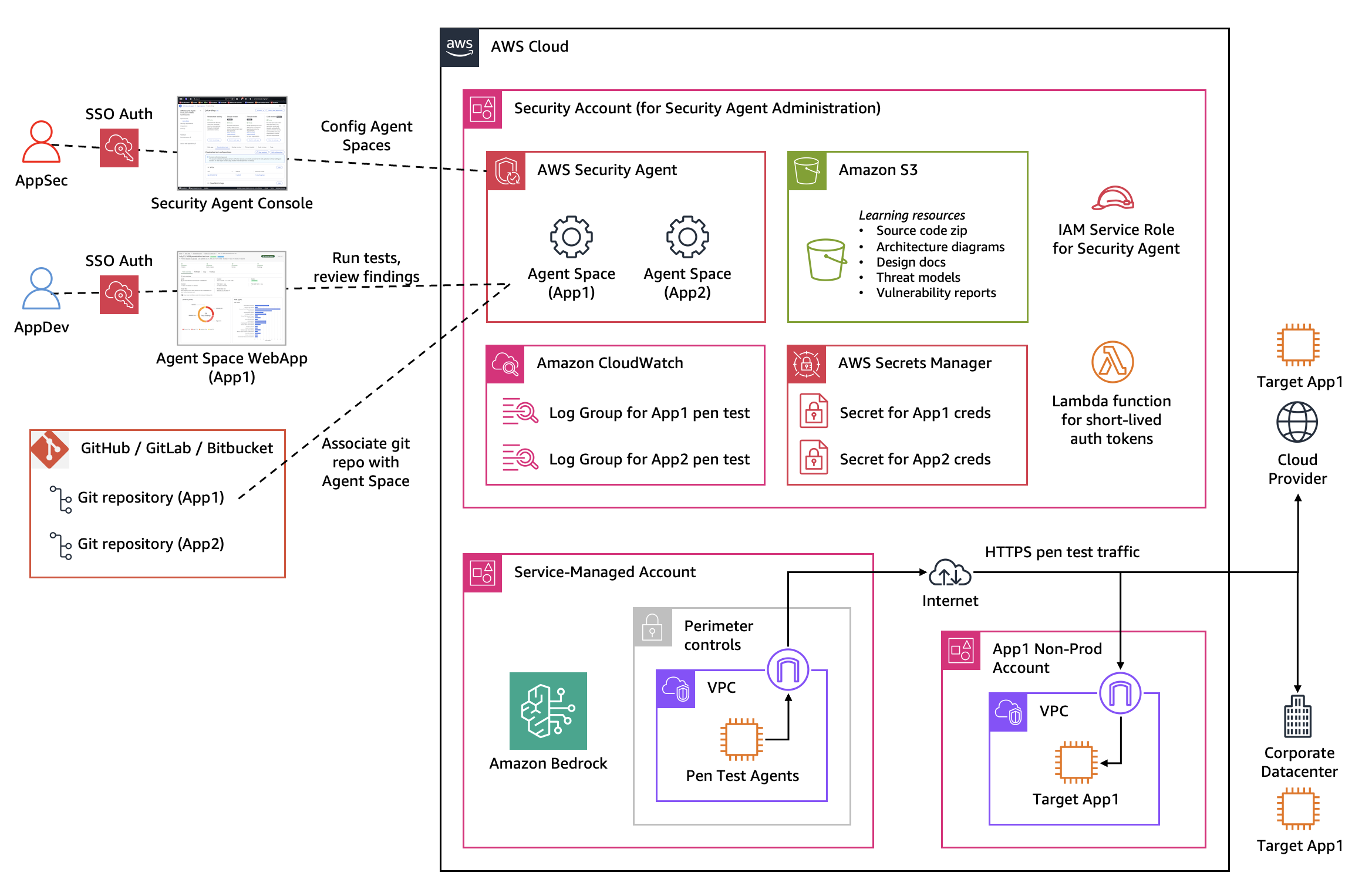
Figure 1: Foundational components of an AWS Security Agent penetration test
What are the benefits of AWS Security Agent penetration testing?
Most organizations limit manual penetration testing to their most critical applications and run those tests periodically because of time and cost constraints. This leaves much of the application portfolio untested between assessments. AWS Security Agent addresses that gap:
- On-demand, not periodic. You can initiate a penetration test in minutes and receive validated findings in hours rather than waiting weeks for an external vendor or an internal team to find capacity. This compresses the testing timeline and reduces the exposure window between releases.
- Validated findings, fewer false positives. Because the agent confirms vulnerabilities through exploitation, your team can focus on legitimate, high-impact risks instead of triaging scanner noise. Each finding includes a Common Vulnerability Scoring System (CVSS) score, an application-specific severity rating, reproduction steps, and impact analysis.
- Context awareness. By learning from your source code and documentation, the agent uncovers implementation-specific and business logic vulnerabilities that pattern-based tools miss, and chains lower-severity findings into critical exploit paths.
- Transparency. The agent shows how it plans its testing, which payloads it uses, and how it verifies successful exploitation, so you can review its reasoning.
- Broader coverage at lower cost. Testing runs autonomously at a fraction of the cost of manual penetration testing, which lets you expand coverage from a handful of critical applications to your entire portfolio.
- Complete lifecycle. The agent does not stop at a report. It can generate pull requests with code fixes and retest to confirm that vulnerabilities are resolved.
Note that AWS Security Agent is not a replacement for a professional penetration testing service. It is best used as an on-demand capability integrated into your security review workflow, with security professionals reviewing, validating, and extending its findings. See Security Considerations for AWS Security Agent.
Position it alongside your existing tools
AWS Security Agent complements, rather than replaces, your existing application security tooling. It focuses on discovering and validating exploitable, context-aware vulnerabilities — business logic flaws and multi-step exploit chains — and does not perform traditional dependency or manifest (software composition analysis) scanning. In practice, this means:
- Keep a fast, rule-based scanner for known CVEs and vulnerable dependencies. A tool such as Amazon Inspector continuously scans for published vulnerabilities in third-party dependencies and is cheap and quick to run. AWS Security Agent will not, for example, flag that a dependency in your manifest has a known CVE and bump its version.
- Use AWS Security Agent for depth. It reasons about your application to find and prove exploitable, high-impact issues that pattern-based tools miss, and runs continuously and on demand between your formal assessments.
- Treat it as supplementary evidence for compliance programs. Where an independent penetration test is mandated, use AWS Security Agent as a force multiplier for your testers and a way to catch issues before the formal assessment, not as a wholesale replacement for a required third-party test.
Getting started
This section covers what to consider before you run your first penetration test.
Region availability
Confirm that AWS Security Agent on-demand penetration testing is available in the AWS Region you intend to use, and consolidate testing in supported Regions. At the time of writing, on-demand penetration testing is available in US East (N. Virginia), US West (Oregon), Europe (Ireland), Europe (Frankfurt), Asia Pacific (Sydney), and Asia Pacific (Tokyo). Because Region support expands over time, verify the current list in the AWS Security Agent User Guide before you plan a deployment.
First-time setup
During first-time setup in the AWS console you make a few organizational decisions that apply to all of your future work. Plan these deliberately:
- Access method. Choose how users access the AWS Security Agent web application. Using AWS IAM Identity Center single sign-on (SSO) is recommended over IAM-only console access, because it lets you centrally manage which team members can create, manage, and view penetration tests and design reviews (role-based access control). For the identity-based IAM permissions to attach to those administrator and user roles — including a gap in the managed policies you need to plan around — see Setting up IAM policies for administrators and users.
- Service permissions. Configure the IAM role the web application uses to access AWS services. Follow least privilege here rather than reusing a broad administrative role (see Scoping the service role with least privilege).
- First agent space. Create your initial agent space with a name and description. After setup, creating additional agent spaces only requires a name and description.
For the full walkthrough, see Set up AWS Security Agent.
Organizing work with agent spaces
An agent space is a dedicated workspace for securing a specific application or project. It holds the security reviews, optionally connected GitHub repositories, penetration test configurations, results, and findings for that application.
The recommended practice is to create one agent space per application or project. This keeps each application's assessments, context, and testing boundaries separate, which makes results easier to reason about and lets teams focus on the application they own. Organizational security requirements are defined once at the organization level and apply across all agent spaces, while each agent space maintains its own design documents, code repositories, penetration testing configurations, results, and findings.
Use a consistent naming convention for agent spaces (for example, by application name and environment) and apply tags so you can filter results, generate targeted reports, and allocate costs by team, environment, compliance framework, or business unit.
In many organizations, agent spaces are set up and managed by a central security team in a dedicated AWS Account (a member account) reserved for security tooling rather than for running workload environments. As a result, the AWS Account that owns an agent space is typically not the AWS Account that owns the target application's test environment. Keep this separation of AWS Accounts in mind as you plan domain verification, VPC connectivity, and cross-account access to the resources a test needs.
Enabling penetration testing
Before you can run a test, enable penetration testing for your agent and configure the AWS integrations it needs. The configuration wizard walks through target domains and optional VPC, CloudWatch logging, credential storage, S3 context, and the service role. The subsections below cover the decisions that most affect safety, coverage, and cost. For the full procedure, see Enable penetration test.
Validating domain ownership
AWS Security Agent will only test domains you have proven you own. This protects both you and AWS, and it is a required step. Complete domain validation for all of your domains during initial configuration so you do not hit delays later when you want to run a test.
Choose the verification method that fits your environment:
- DNS TXT record — Add a TXT record to your domain's DNS. If your domain is hosted in Amazon Route 53 in the same AWS account, you can use one-click verification, and AWS Security Agent creates the record for you.
- HTTP route — Host a verification file at a specific route on your web server.
- Private VPC — Used only for private VPC testing; verifies that the domain resolves to an IP in a private CIDR range.
Sub-domains of a verified domain are covered automatically for DNS TXT and HTTP route verification, so you generally do not need to verify each sub-domain individually. You can add up to 20 target domains.
If you are authorized to test an endpoint but cannot complete ownership verification through any of these methods, you can request manual verification for a valid business case. Open an AWS Support case that includes your business use case and your justification for why you are authorized to test the endpoint. See Enable an application domain for penetration testing for details.
Only verified target domains are tested for vulnerabilities. Requests to any URL outside your target and accessible URLs are blocked by the network. Ensure you have proper authorization to test every system that could be affected, and comply with the AWS Acceptable Use Policy.
Testing private applications with a VPC
To test internal applications that are not publicly reachable, connect AWS Security Agent to the VPC that hosts them instead of exposing them to the internet. When you configure the VPC:
- Provide a private route to the target. You do not need a NAT gateway. Instead, ensure the private subnet you provide in the penetration test configuration has a route to the target's private subnet — for example through AWS Transit Gateway, VPC peering, or another connectivity option.
- Confirm the security groups allow the connections the agent needs to reach the target and perform testing.
Because agent spaces are usually configured in a dedicated security-team AWS Account (see Organizing work with agent spaces), the VPC you attach must be in the same AWS Account and AWS Region as the agent space — which is usually not the AWS Account or VPC that hosts the target application. When the target is not reachable from the internet, create a VPC in the agent space AWS Account and AWS Region, then establish connectivity from that VPC to the target VPC (for example, with VPC peering, AWS Transit Gateway, or a shared subnet) and confirm that routes and security groups on both sides allow the traffic.
A common pattern uses AWS Transit Gateway as a central routing hub: for a private application on AWS, the agent's network interface reaches the workload VPC through a Transit Gateway attachment over the AWS private network; for a target in an on-premises data center or another cloud, traffic routes through a Direct Connect gateway and an AWS Direct Connect connection. No traffic traverses the public internet in either case, and you verify domain ownership with the Private VPC method (see Validating domain ownership).
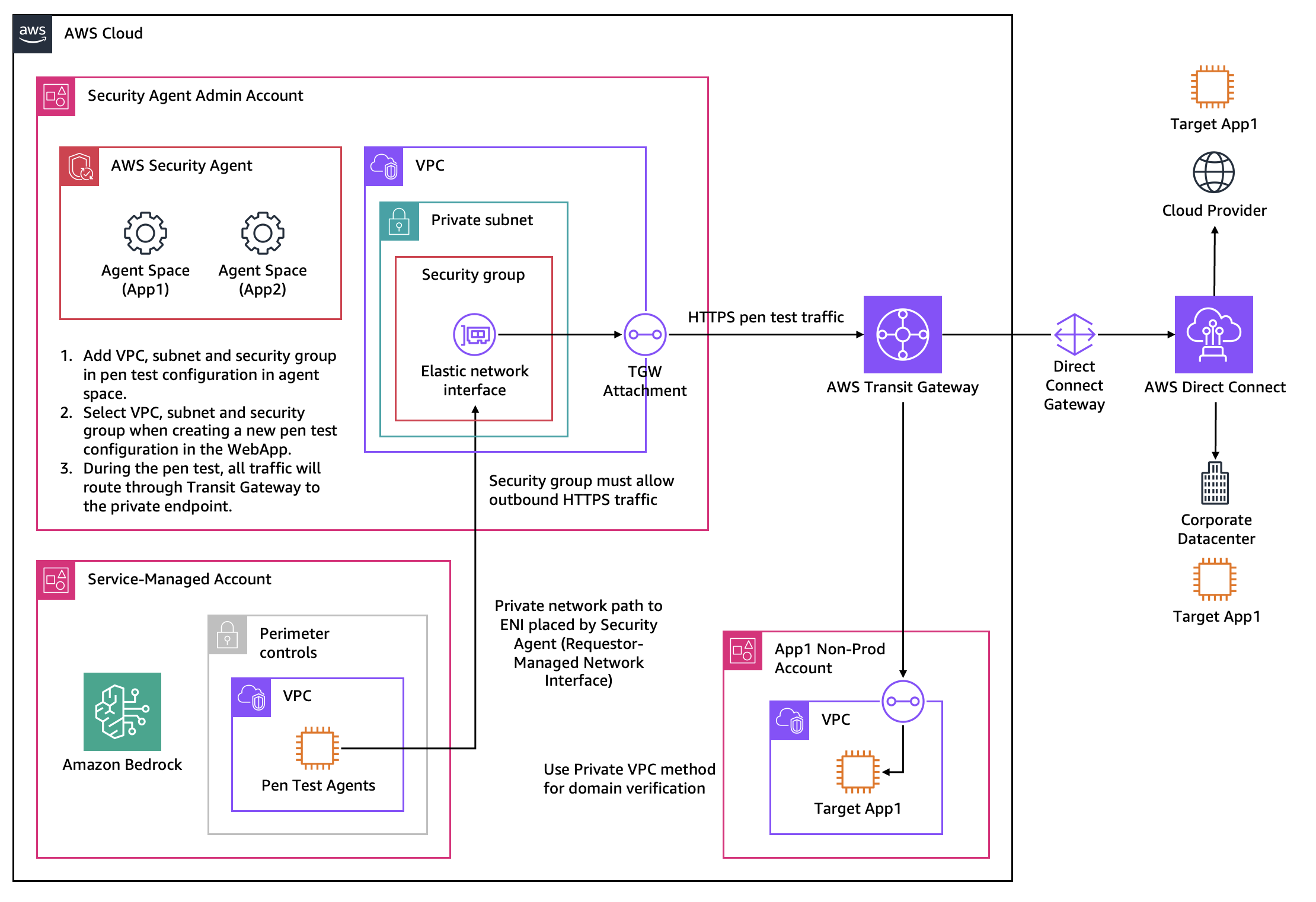
Figure 2: Reaching a private target on AWS, on-premises, or in another cloud through Transit Gateway and AWS Direct Connect
You may also need VPC configuration for a target that is reachable from the internet but only accepts traffic from known static public IP addresses. AWS Security Agent does not publish the public IP addresses it uses for internet-based tests, so there is no fixed range you can add to an ingress allowlist. Instead, attach a VPC and provide a subnet that routes outbound traffic through a NAT gateway that uses Elastic IP addresses (EIPs), then allow those EIPs in the target's ingress rules. This gives the test a predictable, stable source IP that your ingress controls can permit.
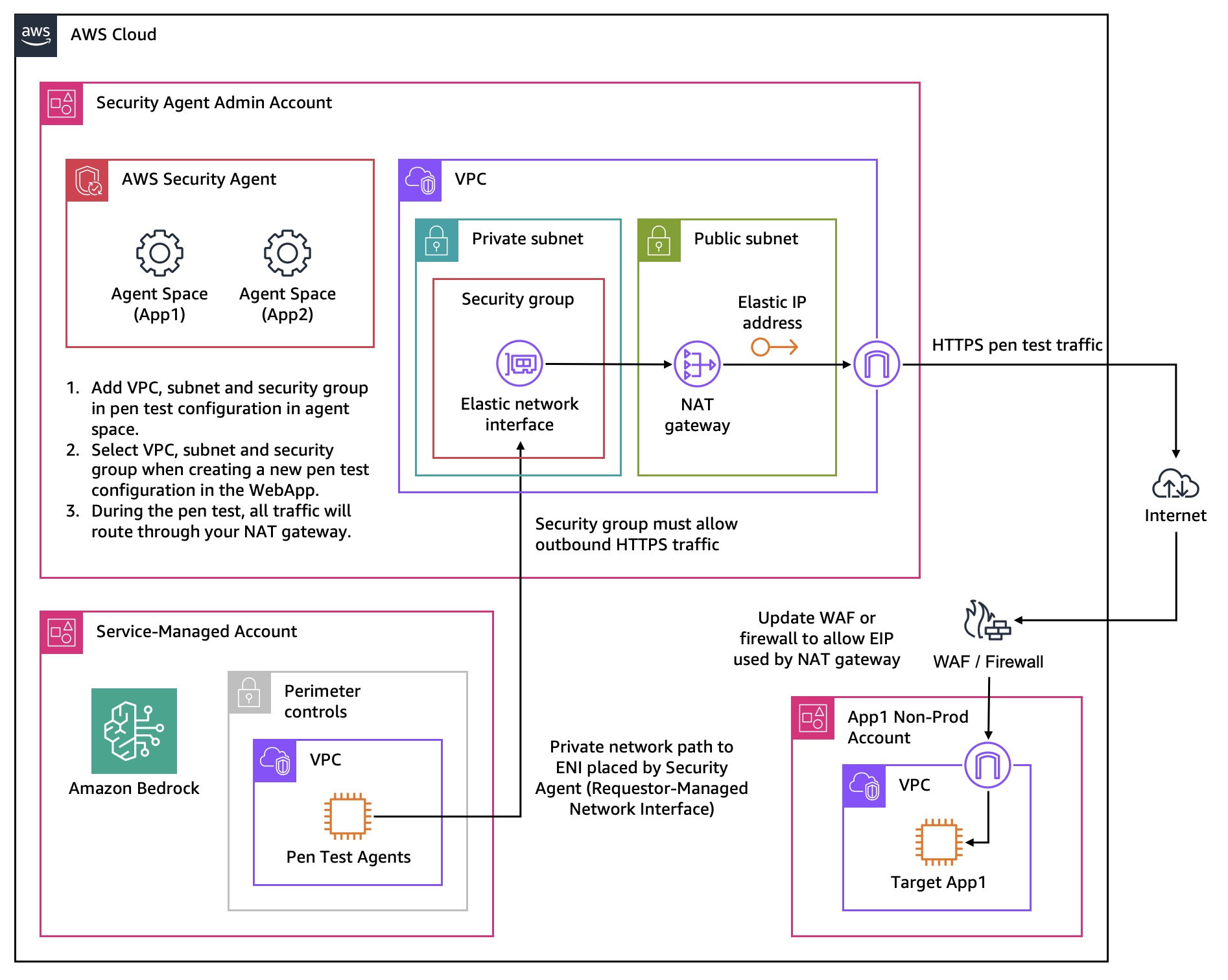
Figure 3: Routing test traffic through a NAT gateway with an Elastic IP so a source-IP allowlist can permit it
For private domains inside a VPC, verification may show as UNREACHABLE; you can still proceed, because AWS Security Agent attempts domain verification for private endpoints at the start of each run.
Logging test activity to CloudWatch
Configure an Amazon CloudWatch log group so you retain a record of penetration test activity for audit and troubleshooting. If you do not select a log group, AWS Security Agent creates one named /aws/securityagent/<agent name>/<pentest id> with the appropriate permissions. Make sure the service role has permission to write to the log group you choose.
Storing test credentials
Most vulnerabilities live behind authentication, so authenticated testing dramatically improves coverage. AWS Security Agent retrieves credentials at runtime from one of two sources:
- AWS Secrets Manager — Store static username/password credentials as secrets. Credentials are encrypted at rest, and the service role needs permission to read the secrets.
- A credential vendor (AWS Lambda function) — Use a Lambda function that returns credentials dynamically in the expected format, which is useful for short-lived tokens or credentials that must be generated on demand.
Create dedicated test credentials with permissions scoped to a realistic user role rather than reusing administrative accounts. Scoping credentials to the privileges of an ordinary user produces more realistic results and lets the agent surface broken access controls. For example, a test using a standard user's credentials can reveal that the user is able to bypass authorization and access another user's data — a flaw you would miss with an administrative account that can see every user's data by default. Provisioning credentials specifically for penetration testing also makes it easy to rotate or revoke access afterward.
Setting up IAM policies for administrators and users
Distinguish two separate IAM concerns: the identity-based permissions you grant to the people who administer and use AWS Security Agent, and the service role the web application assumes to reach AWS resources during a test. This subsection covers the former.
AWS Security Agent provides the AWSSecurityAgentWebAppPolicy AWS managed policy, which grants the permissions needed for day-to-day use of the web application — creating and running penetration tests, viewing findings, and listing existing agent spaces and target domains. Attach it to the roles your security engineers and testers use for ongoing work.
At the time of writing, there is no AWS managed policy that also covers first-time administrative setup. Actions such as creating agent spaces, managing IAM Identity Center user and group memberships, and listing IAM Identity Center applications are not included in AWSSecurityAgentWebAppPolicy. If you attach only that policy to an administrator's role, initial setup fails partway through with access-denied errors for the missing permissions (for example, an action such as ListApplications). This differs from peer services — Amazon GuardDuty, AWS Security Hub, Amazon Inspector, and Amazon Detective — which each ship a full-access managed policy alongside a read-only one.
Until a dedicated administrator (full-access) managed policy is available, set up two distinct roles rather than granting broad access:
- User role — Attach
AWSSecurityAgentWebAppPolicy. This is sufficient to run tests and review findings. - Administrator role — Attach
AWSSecurityAgentWebAppPolicyplus a customer-managed policy that grants the additional setup actions your administrators need, such as creating and managing agent spaces, IAM Identity Center membership management (for example,CreateMembershipandListApplications), VPC configuration, and domain verification.
Avoid the blunt workaround of granting securityagent:* or account-wide administrator access. It unblocks setup but violates least privilege and is generally unacceptable in production environments with strict IAM governance. If you must use a broad grant temporarily to complete setup, scope it tightly and replace it with a least-privilege customer-managed policy as soon as setup is done.
To build that policy accurately, complete setup with the missing-permission (access-denied) messages and AWS CloudTrail events in hand to capture exactly which actions are required, then grant only those. Re-check periodically: when AWS publishes an administrator or full-access managed policy for AWS Security Agent, adopt it in place of your custom policy.
Scoping the service role with least privilege
AWS Security Agent uses an IAM service role to reach the VPC, CloudWatch log groups, Secrets Manager secrets, Lambda functions, and other resources involved in a test. The default role is a reasonable starting point, but for regulated or sensitive environments, provide a custom role scoped to only the specific resources each test needs. Grant access to named secrets, log groups, and functions rather than wildcards, and review the role periodically.
Providing application context
Application context is optional but is one of the most valuable inputs you can give the agent. Richer context produces higher-quality findings, fewer false positives, and more actionable remediation, and it enables white-box testing that surfaces implementation-specific vulnerabilities black-box testing cannot reach. Provide as much of the following as you can:
- Source code — Connect a repository to enable white-box testing. For the current list of supported source control providers, see the AWS Security Agent User Guide. If repository integration is not feasible — or you just want to evaluate AWS Security Agent without setting up the full source control integration — upload a snapshot of your source code to an Amazon S3 bucket and provide it as a learning resource instead. Typically you just upload a zip file containing a snapshot of your mainline branch.
- API specifications (OpenAPI or Swagger) — Document endpoints, parameters, and authentication requirements so the agent tests comprehensively instead of discovering endpoints by trial and error. This applies to REST and GraphQL APIs.
- Architecture documentation — Helps the agent understand service interactions and potential exploit chains. This can be in any format; the underlying models are highly capable at interpreting and reasoning about diagrams and charts, so you do not need to convert visual material to text first.
- Product requirements documents — Convey purpose, features, and user stories so the agent understands intended behavior and can spot business logic flaws.
- Existing threat models — Direct the agent toward your highest-risk areas and known concerns.
- Vulnerability reports from other tools — Provide findings from tools such as SAST or software composition analysis (SCA) scanners so the agent can build on what they have already surfaced.
You can connect an Amazon S3 bucket for artifacts, connect GitHub repositories, or upload files directly in the web application.
Prefer authenticated, context-rich runs over black-box testing. A black-box run with no credentials and no source code exercises only the unauthenticated surface and tends to surface shallow results. For meaningful findings, run authenticated (see Configuring authenticated testing) and provide source code and documentation so the agent can reason about business logic and exploit chains. Reserve black-box runs for cases where you specifically want an external, unauthenticated perspective, and set expectations accordingly.
Feed context forward to improve consistency. Because results vary between runs (see Working with non-deterministic results), providing source code, documentation, and prior findings as context helps stabilize and deepen what the agent discovers from one run to the next.
Configuring a penetration test
You can create and run penetration tests in the AWS Security Agent web application, or programmatically through the AWS Security Agent API and the AWS CLI — which is useful for scripting tests or integrating them into CI/CD and other automated workflows. Run tests against a pre-production environment that closely mirrors production whenever possible; this keeps unexpected business logic interactions away from live systems and customer data. See Quickstart: Run a penetration test and Create a penetration test.
Defining scope with target and accessible URLs
Two scope settings work together and are commonly misconfigured, so understand the distinction:
- Target URLs are the verified domains the agent is allowed to test. Only these are tested; sub-domains are covered automatically.
- Accessible URLs are domains the agent must be able to reach for login and navigation but must not test, such as identity providers, single sign-on endpoints, content delivery networks (CDNs), or APIs outside your target domain.
A frequent cause of failed authenticated tests is a missing accessible URL: if an identity provider or SSO domain is not listed, the network blocks it and the agent cannot complete the sign-in flow. When the login flow redirects through an external identity provider (for example Okta, Auth0, Microsoft Entra ID, or Amazon Cognito), every domain in the redirect chain must be listed as an accessible URL, not just the first one. Capture them by signing in manually with your browser's network inspector open and recording every unique domain the flow touches, or use the open-source AWS Security Agent Recorder browser extension, which records the domains your app contacts and fills them into the target, accessible, and out-of-scope fields for you. Accessible domains do not require ownership verification. Review the networking configuration rules the wizard displays to confirm which endpoints can and cannot receive traffic during the test.
Treat the accessible URL list as a trust boundary: test data, including credentials, may be transmitted to accessible URL endpoints during testing, so only add domains you trust.
Limiting blast radius with out-of-scope paths
Exclude URLs that trigger destructive or irreversible operations (for example, bulk-delete endpoints, payment capture, or email/SMS send actions) so the agent does not exercise them. AWS Security Agent excludes the path you specify and everything nested beneath it. Configuring out-of-scope paths is an important safeguard even though the agent uses intentionally minimal-impact payloads — but treat it as one layer and combine it with defense in depth (a dedicated non-production test account, recent backups, and least-privilege test credentials) so that an accidentally exercised path cannot cause irreversible harm.
Also exclude authentication-sensitive endpoints for your test accounts — password reset, email or username change, and similar account-mutation paths. If the agent exercises these during a run, it can change or lock the very credentials it is testing with and stall the authenticated test partway through.
To bound the cost of a run, use the maximum task-hour limit described under Cost considerations.
Before launching, verify that all target domains are correctly verified and reachable, the service role has appropriate permissions, out-of-scope paths are configured, and you are authorized to test every target.
Working with a WAF in front of the application
A penetration test is meant to test your application, not the web application firewall (WAF) or CDN in front of it. If a WAF sits between AWS Security Agent and your target, it can block or throttle test traffic and distort your results. AWS Security Agent tags its requests with a User-Agent of securityagent by default, and you can add your own custom HTTP headers to every request in the test configuration. Use one of these to identify test traffic, then add a matching allow rule at the top of your WAF rule set so pentest traffic bypasses the WAF for the duration of the test. Scope that rule to your pre-production environment and remove it when testing is complete.
Keep in mind that a WAF is itself a security control that provides real defense in production, so bypassing it changes what your results mean. Testing with the WAF bypassed isolates flaws in the application itself, which is usually what you want to fix at the source. But the agent may then report a vulnerability as verified because it exploited it against the unprotected application, even though the WAF would have blocked that same exploit in production — making the finding a false positive in practice. Treat WAF-bypassed findings as application-layer risks to remediate directly, and, where it matters, re-test through the WAF to confirm what it actually blocks rather than relying on it as your only line of defense.
AWS Security Agent applies internal velocity controls to avoid overwhelming the target, but it does not expose a user-configurable request rate. If a test is causing problems, stop the run.
Configuring authenticated testing
Provide credentials for the different roles in your application so the agent can test privileged and role-specific functionality and detect privilege escalation (for example, a standard user reaching admin functions by manipulating API parameters):
- Standard user credentials for customer-facing functionality.
- Privileged/administrative credentials for admin functions.
- Service account credentials for API-to-API authentication.
AWS Security Agent uses large language model (LLM)-based sign-in to navigate authentication flows including OAuth, SAML, Okta, JWT, and multi-factor authentication (MFA/2FA). Sign-in success improves significantly when you provide clear, sequential sign-in guidance with success criteria, for example:
1. Navigate to app.example.com/auth/login
2. Enter the username in the "Email or Username" field
3. Enter the password in the "Password" field
4. Choose "Sign In"
5. Success looks like: the dashboard at app.example.com/home is displayed
Enter these instructions in the Agent login prompt field of the credential configuration. For MFA, AWS Security Agent supports a time-based one-time password (TOTP) seed entered alongside the credential. For sensitive credentials, reference them from AWS Secrets Manager or a Lambda credential vendor rather than typing them inline (see Storing test credentials). Whichever method you use, combine specific sign-in guidance with the corresponding accessible URLs (see above) so the agent can both reach and complete the login flow — a login that redirects to an unlisted identity-provider domain is the most common reason authenticated tests stall before they start.
Selecting risk types
AWS Security Agent lets you include or exclude specific risk categories so you can focus a run or avoid categories that do not apply. Supported risk types include Arbitrary File Upload, Code Injection, Command Injection, Cross-Site Scripting (XSS), Insecure Direct Object Reference (IDOR), JSON Web Token vulnerabilities, Local File Inclusion, Path Traversal, Privilege Escalation, Server-Side Request Forgery (SSRF), Server-Side Template Injection (SSTI), SQL Injection, and XML External Entity (XXE) processing. Findings can also arise as novel discoveries when the agent follows leads that combine these categories.
Start broad to establish a baseline, then use category selection to target specific concerns (for example, after adding a new payment endpoint) or to re-run focused tests during remediation.
Operationalizing findings
Reviewing validated findings
Each finding is validated through attempted exploitation and includes a CVSS score, an application-specific severity rating, detailed reproduction steps, and impact analysis that explains the business risk. Prioritize using the application-specific severity and the impact analysis, not the CVSS score alone, because the agent chains lower-severity findings into critical exploit paths that isolated scores can understate. Review the agent's reasoning, payloads, and verification steps to understand and confirm each finding.
Working with non-deterministic results
Because AWS Security Agent is powered by AI agents, runs are non-deterministic: testing the same unchanged application twice can surface different findings. This is expected behavior, not a defect, and it shapes how you should use the tool:
- Run more than once. No single run is exhaustive. Run multiple tests and aggregate the findings rather than treating one run as a complete assessment.
- Don't diff runs directly. Treat each run's findings individually and cumulatively, and prioritize by business impact rather than by comparing one run against another.
- Validate before you remediate. Each finding includes verification scripts. Execute them in your test environment to confirm the vulnerability is real and exploitable in your context, and apply professional security judgment to severity.
- Feed context forward. Providing source code, documentation, and prior findings as context improves both depth and run-to-run consistency.
Providing feedback to improve accuracy
AWS Security Agent refines its results based on your input. Mark false positives, add context to findings, and confirm exploits so future runs are more relevant and produce less noise. Treat feedback as an ongoing practice rather than a one-time step: the more consistently your team calibrates findings, the more the agent's output reflects your application's real risk profile and your team's severity conventions.
Remediating and retesting
AWS Security Agent completes the security lifecycle rather than ending at a report:
- Run the penetration test and identify confirmed vulnerabilities.
- Review findings and prioritize critical issues.
- Trigger remediation to generate pull requests with code fixes.
- Have developers review and merge the fixes.
- Retest to confirm the vulnerabilities are resolved.
- Deploy with confidence.
Keep a human in the loop: review generated pull requests as you would any code change before merging, and use retesting to verify the fix rather than assuming the vulnerability is closed.
For a faster and lower-cost confirmation after a fix, use finding revalidation to re-test one or more specific findings without running a full penetration test. AWS Security Agent re-authenticates, re-runs only the validation steps for the selected findings, and reports each as Active (still exploitable) or Resolved (could not be reproduced), keeping a full history per finding. Run a complete penetration test when you have made broad changes. See Revalidate penetration test findings.
Exporting reports
Export findings as PDF reports for executive summaries, compliance documentation, developer handoffs, and audit trails. Reports include detailed findings with CVSS scores and remediation guidance, which supports internal reviews and regulatory assessments.
Integrating with CI/CD and existing tooling
AWS Security Agent provides full API and SDK support so you can embed penetration testing into your workflows rather than treating it as a separate manual step. The penetration test operations are available through the AWS SDKs and CLI (the securityagent API — for example, to start and stop pentest jobs and retrieve findings), so you can trigger a test automatically after each deployment to your test environment, integrate results into your existing security tooling, and gate releases on the outcome. Run the test after the new code is deployed to the environment under test, not before.
Testing safely and responsibly
Penetration testing exercises live functionality, so build these safeguards into your process:
- Get authorization. Confirm you are authorized to test every system that could be affected, and comply with the AWS Acceptable Use Policy. AWS Security Agent monitors for attempts to reach URLs outside the target and accessible URLs; if abuse such as unauthorized third-party testing is detected, ongoing tests in the account are terminated.
- Prefer pre-production. Run against an environment that closely mirrors production to keep unexpected business logic interactions away from real customers and data.
- Configure out-of-scope paths to exclude destructive operations, even though the agent is designed to use minimal-impact payloads (for example, extracting a SQL version rather than dropping a table) and has guardrails against excessive load and denial-of-service behavior.
- Use dedicated, least-privilege test credentials and rotate or revoke them after testing.
Security and data protection considerations
- Role-based access control. Manage who can create, manage, and view tests and reviews through AWS IAM Identity Center.
- Customer managed keys (CMK). Use your own AWS KMS keys to encrypt your security data where CMK support is available, to meet compliance requirements for regulated industries.
- Data handling. Artifacts you upload for context are stored in the Region where the request originated; input prompts and output results may be processed in another Region within your geography via cross-Region inference, and all data is transmitted encrypted across the AWS network. Review Data protection in AWS Security Agent and provide only the context necessary for testing.
- Tagging and quotas. Apply tags to agent spaces and applications to organize testing, filter results, and allocate costs. Monitor service quotas (concurrent tests, applications under test, and API requests) and request increases before you scale up broadly.
Cost considerations
AWS Security Agent penetration testing is priced at $50 per task-hour, metered per second. A task-hour represents the time the agent is actively testing your application. Based on current metrics, an average application test takes roughly 24 task-hours, or about $1,200 for a comprehensive penetration test and remediation, though actual cost varies with application complexity, number of endpoints, authentication mechanisms, code base size, and testing depth.
To manage cost:
- Set a maximum task-hour limit (budget cap). Task-hours are the unit AWS Security Agent bills for, so a maximum acts as a budget cap on what a single run can cost. When a run reaches the limit, the agent stops and preserves every finding discovered so far, so you stay within budget while still getting the results found during the test period. The minimum limit is 20 task-hours, and because billing is based on the hours a run actually uses, a higher limit does not increase cost unless the test needs the extra time.
- Scope runs with risk-type selection and out-of-scope paths so time is spent where it matters.
- Revalidate individual findings instead of re-running a full test. After a fix, use finding revalidation to re-test only the specific findings you care about. It re-runs just the validation steps rather than a complete penetration test, so it consumes far fewer task-hours and keeps the cost of confirming fixes to a minimum.
- Use tags to allocate and track spend by team, environment, or application.
- Take advantage of the free trial. New customers can explore AWS Security Agent with a two-month free trial.
The sample figures above are illustrative and not guaranteed. Confirm current pricing and free-trial terms on the AWS Security Agent pricing page.
Resources
Product and documentation
- AWS Security Agent product page
- AWS Security Agent features
- Getting started with AWS Security Agent
- AWS Security Agent User Guide
- Set up AWS Security Agent
- Enable penetration test
- Quickstart: Run a penetration test
- Create a penetration test
- Security best practices for AWS Security Agent
- Revalidate penetration test findings
- Security considerations for AWS Security Agent
Blogs
- AWS Security Agent on-demand penetration testing now generally available
- New AWS Security Agent secures applications proactively from design to deployment
- Inside AWS Security Agent: A multi-agent architecture for automated penetration testing
- Introducing AWS Continuum: Security at machine speed
Tools
- AWS Security Agent Recorder browser extension — captures the domains your app contacts and fills them into the target, accessible, and out-of-scope URL fields