Choosing a Table Format for Your Migration
Organizations migrating to Amazon EMR often arrive from diverse starting points: some are moving off Databricks and need to evaluate whether to continue with Delta Lake or adopt an alternative format; others are leaving on-premises Hadoop clusters running Hive ACID tables and need a modern replacement; and many are modernizing legacy append-only data lakes that lack the ability to perform record-level changes. Regardless of the origin, a key decision in any EMR migration is selecting an open table format that supports the incremental processing patterns — inserts, updates, upserts, and deletes — that modern data lakehouses require.
Quick-Start Decision Tree:
Use the following decision tree to quickly orient your evaluation before diving into the detailed comparison of each format:
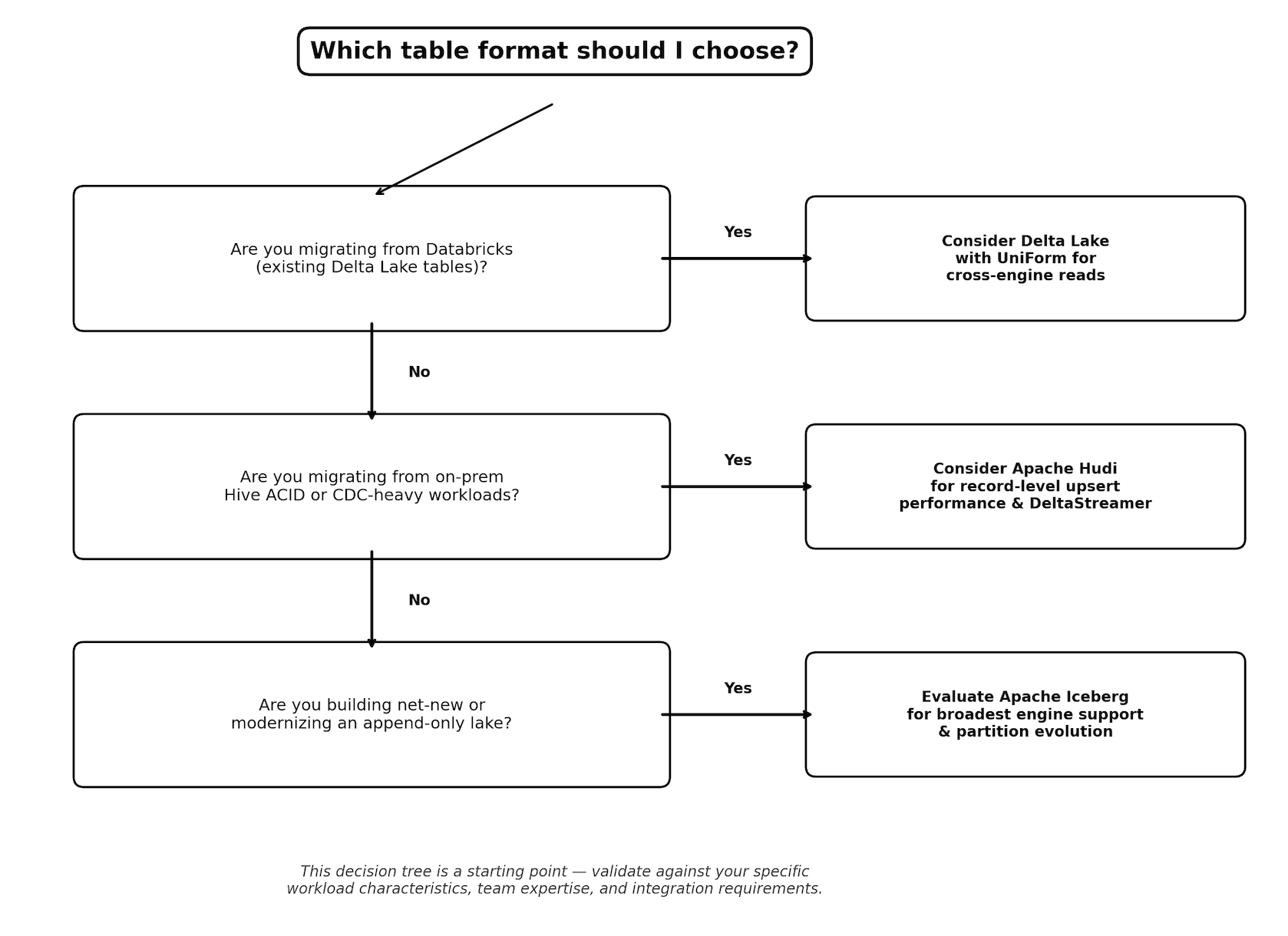
This decision tree is a starting point — the detailed comparison in the sections that follow will help you validate the choice against your specific workload characteristics, team expertise, and integration requirements.
Three open table formats have emerged as the primary solutions for incremental data processing on Amazon EMR: Apache Hudi, Delta Lake, and Apache Iceberg. Each format provides ACID transactions, schema evolution, and time travel capabilities, but they differ in architecture, write patterns, and ecosystem integration. This section provides guidance for evaluating each format in the context of your migration, helping you match your existing workload patterns and team familiarity to the right table format on EMR.
Amazon EMR release 7.12.0 ships with Hudi 1.0.2, Delta Lake 3.3.2, and Iceberg 1.10.0 as first-class components. All three formats are also supported on EMR Serverless and EMR on EKS, and integrate with the AWS Glue Data Catalog, AWS Lake Formation, Amazon Athena, and Amazon Redshift.
When migrating from on-premises Hadoop to EMR, your source environment largely determines the most natural table format path. Use the following table to identify your recommended starting point:
| Migrating From | Recommended Format | Rationale |
|---|---|---|
| Plain Hive tables (Parquet/ORC on HDFS, no table format) | Apache Iceberg | Broadest engine support on AWS (EMR, Athena, Redshift, Glue). In-place migration from Hive is straightforward — existing Parquet/ORC data files can be registered as Iceberg tables without rewriting data. |
| Databricks (Delta Lake in production) | Delta Lake on EMR, or migrate to Iceberg via UniForm | If workloads remain connected to Databricks, keep Delta for interoperability. If consolidating fully on AWS, consider migrating to Iceberg — Delta Lake UniForm generates Iceberg metadata alongside Delta, enabling a gradual transition. |
| Cloudera/HDP with Apache Hudi already in use | Apache Hudi | Continue with Hudi on EMR to minimize migration risk. EMR ships Hudi as a first-class component with CDC ingestion support via HoodieStreamer. |
| No existing table format, new greenfield on S3 | Apache Iceberg on S3 Tables | S3 Tables provides managed Iceberg with automatic compaction and no infrastructure to maintain — lowest operational burden for new deployments. |
| Mixed environment (multiple formats in different teams) | Apache Iceberg as target, UniForm for transition | Standardize on Iceberg for new workloads. Use Delta Lake UniForm to provide Iceberg-readable metadata for existing Delta tables during transition. |
Key migration principle: You do not need to rewrite existing data files when adopting a table format. Apache Iceberg's migrate and add_files procedures can register existing Parquet and ORC data in-place, creating Iceberg metadata without data movement. See the Apache Iceberg on EMR — Table Format Migration section in the Data Migration chapter for detailed steps.
What changes from on-premises: On-premises Hadoop clusters typically store data as plain Hive tables without ACID guarantees, time travel, or automatic maintenance. Adopting a table format during migration is the recommended approach because:
ACID transactions eliminate the risk of readers seeing partial writes during ETL — a common operational issue on HDFS.
Schema evolution removes the need for coordinated table drops and recreates when columns change.
Time travel replaces manual snapshot/backup procedures with built-in point-in-time recovery.
Hidden partitioning (Iceberg) eliminates the error-prone practice of requiring users to include partition columns in query predicates.
For detailed feature comparisons, see the Comparison of Table Formats section later in this chapter. For format-specific documentation, see the Apache Iceberg on EMR documentation, Apache Hudi on EMR documentation, and Delta Lake on EMR documentation.
Comparison of Table Formats
The following table provides a high-level comparison of the three open table formats supported on Amazon EMR to help you choose the right format for your workload.
| Feature | Apache Hudi | Delta Lake | Apache Iceberg |
|---|---|---|---|
| EMR Support Since | 5.28.0 | 6.9.0 | 6.5.0 |
| Latest Version (EMR 7.12.0) | Hudi 1.0.2 | Delta 3.3.2 | Iceberg 1.10.0 |
| ACID Transactions | Yes | Yes | Yes |
| Schema Evolution | Yes | Yes | Yes (full, including partition evolution) |
| Time Travel | Yes | Yes | Yes |
| Streaming Support | Spark Streaming, DeltaStreamer, Flink | Spark Structured Streaming | Spark Streaming, Flink |
| Table Types | Copy on Write, Merge on Read | Single (Parquet-based) | Copy-on-Write, Merge-on-Read (for deletes) |
| Incremental Queries | Native incremental pull | Change Data Feed | Incremental scan via snapshots |
| Multi-Engine Support | Spark, Hive, Presto, Trino, Flink | Spark (primary), Trino, Presto | Spark, Trino, Flink, Hive, Athena, Redshift |
| Partition Evolution | No | No | Yes (hidden partitioning) |
| AWS Glue Catalog | Yes | Yes | Yes |
| Lake Formation FGAC | Yes (EMR 7.10+) | Yes (via UniForm/Iceberg) | Yes (EMR 7.10+) |
When to choose each format:
-
Choose Apache Hudi when your primary use case is CDC ingestion with near real-time data freshness, you need built-in tools like DeltaStreamer for codeless ingestion, or you require fine-grained control over compaction strategies (inline vs. async).
-
Choose Delta Lake when your organization uses Databricks alongside AWS, you need UniForm for cross-format interoperability, or you want tight integration with the Databricks ecosystem including Unity Catalog federation.
-
Choose Apache Iceberg when you need the broadest multi-engine support, hidden partitioning and partition evolution are important for your query patterns, or you want to leverage Amazon S3 Tables for fully managed table maintenance.
Security Considerations
-
Use AWS Lake Formation for fine-grained access control on tables registered in the Glue Data Catalog. Lake Formation supports table, row, column, and cell-level permissions for Hudi and Iceberg tables on EMR 7.10 and later.
-
For catalog federation with Databricks Unity Catalog, OAuth-based authentication is used. Store client secrets in AWS Secrets Manager.
-
Ensure EMR instance profiles and runtime roles follow least-privilege principles for S3 bucket access.
-
Use EMR runtime roles to provide per-job access control for Spark and Hive workloads.
-
When using Delta Lake UniForm, both Delta and Iceberg metadata paths on S3 must be secured, as either path provides access to the underlying data.