Upgrading Amazon EMR Versions
Once your workloads are running on Amazon EMR, the focus shifts from migration to ongoing operations — keeping clusters current, optimizing costs, and maintaining reliability. This chapter covers post-migration operational concerns: upgrading Amazon EMR versions on a regular cadence, optimizing your S3-based data lake storage for cost efficiency, and general best practices for running EMR in production.
One best practice is to upgrade your Amazon EMR releases in a regular cadence. Upgrading your clusters’ software ensures that you are using the latest and greatest features from open source applications. The following are a few benefits of staying up-to-date with software upgrades:
-
Performance enhancements enable applications to run faster.
-
Bug fixes make the infrastructure more stable.
-
Security patches help keep your cluster secure.
These benefits apply to both the open source application software and the Amazon EMR software needed to manage the open source software.
The following figure is a sample of Amazon EMR 5.x software releases and corresponding open source application versions from July 2019 through January 2020. At the time of this document, Amazon EMR releases a new version approximately every 4–6 weeks, which pulls the latest version of the software. For complete list of releases and release notes, see <u>Amazon EMR 5.x Release Versions</u>.
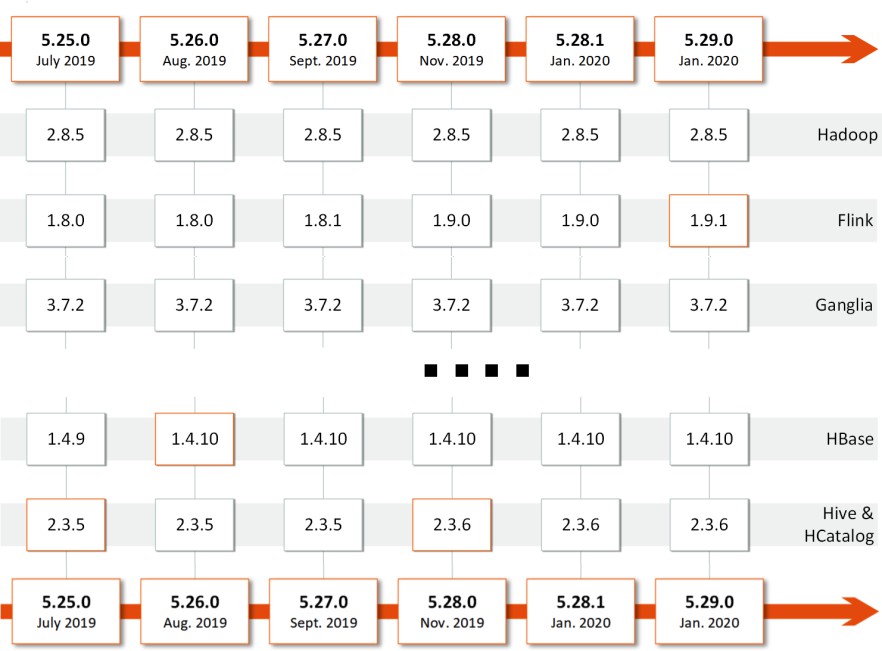
Figure 47: Sample of <u>Amazon EMR 5.x Release Versions</u>
See <u>Software Patching</u> for recommendations on when it may be appropriate to patch software on your Amazon EMR cluster.
Upgrade Process
When upgrading software, the risk of refactoring exists in terms of performance and data quality. Upgrades may change API interfaces so that your code may no longer run as is on the new framework. Upgrades can also introduce new bugs, which can cause applications to fail. AWS provides a best effort to identify regressions in open source software before Amazon EMR releases by running a large suite of integrations tests but some regressions may be difficult to identity. Therefore, it is imperative that each release is tested before making it available to your users. However, the more often you upgrade, the smaller number of changes between versions, which reduces the effort in upgrading as the risk of regressions is reduced.
Recommended Upgrade Steps

Figure 48: Recommended upgrade steps
Research Changes and Outstanding Issues
All open source applications have release notes available and most provide JIRA for issue tracking. Before an upgrade, you can save time by doing research to look for bugs, issues, or configuration updates.
The following table lists common open source applications, their release notes, and issue tracking systems. For Amazon EMR, see <u>Amazon EMR 5.x Release Versions</u>.
Table 10: Application Links for Release Notes and Issue Tracking
| Application | Release Notes | Issue Tracking |
|---|---|---|
| Apache HBase | https://hbase.apache.org/downloads.ht ml | https://issues.apache.org/jira/projects/H BASE/issues |
Test a Subset of Applications/Queries
Before users test the new release or configuration, we recommend that you test the version with a subset of use cases that is representative of the overall usage. This approach ensures that any configuration issues are caught before deployment.
Fix Issues
If you find an issue when testing a version, follow these steps:
-
Check if a configuration value can fix the issue. For example, see if you can use a configuration value to disable a problematic new feature or enhancement.
-
Check if the issue has already been identified and fixed in a later version of the open source project. If there is a fix in a later version, notify an AWS Support engineer through AWS Support channel. AWS will evaluate if it can be included in our next release.
-
Change the application or query to avoid the issue.
-
Contact <u>AWS Support</u> to see if any workarounds exist.
-
Abandon the upgrade if there is no workaround and wait for a release that has the required fix.
Set up A/B Testing (Recommended)
The next step is to gradually move the workload to the new configuration. This approach provides you with the option to abort the upgrade if a serious issue is found in your production environment. If you are using Amazon EMR for interactive user querying, setting up a router helps move the load from one cluster to another in a controlled fashion (Figure 49). You can also use a load balancer that supports both traffic weighting and sticky sessions.
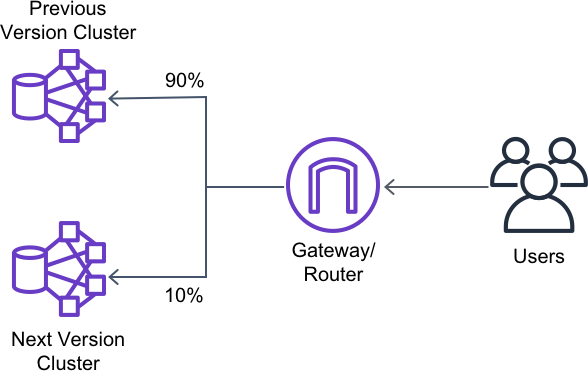
Figure 49: Using a router to gradually move load
Complete Upgrade
Complete your upgrade by moving all of your Amazon EMR clusters to the new version. Finally, discontinue use of the older version.
Best Practices for Upgrading
-
Upgrades require time and effort – make sure that your teams schedule upgrades and allow for the time it takes to complete upgrades.
-
Be aware of dependencies that can change when upgrading.
-
When performing manual testing, replicate your Hive metastore to ensure that the schema remains backward compatible.
-
If you can, track performance of the jobs to ensure that a significant regression has not occurred.
-
Split your clusters by applications. This approach allows you to upgrade components individually, rather than as a package.
-
Research what has changed between releases so that issues are easier to identify.
-
Use Amazon Route 53 to automatically register clusters. This approach makes it easier for users to point to them. For more information on setting up Amazon Route 53, see <u>Dynamically</u> <u>Create Friendly URLs for Your Amazon EMR Web Interfaces</u> on the AWS Big Data Blog.