AWS Managed Rules
Prerequisites
This section assumes familiarity with Firewall policy configuration, particularly the $HOME_NET and $EXTERNAL_NET variable configuration. Review that topic first if you have not configured your network variables.
AWS Network Firewall provides AWS Managed Rule Groups that deliver baseline threat detection without requiring you to write and maintain your own IPS signatures. These rule groups are maintained and updated by AWS and cover domain/IP reputation, threat signatures, and active threat intelligence. This page covers which managed rule groups to prioritize, how to configure them effectively, and how they complement your custom rules.
Active Threat Defense (ATD)
Active Threat Defense is a managed rule group that uses Amazon threat intelligence from MadPot to block communication with known malicious infrastructure. AWS continuously updates the rules based on threats observed across its global network, protecting against active threats and cloud-specific attack patterns.
Best practice
Enable Active Threat Defense on every firewall policy. It provides high-confidence threat blocking using verified indicators sourced from AWS's own threat intelligence. AWS automatically removes indicators when there is no evidence of related threat activity, which helps minimize false positives.
What ATD protects against
ATD matches traffic against IP address, domain name, and URL indicators associated with known threats. AWS groups these indicators into categories based on observed attack patterns:
- Command and control - Infrastructure that malicious actors use to remotely control compromised systems (IPs and domains, egress direction)
- Malware staging - Infrastructure that facilitates the distribution of malware and attack tooling (URLs, ingress and egress)
- Crypto-mining pools - Infrastructure used by crypto-miners (IPs and domains, egress direction)
- Sinkholes - Previously abused infrastructure used for malicious purposes (domains, egress direction)
- Out-of-band application security testing - Infrastructure where injected payloads make outbound connections to validate the existence of a vulnerability (IPs and domains, egress direction)
For full details on indicator types and categories, see Understanding active threat defense managed rule group indicators.
ATD and Amazon GuardDuty
If you use Amazon GuardDuty, ATD strengthens your security posture by automatically blocking the threats that GuardDuty detects. GuardDuty generates findings when it observes suspicious activity, but it does not take action to stop the traffic. Network Firewall with ATD enabled automatically blocks traffic to and from the same malicious infrastructure that GuardDuty would generate findings about, turning detection into prevention.
GuardDuty findings that ATD can proactively block include:
- Command and control activity (Backdoor:EC2/C&CActivity.B, Backdoor:Runtime/C&CActivity.B)
- Cryptocurrency mining (CryptoCurrency:EC2/BitcoinTool.B, Impact:EC2/BitcoinDomainRequest.Reputation)
- Trojan activity (Trojan:EC2/BlackholeTraffic)
- Malicious IP communication (UnauthorizedAccess:EC2/MaliciousIPCaller.Custom)
For the complete list, see Working with active threat defense indicators in Amazon GuardDuty.
For more on how ATD works and its role in a defense-in-depth architecture, see:
- Real-time malware defense: Leveraging AWS Network Firewall Active Threat Defense
- Improve your security posture using Amazon threat intelligence on AWS Network Firewall
Domain and IP rule groups (free)
Domain and IP rule groups block HTTP or HTTPS traffic to domains and IPs identified as low-reputation or known to be associated with malicious activity. These are included at no additional cost beyond standard Network Firewall processing charges.
Available rule groups:
- BotNetCommandAndControlDomainsStrictOrder - Known botnet C2 domains
- AbusedLegitBotNetCommandAndControlDomainsStrictOrder - Legitimate services being abused for botnet C2 (file sharing, paste sites, tunneling services)
- MalwareDomainsStrictOrder - Known malware distribution domains
- AbusedLegitMalwareDomainsStrictOrder - Legitimate services being abused for malware distribution
Best practice
Enable the domain and IP reputation rule groups on every firewall policy. These represent domains and IPs that your workloads should never be communicating with under normal circumstances. They provide a low-effort baseline of protection with zero rule authoring required.
Managed threat signature rule groups (free)
Managed threat signature rule groups provide IDS/IPS coverage across malware, exploits, botnets, web-based attacks, credential phishing, scanning tools, and more. The threat intelligence for these rule groups is sourced from a third-party partner (Proofpoint/Emerging Threats).
Understanding deployment tags
Each rule within a threat signature rule group is tagged with a "deployment type" from the Proofpoint/ET signature metadata system that indicates where the rule is most effective:
- Perimeter - Between internal clients and external servers (egress protection). The majority of rules are tagged for perimeter deployment.
- Internal - East-West traffic monitoring for lateral movement detection.
- Datacenter - Between external clients and internal/DMZ servers (ingress protection).
- SSLDecrypt - Requires TLS inspection to function (inspects decrypted payload content).
- alert_only - Informational rules that should not be placed in drop mode.
As covered in Firewall policy configuration, rules tagged for Internal deployment will match East-West traffic correctly as long as $HOME_NET is set to RFC 1918 ranges.
Recommended threat signature rule groups
The table below shows each available threat signature rule group, what it detects, and the recommended deployment scenarios. Rule counts are approximate and change as the partner updates the rule sets.
| Rule group | What it detects | Skip if... |
|---|---|---|
| ThreatSignaturesBotnetStrictOrder | Autogenerated signatures from known active botnet and C2 hosts | Never skip. Broadly applicable to all traffic. |
| ThreatSignaturesMalwareStrictOrder | Malware across TCP, UDP, SMTP, ICMP, SMB protocols and worm propagation | Never skip. Broadly applicable to all traffic. |
| ThreatSignaturesExploitsStrictOrder | Direct exploits including ActiveX, FTP, NetBIOS, RPC, shellcode, SQL injection, SNMP, Telnet, VOIP | Never skip. Strong coverage for both egress and east-west. |
| ThreatSignaturesIOCStrictOrder | Indicators of compromise, attack response signatures, exploit kit infrastructure | Never skip. Broadly applicable to all traffic. |
| ThreatSignaturesEmergingEventsStrictOrder | Short-lived campaigns and high-profile threats (rules are temporary and frequently rotated) | Rarely skip. High timeliness value for current threats. |
| ThreatSignaturesDoSStrictOrder | Denial of service patterns (small rule set, limited coverage) | Rarely skip. Low capacity cost (200). |
| ThreatSignaturesBotnetWebStrictOrder | HTTP-based botnet communication patterns | No HTTP/HTTPS traffic flows through the firewall |
| ThreatSignaturesMalwareWebStrictOrder | Malicious code in HTTP and TLS protocols | No HTTP/HTTPS traffic flows through the firewall |
| ThreatSignaturesSuspectStrictOrder | Suspicious JA3 fingerprints, IRC chat protocols, anomalous user agents | No TLS/HTTP traffic flows through the firewall |
| ThreatSignaturesWebAttacksStrictOrder | Attacks targeting web clients, web servers, and specific web applications | No web services running internally and no ingress inspection |
| ThreatSignaturesMalwareCoinminingStrictOrder | Cryptocurrency mining software (legitimate and malicious) | You run legitimate cryptocurrency operations |
| ThreatSignaturesScannersStrictOrder | Reconnaissance and probing from tools like Nessus, Nikto, and port scanners | You run legitimate vulnerability scanners that would trigger these rules |
| ThreatSignaturesPhishingStrictOrder | Credential phishing landing pages and credential submission to phishing sites | No end-user browsing traffic flows through the firewall |
| ThreatSignaturesBotnetWindowsStrictOrder | Windows-specific botnet behavior | No Windows workloads in your environment |
| ThreatSignaturesFUPStrictOrder | Policy violations: gaming, P2P traffic, inappropriate content | You do not need acceptable use enforcement |
| ThreatSignaturesMalwareMobileStrictOrder | Malware targeting mobile and tablet operating systems | No mobile device traffic flows through the firewall |
Selecting rule groups by deployment scenario
The 20 stateful rule group limit per policy means you need to be selective. Here is how we recommend prioritizing based on your deployment scenario:
Baseline (recommended for all deployments):
These three rule groups cover the broadest range of threats with the highest signal-to-noise ratio:
- ThreatSignaturesBotnetStrictOrder (comprehensive botnet/C2 detection)
- ThreatSignaturesMalwareStrictOrder (general malware detection)
- ThreatSignaturesExploitsStrictOrder (exploit detection, strong East-West coverage)
Enhanced egress protection (add to baseline for egress-focused deployments):
- ThreatSignaturesBotnetWebStrictOrder (HTTP botnet detection)
- ThreatSignaturesBotnetWindowsStrictOrder (Windows botnet detection)
- ThreatSignaturesMalwareWebStrictOrder (web-based malware)
- ThreatSignaturesEmergingEventsStrictOrder (current campaigns)
- ThreatSignaturesPhishingStrictOrder (credential phishing)
- ThreatSignaturesMalwareCoinminingStrictOrder (cryptomining)
Enhanced East-West protection (add to baseline for lateral movement detection):
- ThreatSignaturesWebAttacksStrictOrder (web attacks between internal systems)
- ThreatSignaturesIOCStrictOrder (indicators of compromise)
- ThreatSignaturesScannersStrictOrder (internal reconnaissance detection)
Enhanced ingress protection (add to baseline for inbound traffic):
- ThreatSignaturesWebAttacksStrictOrder (web application attacks)
- ThreatSignaturesIOCStrictOrder (exploit kit detection)
Best practice
Start with the baseline three rule groups plus ATD and domain/IP reputation rule groups. This gives you strong coverage across the most common threat categories. Add additional rule groups based on your specific deployment scenario and available rule group capacity. Remember that each rule group you add consumes one slot from the 20 stateful rule group maximum per policy. Reserve enough slots for your custom rule groups.
Deploying managed rules in alert mode vs drop mode
Best practice
Deploy managed threat signature rule groups in alert mode first. Monitor the alerts generated over a period of time to understand which rules are firing on your traffic and whether any matches represent legitimate application behavior. Once you have confidence that the rules are not interfering with your workloads, transition to drop mode.
The risk profile for false positives differs from AWS WAF. WAF rules inspect HTTP request structure and can inadvertently block legitimate application traffic (for example, a SQL injection rule blocking a legitimate query parameter that happens to contain SQL-like syntax). Network Firewall managed rules operate at the network layer, detecting patterns associated with known threats. While false positives are less common than with WAF rules, they can still occur, particularly with rules that match on broad network patterns or protocol behaviors that overlap with legitimate application traffic.
The transition from alert to drop can be done incrementally. Start by moving the ATD and domain/IP reputation rule groups to drop mode first (these have the highest confidence indicators), then move threat signature groups to drop as you validate each one against your traffic.
$HOME_NET is critical for managed rules
These rules use $HOME_NET and $EXTERNAL_NET variables to determine traffic directionality. If these variables are not configured correctly, managed rules will not match traffic as expected.
Common misconfiguration
Customers deploy managed threat signature rule groups and never see them fire, then assume the rules are not effective. The most common cause is that $HOME_NET only contains the inspection VPC CIDR (the default), not the spoke VPC CIDRs where workloads actually run. Set $HOME_NET to all RFC 1918 space (10.0.0.0/8, 172.16.0.0/12, 192.168.0.0/16) at the policy level. See Firewall policy configuration for complete guidance.
You can view the individual rules within managed threat signature rule groups through the console to understand exactly what they detect.
Partner managed rule groups (paid)
Partner managed rule groups are paid AWS Marketplace offerings from third-party security vendors. They are shared to customers using AWS Resource Access Manager (AWS RAM) or through the Network Firewall console via AWS Marketplace integration.
Partner managed rules allow you to bring threat intelligence from known and trusted security partners and run it directly on Network Firewall without deploying that partner's dedicated firewall appliance. They complement (rather than replace) the free AWS-managed threat signatures and Active Threat Defense, giving you defense-in-depth from multiple intelligence sources on the same firewall.
Best practice
Evaluate partner managed rule groups if you already have a relationship with one of the available partners or if your compliance requirements specify particular threat intelligence sources.
Filtered managed rule groups with Suricata Rule Generator
AWS managed threat signature rule groups contain thousands of rules covering a wide range of deployment scenarios. In many deployments, you only need a subset of these rules. For example, a firewall inspecting East-West traffic between internal VPCs does not need internet-facing signatures designed for perimeter deployments.
The Suricata Rule Generator for AWS Network Firewall includes a Managed Rule Group Generator that lets you create filtered, automatically-updating rule groups derived from AWS managed threat signatures. You define filter criteria (based on rule metadata fields like deployment type, protocol, or threat category), the tool extracts only the rules that match, and deploys the result as your own rule group with automatic synchronization when AWS updates the source rules.
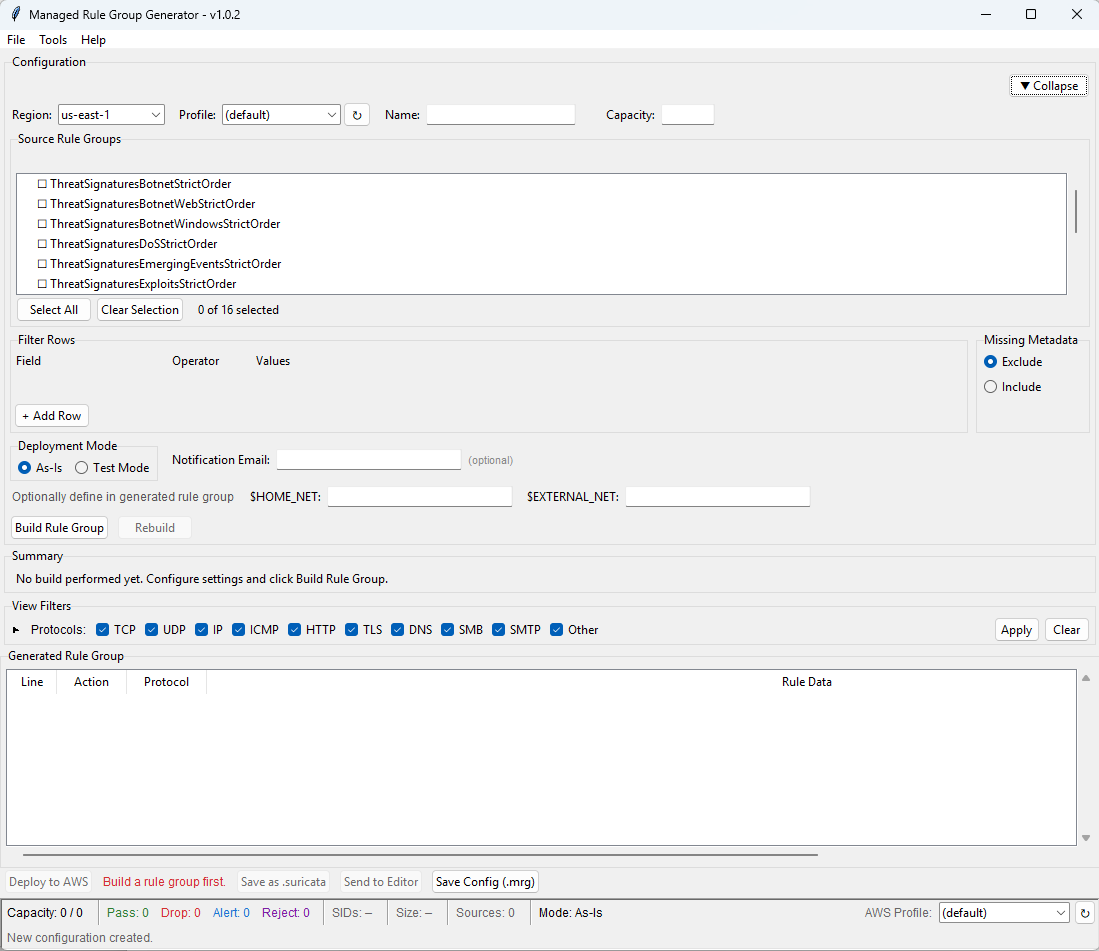
How it works
- Select sources - Choose one or more AWS managed StrictOrder threat signature rule groups as input
- Define filters - Build metadata-based filter conditions (for example:
signature_deployment equals Internal) to extract only the rules relevant to your use case - Build - The tool fetches rules from the selected sources, applies your filters, deduplicates by SID, and optionally applies test mode (converting all actions to
alertfor safe monitoring) - Deploy - One-click deployment creates the filtered rule group in AWS Network Firewall along with a Lambda function that automatically re-applies your filter whenever AWS updates the source rule groups
Automatic synchronization
After deployment, the tool provisions a Lambda function that subscribes to the AWS-Managed-Threat-Signatures SNS topic. When AWS publishes updates to managed rule groups, the Lambda function automatically:
- Re-fetches the source rule groups
- Re-applies your filter criteria and deduplication logic
- Updates your rule group with the latest filtered results
- Optionally sends email notification when rules change
This gives you the automatic update benefits of AWS managed rules, but with only the signatures you actually need, reducing capacity consumption and minimizing false positives from irrelevant signatures.
Example: East-West inspection
Using the filter signature_deployment equals Internal typically reduces thousands of rules to a focused set of 200-300 signatures specifically designed for detecting lateral movement, internal reconnaissance, and East-West threat patterns, without internet-facing rules that could generate false positives on internal traffic.
Key benefits
- Reduced capacity usage - Only consume rule capacity for signatures relevant to your deployment scenario
- Fewer false positives - Exclude rule categories that do not apply to your traffic patterns
- Automatic updates - Rules stay current with AWS threat intelligence without manual intervention
- Configuration persistence - Save filter configurations to
.mrgfiles for version control and reproducibility
What to read next
- Firewall policy configuration - Setting up $HOME_NET for managed rules
- Customer managed rules - Using managed rules alongside custom rules
- Sample Suricata rules - Domain category filtering rule examples
- Logging and monitoring - Monitoring managed rule matches