Cost considerations
Prerequisites
This section assumes familiarity with Deployment architecture. Review that topic first to understand how deployment model choices affect cost.
AWS Network Firewall costs are driven by endpoint hourly charges (per-AZ, regardless of traffic volume), data processing charges (per-GB metered at the stateless engine), optional TLS inspection charges (Advanced Inspection tier), and starting August 2026, standard AWS data transfer charges for traffic flowing through the firewall. Understanding these cost drivers and implementing optimization strategies can significantly reduce your Network Firewall spend without compromising security. See the Network Firewall pricing page for current rates.
Pricing model
Network Firewall pricing consists of:
- Endpoint hourly charge - Per firewall endpoint, per AZ, regardless of traffic volume
- Data processing charge - Per GB of traffic processed by the firewall (metered at the stateless engine)
- Advanced Inspection charges (TLS inspection only) - Additional hourly rate per Region and Availability Zone when TLS inspection is enabled. There are no additional data processing charges for Advanced Inspection traffic beyond the standard Network Firewall traffic processing charges
- Standard AWS data transfer charges - Standard data transfer rates apply for traffic flowing through Network Firewall (see upcoming data transfer changes below)
How traffic processing is metered
Data processing charges are based on traffic that passes through the firewall endpoint once in each direction. The CloudWatch stateless ReceivedBytes metric is the most accurate representation of your billable GB processed. The PrivateLinkEndpoints BytesProcessed metric shows approximately double this amount due to internal packet handling. This does not reflect double billing.
NAT gateway bundled discount
Best practice
Always deploy your NAT gateway in the same networking path as your Network Firewall. When you do, standard NAT gateway per-hour and data processing charges are completely waived. This is one of the most significant cost benefits of using Network Firewall for egress filtering and is frequently overlooked.
If you create a NAT gateway and place it in the same networking path as your Network Firewall, standard NAT gateway per-hour and data processing usage charges are waived. This discount is applied on a one-to-one basis with standard Network Firewall charges: endpoint per-hour usage, secondary VPC endpoint per-hour usage, and standard traffic processing usage through both primary and secondary endpoints.
Requirements
To receive the NAT gateway bundled discount:
- NAT gateway and Network Firewall must be in the same Region and under the same AWS payer ID (same account is not required, cross-account within the same payer is eligible)
- NAT gateway must be configured in the same networking path as your Network Firewall endpoint (can be directly service-chained or with Transit Gateway in between)
What is excluded from the discount
- Regional NAT gateway (RNAT)
Using TLS inspection?
If you have enabled TLS inspection, one additional charge is also outside the discount: the Advanced Inspection Endpoint hourly charge. This applies only to deployments that use TLS inspection. See TLS inspection costs for details.
Verifying your discount
You can verify the bundled discount is being applied by reviewing your AWS bill. The NAT gateway line items should show corresponding credits that offset the NAT gateway hourly and data processing charges up to the amount of your Network Firewall usage.
For more information, see the Network Firewall pricing page.
Minimize endpoint costs
Best practice
Use centralized inspection for multi-account environments. Consolidating traffic through fewer firewall endpoints dramatically reduces your endpoint hourly costs compared to deploying per-VPC firewalls. A centralized deployment with 3 endpoints (one per AZ) serves the same purpose as 30+ endpoints in a distributed model.
Use centralized inspection
Because each endpoint incurs hourly charges even when idle, centralized inspection via Transit Gateway or Cloud WAN is typically more cost-effective for multi-account environments than deploying endpoints in every VPC.
See Deployment architecture for deployment model comparisons.
Native Transit Gateway support
Network Firewall's native Transit Gateway support simplifies centralized inspection by removing the need for a separate inspection VPC. There are no additional charges for the native TGW integration beyond standard Network Firewall and Transit Gateway pricing, and the total cost profile is comparable to a centralized inspection VPC deployment. What differs is cost allocation: only a natively attached firewall lets you charge Network Firewall data processing back to the account that generated the traffic. See Cost allocation.
Multi-endpoint support
For sharing a firewall across multiple VPCs without Transit Gateway, the multi-endpoint support feature allows up to 50 secondary endpoints associated with a single primary firewall. Secondary endpoints have reduced hourly costs compared to creating separate firewalls.
TLS inspection limitation
TLS inspection is not supported for firewalls with VPC endpoint associations (multi-endpoint feature).
Delete unused endpoints
Best practice
Audit your firewall endpoints quarterly. Delete endpoints in AZs where you no longer have workloads. Each unused endpoint costs the full hourly rate whether or not it processes any traffic.
Firewall endpoints incur hourly charges whether or not they are processing traffic. Delete any endpoints that are no longer needed or in AZs where you no longer have workloads.
Reduce data processing costs
Best practice
Deploy gateway VPC endpoints for S3 and DynamoDB in every VPC behind the firewall. Gateway endpoints are free, eliminate firewall data processing charges for that traffic, and are the single highest-impact cost optimization for most deployments.
Do not inspect traffic that does not need inspection
- Use Transit Gateway or Cloud WAN route tables to segment your network. Keep VPC-Prod from talking to VPC-Dev if they do not need to communicate. Do not route that traffic through the firewall.
- Use VPC endpoints for Amazon S3 and Amazon DynamoDB (free gateway endpoints) instead of sending that traffic through Network Firewall. There are no data processing or hourly charges for gateway VPC endpoints.
- Use PrivateLink endpoints for other AWS services in private subnets behind the firewall vs routing through the firewall to reach a public service endpoint. Compare PrivateLink pricing with Network Firewall pricing when making this decision.
- Use VPC peering for shared services VPCs that workloads need to reach frequently and do not need firewall inspection. This avoids both Network Firewall and Transit Gateway data processing charges.
Identify top traffic drivers
Use the "Top Talkers" section of the native firewall monitoring dashboard to identify which source/destination pairs are generating the most traffic through the firewall. This helps you prioritize which traffic to route away from the firewall via VPC endpoints or other mechanisms. For domain-level visibility, the traffic analysis report feature shows which HTTP/HTTPS domains are driving the most data processing charges.
Use DNS Firewall for basic blocks
Amazon Route 53 Resolver DNS Firewall can block traffic at the DNS layer before it ever reaches Network Firewall. For domains you want to block outright, blocking at DNS is:
- Cheaper (no data processing charges on the blocked traffic)
- Faster (blocks closer to the packet source)
- Simpler (no Suricata rules needed for basic domain blocks)
Use DNS Firewall for broad domain blocks and Network Firewall for traffic that needs deeper inspection.
Avoid cross-AZ data transfer
Best practice
Verify your route tables send traffic to the firewall endpoint in the same Availability Zone as the source workload. Cross-AZ routing doubles your data transfer costs and adds latency. Each AZ should have its own firewall endpoint with routes pointing to the local endpoint.
Route tables should send traffic to the local firewall endpoint in the same AZ, not to another AZ's endpoint. Cross-AZ routing incurs data transfer charges in addition to firewall processing charges.
Route to the firewall endpoint closest to the client, not the server.
Analyze traffic costs with Suricata Rule Generator
The Suricata Rule Generator for AWS Network Firewall includes a Traffic Cost Analyzer that queries your CloudWatch flow and alert logs to show exactly where your firewall data processing costs are coming from. It correlates flow logs (traffic volumes) with alert logs (TLS SNI and HTTP hostnames) to produce a breakdown of bandwidth by destination, and recommends where VPC endpoints would be cost-effective.
What the analyzer provides
The Traffic Cost Analyzer produces a three-tab dashboard:
Internet Traffic - Non-AWS destinations with hostname resolution (HTTP host headers, TLS SNI). Shows cost breakdown per destination, source IP drill-down to identify which internal hosts generate the traffic, and opportunities to optimize (Windows Update, CDN traffic, package registries).
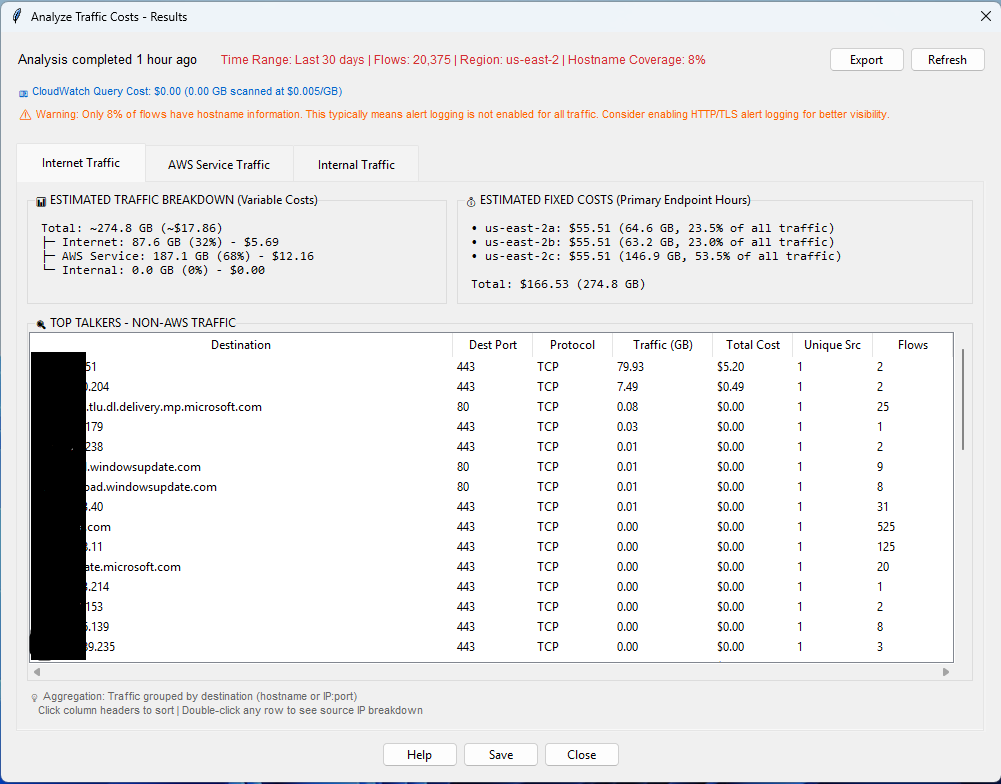
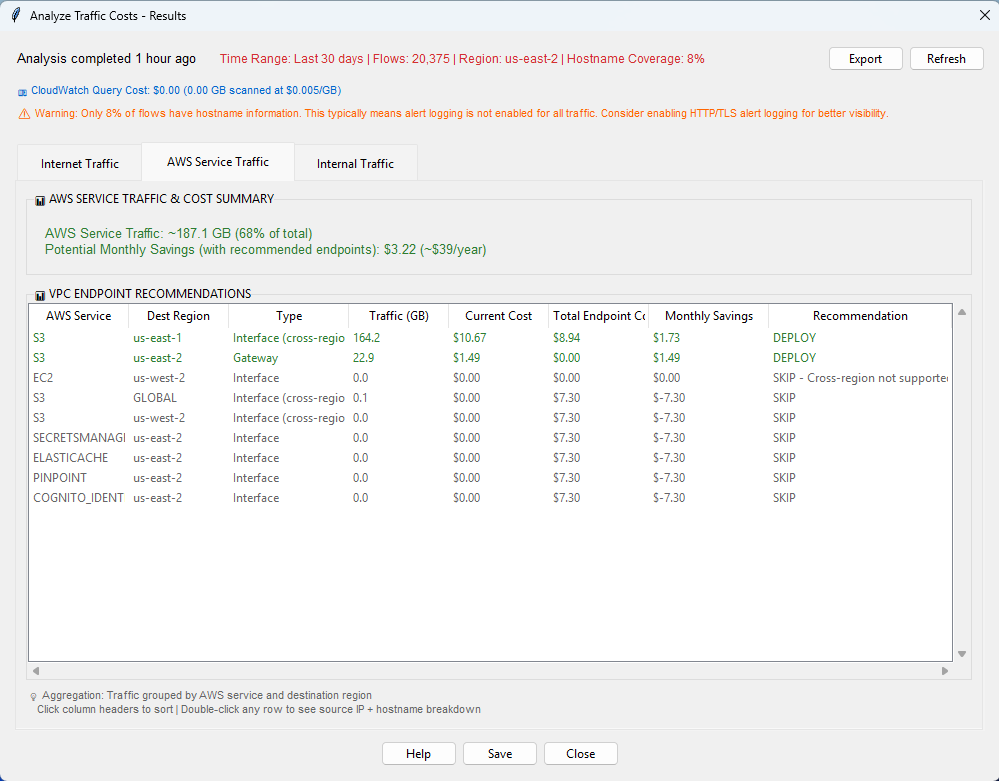
AWS Service Traffic - AWS service endpoints with traffic volumes and per-service costs. Includes VPC endpoint recommendations with monthly savings projections and break-even calculations.
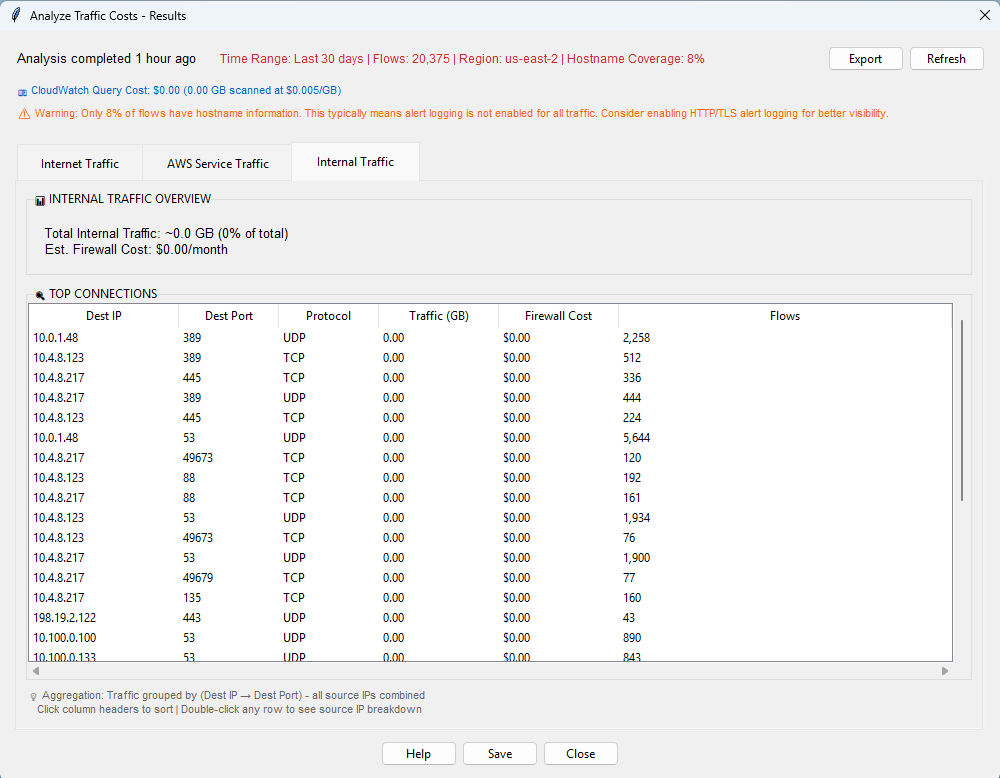
Internal Traffic - VPC-to-VPC communication patterns with source-to-destination flow analysis and associated costs.
VPC endpoint recommendations
The analyzer performs cost-benefit analysis for each AWS service detected in your traffic:
- Gateway endpoints (S3, DynamoDB) - Always recommended when same-region traffic is detected, since gateway endpoints are free and eliminate firewall data processing charges entirely
- Interface endpoints - Only recommended when traffic volume exceeds the break-even threshold (the point where the interface endpoint monthly cost is less than the firewall data processing cost for that traffic). The threshold varies by region and is calculated automatically.
For example, if 245 GB/month of traffic flows to S3 through the firewall, the analyzer recommends a free gateway endpoint that would save approximately $16/month. For SSM at 85 GB/month, it may recommend skipping the interface endpoint because the cost is below break-even - while Lambda at 180 GB/month would justify the endpoint.
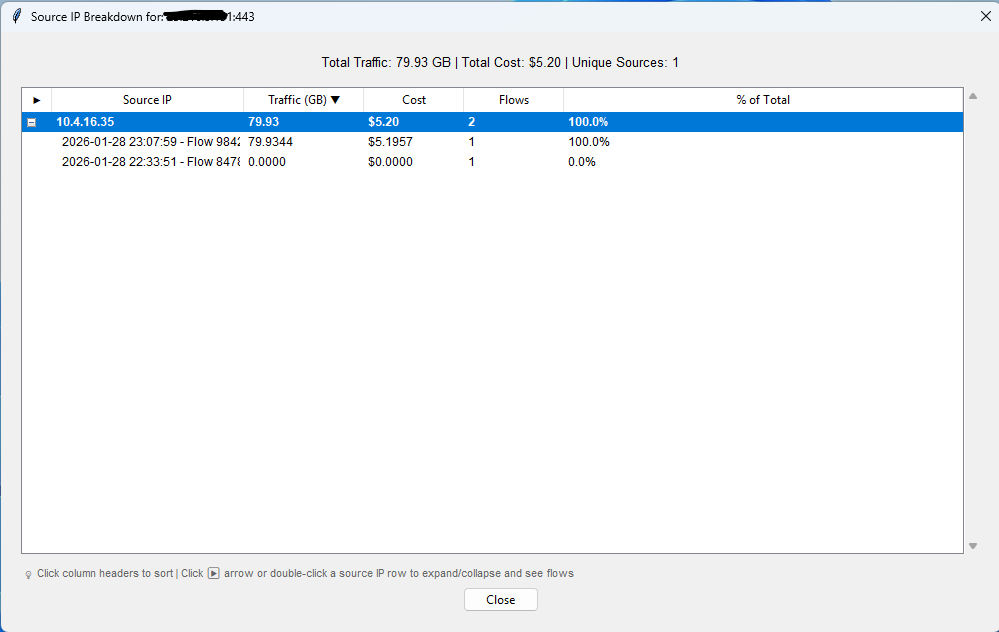
Source IP drill-down
Double-clicking any row in the dashboard reveals which internal hosts are generating the traffic, with individual flow timestamps and volumes. This helps you identify specific workloads responsible for high-cost traffic patterns and take targeted action.
How to run the analysis
- Open your rule file in the Suricata Rule Generator
- Navigate to Tools > Analyze Traffic Costs
- Configure the flow log group, alert log group (optional but recommended for hostname visibility), AWS region, and time range (7-90 days or custom date range)
- Click Analyze - the tool queries CloudWatch Logs Insights and returns results in 60-120 seconds
The analysis requires both flow and alert logs to be published to CloudWatch Logs. Alert logs provide hostname resolution (TLS SNI and HTTP host headers) - without them, traffic is only identifiable by IP address. IAM permissions needed are logs:StartQuery and logs:GetQueryResults.
Results can be saved to a .stats file for offline access without re-querying CloudWatch, and exported to CSV for reporting.
ROI of running this analysis
A typical 30-day analysis costs $0.50-$2.00 in CloudWatch Logs Insights query charges but commonly identifies $50-200/month in VPC endpoint savings opportunities. Run it monthly or after significant workload changes.
Cost allocation
For organizations with multiple accounts or business units sharing a centralized Network Firewall, use Flexible Cost Allocation for Transit Gateway to allocate costs based on traffic usage patterns.
Best practice
To enable per-account or per-business-unit chargeback of Network Firewall data processing costs, the firewall must be natively attached to Transit Gateway using the Transit Gateway attachment. This is one of the strongest reasons to choose native attachment over a customer-managed inspection VPC. With a firewall in a customer-managed inspection VPC, Flexible Cost Allocation can only allocate Transit Gateway data processing charges, not the Network Firewall data processing charges.
Reduce logging costs
Best practice
Use the noalert; keyword on intermediate rules (flowbits setters, JA3 hash enablers) that do not need their own log entries. This reduces log volume without losing visibility on rules that matter.
- Publish flow and alert logs to separate log groups or S3 prefixes for more efficient querying
- Use the
noalert;keyword on rules that perform intermediate logic but do not need to generate log events - See Logging and monitoring for details
TLS inspection costs
Common misconfiguration
Enabling TLS inspection adds an Advanced Inspection Endpoint charge (an additional hourly rate per Region and Availability Zone), billed regardless of traffic volume and not covered by the NAT gateway bundled discount. Evaluate whether the security benefits justify the cost increase for your specific workloads before enabling.
TLS inspection is a paid Advanced Inspection feature with its own pricing tier:
- Additional hourly rate per Region and Availability Zone for the Advanced Inspection endpoint
There are no additional data processing charges for Advanced Inspection traffic beyond the standard Network Firewall traffic processing charges.
The NAT gateway bundled discount still applies to your standard Network Firewall charges (endpoint hourly + standard traffic processing) when TLS inspection is enabled. However, the additional Advanced Inspection Endpoint hourly charge is separate and not covered by the bundled discount.
Evaluate whether the security benefits of TLS inspection justify the additional cost for your specific workloads. Many customers find that domain filtering via TLS SNI (which does not require TLS inspection) provides sufficient security for most use cases.
Data transfer changes (August 2026)
Billing change, effective August 2026
Starting with the August 2026 billing cycle, standard AWS data transfer rates apply for Network Firewall traffic. Customers were notified via email beginning May 2026. No retroactive charges were applied.
Previously, Network Firewall absorbed certain data transfer charges on behalf of customers. Starting August 2026, the following standard AWS data transfer charges apply:
- Data Transfer Out (DTO) - Traffic sent from the firewall to the Internet
- Data Transfer Inter-Region (DTIR) - Traffic transferred between AWS Regions through the firewall
- Regional/Public IP - Traffic sent through the firewall within the same Region over internet gateway
- Same-VPC cross-AZ (DTAZ) - No charge unless customers use public IPs to send traffic through the firewall within the same AWS Region
What is NOT changing: Network Firewall endpoint hourly charges and per-GB traffic processing charges remain unchanged.
Billing visibility
- New line items appear under Data Transfer, separate from endpoint and processing charges
- In Cost Explorer and CUR, charges appear under the AWS Network Firewall service name with usage types such as
DataTransfer-Out-Bytes
What to read next
- Deployment architecture - Choose a cost-effective deployment model
- Logging and monitoring - Log cost optimization
- Network Firewall pricing - Official pricing page