Hive Metastore Deployment Patterns
Apache Hive ships with the Derby database, an embedded database backed by local disk. This database is used for embedded metastores but we do not recommend that you use Derby as it cannot scale for production-level workloads. In Amazon EMR, by default, Hive records metastore information in a MySQL database on the master node's file system. When a cluster terminates, all cluster nodes are shut down, including the master node. When this happens, local data is lost because the node's file systems use ephemeral storage. To avoid this scenario, we recommend that you create an external Hive metastore outside of the cluster. There are two options for an Amazon EMR external metastore:
-
AWS Glue Data Catalog (Recommended)
-
Amazon RDS database or Amazon Aurora database
For an FAQ on these options, refer to <u>Appendix D: Data Catalog Migration FAQs</u>.
AWS Glue Data Catalog
The AWS Glue Data Catalog provides a unified metadata repository across a variety of data sources and data formats, integrating with Amazon EMR, Amazon RDS, Amazon Redshift, Redshift Spectrum, Amazon Athena, and any application compatible with the Apache Hive metastore. The benefits of using the AWS Glue Data Catalog are that you don't have to manage the Hive metastore database instance separately, don't have to maintain ongoing replication, and don't have to scale up the instance. An AWS Glue Data Catalog is fully managed and serverless, highly available, fault-tolerant, maintains data replicas to avoid failure, and expands hardware depending on the usage. When creating a new Amazon EMR cluster, you can choose an AWS Glue Data Catalog as the Hive metastore. (Note: This option is only available on Amazon EMR version 5.8.0 or later.)
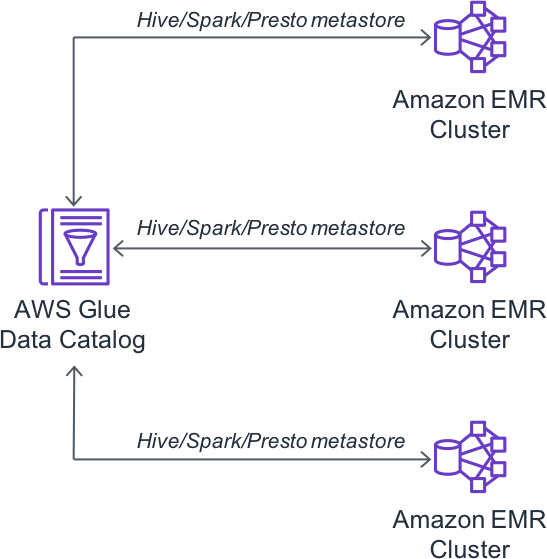
Figure 21: Using AWS Glue Data Catalog as the Hive metastore
| [ |
|---|
| { |
| "Classification": "hive-site", |
| "Properties": { |
| "hive.metastore.client.factory.class": |
| "com.amazonaws.glue.catalog.metastore.AWSGlueDataCatalogHiveClientFactory" |
| } |
| } |
| ] |
Configuration: To configure EMR to use the AWS Glue Data Catalog as the metastore, enable the Glue Data Catalog setting in the EMR console during cluster creation, or set hive.metastore.client.factory.class to com.amazonaws.glue.catalog.metastore.AWSGlueDataCatalogHiveClientFactory in hive-site configuration. For step-by-step instructions, see Using the AWS Glue Data Catalog as the metastore for Hive (https://docs.aws.amazon.com/emr/latest/ReleaseGuide/emr-hive-metastore-glue.html) in the EMR Release Guide.
Considerations
-
You can enable encryption for an AWS Glue Data Catalog. However, it is recommended that AWS managed keys are used for encryption. If you must use customer managed KMS keys, enable “Delegate KMS operations to an IAM role.” For details, see Setting Up Encryption in AWS Glue.
-
Hive authorizations, and Hive constraints are not currently supported. To see a list of AWS Glue Data Catalog's incompatibilities with Hive Metastore, see Using the AWS Glue Data Catalog as the Metastore for Hive.
-
An AWS Glue Data Catalog has versions, which means a table can have multiple schema versions. AWS Glue stores that information in AWS Glue Data Catalog, including the Hive metastore data.
Amazon RDS or Amazon Aurora
There are two main steps to deploy an external Hive metastore:
-
Create an Amazon RDS (MySQL database) or Amazon Aurora database.
-
Configure the hive-site.xml file to point to MySQL or Aurora database.
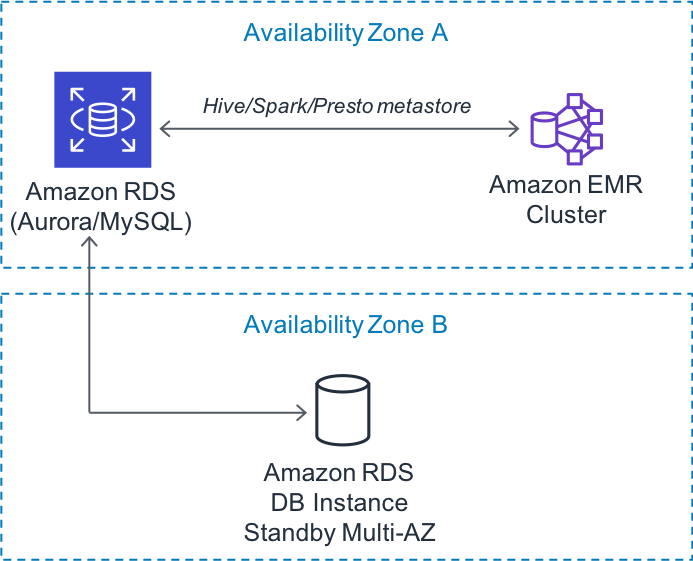
Figure 23: Creating Hive metastore on Amazon RDS or Amazon Aurora
Configuration: To use an external Hive Metastore on Amazon RDS or Aurora, create a MySQL or PostgreSQL database, configure the hive-site settings to point to the external metastore JDBC URL, and ensure the EMR cluster's security group allows connectivity to the database. For step-by-step instructions including schema initialization and multi-master configurations, see Configuring an External Metastore for Hive (https://docs.aws.amazon.com/emr/latest/ReleaseGuide/emr-metastore-external-hive.html) in the EMR Release Guide.
Considerations
A Hive metastore is a single point of failure. Amazon RDS doesn't automatically replicate databases, so it's highly recommended that you enable replication when using Amazon RDS to avoid any failure. To learn more about how to create a database replica in a different Availability Zone, refer to the following sources: