Hive Metastore Migration Options
When migrating Hadoop-based workloads from on-premises to the cloud, you must migrate a Hive metastore as well. Depending on the migration plan and requirements, a metastore can be migrated in two different ways: a one-time migration that migrates an existing Hive metastore completely to AWS, or an on-going migration that migrates the Hive metastore, but keeps a copy on-premises. In this scenario, the two metastores are synced in real time during the migration phase. The following section discusses these two scenarios in detail.
One-Time Metastore Migration
This section focuses on a set of options to consider when migrating an existing Hive metastore completely to AWS. This situation is applicable to a scenario where the organization plans to use the Hive metastore on AWS. The following figure illustrates this scenario:
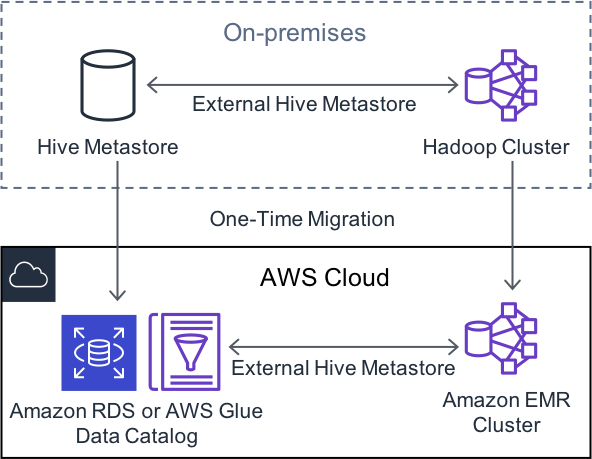
Figure 27: One-time metastore migration
Existing Hive Metastore to AWS Glue Data Catalog
In this case, the goal is to migrate existing Hive metastore from on-premises to an AWS Glue Data Catalog. You can use AWS Glue ETL job to extract metadata from your Hive metastore, and use AWS Glue jobs to load the metadata and update AWS Glue Data Catalog. See <u>Migration between the Hive</u> <u>Metastore and the AWS Glue Data Catalog</u> on GitHub document to learn more about those options:
Existing Hive Metastore to Amazon RDS
In this case, you are not leveraging an AWS Glue Data Catalog, instead, you are moving the Hive metastore data from an on-premises database to Amazon RDS. Depending on which database is currently being used to store the Hive metastore data, you need to take different steps to migrate them to the corresponding Amazon RDS instance. For example:
-
MySQL on on-premises → MySQL on Amazon RDS or Amazon Aurora
-
PostgreSQL on on-premises → PostgreSQL on Amazon RDS or Amazon Aurora
-
Oracle on on-premises → Oracle on Amazon RDS
Here are few resources that cover how to migrate those databases to AWS:
-
<u>Migrating Data from a PostgreSQL DB Instance to an Aurora PostgreSQL DB Cluster</u>
-
<u>Migrating Data from a MySQL DB Instance to an Amazon Aurora MySQL DB Cluster</u>
On-going Metastore Sync
This pattern is used mainly for large-scale migrations when you want to migrate an on-premises Hive metastore to AWS, but also want to keep running the Hive metastore in your data center as well as in the cloud during the migration phase. In that case, on-going sync is required so that both Hive metastores are up-to-date. For a given time, only one application should be used for updating the Hive metastore, otherwise the metastore will be out-of-sync.
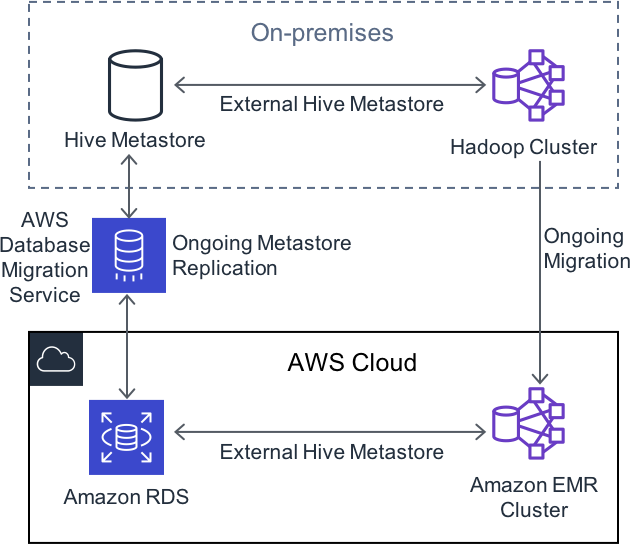
Figure 28: Ongoing metastore sync
<u>AWS Database Migration Service</u> is a data migration service and can be used to create on-going replication. This blog post <u>Replicating Amazon EC2 or On-Premises SQL Server to Amazon RDS for SQL</u> <u>Server</u> discusses how to achieve ongoing replication for SQL Server, but the same method applies to other databases.