Authorization
Authorization is the act of allowing or denying an identity to perform an action. Using authorization to determine what an identity can do first requires that the identity has validated who they are. This section provides the various mechanisms available that can limit what an identity can do.
Authorization mechanisms in EMR can be categorized into two groups: EMR-Native Authorization mechanisms and Open Source Authorization mechanisms.
EMR-Native Authorization
This section covers the native authorization mechanisms available in Amazon EMR on EC2 that can be configured out of the box.
Default Authorization when accessing AWS services from an EMR Cluster
EMR default authorization is based on the EMR cluster's assigned IAM role (instance profile). All actions performed within the cluster are governed by the permissions attached to the cluster's instance profile role through IAM policies.
IAM permissions define which AWS services an IAM role can interact with and under what constraints. For example, you can govern access to:
-
Amazon S3 buckets and prefixes
-
AWS Glue Data Catalog databases and tables
-
Amazon Kinesis Data Streams
-
Amazon DynamoDB tables
-
Amazon MSK topics
-
Any other AWS service accessible via IAM
See Service role for cluster EC2 instances (EC2 instance profile) .
When relying on default authorization, a straightforward approach to control access to AWS resources (e.g., S3, DynamoDB, MSK, Kinesis) is to:
-
Segregate users and workloads onto dedicated clusters: each user group or workload type runs on its own cluster
-
Assign each cluster a specific Instance Profile with a tailored set of IAM policies that enforce least-privilege access
This approach is simple to implement but may increase operational overhead and cost due to multiple clusters. It is best suited for environments with a small number of distinct access patterns.
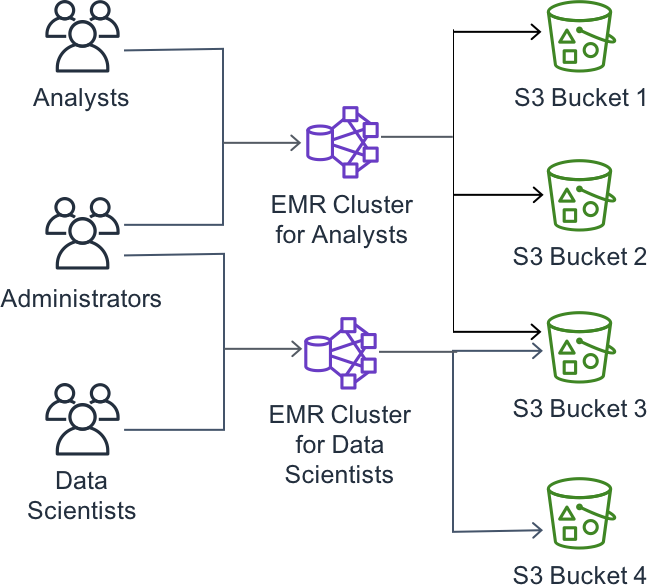
EMR Steps with EMR Default Authorization
With Amazon EMR, you can submit Spark and Hive jobs using traditional methods such as spark-submit or beeline commands, triggered from inside or outside the cluster (e.g., using Kerberos authentication).
However, the recommended approach is to submit Spark and Hive jobs through EMR Steps using AWS APIs. EMR Steps provide a managed, auditable mechanism for job submission that integrates natively with IAM permissions.
See Submit work to an Amazon EMR cluster for more details.
When using default authorization based on instance profile roles, a simple strategy is to restrict IAM principals so they can only submit EMR steps to designated clusters. This ensures that each principal can only trigger jobs on clusters whose instance profile grants the appropriate level of access.
EMR Runtime Roles
Runtime roles allow you to specify a dedicated IAM role when submitting a job (Spark or Hive) to an EMR cluster. The submitted job assumes the runtime role and uses its associated IAM policies to access AWS resources, rather than relying on the shared cluster instance profile. This enables multi-tenant clusters where different jobs operate under different permission boundaries.
A runtime role can be specified when:
-
Submitting EMR Steps (Spark or Hive batch jobs, or Spark Structured Streaming jobs)
-
Submitting Spark jobs (batch or interactive) through Apache Livy
-
Launching interactive Spark sessions through notebook tools such as:
-
EMR Studio
-
Amazon SageMaker AI Studio
-
Amazon SageMaker Unified Studio
-
The job submitter must be an IAM principal (e.g., IAM user or IAM role) with IAM permissions to submit jobs with the specified runtime role.
Runtime roles eliminate the need to create separate clusters for each user or team. Multiple tenants can share a single cluster while maintaining strict permission isolation at the job level.
To get more information check the following:
-
Configure IAM runtime roles for Amazon EMR cluster access in Studio
-
Adding an existing Amazon EMR on EC2 cluster in Amazon SageMaker Unified Studio
EMR Runtime Roles with Lake Formation Integration
On Amazon EMR clusters configured with runtime roles, you can configure to have AWS Lake Formation-based access enabled to control Spark workloads access to Glue Data Catalog resources.
AWS Lake Formation provides centralized access control on top of tables registered in the AWS Glue Data Catalog with data stored in Amazon S3. It offers a unified permission model with fine-grained controls at multiple levels:
-
Database level - control access to entire databases
-
Table level - control access to specific tables
-
Column level - restrict visibility to specific columns
-
Row level - filter rows based on conditions
-
Cell level - combine column and row filters for cell-level precision
Multiple compute engines (including EMR on EC2, EMR Serverless, and Amazon Athena) integrate with Lake Formation to validate requestor permissions and return only the authorized portion of data. The key benefit with using Lake Formation is that you do not need to manage IAM policies or S3 resource policies to grant access as storage access management is delegated to Lake Formation.
See AWS Lake Formation: How it works to get more details.
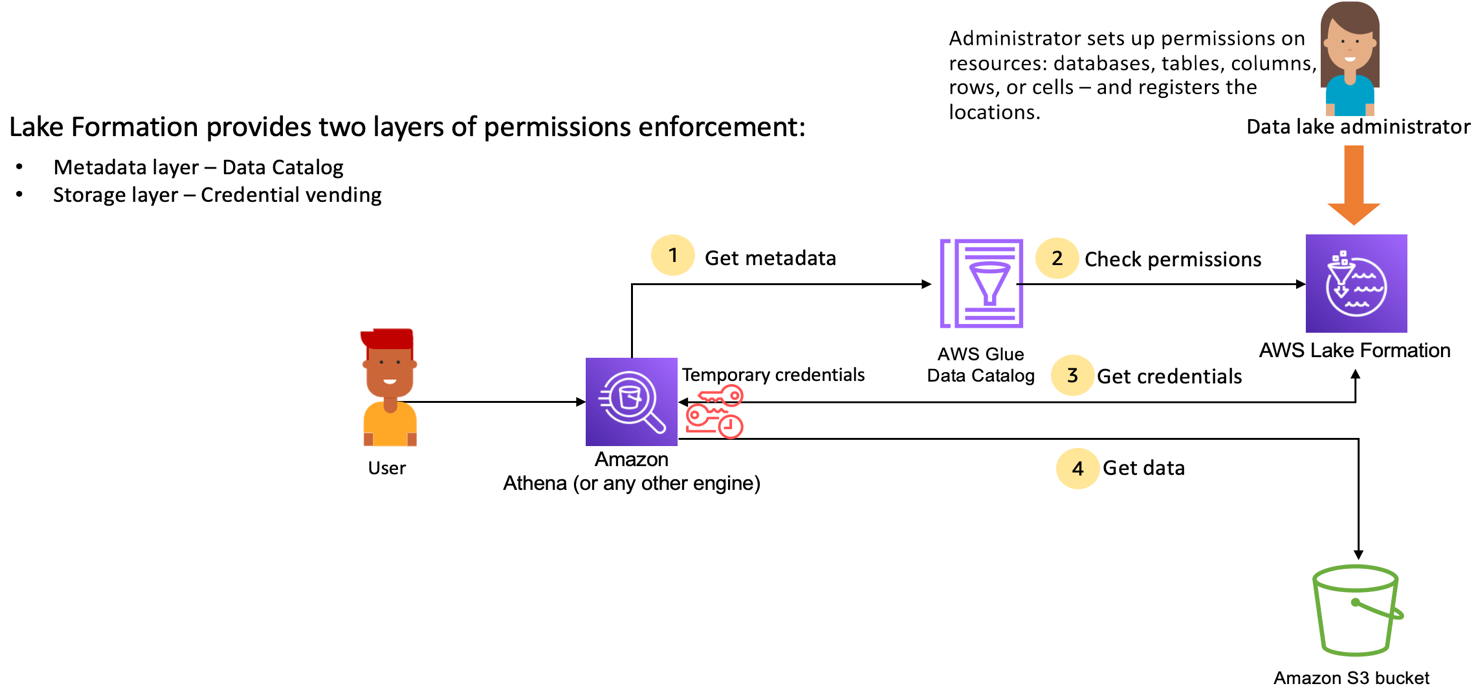
Two types of Lake Formation integration are supported with EMR clusters:
-
Full Table Access: This mode <u>is suggested</u> when submitted Spark jobs access tables that are shared in Lake Formation to the runtime role in their entirety, with no column or row filters applied. A typical example is granting read-only access to all columns and rows of a table. This mode introduces minimal performance overhead since no data filtering logic is injected into the Spark execution plan. Full Table Access requires EMR 7.8.0 or higher. See Lake Formation full table access for Amazon EMR on EC2 for more details.
-
Fine-Grained Access: This mode <u>is required</u> when submitted Spark jobs access tables that are permissioned in Lake Formation to only a subset of columns or when row-level filter conditions are applied. Fine-grained access integration involves a fundamental change in how a Spark job is processed: the application is split into a user space (running under the runtime role with restricted permissions) and a system space (running under a privileged identity responsible for data filtering). This architecture ensures that unauthorized data never reaches user code, preventing unauthorized access to data. It is suggested to leverage EMR 7.10 or higher for enhanced fine-grained access control integration. See Fine-grained access with Lake Formation for more details.
The Using EMR Serverless with AWS Lake Formation for fine-grained access control documentation provides additional details. Although the page references EMR Serverless, the same user space and system space concepts apply to Spark applications submitted on EMR on EC2 clusters.
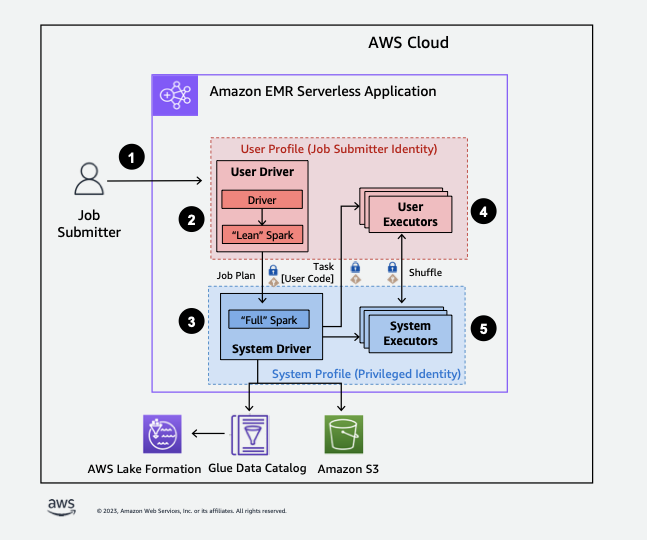
EMR Runtime Roles with S3 Access Grants Integration
On Amazon EMR clusters configured with runtime roles, you can also leverage Amazon S3 Access Grants to provide scalable, identity-based access control to S3 data. This feature is available starting with EMR release 6.15.0 and higher.
S3 Access Grants provide a centralized mechanism to define and manage permissions for S3 data at the bucket, prefix, or object level. When a Spark job requests S3 data, EMR integrates with S3 Access Grants to obtain temporary, scoped-down STS credentials tailored to the specific resource being accessed — ensuring that each job only receives the minimum permissions necessary. Similar to Lake Formation, using S3 Access Grants do not need to manage IAM or S3 resource policies.
Both S3 Access Grants and Lake Formation can be enabled together for EMR on EC2 clusters, where Lake Formation provides fine-grained access control to tabular data, and S3 Access Grants provides permissions to unstructured or direct S3 access.
See Using Amazon S3 Access Grants with Amazon EMR for more details.
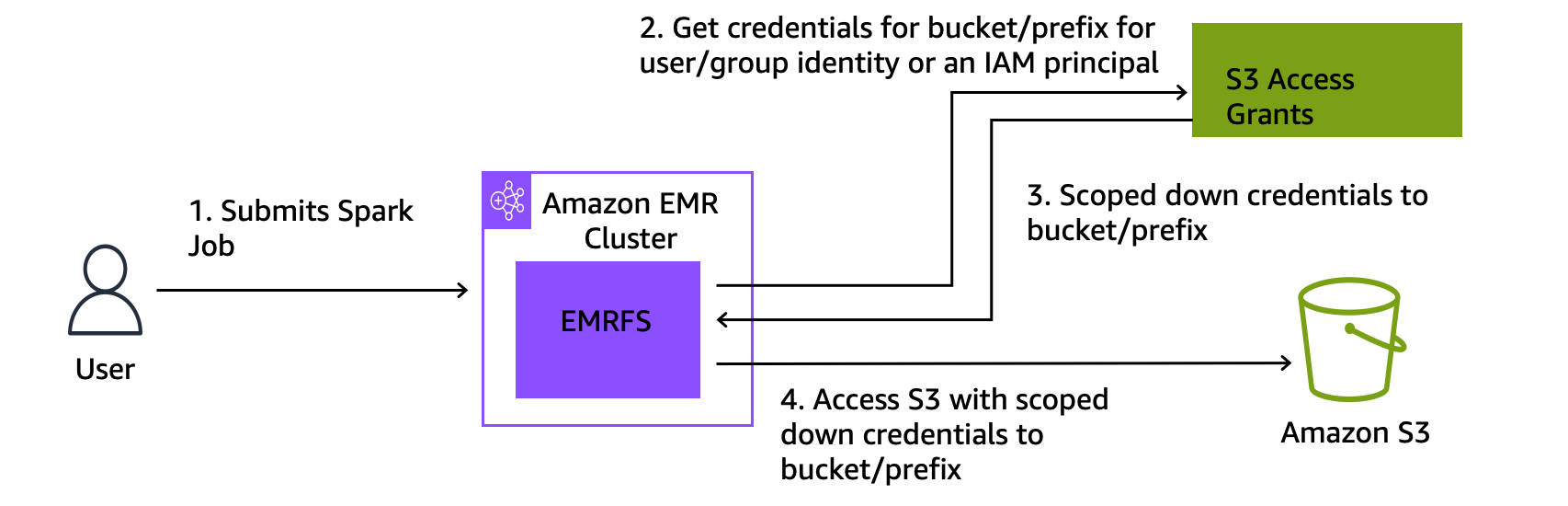
Apache Ranger Authorization
Apache Ranger provides centralized security administration with fine-grained authorization policies across multiple frameworks.
In the past, EMR supported native Ranger integration within releases up to and including EMR 7.3, covering Trino, Hive, Spark, and EMRFS (S3 access). For EMR versions EMR 7.4 and later, native Ranger integration is no longer supported. For customers that are coming from Apache Ranger, there are two options to adopt EMR. The first option is to migrate their Apache Ranger policies to Lake Formation. The second option and recommended approach is to leverage AWS partner solutions such as Privacera, which provides a unified data governance platform with Ranger-compatible policy management. See Access Management for EMR cluster in the Privacera Documentation for more details.
Open Source Authorization mechanisms for Other Frameworks
The following open source authorization mechanisms can be configured for specific frameworks running on EMR clusters.
Trino: File-based Access Control
Trino supports file-based access control where access to data, schemas, and operations is defined by rules declared in manually-configured JSON files deployed on the cluster. This mechanism allows you to define:
-
Which users can access which catalogs and schemas
-
Read/write permissions at the table level
-
Row-level filtering and column masking
For more information, see File-based access control on the Trino Documentation.
Hive: Hive SQL Authorization
Hive provides SQL Standard-Based Authorization, which controls access to tables, databases, and operations using familiar SQL GRANT/REVOKE statements. This mechanism enforces permissions at the HiveServer2 level and supports:
-
Database and table-level privileges (SELECT, INSERT, UPDATE, DELETE)
-
Role-based access control with GRANT/REVOKE semantics
For more information, see <u>SQL Standard Based Hive Authorization</u> on the Apache Hive Wiki.
HBase: HBase ACLs
HBase ACLs provide cell-level authorization to restrict access for specific users to namespaces, tables, column families, and individual cells. Permissions include:
-
Read (R) - read data
-
Write (W) - write data
-
Execute (X) - execute coprocessor endpoints
-
Create (C) - create/drop tables
-
Admin (A) - cluster administration operations
For more information, see Access Control Labels (ACLs) on the HBase documentation.
Note: Regardless of which open source authorization mechanism is configured, the EMR EC2 instance profile role must have IAM permissions that cover the superset of all access needed by the framework. Open source authorization controls filter access at the application layer, but the underlying calls to AWS services such as Amazon S3 and the AWS Glue Data Catalog are made using the instance profile role's IAM credentials. If the IAM role lacks permission to an S3 path or a Glue catalog resource, the request will fail before the framework-level authorization is even evaluated.
Amazon Athena as an Alternative for Interactive SQL Workloads
Amazon Athena is a serverless, interactive SQL query service. Interactive SQL workloads currently running on Trino, Presto, Hive, Impala can be migrated to Athena, which provides native integration with AWS Lake Formation for fine-grained access control (column-level, row-level, and cell-level). Athena eliminates the need to manage cluster infrastructure and provides pay-per-query pricing, and built-in governance through Lake Formation.
Since Athena is largely based on Trino/Presto syntax, workloads migrating from either of these engines will require minimal query adjustments. Migrations from Hive or Impala may require more significant syntax adaptations, as not all features are supported and some Athena-specific behaviors apply.
For more information, see the Amazon Athena documentation.