Encryption
Amazon EMR supports encryption for data in transit and data at rest, covering Amazon S3 storage, local instance storage, and Amazon Elastic Block Store (Amazon EBS) volumes — including root device volumes. You configure these options through EMR Security Configurations, which provide a centralized way to manage encryption settings across your cluster.
The following diagram shows the encryption options available through security configurations.
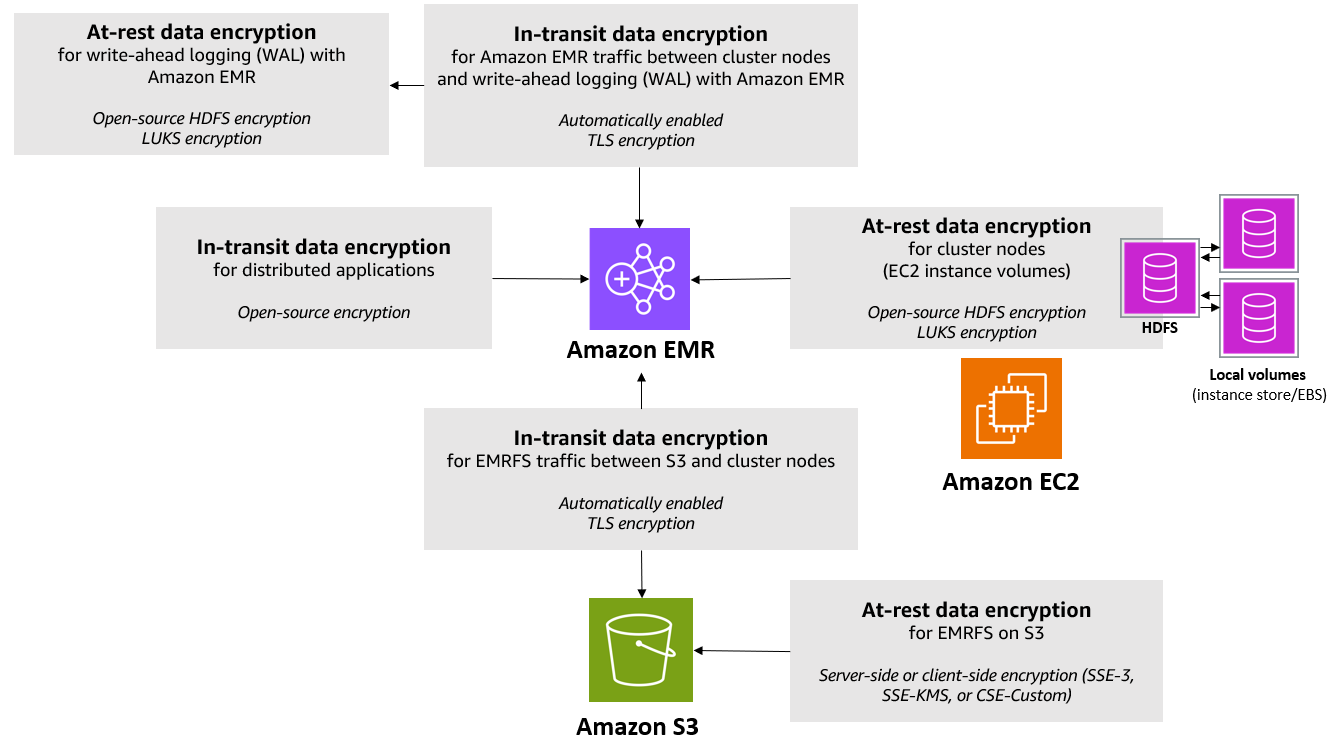
Figure 11: Encryption options
For an up-to-date list of encryption options available on Amazon EMR, see <u>Encryption Options</u>.
Encryption for Data In-Transit
When you enable in-transit encryption through an EMR security configuration, Amazon EMR automatically configures the open-source applications on the cluster to encrypt data as it moves between nodes, between applications, and between clients and the cluster. The encryption mechanisms are application-specific and may vary by Amazon EMR release. For advanced use cases, you can override the default open-source application configurations directly. For details, see Configure applications in the Amazon EMR Release Guide.
Not every endpoint uses the same encryption mechanism. Three categories apply:
-
TLS — Used by web UIs, HTTPS endpoints, and many client-facing ports (e.g., Spark UI, HDFS NameNode HTTPS, HiveServer2, Presto/Trino coordinator and worker communication).
-
SASL with Kerberos — Used by Hadoop RPC endpoints such as YARN ResourceManager, HDFS NameNode RPC, and HBase RPC. These endpoints require Kerberos authentication to be enabled in the security configuration alongside in-transit encryption.
-
Application-specific encryption — Some frameworks implement their own mechanisms. For example, Spark uses AES-based encryption for RPC connections between drivers, executors, and the shuffle service.
For the broadest coverage, enable both in-transit encryption and Kerberos authentication in your security configuration (when using Runtime Roles kerberos is automatically configured and used). Enabling only in-transit encryption protects TLS-capable endpoints but leaves SASL-based endpoints unencrypted. For a per-endpoint breakdown of which frameworks, ports, and encryption mechanisms are supported — and from which EMR release — see the in-transit encryption support matrix in the Amazon EMR Management Guide.
To supply TLS certificates to the cluster, use one of the following approaches:
-
S3 zip archive Create PEM certificates (a private key, a certificate chain, and optionally a trusted-certificates file), bundle them in a zip file, and upload the archive to Amazon S3. Amazon EMR distributes the certificates to every node at cluster launch. Certificates should use a wildcard common name (CN) that matches the VPC domain of your cluster — for example, CN=*.ec2.internal for us-east-1 or CN=*.us-west-2.compute.internal for us-west-2. If the certificate does not include a wildcard CN, the default hostname verifier rejects TLS connections. In that case, set hadoop.ssl.hostname.verifier to ALLOW_ALL via the core-site classification (Amazon EMR 7.3.0+). For the full certificate file requirements and zip structure, see Providing certificates for encrypting data in transit in the Amazon EMR Management Guide.
-
Custom certificate provider Implement a Java class that extends TLSArtifactsProvider and override the getTlsArtifacts() method to return the private key and certificate chain programmatically. Package the class as a JAR, upload it to S3, and reference the S3 path and fully qualified class name in the security configuration. This approach lets you retrieve certificates at cluster startup from any secure backend such as AWS Secrets Manager or an internal CA. The JAR must be compiled against the AWS SDK version that matches your target EMR release to avoid runtime class-loading errors. For a concrete example that stores and retrieves certificates from AWS Secrets Manager using a Custom certificate provider, see Store Amazon EMR in-transit data encryption certificates using AWS Secrets Manager on the AWS Big Data Blog.
-
EMR-generated certificates Let Amazon EMR automatically generate and distribute TLS certificates for the cluster. EMR creates the certificates during cluster creation, stores them in AWS Secrets Manager and distributes them across the nodes of the cluster. This is the simplest option when you do not need to bring your own CA.
For production environments, use certificates issued by a trusted Certificate Authority (CA) rather than self-signed certificates. CA-issued certificates simplify trust management across services and reduce the risk of man-in-the-middle attacks. Some frameworks enforce TLS hostname verification, so certificates must include valid hostnames or Subject Alternative Names (SANs) that match the cluster nodes.
AWS Nitro System Encryption
When your EMR cluster uses EC2 instance types based on the AWS Nitro System, traffic between instances is automatically encrypted at the hardware level by the Nitro networking card using AES-256-GCM. This encryption operates transparently and requires no application configuration, no certificate management, and introduces no measurable performance overhead. It applies automatically when instances communicate within the same VPC or across peered VPCs in the same Region. While Nitro provides a valuable additional security layer at the network level (layer 3), it does not replace EMR in-transit encryption which applies encryption in the application layer (layer 7). For more information, see Enforce VPC encryption in transit in the Amazon VPC User Guide.
Encryption for Data at Rest
Amazon EMR provides encryption at rest for three storage layers: data in Amazon S3, data in Amazon EMR WAL (when using HBase on S3), and local disks (instance store and EBS volumes). You configure all of these through an EMR security configuration.
Data in Amazon S3
Amazon EMR integrates with Amazon S3 encryption to protect data at rest for all objects read from and written to S3. Per-bucket encryption overrides are also supported, enabling fine-grained control when different S3 buckets have distinct compliance or data classification requirements. Data in transit is always protected. Regardless of the encryption settings in the security configuration, Amazon EMR enforces TLS for all data transmitted between cluster nodes and Amazon S3.
Encryption Mode Selection EMR supports two primary encryption modes for S3 data at rest: Server-Side Encryption (SSE) and Client-Side Encryption (CSE). The choice between them determines where encryption and decryption occur and which party controls the keys.
Server-Side Encryption (SSE) With SSE, encryption and decryption are performed by Amazon S3 on the service side, before data is written to disk and after it is read. EMR supports two SSE options:
-
SSE-S3 Amazon S3 manages the full lifecycle of the encryption keys using AES-256 (AES-GCM). This option requires no additional key management infrastructure and is appropriate for workloads where simplified operations take priority over explicit key control. Note that this is also the default encryption applied to all new S3 buckets. If no encryption is specified in the EMR Security Configuration, objects written to your bucket will use this default encryption.
-
SSE-KMS Encryption is performed by Amazon S3 using a customer-managed KMS key that you own and control. This option provides: Key usage audit trails via AWS CloudTrail, Fine-grained access control through KMS key policies, support for automatic key rotation.
NOTE The KMS key policy must explicitly grant permissions to the EMR Instance Profile role or Runtime Role. Otherwise, runtime operations will fail with AccessDeniedException errors.
Client-Side Encryption (CSE)
With CSE, encryption and decryption occur within the EMR cluster itself, before data is transmitted to or after it is retrieved from Amazon S3. Amazon S3 stores and serves only ciphertext — the service has no access to plaintext data at any point. This mode satisfies stricter compliance postures where data must encrypted before being transmitted. EMR supports two CSE key management approaches:
-
CSE-KMS The EMR cluster uses AWS KMS to generate and manage data encryption keys. Each object is encrypted with a unique data key, which is encrypted under the specified CMK.
-
CSE-Custom You supply a custom Java class that implements the EncryptionMaterialsProvider interface. This class is responsible for providing and managing the master key used to encrypt data keys.
For additional information, see the Amazon S3 client-side encryption in the Amazon EMR Management Guide.
NOTE CSE-Custom encrypted objects are not natively readable by services that do not use the EMR S3 client (e.g., Athena or Redshift Spectrum cannot decrypt CSE-C objects). Plan for this interoperability constraint when designing cross-service data pipelines.
Root Volume
Beginning with Amazon EMR version 5.24.0, you can use the Amazon EMR security configuration option to encrypt the EBS root volume when AWS KMS is specified as the key provider. For Amazon EMR versions prior to 5.24.0, you must use a Custom AMI to encrypt the root volume. See <u>Creating a Custom AMI with an Encrypted Amazon EBS Root Device</u> <u>Volume</u> in the Amazon EMR Management Guide for details.
EBS Volumes
There are two mechanisms that allow you to encrypt data on non-root volumes, which typically store HDFS and other application data: EBS Encryption for cloud nativeencryption and LUKS encryption for OS-managed encryption. For documentation on both approaches, see <u>At-rest</u> <u>Encryption for Local Disks</u> in the Amazon EMR Management Guide.
For Amazon EMR version 5.24.0 and later, you can natively encrypt EBS volumes attached to an EMR cluster by using the Amazon EMR security configuration option. EBS encryption provides the following benefits:
-
Native End-to-End Encryption: Data on EBS volumes including intermediate data, I/O between the EC2 instances and EBS volumes are encrypted.
-
Root Volumes Encryption: Root volumes can be encrypted without the need to create custom Amazon Linux AMIs.
-
Transparent Encryption: EBS encryption is transparent to any applications running on EMR and does not require modifications.
-
Simplified Encryption: With EBS encryption, you can check the encryption status from the Volumes page in the EC2 console or through an EC2 API call.