Optimizing Costs
Amazon EMR provides multiple features to help lower costs. To best use these features, consider the following factors.
Workload Type
You can run different applications and workload types on Amazon EMR. Workloads fall into two patterns:
-
Transient - the cluster starts, runs one or more jobs, and terminates when the work is complete. You pay only for the time the cluster is running. Transient clusters fit scheduled batch jobs, ETL pipelines, and ad-hoc analysis.
-
Long-running (persistent) - the cluster stays up continuously to serve multiple jobs, interactive queries, or users. You pay for the cluster 24/7, including idle time. Long-running clusters fit interactive query engines, Apache HBase serving workloads, and shared analytics environments.
The following image shows typical workload types and whether they're classified as transient or long running.
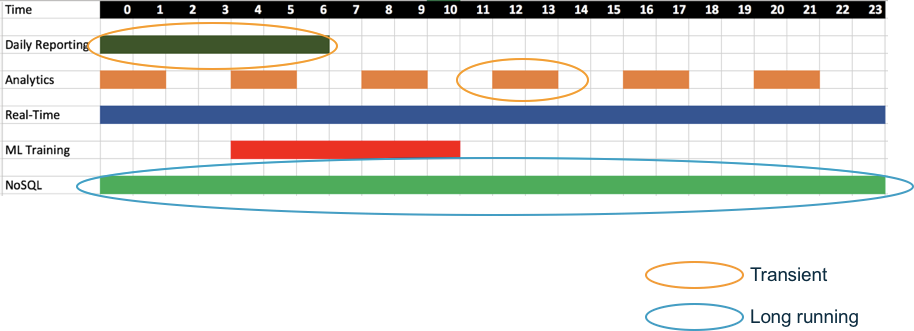
Figure 1: Typical workloads and their cluster types
After you classify each workload as transient or long running, use the following table to map workload characteristics to a deployment option:
| Pattern | Workload characteristic | Recommended deployment option |
|---|---|---|
| Long-running | Steady, predictable load | Amazon EMR on Amazon EC2 with Reserved Instances or Savings Plans |
| Long-running | Apache HBase | Amazon EMR on Amazon EC2 (required for HBase) |
| Long running or transient | Organization runs on Amazon EKS and wants to share cluster capacity between Apache Spark and other container workloads | Amazon EMR on Amazon EKS |
| Transient | Large batch jobs that tolerate Spot interruptions | Amazon EMR on Amazon EC2 with Spot Instances |
| Transient | Bursty Apache Spark or Apache Hive jobs | Amazon EMR Serverless |
| Transient | Interactive SQL or notebooks with unpredictable usage | Amazon EMR Serverless |
For EMR on EC2 and EMR on EKS deployment models, select appropriate EC2 instance types to match your workload requirements. Most Amazon EMR clusters can run on general-purpose EC2 instance types. Compute-intensive clusters may benefit from running on compute optimized instances. Database, memory-caching applications, and workloads with large shuffle requirements may benefit from running on memory optimized instances.
 Each instance family has a different vCPU-to-memory ratio. Choose the family whose ratio matches your application profile. AWS Graviton-based instances offer better price-performance than equivalent x86 instances for Amazon EMR workloads. For supported instance types, see Supported instance types with Amazon EMR.
The primary node does not have large computational requirements. For most clusters of 50 or fewer nodes, you can use a general-purpose instance type. Use a larger instance type for larger clusters so the primary node can handle the added load.
With Amazon EMR Serverless, you configure worker vCPU and memory at the application or job level and choose between the x86_64 (default) and arm64 (Graviton) architectures. Match the vCPU-to-memory ratio to your workload and consider Graviton for better price-performance on compatible workloads.
Application Settings
Job performance also depends on application settings. There are different application settings for different use cases. For example, by default, EMR clusters with Apache HBase installed allocate half of the memory for HBase and allocate the other half of memory for Apache Hadoop YARN. If you use applications such as Apache HBase and Apache Spark, we recommend that you don't use a single, larger cluster for both applications. Instead, run each application on a separate, smaller cluster.