Storage Optimization
When you use Amazon EMR, you can decouple your compute and storage by using Amazon S3 as your persistent data store. By optimizing your storage, you can improve the performance of your jobs. This approach enables you to use less hardware and run clusters for a shorter period. To reduce storage costs further, use Amazon S3 Intelligent-Tiering, which moves data between access tiers automatically as access patterns change.
Amazon EMR presents Amazon S3 as an HDFS-compatible layer, so Hadoop-based applications can read and write Amazon S3 data with no code changes. On Amazon EMR on Amazon EC2, HDFS remains available for scenarios where local-disk performance matters. Consider HDFS for:
-
Apache HBase tables that need sub-millisecond read latency - real-time use cases such as financial services, ad tech, fraud detection, and time-series queries.
-
Apache Spark shuffle and spill data on shuffle-heavy jobs - large joins, aggregations, and sorts that spill to local disk during execution. HDFS-backed local disk outperforms Amazon S3 for shuffle traffic.
-
Iterative workloads that reuse intermediate data across steps - multi-step jobs that read and write the same intermediate datasets within a single cluster run avoid repeated Amazon S3 roundtrips.
HDFS doesn't persist beyond the cluster lifecycle, so it's not a substitute for Amazon S3 as a durable data store. To reduce Amazon S3 storage costs further, use Amazon S3 Intelligent-Tiering, which moves data between access tiers automatically as access patterns change. By optimizing your storage, you can improve the performance of your jobs.
Here are some strategies to help you optimize your cluster storage for Amazon S3:
Partition Data
When your data is partitioned and you read the data based on a partition column, your query only reads the files that are required. This reduces the amount of data scanned during the query. For example, the following image shows two queries executed on two datasets of the same size (5GB of data and 12M rows). One dataset is partitioned, and the other dataset is not.
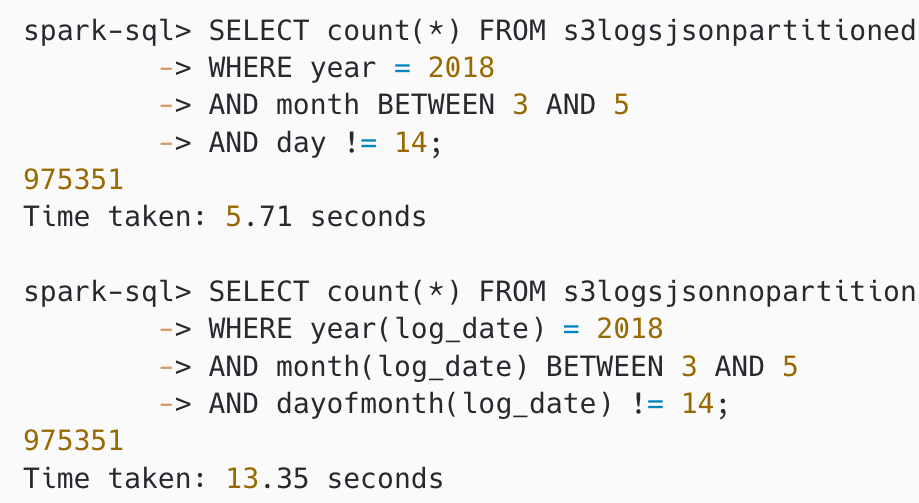
Figure 2: Queries on partitioned and non-partitioned data
The query over the partitioned data (s3logsjsonpartitioned) took 5.7 seconds. Because the data is partitioned by year, month, and day, Spark only read the files in the matching partitions.
The query over the non-partitioned data (s3logsjsonnopartition) took 13.3 seconds to complete and it scanned all 5GB of data.
Optimize File Sizes
Avoid files that are too small (generally, anything less than 128 MB). By having fewer files that are larger, you can reduce the amount of Amazon S3 LIST requests and improve the job performance. To show the performance impact of having too many files, the following image shows a query executed over a dataset containing 50 files and a query over a dataset of the same size, but with 25,000 files.
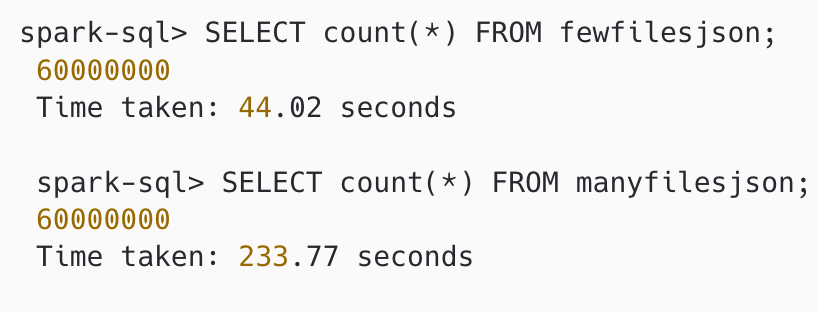
Figure 3: Query time difference on number of files
The query executed over the dataset containing 50 files (fewfilesjson) took 44 seconds to complete. The query over the dataset with 25,000 files (manyfilesjson) took 233 seconds to complete.
Compress the Dataset
By compressing your data, you reduce the amount of storage needed for the data and minimize the network traffic between S3 and the EMR nodes. When you compress your data, make sure to use a compression algorithm that allows files to be split or have each file be the optimal size for parallelization on your cluster. File formats such as Apache Parquet or Apache ORC provide compression by default.
For Apache Spark and Apache Hive workloads on Amazon EMR, choose a compression codec based on your priority:
-
Snappy — fast compression and decompression with a moderate compression ratio. This is the default codec for Parquet in Apache Spark and a good general-purpose choice for hot data and query workloads.
-
Zstandard (Zstd) — higher compression ratios than Snappy at comparable speeds. Zstd is the default codec for Apache Iceberg tables and a strong fit for storage-optimized workloads and large datasets.
-
Gzip — high compression ratio but cannot split on text formats such as CSV and JSON. Avoid Gzip on large text files because a Spark task processing a large Gzip file cannot split the work across executors, which can cause out-of-memory errors. Gzip is fine inside Parquet or ORC, where you can split at the file-format level.
The following image shows the size difference between two file formats, Parquet (has compression
enabled) and JSON (text format, no compression enabled). The Parquet dataset is almost five times
smaller than the JSON dataset:
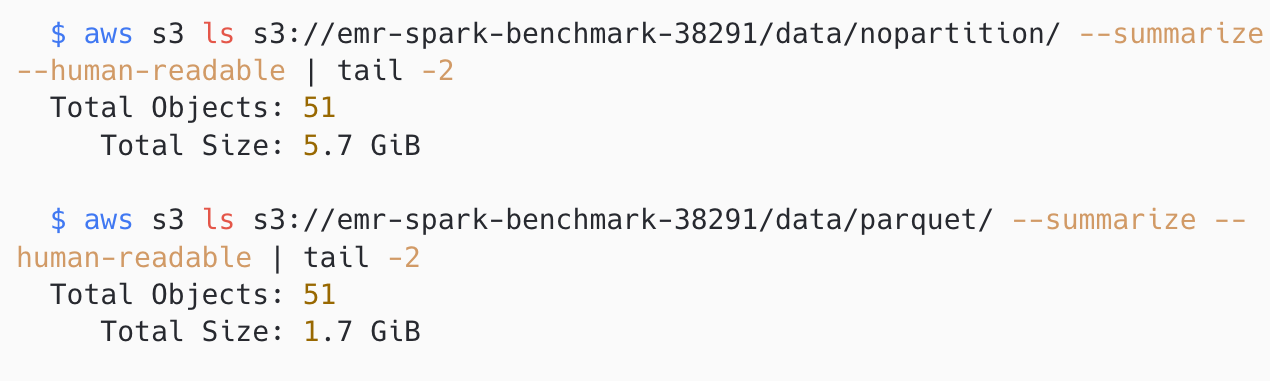
Figure 4: Compressed and non-compressed datasets
Optimize File Formats
Columnar file formats like Parquet and ORC can improve read performance. Columnar formats are ideal if most of your queries only select a subset of columns. For use cases where you primarily select all columns, but only select a subset of rows, choose a row-optimized file format such as Apache Avro. The following image shows a performance comparison of a select count(*) query between Parquet and JSON (text) file formats on datasets containing the same 12 million rows. The Parquet dataset is compressed with Snappy (1.7GB). The JSON dataset is not compressed (5.7GB).
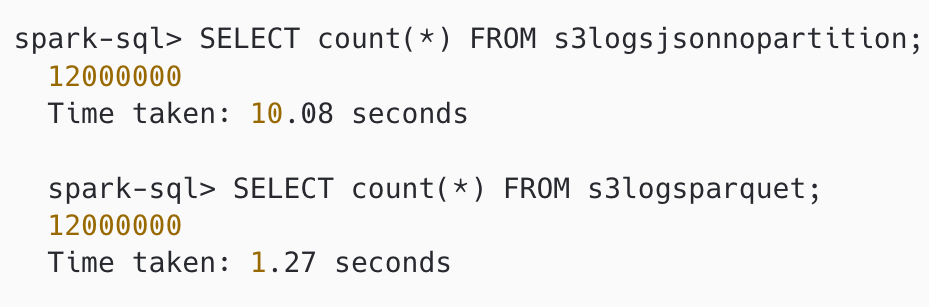
Figure 5: Performance comparison of file formats
The query over the JSON dataset took 10 seconds to complete, and it scanned all 5.7 GB of data. The query over the Parquet dataset took 1.27 seconds to complete, approximately 8 times faster.
The strategies in this section apply to file-based tables stored in Amazon S3. Open table formats such as Apache Iceberg, Apache Hudi, or Apache Delta Lake add ACID transactions, row-level updates, time travel, and schema evolution. Consider an open table format if your workload needs any of these capabilities. These formats manage partitioning, compaction, and metadata through the table format itself.
To learn more about using open table formats with Amazon EMR, see Comparison of Table Formats.