Notifications
Prerequisites
This section assumes familiarity with AWS Services Monitoring and AWS Organizations. Review those topics first if you're new to AWS networking observability and multi-account governance.
The best monitoring in the world is worthless if nobody sees the alert. Notifications bridge the gap between detecting a problem and getting the right person to act on it. For networking specifically, the stakes are high: a VPN tunnel down, a Direct Connect BGP session flap, or a Network Firewall dropping traffic affects every workload that depends on that path. The difference between a five-minute blip and a two-hour outage is almost always how fast the notification reaches someone who can respond.
This page covers the notification pipeline end-to-end: from the metric or event that signals a problem, through the alarm or rule that decides it matters, to the delivery mechanism that reaches the right team at the right time. The organizing principle is signal over noise — the number one operational failure in monitoring is alert fatigue, where teams ignore alerts because too many of them are false positives or low-priority noise.
Notifications in a multi-account AWS environment require deliberate architecture. Events originate in workload accounts, but the networking team typically operates from a centralized monitoring account. Cross-account event forwarding, centralized alarm aggregation, and Organization-wide health event visibility are not optional extras — they are the baseline for any production network.
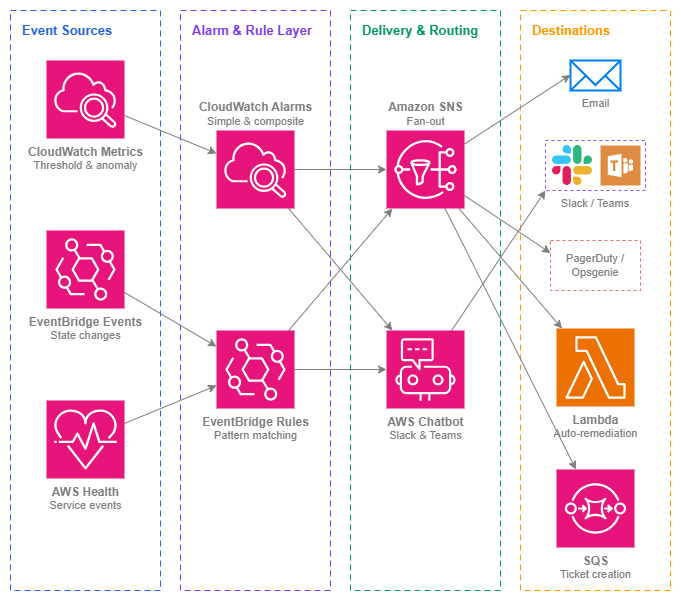
Notification pipeline — Drawio Source
Key Capabilities
-
CloudWatch Alarms
Metric-based alerting with static thresholds, anomaly detection bands, and math expressions. Composite alarms combine multiple alarm states into a single actionable signal, reducing noise from transient single-metric spikes.
-
Amazon EventBridge
Event-driven notifications for state changes: VPN tunnel up/down, Direct Connect connection state, Network Firewall alert, BGP session flap. Pattern-matching rules route events to any target without polling.
-
Amazon SNS
Fan-out delivery to email, SMS, HTTPS endpoints (PagerDuty, Opsgenie), Lambda functions, and SQS queues. SNS is the universal glue between alarm sources and notification destinations.
-
AWS Health Dashboard & API
Proactive awareness of AWS service events affecting your resources: scheduled maintenance on Direct Connect, degraded performance in a Region, or planned VPN endpoint rotation. Organization-wide Health events aggregate across all member accounts.
-
AWS Chatbot
Delivers CloudWatch alarms and EventBridge notifications directly to Slack channels and Microsoft Teams. Interactive — teams can acknowledge, snooze, or run runbooks from the chat interface.
-
Composite Alarms
Combine multiple alarms into a single parent alarm that only fires when a combination of conditions confirms a real problem. The primary tool for eliminating alert fatigue in complex network topologies.
Best Practices
Alarm Design
Alarm on what matters, not on everything
Every alarm that fires without requiring action trains your team to ignore alarms. Before creating an alarm, answer: "If this fires at 3 AM, what will someone do?" If the answer is "look at it tomorrow," it's not a P1 alarm — it's a dashboard metric or a daily report item.
For networking, the alarms that matter are the ones that indicate traffic is affected or about to be affected: tunnel down, BGP session lost, NAT gateway ErrorPortAllocation spiking, Network Firewall dropping legitimate traffic, Transit Gateway blackholing packets. Metrics like "VPN tunnel bytes in" are useful for dashboards but rarely warrant an alarm unless they drop to zero (which means the tunnel is effectively dead even if the state shows "UP").
Key insight: If your team routinely ignores alarms, you don't have a monitoring problem — you have an alarm design problem. Every alarm must have a clear owner and a defined response action.
Use anomaly detection for metrics without obvious thresholds
Some networking metrics don't have a natural static threshold. What's "normal" for Transit Gateway bytes processed depends on time of day, day of week, and business seasonality. CloudWatch anomaly detection builds a model of expected behavior and alarms when the metric deviates beyond a configurable band width. This is particularly useful for detecting DDoS traffic patterns, unexpected traffic shifts after a routing change, or gradual degradation that wouldn't trip a static threshold.
Implement severity tiers with distinct routing
Not every problem deserves a page. Define clear severity tiers and route each tier differently:
| Severity | Criteria | Routing | Response time |
|---|---|---|---|
| P1 — Critical | Traffic is dropping, connectivity is lost, failover has not occurred | PagerDuty/Opsgenie page, Slack war-room channel | Immediate (< 5 min) |
| P2 — High | Redundancy is degraded, single path remaining, capacity approaching limits | Slack notification, email to on-call | Business hours (< 4 hr) |
| P3 — Informational | Planned maintenance, minor metric deviation, successful failover | Slack channel, daily digest email | Next business day |
Map each CloudWatch alarm and EventBridge rule to exactly one severity tier. If you can't decide the tier, the alarm probably needs to be split into two: one for the critical condition and one for the informational condition.
Composite Alarms
Use composite alarms to confirm real problems before paging
A single metric crossing a threshold is often not a problem. A VPN tunnel briefly flapping during AWS-side maintenance is expected. But if both tunnels on a connection are down simultaneously, that's a real outage. Composite alarms let you express this logic: "alarm only when Alarm A AND Alarm B are both in ALARM state."
Networking patterns that benefit from composite alarms:
- Both VPN tunnels down on the same connection (single tunnel down is P2; both down is P1)
- NAT gateway errors AND increased packet drops (errors alone might be transient; combined with drops confirms impact)
- BGP session down AND no traffic on the backup path (BGP down alone might mean traffic shifted to backup successfully)
- Multiple Transit Gateway attachments unhealthy (one attachment flapping is isolated; multiple suggests a broader issue)
Suppress child alarm actions when using composite alarms
When you create a composite alarm, configure the child alarms with ActionsEnabled: false for their notification actions. Let only the composite alarm trigger notifications. This prevents duplicate alerts (one from each child plus one from the composite) and ensures the team receives a single, contextualized notification that describes the combined condition rather than three separate alerts they have to mentally correlate.
EventBridge for State Changes
Use EventBridge rules for infrastructure state-change notifications
CloudWatch Alarms are metric-based. EventBridge handles events — discrete state changes that don't map cleanly to a metric threshold. For networking, the most important EventBridge patterns are:
- VPN tunnel state change:
source: aws.vpn,detail-type: "VPN Tunnel Status Change" - Direct Connect connection state change:
source: aws.directconnect,detail-type: "Direct Connect Connection State Change" - Direct Connect virtual interface state change: BGP session up/down events
- Network Firewall alert: Stateful rule match events forwarded to EventBridge
- Transit Gateway attachment state change: Attachment available/failing/deleting
- AWS Health events: Scheduled maintenance, service issues affecting your resources
EventBridge rules match on event patterns and route to targets (SNS, Lambda, SQS, Step Functions). This is the right mechanism for "something changed state" notifications, as opposed to "a metric crossed a threshold."
Forward events cross-account to a centralized monitoring account
In a multi-account environment, networking events originate in the account that owns the resource (the centralized networking account for Transit Gateway and Direct Connect, workload accounts for VPC-level events). Configure EventBridge cross-account event forwarding to send networking events to a centralized monitoring account where your notification rules, SNS topics, and Chatbot configurations live.
This pattern avoids duplicating notification infrastructure in every account and gives the networking team a single pane of glass for all network events across the Organization. Use an Organization-level EventBridge rule on the default event bus in each account to forward events matching networking patterns to the monitoring account's event bus.
Key insight: Centralize notification logic, not event generation. Events should originate where resources live, but routing decisions and delivery configuration belong in one place.
AWS Health Events
Subscribe to Organization-wide Health events for proactive awareness
AWS Health events tell you about scheduled maintenance (Direct Connect circuit maintenance windows, VPN endpoint rotation), service issues (degraded networking in a Region), and account-specific notifications. With AWS Organizations Health, you see events across all member accounts from the management account or a delegated administrator.
Create EventBridge rules that match Health events for networking services (directconnect, vpn, ec2, networkfirewall, transitgateway) and route them to the networking team's Slack channel. Knowing about a scheduled Direct Connect maintenance window 14 days in advance lets you validate failover paths before the maintenance occurs, rather than discovering at 2 AM that your backup path doesn't work.
Notification Routing
Route alarms to the team that owns the response, not to everyone
A common anti-pattern is a single SNS topic that sends every network alarm to every engineer. This guarantees alert fatigue. Instead, create separate SNS topics per team and per severity:
networking-p1-critical→ PagerDuty rotation for the networking teamnetworking-p2-high→ Slack #network-ops channelnetworking-p3-info→ Slack #network-notifications channel (muted by default)workload-team-a-network→ Team A's own channel for alarms on their VPC resources
Application teams should receive notifications about their workload's network health (their VPC endpoints, their load balancer health), not about shared infrastructure they can't act on. The networking team receives notifications about shared infrastructure (Transit Gateway, Direct Connect, Network Firewall).
Automated Remediation
Use EventBridge → Lambda for automated response to known failure modes
Some network events have well-defined, safe automated responses:
- VPN tunnel down → Lambda triggers a CloudFormation stack update to rotate pre-shared keys and re-establish the tunnel
- NAT gateway ErrorPortAllocation → Lambda provisions an additional NAT gateway and updates route tables
- Direct Connect connection down → Lambda verifies backup VPN path is active and creates a ticket if it isn't
- Network Firewall rule group update failed → Lambda rolls back to the previous rule group version
Automated remediation is not a replacement for human response — it's a first responder that buys time. The Lambda should always create a ticket or send a notification in addition to taking the remediation action, so the team knows what happened and can verify the fix.
Key insight: Automate the response to events you've seen three or more times. If you've manually remediated the same failure mode three times, the fourth time should be automated.
Cost Awareness
Understand notification costs at scale
Individual notification costs are negligible, but they compound in large Organizations:
| Component | Cost | Scale consideration |
|---|---|---|
| CloudWatch Alarm | Per-alarm/month (standard) or per-alarm/month (anomaly detection) — see CloudWatch pricing | Costs scale linearly with alarm count across accounts |
| EventBridge rule | Per-million events matched | Typically negligible for networking events |
| SNS notification | Per-million email deliveries, per-100 SMS | Email is essentially free; SMS adds up for large on-call rotations |
| AWS Chatbot | No additional charge | Free delivery to Slack/Teams |
The real cost risk is not the notification services themselves — it's creating hundreds of alarms that nobody looks at. Each unused alarm costs money and, worse, dilutes the signal from alarms that matter. Audit your alarms quarterly: if an alarm hasn't fired in 6 months, either the threshold is wrong or the alarm isn't needed.
Combining notifications with other services
| Combination | Notifications provide | Other service provides |
|---|---|---|
| CloudWatch Alarms + CloudWatch Metrics | Threshold evaluation, state management, notification triggering | The underlying metric data from networking services (VPN, Direct Connect, NAT gateway, Transit Gateway) |
| EventBridge + AWS Health | Rule matching and routing to notification targets | Proactive service event information (maintenance, degradation, advisories) |
| SNS + PagerDuty/Opsgenie | Fan-out delivery to HTTPS endpoints | On-call rotation, escalation policies, incident management workflow |
| AWS Chatbot + Slack/Teams | Formatted alarm delivery with interactive actions | Team communication, acknowledgment, runbook execution from chat |
| EventBridge + Lambda | Event routing to compute targets | Automated remediation logic (failover, scaling, ticket creation) |
| CloudWatch + AWS Organizations | Cross-account alarm aggregation in a centralized monitoring account | Account structure, delegated administration, Organization-wide Health events |
| Composite Alarms + Simple Alarms | Noise reduction through boolean logic on alarm states | Individual metric evaluation per resource or per condition |
Documentation
-
Amazon CloudWatch Alarms
Complete documentation for creating metric alarms, anomaly detection alarms, composite alarms, and configuring alarm actions.
-
Amazon EventBridge User Guide
Event patterns, rules, targets, cross-account event delivery, and integration with AWS services.
-
Amazon SNS Developer Guide
Topic creation, subscription management, message filtering, and delivery to email, SMS, HTTPS, Lambda, and SQS.
-
AWS Health User Guide
Organization-wide health events, EventBridge integration, and programmatic access via the Health API.
-
AWS Chatbot Administrator Guide
Configuring Slack and Microsoft Teams integrations, channel permissions, and interactive alarm management.
-
CloudWatch Pricing
Alarm pricing tiers (standard, high-resolution, anomaly detection, composite), metric costs, and free tier details.
Related Observability Pages
- AWS Services Monitoring — The metrics and health checks that feed into the notification pipeline covered on this page
- Internal Traffic Monitoring — VPC Flow Logs and traffic mirroring that provide the raw data for anomaly-based network alarms
- External Traffic Monitoring — Internet-facing traffic visibility that drives DDoS and abuse notifications
Relationship to Foundation:
- AWS Organizations — Organization structure determines cross-account event forwarding topology and centralized monitoring account placement
Relationship to Connectivity:
- Hybrid & Multi-Cloud — Direct Connect and VPN state-change events are the most critical networking notifications to configure
- Connectivity Within AWS — Transit Gateway and Cloud WAN attachment health drives composite alarm design