Development
Development Approach
MDAA development follows a working-backwards process, starting from the user experience and ending with tested, compliant infrastructure code.
-
Work backwards from capabilities and user experience. Determine whether the change extends an existing module or requires a new one. Define the desired end-state from the user's perspective — what should they be able to configure, and what should happen when they deploy?
-
Design sample configs before writing code. Draft sample module configurations (
sample-config-minimal.yaml,sample-config-comprehensive.yaml) that reflect the intended user experience. Focus on easy-to-use defaults with optional exposure of more complex fine-tuning options. Review these configs with stakeholders before proceeding. -
Map configs to constructs. Walk through each config property and determine which underlying AWS resources and CDK constructs it maps to. Identify whether new L3 or L2 constructs are needed, or if existing ones can be extended.
-
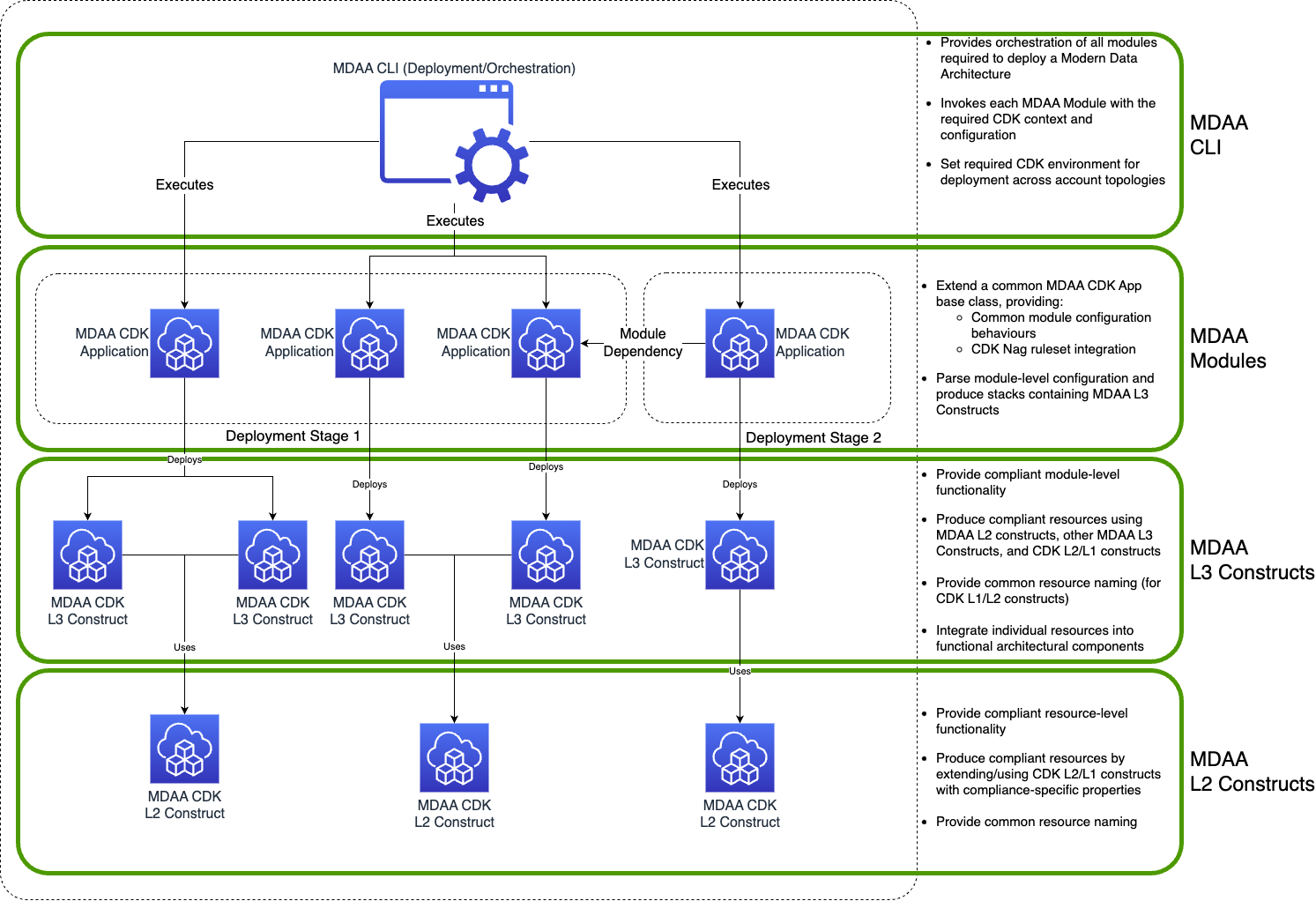
Implement constructs following the architecture. Build from the bottom up — L2 constructs enforce compliance (encryption, access controls, CDK Nag rules) as reusable building blocks, L3 constructs compose them into compliant architectural patterns, and the App layer wires configuration to L3 props. See Architecture Overview for layer responsibilities.
-
Ensure full testing compliance. Every layer requires tests — L2/L3 constructs need CDK Assertions and CDK Nag compliance tests, Apps need diff baseline tests covering every config property, and the CLI needs command baselines pinning the shell commands it emits. All packages must meet coverage thresholds. See TESTING.md for requirements.
Architecture Overview
- Apps / Modules: Configuration-driven CDK apps that translate user-provided YAML configuration into L3 construct props, applying schema validation and deploying compliant infrastructure as CloudFormation stacks. Start here when exposing a new configuration surface to end users or adding a new deployable module.
- L2 Constructs: Wrap CDK L1/L2 constructs with compliance controls, standardized props typing, and MDAA naming conventions. Compiled with JSII and published to npm as TypeScript packages. This is where encryption defaults, access policies, and CDK Nag suppressions live. Start here when adding a new AWS resource type or fixing a compliance gap.
- L3 Constructs: Implement architectural patterns and multi-resource integrations. Compose L2 constructs into higher-level abstractions. TypeScript-only. Start here when building a new module pattern that orchestrates multiple resources (e.g., a data lake with buckets, encryption, Lake Formation permissions).
Setting up MDAA Dev Environment
Prerequisites
- Node.js 22.x and npm 10.x — See the Node.js downloads page.
- Python 3, pip, uv — Required for Python virtual environment, dependency management, schema doc generation, and tests. See the uv installation guide.
Quick Start
-
Fork and clone the repository
-
Install dependencies
-
Build packages
The build automatically creates a Python virtual environment (
.venv) and installs the required Python dependencies (for schema and doc generation) on first run. This requiresuvto be installed — see Prerequisites. -
Run tests to verify your setup
Common Commands
All commands are run from the repository root.
Building
npm run build:all              # Build all packages (no cache)
./scripts/build/build_repo.sh       # Build via nx (uses cache)
Linting and Formatting
npm run lint                   # ESLint on affected packages
npm run lint:all               # ESLint on all packages (no cache)
npm run prettier               # Prettier on affected packages
npm run prettier:all           # Prettier on all packages (no cache)
Testing
npm test                       # Affected TS tests + all Python tests
npm run test:all               # All TS tests (no cache)
npm run test:python            # Python tests on affected packages
npm run test:python:all        # Python tests on all packages
npm run test:update-baselines  # Regenerate diff baselines
npm run test:starter-kits      # Starter kit tests, scoped to what the change affects
npm run test:starter-kits:all  # All starter kit tests for all kits
Starter kit tests run the real CLI end to end per kit and are not included in npm test. Run them when changing the CLI or a kit config.
For test types, coverage requirements, how to write tests, and CI pipeline details, see TESTING.md.
Pre-push Validation
Run the full MR pipeline check locally before pushing:
npm run prepush                # Affected only, uses cache (fast)
npm run prepush:all            # All packages, no cache (thorough)
This runs: validate packages → validate deps → lint → lint Python → prettier → build + test.
Coding Guidelines
TypeScript / CDK
MDAA enforces code quality through ESLint, Prettier, and strict TypeScript compiler settings. Run npm run lint before pushing to catch issues early.
Formatting (Prettier): - 2-space indentation - Single quotes - 120-character line width - Trailing commas everywhere - No parens on single arrow function parameters
TypeScript compiler:
- Strict mode is on — noImplicitAny, strictNullChecks, noUnusedLocals, noUnusedParameters are all enforced
- Prefix unused parameters with _ (e.g., _event) to satisfy the no-unused-vars rule
- Target: ES2020, Module: CommonJS
Construct patterns:
- L2 constructs wrap CDK constructs with MDAA compliance defaults (encryption, public access blocking, SSL enforcement, etc.). Props interfaces extend MdaaConstructProps.
- L3 constructs compose L2 constructs into higher-level modules. Props interfaces extend MdaaL3ConstructProps.
- Constructor signature follows (scope: Construct, id: string, props: <YourProps>).
- Use MdaaParamAndOutput to publish resource identifiers as SSM parameters.
- Use MdaaNagSuppressions.addCodeResourceSuppressions() when suppressing CDK Nag rules — always include a reason.
Python
- Target runtime: Python 3.14
- Use pytest for testing and uv for dependency management
- Security scanning via Bandit
- See the Testing Python Code section in
TESTING.mdfor the full Python testing setup
Scripts Directory
Scripts are organized by purpose under scripts/:
| Directory | Purpose |
|---|---|
scripts/build/ |
Build, install, packaging, license headers |
scripts/ci/ |
CI-specific orchestration (merge_main, schema drift check, python_test_ci) |
scripts/quality/ |
Linting, SAST, SonarQube, validation, pre-push checks |
scripts/test/ |
Test runners — unit, snapshot, integration, Python, baselines |
scripts/publish/ |
Artifact publishing, versioning, CodeArtifact management |
scripts/generate_docs/ |
Documentation generation |
scripts/nx/ |
Nx-related helpers |