DataBrew
Note: This documentation is also available in a rendered format here.
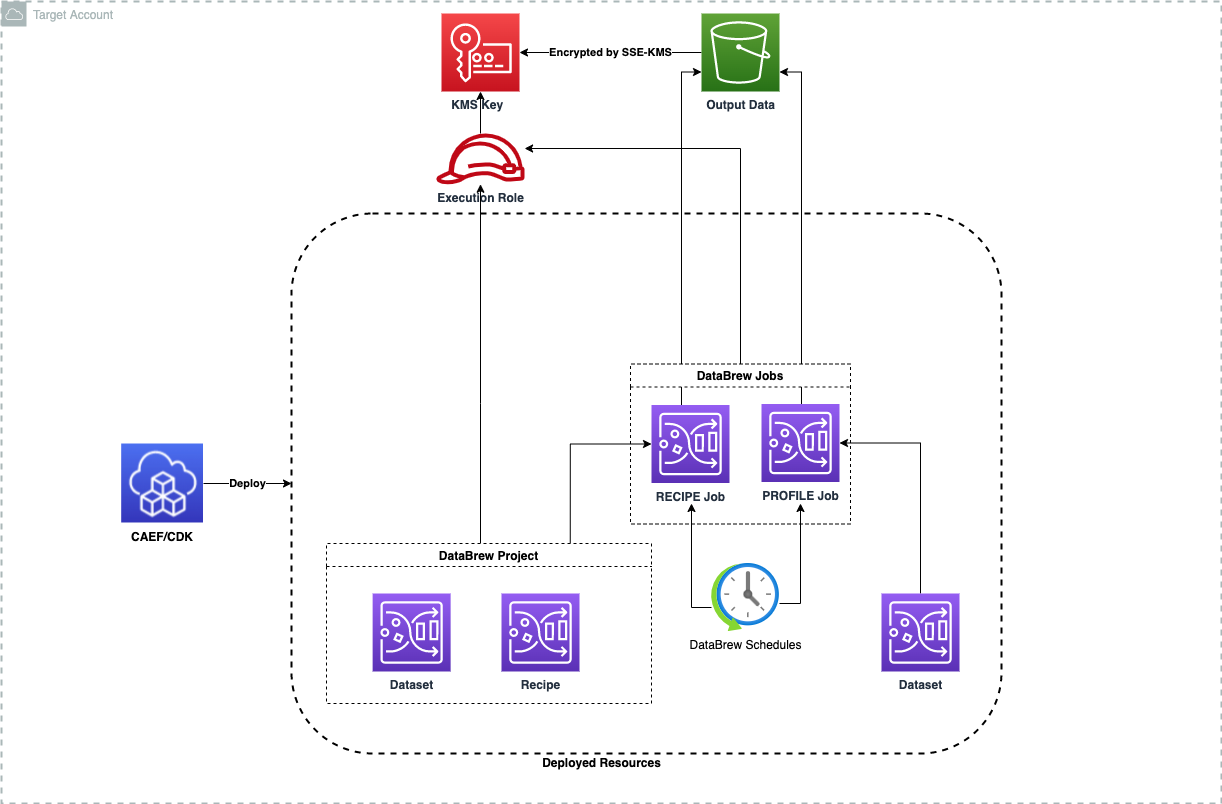
Deploys AWS Glue DataBrew datasets, recipes, projects, and jobs (profile and recipe) with KMS encryption, scheduled execution, and integration with DataOps project resources. Use this module when you need no-code data profiling or visual data transformation workflows for cleaning and normalizing datasets before loading them into your data lake.
Deployed Resources
This module deploys and integrates the following resources:
DataBrew Jobs - DataBrew Profile and Recipe jobs for data profiling and transformation.
DataBrew Projects, Datasets, and Recipes - Supporting resources used by DataBrew jobs.
Related Modules
- DataOps Project — Deploy the shared project infrastructure (KMS keys, connections) that DataBrew jobs reference
- Data Lake — DataBrew can profile and transform data stored in data lake S3 buckets
- Crawlers — Deploy crawlers to catalog DataBrew output data in the Glue Catalog
Security/Compliance Details
This module is designed in alignment with MDAA security/compliance principles and CDK nag rulesets. Additional review is recommended prior to production deployment, ensuring organization-specific compliance requirements are met.
- Encryption at Rest:
- All job output data encrypted with customer-managed KMS key
- Supports project KMS key or explicit key ARN
- Least Privilege:
- Execution roles specified per job with scoped access to required resources
Configuration
MDAA Config
Add the following snippet to your mdaa.yaml under the modules: section of a domain/env in order to use this module:
dataops-databrew: # Module Name can be customized
  module_path: '@aws-mdaa/dataops-databrew' # Must match module NPM package name
  module_configs:
    - ./dataops-databrew.yaml # Filename/path can be customized
Module Config Samples and Variants
Copy the contents of the relevant sample config below into the ./dataops-databrew.yaml file referenced in the MDAA config snippet above.
Minimal Configuration
Deploys a single DataBrew profile job against an S3 dataset. Start here for a quick data profiling setup within an existing DataOps project.
# Contents available via above link
# Minimal DataOps DataBrew module configuration.
# Deploys a single DataBrew profile job against an S3 dataset.

# (Optional) DataOps project name for resource autowiring
projectName: dataops-project-sample

# (Optional) Map of dataset names to DataBrew dataset definitions
datasets:
  my-dataset:
    # File format for S3-based datasets
    format: CSV
    input:
      # S3 input location
      s3InputDefinition:
        bucket: ssm:/path_to_bucket_name
        key: 'data/input/'

# (Optional) Map of job names to DataBrew job definitions — the
# module's primary resource.
jobs:
  my-profile-job:
    # Job type: PROFILE for data profiling, RECIPE for transformation
    type: 'PROFILE'
    # Input dataset reference
    dataset:
      generated: my-dataset
    # See CONFIGURATION.md for role reference options (name, arn, id).
    # IAM execution role for job permissions
    executionRole:
      name: glue-role
    # KMS key ARN for encrypting job outputs
    kmsKeyArn: ssm:/path_to_kms_arn
Comprehensive Configuration
Exercises all compatible non-excluded properties at full depth. Start here when evaluating all available options for DataBrew datasets, recipes, projects, and S3-based job outputs.
sample-config-comprehensive.yaml
# Contents available via above link
# Comprehensive DataOps DataBrew module configuration.
# Exercises all compatible non-excluded properties at full depth.

# DataOps project name for DataBrew resource autowiring.
projectName: glue-project

# SNS topic ARN for job notifications and workflow alerts.
# Auto-resolved from project when projectName is set.
notificationTopicArn: arn:{{partition}}:sns:{{region}}:{{account}}:test-topic

# Map of recipe names to DataBrew recipe definitions for reusable data transformations.
recipes:
  mdaa-jdbc-recipe:
    # Description of the recipe's purpose and transformations.
    description: Renames id column to employee_id for JDBC sources
    # JSON string of transformation steps for recipe execution.
    steps: |
      [
        {
          "Action": {
            "Operation": "RENAME",
            "Parameters": {
              "sourceColumn": "id",
              "targetColumn": "employee_id"
            }
          }
        }
      ]

  mdaa-s3-recipe:
    description: Renames employee_id column back to id for S3 sources
    steps: |
      [
        {
          "Action": {
            "Operation": "RENAME",
            "Parameters": {
              "sourceColumn": "employee_id",
              "targetColumn": "id"
            }
          }
        }
      ]

  mdaa-catalog-recipe:
    description: Renames employee_id column back to id for catalog sources
    steps: |
      [
        {
          "Action": {
            "Operation": "RENAME",
            "Parameters": {
              "sourceColumn": "employee_id",
              "targetColumn": "id"
            }
          }
        }
      ]

# Map of dataset names to DataBrew dataset definitions for data source configuration.
datasets:
  mdaa-jdbc-dataset:
    # Input configuration defining data source location from S3 or Glue Data Catalog.
    input:
      # Connection information for dataset input files stored in a database.
      databaseInputDefinition:
        # AWS Glue Connection that stores the connection information for the target database.
        glueConnectionName: project:connections/connectionJdbc
        # The table within the target database.
        databaseTableName: 'mydb_admin.allusers'
        # Custom SQL to run against the provided AWS Glue connection.
        queryString: 'SELECT * FROM mydb_admin.allusers WHERE active = true'
        # An Amazon location that AWS Glue Data Catalog can use as a temporary directory.
        tempDirectory:
          bucket: ssm:/path_to_bucket_name
          key: 'tmp/jdbc/'

  mdaa-s3-dataset:
    # File format for S3-based datasets (e.g., CSV, JSON, Parquet).
    format: CSV
    # Format options for data interpretation including delimiters, headers, and encoding.
    formatOptions:
      # Options that define how CSV input is to be interpreted by DataBrew.
      csv:
        # A single character that specifies the delimiter being used in the CSV file.
        delimiter: ','
        # Whether the first row in the file is parsed as the header.
        headerRow: true
    input:
      # The Amazon S3 location where the data is stored.
      s3InputDefinition:
        # The Amazon S3 bucket name.
        bucket: ssm:/path_to_bucket_name
        # The unique name of the object in the bucket.
        key: 'data/raw_data/input_data.csv'
        # The AWS account ID of the bucket owner.
        bucketOwner: '{{account}}'
      # Contains additional resource information needed for specific datasets.
      metadata:
        # The Amazon Resource Name (ARN) associated with the dataset (currently only AppFlow).
        sourceArn: arn:{{partition}}:appflow:{{region}}:{{account}}:flow/my-flow
    # Path options for S3 path structure interpretation and file organization.
    pathOptions:
      # Limit on number of Amazon S3 files that should be selected.
      filesLimit:
        # The number of Amazon S3 files to select.
        maxFiles: 100
        # Sorting criteria before selection (DESCENDING or ASCENDING).
        order: DESCENDING
        # Sorting criteria (currently only LAST_MODIFIED_DATE).
        orderedBy: LAST_MODIFIED_DATE
      # Date range for matching Amazon S3 objects based on LastModifiedDate.
      lastModifiedDateCondition:
        # Condition expression with substitution variables.
        expression: 'starts_with :prefix1'
        # Map of substitution variable names to their values.
        valuesMap:
          - valueReference: ':prefix1'
            value: '2024'
      # Path parameters for S3 path structure.
      parameters:
        - # The name of the path parameter.
          pathParameterName: date_partition
          # The path parameter definition.
          datasetParameter:
            # The name of the parameter used in the dataset's Amazon S3 path.
            name: date_partition
            # The type of the dataset parameter (String, Number, or Datetime).
            type: Datetime
            # Whether the captured value should be loaded as an additional column.
            createColumn: true
            # Additional parameter options such as format and timezone.
            datetimeOptions:
              # Datetime format used for a date parameter in the S3 path.
              format: 'yyyy-MM-dd'
              # Optional non-US locale code for correct date format interpretation.
              localeCode: en-US
              # Optional timezone offset of the datetime parameter value.
              timezoneOffset: '+00:00'
            # Optional filter expression for the parameter.
            filter:
              expression: 'starts_with :prefix1'
              valuesMap:
                - valueReference: ':prefix1'
                  value: '2024'

  mdaa-catalog-dataset:
    input:
      # AWS Glue Data Catalog parameters for the data.
      dataCatalogInputDefinition:
        # The unique identifier of the AWS account that holds the Data Catalog.
        catalogId: '{{account}}'
        # The name of a database in the Data Catalog.
        databaseName: project:databaseName/demo-database
        # The name of a database table in the Data Catalog.
        tableName: demo_raw_data
        # An Amazon location that AWS Glue Data Catalog can use as a temporary directory.
        tempDirectory:
          bucket: ssm:/path_to_bucket_name
          key: 'tmp/catalog/'

  mdaa-excel-dataset:
    # File format for Excel datasets.
    format: EXCEL
    formatOptions:
      # Options that define how Excel input is to be interpreted by DataBrew.
      excel:
        # Whether the first row in the file is parsed as the header.
        headerRow: true
        # One or more sheet numbers to include in the dataset.
        sheetIndexes:
          - 0
          - 1
        # One or more named sheets to include in the dataset.
        sheetNames:
          - Sheet1
          - Summary
    input:
      s3InputDefinition:
        bucket: ssm:/path_to_bucket_name
        key: 'data/raw_data/input_data.xlsx'

  mdaa-json-dataset:
    # File format for JSON datasets.
    format: JSON
    formatOptions:
      # Options that define how JSON input is to be interpreted by DataBrew.
      json:
        # Whether JSON input contains embedded new line characters.
        multiLine: true
    input:
      s3InputDefinition:
        bucket: ssm:/path_to_bucket_name
        key: 'data/raw_data/input_data.json'

# Map of job names to DataBrew job definitions for automated data preparation and profiling.
jobs:
  # Recipe job with generated dataset and existing recipe
  test-recipe-job-s3:
    # Job type: 'RECIPE' for data transformation or 'PROFILE' for data profiling.
    type: 'RECIPE'
    # DataBrew project name for recipe job association.
    projectName: 'mdaa-test-project'
    # Input dataset configuration referencing a generated dataset.
    dataset:
      generated: mdaa-jdbc-dataset
    # Recipe configuration referencing an existing recipe.
    recipe:
      # Existing recipe property for direct recipe specification.
      existing:
        # The unique name for the recipe.
        name: org-dev-data-ops-databrew-mdaa-s3-recipe
        # The identifier for the version for the recipe.
        version: '1.0'
    # Output locations for recipe job results including S3 destinations and format specifications.
    outputs:
      - # The location in Amazon S3 where the job writes its output.
        location:
          bucket: ssm:/path_to_bucket_name
          key: 'data/databrew/transformed/'
        # The compression algorithm used to compress the output text of the job.
        compressionFormat: 'SNAPPY'
        # The data format of the output of the job.
        format: 'PARQUET'
        # Whether data in the output location is overwritten with new output.
        overwrite: true
        # The names of one or more partition columns for the output.
        partitionColumns: ['id']
        # The maximum number of files to be generated by the job.
        maxOutputFiles: 10
        # Options that define how DataBrew formats job output files.
        formatOptions:
          # Options for CSV output format.
          csv:
            # A single character that specifies the delimiter used to create CSV job output.
            delimiter: ','
    # See CONFIGURATION.md for role reference options (name, arn, id).
    # Role by name (auto-expanded to ARN at deploy time)
    executionRole:
      name: ssm:/path_to_role_name
    # KMS key ARN for encrypting job outputs and intermediate processing results.
    kmsKeyArn: ssm:/path_to_kms_arn
    # CloudWatch log subscription status for job execution monitoring.
    logSubscription: ENABLE
    # Maximum number of nodes for job execution.
    maxCapacity: 5
    # Maximum retry attempts for failed job runs.
    maxRetries: 3
    # Job timeout in minutes controlling maximum execution time.
    timeout: 120
    # Cron-based schedule configuration for automated job execution.
    schedule:
      # Unique name for the schedule.
      name: 'mdaa-test-job-schedule'
      # Cron expression defining when jobs should run.
      cronExpression: 'Cron(50 21 * * ? *)'
      # Job names to execute on this schedule.
      jobNames:
        - test-recipe-job-s3

  # Recipe job with generated recipe and existing dataset (ConfigOptions variant)
  test-recipe-job-generated:
    type: 'RECIPE'
    dataset:
      # Existing dataset property for direct dataset specification.
      existing:
        name: org-dev-data-ops-databrew-mdaa-jdbc-dataset
    recipe:
      # Generated resource reference name for dynamic resource linking.
      generated: mdaa-s3-recipe
    outputs:
      - location:
          bucket: ssm:/path_to_bucket_name
          key: 'data/databrew/generated-output/'
        format: 'CSV'
        overwrite: true
    # Role by ARN
    executionRole:
      arn: arn:{{partition}}:iam::{{account}}:role/test-execution-role
    kmsKeyArn: ssm:/path_to_kms_arn

  # Profile job with full profiling configuration
  test-profile-job:
    type: 'PROFILE'
    dataset:
      generated: mdaa-jdbc-dataset
    # Output location for profile job results.
    outputLocation:
      # The Amazon S3 bucket name.
      bucket: ssm:/path_to_bucket_name
      # The unique name of the object in the bucket.
      key: 'data/databrew/profile/'
      # The AWS account ID of the bucket owner.
      bucketOwner: '{{account}}'
    # Role by name (auto-expanded to ARN at deploy time)
    executionRole:
      name: databrew-execution-role
    kmsKeyArn: ssm:/path_to_kms_arn
    # Sample configuration for profile jobs controlling data sampling strategy.
    jobSample:
      # Sampling mode: FULL_DATASET or CUSTOM_ROWS.
      mode: CUSTOM_ROWS
      # Number of rows to sample (only for CUSTOM_ROWS mode).
      size: 5000
    logSubscription: ENABLE
    maxCapacity: 3
    maxRetries: 2
    timeout: 60
    # Profile configuration for statistical analysis and data quality assessment.
    profileConfiguration:
      # List of column selectors for profiling.
      profileColumns:
        - # The name of a column from a dataset.
          name: employee_id
        - # A regular expression for selecting a column.
          regex: '.*_date$'
      # Configuration for inter-column evaluations.
      datasetStatisticsConfiguration:
        # List of included evaluations.
        includedStatistics:
          - CORRELATION
          - DUPLICATE_ROWS_COUNT
        # List of overrides for evaluations.
        overrides:
          - # The name of an evaluation.
            statistic: CORRELATION
            # A map that includes overrides of an evaluation's parameters.
            parameters: {}
      # List of configurations for column evaluations.
      columnStatisticsConfigurations:
        - # Configuration for evaluations.
          statistics:
            includedStatistics:
              - MEAN
              - STANDARD_DEVIATION
            overrides:
              - statistic: MEAN
                parameters: {}
          # List of column selectors.
          selectors:
            - name: employee_id
      # Configuration of entity detection for a profile job.
      entityDetectorConfiguration:
        # Entity types to detect.
        entityTypes:
          - EMAIL
          - PHONE_NUMBER
          - USA_SSN
        # Configuration of statistics allowed on columns with detected entities.
        allowedStatistics:
          # One or more column statistics to allow.
          statistics:
            - ROW_COUNT
            - DUPLICATE_ROWS_COUNT
    # Validation configurations for profile job quality assessment.
    validationConfigurations:
      - # The ARN for the ruleset to be validated.
        rulesetArn: arn:{{partition}}:databrew:{{region}}:{{account}}:ruleset/my-ruleset
        # Mode of data quality validation (default CHECK_ALL).
        validationMode: CHECK_ALL
    schedule:
      name: 'mdaa-test-profile-schedule'
      cronExpression: 'Cron(50 21 * * ? *)'
Standalone Configuration (No Project)
Explicit KMS, bucket, deployment role, and security configuration instead of auto-wiring from a DataOps project. Use this when deploying outside of a DataOps project, providing infrastructure references directly.
# Contents available via above link
# DataBrew config without projectName — explicit KMS, bucket, deployment role,
# and security configuration instead of auto-wiring from a DataOps project.

# KMS key ARN for encrypting DataOps resources and data.
kmsArn: arn:{{partition}}:kms:{{region}}:{{account}}:key/test-key-id
# S3 bucket name for project storage (scripts, artifacts, temp files).
bucketName: test-databrew-bucket
# IAM role ARN for deployment operations and resource management.
deploymentRoleArn: arn:{{partition}}:iam::{{account}}:role/test-deploy-role
# Glue security configuration name for job encryption (at rest, in transit, CloudWatch logs).
securityConfigurationName: test-security-config
# SNS topic ARN for job notifications and workflow alerts.
notificationTopicArn: arn:{{partition}}:sns:{{region}}:{{account}}:test-topic

recipes:
  mdaa-jdbc-recipe:
    description: Renames id column to employee_id
    steps: |
      [
        {
          "Action": {
            "Operation": "RENAME",
            "Parameters": {
              "sourceColumn": "id",
              "targetColumn": "employee_id"
            }
          }
        }
      ]

  mdaa-s3-recipe:
    description: Renames employee_id column back to id
    steps: |
      [
        {
          "Action": {
            "Operation": "RENAME",
            "Parameters": {
              "sourceColumn": "employee_id",
              "targetColumn": "id"
            }
          }
        }
      ]

  mdaa-catalog-recipe:
    description: Renames employee_id column back to id for catalog sources
    steps: |
      [
        {
          "Action": {
            "Operation": "RENAME",
            "Parameters": {
              "sourceColumn": "employee_id",
              "targetColumn": "id"
            }
          }
        }
      ]

datasets:
  mdaa-jdbc-dataset:
    input:
      databaseInputDefinition:
        glueConnectionName: project:connections/connectionJdbc
        databaseTableName: 'mydb_admin.allusers'

  mdaa-s3-dataset:
    input:
      s3InputDefinition:
        bucket: ssm:/path_to_bucket_name
        key: 'data/raw_data/input_data.csv.snappy'

  mdaa-catalog-dataset:
    input:
      dataCatalogInputDefinition:
        databaseName: project:databaseName/demo-database
        tableName: demo_raw_data

jobs:
  test-recipe-job6:
    type: 'RECIPE'
    projectName: 'mdaa-test-project'
    dataset:
      generated: mdaa-jdbc-dataset
    recipe:
      existing:
        name: org-dev-data-ops-databrew-mdaa-s3-recipe
    outputs:
      - location:
          bucket: ssm:/path_to_bucket_name
          key: 'data/databrew/transformed/'
        compressionFormat: 'SNAPPY'
        format: 'PARQUET'
        overwrite: true
        partitionColumns: ['id']
    # See CONFIGURATION.md for role reference options (name, arn, id).
    executionRole:
      name: ssm:/path_to_role_name
    kmsKeyArn: ssm:/path_to_kms_arn
    schedule:
      name: 'mdaa-test-job-schedule'
      cronExpression: 'Cron(50 21 * * ? *)'

  test-profile-job:
    type: 'PROFILE'
    dataset:
      generated: mdaa-jdbc-dataset
    outputLocation:
      bucket: ssm:/path_to_bucket_name
      key: 'data/databrew/profile/'
    executionRole:
      name: ssm:/path_to_role_name
    kmsKeyArn: ssm:/path_to_kms_arn
    schedule:
      name: 'mdaa-test-profile-schedule'
      cronExpression: 'Cron(50 21 * * ? *)'
Database Outputs Configuration
Exercises dataCatalogOutputs and databaseOutputs job properties, which are alternative output types to the S3-based outputs property. Choose this variant when your DataBrew jobs need to write results directly to Glue Data Catalog tables or JDBC databases instead of S3.
# Contents available via above link
# DataBrew variant config: database and Data Catalog output destinations.
# Exercises dataCatalogOutputs and databaseOutputs job properties which are
# alternative output types to the S3-based 'outputs' property.

# DataOps project name for DataBrew resource autowiring.
projectName: glue-project

recipes:
  mdaa-db-recipe:
    description: Recipe for database output testing
    steps: |
      [
        {
          "Action": {
            "Operation": "RENAME",
            "Parameters": {
              "sourceColumn": "id",
              "targetColumn": "employee_id"
            }
          }
        }
      ]

datasets:
  mdaa-db-dataset:
    input:
      s3InputDefinition:
        bucket: ssm:/path_to_bucket_name
        key: 'data/raw_data/input_data.csv'

jobs:
  # Recipe job writing to Data Catalog output
  test-catalog-output-job:
    type: 'RECIPE'
    dataset:
      generated: mdaa-db-dataset
    recipe:
      generated: mdaa-db-recipe
    # Data Catalog output configurations for Glue catalog integration.
    dataCatalogOutputs:
      - # The name of a database in the Data Catalog.
        databaseName: my_output_database
        # The name of a table in the Data Catalog.
        tableName: my_output_table
        # The unique identifier of the AWS account that holds the Data Catalog.
        catalogId: '{{account}}'
        # Whether data in the location is overwritten with new output.
        overwrite: true
        # Options for S3 output within Data Catalog.
        s3Options:
          # Represents an Amazon S3 location where DataBrew can write output.
          location:
            bucket: ssm:/path_to_bucket_name
            key: 'data/databrew/catalog-output/'
        # Options for database table output within Data Catalog.
        databaseOptions:
          # A prefix for the name of a table DataBrew will create.
          tableName: output_table_prefix
          # An Amazon S3 location for intermediate results.
          tempDirectory:
            bucket: ssm:/path_to_bucket_name
            key: 'tmp/catalog-output/'
    # See CONFIGURATION.md for role reference options (name, arn, id).
    executionRole:
      name: ssm:/path_to_role_name
    kmsKeyArn: ssm:/path_to_kms_arn

  # Recipe job writing to JDBC database output
  test-database-output-job:
    type: 'RECIPE'
    dataset:
      generated: mdaa-db-dataset
    recipe:
      generated: mdaa-db-recipe
    # JDBC database output destinations for recipe job results.
    databaseOutputs:
      - # The AWS Glue connection for the target database.
        glueConnectionName: project:connections/connectionJdbc
        # The output mode to write into the database (currently NEW_TABLE).
        databaseOutputMode: NEW_TABLE
        # Options for database table output.
        databaseOptions:
          # A prefix for the name of a table DataBrew will create.
          tableName: output_table_prefix
          # An Amazon S3 location for intermediate results.
          tempDirectory:
            bucket: ssm:/path_to_bucket_name
            key: 'tmp/db-output/'
    executionRole:
      name: ssm:/path_to_role_name
    kmsKeyArn: ssm:/path_to_kms_arn