EC2
Note: This documentation is also available in a rendered format here.
Deploys secure EC2 instances with KMS-encrypted EBS volumes, managed key pairs stored in Secrets Manager, configurable security groups, and CloudFormation Init bootstrap configurations for both Linux and Windows. Common scenarios include deploying bastion hosts, DataSync agents, database clients, or other utility compute that your data environment requires within a VPC.
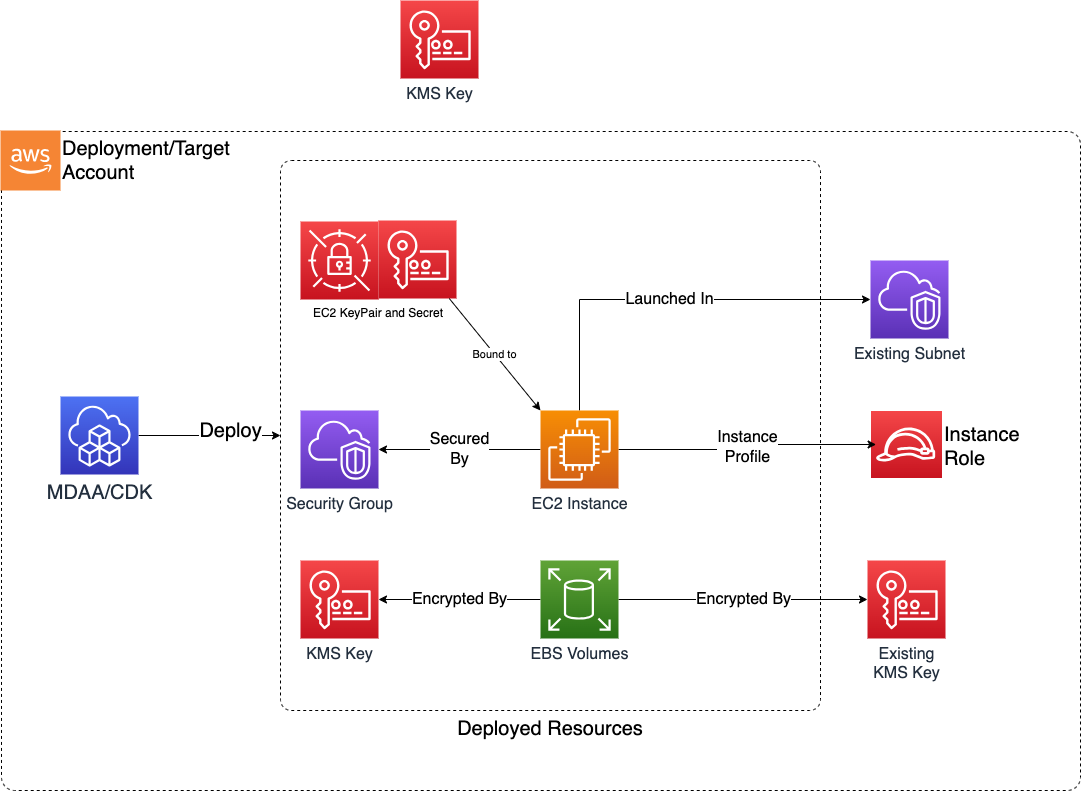
Deployed Resources
This module deploys and integrates the following resources:
- KMS CMK: Customer-managed KMS key created if an existing key is not provided. Used to encrypt instance EBS volumes and key pair secrets.
- EC2 Key Pairs: Created for use by EC2 instances, with private key material stored in Secrets Manager. Key pairs and secrets are retained post stack deletion.
- EC2 Security Groups: Controls network access for instances. Supports CIDR, prefix list, and security group-based rules.
- EC2 Security Group Rules (via
rules): Standalone ingress/egress rules added to pre-existing (externally-owned) security groups referenced by id. No security group is created; each rule renders to a standaloneSecurityGroupIngress/SecurityGroupEgressresource. Use this to wire connectivity between two security groups owned by different modules without creating a circular cross-stack dependency. - EC2 Instances: Instances with termination protection enabled and retained post stack deletion. AMI-configured volumes should be accounted for in config to support encryption.
- EC2 Network Interfaces (via
networkInterfaces): Elastic network interfaces (ENIs) with an optional fixed private IP. Each is a resource in its own right, attached to instances as a secondary interface via an instance'snetworkInterfacesproperty withdeleteOnTermination: false, which is what carries the IP and MAC across the instances it is attached to; interfaces are also retained post stack deletion. See Network Interfaces for the operational model. - CloudFormation Init: Bootstrap configurations for package installation, file creation, command execution, and service management on both Linux and Windows instances.
Network Interfaces
Declare an ENI under networkInterfaces when an instance needs a private IP that outlives it — typically a network appliance (proxy, NAT instance, forwarder, inspection host) whose address is allowlisted on a downstream firewall or referenced by on-premises routing. The interface keeps its private IP and MAC when the instance is replaced or terminated, so those rules do not have to change with it.
Declare the interface, then attach it from the instance:
networkInterfaces:
  proxy-eni:
    subnetId: ssm:/sample-org/shared/vpc/subnet/private/az1/id
    privateIpAddress: 10.0.1.50
    securityGroups: [proxy-sg]
    sourceDestCheck: false

instances:
  proxy-1:
    availabilityZone: '{{region}}a' # must match the ENI subnet's zone
    userDataScriptPath: './userdata.sh' # installs routing that applies once the ENI attaches
    networkInterfaces:
      - networkInterface: proxy-eni
        deviceIndex: 1
What you have to do yourself
- Configure routing over the interface. MDAA creates and attaches it; it does not touch the OS. The interface is attached as a secondary interface, so it is not the default route and outbound traffic uses it only once the OS routes traffic that way — typically
iptablesplus policy routing. CloudFormation attaches it only after the instance resource completes — after its creation signal whencfnInit,signalCountorcreationTimeOutis set — on first deploy and after every replacing update, so it is not present whileuserDataScriptPathorcfnInitrun. Use them to install configuration that applies when the interface appears (on Amazon Linux,ec2-net-utilson AL2 andamazon-ec2-net-utilson AL2023 already add per-interface policy routing on attach; elsewhere, a udev rule or a network profile matched on the interface's MAC), and never wait for the interface before signalling: that blocks until the creation timeout and fails the deploy. - Give it a security group. Set
securityGroupsorsecurityGroupIdson the interface — at least one is required, and omitting both fails at synth. Its groups are independent of the instance's, so a port opened only on the instance's group is dropped on this interface. The requirement exists because EC2 would otherwise place the interface in the VPC default security group, and it makes that association itself, so it appears in neither the template nor CDK Nag. To use the default group deliberately, name its id insecurityGroupIds. - Disable the source/destination check for a forwarding path.
sourceDestCheckis per interface; the instance-level setting of the same name does not cover a secondary interface. A proxy or NAT path needssourceDestCheck: falseon the ENI itself. - Perform failover yourself. MDAA gives you a movable interface; it does not move it. CloudFormation does not detect an out-of-band instance termination and will not recreate the instance on a plain
mdaa deploy. If you detach and reattach the interface by hand, the stack'sInstanceandNetworkInterfaceAttachmentresources no longer describe reality, and the next deploy may fail while the interface is held by an unmanaged instance — reconcile the config before deploying again. - Keep the zones aligned. An ENI's
subnetIdmay differ from the instance's ownsubnetIdto multi-home the instance, but both subnets must be in the same availability zone. MDAA does not check this at synth; a mismatch fails the attachment at deploy time.
Behaviour to expect
- Attachments default to
deleteOnTermination: false, overriding CloudFormation's default oftrue, so the interface outlives the instance. - A replacing update detaches the interface from the outgoing instance and attaches it to the new one, so traffic over it stops for that window. This is not a zero-downtime path.
- Interfaces are retained on stack deletion and on a replacing update, but not when the deploy that created them rolls back — otherwise a failed first deploy would leave an interface holding the pinned
privateIpAddressthat every retry then needs. An interface declared but never attached is still created, and still persists in the account. A retained interface does keep its address against a later redeploy of the same declaration under a new logical ID — after you rename the interface's config key, or delete the stack and deploy it again — and you have to delete it out of band before that address is free. - Changing the
deviceIndexof an already-deployednetworkInterfaceattachment is a single deploy. CloudFormation replacesNetworkInterfaceAttachmentdelete-then-create, so the interface detaches and re-attaches at the new index; moving an interface to a different instance and renaming an instance's config key behave the same way. Two edits still need two deploys — remove the entry, deploy, then add it back: changing thedeviceIndexof anetworkInterfaceIdattachment, and moving an interface onto an index that another interface still holds. - Changing an instance's own
securityGrouporsecurityGroupIdwhile a secondary interface is attached may fail. CloudFormation applies that change in place withModifyInstanceAttribute, which AWS documents "can result in an error if the instance has more than one ENI". Change the interface's ownsecurityGroups/securityGroupIdsinstead where the rule belongs on the interface. - Each interface publishes its id and primary private IP for other modules to consume, as the SSM parameters
/{org}/{domain}/{module}/network-interface/{name}/idand.../private-ip, and as the matching CloudFormation exports. The private IP is the value to reference from downstream allowlists. mdaa destroyfails withDependencyViolationon a module-created security group that a retained interface still uses. Unlike the Lambda ENI case in DEPLOYMENT.md, waiting does not clear this: detach and delete the retained interface, or move it to a security group the module does not own.
Why a custom primary interface is not supported
deviceIndex: 0 is rejected at synth. A primary interface cannot be detached from its instance, and any change that replaces the instance — most commonly an AMI update for patching — replaces it create-before-delete. CloudFormation would try to launch the new instance holding an interface the old instance still holds and fail with Interface: [eni-...] in use, leaving the instance updatable only by terminating it by hand first.
Related Modules
- Roles — Create IAM roles for EC2 instance profiles
- DataSync — Deploy DataSync agents on EC2 instances for data transfer
Security/Compliance Details
This module is designed in alignment with MDAA security/compliance principles and CDK nag rulesets. Additional review is recommended prior to production deployment, ensuring organization-specific compliance requirements are met.
- Encryption at Rest:
- All EBS volumes encrypted with customer-managed KMS key
- Key pair private keys encrypted in Secrets Manager with the same KMS key
- Least Privilege:
- Admin roles granted scoped KMS key admin/usage permissions and Secrets Manager access for key pair retrieval
- Instance profiles use dedicated IAM roles
- Data Protection:
- Termination protection enabled by default
- Key pairs and secrets retained post stack deletion
- Network interfaces retained post stack deletion and across replacing updates, so a retained interface persists in the account until deleted out of band. Retention is not applied when the deploy that created the interface rolls back
- Network Isolation:
- Security groups deny all ingress by default
- All egress allowed by default (configurable)
- Egress rules configurable with CIDR, prefix list, and security group targets
- Network interface security groups are scoped to the interface, independent of the instance's own group. At least one of
securityGroupsorsecurityGroupIdsis required on every interface: omitting both is rejected at synth rather than letting EC2 place the interface in the VPC default security group, which permits all traffic between its members and all outbound traffic and is associated outside CloudFormation where neither the template nor CDK Nag can see it sourceDestCheck: falseon an interface deliberately disables the anti-spoofing control that requires the instance to be the source or destination of the traffic it handles. It is required for a proxy or NAT path, and should be set only on interfaces that forward traffic
AWS Service Endpoints
The following VPC endpoints may be required if public AWS service endpoint connectivity is unavailable (e.g., private subnets without NAT gateway, firewalled environments, or PrivateLink-only architectures):
| AWS Service | Endpoint Service Name | Type |
|---|---|---|
| EC2 | com.amazonaws.{region}.ec2 |
Interface |
| EC2 Messages | com.amazonaws.{region}.ec2messages |
Interface |
| KMS | com.amazonaws.{region}.kms |
Interface |
| Secrets Manager | com.amazonaws.{region}.secretsmanager |
Interface |
| CloudWatch Logs | com.amazonaws.{region}.logs |
Interface |
| STS | com.amazonaws.{region}.sts |
Interface |
| SSM | com.amazonaws.{region}.ssm |
Interface |
| SSM Messages | com.amazonaws.{region}.ssmmessages |
Interface |
| S3 | com.amazonaws.{region}.s3 |
Gateway |
Configuration
MDAA Config
Add the following snippet to your mdaa.yaml under the modules: section of a domain/env in order to use this module:
ec2: # Module Name can be customized
  module_path: '@aws-mdaa/ec2' # Must match module NPM package name
  module_configs:
    - ./ec2.yaml # Filename/path can be customized
Module Config Samples and Variants
Copy the contents of the relevant sample config below into the ./ec2.yaml file referenced in the MDAA config snippet above.
Minimal Configuration
Deploys a single EC2 instance with a security group. Start here for a basic instance deployment with default encryption and termination protection.
# Contents available via above link
# Minimal EC2 module configuration.
# Deploys a single EC2 instance with a security group.

# See CONFIGURATION.md for role reference options (name, arn, id).
# Roles granted access to the KMS key and KeyPair secrets
adminRoles:
  - name: Admin

# (Optional) Security group for the instance
securityGroups:
  my-sg:
    # VPC ID for security group
    # Often created by your VPC/networking stack.
    # Example SSM: ssm:/path/to/vpc/id
    vpcId: vpc-testvpc

# (Optional) EC2 instances — the module's primary resource.
instances:
  my-instance:
    securityGroup: my-sg
    # VPC ID for EC2 instance deployment
    # Often created by your VPC/networking stack.
    # Example SSM: ssm:/path/to/vpc/id
    vpcId: vpc-testvpc
    # Subnet ID for EC2 instance placement
    # Often created by your VPC/networking stack.
    # Example SSM: ssm:/path/to/subnet/id
    subnetId: subnet-testsubnet
    availabilityZone: '{{region}}a'
    instanceType: t3.medium
    amiId: ami-test
    instanceRole:
      name: instance-role
    blockDevices:
      - deviceName: '/dev/sda1'
        volumeSizeInGb: 32
        ebsType: gp3
    osType: linux
Comprehensive Configuration
Provisions EC2 instances with key pairs, security groups, persistent network interfaces, and CloudFormation Init bootstrapping, supporting both Linux and Windows instances with user data scripts and cfnInit configurations. Start here when evaluating all available options for key pairs, security group rules, network interfaces, cfnInit bootstrapping, and multi-OS support.
sample-config-comprehensive.yaml
# Contents available via above link
# EC2 module configuration.
# Provisions EC2 instances with key pairs, security groups, persistent
# network interfaces, and CloudFormation Init bootstrapping. Supports both
# Linux and Windows instances with user data scripts and cfnInit
# configurations.
# This comprehensive config exercises every compatible property at
# full depth.

# See CONFIGURATION.md for role reference options (name, arn, id).
# Roles granted access to the KMS key and KeyPair secrets.
# Roles can be referenced by name, arn, or id.
adminRoles:
  - name: Admin
  - arn: arn:{{partition}}:iam::{{account}}:role/some-admin-role
  - name: EC2Admin

# (Optional) Map of key pair names to key pair configurations.
# Private keys are stored in Secrets Manager.
keyPairs:
  # Key pair with default settings
  test-key-pair: {}
  # Key pair with custom KMS encryption
  test-key-pair2:
    # (Optional) KMS key ARN to encrypt the private key in
    # Secrets Manager
    kmsKeyArn: 'arn:{{partition}}:kms:{{region}}:{{account}}:key/test-key'

# (Optional) Map of security group names to configurations
securityGroups:
  sg1:
    # VPC ID for the security group
    # Often created by your VPC/networking stack.
    # Example SSM: ssm:/path/to/vpc/id
    vpcId: vpc-testvpc
    # (Optional) Add bidirectional self-referencing rule allowing
    # instances in this group to communicate with each other
    addSelfReferenceRule: true
    # (Optional) Inbound traffic rules
    ingressRules:
      # Rules for IPv4 CIDR-based ingress
      ipv4:
        - cidr: 10.0.0.0/28
          port: 443
          protocol: tcp
          # (Optional) Description for the rule
          description: HTTPS from internal subnet
          # (Optional) Ending port for a port range
          toPort: 443
      # Rules for prefix list-based ingress
      prefixList:
        - prefixList: pl-4ea54027
          description: prefix list for DynamoDB endpoint
          protocol: tcp
          port: 443
          # (Optional) Ending port for a port range
          toPort: 443
      # Rules for security group-based ingress
      sg:
        - sgId: sg-ingresssource
          port: 8080
          protocol: tcp
          # (Optional) Description for the rule
          description: Ingress from app tier SG
          # (Optional) Ending port for a port range
          toPort: 8080
    # (Optional) Outbound traffic rules
    egressRules:
      prefixList:
        - prefixList: pl-4ea54027
          description: prefix list for DynamoDB endpoint
          protocol: tcp
          port: 443
        - prefixList: pl-7da54014
          description: prefix list for S3 endpoint
          protocol: tcp
          port: 443
      ipv4:
        - cidr: 10.0.0.0/28
          port: 443
          protocol: tcp
      sg:
        - sgId: ssm:/ml/sm/sg/id
          port: 5472
          protocol: tcp

# (Optional) Map of rule-set names to rules added to pre-existing security
# groups. Unlike securityGroups above, this does NOT create a security group;
# it only authorizes additional ingress/egress rules on a group referenced by
# id. Use this to wire connectivity between two security groups owned by
# different modules without creating a circular cross-stack dependency, since
# each rule references the peer group only by id.
rules:
  example-rule-set:
    # ID of the existing security group to which the rules are added.
    # Often created by another module/stack.
    # Example SSM: ssm:/path/to/security-group/id
    securityGroupId: sg-existingtarget
    # (Optional) Inbound traffic rules added to the existing group
    ingressRules:
      # Rules for IPv4 CIDR-based ingress
      ipv4:
        - cidr: 10.0.0.0/28
          port: 443
          protocol: tcp
          # (Optional) Description for the rule
          description: HTTPS from internal subnet
          # (Optional) Ending port for a port range
          toPort: 443
      # Rules for prefix list-based ingress
      prefixList:
        - prefixList: pl-4ea54027
          description: prefix list for DynamoDB endpoint
          protocol: tcp
          port: 443
          toPort: 443
      # Rules for security group-based ingress
      sg:
        - sgId: sg-ingresssource
          port: 8080
          protocol: tcp
          description: Ingress from app tier SG
          toPort: 8080
    # (Optional) Outbound traffic rules added to the existing group
    egressRules:
      ipv4:
        - cidr: 10.0.0.0/28
          port: 443
          protocol: tcp
          description: HTTPS to internal subnet
          toPort: 443
      prefixList:
        - prefixList: pl-7da54014
          description: prefix list for S3 endpoint
          protocol: tcp
          port: 443
      sg:
        - sgId: ssm:/another/module/sg/id
          port: 5440
          protocol: tcp
          description: Egress to peer module SG on cluster port

# (Optional) Map of named CloudFormation Init configurations.
# Referenced by instances via initName.
cfnInit:
  initWindows:
    # Map of config set names to ordered config lists
    configSets:
      default:
        # Ordered list of config names to execute
        configs:
          - 'awscli'
          - 'Preinstall'
      confgiset2:
        configs:
          - 'Preinstall'
          - 'awscli'
    # Map of config names to config definitions
    configs:
      awscli:
        # (Optional) Packages to install
        packages:
          awspackage:
            # Package manager (msi, rpm, python, yum, apt, gem)
            packageManager: msi
            # Package download location
            packageLocation: 'https://awscli.amazonaws.com//AWSCLI64.msi'
            # (Optional) Identifier key for MSI/RPM packages
            key: awscli-msi
            # (Optional) Restart associated services after install
            restartRequired: true
          anotherpackage:
            packageManager: msi
            packageLocation: 'https://awscli.amazonaws.com//thisisanotherpackage.msi'
      Preinstall:
        packages:
          git:
            packageManager: msi
            packageLocation: 'https://awscli.amazonaws.com/somepackagefromconfig.msi'
        # (Optional) Commands to execute (run in lexicographic order
        # of key names)
        commands:
          01testCommand:
            # Shell command string
            shellCommand: 'echo "this is a command"'
          02anotherTestCommand:
            shellCommand: 'echo "this TOO is a command"'
            # (Optional) Test command; success skips main command
            testCommand: 'echo "this is test command"'
            # (Optional) Working directory for the command
            workingDir: '/some/dir/'
            # (Optional) Resume cfn-init after reboot
            waitForever: true
            # (Optional) Restart service after command completes
            restartRequired: true
          03commandWithArgvs:
            # (Optional) Command as argument vector (mutually
            # exclusive with shellCommand)
            argvs:
              - 'powershell.exe'
              - '-Command'
              - 'Write-Host "argv command"'
            # (Optional) Environment variables for the command
            env:
              MY_VAR: my-value
              ANOTHER_VAR: another-value
            # (Optional) Continue if this command fails
            ignoreErrors: true
            # (Optional) Minutes to wait after completion (Windows)
            waitAfterCompletion: 2
          04commandWithWaitNone:
            shellCommand: 'echo "fire and forget"'
            # (Optional) Do not wait after command completes
            waitNone: true
        # (Optional) Files to create on the instance
        files:
          testfile.txt:
            # Path to source file
            filePath: './somefile.txt'
            restartRequired: true
        # (Optional) Services to manage
        services:
          cfn-hup:
            # Whether the service should be enabled
            enabled: true
            # Ensure the service is running
            ensureRunning: true
            # Restart after file/package/command changes
            restartRequired: true
          # (Optional) Explicitly disable and stop a service
          unused-svc:
            # (Optional) Disable and stop the service
            disabled: true

  initLinux:
    configSets:
      default:
        configs:
          - 'Apache'
          - 'Prereq'
      confgiset2:
        configs:
          - 'Prereq'
          - 'Apache'
    configs:
      Prereq:
        packages:
          git:
            packageManager: yum
            packageName: git
            packageVersions: []
          rpmpackage:
            packageManager: rpm
            packageLocation: 'https://awscli.amazonaws.com//rpmpackage.rpm'
          jqpackage:
            packageManager: yum
            packageName: jq
            packageVersions: []
        # (Optional) Linux/UNIX groups to create (not Windows)
        groups:
          app-group:
            # (Optional) Specific numeric group ID
            gid: '501'
        # (Optional) Linux/UNIX user accounts to create (not Windows)
        users:
          app-user:
            # Groups the user belongs to
            groups:
              - app-group
            # Home directory path
            homeDir: /home/app-user
            # (Optional) Specific numeric user ID
            uid: '1001'
        # (Optional) Archive files to download and extract
        sources:
          /opt/app:
            # URL of the archive to extract into the target directory
            source: 'https://example.com/app-archive.tar.gz'
      Apache:
        packages:
          apachepackage:
            packageManager: yum
            packageName: httpd
            packageVersions: []

# (Optional) Map of ENI names to network interface configurations.
# Attach them to an instance below via its networkInterfaces property.
networkInterfaces:
  proxy-eni:
    # Subnet for the interface. Must be in the same AZ as any instance it
    # is attached to; may differ from the instance's own subnetId, as here,
    # to multi-home the instance onto a dedicated data-path subnet.
    # Often created by your VPC/networking stack.
    # Example SSM: ssm:/path/to/subnet/id
    subnetId: subnet-datapathsubnet
    # (Optional) Fixed private IP inside the subnet CIDR. Omit to let AWS
    # assign one.
    privateIpAddress: 10.0.0.50
    # Security groups for this interface, by name from the securityGroups
    # section above. At least one of securityGroups or securityGroupIds is
    # required; omitting both fails at synth rather than letting EC2 place the
    # interface in the permissive VPC default security group.
    securityGroups:
      - sg1
    # (Optional) IDs of security groups created outside this config
    # Example SSM: ssm:/path/to/security-group/id
    securityGroupIds:
      - sg-existinginterface
    # (Optional) Disable source/destination checking so this interface can
    # forward traffic (proxy / NAT)
    sourceDestCheck: false
    # (Optional) Description shown in the EC2 console
    description: Static proxy data-path interface

# (Optional) Map of instance names to EC2 instance configurations
instances:
  # Linux instance with named init, key pair, and user data
  instance-1:
    # Reference to a security group from the securityGroups section
    securityGroup: sg1
    # Often created by your VPC/networking stack.
    # Example SSM: ssm:/path/to/vpc/id
    vpcId: vpc-testvpc
    # Often created by your VPC/networking stack.
    # Example SSM: ssm:/path/to/subnet/id
    subnetId: subnet-testsubnet
    availabilityZone: '{{region}}a'
    instanceType: t3.medium
    amiId: ami-linux
    # Instance profile role (by arn, name, or id)
    instanceRole:
      arn: arn:{{partition}}:iam::{{account}}:role/instance-role
    # (Optional) EBS block device mappings
    blockDevices:
      - # Device name (must include root volume for unencrypted AMIs)
        deviceName: '/dev/sda1'
        # Volume size in GB
        volumeSizeInGb: 32
        # EBS volume type (gp2, gp3, io1, io2, sc1, st1, standard)
        ebsType: gp3
    # OS type (linux, windows, unknown)
    osType: linux
    # (Optional) Path to user data script relative to this config
    userDataScriptPath: './userdata.sh'
    # (Optional) Name of a key pair from the keyPairs section
    keyPairName: test-key-pair
    # (Optional) Name of a cfnInit configuration to apply
    initName: initLinux
    # (Optional) Disable source/destination checking for NAT or
    # routing instances
    sourceDestCheck: false
    # (Optional) Secondary network interfaces to attach
    networkInterfaces:
      - # Name from the networkInterfaces section above.
        # Mutually exclusive with networkInterfaceId.
        networkInterface: proxy-eni
        # Must be >= 1 and unique per instance
        deviceIndex: 1
        # (Optional) Delete the interface when the instance terminates.
        # Defaults to false.
        deleteOnTermination: false

  # Windows instance with existing security group, custom KMS, and
  # init options
  instance-2:
    # ID of an existing security group (not from this config)
    securityGroupId: sg-123412412
    # Often created by your VPC/networking stack.
    # Example SSM: ssm:/path/to/vpc/id
    vpcId: vpc-testvpc
    # Often created by your VPC/networking stack.
    # Example SSM: ssm:/path/to/subnet/id
    subnetId: subnet-testsubnet
    instanceType: t3.medium
    availabilityZone: '{{region}}b'
    amiId: ami-windows
    instanceRole:
      name: some-instance-role-name
    blockDevices:
      - deviceName: '/dev/sda1'
        volumeSizeInGb: 32
        ebsType: gp3
      - deviceName: '/dev/sdb1'
        volumeSizeInGb: 16
        ebsType: gp2
        # (Optional) IOPS for io1/io2 volumes
        iops: 3000
    # (Optional) KMS key ARN for EBS volume encryption
    kmsKeyArn: 'arn:{{partition}}:kms:{{region}}:{{account}}:key/test-key'
    osType: windows
    userDataScriptPath: './userdata.ps1'
    # (Optional) Whether user data changes trigger instance
    # replacement
    userDataCausesReplacement: false
    # (Optional) Name of an existing key pair (created outside
    # this config)
    existingKeyPairName: 'rsa-key'
    initName: initWindows
    # (Optional) Init execution options
    initOptions:
      # (Optional) Config sets to run (default: ['default'])
      configSets: ['confgiset2']
      # (Optional) Include IAM role in cfn-init call
      includeRole: true
      # (Optional) Embed config fingerprint in UserData for
      # automatic replacement on config change (default: true)
      embedFingerprint: false
      # (Optional) Continue instance creation even if cfn-init
      # fails (default: false)
      ignoreFailures: false
      # (Optional) Include --url argument for custom CloudFormation
      # endpoint
      includeUrl: true
      # (Optional) Print cfn-init output to EC2 System Log
      printLog: true
      # (Optional) Max time in minutes to wait for init
      # (default: 5)
      timeout: 30
    # (Optional) Number of success signals required before
    # CREATE_COMPLETE
    signalCount: 1
    # (Optional) Timeout for creation policy (ISO 8601 duration)
    creationTimeOut: PT25M
    networkInterfaces:
      - # ID of an ENI created outside this config.
        # Mutually exclusive with networkInterface.
        # Example SSM: ssm:/path/to/eni/id
        networkInterfaceId: eni-0123456789abcdef0
        deviceIndex: 1
Inline Init Configuration
Demonstrates using an inline CloudFormation Init definition directly on an instance (via the "init" property) instead of referencing a named init from the top-level cfnInit section. Choose this variant when you prefer to co-locate bootstrap configuration with the instance definition rather than referencing shared init blocks.
sample-config-inline-init.yaml
# Contents available via above link
# EC2 module configuration — inline init variant.
# Demonstrates using an inline CloudFormation Init definition directly
# on an instance (via the "init" property) instead of referencing a
# named init from the top-level cfnInit section. Also exercises the
# osType "unknown" enum value.

# See CONFIGURATION.md for role reference options (name, arn, id).
# Roles granted access to the KMS key and KeyPair secrets
adminRoles:
  - name: Admin

# (Optional) Map of instance names to EC2 instance configurations
instances:
  # Instance with inline init and osType unknown
  instance-inline:
    securityGroupId: sg-inlinetest
    # Often created by your VPC/networking stack.
    # Example SSM: ssm:/path/to/vpc/id
    vpcId: vpc-testvpc
    # Often created by your VPC/networking stack.
    # Example SSM: ssm:/path/to/subnet/id
    subnetId: subnet-testsubnet
    availabilityZone: '{{region}}a'
    instanceType: t3.micro
    amiId: ami-generic
    instanceRole:
      name: inline-instance-role
    blockDevices:
      - deviceName: '/dev/sda1'
        volumeSizeInGb: 20
        ebsType: gp3
    # OS type for the instance
    osType: linux
    # (Optional) Inline CloudFormation Init configuration
    # (alternative to initName referencing a top-level cfnInit entry)
    init:
      configSets:
        default:
          configs:
            - 'setup'
      configs:
        setup:
          commands:
            01hello:
              shellCommand: 'echo "inline init"'