CloudTrail Audit
Note: This documentation is also available in a rendered format here.
Deploys a secure, KMS-encrypted S3 audit bucket for CloudTrail logs and S3 inventories, with Glue/Athena tables for querying audit and inventory data. Supports cross-account and cross-region log aggregation. Use this module when you need a centralized audit log repository for compliance, security investigations, or tracking data access across your AWS accounts.
Deployed Resources
This module deploys and integrates the following resources:
Audit KMS Key - Customer-managed KMS key for encrypting all audit resources at rest.
Audit S3 Bucket - S3 bucket for CloudTrail audit logs and S3 Inventory data.
Glue Database - Glue catalog database containing the audit and inventory tables.
Glue/Athena Audit Table - Athena table for querying CloudTrail data in the Audit Bucket.
Glue/Athena Inventory Table - Athena table for querying S3 Inventory data in the Audit Bucket.
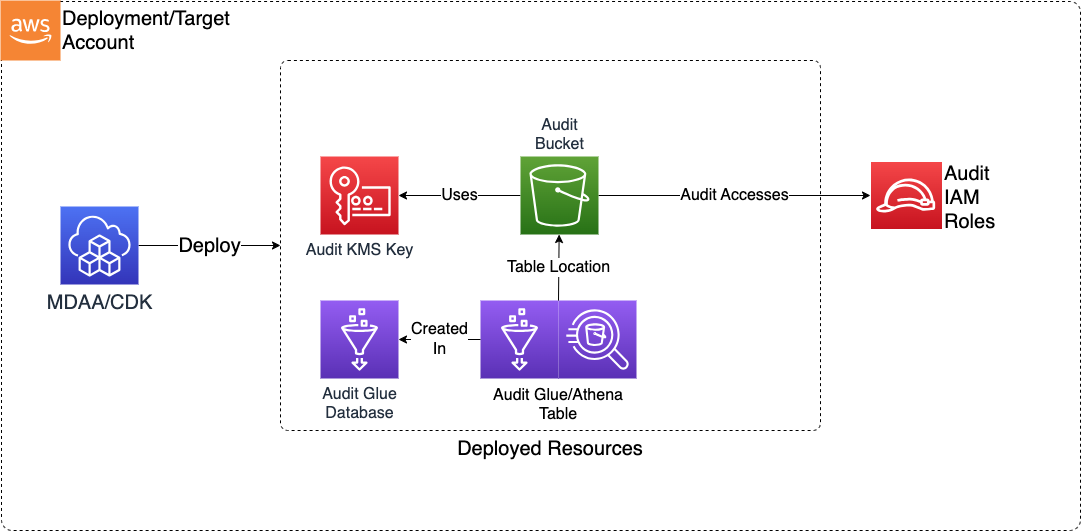
Related Modules
- Data Lake — Audit S3 Inventory data from data lake buckets can be stored and queried in the audit bucket
- Audit Trail — Deploy a CloudTrail trail that writes audit logs to the S3 bucket and KMS key created by this module
- Athena Workgroup — Use Athena workgroups to query CloudTrail and S3 Inventory data in the audit tables
- Roles — Create IAM roles that can be granted read access to audit data
Security/Compliance Details
This module is designed in alignment with MDAA security/compliance principles and CDK nag rulesets. Additional review is recommended prior to production deployment, ensuring organization-specific compliance requirements are met.
- Encryption at Rest:
- All audit data encrypted with customer-managed KMS key
- Read roles granted decrypt-only access via key policy
- Least Privilege:
- Bucket policy restricts write access to CloudTrail and S3 Inventory services
- Read roles granted readonly access via bucket policy
- Cross-account and cross-region source restrictions configurable
Configuration
MDAA Config
Add the following snippet to your mdaa.yaml under the modules: section of a domain/env in order to use this module:
audit: # Module Name can be customized
  module_path: '@aws-mdaa/audit' # Must match module NPM package name
  module_configs:
    - ./audit.yaml # Filename/path can be customized
Module Config Samples and Variants
Copy the contents of the relevant sample config below into the ./audit.yaml file referenced in the MDAA config snippet above.
Minimal Configuration
Deploys an S3 audit bucket with read access for a single role. All properties are optional, but at least one readRole or sourceAccount is recommended for a useful deployment. Start here for a basic audit bucket in a single-account setup.
# Contents available via above link
# Minimal Audit module configuration.
# Deploys an S3 audit bucket with read access for a single role.
# All properties are optional but at least one readRole or
# sourceAccount is recommended for a useful deployment.

# (Optional) Roles granted read access to audit logs via bucket
# policy.
readRoles:
  - arn: arn:{{partition}}:iam::{{account}}:role/Admin
Comprehensive Configuration
Creates an S3 audit bucket that collects audit logs and S3 inventory reports from source accounts and regions, with read access via IAM roles and Athena-queryable inventory tables. Start here when evaluating all available options for cross-account log aggregation, multi-region collection, and Athena-based audit querying.
sample-config-comprehensive.yaml
# Contents available via above link
# Comprehensive Audit module configuration.
# Creates an S3 audit bucket that collects audit logs and S3
# inventory reports from source accounts and regions. Supports
# read access via IAM roles and Athena-queryable inventory tables.

# (Optional) Roles granted read access to audit logs and decrypt
# access to the audit KMS key.
# Roles can be referenced by name (auto-expanded to ARN) or by explicit ARN.
readRoles:
  # Role by ARN
  - arn: arn:{{partition}}:iam::{{account}}:role/Admin
  # Role by unique ID (use when stable references are a security
  # requirement — IDs don't change when roles are recreated)
  - id: ssm:/sample-org/domain1/generated-role/test-role/id
  # Role by name (auto-expanded to ARN at deploy time)
  - name: AuditReadOnlyRole
  # Role by name (auto-expanded to ARN at deploy time)
  - name: AuditReadOnlyRole

# (Optional) Additional AWS account IDs from which CloudTrail logs
# and S3 inventories are accepted. The local account is included
# automatically.
sourceAccounts:
  - '{{context:account-3}}'
  - '{{context:account-2}}'

# (Optional) Additional AWS regions from which CloudTrail logs and
# S3 inventories are accepted. The local region is included
# automatically.
sourceRegions:
  - eu-west-1

# (Optional) S3 key prefix under which inventory reports are
# permitted to be written. Controls bucket policy prefix scope
# for inventory delivery. (default: "inventory/")
inventoryPrefix: inventory/

# (Optional) Bucket inventories queryable via the Glue/Athena
# inventory table. Each entry identifies a source bucket and its
# inventory configuration ID in "<bucketName>/<inventoryName>"
# format.
inventories:
  - # Source S3 bucket name whose inventory data will be collected
    bucketName: test-source-bucket
    # Inventory configuration ID on the source bucket
    inventoryName: test-inventory
  - # Second source bucket for multi-bucket aggregation
    bucketName: test-secondary-bucket
    inventoryName: secondary-inventory