Step Function Orchestrator
This blueprint illustrates how to use a Step Function that can be triggered on S3 file uploads to orchestrate different AWS Services, for example, in this blueprint, a Lambda Function that transforms small to medium sized CSV Files to parquet and then sends a Passed or Failed status via an SNS Notification Step.
This blueprint may be suitable when: there is a need for an orchestrator, for example orchestrating multiple lambda functions or multiple glue jobs or a mix of different AWS Services.
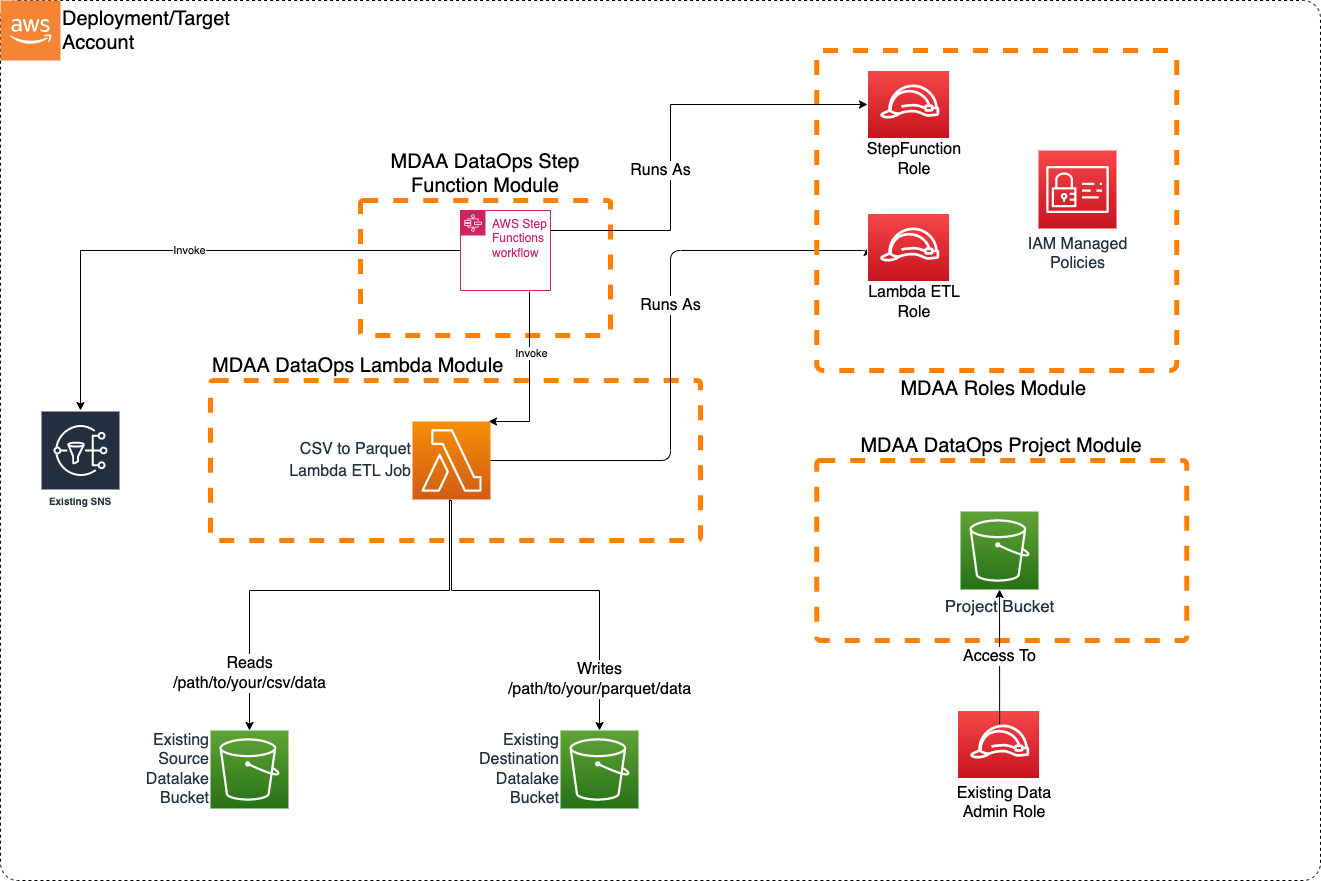
Usage Instructions
The following instructions assume you have already deployed your Data Lake (possibly using MDAA). If already using MDAA, you can merge these sample blueprint configs into your existing mdaa.yaml.
-
Deploy sample configurations into the specified directory structure (or obtain from the MDAA repo under
sample_blueprints/stepfunction_orchestrator). -
Edit the
mdaa.yamlto specify an organization name to replace<unique-org-name>. This must be a globally unique name, as it is used in the naming of all deployed resources, some of which are globally named (such as S3 buckets). -
Edit the
mdaa.yamlto specify a project name which is unique within your organization, replacing<your-project-name>. -
Edit the
mdaa.yamlto specify appropriate context values for your environment. -
Optionally, edit
stepfunction_orchestrator/stepfunctions/src/lambda/lambda_csv_parquet/lambda_csv_parquet.pyto handle additional transformation and partitioning. -
Ensure you are authenticated to your target AWS account.
-
Optionally, run
<path_to_mdaa_repo>/bin/mdaa -l lsfrom the directory containingmdaa.yamlto understand what stacks will be deployed. -
Optionally, run
<path_to_mdaa_repo>/bin/mdaa -l synthfrom the directory containingmdaa.yamland review the produced templates. -
Run
<path_to_mdaa_repo>/bin/mdaa -l deployfrom the directory containingmdaa.yamlto deploy all modules. -
Before loading csv files, you will need to provide the generated
lambda-etlrole with access to your datalake bucket(s).
Additional MDAA deployment commands/procedures can be reviewed in DEPLOYMENT.
Configurations
The sample configurations for this blueprint are provided below. They are also available under sample_blueprints/stepfunction_orchestrator within the MDAA repo.
Config Directory Structure
stepfunction_orchestrator
│   mdaa.yaml
│   tags.yaml
│
└───stepfunctions
    └───roles.yaml
    └───project.yaml
    └───lambda.yaml
    └───stepfunction.yaml
mdaa.yaml
This configuration specifies the global, domain, env, and module configurations required to configure and deploy this sample architecture.
Note - Before deployment, populate the mdaa.yaml with appropriate organization and context values for your environment
# Contents available in mdaa.yaml
# All resources will be deployed to the default region specified in the environment or AWS configurations.
# Can optional specify a specific AWS Region Name.
region: default

# One or more tag files containing tags which will be applied to all deployed resources
tag_configs:
  - ./tags.yaml

## Pre-Deployment Instructions

# TODO: Set an appropriate, unique organization name, likely matching the org name used in other MDAA configs.
# Failure to do so may resulting in global naming conflicts.
organization: <unique-org-name>

# One or more domains may be specified. Domain name will be incorporated by default naming implementation
# to prefix all resource names.
domains:
  # TODO: Set an appropriate project name. This project name should be unique within the organzation.
  <your-project-name>:
    # One or more environments may be specified, typically along the lines of 'dev', 'test', and/or 'prod'
    environments:
      # The environment name will be incorporated into resource name by the default naming implementation.
      dev:
        # The target deployment account can be specified per environment.
        # If 'default' or not specified, the account configured in the environment will be assumed.
        account: default
        #TODO: Set context values appropriate to your env
        context:
          # The arn of a role which will be provided admin privileges to dataops resources
          data_admin_role_arn : <your-data-admin-role-arn>
          # The name of the datalake S3 bucket where the csv files will be uploaded
          datalake_src_bucket_name: <your-src-datalake-bucket-name>
          # The prefix on the datalake S3 bucket where the csv files will be uploaded
          datalake_src_prefix: <your/path/to/csv>
          # The name of the datalake S3 bucket where the parquet files will be written
          datalake_dest_bucket_name: <your-dest-datalake-bucket-name>
          # The prefix on the datalake S3 bucket where the parquet files will be written
          datalake_dest_prefix: <your/path/to/parquet>
          # The arn of the KMS key used to encrypt the datalake bucket
          datalake_kms_arn: <your-datalake-kms-key-arn>
          # The arn of the KMS key used to encrypt the Glue Catalog
          glue_catalog_kms_arn: <your-datalake-kms-key-arn>
          # The arn of the SNS topic to which the Passed or Failed status will be sent.
          sns_topic_arn: <your-sns-topic-arn>
        # The list of modules which will be deployed. A module points to a specific MDAA CDK App, and
        # specifies a deployment configuration file if required.
        modules:
          # This module will create all of the roles required for the Step Function
          roles:
            module_path: "@aws-mdaa/roles"
            module_configs:
              - ./stepfunctions/roles.yaml
          # This module will create DataOps Project resources which can be shared
          # across multiple DataOps modules
          project:
            module_path: "@aws-mdaa/dataops-project"
            module_configs:
              - ./stepfunctions/project.yaml
          # This module will few dummy lambda functions that will be orchestrated by Step Function
          lambda:
            module_path: "@aws-mdaa/dataops-lambda"
            module_configs:
              - ./stepfunctions/lambda.yaml
          # This module will create the Step Function to orchestrate few Lambda Functions
          stepfunction:
            module_path: "@aws-mdaa/dataops-stepfunction"
            module_configs:
              - ./stepfunctions/stepfunction.yaml
tags.yaml
This configuration specifies the tags to be applied to all deployed resources.
stepfunctions/roles.yaml
This configuration will be used by the MDAA Roles module to deploy IAM roles and Managed Policies required for this sample architecture.
# Contents available in roles.yaml
generateRoles:
  stepfunction: # Execution Role used by Step Function to invoke Glue Crawler and Glue Jobs, read from S3 buckets
    trustedPrincipal: service:states.amazonaws.com
    # A list of AWS managed policies which will be added to the role
    awsManagedPolicies:
      - service-role/AWSLambdaRole
      - service-role/AmazonSNSFullAccess
    suppressions:
      - id: "AwsSolutions-IAM4"
        reason: "AWSGlueServiceRole approved for usage"

  lambda-etl:
    trustedPrincipal: service:lambda.amazonaws.com
    awsManagedPolicies:
      - service-role/AWSLambdaBasicExecutionRole
    suppressions:
      - id: "AwsSolutions-IAM4"
        reason: "AWSLambdaBasicExecutionRole approved for usage"
stepfunctions/project.yaml
This configuration will create a DataOps Project which can be used to support a wide variety of data ops activities. Specifically, this configuration will create a number of Glue Catalog databases and apply fine-grained access control to these using basic.
# Contents available in project.yaml
# Arns for IAM roles which will be provided to the projects's resources (IE bucket)
dataAdminRoles:
  # This is an arn which will be resolved first to a role ID for inclusion in the bucket policy.
  # Note that this resolution will require iam:GetRole against this role arn for the role executing CDK.
  - arn: "{{context:data_admin_role_arn}}"

# List of roles which will be used to execute dataops processes using project resources
projectExecutionRoles:
  - id: generated-role-id:stepfunction
  - id: generated-role-id:lambda-etl

s3OutputKmsKeyArn: "{{context:datalake_kms_arn}}"
glueCatalogKmsKeyArn: "{{context:glue_catalog_kms_arn}}"
stepfunctions/lambda.yaml
This configuration will create the transformation Lambda function using the DataOps Lambda module.
# Contents available in lambda.yaml
# The name of the dataops project this crawler will be created within.
# The dataops project name is the MDAA module name for the project.
projectName: project

# List of functions definitions
functions:
  # Required function parameters
  - functionName: lambda_csv_parquet # Function name. Must be unique within the config.

    layers:
      # See https://aws-sdk-pandas.readthedocs.io/en/latest/install.html#aws-lambda-layer
      - "arn:aws:lambda:{{region}}:336392948345:layer:AWSSDKPandas-Python313:1"

    # (Optional) Function Description
    description: Transforms CSVs into Parquet

    # Function source code directory
    srcDir: ./src/lambda/lambda_csv_parquet

    # Code path to the Lambda handler function.
    handler: lambda_csv_parquet.lambda_handler

    # The runtime for the function source code.
    runtime: python3.13

    # The role with which the Lambda function will be executed
    roleArn: generated-role-arn:lambda-etl

    # Number of times Lambda (0-2) will retry before the invocation event
    # is sent to DLQ.
    retryAttempts: 2
    # The max age of an invocation event before it is send to DLQ, either due to
    # failure, or insufficient Lambda capacity.
    maxEventAgeSeconds: 3600

    # (Optional) Number of seconds after which the function will timeout.
    # Setting to 300s (5 min) to allow time for transformation. May need to increase to accomodate larger files.
    timeoutSeconds: 300

    environment:
      DEST_BUCKET_NAME: "{{context:datalake_dest_bucket_name}}"
      DEST_PREFIX: "{{context:datalake_dest_prefix}}"

    # (Optional) Size of function execution memory in MB
    # Default is 128MB
    memorySizeMB: 512

    # (Optional) Size of function ephemeral storage in MB
    # Default is 1024MB
    ephemeralStorageSizeMB: 1024
stepfunctions/stepfunction.yaml
This configuration will create the Stepfunction using the DataOps StepFunction module to be used as an Orchestrator to run a Lambda Function and send SNS Notification.
# Contents available in stepfunction.yaml

# (Required) Name of the Data Ops Project
# Name the the project the resources of which can be used by this step function.
# Other resources within the project can be referenced in the step function config using
# the "project:" prefix on the config value.
projectName: project
# List of step function definitions
stepfunctionDefinitions:
  - stateMachineName: sample-state-machine-1
    # State Machine Type can be STANDARD or EXPRESS. Refer https://docs.aws.amazon.com/step-functions/latest/dg/concepts-standard-vs-express.html
    stateMachineType: STANDARD
    # ARN of role that will be used to execute the step function.
    # Can be specified as string or SSM parameter in format {{resolve:ssm/path/to/ssm/parameter}}
    stateMachineExecutionRole: "{{resolve:ssm:/{{org}}/{{domain}}/roles/role/stepfunction/arn}}"
    # Optional. Number of days the Logs will be retained in Cloudwatch.
    # Possible values are: 1, 3, 5, 7, 14, 30, 60, 90, 120, 150, 180, 365, 400, 545, 731, 1827, 3653, and 0.
    # If you specify 0, the events in the log group are always retained and never expire.
    # Default, if property not specified, is 731 days.
    logGroupRetentionDays: 0
    # Required. true or false. Enable or disable logging execution data e.g. parameter values etc.
    logExecutionData: false
    # Integration with Event Bridge for the purpose
    # of triggering this function with Event Bridge rules
    eventBridge:
      # Number of times Event Bridge will attempt to trigger this step function
      # before sending event to DLQ.
      retryAttempts: 10
      # The max age of an event before Event Bridges sends it to DLQ.
      maxEventAgeSeconds: 3600
      #List of s3 buckets and prefixes which will be monitored via EventBridge in order to trigger this function
      #Note that the S3 Bucket must have Event Bridge Notifications enabled.
      s3EventBridgeRules:
        testing-event-bridge-s3:
          # The bucket producing event notifications
          buckets:
            - "{{context:datalake_src_bucket_name}}"
          # Optional - The S3 prefix to match events on
          prefixes:
            - "{{context:datalake_src_prefix}}"
          # Optional - Can specify a custom event bus for S3 rules, but note that S3 EventBridge notifications
          # are initially sent only to the default bus in the account, and would need to be
          # forwarded to the custom bus before this rule would match.
          #eventBusArn: "arn:{{partition}}:events:{{region}}:{{account}}:event-bus/some-custom-name"
    # The rawStepFunctionDef is Amazon States Langauage (ASL) JSON exported or copied from AWS Console.
    # Environment specific attributes can be specified as SSM Parameters in format {{resolve:ssm:/path/to/ssm/parameter}}
    rawStepFunctionDef:
      {
        "StartAt": "Lambda CSV to Parquet",
        "States": {
          "Lambda CSV to Parquet": {
            "Type": "Task",
            "Resource": "{{resolve:ssm:/{{org}}/{{domain}}/lambda/lambda/lambda_csv_parquet/arn}}",
            "InputPath": "$",
            "ResultPath": "$.status",
            "Next": "Passed or Failed?"
          },
          "Passed or Failed?": {
            "Type": "Choice",
            "Choices": [
              {
                "Variable": "$.status",
                "StringEquals": "passed",
                "Next": "Report Result"
              },
              {
                "Variable": "$.status",
                "StringEquals": "failed",
                "Next": "Report Result"
              }
            ]
          },
          "Report Result": {
            "Type": "Task",
            "Resource": "arn:aws:states:::sns:publish",
            "Parameters": {
              "TopicArn": "{{context:sns_topic_arn}}",
              "Message": {
                "Input.$": "$.detail.object.key",
                "Status.$": "$.status"
              }
            },
            "End": true
          }
        }
      }
    suppressions:
      - id: "NIST.800.53.R5"
        reason: "Cloudwatch Log Group retention period is managed by AWS Secure Environment Accelerator"