SFTP Users
Note: This documentation is also available in a rendered format here.
Deploys AWS Transfer Family user credentials with SSH public key authentication, S3 home directory mappings, and optional auto-generated least-privilege IAM roles for bucket and KMS access. Use this module when you need to onboard SFTP users with scoped access to specific S3 buckets and directories on your Transfer Family server.
Deployed Resources
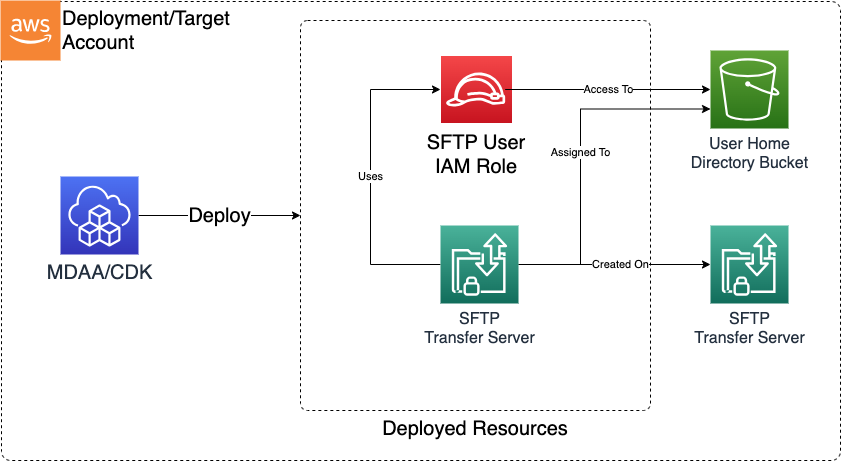
This module deploys and integrates the following resources:
- SFTP Users: Transfer Family users created with SSH public key credentials and home directory mappings to S3 buckets. Private keys are managed externally.
- SFTP User IAM Roles: If an existing IAM role is not specified, a minimally-permissive role is automatically created with scoped-down S3 and KMS access policies for the user's assigned bucket and home directory.
Related Modules
- SFTP Server — Deploy the SFTP server that hosts the users configured here
- Data Lake — Map SFTP user home directories to data lake S3 buckets for direct data ingestion
- Roles — Create IAM roles that can be used as existing SFTP user access roles
Security/Compliance Details
This module is designed in alignment with MDAA security/compliance principles and CDK nag rulesets. Additional review is recommended prior to production deployment, ensuring organization-specific compliance requirements are met.
- Encryption at Rest:
- S3 buckets referenced by users are encrypted with KMS
- User roles are granted access to the specified KMS keys
- Cross-account KMS keys are supported
- Least Privilege:
- Each user is scoped to a specific S3 bucket and home directory prefix
- Auto-generated IAM roles follow least-privilege with S3 path-scoped policies
- SSH public key authentication supports secure credential management
Configuration
MDAA Config
Add the following snippet to your mdaa.yaml under the modules: section of a domain/env in order to use this module:
sftp-users: # Module Name can be customized
  module_path: '@aws-mdaa/sftp-users' # Must match module NPM package name
  module_configs:
    - ./sftp-users.yaml # Filename/path can be customized
Module Config Samples and Variants
Copy the contents of the relevant sample config below into the ./sftp-users.yaml file referenced in the MDAA config snippet above.
Minimal Configuration
Provisions a single AWS Transfer Family SFTP user with SSH public key authentication, one S3 bucket, and a home directory mapping. Start here for a basic SFTP user with access to a single S3 bucket.
# Contents available via above link
# SFTP Users Module - Minimal Sample Configuration
#
# Provisions a single AWS Transfer Family SFTP user with SSH public key
# authentication, one S3 bucket, and a home directory mapping.
#
# This config includes only the required properties:
#   - serverId: Transfer Family server reference
#   - publicKeys: one SSH public key
#   - buckets: one S3 bucket with KMS encryption
#   - users: one user with bucket, home directory, and key reference

# Transfer Family server ID to associate users with.
# Often created by the SFTP Server module.
# Example SSM: ssm:/{{org}}/{{domain}}/<sftp_server_module_name>/server/id
serverId: ssm:/path/to/ssm/server/id

# SSH public key for user authentication.
publicKeys:
  default-key:
    publicKey: ssh-rsa AAAAB3NzaC1yc2EAAAADAQABAAACAQCr1nEXAMPLEPubKey==

# S3 bucket with KMS encryption for user home directory storage.
buckets:
  default-bucket:
    # S3 bucket name for user storage
    # Often created by the Data Lake module.
    # Example SSM: ssm:/{{org}}/{{domain}}/<datalake_module_name>/bucket/<zone_name>/name
    bucketName: ssm:/path/to/ssm/param/bucket/name
    # KMS key ARN for bucket encryption
    # Often created by the Data Lake module.
    # Example SSM: ssm:/{{org}}/{{domain}}/<datalake_module_name>/kms/arn
    kmsKeyArn: arn:{{partition}}:kms:{{region}}:{{account}}:key/1234abcd-12ab-34cd-56ef-1234567890ab

# Single SFTP user referencing the bucket and public key above.
users:
  sftp-user:
    bucket: default-bucket
    homeDirectory: /home
    publicKeys:
      - default-key
Comprehensive Configuration
Provisions AWS Transfer Family SFTP users with SSH public key authentication, scoped S3 bucket access, and home directory mappings. Start here when evaluating all available options for multiple users, custom IAM roles, cross-account KMS keys, and home directory configurations.
sample-config-comprehensive.yaml
# Contents available via above link
# SFTP Users Module - Comprehensive Sample Configuration
#
# Provisions AWS Transfer Family SFTP users with SSH public key
# authentication, scoped S3 bucket access, and home directory mappings.
#
# This config exercises every non-excluded property at full depth:
#   - serverId (required): Transfer Family server reference
#   - publicKeys (required): SSH public key definitions
#   - buckets (required): S3 bucket + KMS key pairs
#   - users (required): per-user bucket, directory, keys, and optional role

# Transfer Family server ID to associate users with. Accepts server
# IDs or SSM parameter references.
# Often created by the SFTP Server module.
# Example SSM: ssm:/{{org}}/{{domain}}/<sftp_server_module_name>/server/id
serverId: ssm:/path/to/ssm/server/id

# Map of key names to SSH public key configurations. Referenced by
# users in the publicKeys array for authentication.
publicKeys:
  test-key1:
    publicKey: ssh-rsa AAAAB3NzaC1yc2EAAAADAQABAAACAQCr1nEXAMPLEPubKey==
  test-key2:
    publicKey: ssh-rsa AAAAB3NzaC1yc2EAAAABJQAAAQEAsyyGZsEXAMPLEPubKey==

# Map of bucket names to S3 bucket configurations with KMS
# encryption. Referenced by users in the bucket field for home
# directory storage.
buckets:
  home-bucket1:
    # S3 bucket name or SSM parameter reference.
    # Often created by the Data Lake module.
    # Example SSM: ssm:/{{org}}/{{domain}}/<datalake_module_name>/bucket/<zone_name>/name
    bucketName: ssm:/path/to/ssm/param/bucket/name
    # KMS key ARN or SSM parameter reference for bucket encryption.
    # Often created by the Data Lake module.
    # Example SSM: ssm:/{{org}}/{{domain}}/<datalake_module_name>/kms/arn
    kmsKeyArn: ssm:/path/to/ssm/param/kms/arn

  home-bucket2:
    # Often created by the Data Lake module.
    # Example SSM: ssm:/{{org}}/{{domain}}/<datalake_module_name>/bucket/<zone_name>/name
    bucketName: some-home-bucket-name
    # Often created by the Data Lake module.
    # Example SSM: ssm:/{{org}}/{{domain}}/<datalake_module_name>/kms/arn
    kmsKeyArn: arn:{{partition}}:kms:{{region}}:{{account}}:key/1234abcd-12ab-34cd-56ef-1234567890ab

# Map of user names to SFTP user configurations. Each user
# references entries from publicKeys and buckets sections.
users:
  test-user-1:
    # Bucket name from the buckets section.
    bucket: home-bucket1
    # Home directory path within the bucket.
    homeDirectory: /incoming
    # (Optional) Existing IAM role ARN or SSM parameter for bucket
    # and KMS key access. If not specified, a minimally scoped role
    # will be created.
    accessRoleArn: ssm:/path/to/ssm/param/role/arn
    # Public key names from the publicKeys section.
    # Multiple keys supported for key rotation and multi-device access.
    publicKeys:
      - test-key1
      - test-key2

  test-user-2:
    bucket: home-bucket2
    homeDirectory: /incoming
    publicKeys:
      - test-key2

  test-user-3:
    bucket: home-bucket2
    homeDirectory: /incoming
    publicKeys:
      - test-key2