DataOps Project
Note: This documentation is also available in a rendered format here.
Deploys shared DataOps project infrastructure including KMS keys, S3 project buckets, Glue databases, Lake Formation grants, security configurations, security groups, Glue connections/classifiers, and optional DataZone/SageMaker project integration. Use this module as the foundation for any data operations project, providing the shared encryption, storage, networking, and catalog resources that other DataOps modules depend on.
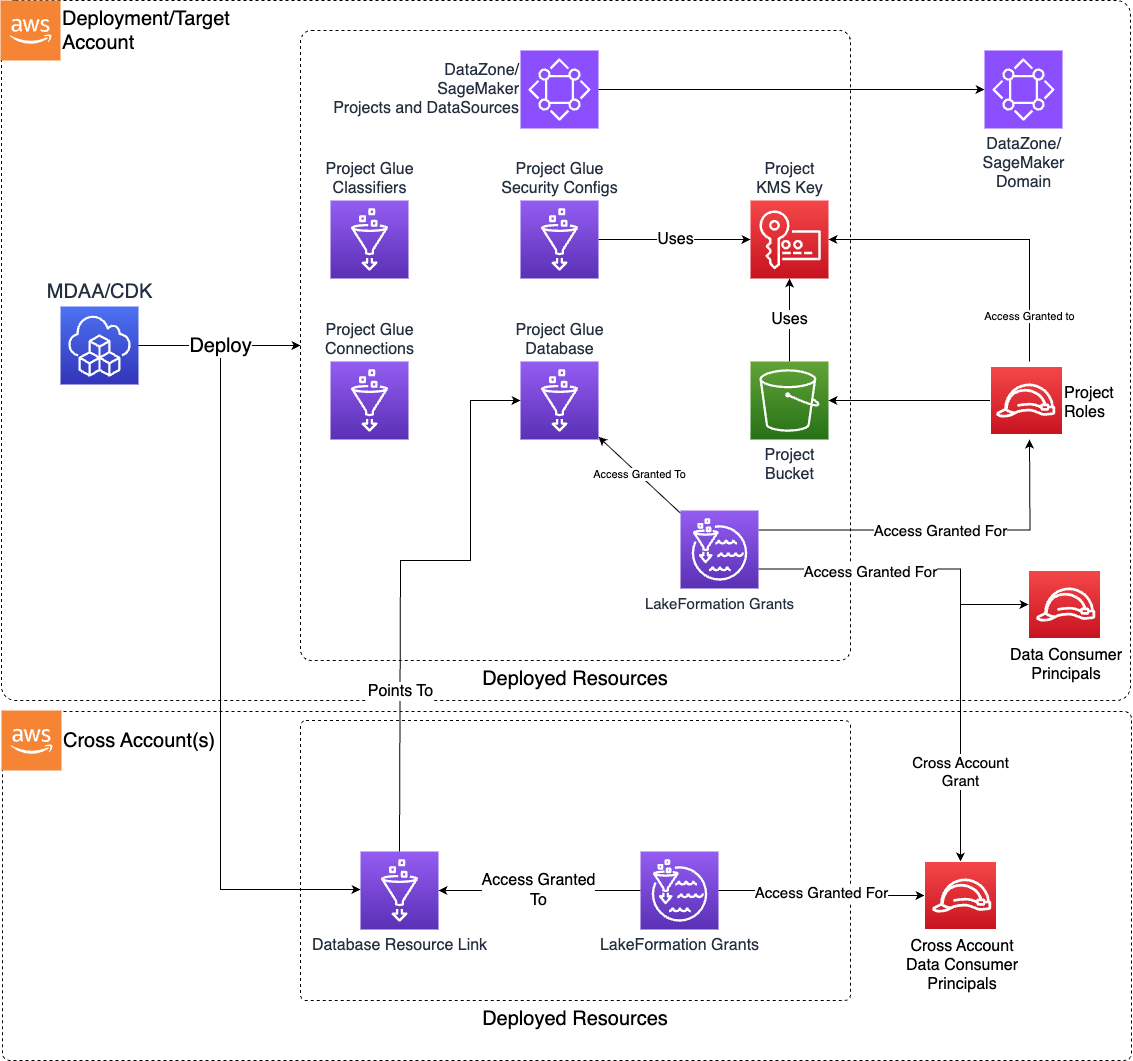
Deployed Resources
This module deploys and integrates the following resources:
Project KMS Key - Customer-managed KMS key used to encrypt all project resources at rest.
Project S3 Bucket - Storage for project activities (scratch, temporary, scripts, artifacts). Used as temp location for all project Glue jobs and to deploy/stage Glue job code.
Glue Databases - Catalog databases for crawled/generated tables.
LakeFormation Grants - Data lake location and read/write permission grants for project roles, with optional cross-account resource links and tag-based access control. The createReadWriteGrantsForProjectExecutionRoles flag accepts the case-sensitive permission levels read, write, and super in addition to boolean values, where true is equivalent to write and super additionally grants table ALTER/DROP and database DROP. Select super only for execution roles whose ETL jobs must replace or recreate catalog objects; because ALTER/DROP are destructive privileges that expand the role's blast radius, prefer read or write (the least-privilege levels) by default and reserve super for roles that genuinely require it.
Project Glue Security Config - Encrypts all job output, logging, and bookmark data with the project KMS key.
Project Security Groups - Configurable security groups for Glue connections and other project resources.
Glue Connections - Network and JDBC connections for reuse across project jobs and crawlers.
Glue Custom Classifiers - Classifiers (CSV, Grok, JSON, XML) for reuse across project crawlers.
DataZone/SageMaker Project (Optional) - Registers DataOps project resources as DataZone/SageMaker project, data sources, and assets.
SNS Failure Notification Topic - SNS topic for publishing DataOps pipeline failure events, with optional email subscriptions.
Related Modules
- ETL Jobs — Deploy Glue ETL jobs that use project KMS keys, security configs, and connections
- Crawlers — Deploy Glue Crawlers that use project security configuration and connections
- Lambda Functions — Deploy Lambda functions for data operations using project KMS keys and security groups
- Workflows — Orchestrate project crawlers and jobs with Glue Workflows
- Step Functions — Orchestrate project resources with Step Functions state machines
- DataBrew — Deploy DataBrew jobs using project KMS keys for data profiling and transformation
- DynamoDB — Deploy DynamoDB tables encrypted with the project KMS key
- DMS — Deploy DMS replication tasks using project KMS keys for data migration
- Data Quality — Deploy Glue Data Quality rulesets for project databases and tables
- Dashboard — Create CloudWatch dashboards aggregating metrics from project Lambda functions and resources
- NiFi — Deploy Apache NiFi clusters using project KMS keys for data flow management
- Data Lake — Deploy data lake buckets that project jobs can read from and write to
- Lake Formation Access Control — Manage Lake Formation grants for Glue resources created outside of the project
- SageMaker (Domain) — Integrate project resources as SageMaker project data sources
- Roles — Create IAM roles for data engineer, execution, and data admin access
Security/Compliance Details
This module is designed in alignment with MDAA security/compliance principles and CDK nag rulesets. Additional review is recommended prior to production deployment, ensuring organization-specific compliance requirements are met.
- Encryption at Rest:
- Project KMS key encrypts all project resources (S3 bucket, Glue security config, job outputs, logs, bookmarks)
- Optional separate S3 output KMS key for data lake integration
- Least Privilege:
- KMS key usage access granted to project data engineer and execution roles via key policy
- KMS key usage/admin access granted to data admin role via key policy
- Project bucket read/write access granted by prefix to data engineer, execution, and data admin roles
- JDBC connection credentials managed via Secrets Manager dynamic references
- Lake Formation grants with tag-based access control and per-database/table permissions
- Separation of Duties:
- Role-based access at data engineer, execution, and data admin levels
- Cross-account resource links for multi-account data governance
- Network Isolation:
- Configurable security groups with self-referencing ingress (required by Glue)
- All egress permitted by default, all other ingress denied
- VPC and JDBC connections for private network access
Configuration
MDAA Config
Add the following snippet to your mdaa.yaml under the modules: section of a domain/env in order to use this module:
dataops-project: # Module Name can be customized
  module_path: '@aws-mdaa/dataops-project' # Must match module NPM package name
  module_configs:
    - ./dataops-project.yaml # Filename/path can be customized
Module Config Samples and Variants
Copy the contents of the relevant sample config below into the ./dataops-project.yaml file referenced in the MDAA config snippet above.
Minimal Configuration
Contains only the required property (dataAdminRoles) plus one database to demonstrate the core use case. Start here for a basic DataOps project with a single Glue database and admin role.
# Contents available via above link
# Minimal config for the DataOps Project module.
# Contains only the required property (dataAdminRoles) plus one
# database to demonstrate the core use case.

# See CONFIGURATION.md for role reference options (name, arn, id).
# Data admin roles with full administrative access to all project resources
dataAdminRoles:
  - name: Admin

# (Optional) Data engineer roles with operational access to project resources
dataEngineerRoles:
  - name: data-engineer

# (Optional) Pre-defined execution roles for project resource operations
projectExecutionRoles:
  - name: glue-role

# (Optional) Glue database definitions for centralized metadata management
databases:
  test-database:
    description: Test Database
    # S3 bucket name for database location
    # Often created by the Data Lake module.
    # Example SSM: ssm:/{{org}}/{{domain}}/<datalake_module_name>/bucket/<zone_name>/name
    locationBucketName: some-bucket-name
    locationPrefix: data/test
Comprehensive Configuration
Covers all available configuration options using the SageMaker integration path. Start here when evaluating all available options for databases, connections, classifiers, Lake Formation grants, SageMaker integration, and S3 lifecycle rules for the project bucket (expiring transient temp/query data and aging cold data to cheaper storage classes).
sample-config-comprehensive.yaml
# Contents available via above link
# Comprehensive sample config for the DataOps Project module.
# Exercises ALL compatible non-excluded properties at full depth.
# Uses the SageMaker integration path (mutually exclusive with datazone).

# See CONFIGURATION.md for role reference options (name, arn, id).
# Data admin roles with full administrative access to all project resources.
# Roles can be referenced by name (auto-expanded to ARN) or by explicit ARN.
dataAdminRoles:
  # Role by name (auto-expanded to ARN at deploy time)
  - name: Admin
  # Role by ARN
  - arn: arn:{{partition}}:iam::{{account}}:role/sample-org-dev-instance1-roles-data-admin
  # Role by MDAA-generated role ID
  - id: generated-role-id:data-admin

# Data engineer roles with operational access to project resources (jobs, crawlers, databases).
dataEngineerRoles:
  - arn: arn:{{partition}}:iam::{{account}}:role/sample-org-dev-instance1-roles-data-engineer

# Pre-defined execution roles for project resource operations (jobs, crawlers).
projectExecutionRoles:
  - arn: ssm:/sample-org/instance1/generated-role/glue-role/arn
  - id: generated-role-id:databrew

# Failure notification configuration for Glue job monitoring and alerting.
failureNotifications:
  # Email addresses for failure notification delivery
  email:
    - user1@example.com
    - user2@example.com

# Shared security group configurations for project resources.
securityGroupConfigs:
  test-security-group:
    # VPC ID for security group deployment
    vpcId: test-vpcid
    # Egress rules for outbound traffic control
    securityGroupEgressRules:
      # IPv4 CIDR block rules
      ipv4:
        - cidr: 10.10.10.0/24
          protocol: TCP
          port: 443
          # Description of the rule
          description: Allow HTTPS to internal network
          # Ending port for port range
          toPort: 443
      # Security group peer rules
      sg:
        - sgId: sg-12312412123
          protocol: TCP
          port: 443
          # Description of the SG rule
          description: Allow HTTPS to peer SG
          # Ending port for port range
          toPort: 443
      # Prefix list rules
      prefixList:
        - prefixList: pl-12345678
          protocol: TCP
          port: 443
          # Description of the prefix list rule
          description: Allow HTTPS via prefix list
          # Ending port for port range
          toPort: 443

# KMS key ARN for encrypting S3 output data from project operations.
s3OutputKmsKeyArn: ssm:/sample-org/instance1/datalake/kms/id

# KMS key ARN for Glue Catalog metadata encryption.
glueCatalogKmsKeyArn: ssm:/sample-org/shared/glue-catalog/kms/arn

# S3 lifecycle rules applied to the project bucket. Each rule targets a key prefix
# so transient data is expired and cold data is aged to cheaper storage without
# affecting primary project data. Rules here are sensible defaults; tune days,
# storage classes, and prefixes to your retention and cost requirements.
lifecycleConfiguration:
  # Expire transient scratch data under temp/ and clean up failed uploads.
  - # Unique lifecycle rule identifier
    id: expire-temp
    # Rule state (enum: Enabled, Disabled)
    status: Enabled
    # Key prefix the rule applies to
    prefix: temp/
    # Days after creation before current objects expire (deleted)
    expirationdays: 7
    # Days after which incomplete multipart uploads are aborted
    abortIncompleteMultipartUploadAfter: 7
  # Expire Athena query results, which are reproducible and short-lived.
  - id: expire-athena-results
    status: Enabled
    prefix: athena-results/
    expirationdays: 30
    abortIncompleteMultipartUploadAfter: 7
  # Age cold project data to cheaper storage and prune old noncurrent versions.
  - id: archive-data
    status: Enabled
    prefix: data/
    # Storage-class transitions for current object versions
    transitions:
      # Days after creation before transitioning (enum storageClass: STANDARD_IA,
      # ONEZONE_IA, INTELLIGENT_TIERING, GLACIER_IR, GLACIER, DEEP_ARCHIVE)
      - days: 90
        storageClass: STANDARD_IA
      - days: 365
        storageClass: GLACIER
    # Days after a version becomes noncurrent before it expires
    noncurrentVersionExpirationDays: 90
    # Number of newer noncurrent versions to retain before expiring older ones
    noncurrentVersionsToRetain: 3

# Project-level Lake Formation configuration for centralized tag-based access control.
lakeFormation:
  # Lake Formation tag definitions (key + allowed values) shared across all project databases
  lfTags:
    - tagKey: environment
      tagValues: [dev, test, prod]
    - tagKey: data_tier
      tagValues: [bronze, silver, gold]
    - tagKey: data_classification
      tagValues: [public, internal, confidential]
      # AWS account ID for tag catalog scope
      catalogId: '{{account}}'

# Custom Glue classifier definitions for specialized data format recognition.
classifiers:
  # CSV classifier
  classifierCsv:
    # Classifier type: 'csv', 'grok', 'json', or 'xml'
    classifierType: 'csv'
    # Format-specific classifier configuration properties
    configuration:
      csvClassifier:
        # Allow recognition of single-column CSV files
        allowSingleColumn: false
        # Header detection: 'UNKNOWN', 'PRESENT', or 'ABSENT'
        containsHeader: 'PRESENT'
        # Field delimiter character
        delimiter: '~'
        # When true, disables automatic whitespace trimming
        disableValueTrimming: false
        # Explicit column names
        header:
          - columnA
          - columnB
        # Quote character for field enclosure
        quoteSymbol: '^'
        # Classifier name
        name: my-csv-classifier
  # Grok classifier
  classifierGrok:
    classifierType: 'grok'
    configuration:
      grokClassifier:
        # Identifier of the data format
        classification: special-logs
        # Custom grok patterns
        customPatterns: 'MESSAGEPREFIX .*-.*-.*-.*-.*'
        # Grok pattern applied to data
        grokPattern: '%{TIMESTAMP_ISO8601:timestamp} \[%{MESSAGEPREFIX:message_prefix}\] %{CRAWLERLOGLEVEL:loglevel} : %{GREEDYDATA:message}'
        # Classifier name
        name: my-grok-classifier
  # JSON classifier
  classifierJson:
    classifierType: 'json'
    configuration:
      jsonClassifier:
        # JsonPath string defining the JSON data
        jsonPath: '$[*]'
        # Classifier name
        name: my-json-classifier
  # XML classifier
  classifierXml:
    classifierType: 'xml'
    configuration:
      xmlClassifier:
        # Identifier of the data format
        classification: xml-data
        # XML tag designating the element containing each record
        rowTag: '<row item_a="A" item_b="B"></row>'
        # Classifier name
        name: my-xml-classifier

# Glue connection definitions for secure connectivity to external data sources.
connections:
  # NETWORK connection
  connectionVpc:
    # Connection type: 'JDBC', 'KAFKA', 'MONGODB', or 'NETWORK'
    connectionType: NETWORK
    # Description of the connection's purpose
    description: VPC Connection Example
    # Criteria for automated connection selection in ETL jobs
    matchCriteria:
      - network-match
    # VPC networking requirements
    physicalConnectionRequirements:
      # Availability zone for connection placement
      availabilityZone: '{{region}}a'
      # Subnet ID for connection VPC placement
      subnetId: subnet-123abc456def
      # Existing security group IDs
      securityGroupIdList:
        - sg-890abc123asc
  # NETWORK connection using project security group
  connectionVpcWithProjectSG:
    connectionType: NETWORK
    description: VPC Connection with Project SG
    physicalConnectionRequirements:
      availabilityZone: '{{region}}a'
      subnetId: subnet-09ba402b76a346ffb
      # Project-generated security group names
      projectSecurityGroupNames:
        - test-security-group
  # JDBC connection
  connectionJdbc:
    connectionType: JDBC
    # Key-value pairs for authentication and connection configuration
    connectionProperties:
      JDBC_CONNECTION_URL: 'jdbc:awsathena://AwsRegion=[REGION];UID=[ACCESS KEY];PWD=[SECRET KEY];S3OutputLocation=[LOCATION]'
      JDBC_ENFORCE_SSL: true
    description: JDBC Connection Example
    physicalConnectionRequirements:
      availabilityZone: '{{region}}a'
      subnetId: subnet-123abc456def
      securityGroupIdList:
        - sg-890abc123asc
  # KAFKA connection
  connectionKafka:
    connectionType: KAFKA
    connectionProperties:
      KAFKA_BOOTSTRAP_SERVERS: 'broker1:9092,broker2:9092'
      KAFKA_SSL_ENABLED: true
    description: Kafka Streaming Connection
    matchCriteria:
      - kafka-match
    physicalConnectionRequirements:
      availabilityZone: '{{region}}a'
      subnetId: subnet-123abc456def
      securityGroupIdList:
        - sg-890abc123asc
  # MONGODB connection
  connectionMongodb:
    connectionType: MONGODB
    connectionProperties:
      CONNECTION_URL: 'mongodb://host:27017/database'
    description: MongoDB Connection Example
    physicalConnectionRequirements:
      availabilityZone: '{{region}}a'
      subnetId: subnet-123abc456def
      securityGroupIdList:
        - sg-890abc123asc

# SageMaker project integration (mutually exclusive with datazone).
sagemaker:
  # SSM parameter name containing domain configuration
  domainConfigSSMParam: /sample-org/shared/sagemaker/domain/test-domain/config
  # Auto-assign data admin roles as project owners
  createDataAdminOwners: false
  project:
    # Name of the project profile to use
    profileName: test-profile
    # Domain unit path for project placement
    domainUnit: /some/domain/unit
    # MDAA group config names with PROJECT_CONTRIBUTOR designation
    groups:
      contributor-group: group-config-name
    # MDAA group config names with PROJECT_OWNER designation
    ownerGroups:
      owner-group: owner-group-config-name
    # MDAA user config names with PROJECT_OWNER designation
    ownerUsers:
      owner-user: owner-user-config-name
    # MDAA user config names with PROJECT_CONTRIBUTOR designation
    users:
      contributor-user: user-config-name
    # Per-environment configuration overrides
    environmentConfigs:
      test-env:
        parameters:
          key1: value1
    # Data sources for Glue databases not created by this DataOps Project
    dataSources:
      test-source:
        # Glue database name to use as the data source
        databaseName: non-project-database
    # (Optional) Metadata form types owned by this project. MDAA assembles the
    # Smithy model; the form name is used verbatim as the structure name.
    metadataForms:
      DataOpsGovernanceForm:
        # (Optional) Description of the form type
        description: Project governance metadata
        # (Required) Field name -> FormFieldProps
        fields:
          owner:
            # (Required) Smithy prelude type
            type: String
            # (Optional) Annotates @required
            required: true
          reviewedOn:
            type: Timestamp

# Glue database definitions for centralized metadata management.
databases:
  # Full-featured database with all Lake Formation options
  test-database1:
    # Description of the database's purpose
    description: Test Database 1
    # S3 bucket name for database data storage location
    # Often created by the Data Lake module.
    # Example SSM: ssm:/{{org}}/{{domain}}/<datalake_module_name>/bucket/<zone_name>/name
    locationBucketName: some-bucket-name
    # S3 prefix for data organization within the bucket
    locationPrefix: data/test1
    # Lake Formation configuration for access control
    lakeFormation:
      # Auto-create super grants for data admin roles
      createSuperGrantsForDataAdminRoles: true
      # Auto-create read grants for data engineer roles
      createReadGrantsForDataEngineerRoles: true
      # Auto-create grants for project execution roles. Accepts a boolean or a
      # permission level (read | write | super). The 'super' level grants
      # ALTER/DROP for ETL jobs that replace or recreate tables.
      createReadWriteGrantsForProjectExecutionRoles: super
      # Target account numbers for cross-account resource link creation
      createCrossAccountResourceLinkAccounts:
        - '{{context:account-2}}'
      # Custom name for cross-account resource links
      createCrossAccountResourceLinkName: 'testing'
      # Named Lake Formation grant configurations
      grants:
        # Read grant example
        example_read_grant:
          # Database permissions level: 'read', 'write', or 'super'
          databasePermissions: read
          # Table permissions level: 'read', 'write', or 'super'
          tablePermissions: read
          # Specific table names for targeted grant creation
          tables:
            - test-table
          # Named principal references
          principals:
            principalA:
              # IAM SAML IDP ARN
              federationProviderArn: some-federation-provider-arn
              # Federated username
              federatedUser: some-user-name
            principalB:
              federationProviderArn: some-federation-provider-arn
              # Federated group
              federatedGroup: some-group-name
            # Principal with role reference
            principalC:
              # IAM role reference
              role:
                name: some-role-name
              # AWS account ID for cross-account principal resolution
              account: '{{context:account-2}}'
          # Direct principal ARN mapping
          principalArns:
            principalD: some-other-role-arn
        # Write grant example
        example_write_grant:
          databasePermissions: write
          tablePermissions: write
          principalArns:
            writer-role: arn:{{partition}}:iam::{{account}}:role/writer-role
        # Super grant example
        example_super_grant:
          databasePermissions: super
          tablePermissions: super
          principalArns:
            super-role: arn:{{partition}}:iam::{{account}}:role/super-role
      # LF-Tag values to associate with this database
      databaseTagValues:
        - tagKey: environment
          tagValues: [dev]
        - tagKey: data_tier
          tagValues: [bronze]
        - tagKey: data_classification
          tagValues: [public]
      # Tag-based grant configurations
      tagBasedGrants:
        dev_access:
          # Map of principal names to IAM ARNs
          principalArns:
            dev-role: arn:{{partition}}:iam::{{account}}:role/dev-data-user
          # Lake Formation permissions to grant
          permissions: [DESCRIBE, SELECT]
          # Resource type scope: DATABASE or TABLE
          resourceType: TABLE
          # LF-Tag expression defining resource selection
          lfTagExpression:
            environment: [dev]
            data_tier: [bronze, silver]
        # Grant with DATABASE resource type and permissionsWithGrantOption
        db_admin_access:
          principalArns:
            db-admin: arn:{{partition}}:iam::{{account}}:role/db-admin
          permissions: [DESCRIBE, ALTER, CREATE_TABLE]
          # Permissions that recipients can further grant
          permissionsWithGrantOption: [DESCRIBE]
          resourceType: DATABASE
          lfTagExpression:
            environment: [prod]

  # Database with crawler configuration
  test-database-crawler:
    description: Test Database with Crawler
    # Often created by the Data Lake module.
    # Example SSM: ssm:/{{org}}/{{domain}}/<datalake_module_name>/bucket/<zone_name>/name
    locationBucketName: some-bucket-name
    locationPrefix: data/test-crawler
    # Auto-create Glue Crawler for this database
    crawler:
      # Crawler execution role (required)
      role:
        name: glue-crawler-role
      # Custom classifier names to use
      classifiers:
        - classifierCsv
      # Crawler configuration object
      extraConfiguration:
        Version: 1.0
        Grouping:
          TableGroupingPolicy: CombineCompatibleSchemas
      # Recrawl behaviour
      recrawlBehavior: CRAWL_NEW_FOLDERS_ONLY
      # Crawler execution schedule
      schedule:
        # Cron expression for scheduling
        scheduleExpression: 'cron(15 12 * * ? *)'
      # Schema change policy
      schemaChangePolicy:
        # Update behavior: LOG or UPDATE_IN_DATABASE
        updateBehavior: UPDATE_IN_DATABASE
        # Delete behavior: LOG, DELETE_FROM_DATABASE, or DEPRECATE_IN_DATABASE
        deleteBehavior: LOG
      # Table name prefix
      tablePrefix: 'crawled_'

  # Condensed DB config
  test-database2:
    description: Test Database 2
    # Often created by the Data Lake module.
    # Example SSM: ssm:/{{org}}/{{domain}}/<datalake_module_name>/bucket/<zone_name>/name
    locationBucketName: some-bucket-name
    locationPrefix: data/test2
    lakeFormation:
      createSuperGrantsForDataAdminRoles: true
      createReadGrantsForDataEngineerRoles: true
      createReadWriteGrantsForProjectExecutionRoles: true
      grants:
        example_condensed_read_grant:
          principalArns:
            principalA: arn:{{partition}}:iam::{{account}}:role/cross-account-role

  # Verbatim DB Name Config
  test-database4:
    description: Test Database 4
    # Use exact database name without applying naming conventions
    verbatimName: true
    # Often created by the Data Lake module.
    # Example SSM: ssm:/{{org}}/{{domain}}/<datalake_module_name>/bucket/<zone_name>/name
    locationBucketName: some-bucket-name
    locationPrefix: data/test4

  # Iceberg Compliant DB Name Config
  test-database5:
    description: Test Database 5
    # Replace hyphens with underscores for Apache Iceberg compatibility
    icebergCompliantName: true
    # Often created by the Data Lake module.
    # Example SSM: ssm:/{{org}}/{{domain}}/<datalake_module_name>/bucket/<zone_name>/name
    locationBucketName: some-bucket-name
    locationPrefix: data/test5

  # SageMaker Project Data Source
  test-database-sus:
    description: Test SageMaker Database
    # Auto-create SageMaker data sources for this database
    createSagemakerDatasource: true
    # Often created by the Data Lake module.
    # Example SSM: ssm:/{{org}}/{{domain}}/<datalake_module_name>/bucket/<zone_name>/name
    locationBucketName: some-bucket-name
    locationPrefix: data/test-sus
SageMaker Integration Configuration
Extends the primary configuration with SageMaker domain integration, project profiles, and data sources for SageMaker-governed data access. Choose this variant when your organization uses SageMaker Unified Studio for data governance and you want project resources automatically registered as SageMaker data sources.
# Contents available via above link
# Arns for IAM role which will be authoring code within the project
dataEngineerRoles:
  - name: data-engineer

# See CONFIGURATION.md for role reference options (name, arn, id).
# Arns for IAM roles which will be provided to the projects's resources (IE bucket)
dataAdminRoles:
  - name: Admin

projectExecutionRoles:
  - name: glue-role

# (Optional) - Generate a SageMaker Project for this DataOps Project (comment if using datazone)
sagemaker:
  # The SSM Parameter containing domain config details for a SageMaker Domain created by the MDAA SageMaker module
  domainConfigSSMParam: /test-org/test-domain/sagemaker/domain/test-domain/config
  project:
    profileName: test-profile

databases:
  # SageMaker Project Data Source (comment if using datazone)
  test-database-sus:
    description: Test SageMaker Database
    # Creates a datasource in the SageMaker Project associated with this DataOps Project
    createSagemakerDatasource: true
    # Often created by the Data Lake module.
    # Example SSM: ssm:/{{org}}/{{domain}}/<datalake_module_name>/bucket/<zone_name>/name
    locationBucketName: some-bucket-name
    locationPrefix: data/test-sus
DataZone Integration Configuration
Uses Amazon DataZone for data governance and catalog management instead of SageMaker Unified Studio. Choose this variant when your organization uses DataZone for data discovery and access management.
# Contents available via above link
# DataZone variant sample config for the DataOps Project module.
# Exercises the DataZone integration path (mutually exclusive with sagemaker).

# Data engineer roles with operational access to project resources
dataEngineerRoles:
  - name: data-engineer

# See CONFIGURATION.md for role reference options (name, arn, id).
# Data admin roles with full administrative access to all project resources
dataAdminRoles:
  - name: Admin

# Pre-defined execution roles for project resource operations
projectExecutionRoles:
  - name: glue-role

# DataZone configuration for data governance and catalog integration.
# Mutually exclusive with sagemaker.
datazone:
  # SSM parameter name containing domain configuration
  domainConfigSSMParam: /test-org/test-domain/test-datazone/domain/test-domain/config
  # DataZone project configuration
  project:
    # Domain unit identifier for organizational hierarchy
    domainUnit: test-domain-unit
    # DataZone environment configuration for Lake Formation integration
    environment:
      # Lake Formation manage access role reference
      lakeformationManageAccessRole:
        name: lf-manage-access-role
    # MDAA module group config names with PROJECT_CONTRIBUTOR designation
    groups:
      contributor-group: group-config-name
    # MDAA module group config names with PROJECT_OWNER designation
    ownerGroups:
      owner-group: owner-group-config-name
    # MDAA module user config names with PROJECT_OWNER designation
    ownerUsers:
      owner-user: owner-user-config-name
    # MDAA module user config names with PROJECT_CONTRIBUTOR designation
    users:
      contributor-user: user-config-name

databases:
  # DataZone Project Data Source
  test-database-datazone:
    description: Test DataZone Database
    # Auto-create DataZone data sources for this database
    createDatazoneDatasource: true
    # Often created by the Data Lake module.
    # Example SSM: ssm:/{{org}}/{{domain}}/<datalake_module_name>/bucket/<zone_name>/name
    locationBucketName: some-bucket-name
    locationPrefix: data/test-sus