Service Catalog
Note: This documentation is also available in a rendered format here.
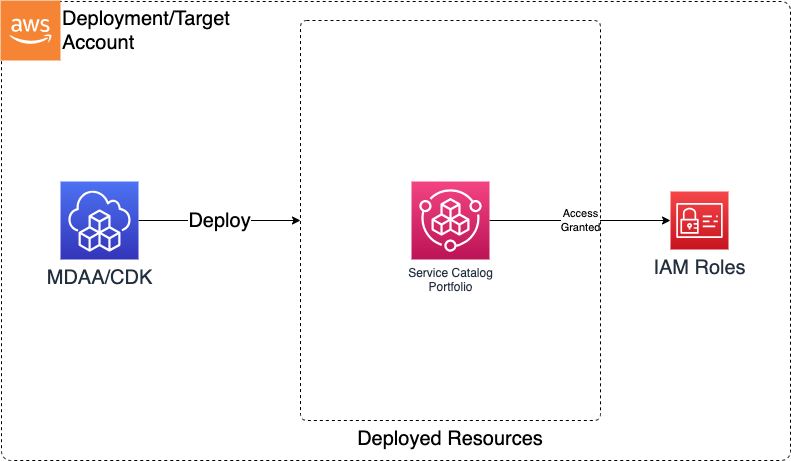
Deploys AWS Service Catalog portfolios with IAM principal associations, enabling governed self-service provisioning of approved products within a data environment. Use this module when you need to offer pre-approved infrastructure products to your teams through a self-service catalog with role-based access control.
Deployed Resources
This module deploys and integrates the following resources:
Service Catalog Portfolios - Portfolios to which products can be added via the MDAA framework.
Portfolio Principal Associations - Associates IAM roles to portfolios for access control.
SSM Parameters - Portfolio ARN and ID stored in Parameter Store for cross-module reference.
Related Modules
- Roles — Create IAM roles that can be associated as portfolio principals
- SageMaker Notebooks — Notebook instances can be offered as Service Catalog products for self-service provisioning
Security/Compliance Details
This module is designed in alignment with MDAA security/compliance principles and CDK nag rulesets. Additional review is recommended prior to production deployment, ensuring organization-specific compliance requirements are met.
- Least Privilege:
- Portfolio access granted through explicit IAM role associations
- Only associated principals can browse and launch products from the portfolio
Configuration
MDAA Config
Add the following snippet to your mdaa.yaml under the modules: section of a domain/env in order to use this module:
service-catalog: # Module Name can be customized
  module_path: '@aws-mdaa/service-catalog' # Must match module NPM package name
  module_configs:
    - ./service-catalog.yaml # Filename/path can be customized
Module Config Samples and Variants
Copy the contents of the relevant sample config below into the ./service-catalog.yaml file referenced in the MDAA config snippet above.
Minimal Configuration
Required properties only — a single portfolio with a provider name. Start here for a basic Service Catalog portfolio that products can be added to later.
# Contents available via above link
# Minimal Service Catalog module configuration.
# Contains only required properties for a basic portfolio.

portfolios:
  TestPortfolio:
    # Provider name displayed in the Service Catalog console
    providerName: 'test-provider'
Comprehensive Configuration
Provisions Service Catalog portfolios with provider details, access controls, and tag options for governed self-service infrastructure deployment. Start here when evaluating all available options for portfolio configuration, principal associations, and tag-based governance.
sample-config-comprehensive.yaml
# Contents available via above link
# Sample config for the Service Catalog module.
# Provisions Service Catalog portfolios with provider details,
# access controls, and tag options for governed self-service
# infrastructure deployment. This comprehensive config exercises
# every compatible property at full depth.

portfolios:
  TestPortfolio:
    # Provider name displayed in the Service Catalog console
    providerName: 'test-provider'
    # (Optional) Portfolio description for users to understand contents and purpose
    description: 'testing description'
    # (Optional) Roles granted access to this portfolio for product provisioning
    access:
      # Role by name (auto-expanded to ARN at deploy time)
      - name: Admin
      # Role by ARN
      - arn: arn:{{partition}}:iam::{{account}}:role/TestRole
      # Role by name (auto-expanded to ARN at deploy time)
      - name: ServiceCatalogUser