DataOps Aurora Module
Deploys compliant Aurora Serverless v2 clusters with enterprise security controls, automatic scaling, and DataOps project integration. Currently supports Aurora PostgreSQL, with Aurora MySQL support planned. Use this module for relational database workloads that need serverless scaling, high availability, and centralized access management.
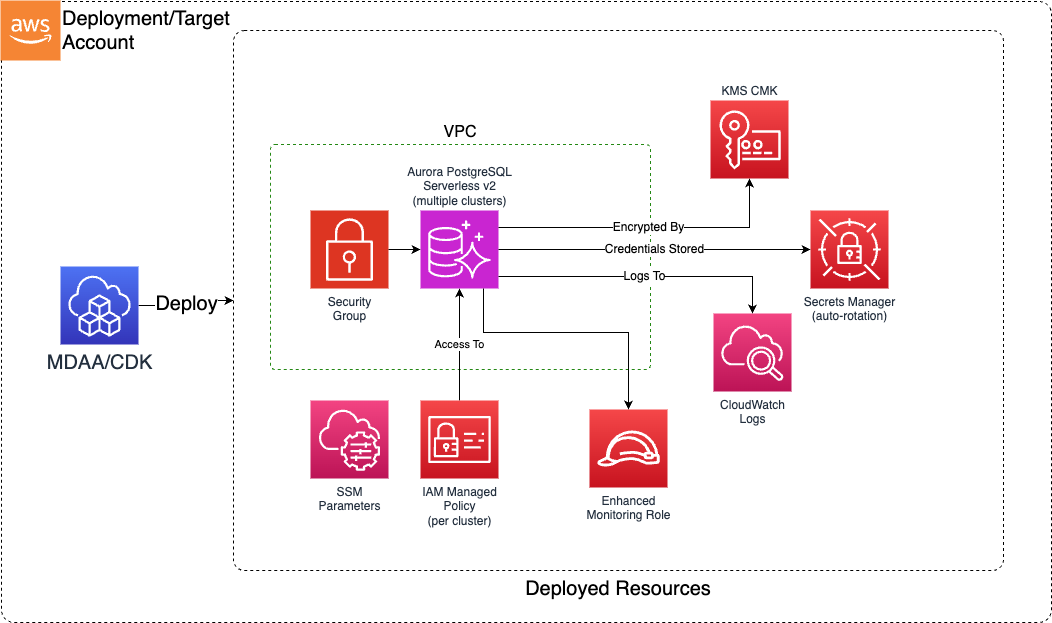
Deployed Resources (per cluster)
Aurora Serverless v2 Cluster - Writer instance with configurable reader instances and automatic capacity scaling
KMS CMK (or project key) - Customer-managed encryption key shared across all clusters in the module
VPC Security Group - Network access control with configurable ingress rules (or imported from DataOps project)
IAM Role - Enhanced Monitoring role for RDS performance insights at 60-second intervals
Secrets Manager Secret - Admin credentials with automatic password rotation on a configurable schedule
DB Subnet Group - Multi-AZ subnet placement for high availability and fault tolerance
IAM Managed Policy - Per-cluster access policy granting rds-db:connect, rds:DescribeDBClusters, and Secrets Manager access
SSM Parameters - Cluster endpoints published for project integration and cross-module references
Related Modules
- DataOps Project — Provides shared KMS key and security groups via
projectNameauto-wiring - Roles — Creates IAM roles referenced by
dataAdminRolesandclusterAccessRoles
Security/Compliance Details
This module is designed in alignment with MDAA security/compliance principles and CDK Nag rulesets (AwsSolutions, NIST 800-53 R5, HIPAA Security, PCI DSS 3.2.1).
- Encryption at Rest: KMS CMK encryption enforced on all cluster storage. Single shared key for all clusters (project key or dedicated).
- Encryption in Transit: SSL-only connections enforced via Aurora cluster configuration.
- Network Isolation: VPC-bound deployment with security group controls. No public access. Non-default port required (port obfuscation).
- Least Privilege: Per-cluster IAM managed policy scoped to specific cluster ARN and secret ARN. rds-db:connect wildcards database user name only within the cluster resource ID.
- Credential Management: Automatic admin password rotation via Secrets Manager on a configurable schedule (default 30 days).
- Monitoring: Enhanced Monitoring at 60-second intervals. PostgreSQL log export to CloudWatch Logs enabled by default.
- IAM Authentication: Token-based database access via IAM enabled by default, eliminating long-lived database passwords for application access.
- Data Protection: Backup retention enforced (default 7 days). Removal policy set to RETAIN with snapshot on delete.
Configuration
MDAA Config
domains:
  shared:
    environments:
      dev:
        modules:
          aurora:
            module_path: '@aws-mdaa/dataops-aurora'
            module_configs:
              - ./aurora.yaml
Module Config Samples and Variants
Minimal Configuration
Deploys a single Aurora PostgreSQL cluster using the project KMS key with secure defaults. Use this as a starting point for simple workloads.
# Minimal config for the DataOps Aurora module.
# Deploys a single Aurora PostgreSQL Serverless v2 cluster with one writer
# and one reader using project KMS key and secure defaults.

# DataOps project name for shared resource autowiring (KMS key)
projectName: dataops-project-sample

# Aurora PostgreSQL cluster configurations
postgresql:
  # Cluster name (becomes the cluster identifier after MDAA naming)
  analytics-db:
    # Aurora PostgreSQL engine version in major.minor format
    engineVersion: '16.13'

    # VPC ID for Aurora cluster deployment
    # Often created by your VPC/networking stack.
    # Example SSM: ssm:/path/to/vpc/id
    vpcId: vpc-a1b2c3d4

    # Subnet configurations for cluster node placement
    # Often created by your VPC/networking stack.
    # Example SSM: ssm:/path/to/subnet/id
    subnets:
      - subnetId: subnet-1a2b3c4d
        # Must match the actual AZ of the specified subnet
        availabilityZone: '{{region}}a'
      - subnetId: subnet-5e6f7g8h
        availabilityZone: '{{region}}b'

    # Security group ingress rules controlling network access
    securityGroupIngress:
      # IPv4 CIDR blocks allowed to connect to the cluster port
      ipv4:
        - 10.0.0.0/16

    # Non-default TCP port for client connections (avoid 5432)
    port: 15432
Comprehensive Configuration
Deploys multiple Aurora PostgreSQL clusters with custom scaling, multi-reader setup, extended backup retention, Data API access, imported security group from project, and role-based access control.
sample-config-comprehensive.yaml
# Comprehensive config for the DataOps Aurora module.
# Deploys multiple Aurora PostgreSQL Serverless v2 clusters exercising all
# available configuration options including scaling, networking,
# backup, authentication, monitoring, and project integration.

# (Optional) DataOps project name for shared resource autowiring (KMS key)
projectName: dataops-project-sample

# (Optional) Override the auto-wired security configuration name
# securityConfigurationName: my-custom-security-config

# (Optional) Override the auto-wired deployment role ARN
# deploymentRoleArn: arn:{{partition}}:iam::{{account}}:role/custom-deploy-role

# (Optional) Override the auto-wired notification topic ARN
# notificationTopicArn: arn:{{partition}}:sns:{{region}}:{{account}}:custom-topic

# (Optional) KMS key ARN — alternative to projectName auto-wiring.
# Use when deploying without a DataOps project.
# kmsArn: arn:{{partition}}:kms:{{region}}:{{account}}:key/my-key-id

# See CONFIGURATION.md for role reference options (name, arn, id).
# Data admin roles granted cluster access managed policy for ALL clusters
dataAdminRoles:
  - arn: arn:{{partition}}:iam::{{account}}:role/data-admin
  - id: generated-role-id:platform-admin

# Aurora PostgreSQL cluster configurations
postgresql:
  # Primary analytics cluster with full configuration
  analytics-primary:
    # Aurora PostgreSQL engine version in major.minor format
    engineVersion: '16.13'

    # VPC ID for Aurora cluster deployment
    # Often created by your VPC/networking stack.
    # Example SSM: ssm:/path/to/vpc/id
    vpcId: vpc-a1b2c3d4

    # Subnet configurations for cluster node placement
    # Often created by your VPC/networking stack.
    # Example SSM: ssm:/path/to/subnet/id
    subnets:
      - subnetId: subnet-1a2b3c4d
        # Must match the actual AZ of the specified subnet
        availabilityZone: '{{region}}a'
      - subnetId: subnet-5e6f7g8h
        availabilityZone: '{{region}}b'
      - subnetId: subnet-9i0j1k2l
        availabilityZone: '{{region}}c'

    # Security group ingress rules controlling network access
    securityGroupIngress:
      # IPv4 CIDR blocks allowed to connect to the cluster port
      ipv4:
        - 10.0.0.0/16
        - 172.16.0.0/12
      # (Optional) Security group IDs allowed to connect to the cluster port
      sg:
        - sg-0abc1234def56789a

    # Non-default TCP port for client connections (avoid 5432)
    port: 15432

    # (Optional) Minimum Aurora Serverless v2 capacity units (ACUs)
    # (default: 0.5)
    minCapacity: 2

    # (Optional) Maximum Aurora Serverless v2 capacity units (ACUs)
    # (default: 2)
    maxCapacity: 16

    # (Optional) Number of Aurora reader instances for read scaling
    # (default: 1)
    numberOfReaders: 2

    # (Optional) Number of days to retain automated backups (1-35)
    # (default: 7)
    backupRetentionDays: 14

    # (Optional) Days between automatic admin password rotation
    # (default: 30)
    adminPasswordRotationDays: 60

    # (Optional) Initial database name created in the cluster
    defaultDatabaseName: analytics

    # (Optional) Enable the RDS Data API for HTTP-based SQL access
    # (default: false)
    enableDataApi: true

    # (Optional) Enable export of PostgreSQL logs to CloudWatch Logs
    # (default: true)
    enableCloudwatchLogsExports: true

    # (Optional) Enable IAM database authentication for token-based access
    # (default: true)
    enableIamAuthentication: true

    # See CONFIGURATION.md for role reference options (name, arn, id).
    # (Optional) Roles granted cluster access managed policy for this cluster only
    clusterAccessRoles:
      - name: analytics-app-role
      - arn: arn:{{partition}}:iam::{{account}}:role/etl-role

  # Secondary lightweight cluster using a project-created security group
  dev-sandbox:
    engineVersion: '16.13'

    vpcId: vpc-a1b2c3d4

    subnets:
      - subnetId: subnet-1a2b3c4d
        availabilityZone: '{{region}}a'
      - subnetId: subnet-5e6f7g8h
        availabilityZone: '{{region}}b'

    # (Optional) Use an existing security group instead of creating a new one.
    # Supports project: prefix for auto-wiring from DataOps project SGs.
    securityGroupId: project:securityGroupId/data-sg

    # (Optional) Additional ingress rules added to the imported security group
    securityGroupIngress:
      ipv4:
        - 10.0.0.0/16

    port: 15433

    # Minimal capacity for dev workloads
    minCapacity: 0.5
    maxCapacity: 2
    numberOfReaders: 1
    backupRetentionDays: 1
    defaultDatabaseName: devdb
    enableDataApi: true
No-Project Configuration
Deploys an Aurora PostgreSQL cluster without DataOps project integration, using a directly specified KMS key ARN. Use this when deploying Aurora clusters independently of a DataOps project.
# No-project config for the DataOps Aurora module.
# Deploys an Aurora PostgreSQL cluster without DataOps project integration.
# Uses a directly specified KMS key ARN instead of project auto-wiring.

# KMS key ARN for encrypting all Aurora clusters
# Use when deploying without a DataOps project.
kmsArn: arn:{{partition}}:kms:{{region}}:{{account}}:key/my-aurora-key-id

# See CONFIGURATION.md for role reference options (name, arn, id).
# Data admin roles granted cluster access managed policy for ALL clusters
dataAdminRoles:
  - name: Admin

# Aurora PostgreSQL cluster configurations
postgresql:
  # Cluster name (becomes the cluster identifier after MDAA naming)
  noproject-db:
    # Aurora PostgreSQL engine version in major.minor format
    engineVersion: '16.13'

    # VPC ID for Aurora cluster deployment
    # Often created by your VPC/networking stack.
    # Example SSM: ssm:/path/to/vpc/id
    vpcId: vpc-a1b2c3d4

    # Subnet configurations for cluster node placement
    # Often created by your VPC/networking stack.
    # Example SSM: ssm:/path/to/subnet/id
    subnets:
      - subnetId: subnet-1a2b3c4d
        # Must match the actual AZ of the specified subnet
        availabilityZone: '{{region}}a'
      - subnetId: subnet-5e6f7g8h
        availabilityZone: '{{region}}b'

    # Security group ingress rules controlling network access
    securityGroupIngress:
      # IPv4 CIDR blocks allowed to connect to the cluster port
      ipv4:
        - 10.0.0.0/16

    # Non-default TCP port for client connections (avoid 5432)
    port: 15432

    # See CONFIGURATION.md for role reference options (name, arn, id).
    # (Optional) Roles granted cluster access managed policy for this cluster only
    clusterAccessRoles:
      - name: app-service-role