GenAI Foundation
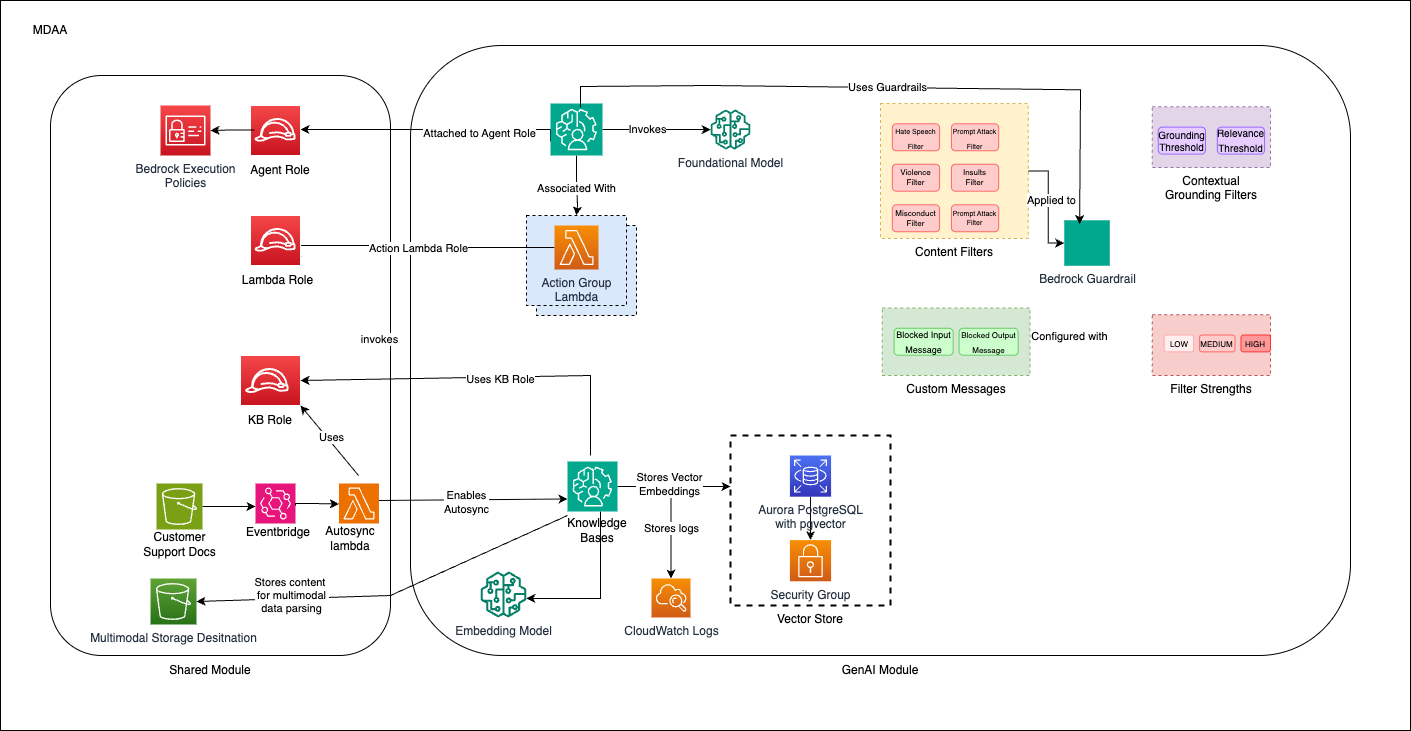
This starter kit deploys an enterprise-ready Customer Support Agent using Amazon Bedrock, featuring intelligent agents with RAG capabilities, knowledge bases, guardrails, and multi-sync architecture for concurrent document processing.
Use Cases
- Customer support agent assistant with natural language interaction
- Knowledge base search and retrieval over internal documents
- Document processing and analysis with RAG (Retrieval Augmented Generation)
- Multi-modal content handling (text and images)
Capabilities
- Bedrock Agents with custom action groups for customer support
- Knowledge Bases with vector stores for efficient retrieval
- Guardrails for content safety and appropriate responses
- Multi-sync architecture for concurrent file uploads
- KMS-encrypted S3 buckets for knowledge base data sources
- IAM roles with least-privilege Bedrock permissions
Architecture
Deployment
Prerequisites and Predeployment
- Authenticate to your target AWS account and region. Ensure the authenticated role has permissions to deploy resources via CDK.
- Bootstrap CDK in your target account and region.
Additional info: PREDEPLOYMENT
Configure MDAA
-
Address all TODOs in
mdaa.yaml, specifically:- Set
organizationto a globally unique name (used in S3 bucket names and all resource prefixes) - Set
vpc_id,subnet_id_1,subnet_id_2,subnet_id_3to your VPC/subnet IDs - Set
llm_modelto your chosen Bedrock model ID or inference profile ARN - Set
kb_embedding_modelandkb_parsing_model
- Set
-
Address all TODOs in module configs, specifically:
- CDK Nag suppressions in
roles.yaml. Uncomment each suppression only after reviewing the associated permissions and confirming they are acceptable for your environment.
- CDK Nag suppressions in
Deploy MDAA
Run the following from the starter kit directory (containing mdaa.yaml):
-
Optionally, run
npx @aws-mdaa/cli lsto understand what stacks will be deployed. -
Optionally, run
npx @aws-mdaa/cli synthand review the produced templates. -
Run
npx @aws-mdaa/cli deployto deploy all modules.
Additional info: DEPLOYMENT
Next Steps
See USAGE for post-deployment instructions including model configuration, document upload, and agent testing.
Modules Deployed
| Module | Purpose |
|---|---|
@aws-mdaa/roles |
IAM roles (data-admin, agent-execution, kb-execution, agent-lambda, kb-sync-lambda) |
@aws-mdaa/datalake |
KMS-encrypted S3 buckets for knowledge base data sources |
@aws-mdaa/bedrock-builder |
Bedrock Agents, Knowledge Bases, Guardrails, and Lambda action groups |
Troubleshooting
-
Access Denied when calling Bedrock: Verify the
llm_modelin context values is correct. For cross-region inference, use the inference profile ARN. Ensure the agent execution role has the necessary Bedrock permissions. -
Knowledge Base ingestion failures: Verify S3 bucket permissions and KMS key access. Check that documents are uploaded with proper encryption. Monitor CloudWatch logs for detailed error messages.
-
Agent not responding: Ensure the agent is in "Prepared" state. Check guardrail configurations. Verify Lambda function permissions for action groups.