Lambda Functions
Note: This documentation is also available in a rendered format here.
Deploys Lambda functions for data operations with VPC binding, EventBridge triggers (S3 notifications and scheduled rules), SQS queues and event source triggers, encrypted DLQ, Lambda layers, and Docker build support for complex dependencies. Common scenarios include running lightweight data transformations, responding to S3 upload events, executing scheduled data processing tasks, buffering variable ingestion load through a queue, or integrating with external APIs as part of a data pipeline.
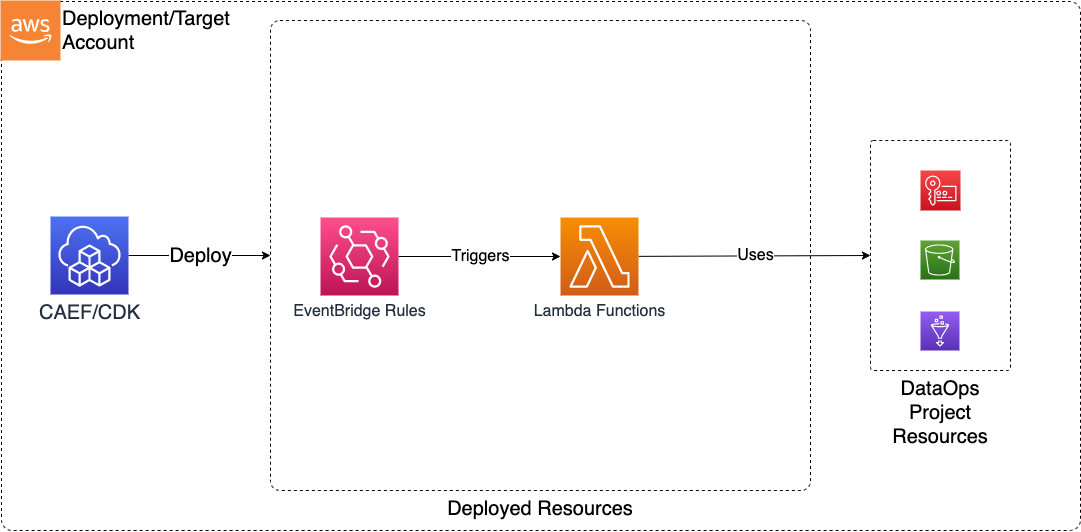
Deployed Resources
This module deploys and integrates the following resources:
Lambda Layers - Lambda layers which can be used in Lambda functions (inside or outside of this config)
Lambda Functions - Lambda functions for use in DataOps
- May be optionally VPC bound with configurable VPC, Subnet, and Security Group Parameters
- Can use an existing security group (from Project, for instance), or create a new security group per function
- DLQ automatically added for each Lambda with configurable retry/retention parameters
EventBridge Rules - EventBridge rules for triggering Lambda functions with events such as S3 Object Created Events
- EventBridge Notifications must be enabled on any bucket for which a rule is specified
SQS Queues - Standard or FIFO queues for buffering messages and decoupling producers from consumers
- Encrypted with the project KMS key, with non-SSL access denied
- A redrive dead letter queue is created for every queue, so repeatedly-failing messages are set aside instead of blocking the queue
- Queue name, ARN, and URL are published as SSM parameters for cross-module reference
- Consume and send permissions are granted automatically on the queue policy, based on how each function references the queue
SQS Event Source Mappings - Bindings which poll a queue and invoke a function with batches of messages
- Configurable batch size, batching window, and maximum concurrency for backpressure
- Optional message-level partial failure reporting and event filtering
Related Modules
- DataOps Project — Deploy the shared project infrastructure (KMS keys, security groups) that Lambda functions reference
- Step Functions — Orchestrate Lambda functions with Step Functions state machines
- Dashboard — Visualize Lambda function metrics and logs in CloudWatch dashboards
- EventBridge — Deploy custom event buses that Lambda functions can publish to or be triggered by
- Data Lake — Lambda functions can process data in data lake S3 buckets via EventBridge S3 notifications
Security/Compliance Details
This module is designed in alignment with MDAA security/compliance principles and CDK nag rulesets. Additional review is recommended prior to production deployment, to assist in meeting organization-specific compliance requirements.
- Encryption at Rest:
- Function environment variables encrypted with project KMS key
- DLQ messages encrypted with project KMS key
- Queue messages encrypted with project KMS key
- Encryption in Transit:
- Queue policies deny any request made without TLS
- Least Privilege:
- Execution roles specified per function
- Configurable reserved concurrency to prevent resource exhaustion
- Queue consume and send permissions granted through the queue resource policy rather than identity policies attached to the execution role, and only to the functions that reference the queue
- Network Isolation:
- Optional VPC binding with configurable egress rules (CIDR, security group, prefix list)
- Per-function security groups deny all ingress by default
- All egress allowed by default (configurable)
AWS Service Endpoints
The following VPC endpoints may be required for VPC-bound Lambda functions if public AWS service endpoint connectivity is unavailable (e.g., private subnets without NAT gateway, firewalled environments, or PrivateLink-only architectures):
| AWS Service | Endpoint Service Name | Type |
|---|---|---|
| Lambda | com.amazonaws.{region}.lambda |
Interface |
| KMS | com.amazonaws.{region}.kms |
Interface |
| S3 | com.amazonaws.{region}.s3 |
Gateway |
| SQS | com.amazonaws.{region}.sqs |
Interface |
| CloudWatch Logs | com.amazonaws.{region}.logs |
Interface |
| STS | com.amazonaws.{region}.sts |
Interface |
| SSM Parameter Store | com.amazonaws.{region}.ssm |
Interface |
| EventBridge | com.amazonaws.{region}.events |
Interface |
Additional VPC endpoints may be required depending on the AWS services accessed by your custom Lambda function code.
SQS Queues and Event Sources
Queues are declared once under the module's queues: section and referenced by key from the functions that use them. A consumer binds to a queue through sqsEventSources, keyed by queue name; a producer receives the queue URL through queueUrlEnvironment. Both reference the same key, and referencing a key that is not declared fails synthesis. Because sqsEventSources is keyed by queue name, a function cannot bind to the same queue twice.
Visibility timeout must cover the consumer's timeout
A queue's visibilityTimeoutSeconds must be at least the timeoutSeconds of every function that consumes it as an event source. Lambda rejects a shorter visibility timeout when it creates the event source mapping, and CDK does not check it — so this module validates it at synthesis time and fails with both values named.
Two details worth knowing:
- The check uses the effective values. A queue with no
visibilityTimeoutSecondsgets the SQS default of 30 seconds, and a function with notimeoutSecondsgets the Lambda default of 3 seconds, so leaving either unset does not skip validation. - Lambda itself only enforces the constraint when a mapping is created or updated. Raising a function's timeout above the visibility timeout of a queue it is already bound to leaves the deployed mapping enabled in an invalid state, where a message can become visible again mid-processing and be delivered twice. This module therefore validates on every synthesis, not only when a queue or mapping is newly introduced.
AWS recommends a visibility timeout of at least six times the function timeout. Only the hard constraint fails synthesis.
Permissions live on the queue
Queue permissions are granted to a function's execution role through the queue resource policy, not through an identity policy on the role, and both directions are wired for you:
| Function declares | Granted on the queue policy |
|---|---|
sqsEventSources (consumer) |
sqs:ReceiveMessage, sqs:DeleteMessage, sqs:GetQueueAttributes |
queueUrlEnvironment (producer) |
sqs:SendMessage |
Injecting a queue URL is what marks a function as a producer for that queue, so no separate permission config is needed — a function given the URL can send to it.
This module removes the inline policy CDK attaches to each execution role so that the IAMNoInlinePolicy rules are not tripped, and Lambda validates a consumer's effective permissions when creating the mapping, which a resource policy grant satisfies. The AWS documentation lists the three consume actions as execution-role permissions; do not add them to the role generated by the Roles module on that basis — it is not required, and it reintroduces the findings this design avoids.
All functions granted the same actions on the same queue share one policy statement, with each role added as a principal.
KMS access is a prerequisite, not something this module grants
Queues are CMK-encrypted, so a consumer needs kms:Decrypt and a producer needs kms:GenerateDataKey on the encryption key. This module grants neither, and cannot: the key is referenced by ARN, so its policy is not modifiable from this stack, and an identity-based grant would be removed along with the inline policy this module deletes.
With projectName set — the normal case — nothing is required of you. Alongside its role-scoped key-user statement, the DataOps Project key carries an sqsEncryption statement granting both actions to any principal in the account acting through SQS (conditioned on kms:CallerAccount and kms:ViaService). That covers every function regardless of whether its execution role is a registered key user, and it is the same statement the per-function async-invoke dead letter queues have always relied on.
With a standalone kmsArn pointing at a key not managed by a DataOps Project, that statement is not guaranteed. The key's policy must grant the execution roles kms:Decrypt and kms:GenerateDataKey, either directly or via an SQS-scoped statement of the same shape. If it does not, the queue and event source mapping deploy cleanly and the function fails at runtime with a KMS AccessDenied — an imported key's policy cannot be read at synthesis time, so this is not something the module can check for you.
Choosing queue names
The keys under queues: become the generated queue names, as <org>-<env>-<domain>-<module>-<key>. SQS constrains what those names may contain, so the keys are validated at synthesis time:
| Rule | Why |
|---|---|
| Only alphanumeric characters, hyphens, and underscores | CreateQueue rejects anything else with InvalidParameterValue. A . is the trap: MDAA's general resource-name validation allows it, so without this check a key like my.queue would synthesize cleanly and fail on deploy |
No .fifo suffix on the key |
Set fifo: true instead and the suffix is appended for you, after truncation, so it survives the 80-character cap |
| Unique against other queue keys and every function name | A queue's redrive dead letter queue and a function's async-invoke dead letter queue are both named <key>-dlq, so an overlap renders two queues with one physical name — clean synthesis, failed deploy |
| Non-empty | An empty key would name the queue after the module alone |
Two behaviours that are not errors but are worth knowing:
- Uppercase is lowercased. A key of
MyQueueproduces…-myqueue. Reference it fromsqsEventSourcesandqueueUrlEnvironmentby the key as written, not the lowercased form. - Long keys are truncated to a hash. The budget for your key is 80 characters minus the
<org>-<env>-<domain>-<module>-prefix. Beyond that the tail is replaced with-<hash>, which stays unique and stable across deploys but is no longer readable — so keep keys short relative to that budget.
Configuration
MDAA Config
Add the following snippet to your mdaa.yaml under the modules: section of a domain/env in order to use this module:
dataops-lambda: # Module Name can be customized
  module_path: '@aws-mdaa/dataops-lambda' # Must match module NPM package name
  module_configs:
    - ./dataops-lambda.yaml # Filename/path can be customized
Module Config Samples and Variants
Copy the contents of the relevant sample config below into the ./dataops-lambda.yaml file referenced in the MDAA config snippet above.
Minimal Configuration
Deploys a single Lambda function with project autowiring. Start here for a basic data operations function within an existing DataOps project.
# Contents available via above link
# Minimal DataOps Lambda module configuration.
# Deploys a single Lambda function with project autowiring.

# (Optional) DataOps project name for Lambda resource autowiring.
projectName: dataops-project-test

# (Optional) Lambda function definitions.
functions:
  - functionName: my-function
    # Function source code directory
    srcDir: ./src/lambda/test
    # Code path to the Lambda handler function.
    handler: test.lambda_handler
    # The runtime for the function source code.
    runtime: python3.14
    # The role with which the Lambda function will be executed.
    roleArn: ssm:/sample-org/instance1/generated-role/lambda/arn
    # Number of times Lambda (0-2) will retry.
    retryAttempts: 2
    # Max age of an invocation event in seconds.
    maxEventAgeSeconds: 3600
Comprehensive Configuration
Demonstrates Lambda functions and layers with VPC connectivity, environment variables, event schedules, and SQS queues with event source triggers, all wired to a DataOps project. Start here when evaluating all available options for VPC binding, event triggers, queues, layers, and concurrency settings.
sample-config-comprehensive.yaml
# Contents available via above link
# Sample config for the DataOps Lambda module - project variant.
# Demonstrates Lambda functions and layers with VPC connectivity,
# environment variables, event schedules, and SQS queues with
# event source triggers, all wired to a DataOps project.

# (Optional) DataOps project name for Lambda function resource
# autowiring.
projectName: dataops-project-test

# (Optional) SNS topic ARN for job notifications and workflow alerts.
# Auto-resolved from project when projectName is set.
notificationTopicArn: arn:{{partition}}:sns:{{region}}:{{account}}:test-topic

# (Optional) Lambda layer definitions for shared code and
# dependencies across functions.
layers:
  - layerName: test-layer
    src: ./src/lambda/test
    description: 'test layer'

# (Optional) SQS queues created by this module. Each queue is encrypted with the
# project KMS key, denies non-SSL access, and is created with a redrive dead letter
# queue so repeatedly-failing messages are set aside instead of blocking the queue.
queues:
  data-pipeline-queue:
    # Must be at least the timeout of every function consuming this queue as an event
    # source, otherwise Lambda rejects the event source mapping. AWS recommends six
    # times the function timeout.
    visibilityTimeoutSeconds: 1800
    # Wait this many seconds for a message to arrive before returning empty (long polling)
    receiveMessageWaitTimeSeconds: 20
    dlq:
      # Messages are redriven to the dead letter queue after this many failed
      # deliveries. Defaults to 5, which AWS recommends as a minimum.
      maxReceiveCount: 5

  # Example of a FIFO queue. The '.fifo' suffix which SQS requires is appended to the
  # generated queue name automatically - including it here fails synthesis.
  # Queue names must also not collide with a function name below, since both generate a
  # dead letter queue named '<name>-dlq'.
  ordered-events-queue:
    fifo: true
    # Treat messages with identical content as duplicates, instead of requiring an
    # explicit deduplication ID on each send. Only applies to FIFO queues.
    contentBasedDeduplication: true
    visibilityTimeoutSeconds: 300
    # Seconds a message is retained before SQS discards it
    retentionPeriodSeconds: 345600
    # Seconds to delay delivery of every message sent to the queue
    deliveryDelaySeconds: 0
    # Maximum size in bytes of a single message
    maxMessageSizeBytes: 262144

# (Optional) Lambda function definitions for serverless data
# processing within the project.
functions:
  # Required function parameters
  - functionName: testfun # Function name. Must be unique within the config.

    # (Optional) Function Description
    description: Function descriptions

    # Function source code directory
    srcDir: ./src/lambda/test

    # Code path to the Lambda handler function.
    handler: test.lambda_handler

    # The runtime for the function source code.
    runtime: python3.14

    # The role with which the Lambda function will be executed
    roleArn: ssm:/sample-org/instance1/generated-role/lambda/arn

    # Number of times Lambda (0-2) will retry before the invocation event
    # is sent to DLQ.
    retryAttempts: 2
    # The max age of an invocation event before it is sent to DLQ, either due to
    # failure, or insufficient Lambda capacity.
    maxEventAgeSeconds: 3600

    # (Optional) Number of seconds after which the function will time out.
    # Default is 3 seconds
    timeoutSeconds: 10

    # (Optional) Set of environment variables and values to be passed to function
    environment:
      env-var-name: value

    # (Optional) Number of reserved concurrent instances to be configured on the function.
    # Ensures function always has this amount of concurrency available, but
    # is subtracted from the overall account-wide concurrency limits.
    # Default is to not reserve concurrency, and use the account-wide pool.
    reservedConcurrentExecutions: 100

    # (Optional) Size of function execution memory in MB
    # Default is 128MB
    memorySizeMB: 512

    # (Optional) Size of function ephemeral storage in MB
    # Default is 1024MB
    ephemeralStorageSizeMB: 1024

    # (Optional) Principal ARN granted Lambda invoke permissions.
    grantInvoke: 'arn:{{partition}}:iam::{{account}}:role/invoker-role'

    # (Optional) Additional resource permissions mapped by SID.
    additionalResourcePermissions:
      AllowS3Invoke:
        # Lambda action (e.g., lambda:InvokeFunction).
        action: 'lambda:InvokeFunction'
        # AWS principal ARN for Lambda function access.
        principal: 's3.amazonaws.com'
        # Optional source account restriction for cross-account security.
        sourceAccount: '{{account}}'
        # Optional source resource ARN restriction for fine-grained access control.
        sourceArn: 'arn:{{partition}}:s3:::my-trigger-bucket'

    # Integration with Event Bridge for the purpose
    # of triggering this function with Event Bridge rules
    eventBridge:
      # Number of times Event Bridge will attempt to trigger this function
      # before sending event to DLQ. Note that Event Bridge Lambda invocation
      # is async, so Lambda Function execution errors will generally be handled
      # on the Lambda side itself.
      retryAttempts: 10
      # The max age of an event before Event Bridges sends it to DLQ.
      maxEventAgeSeconds: 3600
      # List of s3 buckets and prefixes which will be monitored via EventBridge in order to trigger this function
      # Note that the S3 Bucket must have Event Bridge Notifications enabled.
      s3EventBridgeRules:
        testing-event-bridge-s3:
          # The bucket producing event notifications
          buckets: [sample-org-dev-instance1-datalake-raw]
          # Optional - The S3 prefix to match events on
          prefixes: [data/test-lambda/]
          # Optional - Can specify a custom event bus for S3 rules, but note that S3 EventBridge notifications
          # are initially sent only to the default bus in the account, and would need to be
          # forwarded to the custom bus before this rule would match.
          eventBusArn: 'arn:{{partition}}:events:{{region}}:{{account}}:event-bus/some-custom-name'
      # List of generic Event Bridge rules which will trigger this function
      eventBridgeRules:
        testing-event-bridge:
          description: 'testing'
          eventBusArn: 'arn:{{partition}}:events:{{region}}:{{account}}:event-bus/some-custom-name'
          eventPattern:
            source:
              - 'glue.amazonaws.com'
            detail:
              some_event_key: some_event_value
        testing-event-bridge-schedule:
          description: 'testing'
          # (Optional) - Rules can be scheduled using a crontab expression
          scheduleExpression: 'cron(0 20 * * ? *)'
          # (Optional) - If specified, this input will be passed as the event payload to the function.
          # If not specified, the matched event payload will be passed as input.
          input:
            some-test-input-obj:
              some-test-input-key: test-value

  # Example of a function which is VPC bound using a custom security group for this function
  - functionName: testfunvpc
    srcDir: ./src/lambda/test
    handler: test.lambda_handler
    runtime: python3.14
    roleArn: ssm:/sample-org/instance1/generated-role/lambda/arn
    # If vpcConfig is specified, Lambda will be VPC bound
    vpcConfig:
      # Required - The VPC on which the lambda will be bound
      vpcId: 'some-vpc-id'
      # Required - the list of subnet ids on which ENIs will be created for the Lambda
      subnetIds:
        - 'some-subnet-id'

      # Optional - If specified, custom security group egress rules will be generated, and
      # outgoing traffic from the function will be limited to these rules.
      # If not specified, all outgoing traffic from the function will be permitted.
      securityGroupEgressRules:
        # Allow egress to a CIDR range
        ipv4:
          - cidr: 10.0.0.0/8
            port: 443
            protocol: tcp
            # Optional description for the rule
            description: 'Allow HTTPS to internal network'
          # CIDR rule with port range (toPort defines upper bound)
          - cidr: 172.16.0.0/12
            port: 8080
            # Ending port number defining the upper bound of the port range
            toPort: 8090
            protocol: tcp
            description: 'Allow custom port range to private network'
        # Allow egress to another Security Group
        sg:
          - sgId: sg-12312412412
            port: 443
            protocol: tcp
            description: 'Allow HTTPS to peer security group'
            # Ending port number defining the upper bound of the port range
            toPort: 443
        # Allow egress to a prefixlist
        prefixList:
          - prefixList: some-prefixlist-id
            port: 443
            protocol: tcp
            description: 'Allow HTTPS via prefix list'
            # Ending port number defining the upper bound of the port range
            toPort: 443

  # Example of a function which is VPC bound using an existing security group
  - functionName: testfunvpcexistingsg
    srcDir: ./src/lambda/test
    handler: test.lambda_handler
    runtime: python3.14
    roleArn: ssm:/sample-org/instance1/generated-role/lambda/arn
    # If vpcConfig is specified, Lambda will be VPC bound
    vpcConfig:
      # Required - The VPC on which the lambda will be bound
      vpcId: 'some-vpc-id'
      # Required - the list of subnet ids on which ENIs will be created for the Lambda
      subnetIds:
        - 'some-subnet-id'
      # Optional - If specified, this security group will be bound to the Lambda function vpc interfaces
      # In this example, we are using a security group generated by the DataOps Project module
      securityGroupId: project:securityGroupId/test-security-group

  # Example of a producer function which sends messages to one of the queues above
  - functionName: testqueueproducer
    srcDir: ./src/lambda/test
    handler: test.lambda_handler
    runtime: python3.14
    roleArn: ssm:/sample-org/instance1/generated-role/lambda/arn
    timeoutSeconds: 180
    # (Optional) Environment variables to be populated with the URL of a queue declared
    # above, mapped from environment variable name to queue name. Declaring this makes the
    # function a producer for that queue, so it is also granted sqs:SendMessage on the
    # queue policy - no separate permission config is needed.
    queueUrlEnvironment:
      TARGET_QUEUE_URL: data-pipeline-queue

  # Example of a consumer function triggered by messages on the queues above
  - functionName: testqueueconsumer
    srcDir: ./src/lambda/test
    handler: test.lambda_handler
    runtime: python3.14
    # Must be no greater than the visibilityTimeoutSeconds of every queue below
    timeoutSeconds: 300
    memorySizeMB: 1024
    roleArn: ssm:/sample-org/instance1/generated-role/lambda/arn
    # (Optional) SQS event sources which poll a queue declared above and invoke this
    # function with batches of messages, keyed by queue name.
    sqsEventSources:
      data-pipeline-queue:
        # Maximum number of messages delivered to the function per invocation. Batches
        # above 10 require maxBatchingWindowSeconds to also be set.
        batchSize: 10
        # Seconds to gather messages before invoking the function, trading latency for
        # fewer, larger batches.
        maxBatchingWindowSeconds: 5
        # Return only the failed messages to the queue instead of the whole batch.
        # Requires the function to return a batchItemFailures payload.
        reportBatchItemFailures: true
        # Caps concurrent invocations driven by this queue, applying backpressure so a
        # queue backlog cannot exhaust account concurrency.
        maxConcurrency: 20
        # (Optional) Only deliver messages matching one of these filter patterns.
        # Non-matching messages are dropped without invoking the function.
        filterCriteria:
          - body:
              eventType:
                - order-created
      ordered-events-queue:
        batchSize: 1
        # (Optional) Deploy the event source mapping in a stopped state, to be enabled
        # later. Defaults to true.
        enabled: false

  # Example of a function which uses Lambda layers
  - functionName: testlayerfunction
    srcDir: ./src/lambda/test
    handler: test.lambda_handler
    runtime: python3.14
    roleArn: ssm:/sample-org/instance1/generated-role/lambda/arn
    layerArns:
      some-existing-layer: some-existing-layer-arn
    generatedLayerNames:
      - 'test-layer'

  # Example of a function which uses a DockerBuild
  - functionName: testdockerfunction
    srcDir: ./src/lambda/docker
    roleArn: ssm:/sample-org/instance1/generated-role/lambda/arn
    # If true, lambda function will be built and deployed using Docker
    # In this case, the srcDir is expected to container a Dockerfile
    dockerBuild: true

  # Example of a function with CloudWatch Logs Insights queries
  - functionName: testobservabilityfunction
    srcDir: ./src/lambda/test
    handler: test.lambda_handler
    runtime: python3.14
    roleArn: ssm:/sample-org/instance1/generated-role/lambda/arn
    description: Function with CloudWatch observability features

    # CloudWatch Logs Insights queries for analyzing function logs
    logInsightsQueries:
      # Query without explicit log groups (will use function's log group)
      - queryName: testobservabilityfunction/errors
        queryString: |
          fields @timestamp, @message
          | filter @message like /ERROR/
          | sort @timestamp desc

      # Query with explicit log groups for cross-function analysis
      - queryName: testobservabilityfunction/performance
        queryString: |
          fields @timestamp, @duration, @billedDuration, @memorySize, @maxMemoryUsed
          | stats avg(@duration), max(@duration), min(@duration), avg(@maxMemoryUsed)
        logGroupNames:
          - /aws/lambda/testobservabilityfunction
          - /aws/lambda/testfun

      # Query without limit clause (will be auto-added)
      - queryName: testobservabilityfunction/recent-invocations
        queryString: |
          fields @timestamp, @requestId, @message
          | sort @timestamp desc

    # CloudWatch metric filters for extracting custom metrics from logs
    metricFilters:
      # Filter with single transformation
      - filterName: error-count
        filterPattern: '{ $.level = "error" }'
        metricTransformations:
          - metricName: error-count
            metricNamespace: TestObservability/Errors
            metricValue: '1'
            unit: Count
            # Default value when filter pattern does not match.
            defaultValue: 0

      # Filter with multiple transformations
      - filterName: processing-metrics
        filterPattern: '[timestamp, request_id, level, msg, duration_ms, memory_mb]'
        metricTransformations:
          - metricName: processing-duration-ms
            metricNamespace: TestObservability/Performance
            metricValue: '$duration_ms'
            unit: Milliseconds
          - metricName: memory-usage-mb
            metricNamespace: TestObservability/Performance
            metricValue: '$memory_mb'
            unit: Megabytes

      # Filter with dimensions
      - filterName: error-count-with-dimensions
        filterPattern: '{ $.level = "error" }'
        metricTransformations:
          - metricName: error-count-by-type
            metricNamespace: TestObservability/Errors
            metricValue: '1'
            unit: Count
            dimensions:
              Environment: test
              Service: observability

    # CloudWatch alarms for monitoring metrics
    alarms:
      # Simple single metric alarm referencing custom metric
      - alarmName: high-error-rate
        metricName: error-count
        namespace: TestObservability/Errors
        statistic: Sum
        period: 300
        evaluationPeriods: 3
        # Datapoints that must breach threshold (M out of N evaluation).
        datapointsToAlarm: 2
        threshold: 5
        comparisonOperator: GreaterThanOrEqualToThreshold
        treatMissingData: notBreaching
        alarmDescription: Alert when error count exceeds threshold
        actionsEnabled: true
        # CloudWatch metric unit.
        unit: Count
        alarmActions:
          - project:projectTopicArn/default

      # AWS Lambda metric alarm with {{functionName}} placeholder
      - alarmName: lambda-errors
        metricName: Errors
        namespace: AWS/Lambda
        statistic: Sum
        period: 60
        evaluationPeriods: 1
        threshold: 1
        comparisonOperator: GreaterThanOrEqualToThreshold
        alarmDescription: Alert on Lambda function errors
        dimensions:
          FunctionName: '{{functionName}}'
        alarmActions:
          - 'arn:{{partition}}:sns:{{region}}:{{account}}:test-alerts'
        okActions:
          - 'arn:{{partition}}:sns:{{region}}:{{account}}:test-alerts'

      # Metric math alarm (advanced)
      - alarmName: total-errors-across-metrics
        evaluationPeriods: 1
        threshold: 10
        comparisonOperator: GreaterThanOrEqualToThreshold
        treatMissingData: notBreaching
        alarmDescription: Alert when total errors across all metrics exceed threshold
        metrics:
          - id: total
            expression: 'm1+m2'
            label: 'Total Errors'
            returnData: true
          - id: m1
            metricName: error-count
            namespace: TestObservability/Errors
            statistic: Sum
            period: 300
          - id: m2
            metricName: error-count-by-type
            namespace: TestObservability/Errors
            statistic: Sum
            period: 300
            # Metric dimensions for filtering to specific instances.
            dimensions:
              Environment: test
            # CloudWatch metric unit (e.g., Count, Milliseconds).
            unit: Count
        alarmActions:
          - 'arn:{{partition}}:sns:{{region}}:{{account}}:test-alerts'
        insufficientDataActions:
          - 'arn:{{partition}}:sns:{{region}}:{{account}}:test-alerts'
Standalone Configuration (No Project)
Demonstrates standalone Lambda functions and layers with explicit KMS, bucket, deployment role, and security configuration. Use this when deploying outside of a DataOps project, providing infrastructure references directly.
If you add a queues: section to a standalone config, read KMS access is a prerequisite first — the key you supply must grant the execution roles KMS access, which a DataOps Project key does for you and an arbitrary key does not.
# Contents available via above link
# Sample config for the DataOps Lambda module - no-project variant.
# Demonstrates standalone Lambda functions and layers with explicit
# KMS, bucket, deployment role, and security configuration.

# (Optional) KMS key ARN for encrypting DataOps resources and data.
# Auto-resolved from project when projectName is set.
#
# If you add a `queues:` section to a standalone config like this one, this key's
# policy must grant the function execution roles kms:Decrypt (to consume) and
# kms:GenerateDataKey (to produce), because queues are CMK-encrypted. This module
# cannot grant them - the key is referenced by ARN, so its policy is not modifiable
# from this stack. A DataOps Project key already carries an SQS-scoped statement
# covering both; an arbitrary key does not, and the shortfall surfaces only at
# runtime as a KMS AccessDenied. See the module README, "KMS access is a
# prerequisite, not something this module grants".
kmsArn: arn:{{partition}}:kms:{{region}}:{{account}}:key/test-key-id
# (Optional) S3 bucket name for project storage (scripts, artifacts,
# temp files). Auto-resolved from project when projectName is set.
bucketName: test-lambda-bucket
# (Optional) IAM role ARN for deployment operations and resource
# management. Auto-resolved from project when projectName is set.
deploymentRoleArn: arn:{{partition}}:iam::{{account}}:role/test-deploy-role
# (Optional) Glue security configuration name for job encryption
# (at rest, in transit, CloudWatch logs). Auto-resolved from project
# when projectName is set.
securityConfigurationName: test-security-config
# (Optional) SNS topic ARN for job notifications and workflow alerts.
# Auto-resolved from project when projectName is set.
notificationTopicArn: arn:{{partition}}:sns:{{region}}:{{account}}:test-topic

# (Optional) Lambda layer definitions for shared code and
# dependencies across functions.
layers:
  - layerName: test-layer
    src: ./src/lambda/test
    description: 'test layer'

# (Optional) Lambda function definitions for serverless data
# processing within the project.
functions:
  # Required function parameters
  - functionName: testfun # Function name. Must be unique within the config.

    # (Optional) Function Description
    description: Function descriptions

    # Function source code directory
    srcDir: ./src/lambda/test

    # Code path to the Lambda handler function.
    handler: test.lambda_handler

    # The runtime for the function source code.
    runtime: python3.14

    # The role with which the Lambda function will be executed
    roleArn: ssm:/sample-org/instance1/generated-role/lambda/arn

    # Number of times Lambda (0-2) will retry before the invocation event
    # is sent to DLQ.
    retryAttempts: 2
    # The max age of an invocation event before it is sent to DLQ, either due to
    # failure, or insufficient Lambda capacity.
    maxEventAgeSeconds: 3600

    # (Optional) Number of seconds after which the function will timeout.
    # Default is 3 seconds
    timeoutSeconds: 10

    # (Optional) Set of environment variables and values to be passed to function
    environment:
      env-var-name: value

    # (Optional) Number of reserved concurrent instances to be configured on the function.
    # Ensures function always has this amount of concurrency available, but
    # is subtracted from the overall account-wide concurrency limits.
    # Default is to not reserve concurrency, and use the account-wide pool.
    reservedConcurrentExecutions: 100

    # (Optional) Size of function execution memory in MB
    # Default is 128MB
    memorySizeMB: 512

    # (Optional) Size of function ephemeral storage in MB
    # Default is 1024MB
    ephemeralStorageSizeMB: 1024

    # (Optional) Principal ARN granted Lambda invoke permissions.
    grantInvoke: 'arn:{{partition}}:iam::{{account}}:role/invoker-role'

    # (Optional) Additional resource permissions mapped by SID.
    additionalResourcePermissions:
      AllowS3Invoke:
        # Lambda action (e.g., lambda:InvokeFunction).
        action: 'lambda:InvokeFunction'
        # AWS principal ARN for Lambda function access.
        principal: 's3.amazonaws.com'
        # Optional source account restriction for cross-account security.
        sourceAccount: '{{account}}'
        # Optional source resource ARN restriction for fine-grained access control.
        sourceArn: 'arn:{{partition}}:s3:::my-trigger-bucket'

    # Integration with Event Bridge for the purpose
    # of triggering this function with Event Bridge rules
    eventBridge:
      # Number of times Event Bridge will attempt to trigger this function
      # before sending event to DLQ. Note that Event Bridge Lambda invocation
      # is async, so Lambda Function execution errors will generally be handled
      # on the Lambda side itself.
      retryAttempts: 10
      # The max age of an event before Event Bridges sends it to DLQ.
      maxEventAgeSeconds: 3600
      # List of s3 buckets and prefixes which will be monitored via EventBridge in order to trigger this function
      # Note that the S3 Bucket must have Event Bridge Notifications enabled.
      s3EventBridgeRules:
        testing-event-bridge-s3:
          # The bucket producing event notifications
          buckets: [sample-org-dev-instance1-datalake-raw]
          # Optional - The S3 prefix to match events on
          prefixes: [data/test-lambda/]
          # Optional - Can specify a custom event bus for S3 rules, but note that S3 EventBridge notifications
          # are initially sent only to the default bus in the account, and would need to be
          # forwarded to the custom bus before this rule would match.
          eventBusArn: 'arn:{{partition}}:events:{{region}}:{{account}}:event-bus/some-custom-name'
      # List of generic Event Bridge rules which will trigger this function
      eventBridgeRules:
        testing-event-bridge:
          description: 'testing'
          eventBusArn: 'arn:{{partition}}:events:{{region}}:{{account}}:event-bus/some-custom-name'
          eventPattern:
            source:
              - 'glue.amazonaws.com'
            detail:
              some_event_key: some_event_value
        testing-event-bridge-schedule:
          description: 'testing'
          # (Optional) - Rules can be scheduled using a crontab expression
          scheduleExpression: 'cron(0 20 * * ? *)'
          # (Optional) - If specified, this input will be passed as the event payload to the function.
          # If not specified, the matched event payload will be passed as input.
          input:
            some-test-input-obj:
              some-test-input-key: test-value

  # Example of a function which is VPC bound using a custom security group for this function
  - functionName: testfunvpc
    srcDir: ./src/lambda/test
    handler: test.lambda_handler
    runtime: python3.14
    roleArn: ssm:/sample-org/instance1/generated-role/lambda/arn
    # If vpcConfig is specified, Lambda will be VPC bound
    vpcConfig:
      # Required - The VPC on which the lambda will be bound
      vpcId: 'some-vpc-id'
      # Required - the list of subnet ids on which ENIs will be created for the Lambda
      subnetIds:
        - 'some-subnet-id'

      # Optional - If specified, custom security group egress rules will be generated, and
      # outgoing traffic from the function will be limited to these rules.
      # If not specified, all outgoing traffic from the function will be permitted.
      securityGroupEgressRules:
        # Allow egress to a CIDR range
        ipv4:
          - cidr: 10.0.0.0/8
            port: 443
            protocol: tcp
        # Allow egress to another Security Group
        sg:
          - sgId: sg-12312412412
            port: 443
            protocol: tcp
        # Allow egress to a prefixlist
        prefixList:
          - prefixList: some-prefixlist-id
            port: 443
            protocol: tcp

  # Example of a function which is VPC bound using an existing security group
  - functionName: testfunvpcexistingsg
    srcDir: ./src/lambda/test
    handler: test.lambda_handler
    runtime: python3.14
    roleArn: ssm:/sample-org/instance1/generated-role/lambda/arn
    # If vpcConfig is specified, Lambda will be VPC bound
    vpcConfig:
      # Required - The VPC on which the lambda will be bound
      vpcId: 'some-vpc-id'
      # Required - the list of subnet ids on which ENIs will be created for the Lambda
      subnetIds:
        - 'some-subnet-id'
      # Optional - If specified, this security group will be bound to the Lambda function vpc interfaces
      # In this example, we are using a security group generated by the DataOps Project module
      securityGroupId: test-security-group-id

  # Example of a function which uses Lambda layers
  - functionName: testlayerfunction
    srcDir: ./src/lambda/test
    handler: test.lambda_handler
    runtime: python3.14
    roleArn: ssm:/sample-org/instance1/generated-role/lambda/arn
    layerArns:
      some-existing-layer: some-existing-layer-arn
    generatedLayerNames:
      - 'test-layer'

  # Example of a function which uses a DockerBuild
  - functionName: testdockerfunction
    srcDir: ./src/lambda/docker
    roleArn: ssm:/sample-org/instance1/generated-role/lambda/arn
    # If true, lambda function will be built and deployed using Docker
    # In this case, the srcDir is expected to container a Dockerfile
    dockerBuild: true

  # Example of a function with CloudWatch Logs Insights queries
  - functionName: testobservabilityfunction
    srcDir: ./src/lambda/test
    handler: test.lambda_handler
    runtime: python3.14
    roleArn: ssm:/sample-org/instance1/generated-role/lambda/arn
    description: Function with CloudWatch observability features

    # CloudWatch Logs Insights queries for analyzing function logs
    logInsightsQueries:
      # Query without explicit log groups (will use function's log group)
      - queryName: testobservabilityfunction/errors
        queryString: |
          fields @timestamp, @message
          | filter @message like /ERROR/
          | sort @timestamp desc

      # Query with explicit log groups for cross-function analysis
      - queryName: testobservabilityfunction/performance
        queryString: |
          fields @timestamp, @duration, @billedDuration, @memorySize, @maxMemoryUsed
          | stats avg(@duration), max(@duration), min(@duration), avg(@maxMemoryUsed)
        logGroupNames:
          - /aws/lambda/testobservabilityfunction
          - /aws/lambda/testfun

      # Query without limit clause (will be auto-added)
      - queryName: testobservabilityfunction/recent-invocations
        queryString: |
          fields @timestamp, @requestId, @message
          | sort @timestamp desc

    # CloudWatch metric filters for extracting custom metrics from logs
    metricFilters:
      # Filter with single transformation
      - filterName: error-count
        filterPattern: '{ $.level = "error" }'
        metricTransformations:
          - metricName: error-count
            metricNamespace: TestObservability/Errors
            metricValue: '1'
            unit: Count

      # Filter with multiple transformations
      - filterName: processing-metrics
        filterPattern: '[timestamp, request_id, level, msg, duration_ms, memory_mb]'
        metricTransformations:
          - metricName: processing-duration-ms
            metricNamespace: TestObservability/Performance
            metricValue: '$duration_ms'
            unit: Milliseconds
          - metricName: memory-usage-mb
            metricNamespace: TestObservability/Performance
            metricValue: '$memory_mb'
            unit: Megabytes

      # Filter with dimensions
      - filterName: error-count-with-dimensions
        filterPattern: '{ $.level = "error" }'
        metricTransformations:
          - metricName: error-count-by-type
            metricNamespace: TestObservability/Errors
            metricValue: '1'
            unit: Count
            dimensions:
              Environment: test
              Service: observability

    # CloudWatch alarms for monitoring metrics
    alarms:
      # Simple single metric alarm referencing custom metric
      - alarmName: high-error-rate
        metricName: error-count
        namespace: TestObservability/Errors
        statistic: Sum
        period: 300
        evaluationPeriods: 1
        threshold: 5
        comparisonOperator: GreaterThanOrEqualToThreshold
        treatMissingData: notBreaching
        alarmDescription: Alert when error count exceeds threshold
        actionsEnabled: true
        alarmActions:
          - arn:{{partition}}:sns:{{region}}:{{account}}:topic/test-topic

      # AWS Lambda metric alarm with {{functionName}} placeholder
      - alarmName: lambda-errors
        metricName: Errors
        namespace: AWS/Lambda
        statistic: Sum
        period: 60
        evaluationPeriods: 1
        threshold: 1
        comparisonOperator: GreaterThanOrEqualToThreshold
        alarmDescription: Alert on Lambda function errors
        dimensions:
          FunctionName: '{{functionName}}'
        alarmActions:
          - 'arn:{{partition}}:sns:{{region}}:{{account}}:test-alerts'
        okActions:
          - 'arn:{{partition}}:sns:{{region}}:{{account}}:test-alerts'

      # Metric math alarm (advanced)
      - alarmName: total-errors-across-metrics
        evaluationPeriods: 1
        threshold: 10
        comparisonOperator: GreaterThanOrEqualToThreshold
        treatMissingData: notBreaching
        alarmDescription: Alert when total errors across all metrics exceed threshold
        metrics:
          - id: total
            expression: 'm1+m2'
            label: 'Total Errors'
            returnData: true
          - id: m1
            metricName: error-count
            namespace: TestObservability/Errors
            statistic: Sum
            period: 300
          - id: m2
            metricName: error-count-by-type
            namespace: TestObservability/Errors
            statistic: Sum
            period: 300
        alarmActions:
          - 'arn:{{partition}}:sns:{{region}}:{{account}}:test-alerts'
        insufficientDataActions:
          - 'arn:{{partition}}:sns:{{region}}:{{account}}:test-alerts'