Generative AI Accelerator (GAIA)
Deprecated: GAIA v1 is deprecated. New deployments should use Generative AI Accelerator v2 (gaia-v2). This sample configuration will be removed in a future release. See the migration guide.
This is a sample basic GenAI Accelerator architecture which can be implemented using MDAA. This platform is centered around establishing an easy Generative AI on AWS adoption starting point. Built on previous experience delivering GenAI capabilities, this stack aims to automate the infrastructure and layout foundations to experiment and customize use cases around state of the art models while fully owning the code. GAIA is adaptable with usable built in code and optional code overriding where customization is required.
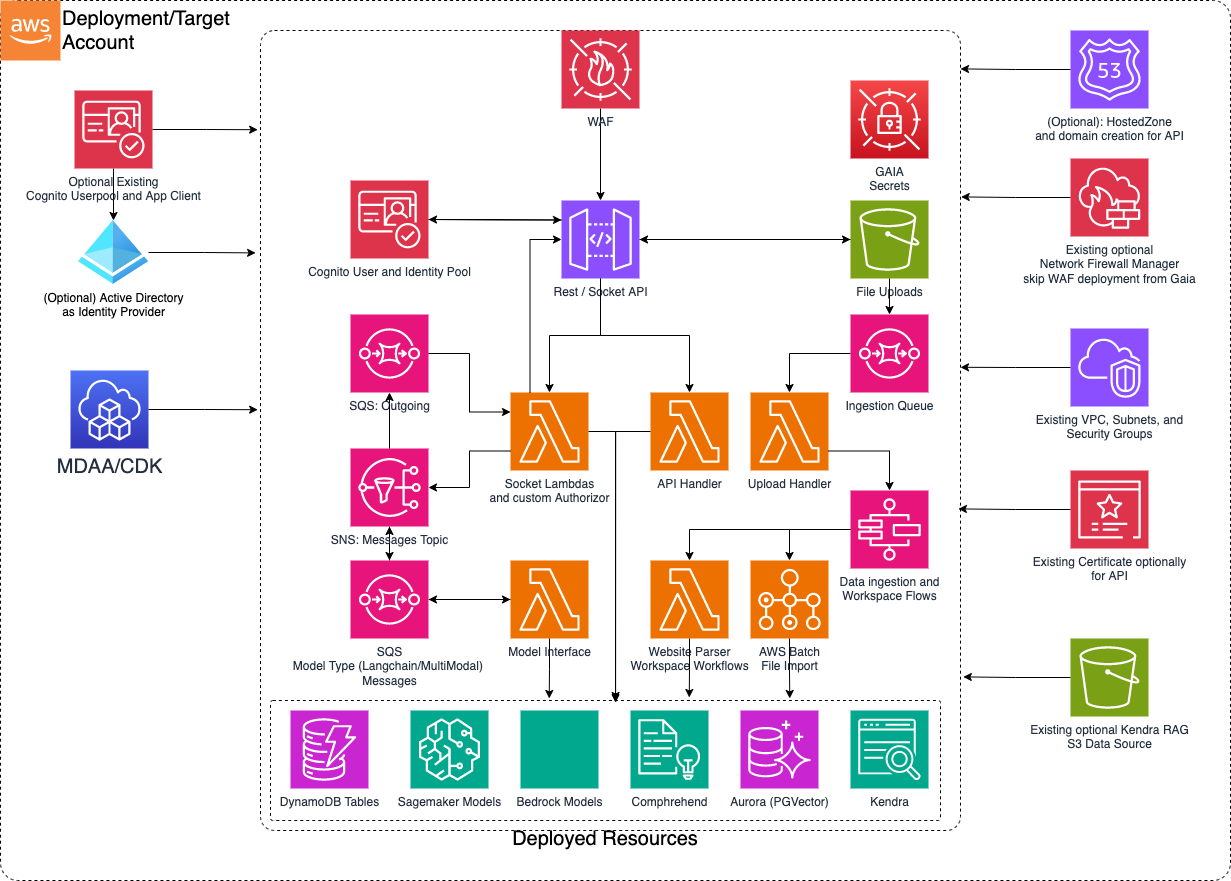
Deployment Instructions
The following instructions assume you have CDK bootstrapped your target account, and that the MDAA source repo is cloned locally. More predeployment info and procedures are available in PREDEPLOYMENT.
-
Deploy sample configurations into the specified directory structure (or obtain from the MDAA repo under
sample_configs/basic_gaia). -
Edit the
mdaa.yamlto specify an organization name. This must be a globally unique name, as it is used in the naming of all deployed resources, some of which are globally named (such as S3 buckets). -
If required, edit the
mdaa.yamlto specifycontext:values specific to your environment. -
Ensure you are authenticated to your target AWS account.
-
Optionally, run
<path_to_mdaa_repo>/bin/mdaa lsfrom the directory containingmdaa.yamlto understand what stacks will be deployed. -
Optionally, run
<path_to_mdaa_repo>/bin/mdaa synthfrom the directory containingmdaa.yamland review the produced templates. -
Run
<path_to_mdaa_repo>/bin/mdaa deployfrom the directory containingmdaa.yamlto deploy all modules.
Additional MDAA deployment commands/procedures can be reviewed in DEPLOYMENT.
Configurations
The sample configurations for this architecture are provided below. They are also available under sample_configs/basic_gaia within the MDAA repo.
Config Directory Structure
mdaa.yaml
This configuration specifies the global, domain, env, and module configurations required to configure and deploy this sample architecture.
Note - Before deployment, populate the mdaa.yaml with appropriate organization and context values for your environment
# Contents available in mdaa.yaml
# All resources will be deployed to the default region specified in the environment or AWS configurations.
# Can optional specify a specific AWS Region Name.
region: default

# One or more tag files containing tags which will be applied to all deployed resources
tag_configs:
  - ./tags.yaml

## Pre-Deployment Instructions
organization: <add-org>

context:
  vpc_id: <your vpc id>
  app_subnet_id_1:  <your app subnet id 1>
  app_subnet_id_2:  <your app subnet id 2>
  app_sg:  <your app sg>
  db_subnet_id_1:  <your db subnet id 1>
  db_subnet_id_2:  <your db subnet id 2>
  db_sg:  <your db sg>

# One or more domains may be specified. Domain name will be incorporated by default naming implementation
# to prefix all resource names.
domains:
  # The named of the domain. In this case, we are building a 'shared' domain.
  gaia-simple:
    # One or more environments may be specified, typically along the lines of 'dev', 'test', and/or 'prod'
    environments:

      # The environment name will be incorporated into resource name by the default naming implementation.
      dev:
        # The target deployment account can be specified per environment.
        # If 'default' or not specified, the account configured in the environment will be assumed.
        account: default
        context: {}
        # The list of modules which will be deployed. A module points to a specific CAEF CDK App, and
        # specifies a deployment configuration file if required.
        modules:
          # An AI module that will deploy a GenAI accelerator set of backend pieces
          backend:
            module_path: "@aws-mdaa/gaia"
            module_configs:
              - ./config/app.yaml

      # The environment name will be incorporated into resource name by the default naming implementation.
      test:
        # The target deployment account can be specified per environment.
        # If 'default' or not specified, the account configured in the environment will be assumed.
        account: default
        context: {}
        # The list of modules which will be deployed. A module points to a specific CAEF CDK App, and
        # specifies a deployment configuration file if required.
        modules:
          # An AI module that will deploy a GenAI accelerator set of backend pieces
          backend:
            module_path: "@aws-mdaa/gaia"
            module_configs:
              - ./config/app.yaml


      # The environment name will be incorporated into resource name by the default naming implementation.
      prod:
        # The target deployment account can be specified per environment.
        # If 'default' or not specified, the account configured in the environment will be assumed.
        account: default
        context: {}
        # The list of modules which will be deployed. A module points to a specific CAEF CDK App, and
        # specifies a deployment configuration file if required.
        modules:
          # An AI module that will deploy a GenAI accelerator set of backend pieces
          backend:
            module_path: "@aws-mdaa/gaia"
            module_configs:
              - ./config/app.yaml
tags.yaml
This configuration specifies the tags to be applied to all deployed resources.
config/app.yaml
This configuration will be used by the MDAA GAIA module to deploy the GenAI accelerator backends.
Ensure to modify the context for VPC specific details at least per environment to be leveraged by the config/app.yml file
# Contents available in config/app.yaml
gaia:
  dataAdminRoles: []
  prefix: "{{org}}-{{domain}}-{{env}}"
  bedrock:
    enabled: true
    region: ca-central-1
  llms:
    sagemaker: []
  rag:
    engines:
      sagemaker:
        instanceType: ml.inf1.xlarge
      aurora:
        minCapacity: 0.5
        maxCapacity: 4
      knowledgeBase: {}
    embeddingsModels: [
      {
        provider: "bedrock",
        name: "amazon.titan-embed-text-v2:0",
        dimensions: 1024,
        isDefault: true
      }
    ]
    crossEncoderModels: []
  # this block must not be enabled on first deployment of
  # the system.
  #   concurrency:
  #     modelInterfaceConcurrentLambdas: 10
  #     restApiConcurrentLambdas: 5
  #     websocketConcurrentLambdas: 2
  auth:
    authType: email_pass
    cognitoDomain: "{{org}}-{{domain}}-{{env}}"
  setApiGateWayAccountCloudwatchRole: true
  skipApiGatewayDefaultWaf: true
  vpc:
    vpcId: "{{context:vpc_id}}"
    appSecurityGroupId: "{{context:app_sg}}"
    appSubnets:
      - "{{context:app_subnet_id_1}}"
      - "{{context:app_subnet_id_2}}"
    dataSecurityGroupId: "{{context:db_sg}}"
    dataSubnets:
      - "{{context:db_subnet_id_1}}"
      - "{{context:db_subnet_id_2}}"
Usage Instructions
Once the MDAA deployment is complete, follow these steps to interact with GAIA.
-
Retrieve the X-Verify-Origin secret value and test backend calls from the API Gateway console.
-
Leverage the SSM parameter outputs from GAIA to bootstrap a user interface stack.
-
Provision user access based on the Authentication model deployed whether it is via the Active Directory or Cognito consoles.
-
Choose to override a subset or all of the Lambda function codes from the stack by passing in configuration entries for code overrides in the config/app.yaml and redeploy. What is not overridden falls back to existing MDAA GAIA code. Below is the list in config format of what can be overridden (Paths are relative to where the mdaa.yaml config file is):
codeOverwrites:
  restApiHandlerCodePath: The Rest API Handler Lambda Code
  commonLibsLayerCodeZipPath: Zip file of the requirements libraries installed with pip to be shared as a lambda layer.
  genAiCoreLayerCodePath: The core library code shared over several lambdas from the stack.  Clients and lower level service functionality is placed here.
  pgVectorDbSetupCodePath: The setup function for Aurora PgVector store.  This is only applicable if Aurora is enabled for RAG.  Useful for very specific metadata setup.
  createAuroraWorkspaceCodePath: The function that handles setting up a workspace.  This entails some Vector store operations depending on RAG engine along with DynamoDB read/writes
  dataImportUploadHandlerCodePath: The function that consumes the SQS Data Ingestion Queue events and triggers the step functions for the respective ingestion workflow.  To customize data ingestion orchestration flows, this would be a good part to override.
  websiteParserCodePath: The function in charge of handling website crawling including sitemap and maintaining a priority tree in cases where follow link is enabled.  To handle more complex website crawling use cases, this is a good starting point.
  deleteWorkspaceHandlerCodePath: The function in charge of handling transactions to delete workspaces.  By default this cleans up entries in Vector stores and DynamoDB workspaces and documents tables.  If further complex use cases or steps are needed, this is a good entry point.
  webSocketConnectionHandlerCodePath: The function in charge of checking connections in the DynamoDB and resolves finding the connection or setting up a new one.  For advanced connection logic, this is a good entry point.
  webSocketAuthorizerFunctionCodePath: The custom authorizer function that verifies the tokens of incoming requests for interactions with LLM interfaces.  By default the token is expected in the query parameters and only Authentication is performed.  For further customizations like Authorization, this is a good entry point.
  webSocketIncomingMessageHandlerCodePath: After the Authorizer and Connection handlers, this function is in charge of orchestrating which session, connection and model interface the message will go to and submits it to the correct SQS queue accordingly.  For advanced and more interface handling, this is a good entry point.
  webSocketOutgoingMessageHandlerCodePath: After responses are generated from the model interfaces, an event is entered in the outgoing messages SQS Queue.  For customized handling of outgoing messages that get sent to the client and advanced vetting of responses, this is a good starting point.
  langchainInterfaceHandlerCodePath: Out of the box a chat with RAG is supported.  To customize and build other LLM base chains and potentially agent workflows in unison with the core lib code, these are good starting points.
- Further details on SageMaker model hosting can be found here