SageMaker
Note: This documentation is also available in a rendered format here.
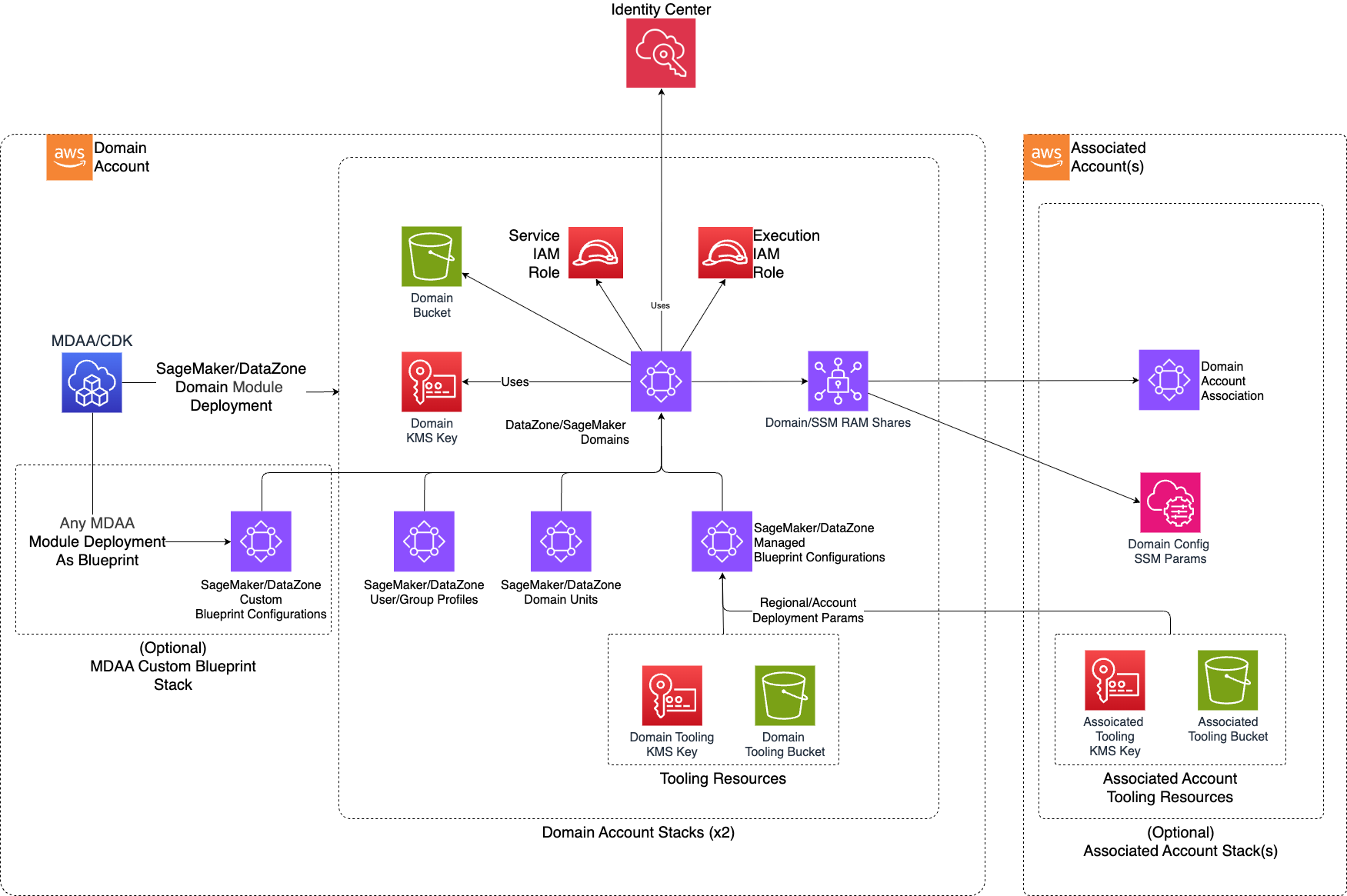
Deploys SageMaker Unified Studio (SMUS) domains with domain units, user/group profiles, managed blueprint configurations, cross-account associations, and Lake Formation integration for governed analytics environments. SMUS is the successor to Amazon DataZone and provides a unified experience for data engineering, analytics, and ML workloads within a single portal. Choose this module over the DataZone module when you want the latest SageMaker Unified Studio experience; choose DataZone if you are on an existing DataZone V1 deployment. Use this module when you need a unified portal for your data teams to collaborate on analytics, data engineering, and machine learning projects with governed access to shared data assets.
Deployed Resources
This module deploys and integrates the following resources:
SageMaker Domain - A SageMaker (DataZone V2) domain with configurable user assignment and encryption.
Domain Units - Hierarchical organizational units within the domain for project scoping and access control, with authorization policies.
User/Group Profiles - IAM and SSO principal profiles for domain access.
KMS CMK - Customer-managed encryption key specific to each domain.
Domain Service Role - IAM role used by the SageMaker domain service.
Domain Bucket - S3 bucket for domain-specific resources such as custom blueprint templates.
Associated Account Stacks - Deployed to associated accounts providing account-specific resources for cross-account domain access.
Tooling Resources - Account-specific resources used by the core Tooling blueprint.
Blueprint Configurations - Standard configurations for Tooling blueprints, optional configurations for other managed blueprints.
RAM Resource Shares - Cross-account blueprint access for associated accounts.
Related Modules
- SageMaker Project — Deploy projects, project profiles, and data sources within a SageMaker domain
- DataOps Project — Register DataOps project resources as SageMaker project data sources and assets
- Lake Formation Settings — Configure Lake Formation admin roles required for SageMaker domain data governance
- Roles — Create IAM roles and federation providers for SageMaker domain user/group profiles
- DataZone — Alternative to SageMaker for data governance and catalog management using Amazon DataZone
Security/Compliance Details
This module is designed in alignment with MDAA security/compliance principles and CDK nag rulesets. Additional review is recommended prior to production deployment, ensuring organization-specific compliance requirements are met.
- Encryption at Rest:
- Each domain gets a dedicated customer-managed KMS key
- Domain bucket and all domain resources encrypted at rest
- Least Privilege:
- Blueprint provisioning roles follow least-privilege with base policies
- User/group profiles control domain membership via IAM roles or SSO identities
- Separation of Duties:
- Domain units provide hierarchical access scoping with authorization policies (CREATE_DOMAIN_UNIT, CREATE_PROJECT)
- Network Isolation:
- Tooling blueprint requires VPC and subnet configuration for network-bound resources (See SageMaker Project Module for VPC Endpoint requirements)
Configuration
MDAA Config
Add the following snippet to your mdaa.yaml under the modules: section of a domain/env in order to use this module:
sagemaker: # Module Name can be customized
  module_path: '@aws-mdaa/sagemaker' # Must match module NPM package name
  module_configs:
    - ./sagemaker.yaml # Filename/path can be customized
Module Config Samples and Variants
Copy the contents of the relevant sample config below into the ./sagemaker.yaml file referenced in the MDAA config snippet above.
Minimal Configuration
Required properties only — a single domain with an admin role and tooling blueprint VPC configuration. Start here for a basic SageMaker Unified Studio domain with one administrator.
# Contents available via above link
# Minimal Sagemaker (DataZone V2) module configuration.
# Contains only required properties for a basic SageMaker domain deployment.

# Map of domain names to SageMaker domain configurations
domains:
  test-domain:
    # See CONFIGURATION.md for role reference options (name, arn, id).
    # IAM role with administrative privileges over the domain
    dataAdminRole:
      name: Admin
    # Required Tooling blueprint configuration including VPC and subnet
    # settings for SageMaker environment provisioning
    tooling:
      # VPC ID for the Tooling blueprint environment
      # Often created by your VPC/networking stack.
      # Example SSM: ssm:/path/to/vpc/id
      vpcId: test-vpc-id
      # Subnet IDs within the VPC for the Tooling blueprint environment
      # Often created by your VPC/networking stack.
      # Example SSM: ssm:/path/to/subnet/id
      subnetIds:
        - test-subnet-id
Comprehensive Configuration
Creates SageMaker Unified Studio domains with user/group management, domain units, associated accounts, managed and custom blueprints, and Lake Formation integration for centralized data governance. Start here when evaluating all available options for domain units, blueprints, cross-account associations, and user/group profiles.
sample-config-comprehensive.yaml
# Contents available via above link
# Comprehensive Sagemaker (DataZone V2) module configuration.
# Exercises EVERY non-excluded property from config-schema.json at full depth.
# Creates SageMaker Unified Studio domains with user/group management,
# domain units, associated accounts, managed and custom blueprints,
# and Lake Formation integration for centralized data governance.

# (Optional) KMS key ARN used to encrypt the Glue catalog. If omitted,
# looked up from the standard LF Settings SSM parameter.
glueCatalogKmsKeyArn: test-glue-catalog-key-arn

# (Optional) Role used to manage LF permissions for all domains.
# Should be an LF Admin role, likely created by the LF Settings module.
# If not specified, looked up from the standard LF Settings SSM param.
lakeformationManageAccessRole:
  arn: 'arn:{{partition}}:iam::{{account}}:role/test-lf-role'

# (Optional) Custom SageMaker domain execution role. When provided,
# uses this role instead of creating a default execution role.
sagemakerDomainExecutionRole:
  arn: 'arn:{{partition}}:iam::{{account}}:role/test-exec-role'

# Map of domain names to SageMaker domain configurations (required)
domains:
  # ── Domain 1: exercises MANUAL userAssignment ──
  test-domain:
    # See CONFIGURATION.md for role reference options (name, arn, id).
    # IAM role with administrative privileges over the domain (required)
    dataAdminRole:
      name: Admin

    # (Optional) Human-readable description of the domain
    description: DataZone Domain Description

    # (Optional) How users are assigned to domain
    # (enum: AUTOMATIC | MANUAL; default: MANUAL)
    # Use AUTOMATIC for policy-based auto-assignment
    userAssignment: MANUAL

    # (Optional) CDK deployment role ARN for this domain's account. Override when
    # using a custom CDK bootstrap qualifier instead of the default.
    cdkRoleArn: 'arn:{{partition}}:iam::{{account}}:role/custom-cdk-cfn-exec-role'

    # (Optional) Externally-defined roles for blueprint provisioning.
    # A base blueprint provisioning policy is attached; blueprint-specific
    # permissions must be attached directly to the role.
    blueprintProvisioningRoles:
      - arn: 'arn:{{partition}}:iam::{{account}}:role/test-provisioning-role'
      - name: test-provisioning-role2

    # Required Tooling blueprint configuration including VPC and subnet
    # settings for SageMaker environment provisioning
    tooling:
      # VPC ID for the Tooling blueprint environment (required)
      # Often created by your VPC/networking stack.
      # Example SSM: ssm:/path/to/vpc/id
      vpcId: test-vpc-id
      # Subnet IDs within the VPC (required)
      # Often created by your VPC/networking stack.
      # Example SSM: ssm:/path/to/subnet/id
      subnetIds:
        - test-subnet-id
      # (Optional) Provisioning role for DataZone environment provisioning
      provisioningRole:
        arn: 'arn:{{partition}}:iam::{{account}}:role/test-provisioning-role'
      # (Optional) Key-value parameter values for blueprint configuration
      parameterValues:
        toolingParam1: toolingValue1
      # (Optional) Domain unit paths authorized to use this blueprint
      authorizedDomainUnits:
        - /root

    # (Optional) Additional managed blueprints to enable with optional
    # parameter values and domain unit authorization
    enabledManagedBlueprints:
      LakehouseCatalog:
        parameterValues:
          stringParam: testValue
        authorizedDomainUnits:
          - /root
      CustomAwsService:
        parameterValues:
          simpleString: test
        authorizedDomainUnits:
          - /root
        # (Optional) Provisioning role for this managed blueprint
        provisioningRole:
          arn: 'arn:{{partition}}:iam::{{account}}:role/test-bp-provisioning-role'
      # Managed blueprint with no parameter values
      NoParams:
        authorizedDomainUnits:
          - /root

    # (Optional) Custom blueprints with CloudFormation templates to enable
    # in the domain. Each blueprint can specify a local path or S3 URL.
    # Note: path and url are mutually exclusive on each blueprint entry.
    customBlueprints:
      # Custom blueprint using an S3 URL for the template
      test-custom-blueprint-url:
        # S3 URL for the custom blueprint CloudFormation template
        # (mutually exclusive with path)
        url: https://test-bucket.s3.amazonaws.com/test-blueprint-template.yaml
        # (Optional) Blueprint parameter definitions
        parameters:
          testParam:
            # Blueprint-specific parameter properties (required)
            blueprintParamProps:
              fieldType: String
              defaultValue: default-value
              description: A test parameter
              isEditable: true
              isOptional: true
              isUpdateSupported: false
            # (Optional) CloudFormation parameter properties
            cfnParamProps:
              type: String
              description: CFN-level description for testParam
              default: default-value
              allowedPattern: '[A-Za-z0-9-]+'
              constraintDescription: Must be alphanumeric with hyphens
              minLength: 1
              maxLength: 256
        # (Optional) Key-value parameter values for blueprint configuration
        parameterValues:
          testParam: testValue
        # (Optional) Domain unit paths authorized to use this blueprint
        authorizedDomainUnits:
          - /root
          - /root/test-unit1
        # (Optional) Provisioning role for this custom blueprint
        provisioningRole:
          arn: 'arn:{{partition}}:iam::{{account}}:role/test-custom-bp-role'
      # Custom blueprint using a local file path (mutually exclusive with url)
      test-custom-blueprint-path:
        path: ./test-blueprint-template.yaml
        parameters:
          pathParam:
            blueprintParamProps:
              fieldType: Number
              defaultValue: '42'
              description: A numeric parameter from path-based blueprint
              isEditable: false
              isOptional: false
              isUpdateSupported: true
            # (Optional) CFN parameter props with numeric constraints
            cfnParamProps:
              type: Number
              description: CFN numeric parameter
              default: '42'
              minValue: 1
              maxValue: 100
              noEcho: false
              allowedValues:
                - '10'
                - '42'
                - '100'

    # (Optional) Users to be added to the domain (IAM Roles or SSO Users)
    # iamRole and ssoId are mutually exclusive on each user entry
    users:
      # IAM-based user
      iam-user-name:
        iamRole:
          arn: role-arn
      # SSO-based user
      sso-user-name:
        ssoId: sso-user-id

    # (Optional) Groups to be added to the domain (SSO only)
    groups:
      test-sso-group1:
        ssoId: test
      test-sso-group2:
        ssoId: test2

    # (Optional) Users who will be added as owners on the root domain unit
    ownerUsers:
      - sso-user-name
    # (Optional) Groups who will be added as owners on the root domain unit
    ownerGroups:
      - test-sso-group1
    # (Optional) Associated accounts granted ownership of the root domain
    # unit, allowing project creation at the domain root
    ownerAccounts:
      - associated-account-name1

    # (Optional) Simplified authorizations for the root domain unit.
    # Provides a concise way to grant common permissions without constructing
    # full AuthorizationPolicy objects.
    authorizations:
      # (Optional) Users/groups allowed to create projects
      # (CREATE_PROJECT_FROM_PROJECT_PROFILE policy on V2 domains)
      projectCreators:
        users:
          - sso-user-name
        groups:
          - test-sso-group1
      # (Optional) Users/groups allowed to be added to project member pools
      # (ADD_TO_PROJECT_MEMBER_POOL policy)
      eligibleProjectMembers:
        users:
          - iam-user-name
        groups:
          - test-sso-group2
      # (Optional) Users/groups allowed to create child domain units
      # (CREATE_DOMAIN_UNIT policy)
      domainUnitCreators:
        users:
          - sso-user-name
      # (Optional) Users/groups allowed to create glossaries
      # (CREATE_GLOSSARY policy)
      glossaryCreators:
        users:
          - sso-user-name
        groups:
          - test-sso-group1
      # (Optional) Users/groups allowed to create environments
      # (CREATE_ENVIRONMENT policy)
      environmentCreators:
        groups:
          - test-sso-group1

    # (Optional) Fine-grained authorization policies for the root domain unit.
    # Supports all PolicyType values with user/group/account principals.
    authorizationPolicies:
      root-create-project-policy:
        policyType: 'CREATE_PROJECT'
        principals:
          - userName: iam-user-name
          - groupName: test-sso-group1
        includeChildDomainUnits: true
      root-create-domain-unit-policy:
        policyType: 'CREATE_DOMAIN_UNIT'
        principals:
          - userName: sso-user-name
        includeChildDomainUnits: true

    # (Optional) Hierarchical domain units for organizing projects and
    # governance scopes within the domain
    domainUnits:
      test-unit1:
        ownerUsers:
          - sso-user-name
        ownerAccounts:
          - associated-account-name2
        description: testing
        # (Optional, Deprecated) Use authorizations.eligibleProjectMembers instead.
        # When true, all domain users are added to the project member pool
        # (does not grant direct project access).
        allowAllUsers: true
        # (Optional) Simplified authorizations for this domain unit
        authorizations:
          # (Optional) Users/groups allowed to create projects
          # (CREATE_PROJECT_FROM_PROJECT_PROFILE policy on V2 domains)
          projectCreators:
            users:
              - sso-user-name
            groups:
              - test-sso-group1
          # (Optional) All domain users added to the project member pool.
          # Replaces the deprecated allowAllUsers property.
          eligibleProjectMembers:
            all: true
          # (Optional) Users/groups allowed to create child domain units
          # (CREATE_DOMAIN_UNIT policy)
          domainUnitCreators:
            users:
              - sso-user-name
          # (Optional) Users/groups allowed to create glossaries
          # (CREATE_GLOSSARY policy)
          glossaryCreators:
            groups:
              - test-sso-group1
        # (Optional) Fine-grained authorization policies for this domain unit
        authorizationPolicies:
          # ── Policy: CREATE_DOMAIN_UNIT ──
          create-domain-unit-policy:
            policyType: 'CREATE_DOMAIN_UNIT'
            principals:
              - userName: sso-user-name
              - accountName: associated-account-name1
            includeChildDomainUnits: true
            description: Allow creating child domain units
          # ── Policy: CREATE_PROJECT with blueprintConfig ──
          create-project-policy:
            policyType: 'CREATE_PROJECT'
            principals:
              - userName: iam-user-name
              - groupName: test-sso-group1
              - allUsersGrantFilter: true
            blueprintConfig:
              includeChildDomainUnits: true
              # (enum: CONTRIBUTOR | OWNER)
              projectDesignation: OWNER
          # ── Policy: CREATE_GLOSSARY with user/group identifiers ──
          create-glossary-policy:
            policyType: 'CREATE_GLOSSARY'
            principals:
              - userIdentifier:
                  name: sso-user-name
                  identifier: sso-user-id
              - groupIdentifier:
                  name: test-sso-group1
                  identifier: test-group-id
            domainUnitId: test-domain-unit-id
          # ── Policy: CREATE_ENVIRONMENT ──
          create-environment-policy:
            policyType: 'CREATE_ENVIRONMENT'
            principals:
              - userName: sso-user-name
            description: Allow environment creation
          # ── Policy: CREATE_ENVIRONMENT_FROM_BLUEPRINT ──
          create-env-from-bp-policy:
            policyType: 'CREATE_ENVIRONMENT_FROM_BLUEPRINT'
            principals:
              - groupName: test-sso-group1
          # ── Policy: CREATE_ENVIRONMENT_PROFILE ──
          create-env-profile-policy:
            policyType: 'CREATE_ENVIRONMENT_PROFILE'
            principals:
              - userName: iam-user-name
          # ── Policy: CREATE_ASSET_TYPE ──
          create-asset-type-policy:
            policyType: 'CREATE_ASSET_TYPE'
            principals:
              - userName: sso-user-name
          # ── Policy: CREATE_FORM_TYPE ──
          create-form-type-policy:
            policyType: 'CREATE_FORM_TYPE'
            principals:
              - groupName: test-sso-group2
          # ── Policy: ADD_TO_PROJECT_MEMBER_POOL ──
          add-to-member-pool-policy:
            policyType: 'ADD_TO_PROJECT_MEMBER_POOL'
            principals:
              - userName: iam-user-name
          # ── Policy: CREATE_PROJECT_FROM_PROJECT_PROFILE ──
          create-project-from-profile-policy:
            policyType: 'CREATE_PROJECT_FROM_PROJECT_PROFILE'
            principals:
              - userName: sso-user-name
          # ── Policy: DELEGATE_CREATE_ENVIRONMENT_PROFILE ──
          delegate-env-profile-policy:
            policyType: 'DELEGATE_CREATE_ENVIRONMENT_PROFILE'
            principals:
              - groupName: test-sso-group1
          # ── Policy: OVERRIDE_DOMAIN_UNIT_OWNERS ──
          override-du-owners-policy:
            policyType: 'OVERRIDE_DOMAIN_UNIT_OWNERS'
            principals:
              - userName: sso-user-name
          # ── Policy: OVERRIDE_PROJECT_OWNERS ──
          override-project-owners-policy:
            policyType: 'OVERRIDE_PROJECT_OWNERS'
            principals:
              - groupName: test-sso-group2
        # (Optional) Child domain units within this domain unit
        domainUnits:
          test-unit2:
            description: testing
            ownerGroups:
              - test-sso-group2
            # (Optional, Deprecated) Use authorizations.eligibleProjectMembers instead.
            # Specific user names added to the project member pool
            # (does not grant direct project access).
            allowedUsers:
              - sso-user-name
            # (Optional, Deprecated) Use authorizations.eligibleProjectMembers instead.
            # Specific group names added to the project member pool
            # (does not grant direct project access).
            allowedGroups:
              - test-sso-group1
            # (Optional) Simplified authorizations for this child domain unit
            authorizations:
              # (Optional) Users/groups allowed to be added to project member pools
              # (ADD_TO_PROJECT_MEMBER_POOL policy)
              eligibleProjectMembers:
                users:
                  - sso-user-name
                groups:
                  - test-sso-group1
              # (Optional) Users/groups allowed to create environments
              # (CREATE_ENVIRONMENT policy)
              environmentCreators:
                users:
                  - sso-user-name

            # (Optional) Fine-grained authorization policies. Exercises CONTRIBUTOR
            # projectDesignation (vs OWNER below).
            authorizationPolicies:
              contributor-project-policy:
                policyType: 'CREATE_PROJECT'
                principals:
                  - allUsersGrantFilter: true
                blueprintConfig:
                  includeChildDomainUnits: false
                  projectDesignation: CONTRIBUTOR
              # CREATE_FORM_TYPE is granted to project members by designation (projectConfig) rather
              # than to named users or groups. The module already grants CREATE_FORM_TYPE to project
              # owners on the root domain unit, and DataZone rejects a second grant on the same unit,
              # so configure it on a child domain unit.
              create-form-type-project-policy:
                policyType: 'CREATE_FORM_TYPE'
                # Required by the schema, but ignored when projectConfig is set.
                principals: []
                projectConfig:
                  domainUnitId: '/root'
                  projectDesignation: OWNER
                  includeChildDomainUnits: false

    # (Optional) Additional accounts associated with this domain for
    # cross-account governance
    associatedAccounts:
      associated-account-name1:
        # AWS account ID of the associated account (required)
        account: '{{context:account-2}}'
        # (Optional) KMS key ARN for Glue catalog encryption in this
        # associated account
        glueCatalogKmsKeyArn: test-associated-glue-catalog-key-arn
        # (Optional) When true, creates a DataZone domain user for
        # CDK-based deployments in the associated account (default: false)
        createCdkUser: true
        # (Optional) IAM role ARN for Lake Formation access management
        # in the associated account
        lakeformationManageAccessRoleArn: 'arn:{{partition}}:iam::{{context:account-2}}:role/test-role'
        # (Optional) CDK deployment role ARN for cross-account
        # infrastructure provisioning
        cdkRoleArn: 'arn:{{partition}}:iam::{{context:account-2}}:role/test-cdk-role'
        # (Optional) AWS region for the associated account resources
        region: '{{region}}'
        # (Optional) Externally-defined roles for blueprint provisioning
        # in the associated account
        blueprintProvisioningRoles:
          - arn: 'arn:{{partition}}:iam::{{context:account-2}}:role/test-provisioning-role'
          - name: test-provisioning-role2
        # Required Tooling blueprint configuration for the associated account
        tooling:
          # Often created by your VPC/networking stack.
          # Example SSM: ssm:/path/to/vpc/id
          vpcId: test-vpc-id
          # Often created by your VPC/networking stack.
          # Example SSM: ssm:/path/to/subnet/id
          subnetIds:
            - test-subnet-id
          # (Optional) Provisioning role for associated account tooling
          provisioningRole:
            arn: 'arn:{{partition}}:iam::{{context:account-2}}:role/test-assoc-tooling-role'
          # (Optional) Parameter values for associated account tooling
          parameterValues:
            assocToolingParam: assocToolingValue
          # (Optional) Authorized domain units for associated account tooling
          authorizedDomainUnits:
            - /root
        # (Optional) Additional managed blueprints in the associated account
        enabledManagedBlueprints:
          LakehouseCatalog:
            parameterValues:
              stringParam: testValue
            authorizedDomainUnits:
              - /root
            # (Optional) Provisioning role for managed blueprint in assoc account
            provisioningRole:
              arn: 'arn:{{partition}}:iam::{{context:account-2}}:role/test-assoc-managed-bp-role'
          CustomAwsService:
            parameterValues:
              simpleString: test
            authorizedDomainUnits:
              - /root
          NoParams:
            authorizedDomainUnits:
              - /root
        # (Optional) Custom blueprints to enable in the associated account
        enabledCustomBlueprints:
          test-assoc-custom-blueprint:
            parameterValues:
              testParam: testValue
            authorizedDomainUnits:
              - /root
            # (Optional) Provisioning role for custom blueprint in assoc account
            provisioningRole:
              arn: 'arn:{{partition}}:iam::{{context:account-2}}:role/test-assoc-custom-bp-role'
      associated-account-name2:
        account: '{{context:account-3}}'
        glueCatalogKmsKeyArn: test-associated-glue-catalog-key-arn
        createCdkUser: true
        lakeformationManageAccessRoleArn: 'arn:{{partition}}:iam::{{account}}:role/test-role'
        # Required Tooling blueprint configuration for the associated account
        tooling:
          # Often created by your VPC/networking stack.
          # Example SSM: ssm:/path/to/vpc/id
          vpcId: test-vpc-id
          # Often created by your VPC/networking stack.
          # Example SSM: ssm:/path/to/subnet/id
          subnetIds:
            - test-subnet-id