DynamoDB
Note: This documentation is also available in a rendered format here.
Deploys DynamoDB tables with KMS encryption, configurable billing modes (provisioned or on-demand), partition/sort keys, and optional TTL attributes. Use this module when you need fast key-value or document storage for pipeline metadata, lookup tables, or application state within your data environment.
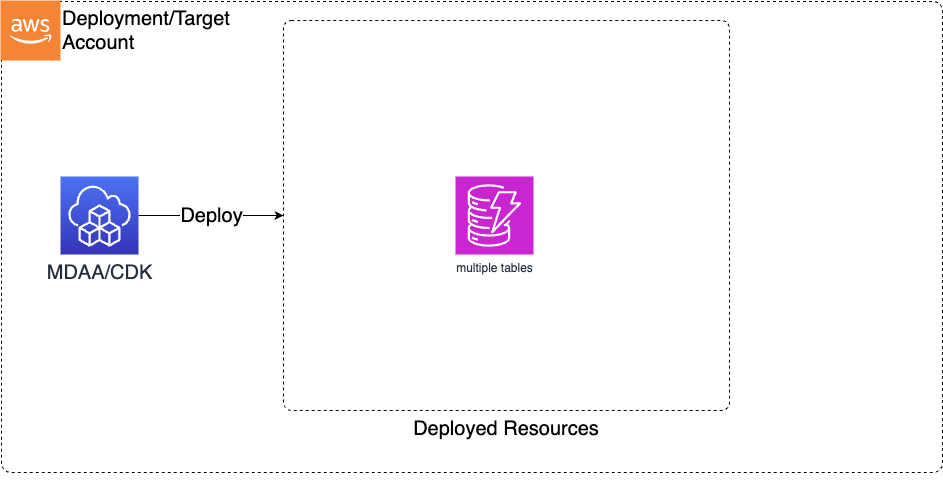
Deployed Resources
This module deploys and integrates the following resources:
DynamoDB Tables - DynamoDB tables will be created for each table specification in the configs, with configurable billing modes, partition/sort keys, and optional TTL attributes.
Related Modules
- DataOps Project — Deploy the shared project infrastructure (KMS keys) that DynamoDB tables reference
Security/Compliance Details
This module is designed in alignment with MDAA security/compliance principles and CDK nag rulesets. Additional review is recommended prior to production deployment, to assist in meeting organization-specific compliance requirements.
- Encryption at Rest:
- All tables encrypted with customer-managed KMS key (project KMS key or explicit key ARN)
- Data Protection:
- Point-in-time recovery enabled for continuous backups
- Optional TTL attribute for automatic item expiration
Configuration
MDAA Config
Add the following snippet to your mdaa.yaml under the modules: section of a domain/env in order to use this module:
dataops-dynamodb: # Module Name can be customized
  module_path: '@aws-mdaa/dataops-dynamodb' # Must match module NPM package name
  module_configs:
    - ./dataops-dynamodb.yaml # Filename/path can be customized
Module Config Samples and Variants
Copy the contents of the relevant sample config below into the ./dataops-dynamodb.yaml file referenced in the MDAA config snippet above.
Minimal Configuration
Deploys a single on-demand DynamoDB table with a partition key, wired to a DataOps project for KMS encryption. Start here for a simple key-value table within an existing DataOps project.
# Contents available via above link
# Minimal DataOps DynamoDB module configuration.
# Deploys a single on-demand DynamoDB table with a partition key,
# wired to a DataOps project for KMS encryption.

# (Optional) DataOps project name for resource autowiring.
projectName: dataops-project-sample

# Map of table names to DynamoDB table definitions.
tableDefinitions:
  my-table:
    # Partition key attribute
    partitionKey:
      # Attribute name
      name: pk
      # Attribute data type (enum: B, N, S)
      type: S
    # (Optional) Billing mode
    billingMode: PAY_PER_REQUEST
Comprehensive Configuration
When projectName is set, shared infrastructure (KMS key, S3 bucket, IAM roles, SNS topic, security configuration) is automatically resolved from the referenced DataOps project. Start here when evaluating all available options for billing modes, sort keys, TTL, and provisioned capacity settings.
sample-config-comprehensive.yaml
# Contents available via above link
# DataOps DynamoDB module configuration with project integration.
# When projectName is set, shared infrastructure (KMS key, S3 bucket,
# IAM roles, SNS topic, security configuration) is automatically
# resolved from the referenced DataOps project.

# (Optional) DataOps project name for resource autowiring
projectName: dataops-project-sample

# Map of table names to DynamoDB table definitions.
tableDefinitions:
  # Table with provisioned capacity, composite key, and TTL
  table-complex:
    # Partition key attribute
    partitionKey:
      # Attribute name
      name: pk1
      # Attribute data type (enum: B, N, S)
      type: S
    # (Optional) Sort key attribute for composite primary key
    sortKey:
      name: sk1
      type: N
    # (Optional) Billing mode
    # (enum: PROVISIONED, PAY_PER_REQUEST; default: PAY_PER_REQUEST)
    billingMode: PROVISIONED
    # (Optional) Provisioned read capacity units (only for
    # PROVISIONED billing mode)
    readCapacity: 2
    # (Optional) Provisioned write capacity units (only for
    # PROVISIONED billing mode)
    writeCapacity: 1
    # (Optional) TTL attribute name for automatic item expiration
    timeToLiveAttribute: ttl

  # Table with on-demand capacity and partition key only
  table-simple:
    partitionKey:
      name: pk1
      type: S
    billingMode: PAY_PER_REQUEST

  # Table exercising Binary (B) partition key and Number (N) sort key
  table-binary-key:
    partitionKey:
      name: binary_pk
      # Binary attribute type
      type: B
    sortKey:
      name: numeric_sk
      # Number attribute type
      type: N
    billingMode: PAY_PER_REQUEST
Standalone Configuration (No Project)
Deploys DynamoDB tables independently of a DataOps project. Infrastructure resources must be provided directly rather than autowired. Use this when deploying outside of a DataOps project, providing infrastructure references directly.
# Contents available via above link
# DataOps DynamoDB module configuration without project integration.
# Use this approach when deploying DynamoDB tables independently of a
# DataOps project. Infrastructure resources must be provided directly
# rather than autowired.

# (Optional) KMS key ARN for encrypting DynamoDB tables
kmsArn: arn:{{partition}}:kms:{{region}}:{{account}}:key/test-key-id
# (Optional) Glue security configuration name
securityConfigurationName: test-security-config
# (Optional) S3 bucket name for project storage
bucketName: test-dynamodb-bucket
# (Optional) IAM role ARN for deployment operations
deploymentRoleArn: arn:{{partition}}:iam::{{account}}:role/test-deploy-role
# (Optional) SNS topic ARN for notifications
notificationTopicArn: arn:{{partition}}:sns:{{region}}:{{account}}:test-topic

# Map of table names to DynamoDB table definitions.
tableDefinitions:
  table-complex:
    partitionKey:
      name: pk1
      type: S
    sortKey:
      name: sk1
      type: S
    billingMode: PROVISIONED
    readCapacity: 2
    writeCapacity: 1
    timeToLiveAttribute: ttl
  table-simple:
    partitionKey:
      name: pk1
      type: S
    billingMode: PAY_PER_REQUEST