GAIA (GenAI Accelerator)
:warning: Deprecated in favor of
@aws-mdaa/gaia-v2. New deployments should use@aws-mdaa/gaia-v2, which deploys a re-architected GAIA backend built on Cognito, AppSync Events, and CloudFront. This v1 module remains published and functional for existing deployments but will not receive new features. It will be removed in v1.9.0. See MIGRATION_TO_V2.md for guidance on migrating existing deployments.Note: This documentation is also available in a rendered format here.
Deploys a comprehensive GenAI application backend with API Gateway, Cognito authentication, DynamoDB tables, Lambda functions, SQS queues, SNS topics, Step Functions workflows, and optional RAG engines (Aurora PgVector, Kendra). Supports Bedrock and SageMaker LLM integrations with WAF protection and custom domain configuration. Common scenarios include deploying an enterprise chatbot with document-based Q&A, building a conversational AI interface with RAG over internal knowledge bases, or prototyping GenAI applications with multiple LLM providers.
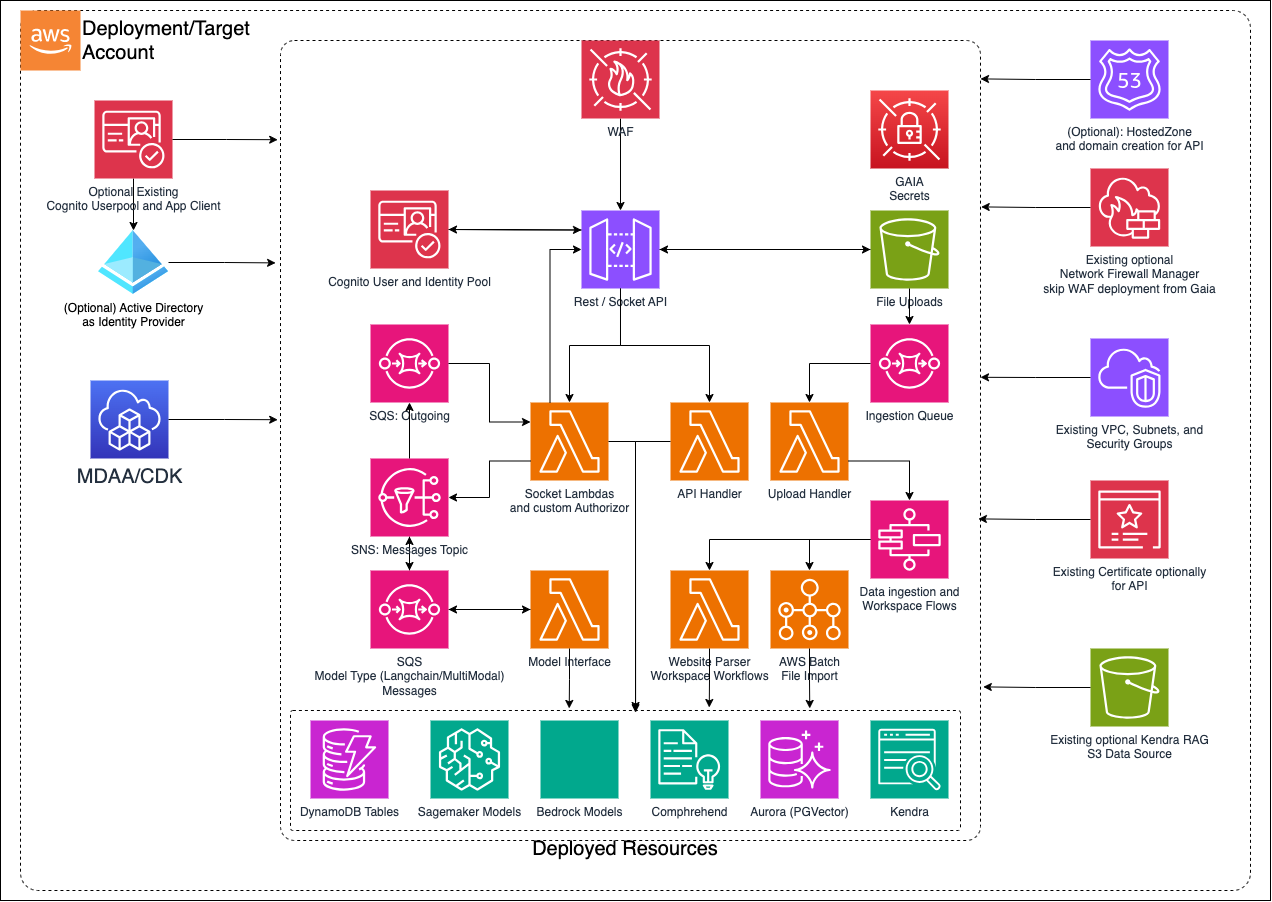
Deployed Resources
This module deploys and integrates the following resources:
Web Application Firewall (WAF) - Deployed in front of the API Gateway with a configurable approved CIDR range. Can be opted out if Firewall Manager applies WAF automatically.
REST/WebSocket APIs - API Gateway entry points to the GenAI backend, gated by Cognito authentication and custom authorizers.
Socket Lambdas - Custom Authorizer, Incoming, Outgoing, and Connections Lambda functions that broker messages through the WebSocket API.
REST API Handler - Lambda that handles CRUD operations for workspaces, prompt templates, data ingestion, models, and semantic search.
SNS Messages Topic - Topic broker for all SQS queues that interact with model interfaces and outgoing messages.
SQS Queues - Queues for incoming and outgoing messages handled by the socket and model interface Lambdas, plus an ingestion queue that listens to S3 put events for RAG file uploads.
Model Interface Lambdas - Handle incoming messages from SQS queues and interface with embedding models, RAG engines, and LLMs via SageMaker and Bedrock.
Upload Files Bucket - S3 bucket that receives file uploads and triggers the ingestion queue for RAG store processing.
Upload Handler Lambda - Consumes ingestion queue events and triggers Step Functions workflows based on the ingested data type.
DynamoDB Tables - Connections, Sessions, Workspaces, and Documents tables for managing WebSocket connections, chat sessions, workspace metadata, and document ingestion statistics.
Step Functions Workflows - State machines for data ingestion (AWS Batch file import, website crawling) and workspace management (create/delete workspaces in vector databases and metadata tables).
RAG Engines (Optional) - Aurora Serverless PgVector cluster with cross-encoder and embedding models on SageMaker/Bedrock, and/or Kendra index integration for retrieval-augmented generation.
Large Language Models - SageMaker LLMs (Falcon, Mistral, Mixtral), Bedrock LLMs (Claude, Jurassic, Cohere, Mistral, Titan), and third-party LLMs (ChatGPT via stored API key), all driven by configuration.
Comprehend - Infers the dominant language for prompts and Aurora Vector store ingestion to support multi-lingual semantic search.
Cognito Authentication - Supports username/password, Active Directory SAML federation, or integration with an existing Cognito User Pool and app client.
Custom Domain (Optional) - Route 53 hosted zone and ACM certificates for custom domain names on API Gateway endpoints.
Secrets - Database credentials (auto-rotated), X-Origin-Verify header secret (auto-rotated), and optional third-party LLM API keys stored in Secrets Manager.
Related Modules
- Bedrock Settings — Configure Bedrock model invocation audit logging for GAIA's Bedrock LLM calls
- Bedrock Builder — Deploy managed Bedrock Agents as an alternative or complement to GAIA's conversational backend
- Data Lake — Data lake buckets can serve as data sources for RAG ingestion
- Roles — Create IAM roles for GAIA Lambda execution or API access
Security/Compliance Details
This module is designed in alignment with MDAA security/compliance principles and CDK nag rulesets. Additional review is recommended prior to production deployment, ensuring organization-specific compliance requirements are met.
- Encryption at Rest:
- All data stores (DynamoDB, Aurora, S3) encrypted with customer-managed KMS keys
- Secrets (DB credentials, API keys, X-Origin-Verify) stored in AWS Secrets Manager with automatic rotation
- Encryption in Transit:
- All API communications use TLS
- Database connections encrypted in transit
- Least Privilege:
- Lambda execution roles scoped to required services
- WebSocket API uses custom authorizer Lambda for token verification
- 3rd party API keys are never logged or stored at runtime
- Separation of Duties:
- Cognito-based authentication supports username/password, Active Directory SAML federation, or existing user pool integration
- WAF protects API Gateway with configurable CIDR allowlists
- Network Isolation:
- All compute resources (Lambda, Aurora, Batch, ECS) deployed within VPC with configurable security groups
- No public endpoints unless custom DNS is configured
AWS Service Endpoints
The following VPC endpoints may be required if public AWS service endpoint connectivity is unavailable (e.g., private subnets without NAT gateway, firewalled environments, or PrivateLink-only architectures):
| AWS Service | Endpoint Service Name | Type |
|---|---|---|
| API Gateway | com.amazonaws.{region}.execute-api |
Interface |
| Lambda | com.amazonaws.{region}.lambda |
Interface |
| Bedrock Runtime | com.amazonaws.{region}.bedrock-runtime |
Interface |
| SageMaker Runtime | com.amazonaws.{region}.sagemaker.runtime |
Interface |
| Kendra | com.amazonaws.{region}.kendra |
Interface |
| DynamoDB | com.amazonaws.{region}.dynamodb |
Gateway |
| S3 | com.amazonaws.{region}.s3 |
Gateway |
| SQS | com.amazonaws.{region}.sqs |
Interface |
| SNS | com.amazonaws.{region}.sns |
Interface |
| Step Functions | com.amazonaws.{region}.states |
Interface |
| Secrets Manager | com.amazonaws.{region}.secretsmanager |
Interface |
| KMS | com.amazonaws.{region}.kms |
Interface |
| CloudWatch Logs | com.amazonaws.{region}.logs |
Interface |
| STS | com.amazonaws.{region}.sts |
Interface |
| ECR API | com.amazonaws.{region}.ecr.api |
Interface |
| ECR Docker | com.amazonaws.{region}.ecr.dkr |
Interface |
| Comprehend | com.amazonaws.{region}.comprehend |
Interface |
Additional VPC endpoints may be required depending on the AWS services accessed by your custom Lambda function code.
Configuration
MDAA Config
Add the following snippet to your mdaa.yaml under the modules: section of a domain/env in order to use this module:
gaia: # Module Name can be customized
  module_path: '@aws-mdaa/gaia' # Must match module NPM package name
  module_configs:
    - ./gaia.yaml # Filename/path can be customized
Module Config Samples and Variants
Copy the contents of the relevant sample config below into the ./gaia.yaml file referenced in the MDAA config snippet above.
Minimal Configuration
Deploys a basic GAIA application with email/password Cognito authentication, no RAG engines, no SageMaker LLMs, and default settings. Start here for a quick proof-of-concept chatbot before adding RAG engines or enterprise authentication.
# Contents available via above link
# Minimal config for the GAIA GenAI platform module.
# Deploys a basic GAIA application with email/password Cognito
# authentication, no RAG engines, no SageMaker LLMs, and default
# settings for all optional properties.

# Minimal GAIA generative AI platform configuration with only
# required properties.
gaia:
  # See CONFIGURATION.md for role reference options (name, arn, id).
  # Admin roles granted access to GAIA app resources (like
  # KMS/Bucket). Roles can be referenced by name, arn, or id.
  dataAdminRoles:
    - name: Admin
  # Prefix for GAIA resource naming
  prefix: testing
  # LLM model configurations
  llms:
    # SageMaker-hosted LLM model configurations
    sagemaker: []
  # Authentication configuration for user access.
  # This config uses email/password authentication.
  auth:
    # Authentication method for the GAIA platform
    # (enum: email_pass, ad, existing)
    authType: 'email_pass'
  # VPC networking configuration for GAIA infrastructure
  vpc:
    # VPC identifier for hosting GAIA application components
    # Often created by your VPC/networking stack.
    # Example SSM: ssm:/path/to/vpc/id
    vpcId: XXXXXXXX
    # Security group ID for application tier components
    # Often created by your VPC/networking stack.
    # Example SSM: ssm:/path/to/security-group/id
    appSecurityGroupId: 'sg-12345351356'
    # Subnet IDs for the application tier
    # Often created by your VPC/networking stack.
    # Example SSM: ssm:/path/to/subnet/id
    appSubnets:
      - subnet1
    # Security group ID for data tier components
    # Often created by your VPC/networking stack.
    # Example SSM: ssm:/path/to/security-group/id
    dataSecurityGroupId: 'sg-46576878787'
    # Subnet IDs for the data tier
    # Often created by your VPC/networking stack.
    # Example SSM: ssm:/path/to/subnet/id
    dataSubnets:
      - subnet2
Comprehensive Configuration
Deploys a conversational AI chatbot with Bedrock foundation models, RAG engines (SageMaker, Aurora, Kendra, Knowledge Base), Cognito auth, VPC networking, and API Gateway endpoints. Uses email/password authentication and covers every available configuration option. Start here when evaluating all available options for a production-grade GenAI backend.
sample-config-comprehensive.yaml
# Contents available via above link
# Sample config for the GAIA GenAI platform module.
# Deploys a conversational AI chatbot with Bedrock foundation models,
# RAG engines (SageMaker, Aurora, Kendra, Knowledge Base), Cognito auth,
# VPC networking, and API Gateway endpoints.
#
# This comprehensive config uses email/password authentication and
# exercises every compatible optional property at full depth.

# Complete GAIA generative AI platform configuration including RAG
# engines, LLM models, authentication, VPC networking, and chatbot
# API setup.
gaia:
  # See CONFIGURATION.md for role reference options (name, arn, id).
  # Admin roles granted access to GAIA app resources (like
  # KMS/Bucket). Roles can be referenced by name, arn, or id.
  dataAdminRoles:
    - name: Admin
    - arn: 'arn:{{partition}}:iam::{{account}}:role/test-admin-role'
  # Prefix for GAIA resource naming
  prefix: testing
  # (Optional) Enable Powertools dev logging
  # (enum: "true", "false")
  powertoolsDevLogging: 'true'
  # (Optional) Main domain for the GAIA platform
  mainDomain: test-domain.example.com
  # (Optional) Amazon Bedrock integration configuration for
  # foundation model access
  bedrock:
    # Enables or disables Amazon Bedrock foundation model
    # integration
    enabled: true
    # AWS region for Bedrock foundation model access
    # (enum: SupportedRegion values)
    region: 'ca-central-1'
    # (Optional) IAM role ARN for cross-account or custom Bedrock
    # access
    roleArn: 'arn:{{partition}}:iam::{{account}}:role/test-bedrock-role'
  # LLM model configurations
  llms:
    # (Optional) HuggingFace API token for model access
    huggingFaceApiToken: 'hf_test_token_placeholder'
    # SageMaker-hosted LLM model configurations
    sagemaker:
      - # SageMaker LLM model to deploy
        # (enum: FalconLite, Llama2_13b_Chat, Mistral7b_Instruct2)
        model: FalconLite
        # (Optional) SageMaker instance type for LLM hosting
        instanceType: ml.g5.2xlarge
        # (Optional) Initial number of instances for the LLM
        # endpoint
        initialInstanceCount: 1
        # (Optional) Minimum instance count for auto-scaling
        minimumInstanceCount: 1
        # (Optional) Maximum instance count for auto-scaling
        maximumInstanceCount: 2
      - # SageMaker LLM model to deploy
        # (enum: FalconLite, Llama2_13b_Chat, Mistral7b_Instruct2)
        model: Llama2_13b_Chat
      - # SageMaker LLM model to deploy
        # (enum: FalconLite, Llama2_13b_Chat, Mistral7b_Instruct2)
        model: Mistral7b_Instruct2
  # (Optional) RAG engine and embedding model configuration
  rag:
    # Retrieval engine configuration
    engines:
      # (Optional) SageMaker RAG engine
      sagemaker:
        # (Optional) SageMaker instance type for RAG
        instanceType: ml.inf1.xlarge
        # (Optional) Initial instance count
        initialInstanceCount: 1
        # (Optional) Minimum instance count for auto-scaling
        minInstanceCount: 1
        # (Optional) Maximum instance count for auto-scaling
        maxInstanceCount: 2
      # (Optional) Aurora RAG engine
      aurora:
        # (Optional) Minimum Aurora Serverless capacity units
        minCapacity: 0.5
        # (Optional) Maximum Aurora Serverless capacity units
        maxCapacity: 4
        # (Optional) Create separate security group for Aurora
        createSeparateSecurityGroup: true
      # (Optional) Kendra RAG engine
      kendra:
        # Whether to create a new Kendra index
        createIndex: true
        # (Optional) S3 data source configuration for Kendra index
        s3DataSourceConfig:
          # S3 bucket name for Kendra data source
          bucketName: test-kendra-bucket
          # Directories to include in the Kendra index
          includedDirectories:
            - documents/
          # KMS key ARN for encrypting Kendra data
          kmsKeyArn: 'arn:{{partition}}:kms:{{region}}:{{account}}:key/test-kendra-key'
          # (Optional) Metadata directory for Kendra documents
          metadataDirectory: metadata/
        # (Optional) External Kendra index configurations
        external:
          - # Kendra index ID
            kendraId: test-kendra-index-id
            # Name for the external Kendra index
            name: test-external-kendra
            # (Optional) AWS region for the external Kendra index
            # (enum: SupportedRegion values)
            region: ca-central-1
            # (Optional) IAM role ARN for cross-account Kendra
            # access
            roleArn: 'arn:{{partition}}:iam::{{account}}:role/test-kendra-role'
      # (Optional) Bedrock Knowledge Base RAG engine
      knowledgeBase:
        # (Optional) External Knowledge Base configurations
        external:
          - # Knowledge Base ID
            kbId: test-kb-id
            # Name for the external Knowledge Base
            name: test-external-kb
            # (Optional) AWS region for the external Knowledge Base
            # (enum: SupportedRegion values)
            region: ca-central-1
            # (Optional) IAM role ARN for cross-account KB access
            roleArn: 'arn:{{partition}}:iam::{{account}}:role/test-kb-role'
    # Embedding models for vector processing
    embeddingsModels:
      - # Model provider (enum: bedrock, openai, sagemaker)
        provider: 'bedrock'
        # Model name identifier
        name: 'amazon.titan-embed-text-v2:0'
        # Vector embedding dimensions
        dimensions: 1024
        # (Optional) Whether this is the default model
        isDefault: true
      - # Model provider (enum: bedrock, openai, sagemaker)
        provider: 'sagemaker'
        # Model name identifier
        name: 'test-sagemaker-embedding-model'
        # Vector embedding dimensions
        dimensions: 768
      - # Model provider (enum: bedrock, openai, sagemaker)
        provider: 'openai'
        # Model name identifier
        name: 'text-embedding-3-large'
        # Vector embedding dimensions
        dimensions: 3072
    # Cross-encoder models for document ranking
    crossEncoderModels:
      - # Model provider (enum: bedrock, openai, sagemaker)
        provider: 'bedrock'
        # Model name identifier
        name: 'test-cross-encoder-model'
        # (Optional) Whether this is the default model
        isDefault: true
      - # Model provider (enum: bedrock, openai, sagemaker)
        provider: 'sagemaker'
        # Model name identifier
        name: 'test-sagemaker-cross-encoder'
  # (Optional) Lambda concurrency settings
  concurrency:
    # (Optional) Concurrent Lambda executions for model interface
    modelInterfaceConcurrentLambdas: 10
    # (Optional) Concurrent Lambda executions for REST API
    restApiConcurrentLambdas: 10
    # (Optional) Concurrent Lambda executions for WebSocket
    websocketConcurrentLambdas: 10
  # Authentication configuration for user access.
  # This config uses email/password authentication.
  auth:
    # Authentication method for the GAIA platform
    # (enum: email_pass, ad, existing)
    authType: 'email_pass'
    # (Optional) Custom Cognito User Pool domain for branded
    # authentication URLs. Must be globally unique.
    cognitoDomain: 'some-unique-pool-domain-name'
  # (Optional) Set API Gateway account CloudWatch role
  setApiGateWayAccountCloudwatchRole: true
  # (Optional) Skip default WAF for API Gateway
  skipApiGatewayDefaultWaf: true
  # (Optional) Custom code override paths for GAIA Lambda
  # functions, layers, and batch jobs. Allows replacing default
  # implementations with custom code. Requires actual code
  # directories/files to exist at the specified paths.
  # Cannot be exercised in synth tests without real code assets.
  # codeOverwrites:
  #   # (Optional) Custom code path for the REST API handler
  #   # Lambda replacing default CRUD operations.
  #   restApiHandlerCodePath: ./custom/rest-api-handler
  #   # (Optional) Custom code path for LangChain interface
  #   # handler Lambda for AI chain orchestration.
  #   langchainInterfaceHandlerCodePath: ./custom/langchain
  #   # (Optional) Custom code path for WebSocket connection
  #   # handler Lambda for real-time connection management.
  #   webSocketConnectionHandlerCodePath: ./custom/ws-conn
  #   # (Optional) Custom code path for WebSocket incoming
  #   # message handler Lambda for message routing.
  #   webSocketIncomingMessageHandlerCodePath: ./custom/ws-in
  #   # (Optional) Custom code path for WebSocket outgoing
  #   # message handler Lambda for response delivery.
  #   webSocketOutgoingMessageHandlerCodePath: ./custom/ws-out
  #   # (Optional) Custom code path for WebSocket authorizer
  #   # Lambda for authentication and authorization.
  #   webSocketAuthorizerFunctionCodePath: ./custom/ws-auth
  #   # (Optional) Custom code path for RAG engines inference
  #   # Lambda for document retrieval and AI response generation.
  #   ragEnginesInferenceCodePath: ./custom/rag-inference
  #   # (Optional) Custom code path for data import upload
  #   # handler Lambda for data ingestion orchestration.
  #   dataImportUploadHandlerCodePath: ./custom/data-import
  #   # (Optional) Custom code path for Aurora workspace
  #   # creation Lambda for workspace provisioning.
  #   createAuroraWorkspaceCodePath: ./custom/aurora-workspace
  #   # (Optional) Custom code path for workspace deletion
  #   # handler Lambda for cleanup and resource management.
  #   deleteWorkspaceHandlerCodePath: ./custom/delete-workspace
  #   # (Optional) Custom code path for Aurora pgVector database
  #   # setup Lambda for vector store initialization.
  #   pgVectorDbSetupCodePath: ./custom/pgvector-setup
  #   # (Optional) Custom code path for GenAI core Lambda layer
  #   # containing shared AI clients and service functionality.
  #   genAiCoreLayerCodePath: ./custom/genai-core-layer
  #   # (Optional) Custom ZIP path for common libraries Lambda
  #   # layer shared across multiple GAIA Lambda functions.
  #   commonLibsLayerCodeZipPath: ./custom/common-libs.zip
  #   # (Optional) Custom Dockerfile path for file import AWS
  #   # Batch job container for batch processing.
  #   fileImportBatchJobDockerFilePath: ./custom/Dockerfile
  #   # (Optional) Custom code path for website parser Lambda
  #   # for web crawling and content extraction.
  #   websiteParserCodePath: ./custom/website-parser
  # (Optional) Backend API configuration for custom REST and
  # WebSocket domains with Route53 DNS. Requires account/region
  # to be specified in the stack environment for hosted zone
  # lookup. Cannot be exercised in synth tests without a real
  # AWS environment.
  # api:
  #   # Route53 hosted zone name for DNS
  #   hostedZoneName: example.com
  #   # Custom domain name for REST API
  #   restApiDomainName: api.example.com
  #   # Custom domain name for WebSocket API
  #   socketApiDomainName: ws.example.com
  # VPC networking configuration for GAIA infrastructure
  vpc:
    # VPC identifier for hosting GAIA application components
    # Often created by your VPC/networking stack.
    # Example SSM: ssm:/path/to/vpc/id
    vpcId: XXXXXXXX
    # Security group ID for application tier components
    # Often created by your VPC/networking stack.
    # Example SSM: ssm:/path/to/security-group/id
    appSecurityGroupId: 'sg-12345351356'
    # Subnet IDs for the application tier
    # Often created by your VPC/networking stack.
    # Example SSM: ssm:/path/to/subnet/id
    appSubnets:
      - subnet1
      - subnet1b
    # Security group ID for data tier components
    # Often created by your VPC/networking stack.
    # Example SSM: ssm:/path/to/security-group/id
    dataSecurityGroupId: 'sg-46576878787'
    # Subnet IDs for the data tier
    # Often created by your VPC/networking stack.
    # Example SSM: ssm:/path/to/subnet/id
    dataSubnets:
      - subnet2
      - subnet2b
Active Directory Authentication Configuration
Use this variant when integrating GAIA with an enterprise Active Directory via SAML for SSO. Choose this approach when your organization manages user identities in Active Directory and requires federated single sign-on. Differs from the primary config only in the auth section, which uses AD-specific SAML metadata and email claim parameters.
# Contents available via above link
# Sample config for the GAIA GenAI platform module with Active Directory
# authentication. Use this variant when integrating GAIA with an
# enterprise Active Directory via SAML for SSO.
#
# Differs from the primary config only in the auth section, which uses
# AD-specific SAML metadata and email claim parameters.

# Complete GAIA generative AI platform configuration including RAG
# engines, LLM models, authentication, VPC networking, and chatbot
# API setup.
gaia:
  # See CONFIGURATION.md for role reference options (name, arn, id).
  # Admin roles granted access to GAIA app resources (like
  # KMS/Bucket). Roles can be referenced by name, arn, or id.
  dataAdminRoles:
    - name: Admin
  # Prefix for GAIA resource naming
  prefix: testing
  # (Optional) Enable Powertools dev logging
  # (enum: "true", "false")
  powertoolsDevLogging: 'false'
  # (Optional) Amazon Bedrock integration configuration for
  # foundation model access
  bedrock:
    # Enables or disables Amazon Bedrock foundation model
    # integration
    enabled: true
    # AWS region for Bedrock foundation model access
    # (enum: SupportedRegion values)
    region: 'ca-central-1'
  # LLM model configurations
  llms:
    # SageMaker-hosted LLM model configurations
    sagemaker: []
  # (Optional) RAG engine and embedding model configuration
  rag:
    # Retrieval engine configuration
    engines:
      # (Optional) Aurora RAG engine
      aurora:
        # (Optional) Minimum Aurora Serverless capacity units
        minCapacity: 0.5
        # (Optional) Maximum Aurora Serverless capacity units
        maxCapacity: 4
      # (Optional) Bedrock Knowledge Base RAG engine
      knowledgeBase:
        # (Optional) External Knowledge Base configurations
        external:
          - # Knowledge Base ID
            kbId: test-kb-id
            # Name for the external Knowledge Base
            name: test-external-kb
    # Embedding models for vector processing
    embeddingsModels:
      - # Model provider (enum: bedrock, openai, sagemaker)
        provider: 'bedrock'
        # Model name identifier
        name: 'amazon.titan-embed-text-v2:0'
        # Vector embedding dimensions
        dimensions: 1024
        # (Optional) Whether this is the default model
        isDefault: true
    # Cross-encoder models for document ranking
    crossEncoderModels: []
  # Authentication configuration for user access.
  # This config uses Active Directory (SAML) authentication.
  auth:
    # Authentication method for the GAIA platform
    # (enum: email_pass, ad, existing)
    authType: 'ad'
    # Custom Cognito User Pool domain for branded authentication
    # URLs. Must be globally unique. Required for AD auth.
    cognitoDomain: 'ad-unique-pool-domain-name'
    # (Optional) SSM parameter path for SAML metadata URL or file
    idpSamlMetadataUrlOrFileParamPath: '/gaia/saml/metadata-url'
    # (Optional) SSM parameter path for SAML email claim attribute
    idpSamlEmailClaimParamPath: '/gaia/saml/email-claim'
    # (Optional) OAuth redirect URL for AD authentication flow
    oAuthRedirectUrl: 'https://gaia.example.com/oauth/callback'
  # VPC networking configuration for GAIA infrastructure
  vpc:
    # VPC identifier for hosting GAIA application components
    # Often created by your VPC/networking stack.
    # Example SSM: ssm:/path/to/vpc/id
    vpcId: XXXXXXXX
    # Security group ID for application tier components
    # Often created by your VPC/networking stack.
    # Example SSM: ssm:/path/to/security-group/id
    appSecurityGroupId: 'sg-12345351356'
    # Subnet IDs for the application tier
    # Often created by your VPC/networking stack.
    # Example SSM: ssm:/path/to/subnet/id
    appSubnets:
      - subnet1
    # Security group ID for data tier components
    # Often created by your VPC/networking stack.
    # Example SSM: ssm:/path/to/security-group/id
    dataSecurityGroupId: 'sg-46576878787'
    # Subnet IDs for the data tier
    # Often created by your VPC/networking stack.
    # Example SSM: ssm:/path/to/subnet/id
    dataSubnets:
      - subnet2
Existing Cognito User Pool Configuration
Use this variant when integrating GAIA with a pre-existing Cognito User Pool and app client, for example when sharing authentication infrastructure across multiple applications. Choose this approach when you already have a Cognito pool and want to avoid creating a duplicate. Differs from the primary config only in the auth section, which references an existing Cognito pool instead of creating a new one.
# Contents available via above link
# Sample config for the GAIA GenAI platform module with an existing
# Cognito User Pool. Use this variant when integrating GAIA with a
# pre-existing Cognito User Pool and app client, for example when
# sharing authentication infrastructure across multiple applications.
#
# Differs from the primary config only in the auth section, which
# references an existing Cognito pool instead of creating a new one.

# Complete GAIA generative AI platform configuration including RAG
# engines, LLM models, authentication, VPC networking, and chatbot
# API setup.
gaia:
  # See CONFIGURATION.md for role reference options (name, arn, id).
  # Admin roles granted access to GAIA app resources (like
  # KMS/Bucket). Roles can be referenced by name, arn, or id.
  dataAdminRoles:
    - name: Admin
  # Prefix for GAIA resource naming
  prefix: testing
  # (Optional) Amazon Bedrock integration configuration for
  # foundation model access
  bedrock:
    # Enables or disables Amazon Bedrock foundation model
    # integration
    enabled: true
    # AWS region for Bedrock foundation model access
    # (enum: SupportedRegion values)
    region: 'ca-central-1'
  # LLM model configurations
  llms:
    # SageMaker-hosted LLM model configurations
    sagemaker: []
  # (Optional) RAG engine and embedding model configuration
  rag:
    # Retrieval engine configuration
    engines:
      # (Optional) Aurora RAG engine
      aurora:
        # (Optional) Minimum Aurora Serverless capacity units
        minCapacity: 0.5
        # (Optional) Maximum Aurora Serverless capacity units
        maxCapacity: 4
      # (Optional) Bedrock Knowledge Base RAG engine
      knowledgeBase:
        # (Optional) External Knowledge Base configurations
        external:
          - # Knowledge Base ID
            kbId: test-kb-id
            # Name for the external Knowledge Base
            name: test-external-kb
    # Embedding models for vector processing
    embeddingsModels:
      - # Model provider (enum: bedrock, openai, sagemaker)
        provider: 'bedrock'
        # Model name identifier
        name: 'amazon.titan-embed-text-v2:0'
        # Vector embedding dimensions
        dimensions: 1024
        # (Optional) Whether this is the default model
        isDefault: true
    # Cross-encoder models for document ranking
    crossEncoderModels: []
  # Authentication configuration for user access.
  # This config uses an existing Cognito User Pool.
  auth:
    # Authentication method for the GAIA platform
    # (enum: email_pass, ad, existing)
    authType: 'existing'
    # Existing Cognito User Pool ID for integrating GAIA with a
    # pre-existing user pool. Required when authType is 'existing'.
    existingPoolId: '{{region}}_TestPoolId'
    # (Optional) Existing Cognito User Pool app client ID
    existingPoolClientId: 'test-app-client-id-12345'
    # (Optional) Existing Cognito User Pool domain
    existingPoolDomain: 'existing-pool-domain'
  # VPC networking configuration for GAIA infrastructure
  vpc:
    # VPC identifier for hosting GAIA application components
    # Often created by your VPC/networking stack.
    # Example SSM: ssm:/path/to/vpc/id
    vpcId: XXXXXXXX
    # Security group ID for application tier components
    # Often created by your VPC/networking stack.
    # Example SSM: ssm:/path/to/security-group/id
    appSecurityGroupId: 'sg-12345351356'
    # Subnet IDs for the application tier
    # Often created by your VPC/networking stack.
    # Example SSM: ssm:/path/to/subnet/id
    appSubnets:
      - subnet1
    # Security group ID for data tier components
    # Often created by your VPC/networking stack.
    # Example SSM: ssm:/path/to/security-group/id
    dataSecurityGroupId: 'sg-46576878787'
    # Subnet IDs for the data tier
    # Often created by your VPC/networking stack.
    # Example SSM: ssm:/path/to/subnet/id
    dataSubnets:
      - subnet2