Machine to Machine API
Note: This documentation is also available in a rendered format here.
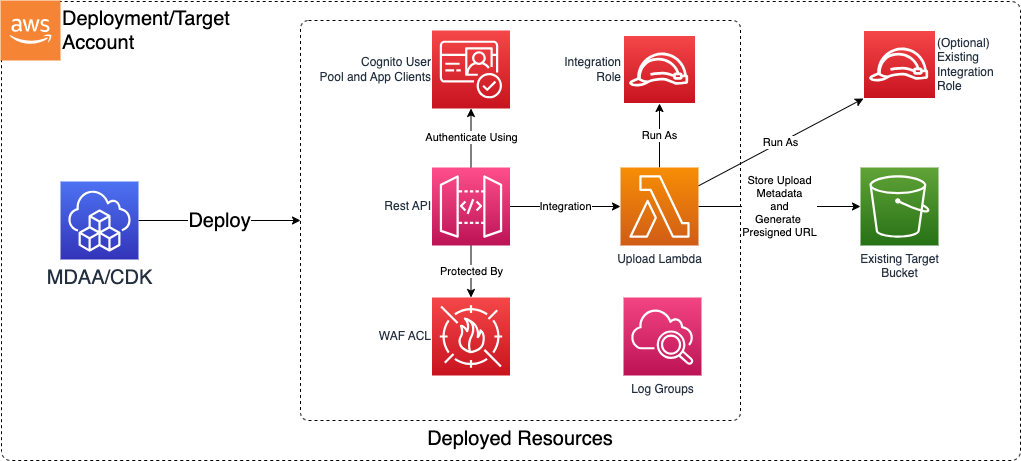
Deploys a secure REST API via Amazon API Gateway for machine-to-machine interaction with a data lake, with Cognito-based client authentication, WAF IP filtering, and Lambda-backed integrations. Use this module when you need to provide external applications or partner systems with authenticated, IP-restricted programmatic access to data in your data lake.
Deployed Resources
This module deploys and integrates the following resources:
- API Gateway REST API: REST API for programmatic data lake interaction with request validation and stage configuration
- Cognito User Pool: Manages client app credentials (client ID/secret) for API authentication with configurable token validity
- WAF WebACL: IP-based access filtering restricting API access to authorized CIDR blocks. Additional WAF ACLs can be attached.
- Lambda Functions: API handler functions executing data operations against the target S3 bucket with configurable concurrency limits
- KMS Encryption Key: Encrypts API and Cognito resources
- CloudWatch Log Groups: API Gateway access logs and Lambda execution logs
Related Modules
- Data Lake — Deploy data lake S3 buckets that the M2M API provides programmatic access to
- Roles — Create IAM roles for API client authentication or Lambda execution
Security/Compliance Details
This module is designed in alignment with MDAA security/compliance principles and CDK nag rulesets. Additional review is recommended prior to production deployment, ensuring organization-specific compliance requirements are met.
- Encryption at Rest:
- KMS encryption for API and Cognito resources
- Encryption in Transit:
- All data in transit over HTTPS
- Least Privilege:
- Cognito User Pool provides OAuth2 client credentials flow
- App clients have configurable token validity periods
- Lambda execution role follows least-privilege with scoped S3 access
- Network Isolation:
- WAF WebACL applies IP-based access control with default-deny
- Only explicitly allowed CIDR ranges can reach the API
Configuration
MDAA Config
Add the following snippet to your mdaa.yaml under the modules: section of a domain/env in order to use this module:
m2m-api: # Module Name can be customized
  module_path: '@aws-mdaa/m2m-api' # Must match module NPM package name
  module_configs:
    - ./m2m-api.yaml # Filename/path can be customized
Module Config Samples and Variants
Copy the contents of the relevant sample config below into the ./m2m-api.yaml file referenced in the MDAA config snippet above.
Minimal Configuration
Deploys an API Gateway with Cognito client credentials authentication, WAF protection, CIDR-based access control, and Lambda integration for secure machine-to-machine data lake access via REST API. Start here for a basic M2M API with a single client and IP-restricted access to a data lake bucket.
# Contents available via above link
# M2M API Module - Minimal Sample Configuration
# Deploys an API Gateway with Cognito client credentials authentication,
# WAF protection, CIDR-based access control, and Lambda integration
# for secure machine-to-machine data lake access via REST API.
#
# This config includes only the required properties for a working deployment.

# M2M API configuration defining API Gateway setup with
# authentication, authorization, and security controls.
api:
  # See CONFIGURATION.md for role reference options (name, arn, id).
  # List of admin roles which will be granted admin access to generated resources
  # (currently KMS key)
  adminRoles:
    - arn: arn:{{partition}}:iam::{{account}}:role/test-admin-role-arn
  # The target bucket against which API interactions will be executed
  # Often created by the Data Lake module.
  # Example SSM: ssm:/{{org}}/{{domain}}/<datalake_module_name>/bucket/<zone_name>/name
  targetBucketName: landing-bucket-name
  # The target prefix in the target bucket
  targetPrefix: testing
  # The reserved concurrency limit for the Lambda which executes the API actions
  concurrencyLimit: 10
  # The list of allowed IPV4 CIDR ranges which will be permitted access to the API.
  # All other requests will be denied.
  allowedCidrs:
    - 10.0.0.0/8
Comprehensive Configuration
Deploys an API Gateway with Cognito client credentials authentication, WAF protection, CIDR-based access control, and Lambda integration for secure machine-to-machine data lake access via REST API. Start here when evaluating all available options for multiple clients, token validity, WAF rules, and Lambda concurrency settings.
sample-config-comprehensive.yaml
# Contents available via above link
# M2M API Module - Comprehensive Sample Configuration
# Deploys an API Gateway with Cognito client credentials authentication,
# WAF protection, CIDR-based access control, and Lambda integration
# for secure machine-to-machine data lake access via REST API.
#
# This config exercises ALL available properties at full depth.

# M2M API configuration defining API Gateway setup with
# authentication, authorization, and security controls.
api:
  # See CONFIGURATION.md for role reference options (name, arn, id).
  # List of admin roles which will be granted admin access to generated resources
  # (currently KMS key)
  adminRoles:
    - name: M2MAdmin
    - name: test-admin-role-name
    - arn: arn:{{partition}}:iam::{{account}}:role/test-admin-role-arn
      # (Optional) Whether the role is immutable and should not be modified by MDAA
      immutable: true
      # (Optional) Whether the role is an AWS SSO auto-generated role
      sso: false
  # The target bucket against which API interactions will be executed
  # Often created by the Data Lake module.
  # Example SSM: ssm:/{{org}}/{{domain}}/<datalake_module_name>/bucket/<zone_name>/name
  targetBucketName: landing-bucket-name
  # The target prefix in the target bucket
  targetPrefix: testing
  # (Optional) Identifies the target prefix for metadata within the bucket. If not specified, will default to targetPrefix.
  metadataTargetPrefix: metadata-testing
  # The reserved concurrency limit for the Lambda which executes the API actions
  concurrencyLimit: 10
  # (Optional) Specific key to use to encrypt CloudWatch logs. If not specified, one will be created.
  kmsKeyArn: arn:{{partition}}:kms:{{region}}:{{account}}:key/test-kms-key-id
  # (Optional) API Gateway deployment stage name (e.g. dev, staging, prod). Defaults to prod.
  stageName: prod
  # (Optional) If true, the API Gateway CloudWatch role will be set at the account/region level. Should be done only once per account/region.
  setAccountCloudWatchRole: false
  # Additional WAF ACL arns which will be applied to the API Gateway.
  # A default WAF is always generated which applies default deny IP address filtering.
  wafArns:
    test-waf: test-waf-arn
  # The list of allowed IPV4 CIDR ranges which will be permitted access to the API.
  # All other requests will be denied.
  allowedCidrs:
    - 10.0.0.0/8
    - 192.168.0.0/16
    - 172.16.0.0/12
  # (Optional) This role will be used to execute the API integration Lambdas.
  # If not specified, one will be created automatically.
  integrationLambdaRoleArn: arn:{{partition}}:iam::{{account}}:role/some-lambda-role-arn

  # (Optional) List of app clients to be added to the Cognito User Pool.
  # A Client ID and Secret will be generated for each.
  appClients:
    test-client:
      # (Optional) The validity period of the ID Token in minutes (default 60 minutes). Valid values are between 5 minutes and 1 day.
      idTokenValidityMinutes: 60
      # (Optional) The validity period of the Refresh Token in hours (default 30 days). Valid values between 60 minutes and 10 years.
      refreshTokenValidityHours: 24
      # (Optional) The validity period of the Access Token in minutes (default 60 minutes). Valid values are between 5 minutes and 1 day.
      accessTokenValidityMinutes: 24

  # (Optional) Map of accepted request parameter names to boolean indicating if they are required.
  # If specified, API gateway will validate that: 1) each provided parameter is accepted;
  # and 2) all required parameters have been provided.
  requestParameters:
    test_required_param: true
    test_opt_param: false

  # (Optional) Mapping of input event fields to metadata fields written to S3.
  # (The input event is that provided from the API to the Lambda Function)
  eventMetadataMappings:
    Resource: resource
    Host: headers.Host
    UserAgent: headers.User-Agent
    IPForwarding: headers.X-Forwarded-For
    RequestTime: requestContext.requestTime
    queryStringParameters: queryStringParameters