Bedrock Builder
Note: This documentation is also available in a rendered format here.
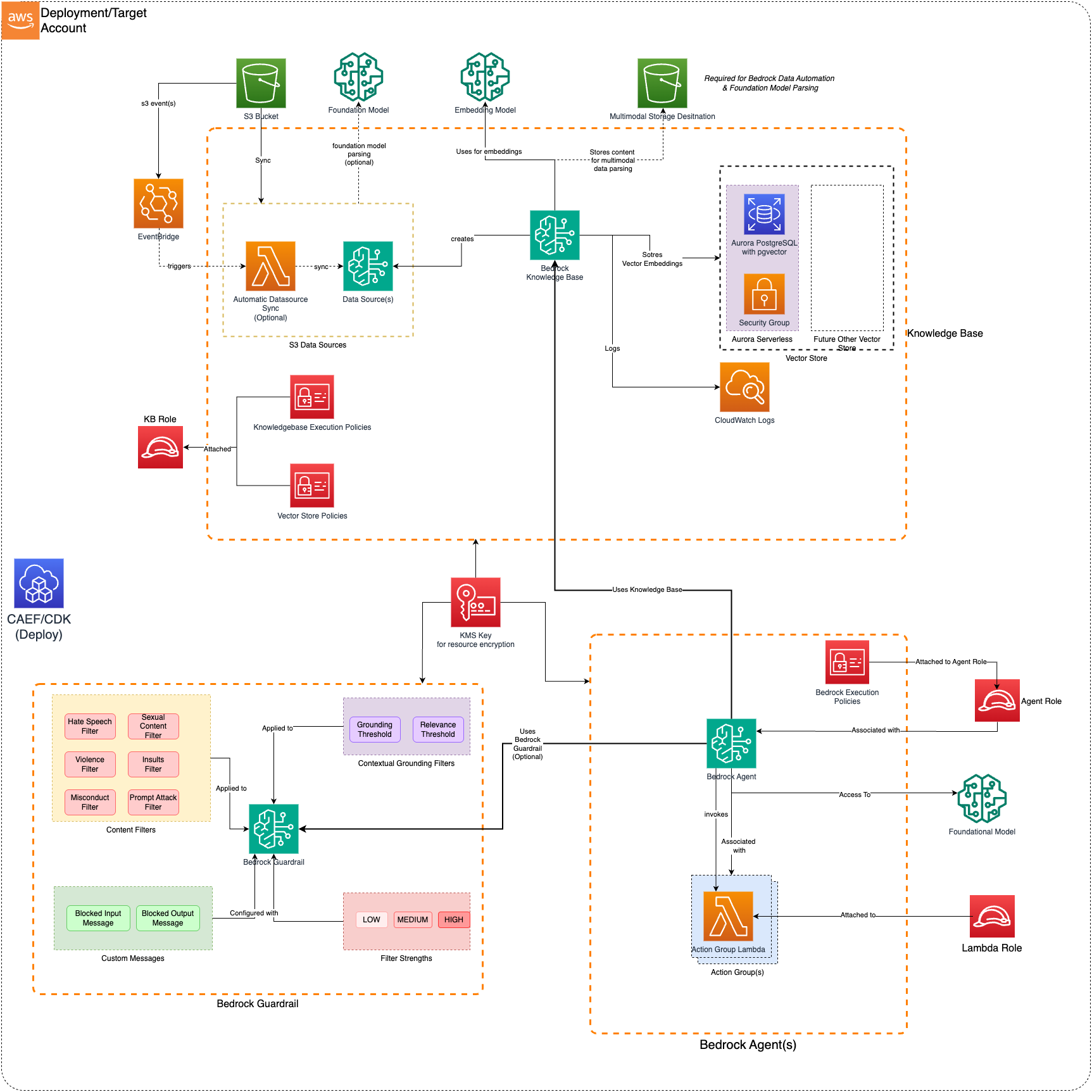
Deploys a secure Bedrock Agent with Knowledge Bases, Action Groups, Vector Stores, Lambda functions, and Guardrails for building AI-powered conversational workflows. Common scenarios include building Q&A chatbots over internal documents, automating business workflows with AI agents, or adding retrieval-augmented generation to your applications.
Deployed Resources
This module deploys and integrates the following resources:
- Bedrock Agent — Amazon Bedrock Agent(s) for automating workflows using Foundation Models. Includes Agent Alias for versioned access.
- Agent Execution Role — IAM role with Bedrock Execution Policy for accessing Knowledge Bases, Foundation Models, and Guardrails.
- Agent KMS Key — Encrypts Agent resources. Auto-generated if not provided in config.
- Lambda Functions (Optional) — Functions for Agent Action Groups and Knowledge Base custom transformations. May be VPC-bound with configurable security groups.
- Lambda Layers (Optional) — Shared code layers for Lambda functions.
- Action Group(s) — Agent Action Groups linking Lambda functions or API schemas to the Agent. Supports existing Lambda ARNs or
generated-function:references. - Knowledge Base(s) (Optional) — Bedrock Knowledge Bases with S3 and SharePoint data sources, multiple parsing strategies (default, BDA, Foundation Model, custom), and chunking configurations.
- Vector Store(s) (Optional) — OpenSearch Serverless collections or Aurora Serverless clusters for Knowledge Base vector storage.
- Bedrock Guardrail (Optional) — Content filters, contextual grounding, PII entity detection, and regex-based sensitive information filtering.
- AgentCore Harness(es) (Optional) - Declarative agent loops (model + system prompt + tools) on AgentCore.
Related Modules
- Bedrock Settings — Configure Bedrock model invocation audit logging before deploying agents
- Bedrock AgentCore Runtime — Deploy custom agent runtimes as an alternative to managed Bedrock Agents
- DataOps Lambda — Deploy Lambda functions independently that can be referenced as Action Group handlers via ARN
- Roles — Create IAM roles for agent execution or Lambda function access
Security/Compliance Details
This module is designed in alignment with MDAA security/compliance principles and CDK nag rulesets. Additional review is recommended prior to production deployment, ensuring organization-specific compliance requirements are met.
- Encryption at Rest:
- Agent resources encrypted with customer-managed KMS keys (auto-generated if not provided)
- OpenSearch Serverless collections use encryption-at-rest security policies
- Aurora Serverless clusters encrypted with KMS
- AgentCore Harness log groups encrypted with a customer-managed KMS key
- Encryption in Transit:
- All Bedrock API communications use TLS
- OpenSearch and Aurora connections encrypted in transit
- Least Privilege:
- Agent execution role scoped to specific Knowledge Bases, Foundation Models, and Guardrails
- Lambda execution roles scoped to required services only
- OpenSearch Serverless uses data access policies for fine-grained control
- AgentCore Harness execution role scoped to its resolved model, guardrail, gateway, and image grants, with an
sts:AssumeRoledeny and a configurable tool allowlist
- Network Isolation:
- Lambda functions and Aurora clusters can be VPC-bound with configurable security groups
- OpenSearch Serverless collections support VPC endpoints
- No public connectivity to VPC-bound resources
- AgentCore Harnesses run in mandatory VPC-only network mode, with module-managed VPC endpoints and a per-harness endpoint client security group when a harness references a
vpcEndpointsset - Module-managed VPC endpoints are a private network path, not an authorization boundary - the supporting service endpoints carry the AWS default policy, which permits their service in any account, so the harness execution role stays the control on what a session can reach
- Content Safety:
- Guardrails provide content filters and contextual grounding checks
- PII entity detection and regex-based sensitive information filtering
- AgentCore Harness log groups apply an always-on PII masking floor, extensible via config
AWS Service Endpoints
VPC-bound resources in this module may need VPC endpoints where public AWS service connectivity is unavailable — private subnets without a NAT gateway, firewalled environments, or PrivateLink-only architectures. Some are created for you; the rest are yours to provision.
Created by this module:
| Needed by | Endpoint service | Type | Notes |
|---|---|---|---|
| AgentCore Harness | bedrock-runtime, ecr.api, ecr.dkr, sts, logs, bedrock-agentcore.gateway, s3 |
Interface + Gateway | Declared per VPC — see Harness VPC endpoints. bedrock-agentcore.gateway only for a harness with a gateway tool |
| OpenSearch Serverless vector store | service-managed OpenSearch Serverless endpoint | — | One per VPC. Reuse an existing one with the vector store's ossVpce, or a duplicate fails to deploy |
You provision:
| Needed by | Endpoint service | Type |
|---|---|---|
| Aurora vector store admin-password rotation | secretsmanager |
Interface |
| Your own VPC-bound Lambda action-group code | whatever it calls (lambda, kms, bedrock-runtime, s3, …) |
Interface / Gateway |
Aurora vector stores enable admin-password rotation unconditionally — every 60 days, not configurable from this module — and the rotation function runs in your VPC. Without a Secrets Manager endpoint or a NAT path it has no route to the API, and the failure is late and quiet: the stack deploys clean and rotation starts failing on the first scheduled run. Aurora itself needs no endpoint — it is reached through its ENIs in your subnets.
Harness VPC endpoints
Give an AgentCore Harness's sessions a private outbound path by declaring a VPC endpoint set and referencing it:
vpcEndpoints:
  agentcore-private:
    vpcId: 'vpc-0123456789abcdef0'
    subnetIds: ['subnet-0123456789abcdef0', 'subnet-0123456789abcdef1']
    routeTableIds: ['rtb-0123456789abcdef0']

harnesses:
  support-agent:
    modelId: 'anthropic.claude-3-sonnet-20240229-v1:0'
    systemPrompt: 'You are a helpful assistant.'
    networkConfiguration:
      securityGroups: ['sg-0123456789abcdef0']
      subnets: ['subnet-0123456789abcdef0', 'subnet-0123456789abcdef1']
      vpcEndpoints: 'agentcore-private'
That creates every endpoint the harness needs — bedrock-runtime, ecr.api, ecr.dkr, sts, logs, an S3 gateway endpoint for container image layers, plus bedrock-agentcore.gateway when the harness declares a gateway tool — and wires the harness to them. No service names or endpoint policies are configured, and no security group IDs unless you bring an endpoint that already exists (see below).
Which endpoints exist is derived from the harnesses, never added by the set. A set only states which VPC it serves, where created endpoints go, and how each derived endpoint is reached. Every harness referencing a set shares its endpoints (AWS allows one Private DNS interface endpoint per service per VPC), and each harness is wired only to the endpoints it needs from its own client security group. A harness that omits vpcEndpoints gets nothing. Remove a set in the same change as the last harness referencing it: a declared set with no referencing harness is a synth error, not a clean teardown.
The three states of an endpoint
Each endpoint property is optional, and which fields you set chooses its state:
| State | How to write it | What happens |
|---|---|---|
| created | omit it, or set neither | Created in the set's subnetIds, with its own security group |
| brought | securityGroupId: 'sg-…' |
Not created. Harnesses are granted HTTPS egress to that group, and one ingress rule is added to it — the endpoint's id isn't needed, and its policy stays as its owner wrote it |
| external | external: true |
Neither created nor wired. Reached over NAT, or through an endpoint whose security group you'd rather not name |
vpcEndpoints:
  agentcore-private:
    vpcId: 'vpc-0123456789abcdef0'
    subnetIds: ['subnet-0123456789abcdef0', 'subnet-0123456789abcdef1']
    routeTableIds: ['rtb-0123456789abcdef0']
    ecrApi:
      subnetIds: ['subnet-0123456789abcdef0'] # created, one AZ only
    sts:
      securityGroupId: 'sg-0centralstsvpce01' # exists already
    logs:
      external: true # stays on the VPC's existing path
The endpoint properties are bedrockRuntime, ecrApi, ecrDocker, sts, logs, agentCoreGateway, and s3ImageLayers. s3ImageLayers takes only external — a gateway endpoint has no security group to wire, and its placement comes from the set's routeTableIds.
Container image layers
Image layers are served from the ECR layer bucket over S3, so the ECR endpoints alone cannot complete a pull. A set must therefore state one of:
routeTableIds— create an S3 gateway endpoint on those route tables. It intercepts all S3 traffic from every subnet on them, and its derived policy allows only the image-layer read, so if other workloads share those tables and need broader S3 access, use the option below instead and provision the endpoint out of band.s3ImageLayers: { external: true }— S3 is already reachable, over NAT or an endpoint provisioned elsewhere. Required for a VPC that already has an S3 gateway endpoint on those route tables: a route table carries a service's prefix-list route from only one endpoint, so a second fails at deploy.
Stating neither is a synth error, because a no-NAT VPC without image-layer access deploys cleanly and its sessions never start.
Rejected at synth
- Both
routeTableIdsands3ImageLayers.external, or neither. externaltogether withsecurityGroupId, orsubnetIdson an endpoint that is brought or external.agentCoreGatewayconfigured when no referencing harness declares a gateway tool.- Two sets naming the same
vpcId, or set names differing only in case. - A harness referencing an undeclared set, or a set no harness references.
Not in the same VPC as an AgentCore Runtime's supporting endpoints
A set's endpoints are owned once per VPC. The bedrock-agentcore-runtime module instead provisions its supporting endpoints per runtime, through networkConfiguration.vpcEndpoint.createSupportingEndpoints, and both cover ecr.api, ecr.dkr, sts and logs. Only one Private DNS endpoint per service per VPC is allowed, so whichever deploys second fails mid-deploy on the duplicate. Keep a set and a createSupportingEndpoints runtime in different VPCs, or turn that flag off and let the set serve both.
One constraint to plan for
An interface endpoint takes at most one subnet per availability zone. Since a set's subnetIds is explicit, that's yours to get right — the endpoints don't have to sit in the same subnets as your sessions, and covering fewer zones costs less in endpoint ENI hours and more in cross-zone data.
Configuration
MDAA Config
Add the following snippet to your mdaa.yaml under the modules: section of a domain/env in order to use this module:
bedrock-builder: # Module Name can be customized
  module_path: '@aws-mdaa/bedrock-builder' # Must match module NPM package name
  module_configs:
    - ./bedrock-builder.yaml # Filename/path can be customized
Module Config Samples and Variants
Copy the contents of the relevant sample config below into the ./bedrock-builder.yaml file referenced in the MDAA config snippet above.
Minimal Configuration
Deploys a single Bedrock Agent with a foundation model. Start here for a quick proof-of-concept agent before adding knowledge bases, action groups, or guardrails.
# Contents available via above link
# Minimal Bedrock Builder module configuration.
# Deploys a single Bedrock Agent with a foundation model.

# See CONFIGURATION.md for role reference options (name, arn, id).
# Admin roles granted access to Bedrock agent resources
dataAdminRoles:
  - name: 'Admin'

# (Optional) Bedrock agent with a foundation model
agents:
  test-agent:
    # Reference to role used as execution role on the agent.
    # Must have assume-role trust with bedrock.amazonaws.com.
    role:
      name: agent-execution-role
    # Foundation model identifier for agent reasoning
    foundationModel: 'anthropic.claude-3-sonnet-20240229-v1:0'
    # Agent instructions defining behavior
    instruction: 'You are a helpful assistant.'
Comprehensive Configuration
Deploys Bedrock agents with action groups, knowledge bases backed by Aurora and OpenSearch vector stores, Lambda functions, guardrails with content and sensitive information filters, and S3/SharePoint data sources with multiple parsing and chunking strategies. Use this as a reference when you need full control over agent orchestration, RAG pipelines, and content safety policies.
sample-config-comprehensive.yaml
# Contents available via above link
# Sample config for the Bedrock Builder module.
# Deploys Bedrock agents with action groups, knowledge bases backed by
# Aurora and OpenSearch vector stores, Lambda functions, guardrails
# with content and sensitive information filters, and S3/SharePoint
# data sources with multiple parsing and chunking strategies.
# See CONFIGURATION.md for role reference options (name, arn, id).
# Admin roles granted access to Bedrock agent resources including
# KMS keys and S3 buckets. Roles can be referenced by name, arn,
# or id.
dataAdminRoles:
- name: 'Admin'
- arn: 'arn:{{partition}}:iam::{{account}}:role/ReadOnlyAdmin'
# (Optional) Existing S3 bucket ARN for agent data storage. If
# omitted, a dedicated bucket is created automatically.
agentBucketArn: 'arn:{{partition}}:s3:::test-agent-bucket'
# (Optional) Existing KMS key ARN for encrypting Bedrock agent
# resources. If omitted, a customer-managed key is created
# automatically.
kmsKeyArn: 'arn:{{partition}}:kms:{{region}}:{{account}}:key/test-key-id'
# (Optional) Lambda functions and layers for Bedrock agent action
# groups. Enables custom business logic, API integrations, and
# business process automation within agents.
lambdaFunctions:
# (Optional) List of Lambda layers to create
layers:
# Layer name
- layerName: test-layer
# Source code directory path containing layer code
src: ./src/layer/
# (Optional) Layer description
description: 'test layer'
# (Optional) If true, src is expected to contain a Dockerfile
# for building the layer
dockerBuild: false
# (Optional) List of Lambda function definitions
functions:
# Lambda function name
- functionName: test-action-group
# (Optional) Optional function description
description: 'Lambda function for Bedrock Agent Action group'
# Source code directory path containing Lambda function code
srcDir: ./src/function
# Lambda function handler (e.g., 'index.handler')
handler: test.lambda_handler
# Lambda runtime (e.g., python3.14, nodejs24.x)
runtime: python3.14
# IAM role ARN for Lambda function execution
roleArn: 'arn:{{partition}}:iam::{{account}}:role/test-lambda-role'
# (Optional) Memory allocation in MB (128-10240)
memorySizeMB: 256
# (Optional) Function timeout in seconds
timeoutSeconds: 60
# (Optional) The size of the function's /tmp directory in MB
# (default: 512 MiB)
ephemeralStorageSizeMB: 1024
# (Optional) Reserved concurrent executions for capacity
# management
reservedConcurrentExecutions: 10
# (Optional) Maximum retry attempts for failed executions
# (0-2)
retryAttempts: 2
# (Optional) Maximum event age in seconds (60-21600)
maxEventAgeSeconds: 3600
# (Optional) When true, srcDir must contain a Dockerfile for
# container image deployment
dockerBuild: false
# (Optional) Environment variables for function configuration
environment:
ENV_VAR_1: 'value1'
ENV_VAR_2: 'value2'
# (Optional) Generated layer names to attach to the function
generatedLayerNames:
- test-layer
# (Optional) Existing layer version ARNs mapped by name
layerArns:
external-layer: 'arn:{{partition}}:lambda:{{region}}:{{account}}:layer:ext-layer:1'
# (Optional) Principal ARN granted Lambda invoke permissions
grantInvoke: 'arn:{{partition}}:iam::{{account}}:role/invoker-role'
# (Optional) Additional resource permissions mapped by SID
additionalResourcePermissions:
crossAccountInvoke:
# AWS principal ARN for Lambda function access
principal: 'arn:{{partition}}:iam::{{account}}:role/cross-account-role'
# Lambda action (e.g., lambda:InvokeFunction)
action: lambda:InvokeFunction
# (Optional) Optional source account restriction for
# cross-account security
sourceAccount: '{{account}}'
# (Optional) Optional source resource ARN restriction for
# fine-grained access control
sourceArn: 'arn:{{partition}}:s3:::test-source-bucket'
# (Optional) VPC configuration for network deployment
vpcConfig:
# VPC ID for Lambda function deployment
vpcId: vpc-testvpc
# Subnet IDs for Lambda function ENI placement
subnetIds:
- subnet-test1
- subnet-test2
# (Optional) Optional security group ID. If omitted, a new
# security group is created.
securityGroupId: sg-test123
# (Optional) Optional egress rules for the Lambda function
# security group
securityGroupEgressRules:
# (Optional) IPv4 CIDR block rules
ipv4:
# CIDR block specification for network access control
- cidr: 10.0.0.0/16
# IP protocol (e.g., tcp, udp)
protocol: tcp
# Port number
port: 443
# (Optional) The ending port number for a port range
toPort: 443
# (Optional) Description of the rule
description: 'Allow HTTPS egress'
# (Optional) CDK Nag rule suppressions for this
# specific security group rule
suppressions:
- id: AwsSolutions-EC23
reason: 'Test CIDR egress rule suppression'
# (Optional) Prefix list rules
prefixList:
# Prefix list identifier for managed IP range access
- prefixList: pl-test123
protocol: tcp
port: 443
# (Optional) The ending port number for a port range
toPort: 443
# (Optional) Description of the rule
description: 'Allow HTTPS via prefix list'
# (Optional) CDK Nag rule suppressions for this
# specific security group rule
suppressions:
- id: AwsSolutions-EC23
reason: 'Test prefix list egress rule suppression'
# (Optional) Security group rules for cross-security
# group traffic
sg:
# Security group identifier
- sgId: sg-peer123
protocol: tcp
port: 5432
# (Optional) The ending port number for a port range
toPort: 5432
# (Optional) Description of the rule
description: 'Allow PostgreSQL to peer SG'
# (Optional) CDK Nag rule suppressions for this
# specific security group rule
suppressions:
- id: AwsSolutions-EC23
reason: 'Test SG peer egress rule suppression'
# (Optional) EventBridge configuration for event-driven
# execution
eventBridge:
# (Optional) Maximum age in seconds that EventBridge will
# attempt to deliver an event (60-86400)
maxEventAgeSeconds: 3600
# (Optional) Maximum number of retry attempts EventBridge
# will make (0-185)
retryAttempts: 3
# (Optional) Collection of named S3 EventBridge rules
s3EventBridgeRules:
test-s3-rule:
# Array of S3 bucket names that trigger the rule
buckets:
- test-source-bucket
# (Optional) Array of S3 object key prefixes for
# filtering
prefixes:
- incoming/
# (Optional) ARN of the custom EventBridge event bus
eventBusArn: 'arn:{{partition}}:events:{{region}}:{{account}}:event-bus/test-bus'
# (Optional) Collection of named general EventBridge rules
eventBridgeRules:
test-schedule-rule:
# (Optional) Human-readable description of the rule
description: 'Scheduled processing rule'
# (Optional) Schedule expression for time-based
# triggering (cron or rate syntax)
scheduleExpression: 'rate(1 hour)'
test-event-pattern-rule:
# (Optional) Human-readable description of the rule
description: 'Event pattern based rule'
# (Optional) ARN of the custom EventBridge event bus
eventBusArn: 'arn:{{partition}}:events:{{region}}:{{account}}:event-bus/test-bus'
# (Optional) EventBridge event pattern for rule
# matching and filtering
eventPattern:
# (Optional) Service that sourced the event
source:
- 'aws.s3'
# (Optional) Identifies the fields and values in
# the detail field
detailType:
- 'Object Created'
# (Optional) The 12-digit number identifying an
# AWS account
account:
- '{{account}}'
# (Optional) AWS region where the event originated
region:
- '{{region}}'
# (Optional) ARNs that identify resources involved
# in the event
resources:
- 'arn:{{partition}}:s3:::test-bucket'
# (Optional) Event timestamp
time:
- '2024-01-01T00:00:00Z'
# (Optional) Event version (default: 0)
version:
- '0'
# (Optional) Unique event identifier for tracing
id:
- 'test-event-id'
# (Optional) A JSON object at the discretion of the
# service originating the event
detail:
bucket:
name:
- test-bucket
# (Optional) Custom input payload for the rule target
input: '{"action": "process"}'
# (Optional) CloudWatch metric filters for custom metric
# extraction
metricFilters:
# Unique name for the metric filter
- filterName: error-filter
# CloudWatch Logs filter pattern for matching log events
filterPattern: 'ERROR'
# Metric transformations defining how matched data is
# converted to metrics
metricTransformations:
# CloudWatch metric name for the transformed metric
- metricName: ErrorCount
# CloudWatch metric namespace for metric organization
metricNamespace: TestApp/Errors
# Metric value extraction pattern
metricValue: '1'
# (Optional) Default value when filter pattern does
# not match
defaultValue: 0
# (Optional) CloudWatch metric unit
unit: Count
# (Optional) Metric dimensions for segmentation
dimensions:
FunctionName: '{{functionName}}'
# (Optional) CloudWatch alarms for monitoring and alerting
alarms:
# Unique name for the alarm
- alarmName: test-error-alarm
# Comparison operator
comparisonOperator: GreaterThanOrEqualToThreshold
# Number of consecutive periods the metric must breach
evaluationPeriods: 3
# Threshold value for alarm comparison
threshold: 5
# (Optional) Human-readable alarm description
alarmDescription: 'Alert on high error rate'
# (Optional) Whether alarm actions are enabled during
# state changes
actionsEnabled: true
# (Optional) SNS topic ARNs for ALARM state notifications
alarmActions:
- 'arn:{{partition}}:sns:{{region}}:{{account}}:test-alarm-topic'
# (Optional) SNS topic ARNs for OK state notifications
okActions:
- 'arn:{{partition}}:sns:{{region}}:{{account}}:test-ok-topic'
# (Optional) SNS topic ARNs for INSUFFICIENT_DATA state
# notifications
insufficientDataActions:
- 'arn:{{partition}}:sns:{{region}}:{{account}}:test-insufficient-topic'
# (Optional) Metric name for single metric alarms
metricName: ErrorCount
# (Optional) Metric namespace. AWS/* namespaces bypass
# validation.
namespace: TestApp/Errors
# (Optional) Evaluation period in seconds
period: 300
# (Optional) Statistic for metric aggregation
statistic: Sum
# (Optional) Datapoints that must breach threshold
# (M out of N evaluation)
datapointsToAlarm: 2
# (Optional) Missing data treatment (notBreaching,
# breaching, ignore, missing)
treatMissingData: notBreaching
# (Optional) CloudWatch metric unit
unit: Count
# (Optional) Metric dimensions. Supports
# {{functionName}} placeholder.
dimensions:
FunctionName: '{{functionName}}'
# Alarm using metric math (mutually exclusive with
# metricName in the same alarm)
- alarmName: test-math-alarm
comparisonOperator: GreaterThanThreshold
evaluationPeriods: 1
threshold: 100
# (Optional) Metric data queries for metric math alarms.
# Mutually exclusive with metricName.
metrics:
# Unique identifier for the query
- id: m1
# (Optional) CloudWatch metric name. Mutually
# exclusive with expression.
metricName: Invocations
# (Optional) CloudWatch metric namespace
namespace: AWS/Lambda
# (Optional) Evaluation period in seconds
period: 300
# (Optional) Statistic for metric aggregation
statistic: Sum
# (Optional) Whether this metric data should be
# returned in query results
returnData: false
# (Optional) Human-readable label
label: 'Total Invocations'
# (Optional) CloudWatch metric unit
unit: Count
# (Optional) Metric dimensions for filtering
dimensions:
FunctionName: '{{functionName}}'
- id: m2
metricName: Errors
namespace: AWS/Lambda
period: 300
statistic: Sum
returnData: false
- id: error_rate
# (Optional) Metric math expression. Mutually
# exclusive with metricName.
expression: '(m2/m1)*100'
# (Optional) Human-readable label
label: 'Error Rate %'
returnData: true
# (Optional) CloudWatch Logs Insights saved queries for log
# analysis
logInsightsQueries:
# Unique name for the saved query
- queryName: error-query
# CloudWatch Logs Insights query string
queryString: |
fields @timestamp, @message
| filter @message like /ERROR/
| sort @timestamp desc
# (Optional) Optional log group names for cross-function
# queries. Defaults to the function's log group.
logGroupNames:
- /aws/lambda/test-function
- functionName: test-custom-transformer
srcDir: ./src/function
handler: test.lambda_handler
runtime: python3.14
roleArn: 'arn:{{partition}}:iam::{{account}}:role/test-lambda-role'
description: For custom parsing and chunking logic
- functionName: test-custom-router1
srcDir: ./src/function
handler: test.lambda_handler
runtime: python3.14
roleArn: 'arn:{{partition}}:iam::{{account}}:role/test-lambda-role'
description: For custom chat routing logic
grantInvoke: 'arn:{{partition}}:iam::{{account}}:role/role-in-another-account'
# (Optional) Bedrock agent configurations with foundation models,
# action groups, knowledge base integration, and guardrails.
agents:
test-agent:
# (Optional) Agent alias name for version management
agentAliasName: test-alias
# Reference to role used as execution role on all agent(s).
# The role must have assume-role trust with
# bedrock.amazonaws.com.
role:
id: generated-role-id:agent-execution-role
# Foundation model identifier for agent reasoning
foundationModel: 'anthropic.claude-3-sonnet-20240229-v1:0'
# (Optional) Agent description
description: 'This is a Test Agent'
# (Optional) Auto-prepare DRAFT version after changes
autoPrepare: true
# Agent instructions defining behavior and interaction patterns
instruction: |
You are a helpful assistant
You are allowed to use associated Knowledge Base to answer questions
Provide responses in markdown format with source citations
# (Optional) Idle session timeout in seconds
idleSessionTtlInSeconds: 400
# (Optional) Knowledge base associations for RAG capabilities
knowledgeBases:
# Knowledge base association description
- description: 'This is a Test Knowledge Base'
# Knowledge base identifier
id: '<kb-id>'
# (Optional) Knowledge base state (controls usage during
# invocation)
knowledgeBaseState: ENABLED
# (Optional) Guardrail association for safety and content
# filtering
guardrail:
# Guardrail identifier
id: 'arn:{{partition}}:bedrock:{{region}}:{{account}}:guardrail/test-guardrail'
# (Optional) Guardrail version
version: '1'
# (Optional) Action groups for task execution and API
# integration
actionGroups:
- # Action group name
actionGroupName: 'test-action-group'
# (Optional) Action group description
description: 'This is a Test Action Group'
# (Optional) Action group state (ENABLED or DISABLED)
actionGroupState: ENABLED
# Action group executor (e.g. Lambda function)
actionGroupExecutor:
# The ARN of the Lambda function containing the business
# logic that is carried out upon invoking the action
lambda: arn:{{partition}}:lambda:{{region}}:{{account}}:function:existing-lambda-function
# (Optional) API schema for external API integration
apiSchema:
# (Optional) Relative path to JSON/YAML OpenAPI schema
# file
openApiSchemaPath: ./api-schema/test-schema.yaml
# (Optional) The JSON or YAML-formatted payload defining
# the OpenAPI schema for the action group
payload: |
openapi: "3.0.0"
info:
title: "Test API"
version: "1.0.0"
# (Optional) S3 location containing the OpenAPI schema
s3:
# (Optional) The name of the S3 bucket
s3BucketName: test-schema-bucket
# (Optional) The S3 object key for the schema resource
s3ObjectKey: schemas/test-schema.yaml
# Action group using functionSchema and customControl
- actionGroupName: 'test-function-action-group'
description: 'Action group using function schema'
actionGroupExecutor:
# (Optional) To return the action group invocation results
# directly in the InvokeInlineAgent response, specify
# RETURN_CONTROL
customControl: RETURN_CONTROL
# (Optional) Function schema for structured function
# invocation (alternative to apiSchema)
functionSchema:
# A list of functions that each define an action in the
# action group
functions:
# A name for the function
- name: testFunction
# (Optional) A description of the function and its
# purpose
description: 'A test function'
# (Optional) Contains information if user confirmation
# is required to invoke the function
requireConfirmation: 'ENABLED'
# (Optional) Prompt override configuration for advanced prompt
# engineering
promptOverrideConfiguration:
# Prompt configurations for overriding agent sequence steps
promptConfigurations:
# (Optional) The step in the agent sequence that this
# prompt configuration applies to
- promptType: ORCHESTRATION
# (Optional) Specifies whether to override the default
# prompt template. Set to OVERRIDDEN to use custom
# basePromptTemplate.
promptCreationMode: DEFAULT
# (Optional) Specifies whether to allow the agent to
# carry out the step (ENABLED or DISABLED)
promptState: ENABLED
# (Optional) The agent's foundation model
foundationModel: 'anthropic.claude-3-sonnet-20240229-v1:0'
# (Optional) Defines the prompt template with which to
# replace the default prompt template
basePromptTemplate: 'You are a helpful assistant. $instruction$'
# (Optional) Specifies whether to override the default
# parser Lambda function (DEFAULT or OVERRIDDEN)
parserMode: DEFAULT
# (Optional) Additional inference parameters beyond the
# base set, passed via Converse or ConverseStream
# operations
additionalModelRequestFields:
top_k: 50
# (Optional) Contains inference parameters to use when
# the agent invokes a foundation model
inferenceConfiguration:
# (Optional) The maximum number of tokens allowed in
# the generated response
maximumLength: 2048
# (Optional) The likelihood of the model selecting
# higher-probability options (0.0-1.0)
temperature: 0.7
# (Optional) The percentage of most-likely candidates
# the model considers (0.0-1.0)
topP: 0.9
# (Optional) The number of most-likely candidates from
# which the model chooses the next token
topK: 50
# (Optional) A list of stop sequences
stopSequences:
- '\n\nHuman:'
# (Optional) The ARN of the Lambda function to use when
# parsing the raw foundation model output
overrideLambda: 'arn:{{partition}}:lambda:{{region}}:{{account}}:function:parser-lambda'
# (Optional) Vector store configurations for knowledge bases
# (OpenSearch Serverless or Aurora). Provides vector database
# storage for semantic search and retrieval-augmented generation.
vectorStores:
test-vector-store:
# (Optional) Vector store type
# (enum: AURORA_SERVERLESS, OPENSEARCH_SERVERLESS)
vectorStoreType: 'AURORA_SERVERLESS'
# VPC ID for vector store network isolation
vpcId: test-vpc-id
# Subnet IDs for vector store deployment
subnetIds:
- 'test-subnet-id1'
- 'test-subnet-id2'
# (Optional) Minimum Aurora Capacity Units for serverless
# scaling (enum: 1, 2, 4, 8, 16, 32, 64, 128, 192, 256, 384)
minCapacity: 1
# (Optional) Maximum Aurora Capacity Units for serverless
# scaling (enum: 1, 2, 4, 8, 16, 32, 64, 128, 192, 256, 384)
maxCapacity: 8
# (Optional) PostgreSQL engine version
engineVersion: '16.13'
# (Optional) Database port for Aurora PostgreSQL connectivity
port: 5432
test-vector-store2:
# (Optional) Vector store type
# (enum: AURORA_SERVERLESS, OPENSEARCH_SERVERLESS)
vectorStoreType: 'OPENSEARCH_SERVERLESS'
vpcId: test-vpc-id
subnetIds:
- 'test-subnet-id1'
- 'test-subnet-id2'
# Standby replica configuration
# (enum: DISABLE, ENABLE)
standbyReplicas: ENABLE
# (Optional) Existing OpenSearch Serverless VPC endpoint
ossVpce:
# Existing VPC endpoint ID
vpceId: 'vpce-0123456789abcdef0'
# Security group ID associated with the VPC endpoint
securityGroupId: 'sg-0123456789abcdef0'
# (Optional) Knowledge base configurations with S3/SharePoint data
# sources and custom parsing strategies. Enables document ingestion,
# embedding generation, and retrieval for RAG applications.
knowledgeBases:
test-knowledge-base:
# Bedrock embedding model ID for vector generation
embeddingModel: 'amazon.titan-embed-text-v2:0'
# Vector store reference name
vectorStore: test-vector-store
# (Optional) Vector field size for embedding dimensionality
vectorFieldSize: 1024
# IAM role reference for knowledge base execution
role:
id: generated-role-id:kb-execution-role
# (Optional) Supplemental S3 bucket for advanced parsing
# workflows. For multimodal documents, mandatory to provide
# location to store images extracted from your data source.
supplementalBucketName: 'supplemental-image-storage-bucket'
# (Optional) S3 data sources for cloud document integration
s3DataSources:
test-ds-default-parsing:
# S3 bucket name containing source documents
bucketName: 'customer-docs-bucket'
# (Optional) S3 key prefix to scope document ingestion
prefix: 'support-documents/'
# (Optional) Enable automatic data source sync
# (default: false)
enableSync: true
# (Optional) Enable multi-account sync (default: false)
enableMultiSync: true
# (Optional) IAM role ARN for sync Lambda
syncLambdaRoleArn: 'arn:{{partition}}:iam::{{account}}:role/test-sync-role'
test-ds-bda-parsing:
bucketName: 'customer-docs-bucket'
prefix: 'support-documents-2/'
# (Optional) Vector ingestion configuration for parsing
# and chunking
vectorIngestionConfiguration:
# (Optional) Parsing configuration for document
# processing
parsingConfiguration:
# Parsing strategy
# (enum: BEDROCK_DATA_AUTOMATION,
# BEDROCK_FOUNDATION_MODEL)
parsingStrategy: 'BEDROCK_DATA_AUTOMATION'
# (Optional) Bedrock Data Automation parsing config
bedrockDataAutomationConfiguration:
# Parsing modality for multimodal data processing
parsingModality: 'MULTIMODAL'
# (Optional) Chunking configuration for the data source
chunkingConfiguration:
# Chunking strategy
# (enum: FIXED_SIZE, HIERARCHICAL, NONE, SEMANTIC)
chunkingStrategy: 'FIXED_SIZE'
# (Optional) Fixed size chunking configuration
fixedSizeChunkingConfiguration:
# Maximum token count per chunk
maxTokens: 512
# Overlap percentage between adjacent chunks
overlapPercentage: 20
# Data source with hierarchical chunking strategy
test-ds-hierarchical-chunking:
bucketName: 'customer-docs-bucket'
prefix: 'support-documents-hierarchical/'
vectorIngestionConfiguration:
chunkingConfiguration:
chunkingStrategy: 'HIERARCHICAL'
# (Optional) Hierarchical chunking configuration
hierarchicalChunkingConfiguration:
# Token overlap between hierarchical chunks
overlapTokens: 50
# Hierarchical chunking level configurations
levelConfigurations:
# Maximum token count for this hierarchical level
- maxTokens: 1024
- maxTokens: 256
# Data source with semantic chunking strategy
test-ds-semantic-chunking:
bucketName: 'customer-docs-bucket'
prefix: 'support-documents-semantic/'
vectorIngestionConfiguration:
chunkingConfiguration:
chunkingStrategy: 'SEMANTIC'
# (Optional) Semantic chunking configuration
semanticChunkingConfiguration:
# Breakpoint percentile threshold for semantic
# boundary detection
breakpointPercentileThreshold: 95
# Buffer size for semantic context preservation
bufferSize: 1
# Maximum token count per semantic chunk
maxTokens: 300
test-ds-foundation-model-parsing:
bucketName: 'customer-docs-bucket'
prefix: 'support-documents-3/'
vectorIngestionConfiguration:
parsingConfiguration:
parsingStrategy: 'BEDROCK_FOUNDATION_MODEL'
# (Optional) Bedrock Foundation Model parsing config
bedrockFoundationModelConfiguration:
# Foundation model ARN for document parsing
modelArn: 'anthropic.claude-3-sonnet-20240229-v1:0'
# (Optional) Parsing modality for multimodal
# foundation model processing
parsingModality: 'MULTIMODAL'
# (Optional) Custom parsing instructions for the
# foundation model
parsingPromptText: 'Extract key information from this document'
test-ds-custom-parsing:
bucketName: 'customer-docs-bucket'
prefix: 'support-documents-4/'
vectorIngestionConfiguration:
parsingConfiguration:
parsingStrategy: 'BEDROCK_DATA_AUTOMATION'
bedrockDataAutomationConfiguration:
parsingModality: 'MULTIMODAL'
chunkingConfiguration:
chunkingStrategy: 'NONE'
# (Optional) Custom transformation configuration for
# data being ingested into the knowledge base
customTransformationConfiguration:
# S3 bucket for intermediate storage
intermediateStorageBucket: 'custom-transform-intermediate-bucket'
# S3 prefix for intermediate storage
intermediateStoragePrefix: 'path/to/data/objects'
# Lambda ARNs for custom transformation
transformLambdaArns:
- 'arn:{{partition}}:lambda:{{region}}:{{account}}:function:test-custom-transformer'
- generated-function:test-custom-transformer
# (Optional) SharePoint data sources for enterprise document
# integration
sharepointDataSources:
test-sharepoint-ds-default-parsing:
# SharePoint data source connection configuration
dataSource:
# Authentication type
authType: OAUTH2_SHAREPOINT_APP_ONLY_CLIENT_CREDENTIALS
# Secrets Manager ARN for SharePoint credentials
credentialsSecretArn: 'arn:{{partition}}:secretsmanager:{{region}}:{{account}}:secret:/test/sharepoint/secret-qeTtB0'
# SharePoint domain
domain: mycompany.sharepoint.com
# SharePoint host type
hostType: ONLINE
# SharePoint site URLs to ingest
siteUrls:
- 'https://mycompany.sharepoint.com/sites/mysite'
# Azure AD tenant ID
tenantId: '2b5901be-9f28-4fa4-b565-706cbbc699c5'
test-sharepoint-ds-bda-parsing:
dataSource:
authType: OAUTH2_SHAREPOINT_APP_ONLY_CLIENT_CREDENTIALS
credentialsSecretArn: 'arn:{{partition}}:secretsmanager:{{region}}:{{account}}:secret:/test/sharepoint/secret-qeTtB0'
domain: mycompany.sharepoint.com
hostType: ONLINE
siteUrls:
- 'https://mycompany.sharepoint.com/sites/mysite'
tenantId: '2b5901be-9f28-4fa4-b565-706cbbc699c5'
vectorIngestionConfiguration:
parsingConfiguration:
parsingStrategy: 'BEDROCK_DATA_AUTOMATION'
bedrockDataAutomationConfiguration:
parsingModality: 'MULTIMODAL'
chunkingConfiguration:
chunkingStrategy: 'FIXED_SIZE'
fixedSizeChunkingConfiguration:
maxTokens: 512
overlapPercentage: 20
test-sharepoint-ds-fm-parsing:
dataSource:
authType: OAUTH2_SHAREPOINT_APP_ONLY_CLIENT_CREDENTIALS
credentialsSecretArn: 'arn:{{partition}}:secretsmanager:{{region}}:{{account}}:secret:/test/sharepoint/secret-qeTtB0'
domain: mycompany.sharepoint.com
hostType: ONLINE
siteUrls:
- 'https://mycompany.sharepoint.com/sites/mysite'
tenantId: '2b5901be-9f28-4fa4-b565-706cbbc699c5'
vectorIngestionConfiguration:
parsingConfiguration:
parsingStrategy: 'BEDROCK_FOUNDATION_MODEL'
bedrockFoundationModelConfiguration:
modelArn: 'anthropic.claude-3-sonnet-20240229-v1:0'
parsingModality: 'MULTIMODAL'
parsingPromptText: 'Extract key information from this document'
test-sharepoint-ds-custom-parsing:
dataSource:
authType: OAUTH2_SHAREPOINT_APP_ONLY_CLIENT_CREDENTIALS
credentialsSecretArn: 'arn:{{partition}}:secretsmanager:{{region}}:{{account}}:secret:/test/sharepoint/secret-qeTtB0'
domain: mycompany.sharepoint.com
hostType: ONLINE
siteUrls:
- 'https://mycompany.sharepoint.com/sites/mysite'
tenantId: '2b5901be-9f28-4fa4-b565-706cbbc699c5'
vectorIngestionConfiguration:
parsingConfiguration:
parsingStrategy: 'BEDROCK_DATA_AUTOMATION'
bedrockDataAutomationConfiguration:
parsingModality: 'MULTIMODAL'
chunkingConfiguration:
chunkingStrategy: 'NONE'
customTransformationConfiguration:
intermediateStorageBucket: 'custom-transform-intermediate-bucket'
intermediateStoragePrefix: 'path/to/data/objects'
transformLambdaArns:
- 'arn:{{partition}}:lambda:{{region}}:{{account}}:function:test-custom-transformer'
- generated-function:test-custom-transformer
test-knowledge-base2:
embeddingModel: 'amazon.titan-embed-text-v2:0'
vectorStore: test-vector-store2
vectorFieldSize: 1024
role:
id: generated-role-id:kb-execution-role
supplementalBucketName: 'supplemental-image-storage-bucket'
s3DataSources:
test-ds-default-parsing:
bucketName: 'customer-docs-bucket'
prefix: 'support-documents/'
enableSync: true
# (Optional) Guardrail configurations for AI safety, content
# filtering, and responsible AI deployment.
guardrails:
enterprise-guardrail:
# (Optional) Guardrail description
description: 'Enterprise content safety guardrail'
# Content filter configuration across safety categories
contentFilters:
# (Optional) Hate content filter with input/output strength
# (enum: LOW, MEDIUM, HIGH)
hate:
inputStrength: 'MEDIUM'
outputStrength: 'MEDIUM'
# (Optional) Insults content filter
insults:
inputStrength: 'HIGH'
outputStrength: 'HIGH'
# (Optional) Misconduct content filter
misconduct:
inputStrength: 'HIGH'
outputStrength: 'HIGH'
# (Optional) Prompt attack content filter
promptAttack:
inputStrength: 'HIGH'
outputStrength: 'HIGH'
# (Optional) Sexual content filter
sexual:
inputStrength: 'HIGH'
outputStrength: 'HIGH'
# (Optional) Violence content filter
violence:
inputStrength: 'MEDIUM'
outputStrength: 'MEDIUM'
# (Optional) Custom message when user input is blocked
blockedInputMessaging: 'Your input contains restricted content'
# (Optional) Custom message when model output is blocked
blockedOutputsMessaging: 'Response blocked due to policy restrictions'
# (Optional) Contextual grounding filters for response accuracy
contextualGroundingFilters:
# (Optional) Grounding threshold (0.0-1.0) for source
# material adherence
grounding: 0.95
# (Optional) Relevance threshold (0.0-1.0) for query
# relevance
relevance: 0.90
# (Optional) Sensitive information filters for PII and custom
# regex patterns
sensitiveInformationFilters:
# (Optional) PII entity filter configurations
piiEntities:
# Configure guardrail type when the PII entity is
# detected
- type: EMAIL
# Configure guardrail action when the PII entity is
# detected
action: ANONYMIZE
# (Optional) Specifies the action to take when harmful
# content is detected in the input (BLOCK, ANONYMIZE,
# NONE)
inputAction: ANONYMIZE
# (Optional) Specifies whether to enable guardrail
# evaluation on the input
inputEnabled: true
# (Optional) Specifies the action to take when harmful
# content is detected in the output (BLOCK, ANONYMIZE,
# NONE)
outputAction: ANONYMIZE
# (Optional) Indicates whether guardrail evaluation is
# enabled on the output
outputEnabled: true
- type: PHONE
action: BLOCK
# (Optional) Custom regex pattern filters
regexes:
# The name of the regular expression
- name: 'account-number'
# The regular expression pattern
pattern: '\d{10,12}'
# The guardrail action when matching regex is detected
action: ANONYMIZE
# (Optional) Description of the regular expression
description: 'Matches account numbers'
# (Optional) Specifies the action to take when harmful
# content is detected in the input (BLOCK, NONE)
inputAction: BLOCK
# (Optional) Specifies whether to enable guardrail
# evaluation on the input
inputEnabled: true
# (Optional) Specifies the action to take when harmful
# content is detected in the output (BLOCK, NONE)
outputAction: BLOCK
# (Optional) Specifies whether to enable guardrail
# evaluation on the output
outputEnabled: true
AgentCore Harness Configuration (Minimal)
Deploys a single AgentCore Harness - a declarative agent loop (foundation model + system prompt) configured via the top-level harnesses map, independently of agents. Sets only the mandatory fields (model, system prompt, VPC network configuration) and takes the default path for everything else. Start here for a quick agent-loop proof-of-concept on AgentCore rather than classic Bedrock Agents.
sample-config-harness-minimal.yaml
# Contents available via above link
# Minimal Bedrock Builder configuration for an AgentCore Harness - a declarative agent loop
# (foundation model + system prompt). Harnesses are configured via the top-level `harnesses` map,
# independently of `agents`.
#
# This config sets only the mandatory fields and takes the default path for everything else: an
# MDAA-created execution role, AWS IAM (SigV4) inbound auth, the AWS-managed harness container, no
# tools, and the service-default model sampling, lifecycle, and truncation behavior. See
# sample-config-harness-comprehensive.yaml for a harness exercising the optional features.

# See CONFIGURATION.md for role reference options (name, arn, id). Admin roles are granted key-admin
# rights on the module's KMS key (used here for the harness's log-group encryption).
dataAdminRoles:
  - name: 'Admin'

# AgentCore Harness configurations, keyed by harness name.
harnesses:
  minimal-harness:
    # Required: foundation model identifier for the agent loop (on-demand id, inference-profile id, or
    # full ARN).
    modelId: 'anthropic.claude-3-sonnet-20240229-v1:0'
    # Required: system prompt defining the agent's behavior.
    systemPrompt: 'You are a helpful assistant.'
    # Required: MDAA enforces VPC network isolation for the harness runtime (NetworkMode: VPC) - there
    # is no public-network option. Supply the security groups and subnets (1-16 each) that run the
    # harness's runtime sessions in your VPC.
    networkConfiguration:
      securityGroups:
        - 'sg-0123456789abcdef0'
      subnets:
        - 'subnet-0123456789abcdef0'
AgentCore Harness Configuration (Comprehensive)
Deploys an AgentCore Harness exercising the optional harness features: model tuning and lifecycle limits, JWT auth, a guardrail and gateway tool via config:<name> references, tools and a tool allowlist, a bring-your-own container, VPC placement with shared VPC endpoints, PII masking, truncation, and a versioned endpoint. Use this as a reference for full control over an AgentCore agent loop.
sample-config-harness-comprehensive.yaml
# Contents available via above link
# Comprehensive Bedrock Builder configuration for an AgentCore Harness - a declarative agent loop
# (foundation model + system prompt + tools) configured via the top-level `harnesses` map,
# independently of `agents`.
#
# This config exercises the optional harness features on a single harness: model sampling and
# iteration limits, idle/max-lifetime lifecycle, inbound JWT auth, a guardrail and an AgentCore
# Gateway tool resolved via `config:<name>` references into the sibling maps below, an inline-function
# tool, a tool allowlist, skills, a bring-your-own ECR container image, VPC network placement with
# references to shared VPC endpoints, additive PII masking, an explicit log retention, a summarization
# truncation strategy, and a named versioned endpoint pinned with `targetVersion`.
#
# A few options are mutually exclusive with the choices above and so are demonstrated by their sibling
# forms rather than shown here:
#   - `role` (bring-your-own execution role) - this harness lets MDAA auto-create the scoped execution
#     role; see the roles-app README for the reference forms (name / arn / id).
#   - literal `guardrail.id` + `guardrail.version` - this harness resolves its guardrail via a
#     `config:<name>` reference (which supplies the version automatically); a literal id would instead
#     require an explicit `version`.
#   - `truncation.messagesCount` - a `sliding_window`-only field, incompatible with the `summarization`
#     strategy set below.
#
# See sample-config-harness-minimal.yaml for the mandatory-only, default-path harness.

# See CONFIGURATION.md for role reference options (name, arn, id). Admin roles are granted key-admin
# rights on the module's KMS key (used here for the harness's log-group encryption).
dataAdminRoles:
  - name: 'Admin'

# Guardrail referenced by the harness below via a `config:<name>` reference. The harness reads the
# guardrail's live id and version from this map - no explicit `version` needed on the reference.
guardrails:
  enterprise-guardrail:
    description: 'Enterprise content safety guardrail'
    contentFilters:
      hate:
        inputStrength: 'MEDIUM'
        outputStrength: 'MEDIUM'
    blockedInputMessaging: 'This request violates our content policy.'
    blockedOutputsMessaging: 'This response violates our content policy.'

# AgentCore Gateway referenced by the harness below via a `config:<name>` reference. Created in-stack,
# so the harness resolves it to the live gateway ARN with no SSM round-trip. No targets are configured
# here - this exercises the harness's gateway-tool wiring, not the gateway's own tool surface (see
# sample-config-gateway.yaml for a fully wired gateway).
gateways:
  weather-gateway:
    description: 'Weather tools MCP gateway'
    authorizerConfiguration:
      customJwt:
        discoveryUrl: 'https://example.com/.well-known/openid-configuration'
        allowedAudience:
          - 'weather-clients'

# VPC endpoint sets, keyed by set name, referenced by a harness's `networkConfiguration.vpcEndpoints`.
# Every harness referencing a set shares its endpoints - AWS allows only one Private DNS interface
# endpoint per service per VPC, so one set owns that VPC's endpoints.
#
# Which endpoints exist is derived from the referencing harnesses (bedrock-runtime, ecr.api, ecr.dkr,
# sts, logs, image layers over S3, plus bedrock-agentcore.gateway when a harness declares a gateway
# tool), so a set never adds one - it only says how each is reached. Endpoint policies are derived too.
vpcEndpoints:
  agentcore-private:
    # Required: the VPC the endpoints are created in, and in which each referencing harness's endpoint
    # client security group is created. Each set must name a distinct VPC.
    vpcId: 'vpc-0123456789abcdef0'
    # Required: ENI placement for every interface endpoint this set creates. At most one subnet per
    # availability zone; endpoints are reachable from any zone, so covering fewer costs less in ENI
    # hours and more in cross-zone data.
    subnetIds:
      - 'subnet-0123456789abcdef0'
      - 'subnet-0123456789abcdef1'
    # (Optional) Route tables that receive the S3 gateway endpoint's prefix-list route, for container
    # image layers: they are served from the ECR layer bucket over S3, which the ECR endpoints cannot
    # fetch. IMPORTANT: the endpoint carries ALL S3 traffic from every subnet on these route tables, and
    # its derived policy allows only the image-layer read. If other workloads share them and need
    # broader S3 access, provision the endpoint out of band and set `s3ImageLayers: { external: true }`
    # instead.
    routeTableIds:
      - 'rtb-0123456789abcdef0'

    # Each endpoint below is optional. Omit one and it is created in `subnetIds` above; the three
    # states are: created (omitted), brought (`securityGroupId`), or external (`external: true`).

    # (Optional) Created here, but in one availability zone only - overrides `subnetIds` above.
    ecrApi:
      subnetIds:
        - 'subnet-0123456789abcdef0'
    # (Optional) Already provisioned in this VPC by a central networking team: not created. Each
    # referencing harness is granted HTTPS egress to this group, and one ingress rule is added to it.
    # The endpoint's own id is not needed, and its endpoint policy stays as its owner wrote it. Name the
    # existing endpoint's own security group here - not a workload group such as the harness's below.
    sts:
      securityGroupId: 'sg-0fedcba9876543210'
    # (Optional) Reached without an endpoint this set manages - over NAT, or through an existing
    # endpoint whose security group is not named here. Neither created nor wired.
    logs:
      external: true
    # bedrockRuntime, ecrDocker and agentCoreGateway are omitted, so they are created here.
    # agentCoreGateway is needed because the harness below declares an agentCoreGateway tool.

# AgentCore Harness configurations, keyed by harness name.
harnesses:
  comprehensive-harness:
    # Required: foundation model identifier for the agent loop.
    modelId: 'anthropic.claude-3-sonnet-20240229-v1:0'
    # Required: system prompt defining the agent's behavior.
    systemPrompt: 'You are a customer support assistant. Use the available tools to help customers.'
    # (Optional) Model sampling tuning; every field is independently optional.
    modelConfig:
      # Sampling temperature, 0-2.
      temperature: 0.7
      # Nucleus sampling (top-p), 0-1.
      topP: 0.9
      # Max tokens the model may generate per iteration.
      maxTokens: 2048
    # (Optional) Max agent-loop iterations per invocation (>= 1).
    maxIterations: 10
    # (Optional) Max agent-loop duration per invocation, in seconds (>= 1).
    timeoutSeconds: 300
    # (Optional) Runtime session lifecycle on the underlying AgentCore Runtime environment; each value
    # is 60-28800 seconds.
    lifecycleConfiguration:
      # Idle timeout before a runtime session is terminated.
      idleRuntimeSessionTimeout: 900
      # Hard maximum session lifetime regardless of activity.
      maxLifetime: 3600
    # (Optional) Inbound JWT (OIDC) authorization; omit the whole block for AWS IAM (SigV4).
    authorizerConfiguration:
      customJwt:
        # Required: OIDC discovery URL; must end with /.well-known/openid-configuration.
        discoveryUrl: 'https://example.com/.well-known/openid-configuration'
        # (Optional) Accepted `aud` claim values.
        allowedAudience:
          - 'support-clients'
        # (Optional) Accepted `client_id` claim values.
        allowedClients:
          - 'support-app'
    # (Optional) Guardrail via a `config:<name>` reference - resolved to the live guardrail id and
    # version from the `guardrails` map above. Guardrails are enforced over the Converse API, so a
    # guarded harness always renders ApiFormat: converse_stream.
    guardrail:
      # `config:<name>` reference (or a literal guardrail id).
      id: 'config:enterprise-guardrail'
      # (Optional) Assessment trace: enabled (default) | disabled | enabled_full.
      trace: 'enabled'
    # (Optional) Tools available to the agent loop, keyed by tool name - the key is the callable tool
    # identifier the model sees and what allowedTools entries below refer to. Each tool sets exactly
    # one of inlineFunction / agentCoreGateway.
    tools:
      # An inline_function tool: the harness invoker (not AWS) executes this tool and returns the
      # result - no execution binding is created.
      get_order_status:
        inlineFunction:
          description: 'Returns the current status of a customer order'
          inputSchema:
            type: object
            properties:
              orderId:
                type: string
                description: 'The order identifier'
            required:
              - orderId
      # An agentcore_gateway tool via a `config:<name>` reference - resolved to the live gateway ARN
      # from the `gateways` map above (AWS_IAM / SigV4 outbound auth).
      gateway_tools:
        agentCoreGateway:
          gatewayArn: 'config:weather-gateway'
    # (Optional) Tool allowlist - restricts which tools (including the built-in shell / file_operations)
    # the agent may select during invocation. Supports the AgentCore allowedTools patterns (`*`, plain
    # names, `@builtin`, `@server/tool`, globs); 1-64 entries. Omit the property entirely to allow all
    # tools - an empty list is rejected (minItems: 1).
    # Every tool declared above must appear here, or the model can never select it: `get_order_status`
    # by name, and the gateway tool via `@gateway_tools` - the `@server` form, which allows every tool
    # the gateway attached under the tool name `gateway_tools` exposes. Naming it without the `@` would
    # not reach the gateway's tools, and omitting it entirely leaves the gateway endpoint and its
    # InvokeGateway grant billed but unreachable.
    allowedTools:
      - 'get_order_status'
      - '@gateway_tools'
      - '@builtin'
    # (Optional) Skills baked into the runtime image, referenced by filesystem path. Only the `path`
    # skill source is supported (git / S3 / awsSkills sources are not yet wired).
    skills:
      - path: '/opt/skills/support-playbook'
    # (Optional) Bring-your-own pre-built container image from ECR; omit to use the AWS-managed harness
    # container. The execution role is granted scoped ecr:GetDownloadUrlForLayer / ecr:BatchGetImage
    # pull permissions on the parsed repository.
    container:
      containerUri: '{{account}}.dkr.ecr.{{region}}.amazonaws.com/my-harness-image:latest'
    # Required: MDAA enforces VPC network isolation for the harness runtime (NetworkMode: VPC) - 1-16
    # subnets, and 1-16 security groups (1-15 here, because `vpcEndpoints` below adds the harness's own
    # endpoint client group).
    networkConfiguration:
      securityGroups:
        - 'sg-0123456789abcdef0'
      subnets:
        - 'subnet-0123456789abcdef0'
      # (Optional) Name of a VPC endpoint set from the top-level `vpcEndpoints` map, giving this
      # harness's sessions a private outbound path (no NAT/internet). The endpoints the harness needs
      # are derived from its own configuration; the set only says how each is reached. Omit this for a
      # harness whose egress follows the VPC's existing path.
      vpcEndpoints: 'agentcore-private'
    # (Optional) Environment variables passed to the harness runtime environment.
    environmentVariables:
      LOG_LEVEL: 'INFO'
      SUPPORT_QUEUE: 'tier-1'
    # (Optional) Global generation cap across the whole agent-loop invocation (>= 1), distinct from
    # modelConfig.maxTokens (which bounds a single model call).
    maxTokens: 16384
    # (Optional) Additive PII masking on the service-created log groups. The built-in identifier floor
    # (email, credit card, SSN, name, address, phone, IP) is always masked; these only add to it.
    dataProtection:
      additionalIdentifiers:
        - 'DriversLicense-US'
        - 'PassportNumber-US'
    # (Optional) CloudWatch Logs retention (days) for the harness's service-created log groups.
    # Defaults to indefinite retention when omitted.
    logRetentionDays: 90
    # (Optional) Context truncation - how the agent loop trims context when it exceeds the model's
    # window. strategy: sliding_window | summarization | none. Each strategy's tuning fields apply only
    # to that strategy (validated at synth); none takes no tuning.
    truncation:
      strategy: 'summarization'
      # Newest turns kept verbatim (summarization only), >= 0.
      preserveRecentMessages: 5
      # Ratio of older content to summarize, 0 < r <= 1 (summarization only).
      summaryRatio: 0.5
      # System prompt steering how older context is summarized (summarization only). The sibling
      # `messagesCount` field is not set here: it applies to `strategy: sliding_window` only and would
      # be rejected at synth alongside `summarization`.
      summarizationSystemPrompt: 'Summarize the earlier conversation, preserving order identifiers, customer decisions, and any unresolved issues.'
    # (Optional) Named, versioned invocation endpoint pinning callers to a specific harness version.
    endpoint:
      # (Optional) Endpoint name (alphanumeric + underscore, max 48 chars).
      name: 'prod'
      # (Optional) Description (1-256 chars).
      description: 'Production endpoint pinned to a released harness version'
      # (Optional) Specific harness version this endpoint points to (matches `^[1-9][0-9]{0,4}$`). Omit
      # to let the endpoint float to the harness's current version on every redeploy.
      targetVersion: '1'