Configuration
Once a platform architecture is defined, the next step is to translate the architecture into MDAA configuration files.
MDAA Configuration Structure
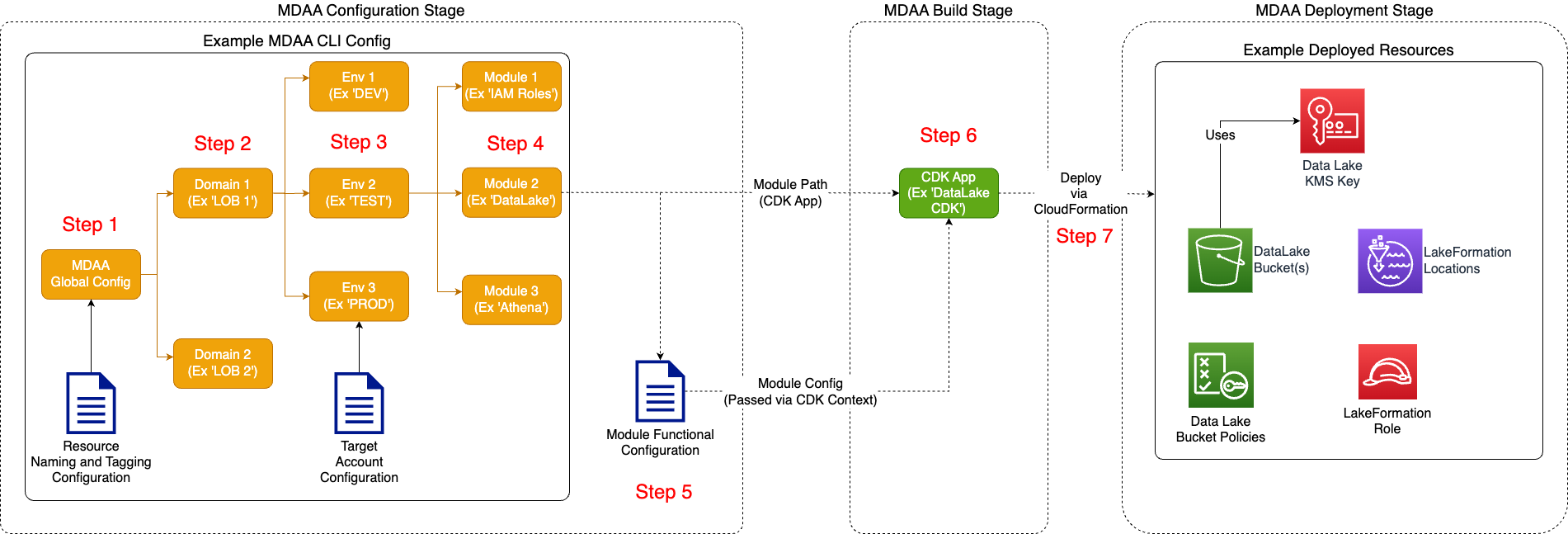
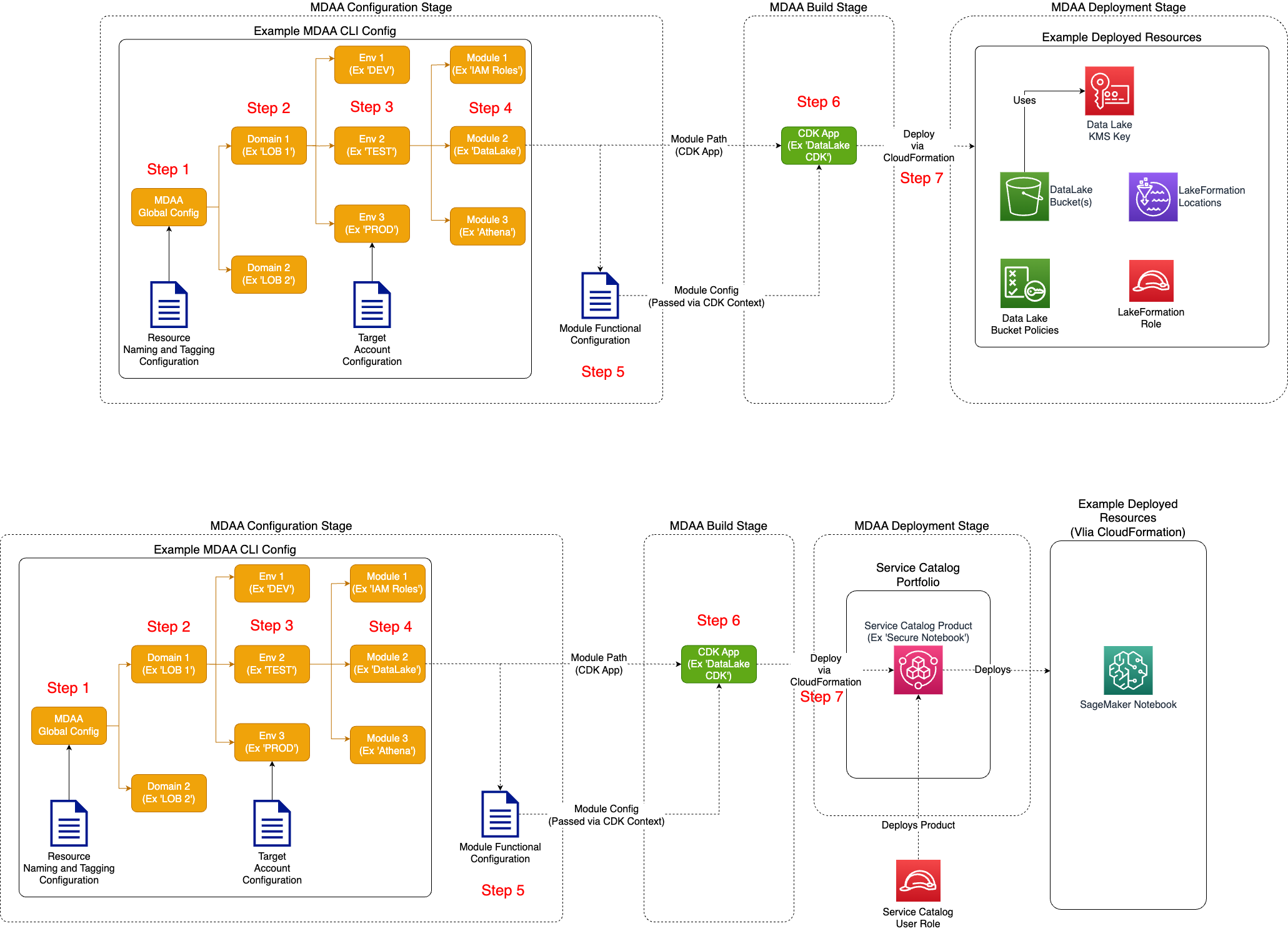
MDAA is designed to deploy data environments across multiple domains and environments. Each domain/environment is constituted by one or more configured MDAA modules. Each MDAA module references a CDK app and corresponding configuration. During deployment, MDAA executes a module's underlying CDK application, providing all necessary configuration details as CDK context.
- Domain - A data environment can be organized into one or more domains, which may align to organizational units such as line of business, directorate, etc. Domains may be spread across one or more accounts. When spread across multiple accounts, each domain becomes a potential node in a data mesh architecture.
- Environment - A domain can be deployed across multiple environments (such as DEV/TEST/PROD). Each environment may be deployed in a separate account.
- Module - A module specifies which CDK App and corresponding configuration will be deployed within a data environment domain/environment. During deployment, modules will be deployed in stages according to dependencies between modules.
- CDK App - A CDK App is built, executed, and deployed using the AWS CDK framework. The CDK app will be forked from the MDAA orchestrator and executed as a regular CDK application. Each CDK produces one or more CloudFormation stacks, which in turn deploy the cloud resources which will constitute the data environment. Alternatively, instead of deploying resources directly to the environment, they can instead be published as Service Catalog products, to be deployed on a self-service basis by users within the accounts.
Direct Configuration and Deployment
Configuration and Deployment via Service Catalog
Sample Architectures and Configurations
These sample MDAA configurations are provided as a starting point for common analytics platform architectures.
Starter Kits
Starter kits provide secure, prepackaged foundations for common use cases. Copy a starter kit to your own directory:
Available kits:
- Basic DataLake — S3 data lake with Glue database and crawler
- Data Science Platform — SageMaker Studio with integrated data lake
- GenAI Foundation — Enterprise-ready Bedrock Agent with RAG and knowledge bases
- GenAI GAIA Chatbot — RAG chatbot backend with document search, auth, and streaming API
- DataZone Governed Lakehouse — DataZone-governed lakehouse with fine-grained access control
- Health Data Accelerator — Healthcare data lake with DMS integration
- Minimal — IAM roles, Glue Catalog encryption, LakeFormation settings
- MLOps Platform — End-to-end ML lifecycle with training, deployment, and monitoring
- SMUS Research Environment — SageMaker Unified Studio for team-based research
- SMUS Data Mesh — Multi-account SageMaker Unified Studio with cross-account data sharing
External Sample Configurations
Additional sample configurations are available in a dedicated repository for easier contribution and faster updates.
MDAA Config File/Folder Layouts
MDAA is configured using a set of YAML configuration files. The main CLI configuration file (typically 'mdaa.yaml') specifies the global, domain, environment, and modules to be deployed. Module (CDK App) configurations are specified in separate YAML files, or can be configured inline in the CLI config itself. Module (CDK App) configurations are documented in detail in their respective READMEs. Terraform modules are configured directly using HCL configurations next to mdaa.yaml.
MDAA configuration layouts are very flexible. Configurations for an entire org can be concentrated into a single MDAA config file, or can be spread out across multiple config files by domain, line of business, environment, etc.
Single Domain, Shared CDK Apps Configs Across Envs
In this scenario, a MDAA config contains a single domain, with CDK App configs shared across dev/test/prod. In this case, the shared configs likely make heavy use of SSM parameters to achieve portability across environments.
Single Domain, Separate CDK Apps Configs Across Envs
In this scenario, a MDAA config contains a single domain, with separate CDK App configs across dev/test/prod.
root_folder
│   mdaa.yaml
│   tags.yaml
│
└───domain1
    └───dev
    │   │   dev_roles.yaml
    │   │   dev_datalake.yaml
    │
    └───test
    │   │   test_roles.yaml
    │   │   test_datalake.yaml
    │
    └───prod
        │   prod_roles.yaml
        │   prod_datalake.yaml
Multiple domains, single MDAA config
In this scenario, multiple domains are in the same MDAA config.
root_folder
│   mdaa.yaml
│   tags.yaml
│
└───domain1
│   │   roles.yaml
│   │   datalake.yaml
│
└───domain2
    │   roles.yaml
    │   datalake.yaml
    │   ...
Multiple domains, Multiple MDAA config
In this scenario, each domain is in its own MDAA config.
root_folder1
│   mdaa.yaml
│   tags.yaml
│
└───domain1
   │   roles.yaml
   │   datalake.yaml

root_folder2
│   mdaa.yaml
│   tags.yaml
│
└───domain2
    │   roles.yaml
    │   datalake.yaml
    │   ...
Sample MDAA CLI Configuration
# All resources will be deployed to the default region specified in the environment or AWS configurations.
# Can optionally specify a specific AWS Region Name.
# Target region can be defined globally, per domain, or per env, with lower-level specifications
# overriding higher-level configs. Each module deploys to the region of the env in which it is
# defined; a module which additionally needs resources in another region can use 'additional_stacks'.
region: default

# All resources will be deployed to the default account specified in the environment or AWS configurations.
# Can optionally specify a specific AWS account number.
# Target account can be defined globally, per domain, or per env, with lower-level specifications
# overriding higher-level configs. Each module deploys to the account of the env in which it is
# defined; a module which additionally needs resources in another account can use
# 'additional_accounts' or 'additional_stacks'.
# Note that CDK trust must be established (using CDK Bootstrap) between the local account
# and the target account (if not default).
account: default

# Path to a custom naming module implementation and class name
naming_module: ../custom-naming
naming_class: ExtendedDefaultNaming

# One or more tag files containing tags which will be applied to all deployed resources
tag_configs:
  - tags.yaml

# Will be injected into CDK context as 'org', and will be used by default naming implementation
# to prefix all resource names with the org name.
# Additionally, can be referenced in MDAA CDK App configs using the inline {{org}} syntax.
organization: sample-org

# Additional context keys can be specified globally, per domain, per env, or per module.
# Values specified lower in the hierarchy (Ie module) will override values specified higher (Ie global)
# Context values can be referenced in MDAA CDK App configs using the "{{context:<key>}}" syntax".
# Context values can be scalars (strings, numbers, booleans), lists (arrays), or objects.
# For example (from Audit CDK App Config):
# readRoles:
#  - id: "{{context:data_admin_role_id}}"
#
# List example:
# appSubnets: "{{context:subnet_ids}}"
#
# Object example:
# vpcConfig: "{{context:vpc_configuration}}"
context:
  # Scalar values
  data_admin_role_id: AROA12312412421
  some_context_key: some_context_value

  # List values
  subnet_ids:
    - subnet-1234567890abcdef0
    - subnet-0fedcba9876543210

  # Object values
  vpc_configuration:
    vpcId: vpc-1234567890abcdef0
    cidr: '10.0.0.0/16'
    enableDnsHostnames: true

# List of custom CDK Aspect implementations which will be applied to all resources produced by all MDAA modules.
# Useful for applying custom global security checks or modifiers
custom_aspects:
  - aspect_module: ./custom-aspects
    aspect_class: RolePermissionsBoundaryAspect
    aspect_props:
      permissionsBoundaryArn: some-test-arn

# (Optional - defaults to latest) The MDAA version can be specified globally,
# and can be overridden per domain, env, or module.
# This should be the NPM package version in standard npm version constraint syntax,
# and will be appended to the MDAA NPM Package name when
# each MDAA CDK App is npm installed.
# Note: any specification of MDAA package version will result in the affected package(s) being installed from NPM instead of being executed from local codebase.
# mdaa_version: '>=1.00.0'

# (Optional) - Env templates can be defined for use across domains/envs.
env_templates:
  example_global_env_template:
    # These modules and configs will be deployed for each environment referencing this config.
    modules:
      roles:
        module_path: '@aws-mdaa/roles'
        module_configs:
          - ./roles.yaml
      datalake:
        module_path: '@aws-mdaa/datalake'
        module_configs:
          - ./datalake.yaml

# One or more domains may be specified. Domain name will be incorporated by default naming implementation
# to prefix all resource names. This allows for multiple MDAA deployments into the same account
# for separate purposes (such as a centralized data lake account hosting separate lines of business.)
domains:
  # Where resources may be shared across multiple domains, and domain name of 'shared' may be appropriate.
  # The domain name can be referenced within MDAA CDK App configs via the inline {{domain}} syntax.
  shared:
    # All resources will be deployed to the default region specified in the environment or AWS configurations.
    # Can optionally specify a specific AWS Region Name.
    # Target region can be defined globally, per domain, or per env, with lower-level specifications
    # overriding higher-level configs.
    region: default

    # All resources will be deployed to the default account specified in the environment or AWS configurations.
    # Can optionally specify a specific AWS account number.
    # Target account can be defined globally, per domain, or per env, with lower-level specifications
    # overriding higher-level configs.
    # Note that CDK trust must be established (using CDK Bootstrap) between the local account
    # and the target account (if not default).
    account: default
    # (Optional - defaults to latest) The MDAA version can be specified by domain.
    # This should be the NPM package version in standard npm version constraint syntax,
    # and will be appended to the MDAA NPM Package name when
    # each MDAA CDK App is npm installed.
    mdaa_version: '>=1.0.0'
    # One or more tag files containing tags which will be applied to all deployed resources in this domain
    tag_configs:
      - domain_tags.yaml
    # One or more environments may be specified, typically along the lines of 'dev', 'test', and/or 'prod'
    environments:
      # The environment name will be incorporated into resource name prefixes by the default naming implementation.
      # It can also be referenced within MDAA CDK App configs via the inline {{env}} syntax.
      dev:
        # All resources will be deployed to the default region specified in the environment or AWS configurations.
        # Can optionally specify a specific AWS Region Name.
        # Target region can be defined globally, per domain, or per env, with lower-level specifications
        # overriding higher-level configs. All modules in this env deploy to this region.
        region: default

        # All resources will be deployed to the default account specified in the environment or AWS configurations.
        # Can optionally specify a specific AWS account number.
        # Target account can be defined globally, per domain, or per env, with lower-level specifications
        # overriding higher-level configs. All modules in this env deploy to this account.
        # Note that CDK trust must be established (using CDK Bootstrap) between the local account
        # and the target account (if not default).
        account: default
        # (Optional - defaults to latest) The MDAA version can be specified by env.
        # This should be the NPM package version in standard npm version constraint syntax,
        # and will be appended to the MDAA NPM Package name when
        # each MDAA CDK App is npm installed.
        # Note: any specification of MDAA package version will result in the affected package(s) being installed from NPM instead of being executed from local codebase.
        mdaa_version: '>=1.0.0'
        # One or more tag files containing tags which will be applied to all deployed resources in this env
        tag_configs:
          - env_tags.yaml
        # The list of modules which will be deployed. A module points to a specific MDAA CDK App, and
        # specifies a deployment configuration file if required.
        modules:
          # The module name is used to discriminate between multiple deployments of the same
          # module type/cdk app in the same env/domain/org.
          # It can also be referenced within MDAA CDK App configs via the inline {{module_name}} syntax.
          test_glue_catalog:
            # (Optional - defaults to latest) The MDAA version can be specified by module.
            # This should be the NPM package version in standard npm version constraint syntax,
            # and will be appended to the MDAA NPM Package name when
            # each MDAA CDK App is npm installed.
            # Note: any specification of MDAA package version will result in the affected package(s) being installed from NPM instead of being executed from local codebase.
            mdaa_version: '>=0.15.0'
            # The CDK App to be executed. An NPM install will be run using this
            # value as the package name--so the package is expected to be available either via
            # public or private NPM repo.
            module_path: '@aws-mdaa/glue-catalog'

          test_datalake_athena_workgroup:
            # The CDK App can be specified with standard npm version constraint syntax
            # which will be directly utilized by the npm install command.
            # Each module's npm packages will be installed and
            # executed in an isolated location to avoid conflicts between modules.
            # This approach overrides any mdaa_version config at the global, domain, env, or module level.
            # Note: any specification of MDAA package version will result in the affected package(s) being installed from NPM instead of being executed from local codebase.
            module_path: '@aws-mdaa/athena-workgroup@>=0.15.0'
            # One or more config files can be specified and will be merged before being fed to the CDK application.
            # Later-specified config file contents will override earlier-specified configs.
            module_configs:
              - ./shared/athena-workgroup.yaml
            # App config data can also be directly specified in the mdaa.yaml
            # Config data specified in the mdaa.yaml will supersede the contents of the
            # individual module config files where conflicts occur. Otherwise,
            # all config data will be merged before being parsed by the module/CDK App.
            module_config_data:
              some_config_key: some_config_value
            tag_configs: # Additional tag configs can be specified at the module level
              - module_tags.yaml
            # Tag config data can also be directly specified in the mdaa.yaml
            # Tag data specified in the mdaa.yaml will supersede the contents of the
            # individual tag config files where conflicts occur. Otherwise,
            # all tag data will be merged before being parsed by the module/CDK App.
            tag_config_data:
              some_tag_key: some_tag_value

  datalake_domain: # Example of a specific domain name.
    environments:
      dev:
        modules:
          test_datalake_roles:
            module_config_data:
              # CDK Nag suppressions can be specified by resource path at the module level.
              # These can be added to here in module_config_data, or directly in module config files.
              # Note that certain modules also have resource-specific suppression configs.
              nag_suppressions:
                by_path:
                  - path: /sample-org-dev-shared-datawarehouse/cluster/Secret/Resource
                    suppressions:
                      - id: AwsSolutions-SMG4
                        reason: Example suppression
            module_path: '@aws-mdaa/roles'
            module_configs:
              - ./datalake_domain/roles.yaml

          test_datalake_buckets:
            module_path: '@aws-mdaa/datalake'
            context:
              anycontext: anyvalue
            module_configs:
              - ./datalake_domain/datalake.yaml

          # an example of a module which may deploy resource to additional accounts
          test_datalake_access:
            module_path: '@aws-mdaa/lakeformation-access-control'
            # Each additional account must be listed here
            # If the module attempts to add resources to an account not listed here, then
            # an exception will be thrown.
            # Once an additional account is listed here, it should not be removed until
            # the module has cleaned up all resources deployed in that account,
            # otherwise MDAA will lose visibility of the stack in that additional account
            # and resources may be orphaned.
            # Note that CDK trust must be established (using CDK Bootstrap) between the local account
            # and the additional account.
            # If deployment to separate accounts/regions are required, use 'additional_stacks' instead.
            # Otherwise all deployments will occur within the same region.
            additional_accounts:
              - '1232412412'
            # Some modules may be configured to deploy resources to separate accounts and/or regions
            # For each additional account/region specified here, an additional stack will be generated into which
            # the module may deploy resources.
            # Note that CDK trust must be established (using CDK Bootstrap) between the local account
            # and the additional account.
            additional_stacks:
              - account: '1232412412'
                region: 'test-region'
            module_configs:
              - ./datalake_domain/lakeformation-access-control.yaml

  datascience_domain:
    environments:
      dev:
        modules:
          service-catalog:
            module_path: '@aws-mdaa/service-catalog'
            module_configs:
              - ./datascience_domain/service-catalog.yaml
          notebook:
            module_path: '@aws-mdaa/sm-notebook'
            # This module will be deployed as a service catalog product in the specified portfolio
            # instead of directly to the account.
            service_catalog_product_config:
              name: Example Notebook Product
              owner: Test Owner
              portfolio_arn: some_portfolio_arn
            module_configs:
              - ./datascience_domain/sm-notebook.yaml

  # Example of a domain which uses globally templated environments
  globally-templated-domain1:
    environments:
      # Example of envs that uses a global environment template
      dev:
        account: dev_acct_num
        template: example_global_env_template
      test:
        account: test_acct_num
        template: example_global_env_template

  # Example of a second domain which uses globally templated environments
  globally-templated-domain2:
    environments:
      # Example of an env that uses a global environment template
      dev:
        template: example_global_env_template
        modules:
          # This env will deploy this module in addition to those defined in the template
          additional-module:
            module_path: '@aws-mdaa/dataops-job'
            module_configs:
              - ./dataops/dataops-job.yaml

  # This domain uses a domain-specific template for its environments
  templated-domain:
    # Env templates can also be defined per domain.
    env_templates:
      example_domain_env_template:
        modules:
          roles:
            module_path: '@aws-mdaa/roles'
            module_configs:
              - ./roles.yaml
          datalake:
            module_path: '@aws-mdaa/datalake'
            module_configs:
              - ./datalake.yaml
    environments:
      # Example of envs that use a domain-specific environment template
      dev:
        template: example_domain_env_template
      test:
        template: example_domain_env_template

# Optional - Configs for MDAA Devops resources to be deployed when using the '-p' MDAA CLI flag
devops:
  # The CodeCommit repo containing these configs
  # Pipelines will be triggered on updates to this repo
  configsCodeCommitRepo: test-config-repo
  # (Optional) - The branch within the configs repo to be deployed
  configsBranch: test-branch
  # The CodeCommit repo containing the MDAA source code
  # Pipelines will be triggered on updates to this repo
  mdaaCodeCommitRepo: test-mdaa-repo
  # (Optional) - The branch within the MDAA repo to be deployed
  mdaaBranch: test-mdaa-branch
  # (Optional) - Install commands to be run on all stages of all pipelines
  install:
    - echo testing
  # (Optional) - Pre commands to be run on all stages of all pipelines
  pre:
    - echo testing
  # (Optional) - Post commands to be run on all stages of all pipelines
  post:
    - echo testing
  # (Optional) - Commands to be run on PreDeploy stage of all pipelines
  preDeploy:
    install:
      - echo testing
    pre:
      - echo testing
    post:
      - echo testing
  # (Optional) - Commands to be run on PreDeployValidate stage of all pipelines
  preDeployValidate:
    install:
      - echo testing
    commands:
      - echo testing
  # (Optional) - Commands to be run on Deploy stage of all pipelines
  deploy:
    install:
      - echo testing
    pre:
      - echo testing
    post:
      - echo testing
  # (Optional) - Commands to be run on PostDeployValidate stage of all pipelines
  postDeployValidate:
    install:
      - echo testing
    commands:
      - echo testing
  # Pipelines to be deployed.
  pipelines:
    # Pipeline Name
    domain-test1:
      # Each pipeline will run on the Domains, Envs, and Modules specified by a set of filters passed to the
      # -d, -e, and -m params of the MDAA CLI. These filters are effectively ANDed together.
      # Domains which will be deployed via this pipeline
      domainFilter:
        - testdomain1
      # Envs which will be deployed via this pipeline
      envFilter:
        - testenv
      # Modules which will be deployed via this pipeline
      moduleFilter:
        - testmodule1
      # (Optional) Commands to be run on all stages of this pipeline
      install:
        - echo testing
      pre:
        - echo testing
      post:
        - echo testing
      # (Optional) Stage-specific commands to be run on this pipeline
      preDeploy:
        install:
          - echo testing
        pre:
          - echo testing
        post:
          - echo testing
      preDeployValidate:
        install:
          - echo testing
        commands:
          - echo testing
      deploy:
        install:
          - echo testing
        pre:
          - echo testing
        post:
          - echo testing
      postDeployValidate:
        install:
          - echo testing
        commands:
          - echo testing
Sample Tag Configurations
Module Configurations
Each MDAA Module/CDK App has its own configuration schema, which is documented in their respective READMEs. There are some common configuration behaviours and capabilities, however, which can be used across all MDAA Module configs.
Role References
Many MDAA modules require IAM role references for granting access to resources like KMS keys, S3 buckets, SageMaker domains, and Lake Formation permissions. These are specified using the MdaaRoleRef format, which supports several resolution strategies.
Reference Styles
# By name — simplest approach, recommended for most cases.
# MDAA automatically expands the name to a full ARN in the
# deployment account.
- name: Admin

# By ARN — use when you need to reference a role in a specific
# account, or when the role ARN is stored in an SSM parameter.
- arn: arn:aws:iam::123456789012:role/Admin
- arn: ssm:/my-org/shared/roles/admin/arn

# By role ID — the AWS-generated unique identifier (e.g. AROA...).
# Use when stable, immutable references are a security requirement,
# since role names and ARNs can be reassigned to different roles.
- id: AROA1234567890EXAMPLE
- id: ssm:/my-org/shared/roles/admin/id

# By MDAA generated role shorthand — resolves the role ID from
# SSM parameters created by the MDAA Roles module.
- id: generated-role-id:my-role-name
How Resolution Works
When MDAA processes a role reference:
name:is expanded to a full IAM role ARN using the deployment account IDarn:is used as-is (or resolved from SSM if prefixed withssm:)id:is used as-is (or resolved from SSM / generated-role-id shorthand)
Some modules (like Data Lake and Lake Formation) further resolve ARN references to role IDs at deploy time via a custom resource. This ensures that bucket policies and Lake Formation grants reference the immutable role ID rather than the role name, which provides stronger security guarantees.
Cross-Account Role References
The role-ID lookup described above calls IAM in the deploying account, so it can only resolve roles that live there. A role in another account is detected automatically: when the account segment of arn: differs from the deployment account, MDAA skips the lookup and grants access by ARN instead.
roles:
  DataEngineer:
    # Same account: resolved to a role ID, granted via aws:userId
    - arn: arn:aws:iam::111111111111:role/DataEngineer
    # Another account: no lookup, granted as an ARN-based principal
    - arn: arn:aws:iam::222222222222:role/CrossAccountEngineer
This applies to KMS key policies, and to the bucket policies of the Data Lake, Athena Workgroup, Data Warehouse and Audit modules. In a bucket policy the role receives two grants: object-level permissions on the prefixes it is entitled to, and a bucket-level s3:List*/s3:GetBucket* grant. Both are needed, because object access alone leaves ListObjectsV2 and GetBucketLocation denied, which breaks Glue crawlers, Athena and aws s3 ls even though individual object reads succeed.
The resource policy grant is only half of cross-account access. The role's own account must also allow the same S3 and KMS actions in the role's IAM policy. Note too that the bucket-level listing grant covers the whole bucket, not only the prefixes the role is entitled to read.
In a KMS key policy a cross-account role is granted the encrypt and decrypt operations plus kms:DescribeKey, which services such as Athena, Glue and Redshift call before using a key. A same-account principal picks DescribeKey up from its own IAM policy, but an external principal only has what the key policy gives it.
Key administration cannot be delegated across accounts. KMS honours a cross-account grant only for cryptographic operations and for CreateGrant, DescribeKey, GetKeyRotationStatus, GetPublicKey, ListGrants, RetireGrant and RevokeGrant; a grant for anything else has no effect. So a cross-account role listed in a field that feeds key administration (dataAdminRoles in most modules) receives only the grant and describe operations listed above, and MDAA emits a CDK warning saying so. Key policy changes, rotation, tagging, aliases, enable/disable and deletion scheduling stay with the account that owns the key. Keep at least one same-account role in those fields so the key remains manageable.
MDAA emits a CDK warning for each cross-account reference. When a resource policy is saved, AWS stores an ARN principal as that role's unique ID, which has two consequences worth planning for. The role must already exist when MDAA deploys, or S3 rejects the bucket policy with Invalid principal in policy and KMS rejects the key policy. And a role that is later deleted and recreated with the same name loses access until the policy is applied again, so plan a redeploy alongside any such role rotation.
Detection needs a literal account in the ARN. A reference by name: is always expanded in the deployment account, and an ARN that is not known until deploy time (an ssm: lookup, or a value carrying a CloudFormation token) cannot be compared against the deployment account at synth time. Both are treated as same-account.
Storing role ARNs in SSM for portability is a common pattern, so an ARN carrying a CloudFormation token gets its own CDK warning at synth time: MDAA reports that it could not read the account from the ARN and is falling back to the lookup, which searches the deploying account by role name only. If the role lives in another account, the deployment fails with Failed to resolve role, or, when the deploying account happens to hold a role of the same name, the grant silently goes to that local role instead. If that is your situation, supply all three anchors as described below. The {{ssm-org:...}}, {{ssm-domain:...}} and {{ssm-env:...}} shorthands resolve to a CloudFormation dynamic reference rather than a token, so they take the same fallback but without the warning.
A role reference arn: which cannot name a role is rejected at synth time rather than carried into a resource policy. That covers an ARN of a service other than IAM, an IAM ARN whose region segment is not empty (IAM is global, so it always is), and an account which is not a twelve-digit account ID. The most common case is omitting the empty region segment, which shifts every later field left:
# Rejected: missing the empty region segment, so 'role/DataEngineer' lands where the account belongs
- arn: arn:aws:iam:222222222222:role/DataEngineer
# Rejected: not an IAM ARN, so it cannot identify a role
- arn: arn:aws:sts::222222222222:assumed-role/DataEngineer/session
# Correct: note the double colon
- arn: arn:aws:iam::222222222222:role/DataEngineer
An arn: which is not yet known at synth time is not subject to these checks, since there is nothing to inspect. That covers the ssm: prefix, which resolves to a CloudFormation token, and the {{ssm-org:...}}, {{ssm-domain:...}} and {{ssm-env:...}} shorthands, which expand to a CloudFormation dynamic reference.
Where a role ID is still required. Some paths still resolve a role to its ID, either because they need something an ARN cannot express, or because they have not been migrated yet:
- the SageMaker Studio domain's user-profile ID conditions, which an ARN cannot express
- the SageMaker Studio domain's notebook sharing bucket policy
- the DataOps Project bucket policy and its Lake Formation grants
Against a cross-account role those paths perform the account-scoped lookup, which fails the deployment with Failed to resolve role or, if the deploying account holds a role of the same name, resolves to that local role instead. Supply all three anchors to bypass the lookup entirely:
roles:
  DataEngineer:
    - id: AROA1234567890EXAMPLE
      arn: arn:aws:iam::222222222222:role/CrossAccountEngineer
      name: CrossAccountEngineer
With id, arn and name all given, MDAA has every property it would otherwise resolve, so it never creates the lookup custom resource. The trade-off is that the three values are no longer verified against each other or against the live role, so a stale id left behind after the role was recreated will silently grant nothing. Read the role's current unique ID with aws iam get-role --role-name <name> --query Role.RoleId in the account that owns it.
Optional Flags
# Mark a role as immutable — MDAA will not attach managed policies
# to this role. Use for roles managed outside of MDAA (e.g. SSO
# permission set roles) where policy attachment is not permitted.
- name: AWSReservedSSO_DataScientist_abcdef
  immutable: true

# Mark a role as SSO-managed — resolves the auto-generated IAM
# role name created by IAM Identity Center for the given
# permission set.
- name: DataScientistPermissionSet
  sso: true
Choosing a Reference Style
| Style | When to use |
|---|---|
name: |
Default choice. Simple, readable, works for same-account roles. |
arn: |
Cross-account roles, which are automatically handled as ARN-based principals in resource policies when the ARN carries a literal account. Also for a portable ARN stored in SSM, though that hides the account and so falls back to the account-scoped lookup. |
id: |
When your security policy requires stable references that survive role recreation. Role IDs are immutable — if a role is deleted and recreated with the same name, the ID changes, preventing unintended access. |
generated-role-id: |
Referencing roles created by the MDAA Roles module. Resolves the role ID from SSM parameters automatically. |
Example
# Data Lake module — demonstrates all reference styles
roles:
  DataAdmin:
    - arn: arn:aws:iam::123456789012:role/Admin
  DataUser:
    - name: data-scientist
    - id: generated-role-id:etl-role
  DataEngineer:
    - name: AWSReservedSSO_Engineer_abcdef
      immutable: true
See the Data Lake sample configs for a complete example demonstrating all role reference styles.
Dynamic References
MDAA allows use of Dynamic References in configuration files. These build on the concept of CloudFormation Dynamic References.
# Example Config File w/Dynamic References

# Will be passed through to CloudFormation as a CFN Dynamic Reference and will be resolved at deployment time
vpcId: "{{resolve:ssm:/path/to/ssm/param}}"
sensitive_value: "{{resolve:ssm-secure:parameter-name:version}}"
db_username: "{{resolve:secretsmanager:MyRDSSecret:SecretString:username}}",
db_password: "{{resolve:secretsmanager:MyRDSSecret:SecretString:password}}"

# Will be resolved at synth time to the CDK context value passed from the MDAA CLI config or directly in CDK context
subnetId: "{{context:some_context_key}}"

# Will be resolved at synth time to environment variable values
subnetId: "{{env_var:some_env_variable_name}}"

# Will be resolved at synth time to the values passed for org/domain/env/account/region from the MDAA CLI config via CDK context
# Identical to org: "{{context:org}}"
org: "{{org}}"
domain: "{{domain}}"
env: "{{env}}"
module_name: "{{module_name}}"
partition: "{{partition}}"
account: "{{account}}"
region: "{{region}}"

# Dynamic references can also be embedded inline in config values:
key_arn: arn:{{partition}}:kms:{{region}}:{{account}}:key/{{context:key_id}}
SSM Parameter References
Most MDAA Config properties allow referencing SSM parameters instead of directly specifying config values. This is useful for configuring an MDAA module to use resources from another MDAA module, or external resources created outside of MDAA.
# Full SSM path
config_key: ssm:/path/to/ssm/param

# Org SSM path - automatically prepends SSM path with standard MDAA org path.
# This is shorthand for referencing SSM parameters created by MDAA within the same org.
# This expands to ssm:/{{org}}/other_domain/other_module/some_path
config_key: ssm-org:/other_domain/other_module/some_path

# Domain SSM path - automatically prepends SSM path with standard MDAA org/domain path.
# This is shorthand for referencing SSM parameters created by MDAA within the same org and domain.
# This expands to ssm:/{{org}}/{{domain}}/other_module/some_path
config_key: ssm-domain:/other_module/some_path
Each of these forms is resolved by CloudFormation at deployment time, against the parameter store of the account and region the module deploys to. To reference a parameter held in another account, see Cross-Account References.
Cross-Account References
A module can consume the output of a module deployed to a different account. Reference the parameter by its full ARN instead of by path, keeping the ssm: prefix, and share the parameter with the consuming account through AWS Resource Access Manager (RAM).
# ssm: prefix, then the full SSM parameter ARN including the account which owns
# the parameter. The prefix is what marks the value as a reference to resolve -
# without it the ARN is taken literally and injected as the config value itself.
# Using {{partition}}/{{region}}/{{org}} and a context key for the account number
# keeps the reference portable across deployments.
config_key: ssm:arn:{{partition}}:ssm:{{region}}:{{context:producer_account}}:parameter/{{org}}/other_domain/other_module/some_path
These parameter paths assume the default SSM layout. With the @mdaaIncludeEnvInSsmPath flag enabled, env is inserted after the domain - parameter/{{org}}/<domain>/<env>/<module>/....
Requirements:
- The parameter must be shared via RAM. Only SSM parameters in the
Advancedtier can be shared, so MDAA modules which publish parameters for cross-account use create them in that tier and RAM-share them with the accounts named in their config. AWS does not allow an Advanced-tier parameter to be returned to Standard, so this is a one-way change: turning sharing off later leaves the parameters Advanced and still billed until they are deleted and recreated out of band. Where the producing module is not managed by MDAA, or does not share the parameter itself, creating the share is yours to do. - The consuming account must normally be in the same AWS Organization as the producer. Within an organization that has RAM sharing enabled, the share is accepted automatically. The data lake and roles modules restrict their shares to the organization (
allowExternalPrincipals: false), so naming an account outside it fails the deployment. The other MDAA modules that share parameters - datazone, glue-catalog and sagemaker-project - do not set this, so an out-of-organization principal raises a RAM invitation that must be accepted in the consuming account before the reference resolves, as does a share you created yourself outside MDAA. To avoid cross-organization sharing entirely, state the value as a literal in config. - Both ends must be in the same region. The reference is resolved by CloudFormation in the region of the stack reading it, so an ARN naming a different region fails at deployment time - nothing catches it at synth. Cross-region references between separately deployed modules are not supported. A single module which needs resources in another region uses
additional_stacksto create the stack there, andallow_cross_reference_stackto permit references between its stacks - the two are complementary rather than alternatives, and such a module generally needs both. - The producing module must be deployed first. MDAA deploys domains and environments in the order they are listed in the config and does not resolve dependencies between them, so list the producing domain ahead of the consuming one. A reference to a parameter which does not yet exist, or which has not been shared, fails at deployment time.
The SMUS Data Mesh starter kit is a complete example of the cross-account sharing itself, though it reads the shared value through the DataZone module's own domainConfigSSMParam rather than through an ssm:-prefixed reference: an enterprise account publishes its SageMaker Unified Studio domain config and shares it with two team accounts, which reference it by ARN from their own module configs.
Configuration Sharing Across Domains, Envs, Modules
MDAA modules may share identical config files across multiple domains, envs, and modules. Because MDAA automatically injects the domain/env/module names into resource naming, each resulting deployment will result in uniquely named resources but with otherwise identical behaviours.
# Example MDAA Config With Shared Configs
domains:
  domain1:
    environments:
      dev:
        modules:
          test_datalake:
            module_path: '@aws-mdaa/datalake'
            module_configs:
              - ./shared/datalake.yaml
  domain2:
    environments:
      dev:
        modules:
          test_datalake:
            module_path: '@aws-mdaa/datalake'
            module_configs:
              - ./shared/datalake.yaml
Both datalakes will have identical configurations, but named according to their domain.
Configuration Composition
Each MDAA module accepts one or more configuration files, which are merged into an effective config, which is then validated and parsed by the app. This allows for configs to be composed of common base configs shared across multiple modules, environments, or domains, with only the differentiating config values to be applied on top.
In general, config files will be merged according to the following rules:
- Lists on same config key will be merged across config files
- Objects on same config key will be concatenated
- Scalar values will be overridden, with config files higher on list taking precedence
# Example MDAA CLI Module Specification With Multiple Configs
domains:
  domain1:
    environments:
      dev:
        modules:
          roles1:
            module_path: '@aws-mdaa/roles'
            module_configs:
              - ./domain1/roles1.yaml
              - ./shared/roles_base.yaml
  domain2:
    environments:
      dev:
        modules:
          roles2:
            module_path: '@aws-mdaa/roles'
            module_configs:
              - ./domain2/roles2.yaml
              - ./shared/roles_base.yaml
Module Hooks
MDAA supports predeploy and postdeploy hooks that allow you to execute custom commands before and after module deployment. This is useful for tasks like data preparation, validation, cleanup, or integration with external systems.
Hook Configuration
Hooks are configured at the module level in your MDAA configuration:
domains:
  shared:
    environments:
      dev:
        modules:
          datalake:
            module_path: '@aws-mdaa/datalake'
            module_configs:
              - ./datalake.yaml
            # Predeploy hook - runs before module deployment
            predeploy:
              command: './scripts/prepare-data.sh'
              exit_if_fail: true
            # Postdeploy hook - runs after module deployment
            postdeploy:
              command: './scripts/validate-deployment.sh'
              exit_if_fail: false
              after_success: true
Hook Properties
command (required)
The command to execute. This can be:
- A shell script:
"./scripts/setup.sh" - A direct command:
"aws s3 cp data.csv s3://my-bucket/" - A complex command:
"npm run build && npm run test"
You can provide template variables as arguments to the script: {{org}}, {{domain}}, {{env}}, {{module_name}}, {{region}}, {{account}}, and {{partition}}
You can also reference values from the module's effective context using {{context:<key>}}, for example "./scripts/setup.sh {{context:my_group}} {{context:my_region}}". These resolve against the same context used elsewhere in the config (see the Context section above).
exit_if_fail (optional, default: false)
If true, the deployment will stop if the hook command fails (exits with non-zero code).
If false, the deployment will continue even if the hook fails.
after_success (optional, default: false, postdeploy only)
For postdeploy hooks only:
- If
true, the hook only runs if the module deployment was successful - If
false, the hook runs regardless of deployment success/failure
Hook Execution Environment
Hooks execute with the following characteristics:
- Working Directory: Commands run in the module's directory
- Environment Variables: All environment variables from the MDAA process are inherited, including AWS credentials
- Output: Command output appears in real-time during execution
- Error Reporting: Enhanced error details are provided when commands fail, including exit codes and file analysis for shell scripts
Common Use Cases
Data Preparation
Deployment Validation
Cleanup Tasks
postdeploy:
  command: './scripts/cleanup-temp-resources.sh'
  exit_if_fail: false
  after_success: false # Run cleanup even if deployment failed
AWS CLI Operations
Hook Execution Order
For modules with both hooks configured:
- Predeploy hook executes first
- Module deployment (CDK/Terraform commands) executes
- Postdeploy hook executes last (subject to
after_successsetting)
If a predeploy hook fails and exit_if_fail: true, the module deployment and postdeploy hook will not execute.
Best Practices
- Script Permissions: Ensure shell scripts are executable (
chmod +x script.sh) - Error Handling: Use
exit_if_fail: truefor critical setup tasks - Idempotency: Design hooks to be safely re-runnable
- Logging: Include appropriate logging in your hook scripts for debugging
- AWS Credentials: Hooks automatically inherit AWS credentials from the MDAA process
- Path References: Use relative paths from the module directory or absolute paths
Resource Naming
MDAA provides a default naming implementation which can be overridden through specification of a custom naming module and class in the MDAA configuration. The default naming convention is implemented as follows:
- organization - Corresponds to the Organization deploying MDAA
- environment - Corresponds to the MDAA Environment
- domain - Corresponds to the MDAA Domain
- module - Corresponds to the name of the MDAA module
- function - An optional resource function/name (established in the CDK App code)