SageMaker Notebooks
Note: This documentation is also available in a rendered format here.
The SageMaker Notebook module configures and deploys secure SageMaker Notebook instances with KMS encryption, VPC networking, lifecycle configurations, and security groups with restricted access. Use this module when you need individual, isolated notebook environments for data exploration, model prototyping, or ad-hoc analysis.
Deployed Resources
This module deploys and integrates the following resources:
KMS CMK - Encrypts data on the storage volume attached to the notebook instance.
Notebook LifeCycle Configs - Scripts for customizing Notebooks on creation or startup.
Notebook Instances - VPC-bound SageMaker notebook instances, accessing internet only via VPC topology. An existing execution role must be specified for each notebook.
Notebook Security Group - Controls network access for notebook instances.
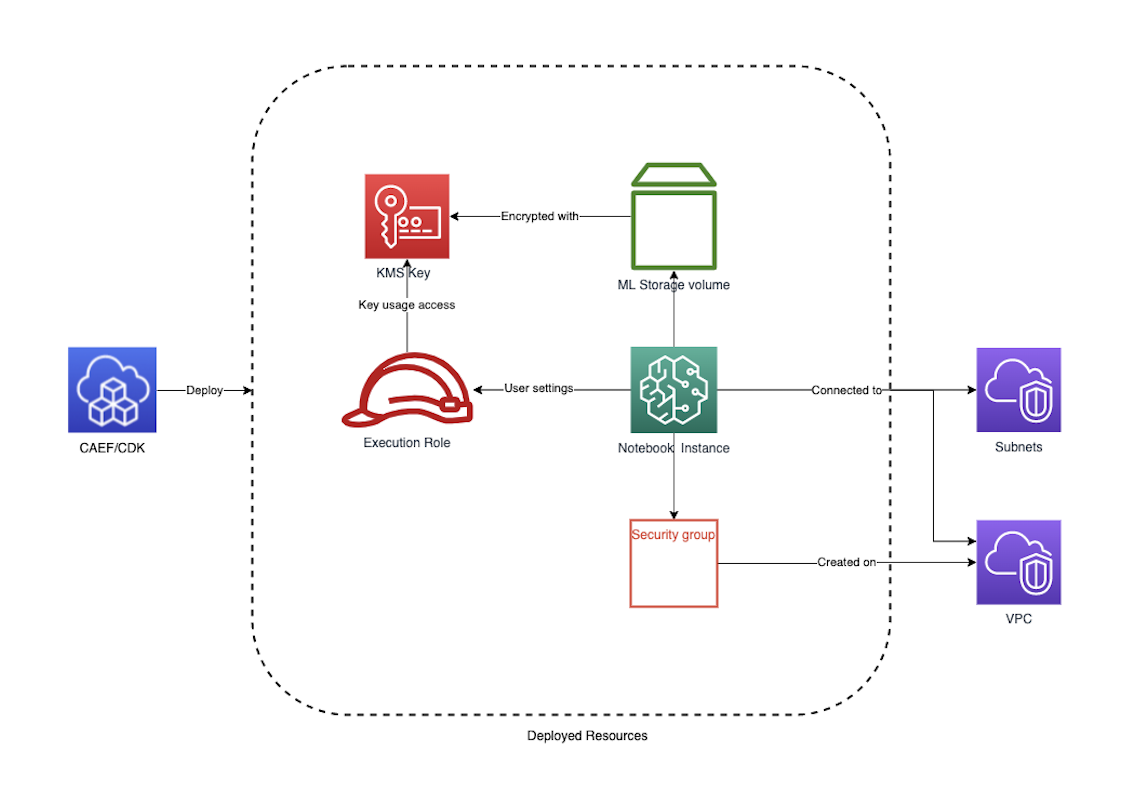
Related Modules
- SageMaker Studio — Deploy a Studio domain for a more full-featured interactive ML environment
- Data Science Team — Provisions notebook-equivalent functionality as part of a complete data science team environment with Athena, S3, and Lake Formation
- Service Catalog — Offer notebook instances as self-service products via Service Catalog portfolios
- Roles — Create IAM execution roles for notebook instances
Security/Compliance Details
This module is designed in alignment with MDAA security/compliance principles and CDK nag rulesets. Additional review is recommended prior to production deployment, ensuring organization-specific compliance requirements are met.
- Encryption at Rest:
- Storage volumes encrypted with customer-managed KMS key
- Key usage permissions granted to notebook execution roles
- Encryption in Transit:
- All SageMaker API communications use TLS
- Least Privilege:
- Each notebook requires an existing execution role with SageMaker service trust
- Root access disabled by default (optionally enabled)
- Network Isolation:
- Notebook instances are VPC-bound with direct internet access disabled
- Security group denies all ingress by default
- Egress rules control outbound connectivity
AWS Service Endpoints
The following VPC endpoints may be required if public AWS service endpoint connectivity is unavailable (e.g., private subnets without NAT gateway, firewalled environments, or PrivateLink-only architectures):
| AWS Service | Endpoint Service Name | Type |
|---|---|---|
| SageMaker API | com.amazonaws.{region}.sagemaker.api |
Interface |
| SageMaker Runtime | com.amazonaws.{region}.sagemaker.runtime |
Interface |
| SageMaker Notebook | com.amazonaws.{region}.notebook |
Interface |
| KMS | com.amazonaws.{region}.kms |
Interface |
| S3 | com.amazonaws.{region}.s3 |
Gateway |
| CloudWatch Logs | com.amazonaws.{region}.logs |
Interface |
| STS | com.amazonaws.{region}.sts |
Interface |
Configuration
MDAA Config
Add the following snippet to your mdaa.yaml under the modules: section of a domain/env in order to use this module:
sm-notebook: # Module Name can be customized
  module_path: '@aws-mdaa/sm-notebook' # Must match module NPM package name
  module_configs:
    - ./sm-notebook.yaml # Filename/path can be customized
Module Config Samples and Variants
Copy the contents of the relevant sample config below into the ./sm-notebook.yaml file referenced in the MDAA config snippet above.
Minimal Configuration
Provisions a single notebook instance with required networking and IAM role settings. Start here for a quick single-user notebook environment before adding lifecycle configs or custom compute options.
# Contents available via above link
# Minimal SageMaker Notebook module configuration.
# Provisions a single notebook instance with required networking
# and IAM role settings.

# (Optional) Map of notebook names to notebook instance
# configurations.
notebooks:
  my-notebook:
    # VPC ID for notebook deployment
    # Often created by your VPC/networking stack.
    # Example SSM: ssm:/path/to/vpc/id
    vpcId: vpc-id
    # Subnet ID for notebook placement
    # Often created by your VPC/networking stack.
    # Example SSM: ssm:/path/to/subnet/id
    subnetId: subnet-id
    # EC2 instance type for the notebook
    instanceType: ml.t3.medium
    # See CONFIGURATION.md for role reference options (name, arn, id).
    # IAM role for notebook instance
    # Often created by the Roles module.
    # Example SSM: ssm:/{{org}}/{{domain}}/<roles_module_name>/role/<role_name>/arn
    notebookRole:
      arn: arn:{{partition}}:iam::{{account}}:role/sagemaker-role
Comprehensive Configuration
Provisions notebook instances with lifecycle configs, security groups, asset deployment, and various compute/networking options. Use this as a reference when you need full control over instance types, lifecycle scripts, and network configuration.
sample-config-comprehensive.yaml
# Contents available via above link
# Sample config for the SageMaker Notebook module.
# Provisions notebook instances with lifecycle configs, security
# groups, asset deployment, and various compute/networking options.
# This comprehensive config exercises every compatible property at
# full depth.

# (Optional) Map of lifecycle configuration names to lifecycle
# configs with startup/shutdown scripts.
lifecycleConfigs:
  example-lifecycle-config:
    # (Optional) Lifecycle script for notebook instance startup.
    # Runs once per startup.
    onStart:
      # (Optional) Assets staged in S3, then copied to container
      # before lifecycle commands run. Available under
      # $ASSETS_DIR/<asset_name>/
      assets:
        testing:
          # Local file or directory path to deploy
          sourcePath: ./assets
          # (Optional) Glob patterns to exclude from asset
          # packaging
          exclude:
            - '*.pyc'
            - '__pycache__'
      # Lifecycle commands to execute
      cmds:
        - echo "testing onStart"
        - sh $ASSETS_DIR/testing/test.sh
    # (Optional) Lifecycle script for notebook instance creation.
    # Runs once when notebook is provisioned.
    onCreate:
      # (Optional) Assets staged in S3, then copied to container
      # before lifecycle commands run.
      assets:
        setup-scripts:
          # Local file or directory path to deploy
          sourcePath: ./assets
          # (Optional) Glob patterns to exclude from asset
          # packaging
          exclude:
            - '*.tmp'
      cmds:
        - echo "Testing onCreate"

# (Optional) Asset deployment configuration for automated notebook
# code and resource provisioning. Required if assets are specified
# in lifecycleConfigs.
assetDeploymentConfig:
  # S3 bucket name for notebook asset storage
  assetBucketName: some-bucket-name
  # (Optional) S3 prefix for asset organization. Defaults to
  # 'sagemaker-lifecycle-assets/notebooks' if not specified.
  assetPrefix: sagemaker/assets
  # IAM role ARN for asset deployment Lambda. Must have write
  # access to the assetBucket and assetPrefix, and an assume role
  # trust policy for Lambda.
  assetDeploymentRoleArn: arn:{{partition}}:iam::{{account}}:role/example_deployment_role
  # (Optional) Lambda memory limit in MB for asset deployment
  memoryLimitMB: 512

# (Optional) Existing KMS key ARN for notebook instance encryption.
# If omitted, a customer-managed key is created automatically.
kmsKeyArn: 'arn:{{partition}}:kms:{{region}}:{{account}}:key/test-notebook-key'

# (Optional) Map of notebook names to notebook instance
# configurations with compute, networking, and access controls.
notebooks:
  notebook-1:
    # (Optional) Custom notebook instance name. If not specified,
    # the notebook ID will be used.
    notebookName: 'test-notebook-name'
    # VPC ID for notebook deployment
    # Often created by your VPC/networking stack.
    # Example SSM: ssm:/path/to/vpc/id
    vpcId: vpc-id
    # Subnet ID for notebook placement
    # Often created by your VPC/networking stack.
    # Example SSM: ssm:/path/to/subnet/id
    subnetId: subnet-id
    # EC2 instance type for the notebook
    instanceType: ml.t3.medium
    # (Optional) Elastic Inference accelerator types to associate
    # with the notebook instance
    acceleratorTypes:
      - ml.eia2.medium
    # (Optional) Instance metadata service configuration
    instanceMetadataServiceConfiguration:
      # Minimum IMDS version (e.g., "2" to enforce IMDSv2)
      minimumInstanceMetadataServiceVersion: '2'
    # (Optional) Inbound traffic rules for the notebook security
    # group
    securityGroupIngress:
      # (Optional) IPv4 CIDR block rules for security group
      # traffic control
      ipv4:
        - # CIDR block specification for network access control
          cidr: 10.0.0.0/28
          # (Optional) Port number to allow
          port: 443
          # IP protocol (e.g., tcp, udp)
          protocol: tcp
          # (Optional) Description for the rule
          description: Allow HTTPS from internal network
          # (Optional) Ending port number defining the upper bound
          # of the port range
          toPort: 443
      # (Optional) Prefix list rules for security group traffic
      # control
      prefixList:
        - # Prefix list identifier for managed IP range access
          prefixList: pl-test-ingress
          # IP protocol
          protocol: tcp
          # (Optional) Port number to allow
          port: 443
          # (Optional) Description for the rule
          description: Allow HTTPS from managed prefix list
          # (Optional) Ending port number defining the upper bound
          # of the port range
          toPort: 443
      # (Optional) Security group rules for cross-security group
      # traffic control
      sg:
        - # Security group identifier for SG-based access control
          sgId: sg-ingresstest
          # IP protocol
          protocol: tcp
          # (Optional) Port number to allow
          port: 443
          # (Optional) Description for the rule
          description: Allow HTTPS from peer security group
          # (Optional) Ending port number defining the upper bound
          # of the port range
          toPort: 443
    # (Optional) Outbound traffic rules for the notebook security
    # group
    securityGroupEgress:
      # (Optional) IPv4 CIDR block rules for egress traffic
      # control
      ipv4:
        - cidr: 0.0.0.0/0
          port: 443
          protocol: tcp
          # (Optional) Description for the rule
          description: Allow HTTPS egress
          # (Optional) Ending port number defining the upper bound
          # of the port range
          toPort: 443
      # (Optional) Prefix list rules for egress traffic control
      prefixList:
        - prefixList: pl-4ea54027
          description: prefix list for com.amazonaws.{{region}}.dynamodb
          protocol: tcp
          port: 443
          # (Optional) Ending port number defining the upper bound
          # of the port range
          toPort: 443
        - prefixList: pl-7da54014
          description: prefix list for com.amazonaws.{{region}}.s3
          protocol: tcp
          port: 443
      # (Optional) Security group rules for egress traffic control
      sg:
        - sgId: ssm:/ml/sm/sg/id
          port: 443
          protocol: tcp
          # (Optional) Description for the rule
          description: Allow HTTPS to peer security group
          # (Optional) Ending port number defining the upper bound
          # of the port range
          toPort: 443
    # (Optional) Size of the root volume in GB
    volumeSizeInGb: 10
    # (Optional) If true, user will have root access to the
    # notebook
    rootAccess: false
    # See CONFIGURATION.md for role reference options (name, arn, id).
    # IAM role for notebook instance. Requires an assume role trust
    # policy for sagemaker.amazonaws.com.
    # Often created by the Roles module.
    # Example SSM: ssm:/{{org}}/{{domain}}/<roles_module_name>/role/<role_name>/arn
    notebookRole:
      arn: arn:{{partition}}:iam::{{account}}:role/sagemaker-role
    # (Optional) Reference to a lifecycle config created by this
    # module
    lifecycleConfigName: example-lifecycle-config
    # (Optional) Platform identifier for the notebook
    platformIdentifier: 'notebook-al2-v2'
    # (Optional) Default code repository URL
    defaultCodeRepository: 'https://github.com/example/repo.git'
    # (Optional) Additional code repository URLs
    additionalCodeRepositories:
      - 'https://github.com/example/repo2.git'

  notebook-2:
    # VPC ID for notebook deployment
    # Often created by your VPC/networking stack.
    # Example SSM: ssm:/path/to/vpc/id
    vpcId: vpc-id
    # Subnet ID for notebook placement
    # Often created by your VPC/networking stack.
    # Example SSM: ssm:/path/to/subnet/id
    subnetId: subnet-id
    # EC2 instance type for the notebook
    instanceType: ml.t3.large
    # (Optional) ID of an existing security group (not created by
    # this module)
    securityGroupId: sg-123124124
    # (Optional) Size of the root volume in GB
    volumeSizeInGb: 5
    # IAM role for notebook instance (name-based reference)
    # Often created by the Roles module.
    # Example SSM: ssm:/{{org}}/{{domain}}/<roles_module_name>/role/<role_name>/arn
    notebookRole:
      name: sagemaker-role
    # Reference to an existing lifecycle config (created outside
    # this module) using the 'external:' prefix
    lifecycleConfigName: external:existing-lifecycle-config

  notebook-3:
    # VPC ID for notebook deployment
    # Often created by your VPC/networking stack.
    # Example SSM: ssm:/path/to/vpc/id
    vpcId: vpc-id
    # Subnet ID for notebook placement
    # Often created by your VPC/networking stack.
    # Example SSM: ssm:/path/to/subnet/id
    subnetId: subnet-id
    # EC2 instance type for the notebook
    instanceType: ml.t3.xlarge
    # (Optional) ID of an existing security group
    securityGroupId: sg-test-id-ref
    # (Optional) Size of the root volume in GB
    volumeSizeInGb: 10
    # IAM role for notebook instance execution
    # Often created by the Roles module.
    # Example SSM: ssm:/{{org}}/{{domain}}/<roles_module_name>/role/<role_name>/arn
    notebookRole:
      name: notebook-execution-role