Basic Data Lake
This basic S3 Data Lake sample illustrates how to create an S3 data lake on AWS. Access to the data lake may be granted to IAM and federated principals, and is controlled on a coarse-grained basis only (using S3 bucket policies).
This architecture may be suitable when:
- Data is primarily unstructured and will not be consumed via Athena.
- User access to the data lake does not need to be governed by fine-grained access controls.
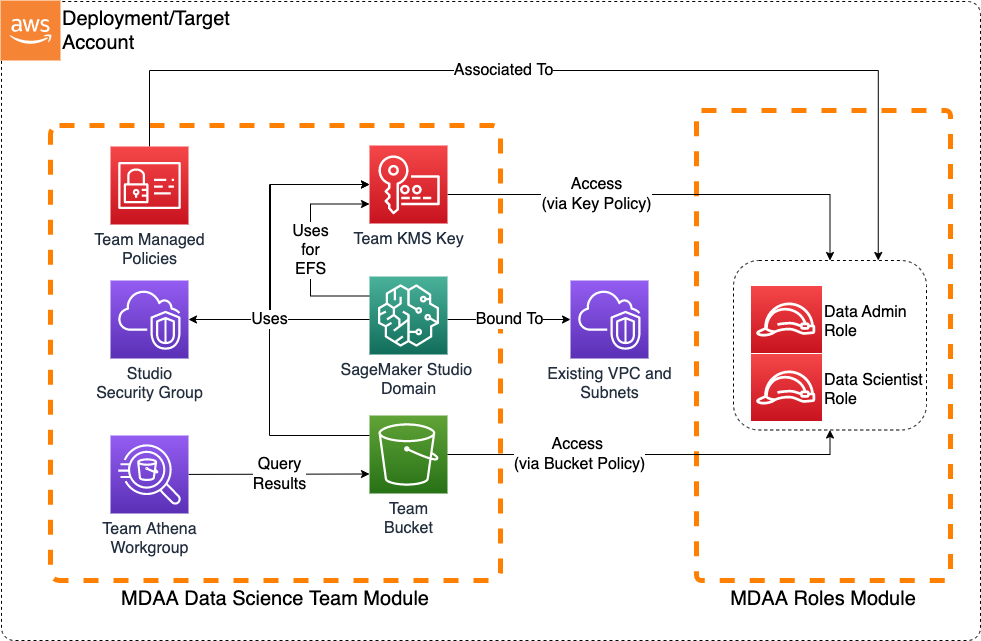
Deployment Instructions
The following instructions assume you have CDK bootstrapped your target account, and that the MDAA source repo is cloned locally. More predeployment info and procedures are available in PREDEPLOYMENT.
-
Deploy sample configurations into the specified directory structure (or obtain from the MDAA repo under
sample_configs/basic_terraform_datascience_platform). -
Edit the
mdaa.yamlto specify an organization name. This must be a globally unique name, as it is used in the naming of all deployed resources, some of which are globally named (such as S3 buckets). -
If required, edit the
mdaa.yamlto specifycontext:values specific to your environment. -
Ensure you are authenticated to your target AWS account.
-
Optionally, run
<path_to_mdaa_repo>/bin/mdaa lsfrom the directory containingmdaa.yamlto understand what stacks will be deployed. -
Optionally, run
<path_to_mdaa_repo>/bin/mdaa synthfrom the directory containingmdaa.yamland review the produced templates. -
Run
<path_to_mdaa_repo>/bin/mdaa deployfrom the directory containingmdaa.yamlto deploy all modules.
Additional MDAA deployment commands/procedures can be reviewed in DEPLOYMENT.
Configurations
The sample configurations for this architecture are provided below. They are also available under sample_configs/basic_terraform_datascience_platform within the MDAA repo.
Config Directory Structure
basic_datalake
│   mdaa.yaml
│   tags.yaml
│   roles.yaml
│
└───datascience
│    └───main.cf
│    └───providers.cf
│
└───roles
│    └───main.cf
│    └───providers.cf
mdaa.yaml
This configuration specifies the global, domain, env, and module configurations required to configure and deploy this sample architecture.
Note - Before deployment, populate the mdaa.yaml with appropriate organization and context values for your environment
# Contents available in mdaa.yaml
# All resources will be deployed to the default region specified in the environment or AWS configurations.
# Can optional specify a specific AWS Region Name.
region: default

## Pre-Deployment Instructions

# TODO: Set an appropriate, unique organization name
# Failure to do so may resulting in global naming conflicts.
organization: <your-org-name>

# TODO: If using an S3 Terraform backend, uncomment these lines and set the backend S3 bucket and DynamoDB table names.
# If not configured, local state tracking will be used.
terraform:
  override:
    terraform:
      backend:
        s3:
          bucket: <your-tf-state-bucket-name>
          dynamodb_table: <your-tf-state-lock-ddb-table>

# One or more domains may be specified. Domain name will be incorporated by default naming implementation
# to prefix all resource names.
domains:
  # The named of the domain. In this case, we are building a 'shared' domain.
  shared:
    # One or more environments may be specified, typically along the lines of 'dev', 'test', and/or 'prod'
    environments:
      # The environment name will be incorporated into resource name by the default naming implementation.
      dev:
        use_bootstrap: false
        # The target deployment account can be specified per environment.
        # If 'default' or not specified, the account configured in the environment will be assumed.
        account: default
        # The list of modules which will be deployed. A module points to a specific MDAA CDK App, and
        # specifies a deployment configuration file if required.
        modules:
          # A roles module deployment will be used to generate IAM roles
          roles:
            module_type: tf
            module_path: ./roles/
          # A Data Science Team module will deploy the resources required for the
          # data science platform.
          example-team:
            module_type: tf
            module_path: ./datascience/
roles/main.tf
A Terraform module which will deploy IAM roles required for the Data Science platform
# Contents available in roles/main.tf
# Create Sagemaker Team Execution Role

// Variables
variable "region" {
  description = "The region to be deployed to"
  type        = string
}

variable "org" {
  description = "The org name used in the naming convention"
  type        = string
}

variable "domain" {
  description = "The domain name used in the naming convention"
  type        = string
}

variable "env" {
  description = "The env name used in the naming convention"
  type        = string
}

variable "module_name" {
  description = "The module_name name used in the naming convention"
  type        = string
}

data "aws_caller_identity" "current" {}

locals {
  account   = data.aws_caller_identity.current.account_id
  team_name = "ds-team-one" # Provide a Suitable name for your team
}

module "role_name" {
  # checkov:skip=CKV_TF_1:Ensure Terraform module sources use a commit hash:Not required.
  # checkov:skip=CKV_TF_2:Ensure Terraform module sources use a tag with a version number:Not required.

  source      = "<your-git-url>/naming_convention"
  base_name   = "${local.team_name}-exec-role"
  module_name = var.module_name
}

resource "aws_iam_policy" "datascience_user_policy" {
  name        = "${module.role_name.base_resource_name}-exec-policy"
  path        = "/"
  description = "Provides basic service access to the team execution role"

  policy = jsonencode({
    Version = "2012-10-17"
    Statement = [
      {
        Sid    = "AllowBedrockAccess"
        Effect = "Allow"
        Action = [
          "bedrock:ListFoundationModels*",
          "bedrock:ListCustomModels*",
          "bedrock:InvokeModel",
          "bedrock:InvokeModelWithResponseStream",
          "bedrock:GetFoundationModel*",
          "bedrock:GetGuardrail"
        ]
        Resource = [
          "arn:aws:bedrock:${var.region}::*-model",
          "arn:aws:bedrock:${var.region}:${local.account}:*",

        ]
      },
      {
        Sid      = "SageMakerLaunchProfileAccess"
        Effect   = "Allow"
        Action   = ["sagemaker:CreatePresignedDomainUrl"]
        Resource = "*"
        Condition = {
          StringEquals = {
            "sagemaker:ResourceTag/userid" = "$${aws:userid}"
          }
        }
      }
    ]
  })
}

resource "aws_iam_role" "sagemaker_team_exec_role" {
  name = module.role_name.base_resource_name
  assume_role_policy = jsonencode({
    Version = "2012-10-17"
    Statement = [
      {
        Action = "sts:AssumeRole"
        Effect = "Allow"
        Principal = {
          Service = [
            "sagemaker.amazonaws.com",
            "bedrock.amazonaws.com",
            "ec2.amazonaws.com"
          ]
        }
      }
    ]
  })

}

resource "aws_iam_role_policy_attachment" "datascience_user_policy_attachment" {
  role       = aws_iam_role.sagemaker_team_exec_role.name
  policy_arn = aws_iam_policy.datascience_user_policy.arn
}
datascience/main.tf
A Terraform module which will deploy the Data Science platform by consuming the MDAA Data Science module.
# Contents available in datascience/main.tf
# Copyright © Amazon.com and Affiliates: This deliverable is considered Developed Content as defined in the AWS Service Terms

// Variables
variable "region" {
  description = "The region to be deployed to"
  type        = string
}

variable "org" {
  description = "The org name used in the naming convention"
  type        = string
}

variable "domain" {
  description = "The domain name used in the naming convention"
  type        = string
}

variable "env" {
  description = "The env name used in the naming convention"
  type        = string
}

variable "module_name" {
  description = "The module_name name used in the naming convention"
  type        = string
}


data "aws_caller_identity" "current" {}

locals {

  account_id = data.aws_caller_identity.current.account_id
  team_name  = "ds-team-one"

  # Roles
  data_admin_role_arn = "arn:aws:iam::${local.account_id}:role/Admin"
  sso_group_name      = "DataScientist"
  team_user_role_arn  = "arn:aws:iam::${local.account_id}:role/DataScientist"
  team_exec_role_arn  = "arn:aws:iam::${local.account_id}:role/<your-team-exec-role>" # Team Execution Role

  # Define a policy prefix that works across environments.
  # These policies may be attached to Permission sets
  policy_prefix = lower(format(
    "%s-%s-%s-%s",
    var.org,
    var.domain,
    var.module_name,
    local.team_name
  ))

  ## Provide information about Identity Store ID and Network configuration where the Sagemaker Domain will be created
  identity_store_id = "<Identity Store Id>" # Example: "d-012345abcd"
  network = {
    vpc_id  = "<vpc id>"
    subnets = ["<subnet-id1>", "<subnet-id2>"],
    #(OPTIONAL) S3 Prefix list for various regions.
    s3_prefix_list = {
      "ca-central-1" = "pl-7da54014",
      "us-east-1"    = "pl-63a5400a"
    }
  }
}

module "mdaa_ds_team" {
  # checkov:skip=CKV_TF_1:Ensure Terraform module sources use a commit hash:Not required.
  # checkov:skip=CKV_TF_2:Ensure Terraform module sources use a tag with a version number:Not required.
  source                      = "<your-git-url>/datascience-team"
  module_name                 = var.module_name
  base_name                   = local.team_name
  data_admin_role_arn         = local.data_admin_role_arn
  team_user_role_arn          = local.team_user_role_arn
  team_exec_role_arn          = local.team_exec_role_arn
  verbatim_policy_name_prefix = local.policy_prefix
  sagemaker_domain_config = {
    auth = {
      mode                   = "SSO",
      identity_store_id      = local.identity_store_id
      assign_sso_group_names = [local.sso_group_name]

    }
    vpc_id         = local.network.vpc_id
    app_subnet_ids = local.network.subnets

    # Provide Ingress/Egress rules based on your network configuration
    # Below Sample Security Group Ingress/Egress rules allow the following traffic:
    # - Ingress: Traffic from the VPC CIDR block and within the SG
    # - Egress: Traffic to the VPC CIDR block, S3 prefix list CIDRs, and within the SG
    security_group_ingress_egress_rules = {
      # Ingress Rules
      cidr_block_ingress_rules = [
        {
          description = "Traffic originating from the VPC CIDR block"
          from_port   = 443,
          to_port     = 443,
          protocol    = "tcp",
          cidr_blocks = ["10.0.0.0/16"]
        }
      ]
      self_ingress_rules = [
        {
          description = "Self-Ref: Traffic from within the SG"
          from_port   = 0,
          to_port     = 0,
          protocol    = "all",
        }
      ]
      # Outbound Rules
      cidr_block_egress_rules = [
        {
          description = "Outbound: Traffic to the VPC CIDR block",
          from_port   = 443,
          to_port     = 443,
          protocol    = "tcp",
          cidr_blocks = ["10.0.0.0/16"]
        }
      ]

      self_egress_rules = [
        {
          description = "Self-Ref: Traffic from within the SG",
          from_port   = 0,
          to_port     = 0,
          protocol    = "all",
        }
      ]
      prefix_list_egress_rules = [{
        description     = "Outbound to s3 prefix list CIDRs"
        from_port       = 443,
        to_port         = 443,
        protocol        = "tcp",
        prefix_list_ids = ["${local.network.s3_prefix_list[var.region]}"]
      }]
    }

  }

}