QuickSight Project
Note: This documentation is also available in a rendered format here.
Deploys QuickSight shared folders with hierarchical permissions and data sources (Redshift, Athena, etc.) for organizing and governing QuickSight assets across teams. Use this module when you need to organize QuickSight dashboards and data sources into team-level folders with controlled access permissions.
Architecture
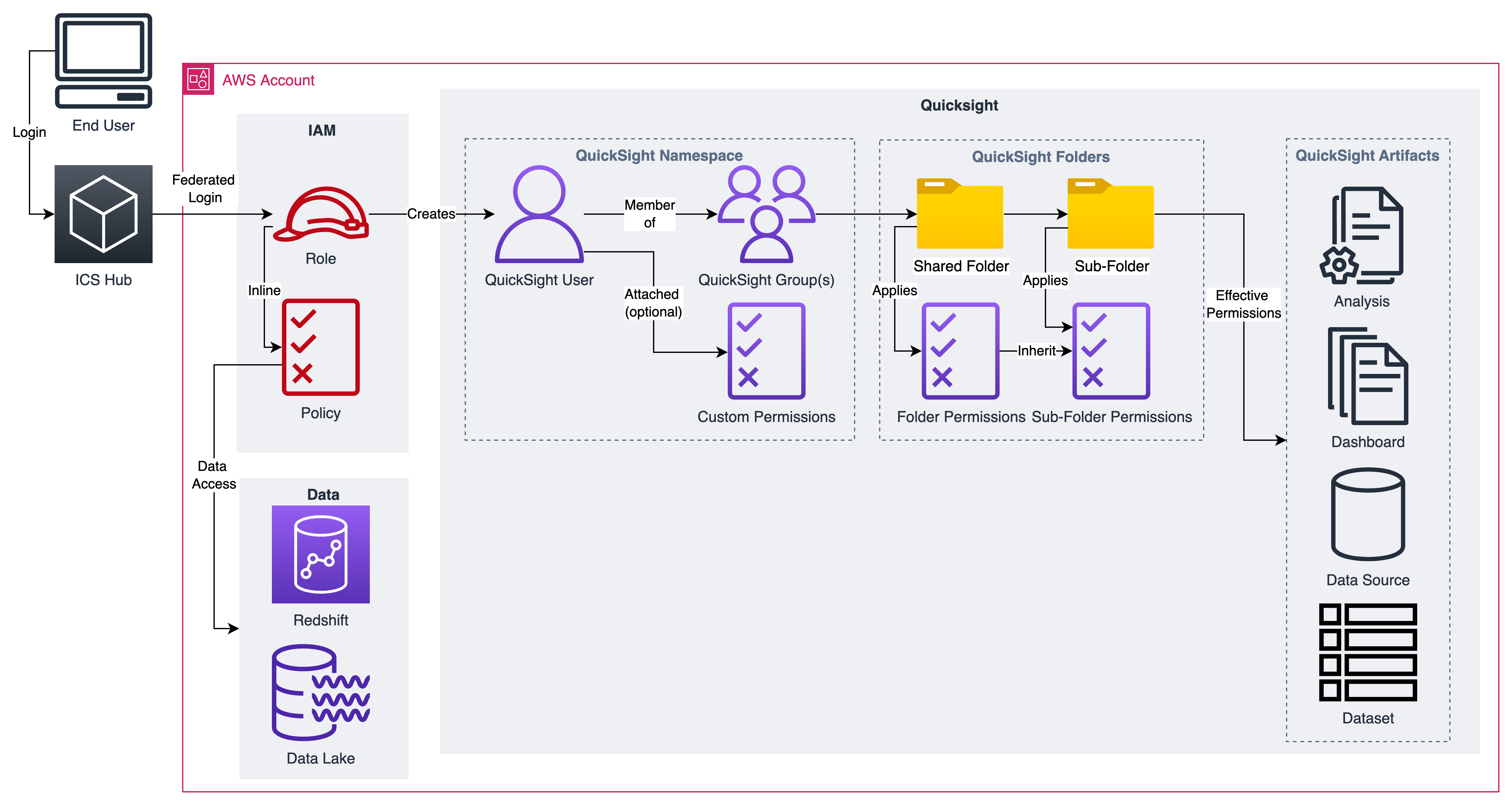
QuickSight Permissions: End to End Flow
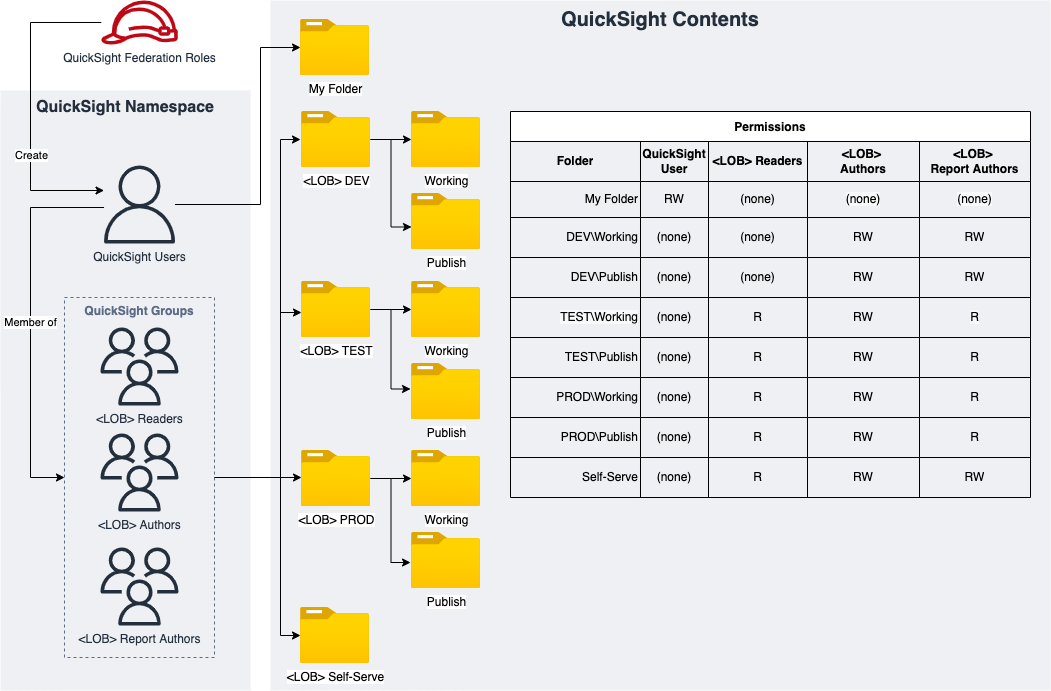
Sample QuickSight Shared Folders for QS Asset Management
QuickSight Shared Folders Deployed Resources
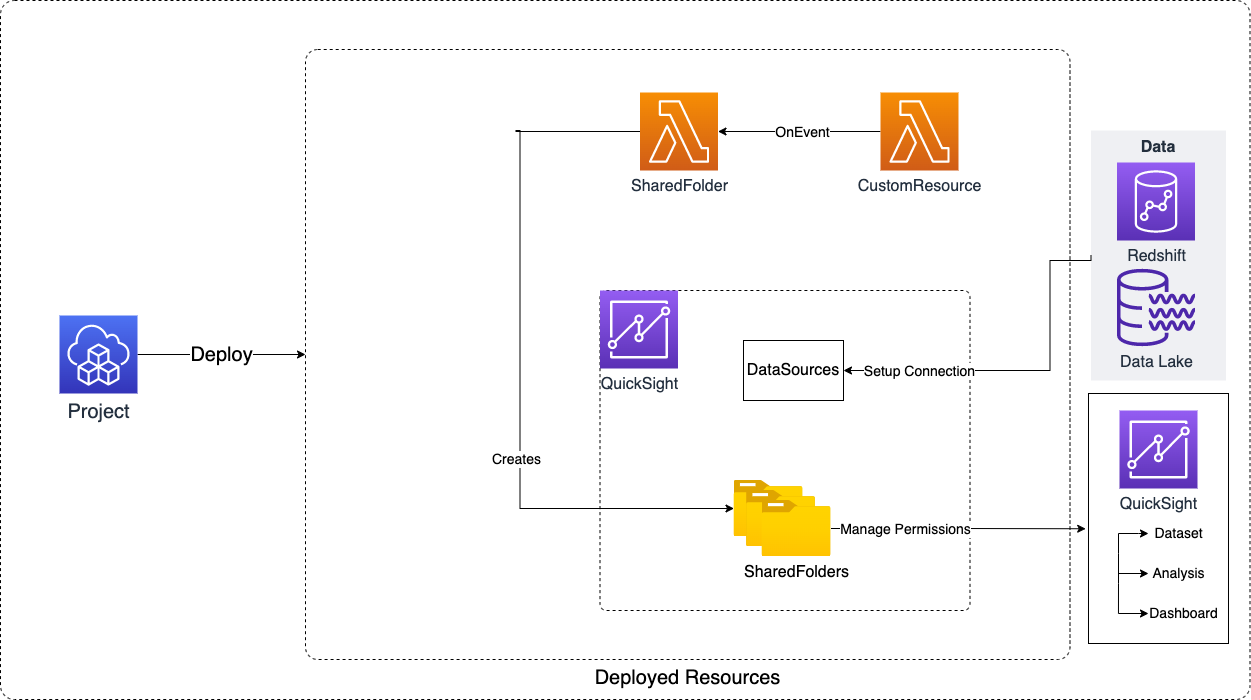
Deployed Resources
This module deploys and integrates the following resources:
QuickSight Shared Folders - Creates QuickSight Shared Folders (Root and Child Folders with Permissions to QS Groups)
- Each shared folder can have read or read/write permissions granted for QS principals
- Each shared folder can have child folders with their own permissions
QuickSight Data Sources - QS data sources which can be used within QS Datasets and Analysis
IAM Managed Policy - When resourceAccessRolePermissions is configured, attaches a data-source-specific managed policy (AWS managed policies plus S3/KMS permissions) to the account-level QuickSight resource-access role so data sources can reach their underlying AWS resources (Athena/S3/KMS)
Redshift IAM Auth Role - For a Redshift data source configured with iamParameters, creates a QuickSight-assumable IAM role scoped to the cluster (redshift:GetClusterCredentials) so the data source authenticates without Secrets Manager
Secrets Manager Grant - When a data source is configured with secretsManager, attaches a managed policy granting the account-level QuickSight Secrets Manager role (aws-quicksight-secretsmanager-role-v0) read access to the secret (and decrypt on its KMS key)
Related Modules
- QuickSight Account — Configure the QuickSight account and VPC connection before deploying projects
- QuickSight Namespace — Create namespaces with user groups that can be granted folder and data source permissions
- Data Warehouse — Deploy a Redshift cluster that can be referenced as a QuickSight data source
Security/Compliance Details
This module is designed in alignment with MDAA security/compliance principles and CDK nag rulesets. Additional review is recommended prior to production deployment, ensuring organization-specific compliance requirements are met.
- Least Privilege:
- Shared folders support granular read/read-write permissions per QuickSight principal (users and groups)
- Child folders inherit or override parent permissions
- Data source permissions scoped per principal with reader/author action sets
- Separation of Duties:
- Data source credentials can be dynamically retrieved from Secrets Manager (recommended, supports rotation) or referenced via static credential pairs
Configuration
MDAA Config
Add the following snippet to your mdaa.yaml under the modules: section of a domain/env in order to use this module:
quicksight-project: # Module Name can be customized
  module_path: '@aws-mdaa/quicksight-project' # Must match module NPM package name
  module_configs:
    - ./quicksight-project.yaml # Filename/path can be customized
Module Config Samples and Variants
Copy the contents of the relevant sample config below into the ./quicksight-project.yaml file referenced in the MDAA config snippet above.
Minimal Configuration
Deploys a shared folder and an Athena data source. Start here for a quick QuickSight project setup before adding Redshift sources, multi-LOB folder hierarchies, or VPC connectivity.
# Contents available via above link
# Minimal QuickSight Project module configuration.
# Deploys a shared folder and an Athena data source.

# Named QuickSight principals referenced in folder and data
# source permissions
principals:
  Readers: 'arn:{{partition}}:quicksight:{{region}}:{{account}}:group/default/Readers'
  Authors: 'arn:{{partition}}:quicksight:{{region}}:{{account}}:group/default/Authors'

# (Optional) Data sources for QuickSight connectivity.
dataSources:
  ATHENA:
    my-athena:
      dataSourceSpecificParameters:
        athenaParameters:
          workGroup: 'my-workgroup'
      displayName: 'MyAthena'
      permissions:
        - actions: 'READER_DATA_SOURCE'
          principal: 'Readers'
        - actions: 'AUTHOR_DATA_SOURCE'
          principal: 'Authors'

# (Optional) Shared folders for organizing QuickSight assets.
sharedFolders:
  my-folder:
    permissions:
      - principal: Readers
        actions: 'READER_FOLDER'
      - principal: Authors
        actions: 'AUTHOR_FOLDER'
Comprehensive Configuration
Sets up QuickSight principals, a Redshift data source with secret-based credentials, VPC connectivity, SSL properties, and a multi-LOB shared folder hierarchy with dev/test/prod/self-serve/datasets tiers and granular permissions. Use this as a reference when you need full control over data source connectivity, folder organization, and team-level access policies.
sample-config-comprehensive.yaml
# Contents available via above link
# Comprehensive QuickSight Project module configuration.
# Sets up QuickSight principals, a Redshift data source with secret-based
# credentials, VPC connectivity, SSL properties, error info, and a multi-LOB
# shared folder hierarchy with dev/test/prod/self-serve/datasets tiers and
# granular permissions. This config exercises every compatible optional property
# using the secretArn credential approach.

# Named QuickSight principals (users or groups) referenced in folder and
# data source permissions. Each key is a logical name, value is the
# QuickSight principal ARN.
principals:
  Lob1_READERS_GROUP: 'arn:{{partition}}:quicksight:{{region}}:{{account}}:group/lob1-qs-ns/lob1-qs-ns-READERS'
  Lob1_AUTHORS_GROUP: 'arn:{{partition}}:quicksight:{{region}}:{{account}}:group/lob1-qs-ns/lob1-qs-ns-AUTHORS'
  Lob1_PUBLISHERS_GROUP: 'arn:{{partition}}:quicksight:{{region}}:{{account}}:group/lob1-qs-ns/lob1-qs-ns-PUBLISHERS'
  Lob1_ALLUSERS_GROUP: 'arn:{{partition}}:quicksight:{{region}}:{{account}}:group/lob1-qs-ns/lob1-qs-ns-ALLUSERS'
  Lob2_READERS_GROUP: 'arn:{{partition}}:quicksight:{{region}}:{{account}}:group/lob2-qs-ns/lob2-qs-ns-READERS'
  Lob2_AUTHORS_GROUP: 'arn:{{partition}}:quicksight:{{region}}:{{account}}:group/lob2-qs-ns/lob2-qs-ns-AUTHORS'
  Lob2_PUBLISHERS_GROUP: 'arn:{{partition}}:quicksight:{{region}}:{{account}}:group/lob2-qs-ns/lob2-qs-ns-PUBLISHERS'
  Lob2_ALLUSERS_GROUP: 'arn:{{partition}}:quicksight:{{region}}:{{account}}:group/lob2-qs-ns/lob2-qs-ns-ALLUSERS'

# (Optional) Nested map of data source type to data source configurations
# for QuickSight project data connectivity. Outer key is the data source
# type (e.g., REDSHIFT, ATHENA), inner key is a unique data source ID.
dataSources:
  # Data source type key (e.g., REDSHIFT, ATHENA)
  REDSHIFT:
    datasource2:
      # Type-specific connection parameters (e.g., redshiftParameters,
      # athenaParameters)
      dataSourceSpecificParameters:
        redshiftParameters:
          database: 'default_db'
          clusterId: 'sample-datawarehouse'
      # A display name for the data source
      displayName: 'sampleRedshift'
      # (Optional) The AWS account ID
      awsAccountId: '{{account}}'
      # (Optional) Credentials used to connect to the data source.
      # Supports secret ARN (recommended), credential pair, or
      # copying credentials from another data source.
      credentials:
        # (Optional) Credentials dynamically retrieved from a secret
        # (recommended). Works with secret rotation.
        secretArn: '{{resolve:ssm:/sample/sampleLOB/datawarehouse/secret/serviceuserquicksightTestsample}}'
      # A list of resource permissions on the data source
      permissions:
        # Either "READER_DATA_SOURCE" or "AUTHOR_DATA_SOURCE"
        # (enum: AUTHOR_DATA_SOURCE, READER_DATA_SOURCE)
        - actions: 'READER_DATA_SOURCE'
          # The Amazon Resource Name (ARN) of the principal
          principal: 'Lob1_PUBLISHERS_GROUP'
        - actions: 'AUTHOR_DATA_SOURCE'
          principal: 'Lob1_AUTHORS_GROUP'
      # (Optional) Error information from the last update or the creation
      # of the data source
      errorInfo:
        # (Optional) Error message
        message: 'test-error-message'
        # (Optional) Error type. Valid Values are: ACCESS_DENIED |
        # CONFLICT | COPY_SOURCE_NOT_FOUND | ENGINE_VERSION_NOT_SUPPORTED
        # | GENERIC_SQL_FAILURE | TIMEOUT | UNKNOWN | UNKNOWN_HOST
        type: 'UNKNOWN'
      # (Optional) SSL properties that apply when Amazon QuickSight
      # connects to your underlying source
      sslProperties:
        # Enable to Disable SSL. Default value is false (SSL is enabled)
        disableSsl: false
      # (Optional) Use this parameter only when you want Amazon
      # QuickSight to use a VPC connection when connecting to your
      # underlying source
      vpcConnectionProperties:
        # QuickSight VPC (created in QS) ARN
        vpcConnectionArn: 'arn:{{partition}}:quicksight:{{region}}:{{account}}:vpcConnection/sampled2ecluster'
  ATHENA:
    sample-athena:
      dataSourceSpecificParameters:
        athenaParameters:
          workGroup: 'sample-workgroup'
      displayName: 'sampleAthena'
      permissions:
        - actions: 'READER_DATA_SOURCE'
          principal: 'Lob1_READERS_GROUP'
        - actions: 'AUTHOR_DATA_SOURCE'
          principal: 'Lob1_AUTHORS_GROUP'

# (Optional) Named shared folder configurations for collaborative
# QuickSight workspace management. Each folder supports hierarchical
# sub-folders and principal-based permissions (READER_FOLDER or
# AUTHOR_FOLDER actions).
sharedFolders:
  Lob1_dev:
    # Permission entries controlling who can access this folder and at
    # what level. (enum: AUTHOR_FOLDER, READER_FOLDER)
    permissions:
      - principal: Lob1_AUTHORS_GROUP
        actions: 'READER_FOLDER'
      - principal: Lob1_PUBLISHERS_GROUP
        actions: 'READER_FOLDER'
    # (Optional) Nested child folders inheriting the parent's
    # organizational context
    folders:
      working:
        permissions:
          - principal: Lob1_AUTHORS_GROUP
            actions: 'AUTHOR_FOLDER'
          - principal: Lob1_PUBLISHERS_GROUP
            actions: 'AUTHOR_FOLDER'
      publishing:
        permissions:
          - principal: Lob1_AUTHORS_GROUP
            actions: 'AUTHOR_FOLDER'
          - principal: Lob1_PUBLISHERS_GROUP
            actions: 'AUTHOR_FOLDER'
  Lob1_test:
    permissions:
      - principal: Lob1_AUTHORS_GROUP
        actions: 'READER_FOLDER'
      - principal: Lob1_PUBLISHERS_GROUP
        actions: 'READER_FOLDER'
      - principal: Lob1_READERS_GROUP
        actions: 'READER_FOLDER'
    folders:
      working:
        permissions:
          - principal: Lob1_AUTHORS_GROUP
            actions: 'AUTHOR_FOLDER'
          - principal: Lob1_PUBLISHERS_GROUP
            actions: 'READER_FOLDER'
          - principal: Lob1_READERS_GROUP
            actions: 'READER_FOLDER'
      publishing:
        permissions:
          - principal: Lob1_AUTHORS_GROUP
            actions: 'AUTHOR_FOLDER'
          - principal: Lob1_PUBLISHERS_GROUP
            actions: 'READER_FOLDER'
          - principal: Lob1_READERS_GROUP
            actions: 'READER_FOLDER'
  Lob1_prod:
    permissions:
      - principal: Lob1_AUTHORS_GROUP
        actions: 'READER_FOLDER'
      - principal: Lob1_PUBLISHERS_GROUP
        actions: 'READER_FOLDER'
      - principal: Lob1_READERS_GROUP
        actions: 'READER_FOLDER'
    folders:
      working:
        permissions:
          - principal: Lob1_AUTHORS_GROUP
            actions: 'AUTHOR_FOLDER'
          - principal: Lob1_PUBLISHERS_GROUP
            actions: 'READER_FOLDER'
          - principal: Lob1_READERS_GROUP
            actions: 'READER_FOLDER'
      publishing:
        permissions:
          - principal: Lob1_AUTHORS_GROUP
            actions: 'AUTHOR_FOLDER'
          - principal: Lob1_PUBLISHERS_GROUP
            actions: 'READER_FOLDER'
          - principal: Lob1_READERS_GROUP
            actions: 'READER_FOLDER'
  Lob1_self_serve:
    permissions:
      - principal: Lob1_AUTHORS_GROUP
        actions: 'AUTHOR_FOLDER'
      - principal: Lob1_PUBLISHERS_GROUP
        actions: 'AUTHOR_FOLDER'
      - principal: Lob1_READERS_GROUP
        actions: 'READER_FOLDER'
  Lob1_datasets:
    permissions:
      - principal: Lob1_ALLUSERS_GROUP
        actions: 'READER_FOLDER'
  Lob2_dev:
    permissions:
      - principal: Lob2_AUTHORS_GROUP
        actions: 'READER_FOLDER'
      - principal: Lob2_PUBLISHERS_GROUP
        actions: 'READER_FOLDER'
    folders:
      working:
        permissions:
          - principal: Lob2_AUTHORS_GROUP
            actions: 'AUTHOR_FOLDER'
          - principal: Lob2_PUBLISHERS_GROUP
            actions: 'AUTHOR_FOLDER'
      publishing:
        permissions:
          - principal: Lob2_AUTHORS_GROUP
            actions: 'AUTHOR_FOLDER'
          - principal: Lob2_PUBLISHERS_GROUP
            actions: 'AUTHOR_FOLDER'
  Lob2_test:
    permissions:
      - principal: Lob2_AUTHORS_GROUP
        actions: 'READER_FOLDER'
      - principal: Lob2_PUBLISHERS_GROUP
        actions: 'READER_FOLDER'
      - principal: Lob2_READERS_GROUP
        actions: 'READER_FOLDER'
    folders:
      working:
        permissions:
          - principal: Lob2_AUTHORS_GROUP
            actions: 'AUTHOR_FOLDER'
          - principal: Lob2_PUBLISHERS_GROUP
            actions: 'READER_FOLDER'
          - principal: Lob2_READERS_GROUP
            actions: 'READER_FOLDER'
      publishing:
        permissions:
          - principal: Lob2_AUTHORS_GROUP
            actions: 'AUTHOR_FOLDER'
          - principal: Lob2_PUBLISHERS_GROUP
            actions: 'READER_FOLDER'
          - principal: Lob2_READERS_GROUP
            actions: 'READER_FOLDER'
  Lob2_prod:
    permissions:
      - principal: Lob2_AUTHORS_GROUP
        actions: 'READER_FOLDER'
      - principal: Lob2_PUBLISHERS_GROUP
        actions: 'READER_FOLDER'
      - principal: Lob2_READERS_GROUP
        actions: 'READER_FOLDER'
    folders:
      working:
        permissions:
          - principal: Lob2_AUTHORS_GROUP
            actions: 'AUTHOR_FOLDER'
          - principal: Lob2_PUBLISHERS_GROUP
            actions: 'READER_FOLDER'
          - principal: Lob2_READERS_GROUP
            actions: 'READER_FOLDER'
      publishing:
        permissions:
          - principal: Lob2_AUTHORS_GROUP
            actions: 'AUTHOR_FOLDER'
          - principal: Lob2_PUBLISHERS_GROUP
            actions: 'READER_FOLDER'
          - principal: Lob2_READERS_GROUP
            actions: 'READER_FOLDER'
  Lob2_self_serve:
    permissions:
      - principal: Lob2_AUTHORS_GROUP
        actions: 'AUTHOR_FOLDER'
      - principal: Lob2_PUBLISHERS_GROUP
        actions: 'AUTHOR_FOLDER'
      - principal: Lob2_READERS_GROUP
        actions: 'READER_FOLDER'
  Lob2_datasets:
    permissions:
      - principal: Lob2_ALLUSERS_GROUP
        actions: 'READER_FOLDER'

# (Optional) S3/KMS permissions to attach to QuickSight's account-level
# resource-access role (aws-quicksight-service-role-v0, created by the
# quicksight-account module) so this project's data sources can read the data they
# query. Attached here on the consumer side because the queried resources (e.g. the
# Athena results bucket and its KMS key) are created by modules that deploy before
# this one. The module imports that standard role by name and attaches a
# customer-managed policy referencing it.
resourceAccessRolePermissions:
  # S3 bucket ARNs the data sources must read (and write, for Athena results).
  s3BucketArns:
    - 'arn:{{partition}}:s3:::sample-datalake-bucket'
    - 'arn:{{partition}}:s3:::sample-athena-results-bucket'
  # KMS key ARNs protecting the data lake objects and Athena query results.
  kmsKeyArns:
    - 'arn:{{partition}}:kms:{{region}}:{{account}}:key/sample-data-lake-key-id'
Copy Source Configuration
Uses copied credentials from another data source to share credentials across multiple data sources without duplicating secret references. Choose this variant when you have multiple data sources that should authenticate with the same credentials managed in a single location.
# Contents available via above link
# QuickSight Project configuration using copied credentials from another
# data source. Use this variant when you want to share credentials across
# multiple data sources without duplicating secret references.

# Named QuickSight principals (users or groups) referenced in folder and
# data source permissions. Each key is a logical name, value is the
# QuickSight principal ARN.
principals:
  Lob1_AUTHORS_GROUP: 'arn:{{partition}}:quicksight:{{region}}:{{account}}:group/lob1-qs-ns/lob1-qs-ns-AUTHORS'

# (Optional) Nested map of data source type to data source configurations
# for QuickSight project data connectivity. Outer key is the data source
# type (e.g., REDSHIFT, ATHENA), inner key is a unique data source ID.
dataSources:
  REDSHIFT:
    datasource-copysource:
      # Type-specific connection parameters
      dataSourceSpecificParameters:
        redshiftParameters:
          database: 'default_db'
          clusterId: 'sample-datawarehouse'
      # A display name for the data source
      displayName: 'sampleRedshiftCopySource'
      # (Optional) Credentials used to connect to the data source.
      # Uses copySourceArn to share credentials from another data source.
      credentials:
        # (Optional) The ARN of a data source that has the credential
        # pair that you want to use
        copySourceArn: 'arn:{{partition}}:quicksight:{{region}}:{{account}}:datasource/existing-datasource-id'
      # A list of resource permissions on the data source
      permissions:
        - actions: 'AUTHOR_DATA_SOURCE'
          # The Amazon Resource Name (ARN) of the principal
          principal: 'Lob1_AUTHORS_GROUP'
Credential Pair Configuration
Uses direct username/password credentials for data source connectivity instead of secret ARN-based authentication. This approach does not support automatic secret rotation. Choose this variant for development or testing environments where Secrets Manager integration is not required.
sample-config-credentialpair.yaml
# Contents available via above link
# QuickSight Project configuration using credential pair authentication.
# Use this variant when you need direct username/password credentials for
# data source connectivity instead of secret ARN-based authentication.
# This approach does not support automatic secret rotation.

# Named QuickSight principals (users or groups) referenced in folder and
# data source permissions. Each key is a logical name, value is the
# QuickSight principal ARN.
principals:
  Lob1_AUTHORS_GROUP: 'arn:{{partition}}:quicksight:{{region}}:{{account}}:group/lob1-qs-ns/lob1-qs-ns-AUTHORS'

# (Optional) Nested map of data source type to data source configurations
# for QuickSight project data connectivity. Outer key is the data source
# type (e.g., REDSHIFT, ATHENA), inner key is a unique data source ID.
dataSources:
  REDSHIFT:
    datasource-credpair:
      # Type-specific connection parameters
      dataSourceSpecificParameters:
        redshiftParameters:
          database: 'default_db'
          clusterId: 'sample-datawarehouse'
      # A display name for the data source
      displayName: 'sampleRedshiftCredPair'
      # (Optional) Credentials used to connect to the data source.
      # Uses credential pair instead of secretArn.
      credentials:
        # (Optional) Username/password credential pair for direct
        # authentication. Note: does not support secret rotation.
        credentialPair:
          # Username for data source authentication
          username: '{{resolve:secretsmanager:clusterSecret:SecretString:username}}'
          # Password for data source authentication. Can use dynamic
          # references for secure credential retrieval.
          password: '{{resolve:secretsmanager:clusterSecret:SecretString:password}}'
          # (Optional) Alternate data source parameters
          alternateDataSourceParameters:
            - redshiftParameters:
                database: 'alternate_db'
                clusterId: 'sample-datawarehouse'
      # A list of resource permissions on the data source
      permissions:
        - actions: 'AUTHOR_DATA_SOURCE'
          # The Amazon Resource Name (ARN) of the principal
          principal: 'Lob1_AUTHORS_GROUP'
Secrets Manager Configuration
Authenticates a Redshift data source with a Secrets Manager secret. Setting secretsManager wires the secret as the data source credentials and grants the account-level QuickSight Secrets Manager role read access to it. Choose this variant for secret-based authentication with rotation support.
sample-config-secretsmanager.yaml
# Contents available via above link
# QuickSight Project configuration using Secrets Manager authentication.
# Use this variant when you want a Redshift (or other credential-pair) data
# source to authenticate with a Secrets Manager secret instead of IAM.
# Setting secretsManager both wires the secret as the data source credentials
# and grants QuickSight's account-level Secrets Manager role
# (aws-quicksight-secretsmanager-role-v0) read access to the secret.

# Named QuickSight principals (users or groups) referenced in folder and
# data source permissions. Each key is a logical name, value is the
# QuickSight principal ARN.
principals:
  Lob1_AUTHORS_GROUP: 'arn:{{partition}}:quicksight:{{region}}:{{account}}:group/lob1-qs-ns/lob1-qs-ns-AUTHORS'

# (Optional) Nested map of data source type to data source configurations
# for QuickSight project data connectivity. Outer key is the data source
# type (e.g., REDSHIFT, ATHENA), inner key is a unique data source ID.
dataSources:
  REDSHIFT:
    datasource-secretsmanager:
      # Type-specific connection parameters
      dataSourceSpecificParameters:
        redshiftParameters:
          # Target database within the cluster
          database: 'default_db'
          # Redshift cluster identifier the data source connects to
          clusterId: 'sample-datawarehouse'
      # A display name for the data source
      displayName: 'sampleRedshiftSecretsManager'
      # (Optional) Secrets Manager authentication. The single toggle for the
      # secret-based auth path; the QuickSight Secrets Manager role and all IAM
      # wiring are handled automatically.
      secretsManager:
        # ARN of the Secrets Manager secret holding the data source credentials
        arn: 'arn:{{partition}}:secretsmanager:{{region}}:{{account}}:secret:sample-datawarehouse-serviceuser'
        # (Optional) KMS key ARNs encrypting the secret; QuickSight's Secrets
        # Manager role is granted decrypt on these for CMK-encrypted secrets
        kmsKeyArns:
          - 'arn:{{partition}}:kms:{{region}}:{{account}}:key/sample-secret-key-id'
      # A list of resource permissions on the data source
      permissions:
        - actions: 'AUTHOR_DATA_SOURCE'
          # The Amazon Resource Name (ARN) of the principal
          principal: 'Lob1_AUTHORS_GROUP'