SageMaker Project
Note: This documentation is also available in a rendered format here.
Deploys SageMaker Unified Studio projects, project profiles, and associated data sources for organizing and managing analytics workloads within a SageMaker domain. Use this module when you need to create governed analytics projects within SageMaker Unified Studio, with data sources imported from your Glue Catalog for team-based data exploration and publishing.
Note: SageMaker Projects can also be deployed via the DataOps Project module, allowing for automatic registration of Glue-based data sources and discovery of data assets. This module can be used when all data assets will be created and consumed entirely within SageMaker.
Deployed Resources
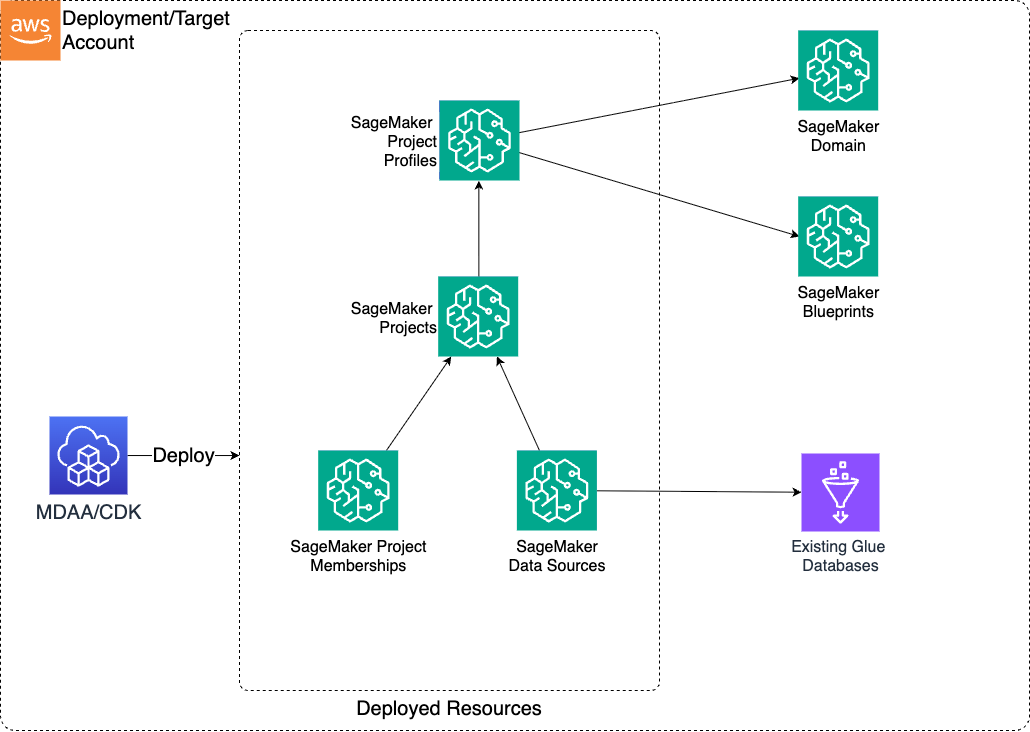
This module deploys and integrates the following resources:
Project Profiles - Enables blueprints for use in projects, with configurable environment templates.
Projects - SageMaker Unified Studio (DataZone V2) projects created within a domain.
Data Sources - Allows importing of existing Glue databases as data sources into SageMaker projects for publishing.
Metadata Form Types - Project-owned DataZone metadata form types, defined declaratively by their fields. MDAA assembles the Smithy model, so config authors do not write Smithy. See Metadata Form Types below for naming rules and the domain-redeploy prerequisite.
Related Modules
- SageMaker (Domain) — Deploy the SageMaker domain that hosts projects created by this module
- DataOps Project — Alternative way to deploy SageMaker projects with automatic Glue data source registration
- Glue Catalog Settings — Configure cross-account Glue Catalog access for data sources imported into SageMaker projects
- Lake Formation Access Control — Manage fine-grained Lake Formation grants for data sources used by SageMaker projects
Security/Compliance Details
This module is designed in alignment with MDAA security/compliance principles and CDK nag rulesets. Additional review is recommended prior to production deployment, ensuring organization-specific compliance requirements are met.
- Encryption at Rest:
- Projects inherit the domain-level customer-managed KMS encryption configuration
- Least Privilege:
- Projects are scoped to specific domain units and project profiles
- Data sources use Lake Formation access control grants for fine-grained permissions on imported Glue databases
AWS Service Endpoints
When DataZone blueprints provision VPC-bound environments (e.g., SageMaker Studio, Athena, Glue), the following VPC endpoints may be required if public AWS service endpoint connectivity is unavailable (e.g., private subnets without NAT gateway, firewalled environments, or PrivateLink-only architectures). Specific endpoints depend on which blueprints are enabled:
| AWS Service | Endpoint Service Name | Type |
|---|---|---|
| DataZone | com.amazonaws.{region}.datazone |
Interface |
| SageMaker API | com.amazonaws.{region}.sagemaker.api |
Interface |
| SageMaker Runtime | com.amazonaws.{region}.sagemaker.runtime |
Interface |
| SageMaker Studio | com.amazonaws.{region}.studio |
Interface |
| Athena | com.amazonaws.{region}.athena |
Interface |
| Glue | com.amazonaws.{region}.glue |
Interface |
| Lake Formation | com.amazonaws.{region}.lakeformation |
Interface |
| KMS | com.amazonaws.{region}.kms |
Interface |
| S3 | com.amazonaws.{region}.s3 |
Gateway |
| CloudWatch Logs | com.amazonaws.{region}.logs |
Interface |
| STS | com.amazonaws.{region}.sts |
Interface |
| EFS | com.amazonaws.{region}.elasticfilesystem |
Interface |
Configuration
MDAA Config
Add the following snippet to your mdaa.yaml under the modules: section of a domain/env in order to use this module:
sagemaker-project: # Module Name can be customized
  module_path: '@aws-mdaa/sagemaker-project' # Must match module NPM package name
  module_configs:
    - ./sagemaker-project.yaml # Filename/path can be customized
Metadata Form Types
Form and field names must be valid Smithy identifiers (letter or underscore first, then letters, digits, or underscores), and form names must be unique across the domain. Deleting a form type on stack teardown is best-effort: if DataZone rejects the delete (for example, because the form is still attached to assets), the form type is left in place. Existing deployments must redeploy the DataZone/SageMaker domain module before deploying a project with metadataForms, so that the domain grants form-type creation to the custom-resource role.
Module Config Samples and Variants
Copy the contents of the relevant sample config below into the ./sagemaker-project.yaml file referenced in the MDAA config snippet above.
Minimal Configuration
Deploys a single SageMaker project with a project profile. Start here for a basic SageMaker project within an existing domain.
# Contents available via above link
# Minimal SageMaker Project module configuration.
# Deploys a single SageMaker project with a project profile.

# SSM parameter for SageMaker Domain config resolution
# Often created by the SageMaker module.
# Example SSM: ssm:/{{org}}/{{domain}}/<sagemaker_module_name>/domain/<domain_name>/config
domainConfigSSMParam: /test-org/test-domain/test-module/domain/test-sus-domain/config

# (Optional) Project profiles — reusable templates that determine
# which environments are provisioned when a project is created.
projectProfiles:
  my-profile:
    environments:
      my-env:
        deploymentMode: ON_CREATE

# (Optional) SageMaker projects — the module's primary resource.
projects:
  my-project:
    # Name of the project profile to use
    profileName: my-profile
Comprehensive Configuration
Covers both ON_CREATE and ON_DEMAND deployment modes, environment templates, project profiles with all options, and projects with full membership. Use this as a reference when you need full control over deployment modes, environment templates, data sources, and project membership.
sample-config-comprehensive.yaml
# Contents available via above link
# Comprehensive sample config for the SageMaker Project module.
# Exercises ALL compatible non-excluded properties at full depth.
# Covers both deploymentMode enum variants, environment templates,
# project profiles with all options, and projects with full membership.
#
# Mutually exclusive: domainConfigSSMParam vs domainConfig.
# domainConfig is a runtime-resolved CDK construct (not user-configurable YAML).
# Use domainConfigSSMParam for SSM-based domain config resolution.

# (Optional) SSM parameter base name for the SageMaker Domain config.
# Resolves domain ID, blueprint IDs, domain unit IDs from SSM and APIs.
# Mutually exclusive with domainConfig.
# Often created by the SageMaker module.
# Example SSM: ssm:/{{org}}/{{domain}}/<sagemaker_module_name>/domain/<domain_name>/config
domainConfigSSMParam: /test-org/test-domain/test-module/domain/test-sus-domain/config

# (Optional) Reusable environment templates referenced by project profiles
# via the environmentsTemplate property. Template environments are merged
# with profile-specific environments.
projectProfileEnvironmentsTemplates:
  # Template with ON_CREATE deployment and parameter overrides
  test-template-on-create:
    # Environment name → ProfileEnvironmentConfig
    test-env-blueprint:
      # (Optional) Deployment mode enum: ON_CREATE | ON_DEMAND
      deploymentMode: ON_CREATE
      # (Optional) Numeric deployment order; lower deploys first
      deploymentOrder: 1
      # (Optional) Blueprint parameter overrides
      parameters:
        overrides:
          param-one:
            # (Optional) Override value for this blueprint parameter
            value: override-value-one
            # (Optional) Whether project creators can edit this parameter
            isEditable: true
          param-two:
            value: locked-value
            isEditable: false

  # Template with ON_DEMAND deployment (second enum variant)
  test-template-on-demand:
    test-env-blueprint-demand:
      deploymentMode: ON_DEMAND
      deploymentOrder: 2
      parameters:
        overrides:
          demand-param:
            value: demand-override
            isEditable: false

# (Optional) Project profiles defining environment blueprints and
# deployment configurations. Profiles are reusable templates that
# determine which environments are provisioned when a project is created.
projectProfiles:
  # Profile using an environment template with all optional properties
  test-profile-full:
    # (Optional) Target AWS account ID for the profile's environments
    account: '{{account}}'
    # (Optional) Target AWS region for the profile's environments
    region: '{{region}}'
    # (Optional) Domain unit path for profile scoping
    domainUnit: /root/team-a
    # (Optional) Reference to a template in projectProfileEnvironmentsTemplates
    environmentsTemplate: test-template-on-create
    # (Optional) Profile-specific environments merged with template environments
    environments:
      profile-specific-env:
        deploymentMode: ON_CREATE
        deploymentOrder: 3
        parameters:
          overrides:
            profile-param:
              value: profile-value
              isEditable: true

  # Minimal profile with only environments (no template, no account/region)
  test-profile-minimal:
    environments:
      minimal-env:
        deploymentMode: ON_DEMAND

# (Optional) SageMaker projects to create in the domain. Each project
# references a project profile and can include data sources and membership.
projects:
  # Project with all optional properties exercised
  test-project-full:
    # (Required) Name of the project profile to use
    profileName: test-profile-full
    # (Optional) Domain unit path where the project will be created
    domainUnit: /some/domain/unit
    # (Optional) Per-environment configuration overrides
    environmentConfigs:
      test-env-blueprint:
        # (Optional) Map of parameter name to value
        parameters:
          env-param-key: env-param-value
    # (Optional) Data sources to import into the project
    dataSources:
      test-source:
        # (Required) Glue database name for the data source
        databaseName: test-database-name
      second-source:
        databaseName: another-database
    # (Optional) Owner users with PROJECT_OWNER designation
    ownerUsers:
      owner1: test-owner-user
    # (Optional) Owner groups with PROJECT_OWNER designation
    ownerGroups:
      ownergrp1: test-owner-group
    # (Optional) Contributor users with PROJECT_CONTRIBUTOR designation
    users:
      user1: test-contributor-user
    # (Optional) Contributor groups with PROJECT_CONTRIBUTOR designation
    groups:
      grp1: test-contributor-group
    # (Optional) Metadata form types owned by this project. MDAA assembles the
    # Smithy model; the form name is used verbatim as the structure name.
    metadataForms:
      # Form exercising all field options
      CustomerMetadataForm:
        # (Optional) Description of the form type
        description: Customer governance metadata
        # (Optional) Status enum: ENABLED | DISABLED
        status: ENABLED
        # (Required) Field name → FormFieldProps
        fields:
          # Required, technical-identifier searchable string
          customerName:
            # (Required) Smithy prelude type
            type: String
            # (Optional) Annotates @required
            required: true
            # (Optional) @amazon.datazone#searchable modes
            searchable:
              - TECHNICAL
          # Lexical searchable string tied to a glossary
          tier:
            type: String
            searchable:
              - LEXICAL
            # (Optional) @amazon.datazone#glossaryterm(<id>)
            glossaryId: test-glossary-id
          # Non-string field types
          activeFlag:
            type: Boolean
          recordCount:
            type: Integer
          createdAt:
            type: Timestamp
      # Minimal form with a single field, defaulted ENABLED status
      SimpleForm:
        fields:
          note:
            type: String

  # Minimal project with only required profileName
  test-project-minimal:
    profileName: test-profile-minimal