Step Functions
Note: This documentation is also available in a rendered format here.
Deploys Step Functions state machines with Amazon States Language definitions, EventBridge triggers (S3 notifications, scheduled, and custom rules), CloudWatch logging, and project KMS encryption. Use this module when you need to orchestrate multi-step data pipelines that coordinate Glue jobs, Lambda functions, and crawlers with branching logic, error handling, and retry strategies.
Deployed Resources
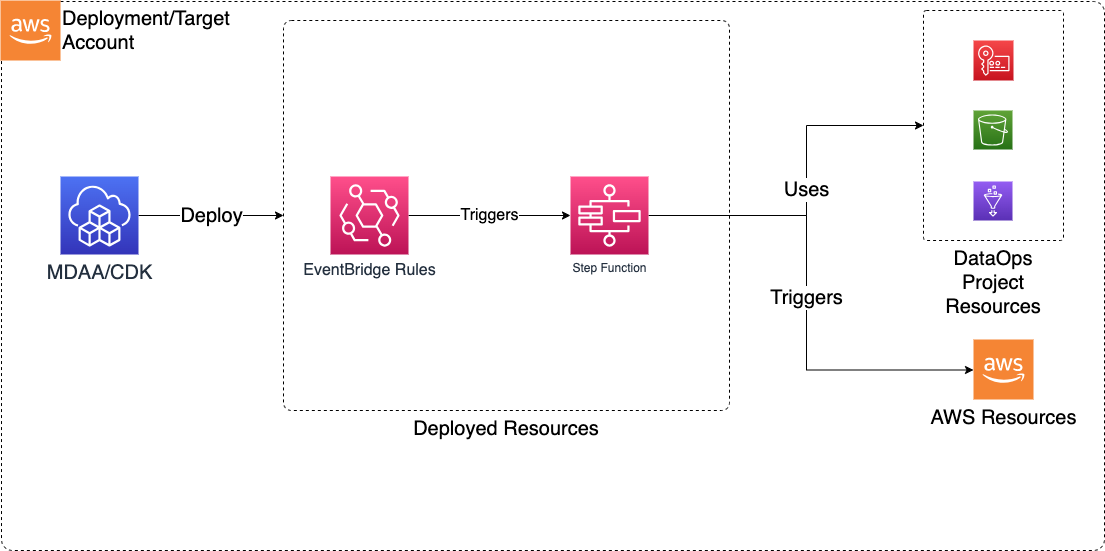
This module deploys and integrates the following resources:
Step Functions - State machines created for each specification in the configs
- Configs can be hand crafted or directly specified as Amazon States Language (exported from AWS Console or CLI)
EventBridge Rules - Rules for triggering Step Functions with events such as S3 Object Created Events
- EventBridge Notifications must be enabled on any bucket for which a rule is specified
Related Modules
- DataOps Project — Deploy the shared project infrastructure (KMS keys) that Step Functions reference
- ETL Jobs — Orchestrate Glue ETL jobs from within Step Functions state machines
- Crawlers — Trigger crawlers from Step Functions for end-to-end pipeline orchestration
- Lambda Functions — Invoke Lambda functions as steps within state machine workflows
- Workflows — Alternative orchestration using Glue Workflows instead of Step Functions
Security/Compliance Details
This module is designed in alignment with MDAA security/compliance principles and CDK nag rulesets. Additional review is recommended prior to production deployment, ensuring organization-specific compliance requirements are met.
- Encryption at Rest:
- State machine data encrypted with project KMS key
- Least Privilege:
- Execution roles scoped to required state machine operations
- EventBridge retry attempts and max event age configurable with DLQ for failed triggers
Configuration
MDAA Config
Add the following snippet to your mdaa.yaml under the modules: section of a domain/env in order to use this module:
dataops-stepfunction: # Module Name can be customized
  module_path: '@aws-mdaa/dataops-stepfunction' # Must match module NPM package name
  module_configs:
    - ./dataops-stepfunction.yaml # Filename/path can be customized
Module Config Samples and Variants
Copy the contents of the relevant sample config below into the ./dataops-stepfunction.yaml file referenced in the MDAA config snippet above.
Minimal Configuration
Deploys a single Step Functions state machine with a basic pass-through definition, wired to a DataOps project. Start here for a simple state machine within an existing DataOps project.
# Contents available via above link
# Minimal DataOps Step Function module configuration.
# Deploys a single Step Functions state machine with a basic
# pass-through definition, wired to a DataOps project.

# (Optional) DataOps project name for resource autowiring.
projectName: dataops-project-sample

# List of step function definitions
stepfunctionDefinitions:
  - stateMachineName: my-state-machine
    # State machine type (STANDARD or EXPRESS)
    stateMachineType: STANDARD
    # ARN of role used to execute the step function
    # Often created by the Roles module.
    # Example SSM: ssm:/{{org}}/{{domain}}/<roles_module_name>/role/<role_name>/arn
    stateMachineExecutionRole: 'arn:{{partition}}:iam::{{account}}:role/service-role/StepFunctions-role'
    # Enable or disable logging execution data
    logExecutionData: false
    # Amazon States Language (ASL) definition
    rawStepFunctionDef:
      Comment: Minimal state machine
      StartAt: PassState
      States:
        PassState:
          Type: Pass
          End: true
Comprehensive Configuration
Exercises every non-excluded schema property at full depth. Start here when evaluating all available options for state machine definitions, EventBridge triggers, and logging configurations.
sample-config-comprehensive.yaml
# Contents available via above link
# Comprehensive DataOps Step Function module configuration.
# Exercises every non-excluded schema property at full depth.

# DataOps project name for Step Functions resource autowiring.
projectName: dataops-project-sample

# S3 bucket name for project storage (scripts, artifacts, temp files).
# Auto-resolved from project when projectName is set.
bucketName: test-stepfn-bucket

# IAM role ARN for deployment operations and resource management.
# Auto-resolved from project when projectName is set.
deploymentRoleArn: arn:{{partition}}:iam::{{account}}:role/test-deploy-role

# KMS key ARN for encrypting DataOps resources and data.
# Auto-resolved from project when projectName is set.
kmsArn: arn:{{partition}}:kms:{{region}}:{{account}}:key/test-key-id

# Glue security configuration name for job encryption
# (at rest, in transit, CloudWatch logs).
# Auto-resolved from project when projectName is set.
securityConfigurationName: test-security-config

# SNS topic ARN for job notifications and workflow alerts.
# Auto-resolved from project when projectName is set.
notificationTopicArn: arn:{{partition}}:sns:{{region}}:{{account}}:test-topic

# Step Functions state machine definitions for serverless workflow orchestration.
stepfunctionDefinitions:
  # --- STANDARD state machine with full EventBridge integration ---
  - # Name for the Step Functions state machine.
    stateMachineName: sample-state-machine-standard
    # State machine type: STANDARD for long-running workflows.
    stateMachineType: STANDARD
    # IAM role ARN the state machine assumes for executing workflow steps.
    # Often created by the Roles module.
    # Example SSM: ssm:/{{org}}/{{domain}}/<roles_module_name>/role/<role_name>/arn
    stateMachineExecutionRole: 'arn:{{partition}}:iam::{{account}}:role/service-role/StepFunctions-standard-role'
    # CloudWatch log group retention in days (0 for infinite, defaults to 731).
    logGroupRetentionDays: 0
    # Whether to log parameter values and execution data during state machine execution.
    logExecutionData: false
    # EventBridge configuration for event-driven state machine triggering.
    eventBridge:
      # Maximum number of retry attempts EventBridge will make when the target returns an error.
      retryAttempts: 10
      # Maximum age in seconds that EventBridge will attempt to deliver an event before discarding.
      maxEventAgeSeconds: 3600
      # S3 EventBridge rules that trigger processing workflows based on S3 object events.
      s3EventBridgeRules:
        testing-event-bridge-s3:
          # S3 bucket names that should trigger the EventBridge rule.
          buckets: [sample-org-dev-instance1-datalake-raw]
          # S3 object key prefixes that filter which objects trigger the rule.
          prefixes: [data/test-lambda/]
          # ARN of the custom EventBridge event bus where the rule should be created.
          eventBusArn: 'arn:{{partition}}:events:{{region}}:{{account}}:event-bus/some-custom-name'
      # General EventBridge rules that trigger processing workflows.
      eventBridgeRules:
        testing-event-bridge:
          # Human-readable description of the EventBridge rule.
          description: 'testing event pattern rule'
          # ARN of the custom EventBridge event bus.
          eventBusArn: 'arn:{{partition}}:events:{{region}}:{{account}}:event-bus/some-custom-name'
          # EventBridge event pattern that defines which events trigger the rule.
          eventPattern:
            # The 12-digit number identifying an AWS account.
            account:
              - '{{account}}'
            # Identifies the service that sourced the event.
            source:
              - 'glue.amazonaws.com'
            # Identifies, in combination with source, the fields and values in detail.
            detailType:
              - 'Glue Job State Change'
            # A unique value generated for every event.
            id:
              - 'example-event-id'
            # Identifies the AWS region where the event originated.
            region:
              - '{{region}}'
            # ARNs that identify resources involved in the event.
            resources:
              - 'arn:{{partition}}:glue:{{region}}:{{account}}:job/my-job'
            # The event timestamp.
            time:
              - '2024-01-01T00:00:00Z'
            # By default set to 0 in all events.
            version:
              - '0'
            # JSON object with event detail at the discretion of the originating service.
            detail:
              some_event_key: some_event_value
        testing-event-bridge-schedule:
          # Human-readable description of the EventBridge rule.
          description: 'testing schedule rule'
          # Schedule expression for time-based rule triggering.
          scheduleExpression: 'cron(0 20 * * ? *)'
          # Custom input payload provided to the rule target instead of the original event.
          input:
            some-test-input-obj:
              some-test-input-key: test-value
    # State machine definition in Amazon States Language (ASL).
    # ASL is natively JSON, so you can paste definitions directly
    # from the Step Functions console or AWS CLI output.
    rawStepFunctionDef:
      {
        'Comment': 'A description of my state machine',
        'StartAt': 'StartCrawler-Domain1',
        'States':
          {
            'StartCrawler-Domain1':
              {
                'Type': 'Task',
                'Next': 'WaitForDomain1Crawler',
                'Parameters':
                  { 'Name': '{{resolve:ssm:/org/domain/glue-project/crawler/name/raw-source-files-crawler}}' },
                'Resource': 'arn:{{partition}}:states:::aws-sdk:glue:startCrawler',
              },
            'WaitForDomain1Crawler': { 'Type': 'Wait', 'Seconds': 5, 'Next': 'GetCrawlerStatus-Domain1' },
            'GetCrawlerStatus-Domain1':
              {
                'Type': 'Task',
                'Next': 'CheckStatus-Domain1Crawler',
                'Parameters':
                  { 'Name': '{{resolve:ssm:/org/domain1/glue-project/crawler/name/raw-source-files-crawler}}' },
                'Resource': 'arn:{{partition}}:states:::aws-sdk:glue:getCrawler',
              },
            'CheckStatus-Domain1Crawler':
              {
                'Type': 'Choice',
                'Choices':
                  [
                    {
                      'Or':
                        [
                          { 'Variable': '$.Crawler.State', 'StringEquals': 'RUNNING' },
                          { 'Variable': '$.Crawler.State', 'StringEquals': 'STOPPING' },
                        ],
                      'Next': 'WaitForDomain1Crawler',
                    },
                    {
                      'Or':
                        [
                          { 'Variable': '$.Crawler.State', 'StringEquals': 'FAILED' },
                          { 'Variable': '$.Crawler.State', 'StringEquals': 'STOPPED' },
                        ],
                      'Next': 'Fail-Domain1Crawler',
                    },
                  ],
                'Default': 'Success',
              },
            'Success': { 'Type': 'Pass', 'End': true },
            'Fail-Domain1Crawler': { 'Type': 'Fail', 'Cause': 'GlueCrawlerError - Glue Crawler Failed' },
          },
      }
    # CDK Nag suppressions for controlled security rule exceptions.
    suppressions:
      # CDK Nag rule ID to suppress.
      - id: 'NIST.800.53.R5'
        # Business or technical justification for the suppression.
        reason: 'Cloudwatch Log Group retention period is managed by AWS Secure Environment Accelerator'
Standalone Configuration (No Project)
Demonstrates standalone Step Functions with explicit KMS, bucket, deployment role, and security configuration. Use this when deploying outside of a DataOps project, providing infrastructure references directly.
# Contents available via above link
# Sample config for the DataOps Step Function module - no-project
# variant. Demonstrates standalone Step Functions with explicit KMS,
# bucket, deployment role, and security configuration.

# (Optional) KMS key ARN for encrypting DataOps resources and data.
# Auto-resolved from project when projectName is set.
kmsArn: arn:{{partition}}:kms:{{region}}:{{account}}:key/test-key-id
# (Optional) S3 bucket name for project storage (scripts, artifacts,
# temp files). Auto-resolved from project when projectName is set.
bucketName: test-stepfn-bucket
# (Optional) IAM role ARN for deployment operations and resource
# management. Auto-resolved from project when projectName is set.
deploymentRoleArn: arn:{{partition}}:iam::{{account}}:role/test-deploy-role
# (Optional) Glue security configuration name for job encryption
# (at rest, in transit, CloudWatch logs). Auto-resolved from project
# when projectName is set.
securityConfigurationName: test-security-config
# (Optional) SNS topic ARN for job notifications and workflow alerts.
# Auto-resolved from project when projectName is set.
notificationTopicArn: arn:{{partition}}:sns:{{region}}:{{account}}:test-topic

# List of step function definitions
stepfunctionDefinitions:
  - stateMachineName: sample-state-machine-1
    # State Machine Type can be STANDARD or EXPRESS. Refer https://docs.aws.amazon.com/step-functions/latest/dg/concepts-standard-vs-express.html
    stateMachineType: STANDARD
    # ARN of role that will be used to execute the step function.
    # Can be specified as string or SSM parameter in format {{resolve:ssm/path/to/ssm/parameter}}
    # Often created by the Roles module.
    # Example SSM: ssm:/{{org}}/{{domain}}/<roles_module_name>/role/<role_name>/arn
    stateMachineExecutionRole: 'arn:{{partition}}:iam::{{account}}:role/service-role/StepFunctions-explore-Table1sInfo-ETL-role-4c710b67'
    # Optional. Number of days the Logs will be retained in Cloudwatch.
    # Possible values are: 1, 3, 5, 7, 14, 30, 60, 90, 120, 150, 180, 365, 400, 545, 731, 1827, 3653, and 0.
    # If you specify 0, the events in the log group are always retained and never expire.
    # Default, if property not specified, is 731 days.
    logGroupRetentionDays: 0
    # Required. true or false. Enable or disable logging execution data e.g. parameter values etc.
    logExecutionData: false
    # Integration with Event Bridge for the purpose
    # of triggering this function with Event Bridge rules
    eventBridge:
      # Number of times Event Bridge will attempt to trigger this step function
      # before sending event to DLQ.
      retryAttempts: 10
      # The max age of an event before Event Bridges sends it to DLQ.
      maxEventAgeSeconds: 3600
      # List of s3 buckets and prefixes which will be monitored via EventBridge in order to trigger this function
      # Note that the S3 Bucket must have Event Bridge Notifications enabled.
      s3EventBridgeRules:
        testing-event-bridge-s3:
          # The bucket producing event notifications
          buckets: [sample-org-dev-instance1-datalake-raw]
          # Optional - The S3 prefix to match events on
          prefixes: [data/test-lambda/]
          # Optional - Can specify a custom event bus for S3 rules, but note that S3 EventBridge notifications
          # are initially sent only to the default bus in the account, and would need to be
          # forwarded to the custom bus before this rule would match.
          eventBusArn: 'arn:{{partition}}:events:{{region}}:{{account}}:event-bus/some-custom-name'
      # List of generic Event Bridge rules which will trigger this function
      # List of generic Event Bridge rules which will trigger this function
      eventBridgeRules:
        testing-event-bridge:
          description: 'testing'
          eventBusArn: 'arn:{{partition}}:events:{{region}}:{{account}}:event-bus/some-custom-name'
          eventPattern:
            source:
              - 'glue.amazonaws.com'
            detail:
              some_event_key: some_event_value
        testing-event-bridge-schedule:
          description: 'testing'
          # (Optional) - Rules can be scheduled using a crontab expression
          scheduleExpression: 'cron(0 20 * * ? *)'
          # (Optional) - If specified, this input will be passed as the event payload to the function.
          # If not specified, the matched event payload will be passed as input.
          input:
            some-test-input-obj:
              some-test-input-key: test-value
    # The rawStepFunctionDef is Amazon States Langauage (ASL) JSON exported or copied from AWS Console.
    # Environment specific attributes can be specified as SSM Parameters in format {{resolve:ssm:/path/to/ssm/parameter}}
    rawStepFunctionDef:
      {
        'Comment': 'A description of my state machine',
        'StartAt': 'StartCrawler-Domain1',
        'States':
          {
            'StartCrawler-Domain1':
              {
                'Type': 'Task',
                'Next': 'WaitForDomain1Crawler',
                'Parameters':
                  { 'Name': '{{resolve:ssm:/org/domain/glue-project/crawler/name/raw-source-files-crawler}}' },
                'Resource': 'arn:{{partition}}:states:::aws-sdk:glue:startCrawler',
              },
            'WaitForDomain1Crawler': { 'Type': 'Wait', 'Seconds': 5, 'Next': 'GetCrawlerStatus-Domain1' },
            'GetCrawlerStatus-Domain1':
              {
                'Type': 'Task',
                'Next': 'CheckStatus-Domain1Crawler',
                'Parameters':
                  { 'Name': '{{resolve:ssm:/org/domain1/glue-project/crawler/name/raw-source-files-crawler}}' },
                'Resource': 'arn:{{partition}}:states:::aws-sdk:glue:getCrawler',
              },
            'CheckStatus-Domain1Crawler':
              {
                'Type': 'Choice',
                'Choices':
                  [
                    {
                      'Or':
                        [
                          { 'Variable': '$.Crawler.State', 'StringEquals': 'RUNNING' },
                          { 'Variable': '$.Crawler.State', 'StringEquals': 'STOPPING' },
                        ],
                      'Next': 'WaitForDomain1Crawler',
                    },
                    {
                      'Or':
                        [
                          { 'Variable': '$.Crawler.State', 'StringEquals': 'FAILED' },
                          { 'Variable': '$.Crawler.State', 'StringEquals': 'STOPPED' },
                        ],
                      'Next': 'Fail-Domain1Crawler',
                    },
                  ],
                'Default': 'Success',
              },
            'Success': { 'Type': 'Pass', 'End': true },
            'Fail-Domain1Crawler': { 'Type': 'Fail', 'Cause': 'GlueCrawlerError - Glue Crawler Failed' },
          },
      }
    suppressions:
      - id: 'NIST.800.53.R5'
        reason: 'Cloudwatch Log Group retention period is managed by AWS Secure Environment Accelerator'
Express State Machine Configuration
Demonstrates an EXPRESS state machine type for high-volume, short-duration workflows. Choose this variant when your workflow executes frequently (e.g., event-driven microservices) and completes within five minutes, where cost-efficiency at high throughput is more important than exactly-once execution guarantees.
# Contents available via above link
# DataOps Step Function module configuration - EXPRESS variant.
# Demonstrates an EXPRESS state machine type for high-volume,
# short-duration workflows.

# DataOps project name for Step Functions resource autowiring.
projectName: dataops-project-sample

# Step Functions state machine definitions.
stepfunctionDefinitions:
  - # Name for the Step Functions state machine.
    stateMachineName: sample-express-machine
    # State machine type: EXPRESS for high-volume short-duration workflows.
    stateMachineType: EXPRESS
    # IAM role ARN the state machine assumes for executing workflow steps.
    # Often created by the Roles module.
    # Example SSM: ssm:/{{org}}/{{domain}}/<roles_module_name>/role/<role_name>/arn
    stateMachineExecutionRole: 'arn:{{partition}}:iam::{{account}}:role/service-role/StepFunctions-express-role'
    # Whether to log parameter values and execution data during execution.
    logExecutionData: true
    # CloudWatch log group retention in days.
    logGroupRetentionDays: 30
    # State machine definition as a JSON object (ASL).
    rawStepFunctionDef:
      Comment: Express state machine for high-volume processing
      StartAt: ProcessEvent
      States:
        ProcessEvent:
          Type: Pass
          End: true