Crawlers
Note: This documentation is also available in a rendered format here.
Deploys Glue Crawlers with automatic project security configuration wiring, optional VPC binding via Glue connections, and EventBridge-based failure notifications. Use this module when you need to automatically discover and catalog data schemas from S3, JDBC, DynamoDB, or Glue Catalog sources into your data lake.
Deployed Resources
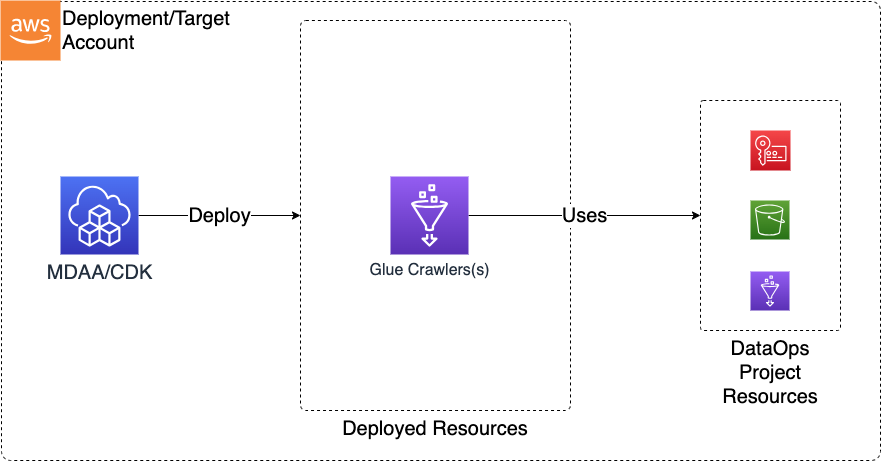
This module deploys and integrates the following resources:
Glue Crawlers - Glue Crawlers will be created for each crawler specification in the configs
- Automatically configured to use project security config
- Can optionally be VPC bound (via Glue connection)
Related Modules
- DataOps Project — Deploy the shared project infrastructure (KMS keys, databases, connections) that crawlers reference. Note: the DataOps Project module can also create crawlers directly for databases it manages — use this standalone crawler module when you need crawlers with custom targets, schedules, or configurations beyond what the project provides
- ETL Jobs — Deploy Glue ETL jobs to transform data discovered by crawlers
- Workflows — Orchestrate crawlers and jobs together in Glue Workflows
- Data Quality — Deploy data quality rulesets on tables created by crawlers
Security/Compliance Details
This module is designed in alignment with MDAA security/compliance principles and CDK nag rulesets. Additional review is recommended prior to production deployment, ensuring organization-specific compliance requirements are met.
- Encryption at Rest:
- Crawlers use project Glue security configuration for encrypting output data, logs, and bookmarks with the project KMS key
- Least Privilege:
- Execution role specified per crawler
- Project resources referenced via
project:prefix for consistent access control
- Network Isolation:
- Optional VPC binding via Glue connections for accessing data sources in private networks
Configuration
MDAA Config
Add the following snippet to your mdaa.yaml under the modules: section of a domain/env in order to use this module:
dataops-crawler: # Module Name can be customized
  module_path: '@aws-mdaa/dataops-crawler' # Must match module NPM package name
  module_configs:
    - ./dataops-crawler.yaml # Filename/path can be customized
Module Config Samples and Variants
Copy the contents of the relevant sample config below into the ./dataops-crawler.yaml file referenced in the MDAA config snippet above.
Minimal Configuration
Only required properties are included, with projectName to auto-wire security configuration. Start here for a quick single-crawler deployment within an existing DataOps project.
# Contents available via above link
# Minimal configuration for DataOps Crawler module.
# Only required properties are included.
# projectName is included to auto-wire security configuration.

# DataOps project name for crawler resource autowiring.
projectName: dataops-project-test

# Map of crawler names to Glue crawler definitions for data source
# discovery and cataloging.
crawlers:
  test-crawler:
    # IAM role ARN for crawler execution
    # Often created by the Roles module.
    # Example SSM: ssm:/{{org}}/{{domain}}/<roles_module_name>/role/<role_name>/arn
    executionRoleArn: some-arn
    databaseName: project:databaseName/example-database
    description: Example for a Crawler
    targets:
      s3Targets:
        - path: s3://some-s3-bucket/path/to/crawler/target
Comprehensive Configuration
When projectName is set, infrastructure resources (KMS key, S3 bucket, IAM roles, SNS topic, security configuration) are automatically resolved from the referenced DataOps project. Configures crawlers for S3, JDBC, Glue Catalog, and DynamoDB data sources with scheduling and schema change policies. Start here when evaluating all available options for crawler data sources, scheduling, and schema change behavior.
sample-config-comprehensive.yaml
# Contents available via above link
# DataOps Crawler module configuration with project integration.
# When projectName is set, infrastructure resources (KMS key, S3
# bucket, IAM roles, SNS topic, security configuration) are
# automatically resolved from the referenced DataOps project.
# This example configures crawlers for S3, JDBC, Glue Catalog,
# and DynamoDB data sources with scheduling and schema change
# policies.

# (Optional) DataOps project name for crawler resource autowiring
# (databases, roles, security).
projectName: dataops-project-test

# Map of crawler names to Glue crawler definitions for data source
# discovery and cataloging.
crawlers:
  # Crawler with S3, JDBC, catalog, and DynamoDB targets
  test-crawler:
    # ARN of the execution role
    # Often created by the Roles module.
    # Example SSM: ssm:/{{org}}/{{domain}}/<roles_module_name>/role/<role_name>/arn
    executionRoleArn: some-arn
    # Name of the database to crawl
    databaseName: project:databaseName/example-database
    # Description for the crawler
    description: Example for a Crawler
    # Crawler targets specifying data sources to crawl
    targets:
      # S3 targets for data lake object discovery
      s3Targets:
        - # Path to the S3 target
          path: s3://some-s3-bucket/path/to/crawler/target
        - path: s3://some-s3-bucket/path/to/second/target
          # (Optional) Connection name for S3 access within a VPC
          connectionName: test-s3-connection
          # (Optional) Dead-letter SQS ARN for failed event notifications
          dlqEventQueueArn: arn:{{partition}}:sqs:{{region}}:{{account}}:test-dlq
          # (Optional) SQS ARN for S3 event notifications
          eventQueueArn: arn:{{partition}}:sqs:{{region}}:{{account}}:test-queue
          # (Optional) Glob patterns to exclude from the crawl
          exclusions:
            - '**/_temporary/**'
            - '**.tmp'
          # (Optional) Number of files per leaf folder to crawl (1-249)
          sampleSize: 10
      # (Optional) JDBC targets for relational database discovery
      jdbcTargets:
        - # Connection name for the JDBC target
          connectionName: test-jdbc-connection
          # Path of the JDBC target
          path: test-db/test-schema/test-table
          # (Optional) Glob patterns to exclude from the crawl
          exclusions:
            - 'test-db/temp_*'
          # (Optional) Additional metadata types (RAWTYPES, COMMENTS)
          enableAdditionalMetadata:
            - RAWTYPES
      # (Optional) Catalog targets for cross-catalog synchronization
      catalogTargets:
        - # Name of the database to synchronize
          databaseName: test-catalog-db
          # Tables to synchronize
          tables:
            - test-table-1
            - test-table-2
          # (Optional) Connection name for catalog access
          connectionName: test-catalog-connection
          # (Optional) Dead-letter SQS ARN
          dlqEventQueueArn: arn:{{partition}}:sqs:{{region}}:{{account}}:test-catalog-dlq
          # (Optional) SQS ARN for event notifications
          eventQueueArn: arn:{{partition}}:sqs:{{region}}:{{account}}:test-catalog-queue
      # (Optional) DynamoDB targets for NoSQL table discovery
      dynamoDbTargets:
        - # Name of the DynamoDB table to crawl
          path: test-dynamo-table
          # (Optional) Whether to scan all records (default: true)
          scanAll: true
          # (Optional) Percentage of read capacity units to use
          # (0.1-1.5)
          scanRate: 0.5
    # (Optional) Custom classifier names
    classifiers:
      - project:classifiers/classifierCsv
    # (Optional) Recrawl behavior
    recrawlBehavior: CRAWL_NEW_FOLDERS_ONLY
    # (Optional) Extra crawler configuration
    extraConfiguration:
      Version: 1
      CrawlerOutput:
        Partitions:
          AddOrUpdateBehavior: InheritFromTable
    # (Optional) String prefix prepended to all table names created
    # by the crawler.
    tablePrefix: test_
    # (Optional) Cron schedule for automated periodic execution
    schedule:
      # Cron expression for the schedule
      scheduleExpression: 'cron(15 12 * * ? *)'
    # (Optional) Policy controlling how the crawler handles detected
    # schema modifications.
    schemaChangePolicy:
      # (Optional) Deletion behavior when a deleted object is found
      # Valid values: LOG, DELETE_FROM_DATABASE, DEPRECATE_IN_DATABASE
      deleteBehavior: LOG
      # (Optional) Update behavior when a changed schema is found
      # Valid values: LOG, UPDATE_IN_DATABASE
      updateBehavior: UPDATE_IN_DATABASE

  # Second crawler exercising remaining enum values
  test-crawler-enum-variants:
    # Often created by the Roles module.
    # Example SSM: ssm:/{{org}}/{{domain}}/<roles_module_name>/role/<role_name>/arn
    executionRoleArn: some-arn
    databaseName: project:databaseName/example-database-2
    description: Crawler exercising alternate enum values
    targets:
      s3Targets:
        - path: s3://some-s3-bucket/path/to/enum-variant-target
    # Recrawl behavior: CRAWL_EVERYTHING
    recrawlBehavior: CRAWL_EVERYTHING
    schemaChangePolicy:
      # Alternate deletion behavior
      deleteBehavior: DELETE_FROM_DATABASE
      # Alternate update behavior
      updateBehavior: LOG

  # Third crawler exercising CRAWL_EVENT_MODE and DEPRECATE_IN_DATABASE
  test-crawler-event-mode:
    # Often created by the Roles module.
    # Example SSM: ssm:/{{org}}/{{domain}}/<roles_module_name>/role/<role_name>/arn
    executionRoleArn: some-arn
    databaseName: project:databaseName/example-database-3
    description: Crawler exercising event mode and deprecate behavior
    targets:
      s3Targets:
        - path: s3://some-s3-bucket/path/to/event-mode-target
    # Recrawl behavior: CRAWL_EVENT_MODE
    recrawlBehavior: CRAWL_EVENT_MODE
    schemaChangePolicy:
      # Alternate deletion behavior
      deleteBehavior: DEPRECATE_IN_DATABASE
      updateBehavior: UPDATE_IN_DATABASE
Standalone Configuration (No Project)
Deploys crawlers independently of a DataOps project. Infrastructure resources (KMS key, S3 bucket, IAM roles, SNS topic, security configuration) must be provided directly rather than autowired from a project. Use this when deploying outside of a DataOps project, providing infrastructure references directly.
# Contents available via above link
# DataOps Crawler module configuration without project integration.
# Use this approach when deploying crawlers independently of a
# DataOps project. Infrastructure resources (KMS key, S3 bucket,
# IAM roles, SNS topic, security configuration) must be provided
# directly rather than autowired from a project.

# (Optional) KMS key ARN for encrypting DataOps resources and data.
kmsArn: arn:{{partition}}:kms:{{region}}:{{account}}:key/test-key-id
# (Optional) Glue security configuration name for crawler encryption
# (at rest, in transit, CloudWatch logs).
securityConfigurationName: test-security-config
# (Optional) S3 bucket name for project storage (scripts, artifacts,
# temp files).
bucketName: test-crawler-bucket
# (Optional) IAM role ARN for deployment operations and resource
# management.
deploymentRoleArn: arn:{{partition}}:iam::{{account}}:role/test-deploy-role
# (Optional) SNS topic ARN for job notifications and workflow alerts.
notificationTopicArn: arn:{{partition}}:sns:{{region}}:{{account}}:test-topic

# Map of crawler names to Glue crawler definitions for data source
# discovery and cataloging.
crawlers:
  test-crawler:
    # ARN of the execution role
    # Often created by the Roles module.
    # Example SSM: ssm:/{{org}}/{{domain}}/<roles_module_name>/role/<role_name>/arn
    executionRoleArn: some-arn
    # Name of the database to crawl
    databaseName: project:databaseName/example-database
    # Description for the crawler
    description: Example for a Crawler
    # Crawler targets specifying data sources to crawl
    targets:
      # S3 targets for data lake object discovery
      s3Targets:
        - # Path to the S3 target
          path: s3://some-s3-bucket/path/to/crawler/target
    # (Optional) Custom classifier names
    classifiers:
      - project:classifiers/classifierCsv
    # (Optional) Recrawl behavior
    recrawlBehavior: CRAWL_NEW_FOLDERS_ONLY
    # (Optional) Extra crawler configuration
    extraConfiguration:
      Version: 1
      CrawlerOutput:
        Partitions:
          AddOrUpdateBehavior: InheritFromTable