DataOps NiFi Clusters
Note: This documentation is also available in a rendered format here.
Deploys Apache NiFi clusters on EKS with Fargate compute, TLS-encrypted communications via internal CA, EFS persistent storage, SAML federation, Zookeeper coordination, NiFi Registry, and per-cluster IAM roles and security groups. Use this module when you need a visual data flow management platform for building complex, real-time data ingestion and routing pipelines across diverse sources and destinations.
Deployed Resources
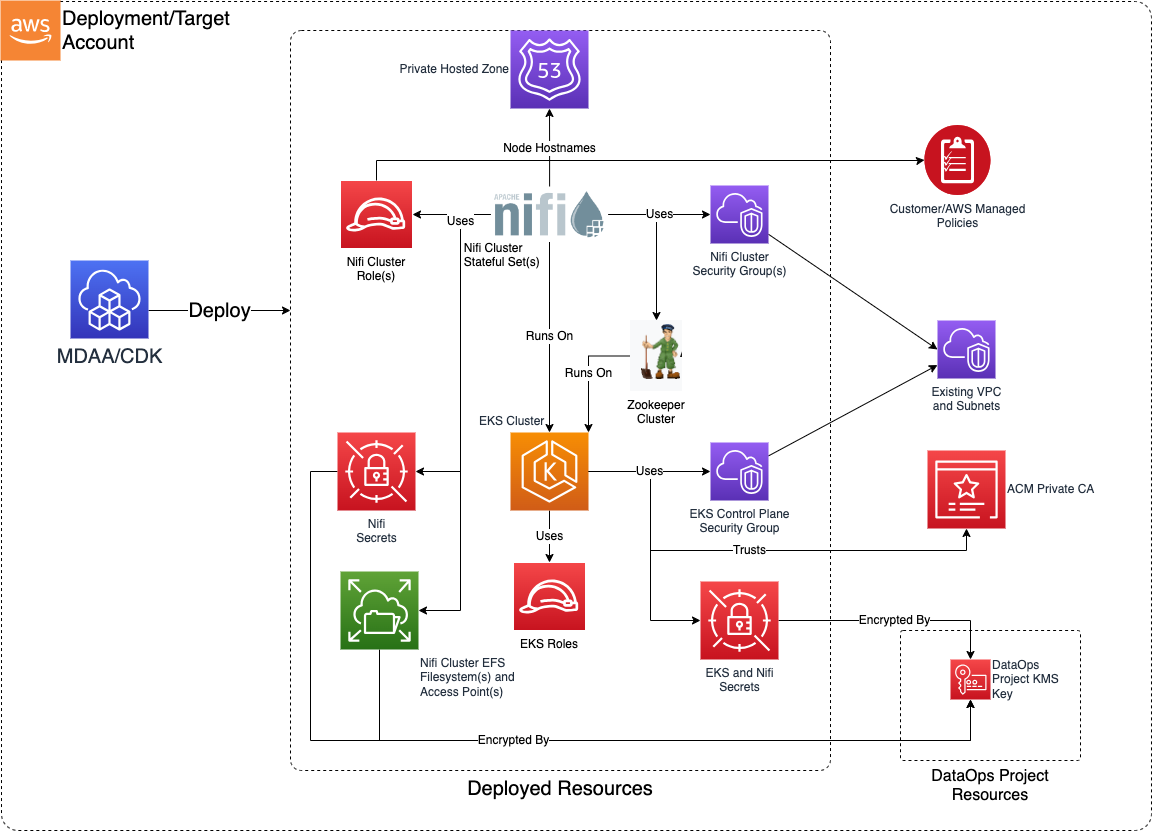
This module deploys and integrates the following resources:
EKS Cluster - Hosts Zookeeper and multiple NiFi clusters on Fargate.
Internal CA - cert-manager for SSL certs, optionally backed by ACM Private CA.
External Secrets - AWS Secrets Manager integration for the EKS cluster.
External DNS - Route 53 private hosted zone updates for NiFi node hostnames.
Zookeeper - TLS-encrypted cluster coordination deployed on the EKS cluster.
Route 53 Private Hosted Zone - DNS resolution for NiFi node hostnames.
NiFi Clusters - Separate StatefulSets per cluster with EFS storage, TLS certs, security groups, and IAM roles.
NiFi Registry - Optional version control for NiFi flows with EFS, TLS, and IAM.
Related Modules
- DataOps Project — Deploy the shared project infrastructure (KMS keys, security groups) that NiFi clusters reference
- Data Lake — NiFi clusters can read from and write to data lake S3 buckets
- Roles — Create IAM roles for NiFi cluster service accounts
Security/Compliance Details
This module is designed in alignment with MDAA security/compliance principles and CDK nag rulesets. Additional review is recommended prior to production deployment, to assist in meeting organization-specific compliance requirements.
- Encryption at Rest:
- All secrets encrypted with project KMS key
- EFS filesystems encrypted with project KMS key
- JKS keystore passwords stored in Secrets Manager
- Encryption in Transit:
- All NiFi and Zookeeper communications TLS-encrypted using certs from internal CA
- Least Privilege:
- Per-cluster IAM service account roles for AWS resource access
- Configurable admin identities, groups, policies, and authorizations with automatic background enforcement
- Separation of Duties:
- SAML federation for user authentication (supports AWS IAM Identity Center)
- Per-cluster security groups with configurable ingress/egress
- Network Isolation:
- EKS control plane access restricted via security group rules
- NiFi nodes accessible only via private hosted zone DNS
- No public connectivity
AWS Service Endpoints
The following VPC endpoints may be required if public AWS service endpoint connectivity is unavailable (e.g., private subnets without NAT gateway, firewalled environments, or PrivateLink-only architectures):
| AWS Service | Endpoint Service Name | Type |
|---|---|---|
| EKS | com.amazonaws.{region}.eks |
Interface |
| ECR API | com.amazonaws.{region}.ecr.api |
Interface |
| ECR Docker | com.amazonaws.{region}.ecr.dkr |
Interface |
| EFS | com.amazonaws.{region}.elasticfilesystem |
Interface |
| KMS | com.amazonaws.{region}.kms |
Interface |
| S3 | com.amazonaws.{region}.s3 |
Gateway |
| Secrets Manager | com.amazonaws.{region}.secretsmanager |
Interface |
| CloudWatch Logs | com.amazonaws.{region}.logs |
Interface |
| STS | com.amazonaws.{region}.sts |
Interface |
| Route 53 Resolver | com.amazonaws.{region}.route53resolver |
Interface |
| ACM PCA | com.amazonaws.{region}.acm-pca |
Interface |
Configuration
MDAA Config
Add the following snippet to your mdaa.yaml under the modules: section of a domain/env in order to use this module:
dataops-nifi: # Module Name can be customized
  module_path: '@aws-mdaa/dataops-nifi' # Must match module NPM package name
  module_configs:
    - ./dataops-nifi.yaml # Filename/path can be customized
Module Config Samples and Variants
Copy the contents of the relevant sample config below into the ./dataops-nifi.yaml file referenced in the MDAA config snippet above.
Minimal Configuration
Deploys an EKS-based NiFi cluster with a single node and SAML authentication, wired to a DataOps project. Start here for a basic NiFi deployment with SAML-based user access within an existing DataOps project.
# Contents available via above link
# Minimal DataOps NiFi module configuration.
# Deploys an EKS-based NiFi cluster with a single node and SAML
# authentication, wired to a DataOps project.

# (Optional) DataOps project name for NiFi resource autowiring.
projectName: dataops-project-test

nifi:
  # See CONFIGURATION.md for role reference options (name, arn, id).
  # Roles granted admin access to the Kubernetes cluster
  adminRoles:
    - name: Admin

  # VPC for NiFi cluster deployment
  # Often created by your VPC/networking stack.
  # Example SSM: ssm:/path/to/vpc/id
  vpcId: test-vpc-id

  # Subnets for NiFi cluster deployment
  # Often created by your VPC/networking stack.
  # Example SSM: ssm:/path/to/subnet/id
  subnetIds:
    subnet1: test-subnet-id-1
    subnet2: test-subnet-id-2

  # NiFi cluster definitions
  clusters:
    my-cluster:
      # Initial number of nodes
      nodeCount: 2
      # Node size (SMALL, MEDIUM, LARGE, XLARGE, 2XLARGE)
      nodeSize: SMALL
      # Admin identities for SAML-based access
      adminIdentities:
        - 'admin-identity'
      # SAML federation configuration
      saml:
        idpMetadataUrl: 'https://portal.sso.ca-central-1.amazonaws.com/saml/metadata/abc-123'
Comprehensive Configuration
Exercises every compatible, non-excluded property at full depth, wired to a DataOps project for auto-resolution of shared resources. Start here when evaluating all available options for multi-node clusters, NiFi Registry, Zookeeper tuning, and security group configurations.
sample-config-comprehensive.yaml
# Contents available via above link
# Comprehensive sample config for the DataOps NiFi module.
# Exercises every compatible, non-excluded property at full depth.
# Wired to a DataOps project for auto-resolution of shared resources.

# DataOps project name for NiFi resource autowiring
projectName: dataops-project-test

# SNS topic ARN for job notifications and workflow alerts
notificationTopicArn: arn:{{partition}}:sns:{{region}}:{{account}}:test-topic

nifi:
  # See CONFIGURATION.md for role reference options (name, arn, id).
  # Admin roles with access to EKS cluster resources.
  # Roles can be referenced by name (auto-expanded to ARN) or by explicit ARN.
  adminRoles:
    # Role by name (auto-expanded to ARN at deploy time)
    - name: Admin
    # Role by ARN
    - arn: arn:{{partition}}:iam::{{account}}:role/eks-admin
    # Role by name (auto-expanded to ARN at deploy time)
    - name: NifiAdmin

  # EC2 management instance for EKS cluster administration with kubectl access
  mgmtInstance:
    # Subnet ID for management instance network placement
    subnetId: test-subnet-id
    # Availability zone for management instance placement
    availabilityZone: test-az
    # EC2 key pair name for SSH access
    keyPairName: test-key-pair
    # User data commands for management instance initialization
    userDataCommands:
      - echo "Installing kubectl"
      - curl -LO https://dl.k8s.io/release/stable.txt

  # VPC ID for EKS and NiFi cluster deployment
  # Often created by your VPC/networking stack.
  # Example SSM: ssm:/path/to/vpc/id
  vpcId: test-vpc-id

  # Named subnet ID mappings for cluster deployment
  # Often created by your VPC/networking stack.
  # Example SSM: ssm:/path/to/subnet/id
  subnetIds:
    subnet1: test-subnet-id-1
    subnet2: test-subnet-id-2

  # Existing ACM Private CA ARN for signing the internal CA
  existingPrivateCaArn: arn:{{partition}}:acm-pca:{{region}}:{{account}}:certificate-authority/test-acm-pca-id

  # CA certificate validity period (must be <7 days for ACM Private CA short-term certs)
  caCertDuration: 144h0m0s
  # Time before CA cert expiration to trigger renewal
  caCertRenewBefore: 12h0m0s

  # Node certificate validity period (must be <6 days for ACM Private CA short-term certs)
  nodeCertDuration: 140h0m0s
  # Time before node cert expiration to trigger renewal
  nodeCertRenewBefore: 6h0m0s

  # Certificate key algorithm (e.g., RSA, ECDSA)
  certKeyAlg: RSA
  # Certificate key size in bits
  certKeySize: 4096

  # Ingress rules for the EKS control plane security group
  eksSecurityGroupIngressRules:
    # Security group-based ingress rules
    sg:
      - sgId: sg-kubectlclientid
        protocol: tcp
        port: 443
        # Ending port for port range rules
        toPort: 443
        # Human-readable description of the rule
        description: Allow kubectl access from bastion
    # IPv4 CIDR-based ingress rules
    ipv4:
      - cidr: 10.0.0.0/16
        protocol: tcp
        port: 443
        toPort: 443
        description: Allow kubectl from corporate network
    # Prefix list-based ingress rules
    prefixList:
      - prefixList: pl-12345678
        protocol: tcp
        port: 443
        toPort: 443
        description: Allow kubectl from managed prefix list

  # Security groups granted ingress to all NiFi cluster EFS security groups
  additionalEfsIngressSecurityGroupIds:
    - sg-glefsclientid

  # Security groups granted ingress to all NiFi cluster security groups
  securityGroupIngressSGs:
    - sg-glnificlientid

  # IPv4 CIDRs granted ingress to all NiFi cluster security groups
  securityGroupIngressIPv4s:
    - 10.10.10.10/24

  # Global egress rules for all NiFi cluster security groups
  securityGroupEgressRules:
    sg:
      - sgId: sg-egressdest
        protocol: tcp
        port: 443
    ipv4:
      - cidr: 0.0.0.0/0
        protocol: tcp
        port: 443
        description: Allow HTTPS egress
    prefixList:
      - prefixList: pl-egress123
        protocol: tcp
        port: 443

  # Named NiFi cluster configurations
  clusters:
    # First cluster: exercises all cluster-level properties
    test1:
      # Number of nodes in the NiFi cluster
      nodeCount: 2
      # Node compute size (enum: SMALL, MEDIUM, LARGE, XLARGE, 2XLARGE)
      nodeSize: SMALL
      # Docker image tag for NiFi
      nifiImageTag: '1.25.0'
      # Admin identities for NiFi cluster management
      adminIdentities:
        - 'some-admin-identity'
        - 'some-other-admin-identity'
      # Peer cluster names for cross-cluster communication
      peerClusters:
        - test2
      # Named NiFi Registry client configurations
      registryClients:
        example-extra-client:
          # NiFi Registry URL for flow versioning
          url: https://some-external-registry-url:8443
      # External node identities authorized to join the cluster
      externalNodeIdentities:
        - CN=test-external-node1
        - CN=test-external-node2
      # User identities authorized to access the cluster
      identities:
        - test-identity-1
        - test-identity-2
        - test-identity-3
      # User groups for group-based access control
      groups:
        test_group:
          - test-identity-1
          - test-identity-2
      # NiFi access policies for resource-level permissions
      policies:
        - resource: /data/ROOT_ID
          # Policy action (enum: READ, WRITE, DELETE)
          action: READ
        - resource: /data/ROOT_ID
          action: WRITE
        - resource: /system
          action: DELETE
      # Authorization rules with pattern-based resource matching
      authorizations:
        - policyResourcePattern: /data/ROOT_ID
          # Policy actions granted for matched resources
          actions:
            - READ
          # User groups the authorization applies to
          groups:
            - test_group
          # User identities the authorization applies to
          identities:
            - 'test-identity-1'
        - policyResourcePattern: /data/.*
          actions:
            - READ
            - WRITE
          groups:
            - test_group
          identities:
            - 'test-identity-1'
      # SAML IdP configuration for authentication
      saml:
        # SAML Identity Provider metadata URL
        idpMetadataUrl: 'https://portal.sso.ca-central-1.amazonaws.com/saml/metadata/abc-123'
      # Per-cluster EFS ingress security groups
      additionalEfsIngressSecurityGroupIds:
        - sg-efsclientid
      # Per-cluster security group ingress SGs
      securityGroupIngressSGs:
        - sg-nificlientid
      # Per-cluster security group ingress IPv4 CIDRs
      securityGroupIngressIPv4s:
        - 10.10.10.10/24
      # Per-cluster egress rules
      securityGroupEgressRules:
        sg:
          - sgId: sg-clusteregressdest
            protocol: tcp
            port: 443
      # AWS managed policies for the NiFi cluster role
      clusterRoleAwsManagedPolicies:
        - policyName: AmazonS3ReadOnlyAccess
          suppressionReason: 'AmazonS3ReadOnlyAccess authorized for use'
      # Customer managed policy ARNs for the NiFi cluster role
      clusterRoleManagedPolicies:
        - 'customer-managed-policy-1'

    # Second cluster: exercises remaining enum values and port overrides
    test2:
      nodeCount: 3
      # Exercise MEDIUM nodeSize enum value
      nodeSize: MEDIUM
      saml:
        idpMetadataUrl: 'https://portal.sso.ca-central-1.amazonaws.com/saml/metadata/abc-123'
      adminIdentities:
        - 'example_admin_identity'
      # HTTPS port override (default 8443)
      httpsPort: 8444
      # Remote port override (default 10000)
      remotePort: 10001
      # Cluster protocol port override (default 14443)
      clusterPort: 14444
      peerClusters:
        - test1

    # Third cluster: exercises LARGE nodeSize
    test3:
      nodeCount: 1
      nodeSize: LARGE
      saml:
        idpMetadataUrl: 'https://portal.sso.ca-central-1.amazonaws.com/saml/metadata/abc-123'
      adminIdentities:
        - 'large-cluster-admin'

    # Fourth cluster: exercises XLARGE nodeSize
    test4:
      nodeCount: 1
      nodeSize: XLARGE
      saml:
        idpMetadataUrl: 'https://portal.sso.ca-central-1.amazonaws.com/saml/metadata/abc-123'
      adminIdentities:
        - 'xlarge-cluster-admin'

    # Fifth cluster: exercises 2XLARGE nodeSize
    test5:
      nodeCount: 1
      nodeSize: 2XLARGE
      saml:
        idpMetadataUrl: 'https://portal.sso.ca-central-1.amazonaws.com/saml/metadata/abc-123'
      adminIdentities:
        - '2xlarge-cluster-admin'

  # NiFi Registry configuration for flow versioning and template management
  registry:
    # Admin identities for Registry management
    adminIdentities:
      - 'CN=some-admin-identity'
      - 'CN=some-other-admin-identity'
    # Docker image tag for NiFi Registry
    registryImageTag: '1.25.0'
    # HTTPS port for Registry web interface
    httpsPort: 18443
    # External node identities for Registry access
    externalNodeIdentities:
      - CN=test-external-node1
      - CN=test-external-node2
    # User identities for Registry access
    identities:
      - test-identity-1
      - test-identity-2
      - test-identity-3
    # User groups for Registry access control
    groups:
      test_group:
        - test-identity-1
        - test-identity-2
    # Registry bucket configurations with full policy coverage
    buckets:
      example-extra-bucket:
        # READ policy with groups and identities
        READ:
          groups:
            - test_group
          identities:
            - test-identity-1
        # WRITE policy with groups and identities
        WRITE:
          groups:
            - test_group
          identities:
            - test-identity-2
        # DELETE policy with groups and identities
        DELETE:
          groups:
            - test_group
          identities:
            - test-identity-3
    # Registry access policies
    policies:
      - resource: /buckets
        action: READ
      - resource: /buckets
        action: WRITE
      - resource: /buckets
        action: DELETE
    # Registry authorization rules
    authorizations:
      - policyResourcePattern: /data/
        actions:
          - READ
        groups:
          - test_group
        identities:
          - 'test-identity-1'
      - policyResourcePattern: /data/.*
        actions:
          - READ
          - WRITE
        groups:
          - test_group
        identities:
          - 'test-identity-1'
    # AWS managed policies for the Registry cluster role
    registryRoleAwsManagedPolicies:
      - policyName: AmazonS3ReadOnlyAccess
        suppressionReason: 'AmazonS3ReadOnlyAccess authorized for Registry use'
    # Customer managed policy ARNs for the Registry cluster role
    registryRoleManagedPolicies:
      - 'registry-customer-managed-policy-1'
    # Registry-level security group ingress SGs
    securityGroupIngressSGs:
      - sg-registryclientid
    # Registry-level security group ingress IPv4 CIDRs
    securityGroupIngressIPv4s:
      - 10.20.20.0/24
    # Registry-level EFS ingress security groups
    additionalEfsIngressSecurityGroupIds:
      - sg-registryefsclientid
Standalone Configuration (No Project)
Demonstrates standalone NiFi EKS cluster with explicit KMS, bucket, deployment role, and security configuration. Use this when deploying outside of a DataOps project, providing infrastructure references directly.
# Contents available via above link
# Sample config for the DataOps NiFi module - no-project variant.
# Demonstrates standalone NiFi EKS cluster with explicit KMS,
# bucket, deployment role, and security configuration.

# KMS key ARN for encrypting DataOps resources and data
kmsArn: arn:{{partition}}:kms:{{region}}:{{account}}:key/test-key-id
# S3 bucket name for project storage (scripts, artifacts, temp files)
bucketName: test-nifi-bucket
# IAM role ARN for deployment operations and resource management
deploymentRoleArn: arn:{{partition}}:iam::{{account}}:role/test-deploy-role
# Glue security configuration name for job encryption
securityConfigurationName: test-security-config
# SNS topic ARN for job notifications and workflow alerts
notificationTopicArn: arn:{{partition}}:sns:{{region}}:{{account}}:test-topic

nifi:
  # See CONFIGURATION.md for role reference options (name, arn, id).
  # Admin roles with access to EKS cluster resources
  adminRoles:
    - name: Admin
    - name: eks-admin

  # EC2 management instance for EKS cluster administration
  mgmtInstance:
    # Subnet ID for management instance network placement
    subnetId: test-subnet-id
    # Availability zone for management instance placement
    availabilityZone: test-az
    # EC2 key pair name for SSH access
    keyPairName: test-key-pair

  # VPC ID for EKS and NiFi cluster deployment
  # Often created by your VPC/networking stack.
  # Example SSM: ssm:/path/to/vpc/id
  vpcId: test-vpc-id

  # Named subnet ID mappings for cluster deployment
  # Often created by your VPC/networking stack.
  # Example SSM: ssm:/path/to/subnet/id
  subnetIds:
    subnet1: test-subnet-id-1
    subnet2: test-subnet-id-2

  # Existing ACM Private CA ARN for signing the internal CA
  existingPrivateCaArn: arn:{{partition}}:acm-pca:{{region}}:{{account}}:certificate-authority/test-acm-pca-id

  # Ingress rules for the EKS control plane security group
  eksSecurityGroupIngressRules:
    sg:
      - sgId: sg-kubectlclientid
        protocol: tcp
        port: 443

  # Named NiFi cluster configurations
  clusters:
    test1:
      # Number of nodes in the NiFi cluster
      nodeCount: 2
      # Node compute size
      nodeSize: SMALL
      # Admin identities for NiFi cluster management
      adminIdentities:
        - 'some-admin-identity'
      # SAML IdP configuration for authentication
      saml:
        idpMetadataUrl: 'https://portal.sso.ca-central-1.amazonaws.com/saml/metadata/abc-123'

    test2:
      nodeCount: 2
      nodeSize: SMALL
      saml:
        idpMetadataUrl: 'https://portal.sso.ca-central-1.amazonaws.com/saml/metadata/abc-123'
      adminIdentities:
        - 'example_admin_identity'
      peerClusters:
        - test1