OpenSearch
Note: This documentation is also available in a rendered format here.
Deploys a secure, VPC-bound Amazon OpenSearch domain with KMS encryption, fine-grained access control, configurable cluster topology (master, data, and UltraWarm nodes), CloudWatch logging, custom endpoints with Route 53, and optional SAML authentication for SSO integration. Common scenarios include full-text search over application or business data, log analytics and observability dashboards, or near-real-time indexing for operational intelligence.
Deployed Resources
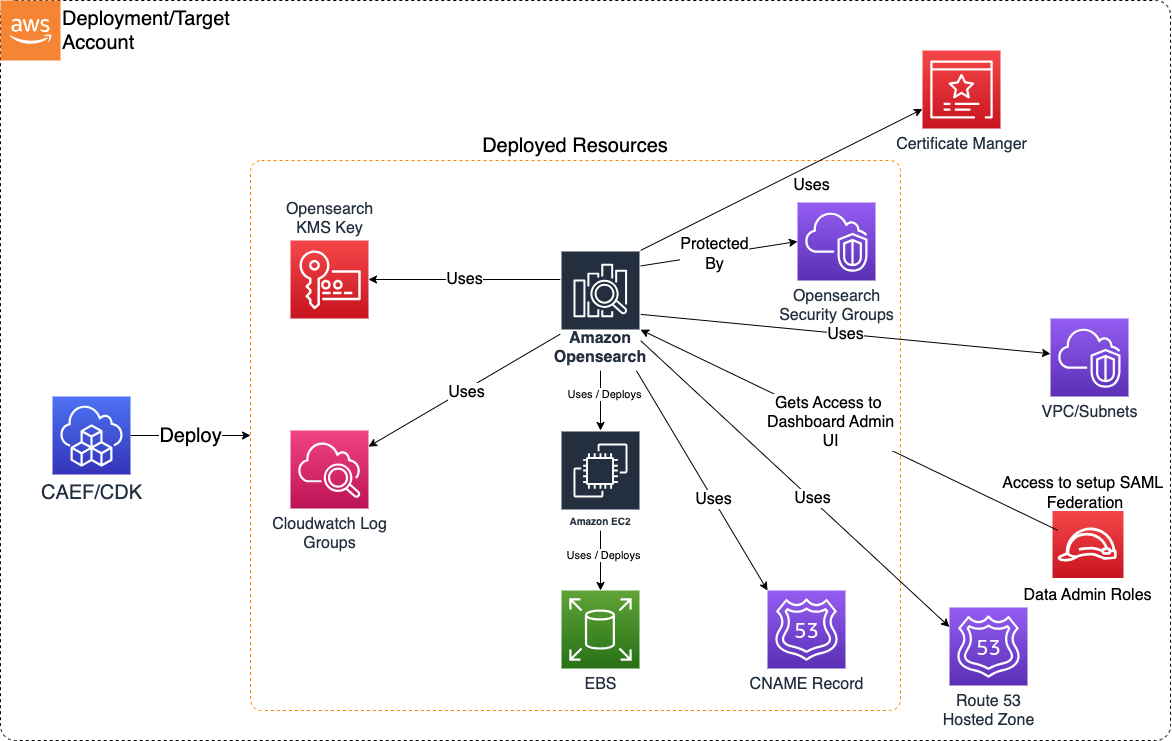
This module deploys and integrates the following resources:
OpenSearch KMS Key - Encrypts all data at rest (cluster nodes and storage).
CloudWatch Log Groups - Logs Application logs, Audit logs, Index Slow logs, Search Slow logs.
CNAME Record - CNAME record created in Private Hosted Zone (in Route 53) if hosted zone configuration is enabled along with custom endpoint.
Domain Security Group - Controls network connectivity to the Domain cluster.
Amazon OpenSearch - OpenSearch Domain (including OpenSearch Dashboards).
- Cluster nodes hosted on EC2 instances (master nodes, data nodes, UltraWarm data nodes)
- Data at rest stored in EBS storage attached to data nodes
- Cluster is VPC-bound with network connectivity controlled by security group
SNS Events Topic - SNS topic for publishing OpenSearch domain event notifications.
Related Modules
- Data Warehouse — Deploy a Redshift cluster as a complementary structured analytics engine
- Roles — Create IAM roles that can be granted domain access via access policies
- Data Lake — Index data lake content into OpenSearch for full-text search and analytics
Security/Compliance Details
This module is designed in alignment with MDAA security/compliance principles and CDK nag rulesets. Additional review is recommended prior to production deployment, ensuring organization-specific compliance requirements are met.
- Encryption at Rest:
- All data at rest encrypted with customer-managed KMS key (cluster nodes and EBS storage)
- Custom endpoint supports ACM TLS certificates
- Encryption in Transit:
- All cluster communications use TLS
- Least Privilege:
- Domain access policies configurable per principal
- Data admin role granted scoped KMS key admin/usage permissions
- Separation of Duties:
- Fine-grained access control supported
- Optional SAML authentication for SSO integration with OpenSearch Dashboards
- Network Isolation:
- Domain is VPC-bound with no public addresses
- Security group denies all ingress by default
- Custom endpoint uses private hosted zone CNAME records
AWS Service Endpoints
The following VPC endpoints may be required if public AWS service endpoint connectivity is unavailable (e.g., private subnets without NAT gateway, firewalled environments, or PrivateLink-only architectures):
| AWS Service | Endpoint Service Name | Type |
|---|---|---|
| OpenSearch | com.amazonaws.{region}.es |
Interface |
| KMS | com.amazonaws.{region}.kms |
Interface |
| CloudWatch Logs | com.amazonaws.{region}.logs |
Interface |
| S3 | com.amazonaws.{region}.s3 |
Gateway |
| SNS | com.amazonaws.{region}.sns |
Interface |
| STS | com.amazonaws.{region}.sts |
Interface |
| ACM | com.amazonaws.{region}.acm |
Interface |
Configuration
MDAA Config
Add the following snippet to your mdaa.yaml under the modules: section of a domain/env in order to use this module:
opensearch: # Module Name can be customized
  module_path: '@aws-mdaa/opensearch' # Must match module NPM package name
  module_configs:
    - ./opensearch.yaml # Filename/path can be customized
Module Config Samples and Variants
Copy the contents of the relevant sample config below into the ./opensearch.yaml file referenced in the MDAA config snippet above.
Minimal Configuration
Demonstrates the simplest valid configuration using only required properties. Uses id-style MdaaRoleRef for role resolution by AWS-generated unique ID. Start here for a quick OpenSearch domain deployment before adding multi-AZ, SAML auth, or custom endpoints.
# Contents available via above link
# Minimal config for the OpenSearch module.
# Demonstrates the simplest valid configuration using only required
# properties.

# Complete OpenSearch domain configuration
domain:
  # See CONFIGURATION.md for role reference options (name, arn, id).
  # IAM role granted admin access to OpenSearch Dashboard.
  # Role by name (auto-expanded to ARN at deploy time)
  dataAdminRole:
    name: Admin

  # Functional name for the OpenSearch domain
  opensearchDomainName: osdomain-min

  # VPC ID for OpenSearch domain deployment
  # Often created by your VPC/networking stack.
  # Example SSM: ssm:/path/to/vpc/id
  vpcId: vpc-a1b2c3d4

  # Subnet configurations for domain node placement
  # Often created by your VPC/networking stack.
  # Example SSM: ssm:/path/to/subnet/id
  subnets:
    # Availability zone of the subnet
    - subnetId: subnet-1a2b3c4d
      # Must match the actual AZ of the specified subnet
      availabilityZone: '{{region}}a'

  # Security group ingress rules controlling network access
  securityGroupIngress:
    # IPv4 CIDR blocks allowed to access the domain
    ipv4:
      - 10.0.0.0/28

  # Cluster capacity configuration
  capacity:
    # Number of data nodes (default: 1)
    dataNodes: 1
    # Data node instance type (default: r5.large.search)
    dataNodeInstanceType: r5.large.search

  # EBS storage configuration for cluster data nodes
  ebs:
    # (Optional) EBS volume size in GiB (default: 10)
    volumeSize: 10

  # Hour of day (0-23 UTC) for automated snapshot creation
  automatedSnapshotStartHour: 0

  # OpenSearch engine version in x.y format
  opensearchEngineVersion: '2.3'

  # Allow automatic OpenSearch engine version upgrades
  enableVersionUpgrade: false

  # Access policy definitions as IAM policy statement JSON objects
  accessPolicies:
    - SID: minimal-access
      Effect: Allow
      Principal:
        AWS:
          - 'arn:{{partition}}:iam::{{account}}:root'
      Resource: 'arn:{{partition}}:es:{{region}}:{{account}}:domain/test-domain/*'
      Action: es:*
Comprehensive Configuration
Deploys a VPC-bound OpenSearch domain with multi-AZ zone awareness, master/data/warm/coordinator nodes, EBS storage, custom endpoint, access policies, SAML authentication, and event notifications. Start here when evaluating all available options for a production-grade OpenSearch deployment.
sample-config-comprehensive.yaml
# Contents available via above link
# Sample config for the OpenSearch module.
# Deploys a VPC-bound OpenSearch domain with multi-AZ zone awareness,
# master/data/warm/coordinator nodes, EBS storage, custom endpoint,
# access policies, SAML authentication, and event notifications.
# This is the comprehensive config exercising every compatible
# schema property.

# Complete OpenSearch domain configuration including cluster
# settings, networking, security, and access controls.
domain:
  # See CONFIGURATION.md for role reference options (name, arn, id).
  # IAM role granted admin access to OpenSearch Dashboard for SAML
  # configuration and domain management
  dataAdminRole:
    arn: arn:{{partition}}:iam::{{account}}:role/test-admin

  # Functional name for the OpenSearch domain. Processed through
  # MDAA naming conventions; if the resulting name exceeds 28
  # characters, a random ID suffix is appended.
  opensearchDomainName: osdomain

  # (Optional) Custom endpoint configuration for branded domain
  # access with SSL and optional Route53 DNS
  customEndpoint:
    # Fully qualified domain name for the custom endpoint
    domainName: abc.xyz.com
    # (Optional) ACM certificate ARN for SSL/TLS. If omitted, a
    # new certificate is created.
    acmCertificateArn: 'arn:{{partition}}:acm:{{region}}:{{account}}:certificate/018bb092-7e2c-4f4e-87ae-08611a424e02'
    # (Optional) Enable automatic Route53 CNAME record creation
    # for the custom endpoint.
    route53HostedZoneEnabled: false
    # (Optional) Route53 hosted zone domain name for DNS record
    # creation. Required when route53HostedZoneEnabled is true.
    # Cannot be synth-tested without account/region context.
    # route53HostedZoneDomainName: xyz.com

  # VPC ID for OpenSearch domain deployment. The domain is
  # VPC-bound without public addresses.
  # Often created by your VPC/networking stack.
  # Example SSM: ssm:/path/to/vpc/id
  vpcId: vpc-a1b2c3d4

  # Subnet configurations for domain node placement. Number of
  # subnets must match or exceed the zoneAwareness
  # availabilityZoneCount.
  # Often created by your VPC/networking stack.
  # Example SSM: ssm:/path/to/subnet/id
  subnets:
    - subnetId: subnet-1a2b3c4d
      availabilityZone: '{{region}}a'
    - subnetId: subnet-9p0q1r2s
      availabilityZone: '{{region}}b'

  # Security group ingress rules controlling network access to the
  # domain. All egress is permitted by default.
  securityGroupIngress:
    # (Optional) IPv4 CIDR blocks allowed to access the domain
    ipv4:
      - 10.0.0.0/28
    # (Optional) Security group IDs allowed to access the domain
    sg:
      - sg-u5x6y7z8

  # (Optional) Zone awareness configuration for shard distribution
  # across availability zones
  zoneAwareness:
    # (Optional) Indicates whether to enable zone awareness
    # (default: false)
    enabled: true
    # (Optional) Number of AZs to distribute data nodes and shards
    # in (valid values: 2 or 3) (default: 2 if zone awareness is
    # enabled)
    availabilityZoneCount: 2

  # Cluster capacity configuration defining master nodes, data
  # nodes, warm nodes, and coordinator nodes
  capacity:
    # (Optional) Number of dedicated master nodes
    # (default: no dedicated master nodes)
    masterNodes: 3
    # (Optional) Master node instance type
    # (default: r5.large.search)
    masterNodeInstanceType: c5.large.search
    # Number of data nodes (should be multiple of AZ count)
    # (default: 1)
    dataNodes: 6
    # Data node instance type (default: r5.large.search)
    dataNodeInstanceType: c5.large.search
    # (Optional) Number of UltraWarm nodes
    # (default: no UltraWarm nodes)
    warmNodes: 2
    # (Optional) UltraWarm node instance type
    # (default: ultrawarm1.medium.search)
    warmInstanceType: 'ultrawarm1.medium.search'
    # (Optional) Indicates whether Multi-AZ with Standby deployment
    # option is enabled (default: depends on feature flag
    # ENABLE_OPENSEARCH_MULTIAZ_WITH_STANDBY)
    multiAzWithStandbyEnabled: false
    # (Optional) Additional node options for the domain
    # (default: no additional node options)
    nodeOptions:
      - # The type of node. Currently only 'coordinator' is
        # supported.
        nodeType: coordinator
        # Configuration for the node type
        nodeConfig:
          # (Optional) Whether this node type is enabled
          # (default: false)
          enabled: true
          # (Optional) The number of nodes of this type (default: 1)
          count: 2
          # (Optional) The instance type for the nodes
          # (default: m5.large.search)
          type: m5.large.search

  # EBS storage configuration for cluster data nodes
  ebs:
    # (Optional) Whether EBS volumes are attached to data nodes
    # (default: true)
    enabled: true
    # (Optional) EBS volume size in GiB (default: 10)
    volumeSize: 20
    # (Optional) EBS volume type
    # (enum: gp2, gp3, io1, io2, sc1, st1, standard) (default: gp2)
    volumeType: gp3
    # (Optional) The number of I/O operations per second (IOPS).
    # Applies only to gp3 and Provisioned IOPS (io1/io2) volume
    # types. (default: iops are not set)
    iops: 3000
    # (Optional) The throughput (in MiB/s) of the EBS volumes.
    # Applies only to the gp3 volume type.
    # (default: throughput is not set)
    throughput: 125

  # Hour of day (0-23 UTC) when automated snapshot creation begins
  automatedSnapshotStartHour: 23

  # OpenSearch engine version in x.y format
  opensearchEngineVersion: '2.3'

  # Allow automatic OpenSearch engine version upgrades
  enableVersionUpgrade: true

  # Access policy definitions as IAM policy statement JSON objects
  accessPolicies:
    - SID: testing
      Effect: Allow
      Principal:
        AWS:
          - 'arn:{{partition}}:iam::{{account}}:root'
      Resource: 'arn:{{partition}}:es:{{region}}:{{account}}:domain/test-domain/*'
      Action: es:*

  # (Optional) Event notification configuration for domain
  # monitoring via SNS email subscriptions
  eventNotifications:
    # (Optional) Email addresses for event delivery
    email:
      - example@example.com

  # (Optional) SAML authentication configuration for SSO
  # integration with corporate identity providers
  samlAuthentication:
    # The unique entity ID of the SAML identity provider
    idpEntityId: 'https://portal.sso.{{region}}.amazonaws.com/saml/assertion/ABC123'
    # The SAML metadata XML content from the identity provider
    idpMetadataXml: |
      <?xml version="1.0"?>
      <EntityDescriptor xmlns="urn:oasis:names:tc:SAML:2.0:metadata" entityID="test-idp">
        <IDPSSODescriptor protocolSupportEnumeration="urn:oasis:names:tc:SAML:2.0:protocol">
        </IDPSSODescriptor>
      </EntityDescriptor>
SAML Authentication Configuration
Demonstrates an OpenSearch domain with SAML SSO authentication enabled, using a minimal cluster configuration to validate the SAML integration path separately from the primary config. Choose this variant when your organization requires SSO access to OpenSearch Dashboards via a SAML identity provider.
# Contents available via above link
# Sample config for the OpenSearch module - SAML variant.
# Demonstrates an OpenSearch domain with SAML SSO authentication
# enabled, using a minimal cluster configuration to validate the
# SAML integration path separately from the primary config.

domain:
  # See CONFIGURATION.md for role reference options (name, arn, id).
  # IAM role granted admin access to OpenSearch Dashboard.
  # Role by name (auto-expanded to ARN at deploy time)
  dataAdminRole:
    name: test-admin-role

  # Functional name for the OpenSearch domain
  opensearchDomainName: osdomain-saml

  # VPC ID for OpenSearch domain deployment
  # Often created by your VPC/networking stack.
  # Example SSM: ssm:/path/to/vpc/id
  vpcId: vpc-a1b2c3d4

  # Subnet configurations for domain node placement
  # Often created by your VPC/networking stack.
  # Example SSM: ssm:/path/to/subnet/id
  subnets:
    - subnetId: subnet-1a2b3c4d
      availabilityZone: '{{region}}a'

  # Security group ingress rules
  securityGroupIngress:
    # (Optional) Security group IDs allowed to access the domain
    sg:
      - sg-u5x6y7z8

  # Cluster capacity configuration
  capacity:
    # Number of data nodes (default: 1)
    dataNodes: 1
    # Data node instance type (default: r5.large.search)
    dataNodeInstanceType: r6g.large.search

  # EBS storage configuration
  ebs:
    # (Optional) Whether EBS volumes are attached to data nodes
    # (default: true)
    enabled: true
    # (Optional) EBS volume size in GiB (default: 10)
    volumeSize: 20
    # (Optional) EBS volume type
    # (enum: gp2, gp3, io1, io2, sc1, st1, standard) (default: gp2)
    volumeType: gp2

  # Hour of day (0-23 UTC) for automated snapshot creation
  automatedSnapshotStartHour: 23

  # OpenSearch engine version in x.y format
  opensearchEngineVersion: '2.3'

  # Allow automatic version upgrades
  enableVersionUpgrade: true

  # Access policy definitions as IAM policy statement JSON objects
  accessPolicies:
    - SID: testing
      Effect: Allow
      Principal:
        AWS:
          - 'arn:{{partition}}:iam::{{account}}:root'
      Resource: 'arn:{{partition}}:es:{{region}}:{{account}}:domain/test-domain/*'
      Action: es:*

  # (Optional) SAML authentication configuration for SSO
  # integration with corporate identity providers
  samlAuthentication:
    # The unique entity ID of the SAML identity provider
    idpEntityId: 'https://portal.sso.{{region}}.amazonaws.com/saml/assertion/ABC123'
    # The SAML metadata XML content from the identity provider
    idpMetadataXml: |
      <?xml version="1.0"?>
      <EntityDescriptor xmlns="urn:oasis:names:tc:SAML:2.0:metadata" entityID="test-idp">
        <IDPSSODescriptor protocolSupportEnumeration="urn:oasis:names:tc:SAML:2.0:protocol">
        </IDPSSODescriptor>
      </EntityDescriptor>