Workflows
Note: This documentation is also available in a rendered format here.
Deploys Glue Workflows with triggers (scheduled, event-based, conditional), EventBridge integration for S3 notifications and custom rules, and project resource references for cross-module orchestration. Use this module when you need to chain Glue crawlers and ETL jobs into automated, scheduled pipelines with conditional execution and event-driven triggers.
Deployed Resources
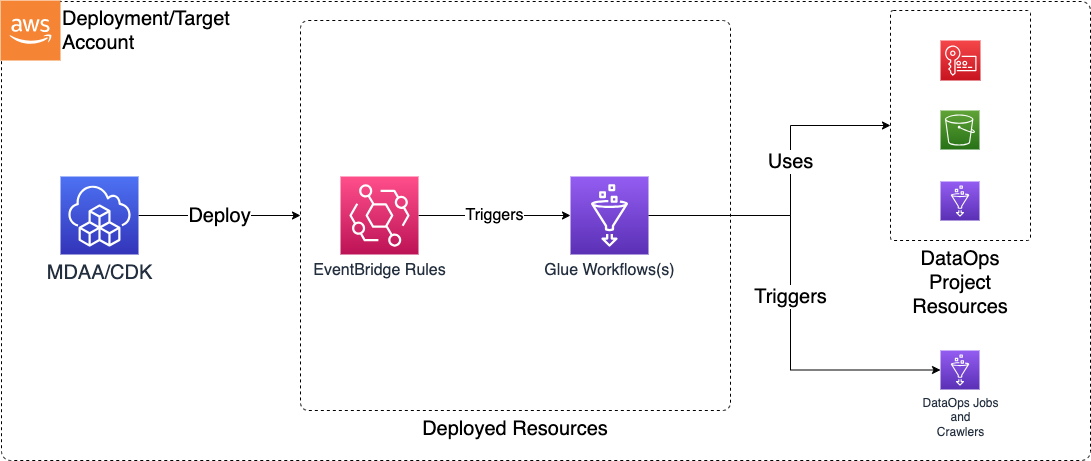
This module deploys and integrates the following resources:
Glue Workflows - Glue Workflows will be created for each workflow specification in the configs
- Workflow configs can be created directly from the output of the
aws glue get-workflow --name <name> --include-graphcommand
EventBridge Rules - EventBridge rules for triggering Workflows with events such as S3 Object Created Events
- EventBridge Notifications must be enabled on any bucket for which a rule is specified
Related Modules
- DataOps Project — Deploy the shared project infrastructure (KMS keys, security configs) that workflows reference
- ETL Jobs — Deploy Glue ETL jobs that can be chained within workflow triggers
- Crawlers — Deploy crawlers that can be chained within workflow triggers
- Step Functions — Alternative orchestration using Step Functions instead of Glue Workflows
Security/Compliance Details
This module is designed in alignment with MDAA security/compliance principles and CDK nag rulesets. Additional review is recommended prior to production deployment, ensuring organization-specific compliance requirements are met.
- Encryption at Rest:
- Workflow resources encrypted with project KMS key via Glue security configuration
Configuration
MDAA Config
Add the following snippet to your mdaa.yaml under the modules: section of a domain/env in order to use this module:
dataops-workflow: # Module Name can be customized
  module_path: '@aws-mdaa/dataops-workflow' # Must match module NPM package name
  module_configs:
    - ./dataops-workflow.yaml # Filename/path can be customized
Module Config Samples and Variants
Copy the contents of the relevant sample config below into the ./dataops-workflow.yaml file referenced in the MDAA config snippet above.
Minimal Configuration
Deploys a single Glue workflow with a scheduled trigger, wired to a DataOps project. Start here for a basic scheduled workflow within an existing DataOps project.
# Contents available via above link
# Minimal DataOps Workflow module configuration.
# Deploys a single Glue workflow with a scheduled trigger,
# wired to a DataOps project.

# (Optional) DataOps project name for resource autowiring.
projectName: dataops-project-test

# List of workflow definitions
workflowDefinitions:
  - rawWorkflowDef:
      Workflow:
        Name: my-workflow
        DefaultRunProperties: {}
        Graph:
          Nodes:
            - Type: TRIGGER
              Name: Start_wf
              TriggerDetails:
                Trigger:
                  Name: Start_wf
                  WorkflowName: my-workflow
                  Type: SCHEDULED
                  Schedule: 'cron(0 12 * * ? *)'
                  State: CREATED
                  Actions:
                    - CrawlerName: my-crawler
Comprehensive Configuration
Covers all available trigger types, conditional triggers, EventBridge integration, and cross-module job/crawler references. Start here when evaluating all available options for workflow orchestration.
sample-config-comprehensive.yaml
# Contents available via above link
# Comprehensive config for the DataOps Workflow module.
# Exercises every non-excluded property at full depth.

# DataOps project name for workflow resource autowiring.
projectName: dataops-project-test

# S3 bucket name for project storage (scripts, artifacts, temp files).
bucketName: test-workflow-bucket

# IAM role ARN for deployment operations and resource management.
deploymentRoleArn: arn:{{partition}}:iam::{{account}}:role/test-deploy-role

# KMS key ARN for encrypting DataOps resources and data.
kmsArn: arn:{{partition}}:kms:{{region}}:{{account}}:key/test-key-id

# Glue security configuration name for job encryption
# (at rest, in transit, CloudWatch logs).
securityConfigurationName: test-security-config

# SNS topic ARN for job notifications and workflow alerts.
notificationTopicArn: arn:{{partition}}:sns:{{region}}:{{account}}:test-topic

# Glue workflow definitions for ETL pipeline orchestration.
workflowDefinitions:
  # Workflow 1: Event-driven with full EventBridge configuration
  - eventBridge:
      # Maximum number of retry attempts EventBridge will make on error.
      retryAttempts: 10
      # Maximum age in seconds before EventBridge discards the event.
      maxEventAgeSeconds: 3600

      # S3 EventBridge rules that trigger workflows on S3 object events.
      s3EventBridgeRules:
        testing-event-bridge-s3:
          # S3 bucket names that trigger the rule.
          buckets: [sample-org-dev-instance1-datalake-raw]
          # S3 object key prefixes to filter events.
          prefixes: [data/test-lambda/]
          # Custom EventBridge event bus ARN for rule placement.
          eventBusArn: 'arn:{{partition}}:events:{{region}}:{{account}}:event-bus/some-custom-name'

      # General EventBridge rules with custom event patterns or schedules.
      eventBridgeRules:
        # Rule with full eventPattern coverage
        testing-event-bridge:
          # Human-readable description of the rule.
          description: 'testing full event pattern'
          # Custom event bus ARN for rule placement.
          eventBusArn: 'arn:{{partition}}:events:{{region}}:{{account}}:event-bus/some-custom-name'
          # EventBridge event pattern for matching and filtering.
          eventPattern:
            # The 12-digit number identifying an AWS account.
            account:
              - '{{account}}'
            # JSON object at the discretion of the originating service.
            detail:
              some_event_key: some_event_value
            # Identifies, in combination with source, the detail fields.
            detailType:
              - 'Glue Job State Change'
            # A unique value generated for every event.
            id:
              - 'example-event-id'
            # AWS region where the event originated.
            region:
              - '{{region}}'
            # ARNs identifying resources involved in the event.
            resources:
              - 'arn:{{partition}}:glue:{{region}}:{{account}}:job/my-job'
            # Service that sourced the event.
            source:
              - 'glue.amazonaws.com'
            # Event timestamp.
            time:
              - '2024-01-01T00:00:00Z'
            # Event version (default 0).
            version:
              - '0'
        # Rule with schedule expression and custom input
        testing-event-bridge-schedule:
          description: 'testing schedule'
          # Schedule expression using cron or rate syntax.
          scheduleExpression: 'cron(0 20 * * ? *)'
          # Custom input payload provided to the target.
          input:
            some-test-input-obj:
              some-test-input-key: test-value

    # Raw Glue workflow definition object (as exported from AWS CLI get-workflow).
    rawWorkflowDef:
      Workflow:
        Name: event-based-wf
        DefaultRunProperties: {}
        Graph:
          Nodes:
            - Type: TRIGGER
              Name: Start_wf
              TriggerDetails:
                Trigger:
                  Name: Start_wf
                  WorkflowName: event-based-wf
                  Type: EVENT
                  State: CREATED
                  Actions:
                    - CrawlerName: project:crawler/name/test-crawler
                  EventBatchingCondition:
                    BatchSize: 1
                    BatchWindow: 10
            - Type: TRIGGER
              Name: if_crawler_successed
              TriggerDetails:
                Trigger:
                  Name: if_crawler_successed
                  WorkflowName: event-based-wf
                  Type: CONDITIONAL
                  State: ACTIVATED
                  Actions:
                    - JobName: project:job/name/JobOne
                  Predicate:
                    Logical: ANY
                    Conditions:
                      - LogicalOperator: EQUALS
                        CrawlerName: project:crawler/name/test-crawler
                        CrawlState: SUCCEEDED
            - Type: TRIGGER
              Name: if_csv_to_parquet_job_successed
              TriggerDetails:
                Trigger:
                  Name: if_csv_to_parquet_job_successed
                  WorkflowName: event-based-wf
                  Type: CONDITIONAL
                  State: ACTIVATED
                  Actions:
                    - JobName: project:job/name/JobTwo
                  Predicate:
                    Logical: ANY
                    Conditions:
                      - LogicalOperator: EQUALS
                        JobName: project:job/name/JobOne
                        State: SUCCEEDED
  # Workflow 2: Schedule-based (no EventBridge)
  - rawWorkflowDef:
      Workflow:
        Name: schedule-based-wf
        DefaultRunProperties: {}
        Graph:
          Nodes:
            - Type: TRIGGER
              Name: Start_wf-with-schedule
              TriggerDetails:
                Trigger:
                  Name: Start_wf-with-schedule
                  WorkflowName: schedule-based-wf
                  Type: SCHEDULED
                  Schedule: 'cron(5 12 * * ? *)'
                  State: CREATED
                  Actions:
                    - CrawlerName: project:crawler/name/test-crawler

  # Workflow 3: JSON-style inline definition.
  # You can paste the output of `aws glue get-workflow --name <name>`
  # directly as the rawWorkflowDef value. YAML accepts JSON syntax
  # inline, so no conversion is needed.
  - rawWorkflowDef:
      {
        'Workflow':
          {
            'Name': 'json-inline-wf',
            'DefaultRunProperties': {},
            'Graph':
              {
                'Nodes':
                  [
                    {
                      'Type': 'TRIGGER',
                      'Name': 'Start_json_wf',
                      'TriggerDetails':
                        {
                          'Trigger':
                            {
                              'Name': 'Start_json_wf',
                              'WorkflowName': 'json-inline-wf',
                              'Type': 'SCHEDULED',
                              'Schedule': 'cron(0 6 * * ? *)',
                              'State': 'CREATED',
                              'Actions': [{ 'JobName': 'project:job/name/JobOne' }],
                            },
                        },
                    },
                  ],
              },
          },
      }
Standalone Configuration (No Project)
Demonstrates standalone Glue workflows with explicit KMS, bucket, deployment role, and security configuration. Use this when deploying outside of a DataOps project, providing infrastructure references directly.
# Contents available via above link
# Sample config for the DataOps Workflow module - no-project variant.
# Demonstrates standalone Glue workflows with explicit KMS, bucket,
# deployment role, and security configuration.

# (Optional) KMS key ARN for encrypting DataOps resources and data.
# Auto-resolved from project when projectName is set.
kmsArn: arn:{{partition}}:kms:{{region}}:{{account}}:key/test-key-id
# (Optional) Glue security configuration name for job encryption
# (at rest, in transit, CloudWatch logs). Auto-resolved from project
# when projectName is set.
securityConfigurationName: test-security-config
# (Optional) S3 bucket name for project storage (scripts, artifacts,
# temp files). Auto-resolved from project when projectName is set.
bucketName: test-workflow-bucket
# (Optional) IAM role ARN for deployment operations and resource
# management. Auto-resolved from project when projectName is set.
deploymentRoleArn: arn:{{partition}}:iam::{{account}}:role/test-deploy-role
# (Optional) SNS topic ARN for job notifications and workflow alerts.
# Auto-resolved from project when projectName is set.
notificationTopicArn: arn:{{partition}}:sns:{{region}}:{{account}}:test-topic

# List of workflow definitions
workflowDefinitions:
  # Integration with EventBridge for the purpose
  # of triggering this workflow with Event Bridge rules
  - eventBridge:
      # Number of times Event Bridge will attempt to trigger this workflow
      # before sending event to DLQ.
      retryAttempts: 10
      # The max age of an event before Event Bridges sends it to DLQ.
      maxEventAgeSeconds: 3600
      #List of s3 buckets and prefixes which will be monitored via EventBridge in order to trigger this workflow
      #Note that the S3 Bucket must have Event Bridge Notifications enabled.
      s3EventBridgeRules:
        testing-event-bridge-s3:
          # The bucket producing event notifications
          buckets: [sample-org-dev-instance1-datalake-raw]
          # Optional - The S3 prefix to match events on
          prefixes: [data/test-lambda/]
          # Optional - Can specify a custom event bus for S3 rules, but note that S3 EventBridge notifications
          # are initially sent only to the default bus in the account, and would need to be
          # forwarded to the custom bus before this rule would match.
          eventBusArn: 'arn:{{partition}}:events:{{region}}:{{account}}:event-bus/some-custom-name'
      # List of generic Event Bridge rules which will trigger this workflow
      eventBridgeRules:
        testing-event-bridge:
          description: 'testing'
          eventBusArn: 'arn:{{partition}}:events:{{region}}:{{account}}:event-bus/some-custom-name'
          eventPattern:
            source:
              - 'glue.amazonaws.com'
            detail:
              some_event_key: some_event_value
        testing-event-bridge-schedule:
          description: 'testing'
          # (Optional) - Rules can be scheduled using a crontab expression
          scheduleExpression: 'cron(0 20 * * ? *)'
          # (Optional) - If specified, this input will be passed as the event payload to the function.
          # If not specified, the matched event payload will be passed as input.
          input:
            some-test-input-obj:
              some-test-input-key: test-value
    # The rawWorkflowDef can be specified directly, or can be Json/Yaml representation of the output of the
    # 'aws glue get-workflow --name <name> --include-graph' command. This allows workflows to be created in the Glue
    # interface, exported, and pasted directly into this config. The parts of the command output which are not required
    # will be ignored.
    rawWorkflowDef:
      Workflow:
        Name: event-based-wf
        DefaultRunProperties: {}
        Graph:
          Nodes:
            - Type: TRIGGER
              Name: Start_wf
              TriggerDetails:
                Trigger:
                  Name: Start_wf
                  WorkflowName: event-based-wf
                  Type: EVENT
                  State: CREATED
                  Actions:
                    - CrawlerName: project:crawler/name/test-crawler
                  EventBatchingCondition:
                    BatchSize: 1
                    BatchWindow: 10
            - Type: TRIGGER
              Name: if_crawler_successed
              TriggerDetails:
                Trigger:
                  Name: if_crawler_successed
                  WorkflowName: event-based-wf
                  Type: CONDITIONAL
                  State: ACTIVATED
                  Actions:
                    - JobName: project:job/name/JobOne
                  Predicate:
                    Logical: ANY
                    Conditions:
                      - LogicalOperator: EQUALS
                        CrawlerName: project:crawler/name/test-crawler
                        CrawlState: SUCCEEDED
            - Type: TRIGGER
              Name: if_csv_to_parquet_job_successed
              TriggerDetails:
                Trigger:
                  Name: if_csv_to_parquet_job_successed
                  WorkflowName: event-based-wf
                  Type: CONDITIONAL
                  State: ACTIVATED
                  Actions:
                    - JobName: project:job/name/JobTwo
                  Predicate:
                    Logical: ANY
                    Conditions:
                      - LogicalOperator: EQUALS
                        JobName: project:job/name/JobOne
                        State: SUCCEEDED
  - rawWorkflowDef:
      Workflow:
        Name: schedule-based-wf
        DefaultRunProperties: {}
        Graph:
          Nodes:
            - Type: TRIGGER
              Name: Start_wf-with-schedule
              TriggerDetails:
                Trigger:
                  Name: Start_wf-with-schedule
                  WorkflowName: schedule-based-wf
                  Type: SCHEDULED
                  Schedule: 'cron(5 12 * * ? *)'
                  State: CREATED
                  Actions:
                    - CrawlerName: project:crawler/name/test-crawler