QuickSight Namespace
Note: This documentation is also available in a rendered format here.
Deploys a single QuickSight namespace with SAML federation roles, automatic user-to-namespace assignment via EventBridge, and QuickSight group management. Each deployment creates one namespace — deploy the module multiple times with different module names to create multiple namespaces for multi-tenancy. Use this module when you need to isolate QuickSight users and assets for a team or tenant within a shared QuickSight account.
Deployed Resources
This module deploys and integrates the following resources:
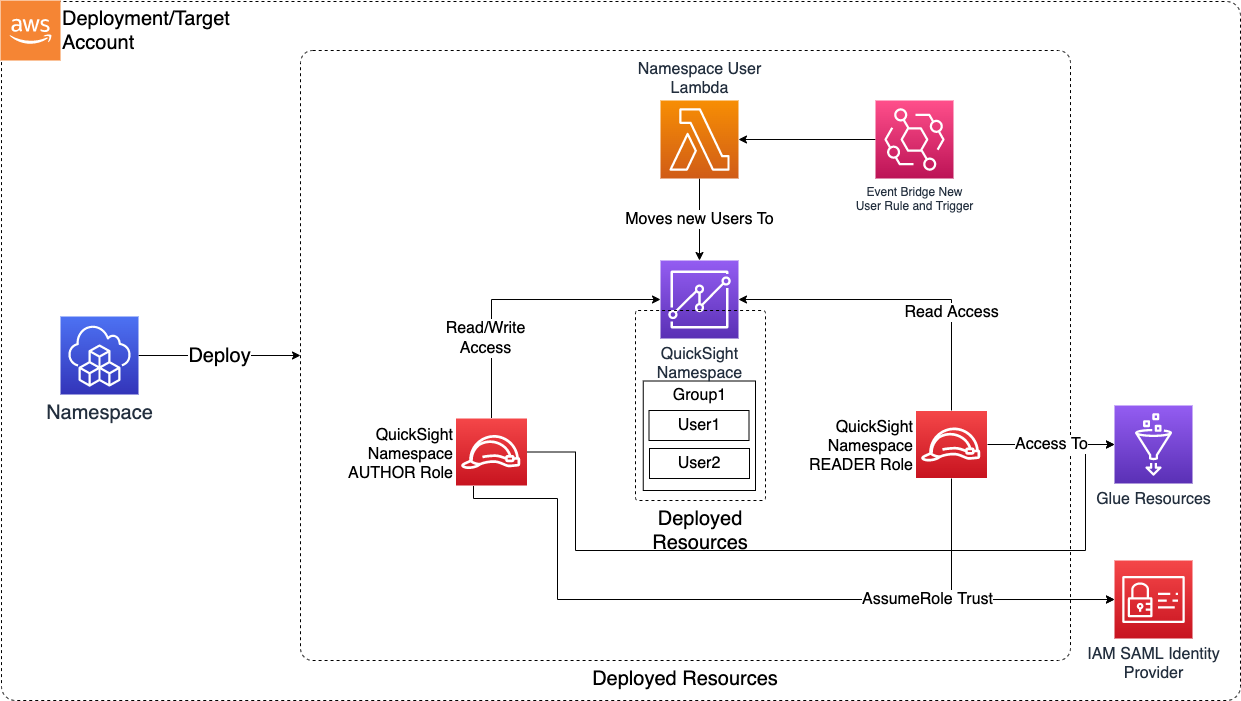
QuickSight Namespace - Creates a single QuickSight Namespace via Custom Resource. The namespace name is derived from the module name. Deploy the module multiple times with different module names to create multiple namespaces.
- Supports multi-tenancy within a single QS/AWS account
- Each namespace has its own users and groups
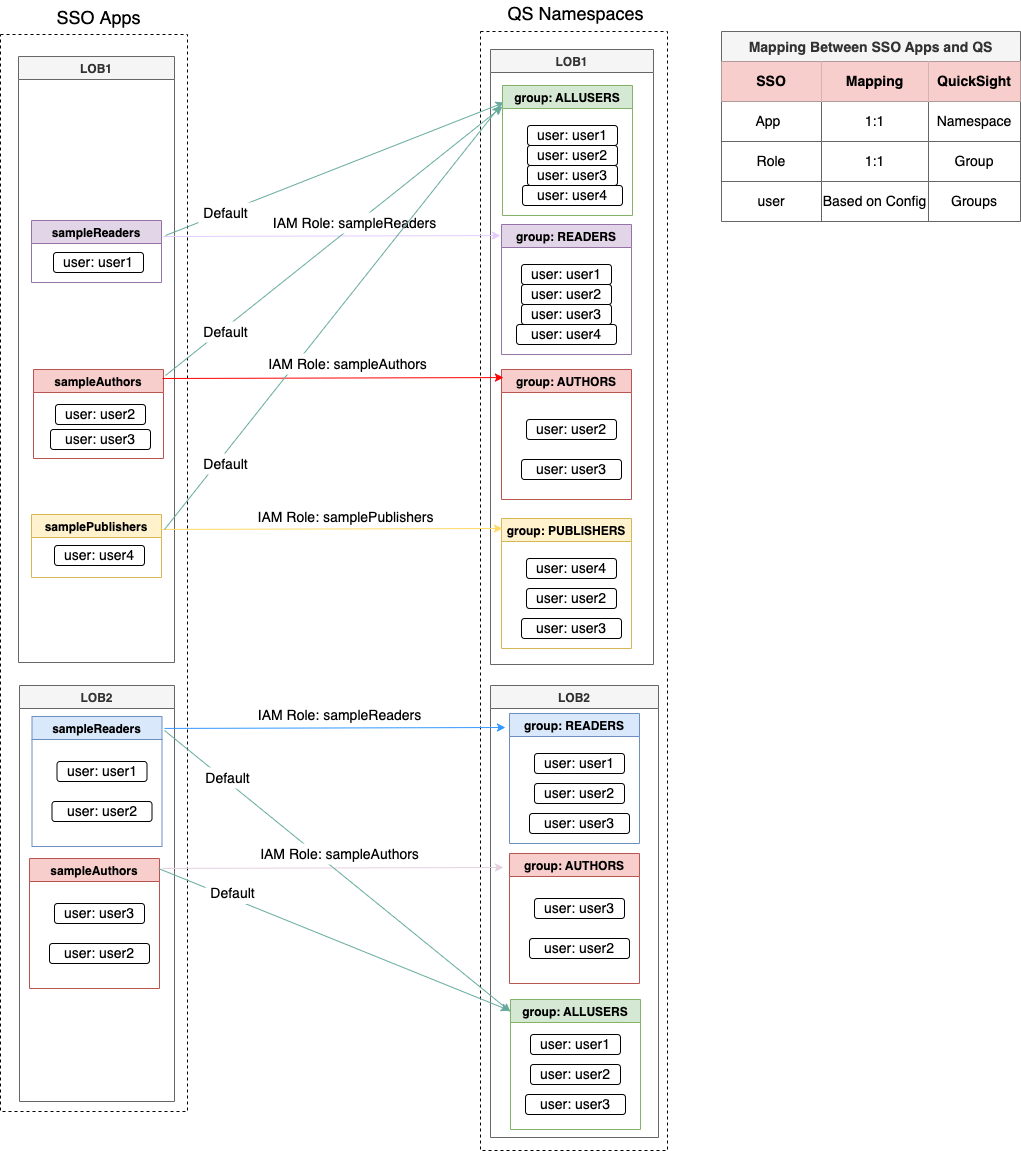
QuickSight Namespace Roles - Creates IAM roles suitable for federation into the Namespace based on roles section in the config
QuickSight Namespace User Lambda and EventBridge Trigger - Watches for new users created using the Namespace roles and automatically moves them into the namespace from the default namespace. Also creates QuickSight Groups and assigns QS users into groups.
Related Modules
- QuickSight Account — Configure the QuickSight account before deploying namespaces
- QuickSight Project — Deploy shared folders and data sources within namespaces for team-level asset management
- Roles — Create IAM federation providers and roles for SAML-based namespace access
Security/Compliance Details
This module is designed in alignment with MDAA security/compliance principles and CDK nag rulesets. Additional review is recommended prior to production deployment, ensuring organization-specific compliance requirements are met.
- Least Privilege:
- SAML federation roles provide SSO access with configurable QuickSight user types (READER, AUTHOR)
- Glue resource access scoped to specific database patterns
- Separation of Duties:
- Users automatically assigned to appropriate QuickSight groups based on their federation role
- Namespace isolation helps segregate users and groups per tenant within a single QuickSight account
Configuration
MDAA Config
Add the following snippet to your mdaa.yaml under the modules: section of a domain/env in order to use this module:
quicksight-namespace: # Module Name can be customized
  module_path: '@aws-mdaa/quicksight-namespace' # Must match module NPM package name
  module_configs:
    - ./quicksight-namespace.yaml # Filename/path can be customized
Module Config Samples and Variants
Copy the contents of the relevant sample config below into the ./quicksight-namespace.yaml file referenced in the MDAA config snippet above.
Minimal Configuration
Contains only the required properties to deploy a working SAML-federated QuickSight namespace: a single federation with one role mapping. Start here for a quick namespace setup before adding multiple federations, Glue catalog access, or complex group structures.
# Contents available via above link
# Minimal config for the QuickSight Namespace module.
# Deploys a single SAML-federated QuickSight namespace with one
# federation provider and one role mapping.

# Named federation configurations for identity provider integration
# with QuickSight namespaces. Each federation creates IAM roles for
# SAML-based access, a QuickSight namespace, users, and groups.
federations:
  test-federation:
    # URL used by the connecting driver (redirect target after SAML
    # tokens are obtained)
    url: https://ca-central-1.quicksight.aws.amazon.com/sn/auth/signin?enable-sso=1
    # ARN or SSM import (prefix with ssm:) of the federation provider
    providerArn: arn:{{partition}}:iam::{{account}}:saml-provider/test-provider
    # See CONFIGURATION.md for role reference options (name, arn, id).
    # QS groups and role info for creating IAM roles, QS groups, and
    # registering users with a QS role
    roles:
      testReaders:
        # QS groups this role will be part of
        qsGroups: ['READERS']
        # QS role (Reader|Author) info for creating IAM roles
        # (enum: READER, AUTHOR)
        qsUserType: 'READER'
Comprehensive Configuration
Provisions a single SAML-federated QuickSight namespace with multiple federation providers, reader/author role tiers, and optional Glue catalog access for data source discovery. Use this as a reference when you need full control over federation role mappings and group management within a namespace.
sample-config-comprehensive.yaml
# Contents available via above link
# Comprehensive config for the QuickSight Namespace module.
# Deploys a single SAML-federated QuickSight namespace with
# multiple federation providers, reader/author/publisher role
# tiers, and optional Glue catalog access for data source
# discovery.
#
# This comprehensive config exercises every non-excluded schema
# property at full depth.

# Named federation configurations for identity provider integration
# with QuickSight namespaces. Each federation creates IAM roles for
# SAML-based access, a QuickSight namespace, users, and groups.
# Roles are configured with QS user types (READER/AUTHOR) and group
# memberships.
federations:
  test-federation:
    # URL used by the connecting driver (redirect target after SAML
    # tokens are obtained)
    url: https://ca-central-1.quicksight.aws.amazon.com/sn/auth/signin?enable-sso=1
    # ARN or SSM import (prefix with ssm:) of the federation provider
    providerArn: arn:{{partition}}:iam::{{account}}:saml-provider/test-provider
    # (Optional) Adds sts:TagSession to every role's trust policy for this
    # federation, the prerequisite for QuickSight "Email Syncing for Federated
    # Users" (IdP passes the email via the PrincipalTag:Email SAML attribute).
    # The IdP claim mapping and the QuickSight account-level email-syncing
    # toggle must be configured separately, outside of MDAA. (default: false)
    enableEmailSyncing: true
    # See CONFIGURATION.md for role reference options (name, arn, id).
    # QS groups and role info for creating IAM roles, QS groups, and
    # registering users with a QS role
    roles:
      testReaders:
        # QS groups this role will be part of
        qsGroups: ['READERS']
        # QS role (Reader|Author) info for creating IAM roles
        # (enum: READER, AUTHOR)
        qsUserType: 'READER'
      testAuthors:
        # QS groups this role will be part of
        qsGroups: ['AUTHORS', 'READERS']
        # QS role (Reader|Author) info for creating IAM roles
        # (enum: READER, AUTHOR)
        qsUserType: 'AUTHOR'
      testPublishers:
        # QS groups this role will be part of
        qsGroups: ['PUBLISHERS']
        # QS role (Reader|Author) info for creating IAM roles
        # (enum: READER, AUTHOR)
        qsUserType: 'AUTHOR'

# (Optional) Glue resource names (database/table patterns) to which
# namespace roles are granted IAM read access. Used for QuickSight
# data source setup and validation.
glueResourceAccess:
  - database/test_org*