Database Migration Service (DMS)
Note: This documentation is also available in a rendered format here.
Deploys AWS DMS replication instances, source/target endpoints, and replication tasks for migrating data between data stores (RDBMS, S3, etc.) with encrypted, VPC-bound replication and Secrets Manager credential management. Common scenarios include migrating on-premises databases to AWS, replicating data from relational databases into S3 for analytics, or setting up ongoing change data capture from source systems.
Deployed Resources
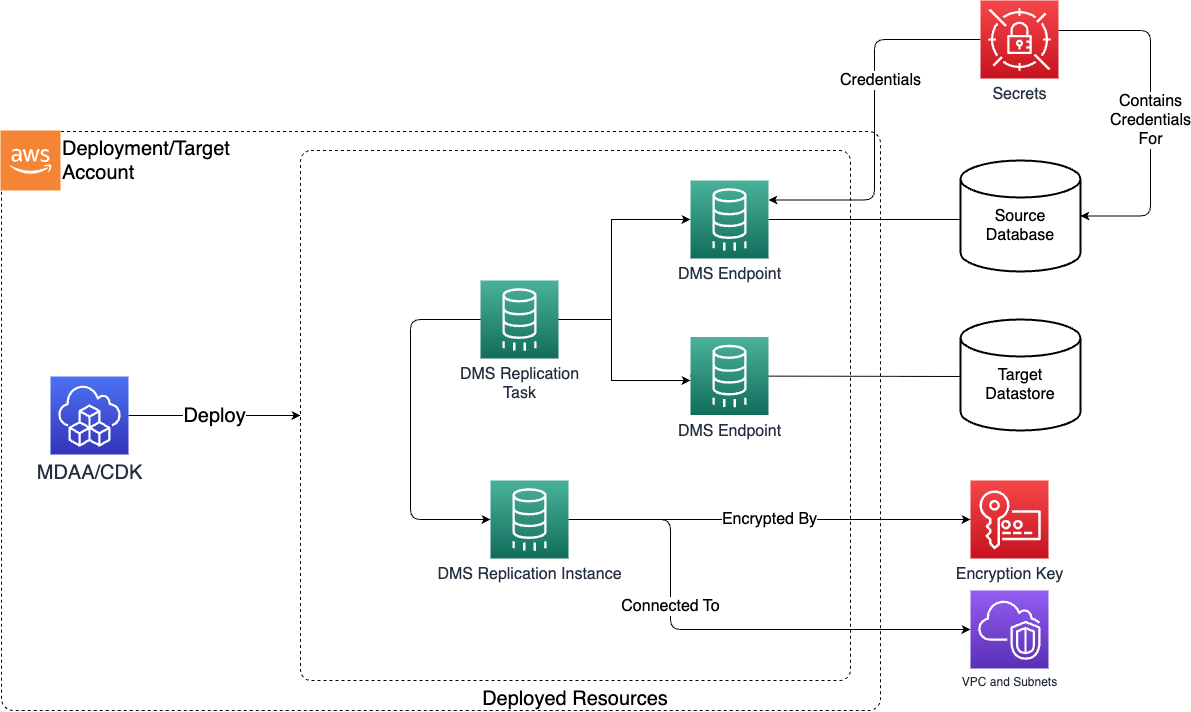
This module deploys and integrates the following resources:
DMS Replication Instance - Provisioned compute used to perform replication tasks.
DMS Endpoint - Source and target data sources from/to which data will be migrated.
DMS Replication Task - Tasks move data between DMS Endpoints, and are executed using Replication Instance compute.
Related Modules
- DataOps Project — Deploy the shared project infrastructure (KMS keys, security groups) that DMS resources reference
- Data Lake — DMS can replicate data into data lake S3 buckets as a target endpoint
- Crawlers — Deploy crawlers to catalog DMS-replicated data in the Glue Catalog
Security/Compliance Details
This module is designed in alignment with MDAA security/compliance principles and CDK nag rulesets. Additional review is recommended prior to production deployment, ensuring organization-specific compliance requirements are met.
- Encryption at Rest:
- Replication instances encrypted at rest with project KMS key
- Target endpoints support KMS server-side encryption for S3 destinations
- Least Privilege:
- Endpoint credentials managed exclusively through Secrets Manager
- DMS role automatically granted scoped access to retrieve secrets and decrypt associated KMS keys
- Network Isolation:
- Replication instances deployed in VPC with configurable subnets
- Private instances only (no public access)
AWS Service Endpoints
The following VPC endpoints may be required if public AWS service endpoint connectivity is unavailable (e.g., private subnets without NAT gateway, firewalled environments, or PrivateLink-only architectures):
| AWS Service | Endpoint Service Name | Type |
|---|---|---|
| DMS | com.amazonaws.{region}.dms |
Interface |
| KMS | com.amazonaws.{region}.kms |
Interface |
| S3 | com.amazonaws.{region}.s3 |
Gateway |
| Secrets Manager | com.amazonaws.{region}.secretsmanager |
Interface |
| CloudWatch Logs | com.amazonaws.{region}.logs |
Interface |
| STS | com.amazonaws.{region}.sts |
Interface |
Configuration
MDAA Config
Add the following snippet to your mdaa.yaml under the modules: section of a domain/env in order to use this module:
dataops-dms: # Module Name can be customized
  module_path: '@aws-mdaa/dataops-dms' # Must match module NPM package name
  module_configs:
    - ./dataops-dms.yaml # Filename/path can be customized
Requiring a VPC role
DMS requires the existence of a dms-vpc-role role. If this role doesn't already exist, in the first DMS module configuration you need to add the following flag:
For more information about this requirement, see DMS documentation.
Module Config Samples and Variants
Copy the contents of the relevant sample config below into the ./dataops-dms.yaml file referenced in the MDAA config snippet above.
Minimal Configuration
Only required properties are included, with projectName to auto-wire KMS and other shared resources. Start here for a basic DMS replication setup within an existing DataOps project.
# Contents available via above link
# Minimal configuration for DataOps DMS module.
# Only required properties are included.
# projectName is included to auto-wire KMS and other shared resources.

# DataOps project name for auto-wiring shared resources.
projectName: test-project

# DMS migration and replication configuration.
dms:
  replicationInstances:
    test-instance:
      instanceClass: dms.t3.micro
      # VPC ID for DMS replication instance deployment
      # Often created by your VPC/networking stack.
      # Example SSM: ssm:/path/to/vpc/id
      vpcId: test_vpc_id
      # Subnet IDs for DMS replication instance placement
      # Often created by your VPC/networking stack.
      # Example SSM: ssm:/path/to/subnet/id
      subnetIds:
        - test_subnet_id1
        - test_subnet_id2
Comprehensive Configuration
Covers all available replication instance, endpoint, and task settings using projectName for auto-wiring shared resources. Start here when evaluating all available options for replication instances, endpoint types, and task settings.
sample-config-comprehensive.yaml
# Contents available via above link
# Comprehensive sample config for the DataOps DMS module.
# Exercises ALL non-excluded schema properties at full depth.
# Uses projectName for auto-wiring shared resources.

# DataOps project name enabling auto-wiring of shared resources
# (bucket, KMS key, SNS topic, deployment role, security configuration)
# via SSM parameters.
projectName: test-project

# SNS topic ARN for job notifications and workflow alerts.
# Auto-resolved from project when projectName is set.
notificationTopicArn: arn:{{partition}}:sns:{{region}}:{{account}}:test-topic

# DMS migration and replication configuration including instances,
# endpoints, and tasks.
dms:
  # Whether to create the DMS VPC service role.
  createDmsVpcRole: true
  # Whether to create the DMS CloudWatch Logs service role.
  createDmsLogRole: true
  # Custom IAM role ARN for DMS operations.
  dmsRoleArn: arn:{{partition}}:iam::{{account}}:role/test-dms-role

  # Named replication instance configurations.
  replicationInstances:
    test-instance:
      # DMS replication instance class.
      instanceClass: dms.t3.micro
      # VPC ID for replication instance deployment.
      # Often created by your VPC/networking stack.
      # Example SSM: ssm:/path/to/vpc/id
      vpcId: test_vpc_id
      # Subnet IDs spanning at least two AZs.
      # Often created by your VPC/networking stack.
      # Example SSM: ssm:/path/to/subnet/id
      subnetIds:
        - test_subnet_id1
        - test_subnet_id2
      # If true, the SG will allow traffic to and from itself.
      addSelfReferenceRule: true
      # Ingress rules to be added to the replication instance SG.
      ingressRules:
        # IPv4 CIDR block rules.
        ipv4:
          - cidr: 10.0.0.0/16
            protocol: tcp
            port: 3306
            # Ending port for port range rules.
            toPort: 3306
            description: Allow MySQL from VPC
        # Prefix list rules.
        prefixList:
          - prefixList: pl-12345678
            protocol: tcp
            port: 5432
            toPort: 5432
            description: Allow PostgreSQL via prefix list
        # Security group peer rules.
        sg:
          - sgId: sg-12345678
            protocol: tcp
            port: 1521
            toPort: 1521
            description: Allow Oracle from app SG
      # Egress rules to be added to the replication instance SG.
      egressRules:
        ipv4:
          - cidr: 0.0.0.0/0
            protocol: tcp
            port: 443
            toPort: 443
            description: Allow HTTPS egress

  # Named endpoint configurations for source and target databases.
  endpoints:
    # SQL Server source endpoint.
    test-source-sqlserver:
      # The type of endpoint. (enum: source, target)
      endpointType: source
      # The endpoint engine name.
      engineName: sqlserver
      # Optional database name for the endpoint.
      databaseName: test-database
      # Microsoft SQL Server settings.
      microsoftSqlServerSettings:
        # Database name for SQL Server endpoint connectivity.
        databaseName: test-database
        # Secrets Manager secret ARN containing credentials.
        secretsManagerSecretArn: arn:{{partition}}:secretsmanager:{{region}}:{{account}}:secret:test-sqlserver-secret
        # KMS key ARN for the secret.
        secretsManagerSecretKMSArn: arn:{{partition}}:kms:{{region}}:{{account}}:key/test-sqlserver-key
        # IAM role ARN for Secrets Manager access.
        secretsManagerAccessRoleArn: arn:{{partition}}:iam::{{account}}:role/test-sm-access-role
        # BCP packet size in bytes.
        bcpPacketSize: 4096
        controlTablesFileGroup: dms_control
        forceLobLookup: false
        # TCP port number.
        port: 1433
        querySingleAlwaysOnNode: false
        # Read changes only from transaction log backups.
        readBackupOnly: false
        safeguardPolicy: rely-on-sql-server-replication-agent
        serverName: test-sqlserver.example.com
        # Transaction log access mode.
        tlogAccessMode: BackupOnly
        trimSpaceInChar: false
        # Use BCP for full-load operations.
        useBcpFullLoad: true
        useThirdPartyBackupDevice: false

    # S3 target endpoint.
    test-target-s3:
      endpointType: target
      engineName: s3
      # Amazon S3 settings.
      s3Settings:
        # S3 bucket name for data migration destination.
        bucketName: test-target-bucket
        # KMS key ID for server-side encryption.
        serverSideEncryptionKmsKeyId: test-target-kms-key-id
        # IAM role ARN for DMS service access to S3.
        serviceAccessRoleArn: arn:{{partition}}:iam::{{account}}:role/test-s3-access-role
        # S3 bucket folder for organizing migrated data.
        bucketFolder: dms-output
        # Add column name information to CSV output.
        addColumnName: true
        # Predefined ACL for S3 objects.
        cannedAclForObjects: bucket-owner-full-control
        # Enable CDC INSERT and UPDATE capture.
        cdcInsertsAndUpdates: true
        # CDC INSERT-only capture.
        cdcInsertsOnly: false
        # Maximum batch interval in seconds for CDC.
        cdcMaxBatchInterval: 60
        # Minimum file size in KB for CDC.
        cdcMinFileSize: 32000
        # CDC folder path.
        cdcPath: cdc-data
        # Compression type for S3 target files.
        compressionType: gzip
        # Column delimiter for CSV.
        csvDelimiter: ','
        # String value for columns not in supplemental log.
        csvNoSupValue: ''
        # Null value representation for CSV.
        csvNullValue: 'NULL'
        # Row delimiter for CSV.
        csvRowDelimiter: '\n'
        # Data format for S3 output files.
        dataFormat: parquet
        # Data page size in bytes for Parquet.
        dataPageSize: 1048576
        # Date partition delimiter.
        datePartitionDelimiter: SLASH
        # Enable date-based folder partitioning.
        datePartitionEnabled: true
        # Date format sequence for partitioning.
        datePartitionSequence: YYYYMMDD
        # Time zone for date partition folders.
        datePartitionTimezone: UTC
        # Maximum dictionary page size for Parquet.
        dictPageSizeLimit: 1048576
        # Enable statistics for Parquet pages.
        enableStatistics: true
        # Encoding type for Parquet.
        encodingType: rle-dictionary
        # (Optional) AWS account ID of the S3 bucket owner for cross-account access.
        expectedBucketOwner: '{{context:account-2}}'
        # External table definition for S3 source.
        externalTableDefinition: ''
        # Number of header rows to ignore in CSV.
        ignoreHeaderRows: 1
        # Include INSERT operation indicators in full load CSV.
        includeOpForFullLoad: true
        # Maximum CSV file size in KB.
        maxFileSize: 1048576
        # TIMESTAMP column precision to milliseconds in Parquet.
        parquetTimestampInMillisecond: true
        # Apache Parquet format version.
        parquetVersion: parquet-2-0
        # Preserve transaction order for CDC loads.
        preserveTransactions: true
        # Enable RFC 4180 compliance for CSV.
        rfc4180: true
        # Number of rows in Parquet row group.
        rowGroupLength: 10000
        # Timestamp column name for migration timing.
        timestampColumnName: _dms_timestamp
        # Use CsvNoSupValue for columns not in supplemental log.
        useCsvNoSupValue: false
        # Use task start time for full load timestamp.
        useTaskStartTimeForFullLoadTimestamp: true

    # MySQL source endpoint.
    test-source-mysql:
      endpointType: source
      engineName: mysql
      databaseName: test-mysql-db
      # MySQL settings.
      mySqlSettings:
        # Secrets Manager secret ARN containing MySQL credentials.
        secretsManagerSecretArn: arn:{{partition}}:secretsmanager:{{region}}:{{account}}:secret:test-mysql-secret
        # KMS key ARN for the MySQL secret.
        secretsManagerSecretKMSArn: arn:{{partition}}:kms:{{region}}:{{account}}:key/test-mysql-key
        # IAM role ARN for Secrets Manager access.
        secretsManagerAccessRoleArn: arn:{{partition}}:iam::{{account}}:role/test-sm-access-role
        # SQL script to execute after connecting.
        afterConnectScript: SET SESSION wait_timeout=28800
        # Clean and recreate table metadata on mismatch.
        cleanSourceMetadataOnMismatch: true
        # Polling interval in seconds for binary log changes.
        eventsPollInterval: 5
        # Maximum CSV file size in KB.
        maxFileSize: 65536
        # Number of parallel threads for loading data.
        parallelLoadThreads: 1
        # Time zone for MySQL source database.
        serverTimezone: UTC
        # Target database type.
        targetDbType: specific-database

    # PostgreSQL source endpoint.
    test-source-postgres:
      endpointType: source
      engineName: postgres
      databaseName: test-postgres-db
      # PostgreSQL settings.
      postgreSqlSettings:
        # Secrets Manager secret ARN containing PostgreSQL credentials.
        secretsManagerSecretArn: arn:{{partition}}:secretsmanager:{{region}}:{{account}}:secret:test-pg-secret
        # KMS key ARN for the PostgreSQL secret.
        secretsManagerSecretKMSArn: arn:{{partition}}:kms:{{region}}:{{account}}:key/test-pg-key
        # IAM role ARN for Secrets Manager access.
        secretsManagerAccessRoleArn: arn:{{partition}}:iam::{{account}}:role/test-sm-access-role
        # SQL script executed after connecting for CDC.
        afterConnectScript: SET search_path TO public
        # Babelfish for Aurora PostgreSQL database name.
        babelfishDatabaseName: test-babelfish-db
        # Enable DDL event capture.
        captureDdls: true
        # Database mode specification.
        databaseMode: default
        # Schema for operational DDL artifacts.
        ddlArtifactsSchema: cdc_ddl_schema
        # Client statement timeout in seconds.
        executeTimeout: 60
        # Fail task if LOB column exceeds LobMaxSize.
        failTasksOnLobTruncation: false
        # Enable WAL heartbeat.
        heartbeatEnable: true
        # WAL heartbeat frequency in minutes.
        heartbeatFrequency: 5
        # Schema for heartbeat artifacts.
        heartbeatSchema: public
        # Migrate boolean as boolean.
        mapBooleanAsBoolean: true
        # Maximum CSV file size in KB.
        maxFileSize: 32000
        # Plugin for replication slot.
        pluginName: pglogical
        # Logical replication slot name.
        slotName: test_slot

    # Oracle source endpoint.
    test-source-oracle:
      endpointType: source
      engineName: oracle
      databaseName: test-oracle-db
      # Oracle settings.
      oracleSettings:
        # Secrets Manager secret ARN containing Oracle credentials.
        secretsManagerSecretArn: arn:{{partition}}:secretsmanager:{{region}}:{{account}}:secret:test-oracle-secret
        # KMS key ARN for the Oracle secret.
        secretsManagerSecretKMSArn: arn:{{partition}}:kms:{{region}}:{{account}}:key/test-oracle-key
        # IAM role ARN for Secrets Manager access.
        secretsManagerAccessRoleArn: arn:{{partition}}:iam::{{account}}:role/test-sm-access-role
        # Disable Binary Reader direct file access.
        accessAlternateDirectly: false
        # Enable table-level supplemental logging.
        addSupplementalLogging: true
        # Additional archived log destination ID.
        additionalArchivedLogDestId: 1
        # Enable replication of nested tables.
        allowSelectNestedTables: true
        # Archived redo log destination ID.
        archivedLogDestId: 1
        # Restrict to archived redo logs only.
        archivedLogsOnly: false
        # ASM server address.
        asmServer: test-asm-server
        # Character length semantics.
        charLengthSemantics: byte
        # Enable direct path loading without logging.
        directPathNoLog: false
        # Enable parallel loading with direct path.
        directPathParallelLoad: false
        # Enable homogeneous tablespace replication.
        enableHomogenousTablespace: false
        # Additional archived log destination IDs.
        extraArchivedLogDestIds:
          - 2
          - 3
        # Fail task when LOB exceeds LobMaxSize.
        failTasksOnLobTruncation: false
        # Number data type scale.
        numberDatatypeScale: -1
        # Oracle path prefix for Binary Reader.
        oraclePathPrefix: /rdsdbdata/db/
        # Parallel ASM read threads.
        parallelAsmReadThreads: 2
        # Read-ahead blocks for ASM.
        readAheadBlocks: 1000
        # Enable tablespace name reading.
        readTableSpaceName: false
        # Enable path prefix replacement.
        replacePathPrefix: false
        # Retry interval in seconds.
        retryInterval: 5
        # Secrets Manager ARN for Oracle ASM access role.
        secretsManagerOracleAsmAccessRoleArn: arn:{{partition}}:iam::{{account}}:role/test-asm-role
        # Secrets Manager ARN for Oracle ASM secret.
        secretsManagerOracleAsmSecretArn: arn:{{partition}}:secretsmanager:{{region}}:{{account}}:secret:test-asm-secret
        # Custom function for SDO_GEOMETRY to GEOJSON.
        spatialDataOptionToGeoJsonFunctionName: test_sdo_to_geojson
        # Standby delay time in minutes.
        standbyDelayTime: 0
        # Enable alternate folder for online redo logs.
        useAlternateFolderForOnline: false
        # Enable Binary Reader utility.
        useBFile: false
        # Enable direct path full load.
        useDirectPathFullLoad: true
        # Enable Oracle LogMiner.
        useLogminerReader: true
        # Path prefix for Binary Reader replacement.
        usePathPrefix: /rdsdbdata/log/

    # MongoDB source endpoint.
    test-source-mongodb:
      endpointType: source
      engineName: mongodb
      databaseName: test-mongo-db
      # MongoDB settings.
      mongoDbSettings:
        # Secrets Manager secret ARN containing MongoDB credentials.
        secretsManagerSecretArn: arn:{{partition}}:secretsmanager:{{region}}:{{account}}:secret:test-mongo-secret
        # KMS key ARN for the MongoDB secret.
        secretsManagerSecretKMSArn: arn:{{partition}}:kms:{{region}}:{{account}}:key/test-mongo-key
        # IAM role ARN for Secrets Manager access.
        secretsManagerAccessRoleArn: arn:{{partition}}:iam::{{account}}:role/test-sm-access-role
        # Authentication mechanism.
        authMechanism: scram-sha-1
        # MongoDB database for authentication.
        authSource: admin
        # Authentication type.
        authType: password
        # Database name on MongoDB source.
        databaseName: test-mongo-db
        # Number of documents to preview.
        docsToInvestigate: '1000'
        # Document ID extraction flag.
        extractDocId: 'true'
        # Nesting level (document or table mode).
        nestingLevel: one
        # Port value for MongoDB source.
        port: 27017
        # Server name.
        serverName: test-mongo-server.example.com

    # DocumentDB source endpoint.
    test-source-docdb:
      endpointType: source
      engineName: docdb
      databaseName: test-docdb-db
      # DocumentDB settings.
      docDbSettings:
        # Secrets Manager secret ARN containing DocumentDB credentials.
        secretsManagerSecretArn: arn:{{partition}}:secretsmanager:{{region}}:{{account}}:secret:test-docdb-secret
        # KMS key ARN for the DocumentDB secret.
        secretsManagerSecretKMSArn: arn:{{partition}}:kms:{{region}}:{{account}}:key/test-docdb-key
        secretsManagerAccessRoleArn: arn:{{partition}}:iam::{{account}}:role/test-sm-access-role
        # Number of documents to preview.
        docsToInvestigate: 1000
        extractDocId: true
        # Nesting level for migration mode.
        nestingLevel: one

    # IBM DB2 source endpoint.
    test-source-db2:
      endpointType: source
      engineName: db2
      databaseName: test-db2-db
      # IBM DB2 settings.
      ibmDb2Settings:
        # Secrets Manager secret ARN containing DB2 credentials.
        secretsManagerSecretArn: arn:{{partition}}:secretsmanager:{{region}}:{{account}}:secret:test-db2-secret
        # KMS key ARN for the DB2 secret.
        secretsManagerSecretKMSArn: arn:{{partition}}:kms:{{region}}:{{account}}:key/test-db2-key
        # IAM role ARN for Secrets Manager access.
        secretsManagerAccessRoleArn: arn:{{partition}}:iam::{{account}}:role/test-sm-access-role
        # Log sequence number for CDC starting point.
        currentLsn: '00000000:00000000:0000'
        # Maximum bytes per read operation.
        maxKBytesPerRead: 64
        # Enable ongoing replication (CDC).
        setDataCaptureChanges: true

    # DynamoDB target endpoint.
    test-target-dynamodb:
      endpointType: target
      engineName: dynamodb
      # DynamoDB settings.
      dynamoDbSettings:
        # IAM service role ARN for DynamoDB endpoint access.
        serviceAccessRoleArn: arn:{{partition}}:iam::{{account}}:role/test-dynamodb-access-role

    # OpenSearch/Elasticsearch target endpoint.
    test-target-elasticsearch:
      endpointType: target
      engineName: elasticsearch
      # OpenSearch/Elasticsearch settings.
      elasticsearchSettings:
        # OpenSearch cluster endpoint URI.
        endpointUri: https://test-es-domain.{{region}}.es.amazonaws.com
        # Retry duration in seconds.
        errorRetryDuration: 300
        # Maximum percentage of failed records before stopping.
        fullLoadErrorPercentage: 10
        # IAM role ARN for service access.
        serviceAccessRoleArn: arn:{{partition}}:iam::{{account}}:role/test-es-access-role

    # Kinesis target endpoint.
    test-target-kinesis:
      endpointType: target
      engineName: kinesis
      # Kinesis settings.
      kinesisSettings:
        # Kinesis data stream ARN.
        streamArn: arn:{{partition}}:kinesis:{{region}}:{{account}}:stream/test-stream
        # IAM role ARN for Kinesis access.
        serviceAccessRoleArn: arn:{{partition}}:iam::{{account}}:role/test-kinesis-access-role
        # Show detailed control information.
        includeControlDetails: true
        # Include NULL and empty columns.
        includeNullAndEmpty: true
        # Show partition value in output.
        includePartitionValue: true
        # Include DDL operations.
        includeTableAlterOperations: true
        # Provide detailed transaction information.
        includeTransactionDetails: true
        # Output format for records.
        messageFormat: json
        # Avoid adding '0x' prefix to hex data.
        noHexPrefix: false
        # Prefix schema and table names to partition values.
        partitionIncludeSchemaTable: true

    # Neptune target endpoint.
    test-target-neptune:
      endpointType: target
      engineName: neptune
      # Neptune settings.
      neptuneSettings:
        # S3 bucket name for temporary graph data storage.
        s3BucketName: test-neptune-staging-bucket
        # S3 bucket folder for staging.
        s3BucketFolder: neptune-staging
        # IAM role ARN for service access.
        serviceAccessRoleArn: arn:{{partition}}:iam::{{account}}:role/test-neptune-access-role
        # Retry duration in milliseconds.
        errorRetryDuration: 300
        maxFileSize: 1048576
        # Maximum retry count.
        maxRetryCount: 3

    # Redshift target endpoint.
    test-target-redshift:
      endpointType: target
      engineName: redshift
      databaseName: test-redshift-db
      # Redshift settings.
      redshiftSettings:
        # S3 bucket name for intermediate CSV storage.
        bucketName: test-redshift-staging-bucket
        # Secrets Manager secret ARN containing Redshift credentials.
        secretsManagerSecretArn: arn:{{partition}}:secretsmanager:{{region}}:{{account}}:secret:test-redshift-secret
        # KMS key ID for server-side encryption.
        serverSideEncryptionKmsKeyId: test-redshift-kms-key-id
        # KMS key ARN for the Redshift secret.
        secretsManagerSecretKMSArn: arn:{{partition}}:kms:{{region}}:{{account}}:key/test-redshift-key
        # IAM role ARN for Secrets Manager access.
        secretsManagerAccessRoleArn: arn:{{partition}}:iam::{{account}}:role/test-sm-access-role
        # IAM role ARN for DMS service access.
        serviceAccessRoleArn: arn:{{partition}}:iam::{{account}}:role/test-redshift-access-role
        # Allow any date format.
        acceptAnyDate: true
        # SQL script after connecting.
        afterConnectScript: SET search_path TO public
        # S3 folder for CSV staging.
        bucketFolder: redshift-staging
        # Enable case-sensitive schema names.
        caseSensitiveNames: false
        # Enable automatic compression.
        compUpdate: true
        # Connection timeout in milliseconds.
        connectionTimeout: 10000
        # Date format specification.
        dateFormat: auto
        # Migrate empty fields as NULL.
        emptyAsNull: true
        # Override auto-generated IDENTITY values.
        explicitIds: false
        # Parallel threads for file upload.
        fileTransferUploadStreams: 3
        # Timeout in milliseconds for cluster operations.
        loadTimeout: 600000
        # Migrate boolean as native boolean.
        mapBooleanAsBoolean: true
        # Maximum CSV file size in KB.
        maxFileSize: 1048576
        # Remove surrounding quotation marks.
        removeQuotes: true
        # Replacement character for invalid characters.
        replaceChars: '?'
        # Characters to replace during migration.
        replaceInvalidChars: ''
        # Time format specification.
        timeFormat: auto
        # Remove trailing white space from VARCHAR.
        trimBlanks: true
        # Truncate data to fit column size.
        truncateColumns: true
        # In-memory write buffer size in KB.
        writeBufferSize: 512

    # Sybase (SAP ASE) source endpoint.
    test-source-sybase:
      endpointType: source
      engineName: sybase
      databaseName: test-sybase-db
      # SAP ASE (Sybase) settings.
      sybaseSettings:
        # Secrets Manager secret ARN containing Sybase credentials.
        secretsManagerSecretArn: arn:{{partition}}:secretsmanager:{{region}}:{{account}}:secret:test-sybase-secret
        # KMS key ARN for the Sybase secret.
        secretsManagerSecretKMSArn: arn:{{partition}}:kms:{{region}}:{{account}}:key/test-sybase-key
        # IAM role ARN for Secrets Manager access.
        secretsManagerAccessRoleArn: arn:{{partition}}:iam::{{account}}:role/test-sm-access-role

  # Named replication task configurations.
  replicationTasks:
    # Full-load migration task.
    test-task-full-load:
      # Replication instance name from replicationInstances section.
      replicationInstance: test-instance
      # Source endpoint name from endpoints section.
      sourceEndpoint: test-source-sqlserver
      # Target endpoint name from endpoints section.
      targetEndpoint: test-target-s3
      # Migration type. (enum: full-load, cdc, full-load-and-cdc)
      migrationType: full-load
      # Overall settings for the task in JSON format.
      replicationTaskSettings:
        TargetMetadata:
          TargetSchema: ''
          SupportLobs: true
        FullLoadSettings:
          TargetTablePrepMode: DROP_AND_CREATE
      # Table mappings for the task.
      tableMappings:
        rules:
          - rule-type: selection
            rule-id: '1'
            rule-name: '1'
            object-locator:
              schema-name: Test
              table-name: '%'
            rule-action: include
          - rule-type: selection
            rule-id: '2'
            rule-name: '2'
            object-locator:
              schema-name: Test
              table-name: DMS%
            rule-action: exclude
      # Supplemental information for certain source/target endpoints.
      taskData:
        supplementalKey: supplementalValue
Standalone Configuration (No Project)
Demonstrates standalone DMS configuration with explicit KMS, bucket, deployment role, and security configuration. Use this when deploying outside of a DataOps project, providing infrastructure references directly.
# Contents available via above link
# Sample config for the DataOps DMS module - no-project variant.
# Demonstrates standalone DMS configuration with explicit KMS,
# bucket, deployment role, and security configuration.

# (Optional) KMS key ARN for encrypting DataOps resources and data.
# Auto-resolved from project when projectName is set.
kmsArn: arn:{{partition}}:kms:{{region}}:{{account}}:key/test-key-id
# (Optional) S3 bucket name for project storage (scripts, artifacts,
# temp files). Auto-resolved from project when projectName is set.
bucketName: test-dms-bucket
# (Optional) IAM role ARN for deployment operations and resource
# management. Auto-resolved from project when projectName is set.
deploymentRoleArn: arn:{{partition}}:iam::{{account}}:role/test-deploy-role
# (Optional) Glue security configuration name for job encryption
# (at rest, in transit, CloudWatch logs). Auto-resolved from project
# when projectName is set.
securityConfigurationName: test-security-config
# (Optional) SNS topic ARN for job notifications and workflow alerts.
# Auto-resolved from project when projectName is set.
notificationTopicArn: arn:{{partition}}:sns:{{region}}:{{account}}:test-topic

# DMS migration and replication configuration including instances,
# endpoints, and tasks.
dms:
  # (Optional) Whether to create the DMS VPC service role.
  createDmsVpcRole: true
  # (Optional) Whether to create the DMS CloudWatch Logs service role.
  createDmsLogRole: true
  # (Optional) Custom IAM role ARN for DMS operations. Role must have
  # an assume role trust policy to the regional DMS service name:
  # dms.<region>.amazonaws.com
  dmsRoleArn: arn:{{partition}}:iam::{{account}}:role/test-dms-role

  # (Optional) Named replication instance configurations.
  replicationInstances:
    test-instance:
      # The instance class.
      instanceClass: dms.t3.micro
      # The VPC ID on which the replication instance will be deployed.
      # Often created by your VPC/networking stack.
      # Example SSM: ssm:/path/to/vpc/id
      vpcId: test_vpc_id
      # The subnets to which the replication instance will be
      # connected.
      # Often created by your VPC/networking stack.
      # Example SSM: ssm:/path/to/subnet/id
      subnetIds:
        - test_subnet_id1
        - test_subnet_id2

  # (Optional) Named endpoint configurations for source and target
  # databases.
  endpoints:
    test-source:
      # The type of endpoint. (enum: source, target)
      endpointType: source
      # The endpoint engine name.
      engineName: sqlserver
      # The appropriate settings for the provided engine name.
      microsoftSqlServerSettings:
        # Name of the database.
        databaseName: test-database
        # Secrets Manager secret ARN from which credentials will be
        # read. The DMS role will be granted access to retrieve the
        # secret.
        secretsManagerSecretArn: arn:{{partition}}:secretsmanager:{{region}}:{{account}}:secret:test-secret-abc123
        # KMS key ARN for the secret. The DMS role will be granted
        # decrypt access to this key.
        secretsManagerSecretKMSArn: arn:{{partition}}:kms:{{region}}:{{account}}:key:test-secret-key-id
    test-target:
      endpointType: target
      engineName: s3
      s3Settings:
        bucketName: test_target_bucket
        serverSideEncryptionKmsKeyId: test_target_kms_key_id

  # (Optional) Named replication task configurations.
  replicationTasks:
    test-task:
      # The name of the replication instance from the
      # replicationInstances section.
      replicationInstance: test-instance
      # The name of the source endpoint from the endpoints section.
      sourceEndpoint: test-source
      # The name of the target endpoint from the endpoints section.
      targetEndpoint: test-target
      # The type of migration.
      # (enum: full-load, cdc, full-load-and-cdc)
      migrationType: full-load
      # Table mappings config passed directly to the task.
      tableMappings:
        rules:
          - rule-type: selection
            rule-id: '1'
            rule-name: '1'
            object-locator:
              schema-name: Test
              table-name: '%'
            rule-action: include
          - rule-type: selection
            rule-id: '2'
            rule-name: '2'
            object-locator:
              schema-name: Test
              table-name: DMS%
            rule-action: exclude
CDC Migration Configuration
Demonstrates CDC and full-load-and-cdc migration types with CDC-specific task properties (cdcStartPosition, cdcStartTime, cdcStopPosition). Choose this variant when you need ongoing change data capture replication from a source database rather than a one-time full-load migration.
# Contents available via above link
# Sample config for the DataOps DMS module - CDC migration variant.
# Demonstrates CDC and full-load-and-cdc migration types with
# CDC-specific task properties (cdcStartPosition, cdcStartTime,
# cdcStopPosition).

# DataOps project name for auto-wiring shared resources.
projectName: test-project

# DMS migration and replication configuration.
dms:
  # Named replication instance configurations.
  replicationInstances:
    test-instance:
      # DMS replication instance class.
      instanceClass: dms.t3.micro
      # VPC ID for replication instance deployment.
      # Often created by your VPC/networking stack.
      # Example SSM: ssm:/path/to/vpc/id
      vpcId: test_vpc_id
      # Subnet IDs spanning at least two AZs.
      # Often created by your VPC/networking stack.
      # Example SSM: ssm:/path/to/subnet/id
      subnetIds:
        - test_subnet_id1
        - test_subnet_id2

  # Named endpoint configurations.
  endpoints:
    test-source:
      # The type of endpoint. (enum: source, target)
      endpointType: source
      # The endpoint engine name.
      engineName: postgres
      databaseName: test-cdc-db
      # PostgreSQL settings.
      postgreSqlSettings:
        secretsManagerSecretArn: arn:{{partition}}:secretsmanager:{{region}}:{{account}}:secret:test-pg-secret
        secretsManagerSecretKMSArn: arn:{{partition}}:kms:{{region}}:{{account}}:key/test-pg-key
        captureDdls: true
        pluginName: pglogical
        slotName: test_cdc_slot
    test-target:
      endpointType: target
      engineName: s3
      # S3 settings.
      s3Settings:
        bucketName: test-cdc-target-bucket
        serverSideEncryptionKmsKeyId: test-cdc-kms-key-id

  # Named replication task configurations.
  replicationTasks:
    # CDC-only migration task.
    test-task-cdc:
      replicationInstance: test-instance
      sourceEndpoint: test-source
      targetEndpoint: test-target
      # Migration type: cdc (change data capture only).
      migrationType: cdc
      # CDC start position (date, checkpoint, LSN, or SCN format).
      cdcStartPosition: '2024-01-01T00:00:00'
      # CDC stop position (server_time or commit_time format).
      cdcStopPosition: 'server_time:2024-12-31T23:59:59'
      # Table mappings for the task.
      tableMappings:
        rules:
          - rule-type: selection
            rule-id: '1'
            rule-name: '1'
            object-locator:
              schema-name: public
              table-name: '%'
            rule-action: include

    # Full-load-and-cdc migration task.
    test-task-full-load-and-cdc:
      replicationInstance: test-instance
      sourceEndpoint: test-source
      targetEndpoint: test-target
      # Migration type: full-load-and-cdc.
      migrationType: full-load-and-cdc
      # CDC start time (epoch timestamp).
      cdcStartTime: 1704067200
      # Table mappings for the task.
      tableMappings:
        rules:
          - rule-type: selection
            rule-id: '1'
            rule-name: '1'
            object-locator:
              schema-name: public
              table-name: '%'
            rule-action: include
      # Overall settings for the task.
      replicationTaskSettings:
        TargetMetadata:
          TargetSchema: ''
          SupportLobs: true