Data Lake
Note: This documentation is also available in a rendered format here.
Deploys a secure S3-based data lake with KMS encryption, versioned buckets, prefix-level access policies, S3 inventory, lifecycle rules, Lake Formation location registrations, and Glue catalog databases. Common scenarios include building a centralized data repository for analytics and ML workloads, establishing governed data zones (raw, curated, transformed) for ETL pipelines, or providing a shared storage layer for cross-team data access.
Deployed Resources
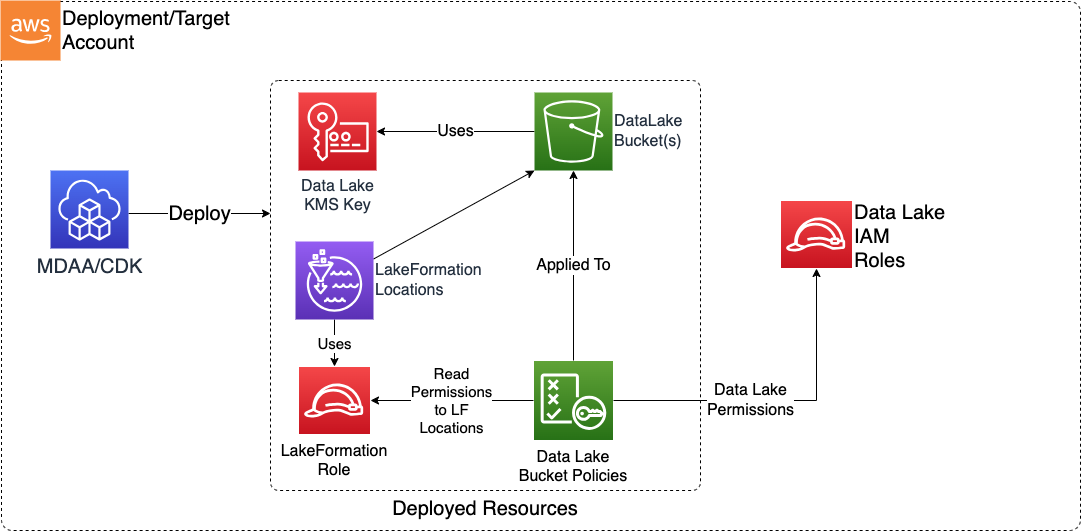
This module deploys and integrates the following resources:
Data Lake KMS Key - Customer-managed KMS key used to encrypt all Data Lake resources which support encryption at rest.
Data Lake S3 Buckets - S3 buckets forming the persistence basis of the Data Lake, with versioning, prefix-level access policies, and optional S3 Inventory and Lifecycle rules.
S3 Lifecycle Rules - A set of lifecycle rule configurations which can be applied across data lake buckets.
Glue Utility Database - Glue catalog database for bucket utility tables such as S3 inventory.
Lake Formation Locations - Lake Formation resource registrations for S3 bucket prefixes, enabling governed data access.
Lake Formation Role - IAM role assumed by Lake Formation for accessing registered data lake locations.
Replication Role - IAM role assumed by S3 to replicate objects out of a bucket configured with outbound cross-account replication. Created only for buckets that send replicas.
Related Modules
- Athena Workgroup — Deploy Athena workgroups for querying data stored in data lake buckets
- Lake Formation Settings — Configure account-level Lake Formation admin roles required for data lake location registrations
- Lake Formation Access Control — Manage fine-grained Lake Formation grants on data lake databases and tables
- Glue Catalog Settings — Configure Glue Catalog encryption and cross-account access for data lake metadata
- Roles — Create IAM roles that can be referenced as data admin, read, write, or super roles on data lake buckets
- Audit — Configure S3 Inventory from data lake buckets into the audit bucket for compliance reporting
- Macie Session — Enable Macie sensitive data discovery on data lake buckets
- DataOps Project — DataOps projects can reference data lake buckets as output targets for ETL jobs
- M2M API — Expose data lake buckets via a secure REST API for programmatic machine-to-machine access
Security/Compliance Details
This module is designed in alignment with MDAA security/compliance principles and CDK nag rulesets. Additional review is recommended prior to production deployment, ensuring organization-specific compliance requirements are met.
- Encryption at Rest:
- All buckets encrypted with customer-managed KMS key
- BucketKey feature minimizes KMS API calls during high-volume operations
- Exclusive KMS key usage enforced by default via bucket policy
- Key usage access granted to all data lake roles via key policy
- Encrypt access granted to S3 service for S3 Inventory writes
- Encryption in Transit:
- SSL enforced on all bucket access via bucket policy
- Least Privilege:
- Prefix-level access policies (read/write/super) injected into bucket policies
- Default-deny bucket policy blocks any role not explicitly specified in config
- Separation of Duties:
- Three access tiers (read, write, super) at prefix level
- Only super user roles can permanently delete object versions
- Write access creates delete markers only
- Bucket versioning enabled by default
- Data Governance:
- Lake Formation location registrations for governed data access
- Glue catalog databases for metadata management
- Cross-Account Replication:
- Opt-in and default-off; no replication is configured unless a bucket declares it
- Replication role permissions and cross-account grants scoped to the configured buckets and prefixes
- KMS grants restricted to calls made through S3 in the relevant region
Cross-Account Replication
Buckets can replicate objects to, or receive objects from, a bucket in another AWS account via the optional replication config block. The two sides are independent and both default off: outbound makes the bucket a replication source, inbound makes it a destination. Replication rules always live on the source bucket, so MDAA creates rules only for outbound.
Set only the side(s) MDAA manages. Where the bucket at the other end is not managed by MDAA, that end is yours to configure. The two are additive rather than mutually exclusive, so one bucket may set both and act as a hub that distributes and collects.
| Topology | Config | MDAA creates | You must configure |
|---|---|---|---|
| MDAA manages both ends | outbound on the source bucket, inbound on the destination bucket |
Replication rules on the source; bucket policy and KMS grants on the destination | A replication role deployed ahead of both, referenced from outbound.replicationRole - see Replicating between two MDAA data lakes |
| MDAA manages the source only | outbound |
Replication rules, replication role, source-key decrypt grant | Destination bucket policy and destination KMS key policy, granting the MDAA replication role. Its ARN is published to SSM as .../role/<zone>-replication/arn |
| MDAA manages the destination only | inbound |
Bucket policy grant and data lake KMS key grant for the external replication role | Source bucket's replication rules and replication role, in the sending account |
Source and destination may be in different regions, except when the two ends discover each other through shared SSM parameters, which cannot be read across regions - see Sharing parameters with another account.
Replicating between two MDAA data lakes
When both ends are MDAA data lakes, the receiving one has to name the sending one's replication role in a bucket policy and a KMS key policy, and S3 and KMS both reject a policy naming a principal that does not resolve. The role therefore has to exist before the destination is deployed, which rules out the role the source data lake would create for itself - the source is deployed after the destination, because PutBucketReplication is rejected until the destination bucket exists.
Deploy the role separately, ahead of both, and reference it:
buckets:
  raw:
    accessPolicies: [Root]
    replication:
      outbound:
        replicationRole:
          arn: ssm-org:/replication-roles/generated-role/s3-replication/arn
        # excerpt - destinationBucketArn, destinationAccount, destinationRegion and
        # destinationKmsKeyArn are all required too, as in the example below
        destinationBucketArn: ...
The role must be in the source bucket's account, since S3 assumes it as the bucket owner, and must be assumable by s3.amazonaws.com. MDAA rejects a role in another account at synth, when the ARN is a literal - an ARN resolved from an SSM parameter is still a token at synth, so the check cannot run and a wrong value surfaces only as a replication failure. An @aws-mdaa/roles module with trustedPrincipal: service:s3.amazonaws.com produces a suitable role; MDAA attaches the replication permissions to whichever role is referenced as a managed policy.
Both sides then need identifiers from the other, and neither can be told them in config. The sending side needs the destination's bucket ARN and replica key ARN, and the key ARN contains a key id AWS generates when the key is created. The receiving side needs the replication role's ARN, and a role name at or over 64 characters is truncated with a hash. Each side publishes what the other needs:
| Deploy order | Module | Config |
|---|---|---|
| 1 | @aws-mdaa/roles in the source account |
the replication role, with shareParametersWithAccounts: ['<destination account>'] |
| 2 | @aws-mdaa/datalake in the destination account |
inbound naming the role by its shared parameter, plus shareParametersWithAccounts: ['<source account>'] |
| 3 | @aws-mdaa/datalake in the source account |
outbound referencing the role and the destination's shared parameters |
The order is not a suggestion: the destination cannot grant a role that does not exist, and PutBucketReplication on the source is rejected until the destination bucket does. In one mdaa.yaml that means three domains, declared in this order, since MDAA deploys domains as declared and resolves no dependencies between them.
Each cross-account reference is a full parameter ARN with the ssm: prefix, which MDAA resolves to a CloudFormation-time lookup:
# in the destination data lake's module config, reading the role from the source account
buckets:
  curated:
    accessPolicies: [Root]
    replication:
      inbound:
        sourceReplicationRoleArn: 'ssm:arn:{{partition}}:ssm:{{region}}:{{context:source_account}}:parameter/{{org}}/<roles domain>/generated-role/s3-replication/arn'
        sourceAccount: '{{context:source_account}}'
# in the source data lake's module config, reading the bucket and key from the destination account
buckets:
  curated:
    accessPolicies: [Root]
    replication:
      outbound:
        destinationBucketArn: 'ssm:arn:{{partition}}:ssm:{{region}}:{{context:dest_account}}:parameter/{{org}}/<datalake domain>/<module>/bucket/<zone>/arn'
        destinationKmsKeyArn: 'ssm:arn:{{partition}}:ssm:{{region}}:{{context:dest_account}}:parameter/{{org}}/<datalake domain>/<module>/kms/arn'
        destinationAccount: '{{context:dest_account}}'
        destinationRegion: '{{region}}'
These parameter paths assume the default SSM layout. With the @mdaaIncludeEnvInSsmPath flag enabled, env is inserted after the domain - parameter/{{org}}/<domain>/<env>/<module>/....
All three deployments must be in the same region, and each must state its account explicitly rather than leaving account: default: the share is built from the publishing account's own id and names its principals as literal account ids, and neither is available when the stack is environment-agnostic.
Both accounts must be in the same AWS Organization, with RAM sharing enabled for it (aws ram enable-sharing-with-aws-organization). MDAA restricts the shares it creates to the organization, because a share reaching outside it raises an invitation nobody can accept mid-run, which is precisely the single-pass deployment this sharing exists to serve. A cross-organization pair does not use parameter sharing at all: deploy the sides in separate runs and state the far end's ARNs as literals in config, which is simpler and more flexible than a share once multiple runs are on the table anyway.
Sharing parameters with another account
shareParametersWithAccounts lets named accounts read the SSM parameters this data lake publishes for its KMS key and its buckets:
A consumer in that account then references a parameter by its full ARN, and CloudFormation resolves it at deploy time. Note the account in the ARN is this data lake's - the account that published the parameter, not the one reading it:
# in the consuming data lake's module config
buckets:
  curated:
    accessPolicies: [Root]
    replication:
      outbound:
        destinationKmsKeyArn: 'ssm:arn:{{partition}}:ssm:{{region}}:{{context:dest_account}}:parameter/{{org}}/<domain>/<module>/kms/arn'
Worth knowing before turning it on:
- Only the accounts named here can read the parameters. A RAM share always names its principals, and MDAA has no way to work out who the consumers are, so this cannot be inferred from the
replicationblock. Only the MDAA-to-MDAA topology needs a share; the other two have a non-MDAA bucket at the far end and want none, so the share cannot be inferred from thereplicationblock even when it names an account. - Sharing is confined to the organization of the account this data lake deploys into. RAM scopes a share to the organization of the account that owns it, and the share sets
allowExternalPrincipals: false, so an account outside that organization cannot be named - the deployment fails rather than raising an invitation that nobody can accept during the run. Within the organization the share is accepted automatically, provided RAM sharing is enabled for it (aws ram enable-sharing-with-aws-organization). To hand a value to an account in another organization, put the ARN in that account's config as a literal. - The parameters move to the Advanced tier, which RAM requires in order to share them and which AWS bills. Nothing changes tier unless it is being shared, so leaving this unset costs nothing. Turning it on is a one-way change for the parameters it covers: AWS does not allow an Advanced-tier parameter to be moved back to Standard, so removing this field later leaves them Advanced and still billed until they are deleted and recreated out of band.
- Both accounts must be in the same region. A parameter reference is resolved by CloudFormation in the region of the stack reading it, and a parameter exists only in the region that published it, so a parameter cannot be read across regions even with the ARN in hand. This, rather than anything in S3, is why two MDAA data lakes replicating to each other have to be deployed in one region - the pair passes a value that has to be resolved rather than stated.
- The consuming account needs its own permission too. Sharing makes the parameter reachable; the CloudFormation execution role in the reading account still needs
ssm:GetParameter*on it. A default MDAA bootstrap has that, a narrowly scoped execution policy may not. - The values shared are identifiers, not data: bucket ARNs and names, and the key ARN and id.
Requirements and behaviour to be aware of
outboundrequiresdestinationBucketArn,destinationAccountanddestinationRegion. An S3 bucket ARN carries neither account nor region: S3 needs the account to confirm destination ownership, and the region scopes the replication role's grant on the replica key.destinationKmsKeyArnis required onoutbound. MDAA buckets always encrypt with a customer managed key, and S3 does not replicate SSE-KMS encrypted objects unless the rule names a replica key. Without it, replication would be configured and silently copy nothing. The key must be a customer managed key in the destination account, in the same region as the destination bucket - AWS managed keys cannot be used across accounts. Both are checked at synth against the key ARN, when the ARN is a literal - an ARN resolved from an SSM parameter is still a token at synth, so the check cannot run and a wrong value surfaces only as a replication failure. See Replicating encrypted objects.- The destination bucket must already exist with versioning enabled. MDAA does not create it.
- Replica ownership needs no special handling. MDAA buckets leave S3 Object Ownership at its default of Bucket owner enforced, so replicas arriving in an MDAA bucket are already owned by the destination bucket owner. No
AccessControlTranslationand nos3:ObjectOwnerOverrideToBucketOwnergrant is emitted, and none is needed. When replicating to a non-MDAA destination that has ACLs enabled, the owner override is yours to configure on that bucket. - Replicas arriving from outside bypass the
ForceKMSguard. The bucket policy'sDenyAESandForceKMSstatements only apply tos3:PutObject, while replication writes vias3:ReplicateObject. For aninboundbucket, the external source therefore chooses the replica encryption key, and MDAA cannot enforce its own CMK on arriving replicas. - An
inboundgrant is scoped to the receiving bucket. The data lake uses one CMK across all its buckets, so the grant carries akms:EncryptionContext:aws:s3:arncondition naming that bucket, alongsidekms:Encrypt/kms:Decryptthrough S3 in the deployment region. The condition names the bucket by the name it was created with rather than by its ARN attribute, because a policy on the key that encrypts the bucket cannot reference the bucket resource without a CloudFormation dependency cycle. The external role can still only write to the buckets and prefixes its bucket-policy grant names. sourceAccountis required oninbound. It duplicates the account already present insourceReplicationRoleArndeliberately: synth compares the two, so a mistyped ARN fails the build rather than granting an account you did not intend.- Delete markers are not replicated unless you ask.
outbound.deleteMarkerReplicationdefaults to false, matching S3's own default: deleting an object here leaves the replica in place, so the destination stays usable as a recovery point after an accidental or malicious delete. Set it to true when the destination has to mirror this bucket rather than protect it, and the replication role is then granteds3:ReplicateDeleteto match. Two limits apply either way, both S3's: the deletion of a specific version is never replicated, and neither are delete markers written by an S3 Lifecycle expiration rule - so a bucket whoselifecycleConfigurationexpires objects cannot be mirrored exactly. A bucket receiving replicas is always granteds3:ReplicateDelete, since the sending rule belongs to the other account and may enable delete markers at any time. - Prefix scoping. Omitting
prefixFiltersonoutboundreplicates the whole bucket, which is usually what a DR copy wants. Omitting it oninboundis a wider decision: it grants the external role replicate-write across every key in the receiving bucket and leaves it able to list every key too, so set it whenever the sending side only writes under known prefixes - most of all when that side is not MDAA-managed. When both ends set it, theinboundprefixes must cover theoutboundprefixes or the uncovered objects fail to replicate.
Trusting Additional KMS Keys
Every bucket in this module is encrypted with the module's own KMS key, and its bucket policy denies s3:PutObject for any object encrypted with a different key. A Glue Security Configuration encrypts with exactly one key, so when a data lake is split across several Data Lake modules - each of which creates its own key - a Glue job running under one Security Configuration can only write to the module whose key that Security Configuration uses. Writes to the others fail with Access Denied.
Name the Security Configuration's key on the modules that have to accept those writes. additionalBucketKmsKeyArns applies to every bucket in the module, and a bucket's own additionalKmsKeyArns adds a key for that zone alone; the two are unioned, and each bucket always trusts its own key:
# in the module that does not own the Security Configuration key
additionalBucketKmsKeyArns:
  - ssm-domain:/datalake-raw/kms/arn

buckets:
  standardized:
    accessPolicies: [Root]
  exchange:
    accessPolicies: [Root]
    additionalKmsKeyArns:
      - arn:aws:kms:us-east-1:111111111111:key/33333333-4444-5555-6666-777777777777
Both properties take full KMS key ARNs - the bucket policy condition carries an ARN, not a key id. List only keys the deployment controls: each one widens which keys may encrypt objects in these buckets.
Three things to know before setting them:
- Reading the objects needs a KMS grant this does not give. Objects a Glue job writes are encrypted with the Security Configuration's key, not with the bucket's own key, so anything that reads them also needs
kms:Decrypton that key. A Data Lake module makes key users of the roles in its ownaccessPoliciesonly, so a role that reaches these buckets through this module holds no rights on the other module's key. Granting it there means adding it to that module'saccessPolicies, which also grants it prefix access to that module's buckets. - An SSM reference couples this module's deployment to the module that owns the key.
ssm-domain:,ssm-org:andssm:all resolve through CloudFormation at stack-operation time, and CloudFormation fails the operation when the parameter does not exist - so this module cannot deploy until the module publishing the key has. A literal ARN carries no such dependency; use one when the two are deployed independently. - A wildcard is caught only in a literal ARN. MDAA refuses a
*or?in these values at synth, because the bucket policy matches them withStringNotLikeIfExists- an operator that honours wildcards - so one value containing a wildcard would match every key ARN and switch the guard off for the whole bucket. An SSM reference is still an unresolved token at synth and cannot be checked, so whatever the parameter holds at stack-operation time is what lands in the policy. Anyone who can write that parameter can therefore disable the bucket's encryption enforcement: restrict write access to it as tightly as to the bucket policy, or name the key with a literal ARN.
Configuration
MDAA Config
Add the following snippet to your mdaa.yaml under the modules: section of a domain/env in order to use this module:
datalake: # Module Name can be customized
  module_path: '@aws-mdaa/datalake' # Must match module NPM package name
  module_configs:
    - ./datalake.yaml # Filename/path can be customized
Module Config Samples and Variants
Copy the contents of the relevant sample config below into the ./datalake.yaml file referenced in the MDAA config snippet above.
Minimal Configuration
Deploys a three-zone data lake (raw, standardized, curated) with a single admin role and root-level access policy. Start here for a quick data lake deployment before adding lifecycle rules, Lake Formation registrations, or fine-grained access tiers.
# Contents available via above link
# Minimal config for the Data Lake module.
# Deploys a three-zone data lake (raw, standardized, curated) with
# a single admin role and root-level access policy.

# See CONFIGURATION.md for role reference options (name, arn, id).
# Logical role mappings used throughout the config.
roles:
  DataAdmin:
    - arn: arn:{{partition}}:iam::{{account}}:role/Admin

# Named access policies defining role-based permissions per S3 prefix.
accessPolicies:
  Root:
    rule:
      prefix: /
      ReadWriteSuperRoles:
        - DataAdmin

# Data lake bucket definitions — one per zone.
buckets:
  raw:
    accessPolicies:
      - Root
  standardized:
    accessPolicies:
      - Root
  curated:
    accessPolicies:
      - Root
Comprehensive Configuration
Deploys a three-zone data lake (raw, standardized, curated) with role-based access policies (admin/user/engineer), lifecycle configurations with tiered storage transitions, S3 inventories, LakeFormation locations, EventBridge notifications, and cross-account replication. Use this as a reference when you need full control over bucket layout, access tiers, data lifecycle, and governance integration.
sample-config-comprehensive.yaml
# Contents available via above link
# Comprehensive config for the Data Lake module.
# Exercises all schema properties including optional features.
# Deploys a three-zone data lake (raw, standardized, curated) with
# role-based access policies (admin/user/engineer), lifecycle
# configurations with tiered storage transitions, S3 inventories,
# LakeFormation locations, EventBridge notifications, and
# cross-account replication (outbound on raw, inbound on curated).

# See CONFIGURATION.md for role reference options (name, arn, id).
# Logical role mappings. Each key is a logical role name used
# throughout the config. Values are lists of physical role references.
# Roles can be referenced by name (auto-expanded to ARN), by explicit ARN,
# by unique ID, by SSM parameter, or as SSO-managed roles.
roles:
  DataAdmin:
    # Role by ARN
    - arn: arn:{{partition}}:iam::{{account}}:role/Admin
    # Role by name (auto-expanded to ARN at deploy time)
    - name: Admin
    # Role by unique ID (use when stable references are a security
    # requirement — IDs don't change when roles are recreated)
    - id: AROA1234567890
  DataUser:
    # Role by unique ID via SSM parameter
    - id: ssm:/sample-org/instance1/generated-role/test-role/id
    # Role by ARN via SSM parameter
    - arn: ssm:/sample-org/instance1/generated-role/data-scientist/arn
    # Role by MDAA-generated role ID
    - id: generated-role-id:test-role
    # Role by MDAA-generated role ID
    - id: generated-role-id:data-scientist
    # SSO-managed role (resolved from IAM Identity Center)
    - name: data_scientist
      sso: true
  DataEngineer:
    # Role by ARN
    - arn: arn:{{partition}}:iam::{{account}}:role/DataEngineer
    # Cross-account role by ARN: automatically uses ARN-based principal
    # in resource policies since the role ID cannot be resolved cross-account
    - arn: arn:{{partition}}:iam::{{context:account-2}}:role/CrossAccountEngineer

# Named access policies defining role-based permissions per S3
# prefix. Policies are referenced by name in bucket configurations.
accessPolicies:
  Root: # A friendly name for the access policy
    rule:
      # S3 prefix path where this access rule applies (e.g., '/data', '/').
      prefix: /
      # (Optional) Role names granted superuser access including permanent version deletion.
      ReadWriteSuperRoles:
        - DataAdmin
  Data: # A friendly name for the access policy
    rule:
      prefix: /data
      # (Optional) Role names granted read-only access to this prefix.
      ReadRoles:
        - DataUser
      # (Optional) Role names granted read-write access to this prefix.
      # Write access creates delete markers but cannot permanently delete versions.
      ReadWriteRoles:
        - DataEngineer

# (Optional) Named lifecycle configurations containing sets of
# lifecycle rules. Referenced by name in bucket configurations.
lifecycleConfigurations:
  SampleConfiguration1: # A friendly name for life cycle transition rules configuration.
    SampleRule1:
      # Whether this lifecycle rule is active.
      Status: Enabled
      # (Optional) S3 prefix filter restricting which objects this rule applies to.
      Prefix: test_prefix
      # (Optional) Minimum object size (bytes) for rule application.
      ObjectSizeGreaterThan: 500
      # (Optional) Maximum object size (bytes) for rule application.
      ObjectSizeLessThan: 10000
      # (Optional) Days after which incomplete multipart uploads are automatically aborted.
      AbortIncompleteMultipartUploadAfter: 2
      # (Optional) Storage class transitions for current object versions.
      Transitions:
        # Number of days after object creation (or becoming noncurrent) to trigger the transition.
        - Days: 30
          # Target S3 storage class for the transition.
          StorageClass: STANDARD_IA
        - Days: 60
          StorageClass: GLACIER_IR
        - Days: 150
          StorageClass: GLACIER
        - Days: 240
          StorageClass: DEEP_ARCHIVE
      # (Optional) Days after creation when current object versions expire (are deleted). Cannot be
      # set together with ExpiredObjectDeleteMarker.
      ExpirationDays: 270
      # ExpiredObjectDeleteMarker: True # Permanently delete expired objects. Cannot be set if ExpirationDays is set
      # (Optional) Storage class transitions for noncurrent (previous) object versions.
      NoncurrentVersionTransitions:
        - Days: 30
          StorageClass: STANDARD_IA
          # (Optional) Number of newer noncurrent versions to retain before applying this
          # transition.
          NewerNoncurrentVersions: 1
        - Days: 60
          StorageClass: GLACIER_IR
          NewerNoncurrentVersions: 2
        - Days: 150
          StorageClass: GLACIER
          NewerNoncurrentVersions: 3
        - Days: 240
          StorageClass: DEEP_ARCHIVE
          NewerNoncurrentVersions: 4
      # (Optional) Days after which noncurrent versions expire (are permanently deleted).
      NoncurrentVersionExpirationDays: 270
      # (Optional) Number of noncurrent versions to retain before applying expiration.
      NoncurrentVersionsToRetain: 5
    SampleRule2:
      Status: Enabled
      Prefix: test_prefix
      ObjectSizeGreaterThan: 500
      ObjectSizeLessThan: 10000
      AbortIncompleteMultipartUploadAfter: 2
      Transitions:
        - Days: 30
          StorageClass: STANDARD_IA
        - Days: 60
          StorageClass: GLACIER_IR
        - Days: 150
          StorageClass: GLACIER
        - Days: 240
          StorageClass: DEEP_ARCHIVE
      # (Optional) Permanently remove expired object delete markers to reduce storage overhead.
      # Cannot be set together with ExpirationDays.
      ExpiredObjectDeleteMarker: True
      NoncurrentVersionTransitions:
        - Days: 30
          StorageClass: STANDARD_IA
          NewerNoncurrentVersions: 1
        - Days: 60
          StorageClass: GLACIER_IR
          NewerNoncurrentVersions: 2
        - Days: 150
          StorageClass: GLACIER
          NewerNoncurrentVersions: 3
        - Days: 240
          StorageClass: DEEP_ARCHIVE
          NewerNoncurrentVersions: 4
      NoncurrentVersionExpirationDays: 270
      NoncurrentVersionsToRetain: 5
  SampleConfiguration2: # A friendly name for life cycle transition rules configuration.
    SampleRule1:
      Status: Enabled
      Prefix: test_prefix
      Transitions:
        - Days: 30
          StorageClass: STANDARD_IA
    SampleRule2:
      Status: Enabled
      Prefix: test_prefix
      NoncurrentVersionTransitions:
        - Days: 30
          StorageClass: STANDARD_IA
          NewerNoncurrentVersions: 1

# (Optional) Keys, besides each bucket's own, allowed to encrypt objects written to any bucket
# here. Usually the key a Glue Security Configuration uses, created by another data lake module.
# Example SSM: ssm-domain:/datalake-raw/kms/arn
additionalBucketKmsKeyArns:
  - ssm-domain:/datalake-raw/kms/arn

# Data lake bucket definitions keyed by zone name (e.g., 'raw',
# 'transformed', 'curated'). Each bucket gets its own S3 bucket
# with the specified access policies and features.
buckets:
  raw:
    # (Optional) Deny access to any role not explicitly listed in access policies.
    # (default: true)
    defaultDeny: false
    #enableEventBridgeNotifications: true
    # (Optional) Create folder placeholder objects for each access policy prefix.
    # (default: true)
    createFolderSkeleton: false
    # (Optional) S3 inventory configurations for automated bucket content reporting. Each entry
    # generates inventory data for the specified prefix.
    #Inventory data will be written for each listed name/prefix under /inventory/<name>
    inventories:
      all-data:
        # S3 prefix to include in the inventory report.
        prefix: data
      # Inventory with cross-account destination fields
      cross-account-inventory:
        # S3 prefix to include in the inventory report.
        prefix: data/reports
        # (Optional) AWS account ID owning the destination bucket for cross-account inventory delivery.
        destinationAccount: '{{context:account-2}}'
        # (Optional) Destination bucket for inventory reports. Defaults to the source bucket
        # under the /inventory prefix if not specified.
        destinationBucket: central-inventory-bucket
        # (Optional) S3 prefix within the destination bucket for inventory report storage.
        destinationPrefix: datalake/raw
    # Access policy names to apply to this bucket. Each name must reference a policy defined in the
    # top-level accessPolicies configuration.
    accessPolicies:
      - Root
      - Data
    # (Optional) Name of a lifecycle configuration from the top-level lifecycleConfigurations to
    # apply to this bucket.
    lifecycleConfiguration: SampleConfiguration1
    # (Optional) Cross-account S3 replication. Both sides are independent and default off.
    replication:
      # Sending side: MDAA creates the replication rules and replication role on this bucket.
      outbound:
        # Destination bucket receiving the replicas. Must already exist with versioning enabled.
        destinationBucketArn: arn:{{partition}}:s3:::sample-dr-datalake-raw
        # Account owning the destination bucket. Required - S3 bucket ARNs carry no account ID.
        destinationAccount: '{{context:account-2}}'
        # Region of the destination bucket.
        destinationRegion: '{{region}}'
        # Customer managed key encrypting the replicas, in the destination account and region.
        # Required: without it S3 replicates none of this bucket's SSE-KMS encrypted objects.
        destinationKmsKeyArn: 'arn:{{partition}}:kms:{{region}}:{{context:account-2}}:key/test-replication-key'
        # (Optional) Prefixes to replicate, one rule each. Omit to replicate the whole bucket.
        prefixFilters:
          - data
        # (Optional) Replicate delete markers, so a delete here also hides the object at the
        # destination. Off by default, which keeps the destination usable as a recovery point.
        deleteMarkerReplication: true

  standardized:
    # (Optional) Create folder placeholder objects for each access policy prefix.
    createFolderSkeleton: true
    # (Optional) Enable EventBridge notifications for S3 data events on this bucket.
    enableEventBridgeNotifications: true
    # (Optional) LakeFormation location registrations for governed access.
    lakeFormationLocations:
      standardized-data:
        prefix: data
    accessPolicies:
      - Root
      - Data
    lifecycleConfiguration: SampleConfiguration2
    # (Optional) Cross-account S3 replication. Both sides are independent and default off.
    replication:
      outbound:
        destinationBucketArn: arn:{{partition}}:s3:::sample-dr-datalake-standardized
        destinationAccount: '{{context:account-2}}'
        destinationRegion: '{{region}}'
        destinationKmsKeyArn: 'arn:{{partition}}:kms:{{region}}:{{context:account-2}}:key/test-replication-key'
        # (Optional) Use an existing role instead of MDAA creating one. Needed when the
        # destination is another MDAA data lake, which has to grant the role before this bucket
        # is deployed. The role must be in this account and assumable by s3.amazonaws.com.
        replicationRole:
          arn: arn:{{partition}}:iam::{{account}}:role/sample-existing-replication

  curated:
    createFolderSkeleton: true
    # (Optional) Enable EventBridge notifications for S3 data events on this bucket.
    enableEventBridgeNotifications: true
    # (Optional) LakeFormation location registrations for fine-grained access control at specific
    # S3 prefixes within this bucket.
    lakeFormationLocations:
      read-data:
        # S3 prefix within the bucket to register with LakeFormation.
        prefix: data
      read-write-data:
        prefix: data
        # (Optional) Grant write access to the LakeFormation role for this location. (default: false)
        write: true
    accessPolicies:
      - Root
      - Data
    lifecycleConfiguration: SampleConfiguration2
    # (Optional) Cross-origin resource sharing rules for this bucket.
    # Required when web browsers or AWS services need cross-origin access.
    corsRules:
      # CORS rule for SageMaker Ground Truth labeling workflows
      - id: sagemaker-ground-truth
        # Origins allowed to make cross-origin requests to the bucket.
        allowedOrigins:
          - 'https://sagemaker.*.amazonaws.com'
        # HTTP methods allowed for cross-origin requests.
        # (enum: GET, PUT, HEAD, POST, DELETE)
        allowedMethods:
          - GET
          - PUT
          - POST
        # (Optional) Headers allowed in cross-origin requests.
        allowedHeaders:
          - '*'
        # (Optional) Response headers exposed to the browser.
        exposedHeaders:
          - ETag
        # (Optional) Time in seconds the browser caches the preflight response.
        maxAge: 3000
    # (Optional) Cross-account S3 replication. Both sides are independent and default off.
    replication:
      # Receiving side: grants an externally-owned replication role access to write replicas
      # here. No replication rules or role are created - those live on the sending bucket.
      inbound:
        # Replication role used by the sending bucket, granted by ARN.
        sourceReplicationRoleArn: 'arn:{{partition}}:iam::{{context:account-2}}:role/sample-datalake-replication'
        # Account owning the sending bucket, checked against the role ARN at synth so a mistyped
        # ARN fails the build instead of granting an unintended account.
        sourceAccount: '{{context:account-2}}'
        # (Optional) Prefixes the sending role may replicate into. Omit to allow the whole bucket.
        prefixFilters:
          - data

  # A bucket may send and receive at once, since outbound and inbound are additive rather than
  # mutually exclusive - useful for a hub zone that both distributes and collects data.
  exchange:
    createFolderSkeleton: true
    accessPolicies:
      - Root
      - Data
    # (Optional) Keys allowed to encrypt objects written to this bucket only, on top of the
    # module-level additionalBucketKmsKeyArns above.
    additionalKmsKeyArns:
      - arn:{{partition}}:kms:{{region}}:{{account}}:key/sample-shared-analytics-key
    replication:
      # Sending side, as on raw: MDAA creates the rules and the replication role here.
      outbound:
        destinationBucketArn: arn:{{partition}}:s3:::sample-dr-datalake-exchange
        destinationAccount: '{{context:account-2}}'
        destinationRegion: '{{region}}'
        destinationKmsKeyArn: 'arn:{{partition}}:kms:{{region}}:{{context:account-2}}:key/test-replication-key'
        prefixFilters:
          - outgoing
      # Receiving side, as on curated: an externally-owned role writes replicas in. Scoped to a
      # different prefix than the outbound rules so replicas are not themselves re-replicated.
      inbound:
        sourceReplicationRoleArn: 'arn:{{partition}}:iam::{{context:account-2}}:role/sample-datalake-replication'
        sourceAccount: '{{context:account-2}}'
        prefixFilters:
          - incoming

# (Optional) Enable S3 Storage Lens for storage analytics
# covering all buckets defined in this app's config.
storageLensEnabled: true

# (Optional) Accounts allowed to read this data lake's published SSM parameters. Every bucket's
# arn and name plus the KMS key's arn and id are shared and moved to the billed Advanced tier -
# not only the buckets that replicate. Needed when a deployment in another account has to resolve
# those values itself, such as an MDAA data lake replicating into this one. Both accounts must be
# in the same region and organization. See SCHEMA.md.
shareParametersWithAccounts:
  - '{{context:account-2}}'