Glue Catalog Settings
Note: This documentation is also available in a rendered format here.
Configures an account's Glue Catalog for encryption at rest and cross-account access for data mesh deployments. Supports complete mesh, partial mesh, and hub/spoke topologies. Use this module when you need to encrypt your Glue Catalog metadata and enable cross-account data sharing for multi-account data mesh or hub-and-spoke architectures.
⚠️ Account-Level Module — This module can only be deployed once per AWS account. A second deployment to the same account will fail. See Account-Level Modules for details.
Deployed Resources
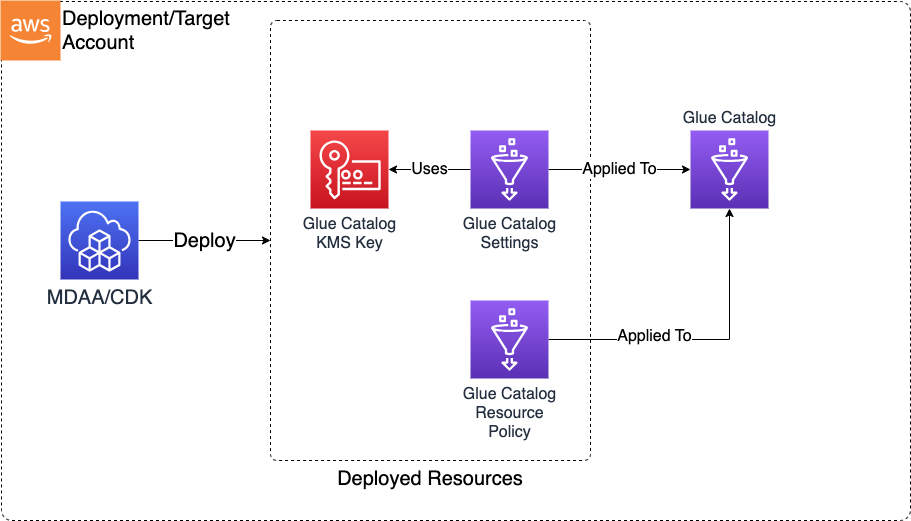
This module deploys and integrates the following resources:
Glue Catalog KMS Key - Customer-managed KMS key for encrypting Glue Catalog metadata at rest.
Glue Catalog Settings - Configures the Glue Catalog to use the Catalog KMS Key for encryption.
Catalog Resource Policy - Glue Catalog resource policy granting cross-account read access to consumer accounts.
Athena Data Source - Each configured producer account creates an Athena Data Source pointing to the producer's Glue Catalog for cross-account queries.
RAM Resource Share (Optional) - Shares the Catalog KMS Key SSM parameter with consumer accounts for cross-account key discovery.
SSM Parameters - Catalog KMS Key ARN stored in Parameter Store for cross-module reference.
Related Modules
- Data Lake — Data lake buckets and Glue databases use the Glue Catalog encryption configured by this module
- Lake Formation Settings — Configure Lake Formation admin roles and IAM Allowed Principals behavior for the account
- DataZone — DataZone associated accounts require access to the Glue Catalog KMS key configured here
- SageMaker (Domain) — SageMaker associated accounts require access to the Glue Catalog KMS key configured here
- DataOps Project — Project Glue databases are encrypted with the Catalog KMS key configured here
Security/Compliance Details
This module is designed in alignment with MDAA security/compliance principles and CDK nag rulesets. Additional review is recommended prior to production deployment, ensuring organization-specific compliance requirements are met.
- Encryption at Rest:
- Glue Catalog metadata encrypted with customer-managed KMS key
- Key usage via Glue service within local account permitted by default
- Consumer accounts granted scoped key usage via key policy
- KMS-only consumer accounts can be granted decrypt access without catalog read
- Least Privilege:
- Catalog resource policy grants read access to consumer accounts
- KMS-only consumer accounts can decrypt metadata without catalog read access
- Separation of Duties:
- Athena data sources provide cross-account query access without granting underlying catalog permissions
Configuration
MDAA Config
Add the following snippet to your mdaa.yaml under the modules: section of a domain/env in order to use this module:
glue-catalog: # Module Name can be customized
  module_path: '@aws-mdaa/glue-catalog' # Must match module NPM package name
  # module_configs is optional — all properties are optional.
  # Omit to deploy the Glue Catalog KMS key and encryption
  # settings with defaults.
  module_configs:
    - ./glue-catalog.yaml # Filename/path can be customized
Module Config Samples and Variants
Copy the contents of the relevant sample config below into the ./glue-catalog.yaml file referenced in the MDAA config snippet above.
Minimal Configuration
Deploys the Glue Catalog KMS key and encryption settings. All properties are optional — this config demonstrates a single consumer account for cross-account catalog access. Start here for a basic encrypted Glue Catalog with optional cross-account sharing.
# Contents available via above link
# Minimal Glue Catalog module configuration.
# Deploys the Glue Catalog KMS key and encryption settings.
# All properties are optional — this config demonstrates a single
# consumer account for cross-account catalog access.

# (Optional) Consumer accounts granted read access to the Glue
# Catalog via catalog resource policy.
consumerAccounts:
  consumer-team: '{{context:account-2}}'
Comprehensive Configuration
Manages cross-account Glue Catalog access through consumer/producer account mappings, KMS key sharing, and resource-scoped access policies for fine-grained data governance. Start here when evaluating all available options for data mesh topologies, Athena data sources, and multi-account catalog sharing.
sample-config-comprehensive.yaml
# Contents available via above link
# Comprehensive Glue Catalog module configuration.
# Manages cross-account Glue Catalog access through consumer/producer
# account mappings, KMS key sharing, and resource-scoped access
# policies for fine-grained data governance.

# (Optional) Consumer accounts granted read access to the entire
# Glue Catalog via catalog resource policy. Each entry maps a
# friendly name to a 12-digit AWS account ID.
consumerAccounts:
  consumer-analytics: '888888888888'
  consumer-reporting: '{{context:account-2}}'

# (Optional) Accounts granted access to the catalog KMS encryption
# key only, without catalog read access. Useful when accounts need
# to decrypt catalog-encrypted data but should not browse the catalog.
kmsKeyConsumerAccounts:
  kms-consumer-etl: '{{context:account-3}}'
  kms-consumer-lake: '444444444444'

# (Optional) Producer accounts for which additional Athena data source
# catalogs are created in the deployment account. Does not grant access
# to the producer catalog unless separately configured on the producer side.
producerAccounts:
  producer-ingestion: '555555555555'
  producer-transform: '666666666666'
  producer-curated: '777777777777'

# (Optional) Named catalog access policies for fine-grained
# resource-level access control. Each policy defines read/write
# principal ARNs scoped to specific catalog resource ARNs.
accessPolicies:
  # Policy with full read and write principal coverage
  full-access-policy:
    # (Required) Glue Catalog resource ARNs defining the policy scope.
    # Supports catalog, database, table, and partition ARNs.
    resources:
      - arn:{{partition}}:glue:{{region}}:{{account}}:catalog
      - arn:{{partition}}:glue:{{region}}:{{account}}:database/analytics-db
      - arn:{{partition}}:glue:{{region}}:{{account}}:table/analytics-db/*
    # (Optional) IAM principal ARNs granted read-only access
    # (glue:Get*, glue:List*) to the specified catalog resources.
    readPrincipalArns:
      - arn:{{partition}}:iam::888888888888:root
      - 'arn:{{partition}}:iam::{{context:account-2}}:role/DataReader'
    # (Optional) IAM principal ARNs granted read/write access
    # to the specified catalog resources.
    writePrincipalArns:
      - 'arn:{{partition}}:iam::{{context:account-3}}:root'

  # Policy with resources only — no principals (minimal required config)
  resources-only-policy:
    resources:
      - arn:{{partition}}:glue:{{region}}:{{account}}:database/staging-db
      - arn:{{partition}}:glue:{{region}}:{{account}}:table/staging-db/*

  # Policy with read-only principals (no write principals)
  read-only-policy:
    resources:
      - arn:{{partition}}:glue:{{region}}:{{account}}:database/curated-db
    readPrincipalArns:
      - arn:{{partition}}:iam::444444444444:root

  # Policy with write-only principals (no read principals)
  write-only-policy:
    resources:
      - arn:{{partition}}:glue:{{region}}:{{account}}:database/ingest-db
    writePrincipalArns:
      - arn:{{partition}}:iam::555555555555:role/DataWriter