QuickSight Account
Note: This documentation is also available in a rendered format here.
Configures and deploys account-level QuickSight resources including the QuickSight account, VPC connection security group, service role, and IP restrictions. Manual post-deployment procedures are required to finalize the account configuration. See Manual Procedures. Use this module when you need to set up QuickSight for the first time in an AWS account, establishing the foundation for BI dashboards and data visualization.
⚠️ Account-Level Module — This module can only be deployed once per AWS account. A second deployment to the same account will fail. See Account-Level Modules for details.
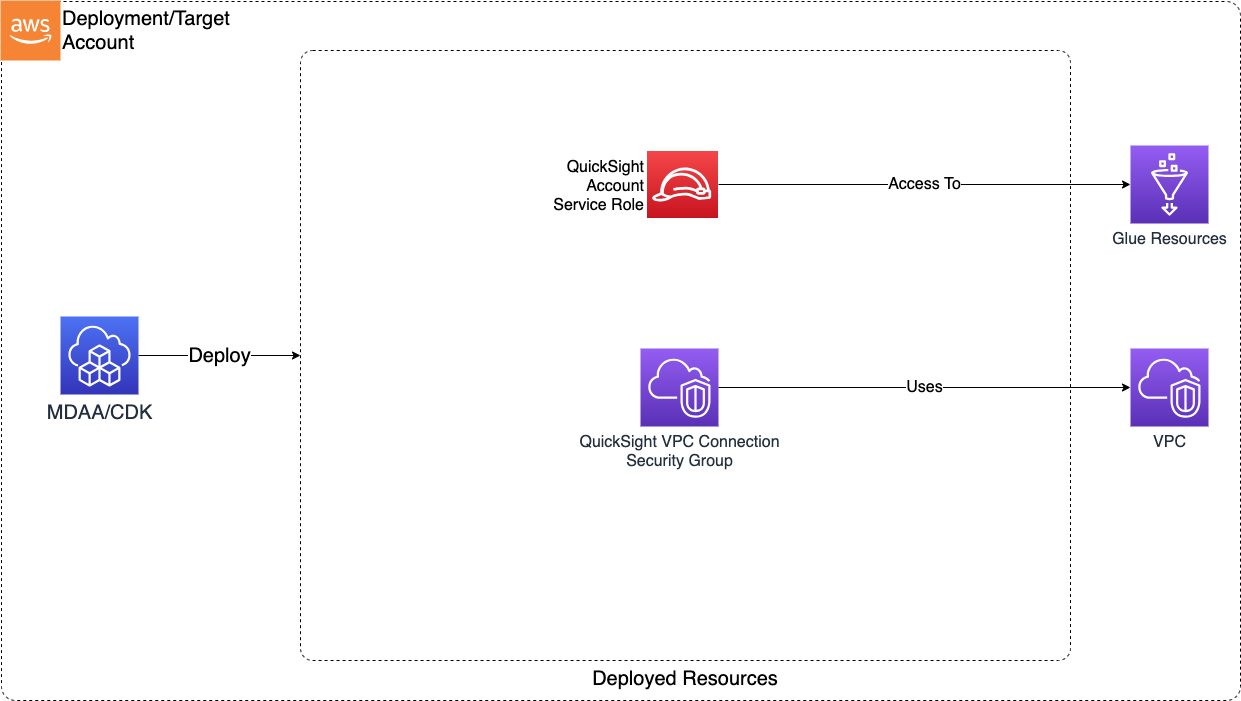
Deployed Resources
This module deploys and integrates the following resources:
QuickSight Service Role - The account-level QuickSight resource-access role (aws-quicksight-service-role-v0) used by QuickSight to access the AWS services its data sources query.
- When
resourceAccessRolePermissionsis configured, this module attaches the specified AWS-managed policies (e.g.,AWSQuicksightAthenaAccess) and any customer-managed policies (referenced by name, e.g. a scopedathena:GetTableMetadatagrant) to the role. Data-source-specific S3/KMS grants are not attached here — those are attached by the consuming@aws-mdaa/quicksight-projectmodule, which owns the data sources.
QuickSight Security Group - Security group for QuickSight VPC connection, controlling network access to VPC-connected data sources such as Redshift.
- QS VPC connection must be manually created within the QS account post deployment, and should be manually configured with this security group
QuickSight Account - Creates the QS account for the AWS account.
- Requires manual post deployment configuration in order to use deployed service role and security group
QuickSight Groups - When groups is configured, creates the listed QuickSight groups (in the default namespace) via a custom resource. Groups are created idempotently and are intentionally not deleted on stack removal, since they may own assets and be shared across deployments.
Related Modules
- QuickSight Namespace — Create namespaces for multi-tenant isolation within the QuickSight account configured here
- QuickSight Project — Deploy shared folders and data sources within the QuickSight account
- Data Warehouse — Deploy a Redshift cluster that QuickSight can connect to as a VPC data source
- Roles — Create IAM roles for QuickSight SAML federation
Security/Compliance Details
This module is designed in alignment with MDAA security/compliance principles and CDK nag rulesets. Additional review is recommended prior to production deployment, ensuring organization-specific compliance requirements are met.
- Least Privilege:
- Service role follows least-privilege for account-level operations
- Glue resource access scoped to specific databases/tables
- Network Isolation:
- Security group controls QuickSight connectivity to VPC data sources
- VPC connection binds QuickSight to specific subnets
- QuickSight requires matching ingress rule for each egress rule (allowing return traffic from data source)
- Optional IP restrictions limit QuickSight console access to approved CIDR ranges
AWS Service Endpoints
The following VPC endpoints may be required if public AWS service endpoint connectivity is unavailable (e.g., private subnets without NAT gateway, firewalled environments, or PrivateLink-only architectures):
| AWS Service | Endpoint Service Name | Type |
|---|---|---|
| QuickSight | com.amazonaws.{region}.quicksight |
Interface |
| Glue | com.amazonaws.{region}.glue |
Interface |
| Athena | com.amazonaws.{region}.athena |
Interface |
| Redshift | com.amazonaws.{region}.redshift |
Interface |
| Lake Formation | com.amazonaws.{region}.lakeformation |
Interface |
| S3 | com.amazonaws.{region}.s3 |
Gateway |
| STS | com.amazonaws.{region}.sts |
Interface |
| CloudWatch Logs | com.amazonaws.{region}.logs |
Interface |
Configuration
MDAA Config
Add the following snippet to your mdaa.yaml under the modules: section of a domain/env in order to use this module:
quicksight-account: # Module Name can be customized
  module_path: '@aws-mdaa/quicksight-account' # Must match module NPM package name
  module_configs:
    - ./quicksight-account.yaml # Filename/path can be customized
Module Config Samples and Variants
Copy the contents of the relevant sample config below into the ./quicksight-account.yaml file referenced in the MDAA config snippet above.
Minimal Configuration
Demonstrates the simplest valid configuration with only required properties, using STANDARD edition and IAM_ONLY authentication. Start here for a quick QuickSight account setup before adding VPC connections, IP restrictions, or enterprise features.
# Contents available via above link
# Minimal sample config for the QuickSight Account module.
# Demonstrates the simplest valid configuration with only required
# properties. Uses STANDARD edition and IAM_ONLY authentication to
# exercise alternative enum values not covered in the comprehensive
# config.

# QuickSight account configuration with only required fields
account:
  # QuickSight edition determining feature set and pricing tier
  # (enum: ENTERPRISE, ENTERPRISE_AND_Q, STANDARD)
  edition: 'STANDARD'
  # Authentication method controlling how users sign in to QuickSight
  # (enum: ACTIVE_DIRECTORY, IAM_AND_QUICKSIGHT, IAM_ONLY)
  authenticationMethod: 'IAM_ONLY'
  # Email address for QuickSight account notifications including billing
  # and service alerts
  notificationEmail: 'notifications@example.com'

  # VPC to associate with the QuickSight account for secure data source
  # connectivity
  # Often created by your VPC/networking stack.
  # Example SSM: ssm:/path/to/vpc/id
  vpcId: vpc-minimal1234

  # Subnets for the QuickSight VPC connection. QuickSight requires at
  # least 2 subnets for multi-AZ availability.
  # Often created by your VPC/networking stack.
  # Example SSM: ssm:/path/to/subnet/id
  subnetIds:
    - subnet-min1
    - subnet-min2
Comprehensive Configuration
Configures a QuickSight Enterprise account with IAM+QuickSight authentication, VPC connection with security group access rules, IP restrictions, and Glue catalog read access for data source validation. Use this as a reference when you need full control over authentication, network connectivity, and catalog access for a production QuickSight account.
sample-config-comprehensive.yaml
# Contents available via above link
# Sample config for the QuickSight Account module.
# Provisions a QuickSight account with Enterprise edition, IAM+QuickSight
# authentication, VPC connectivity for data sources, IP-based access
# restrictions, security group rules, and Glue catalog integration.
# This is the comprehensive config exercising all available properties.

# QuickSight account configuration defining edition, authentication,
# networking, and security settings. The module deploys a QS service role,
# security group for VPC data source connectivity, and the QS account
# itself.
account:
  # QuickSight edition determining feature set and pricing tier
  # (enum: ENTERPRISE, ENTERPRISE_AND_Q, STANDARD)
  edition: 'ENTERPRISE'
  # Authentication method controlling how users sign in to QuickSight
  # (enum: ACTIVE_DIRECTORY, IAM_AND_QUICKSIGHT, IAM_ONLY)
  authenticationMethod: 'IAM_AND_QUICKSIGHT'
  # Email address for QuickSight account notifications including billing
  # and service alerts
  notificationEmail: 'example@example.com'

  # (Optional) First name of the QuickSight account administrator
  firstName: 'Test'
  # (Optional) Last name of the QuickSight account administrator
  lastName: 'Admin'
  # (Optional) Email address of the QuickSight account administrator
  emailAddress: 'admin@example.com'
  # (Optional) Phone number for the QuickSight account administrator
  contactNumber: '1234567890'

  # VPC to associate with the QuickSight account for secure data source
  # connectivity
  # Often created by your VPC/networking stack.
  # Example SSM: ssm:/path/to/vpc/id
  vpcId: vpc-abcd1234

  # Subnets for the QuickSight VPC connection. QuickSight requires at
  # least 2 subnets for multi-AZ availability.
  # Often created by your VPC/networking stack.
  # Example SSM: ssm:/path/to/subnet/id
  subnetIds:
    - test-subnet-id1
    - test-subnet-id2

  # (Optional) QuickSight groups (default namespace) to create. Groups are
  # referenced when granting access to data sources, datasets, and folders.
  # Created idempotently; not deleted on stack removal. Add users separately.
  groups:
    - readers
    - authors

  # (Optional) IP CIDR restrictions for QuickSight console access. When
  # specified, only requests from these IP ranges can access the
  # QuickSight interface.
  ipRestrictions:
    # CIDR block defining the allowed IP range for QuickSight access
    - cidr: a.b.c.d/n
      # (Optional) Human-readable description of the IP restriction rule
      description: Restrict to my IP

  # (Optional) Security group rules controlling which VPC resources
  # QuickSight can connect to. Defines ingress rules for the MDAA-created
  # security group.
  securityGroupAccess:
    # (Optional) Security group rules for cross-security group traffic
    # control
    sg:
      # Security group identifier for security group-based access control
      - sgId: sg-1234abcd
        # IP protocol for the security group rule
        protocol: tcp
        # (Optional) Port number for the security group rule
        port: 5439
        # (Optional) Ending port number defining the upper bound of the
        # port range
        toPort: 5439
        # (Optional) Human-readable description of the security group rule
        description: Redshift access via security group
        # (Optional) CDK Nag rule suppressions for this security group
        # rule
        suppressions:
          # The id of the rule to ignore
          - id: AwsSolutions-EC23
            # The reason to ignore the rule (minimum 10 characters)
            reason: Required for QuickSight VPC connectivity
            # (Optional) Rule specific granular suppressions
            appliesTo:
              - Resource::*
    # (Optional) IPv4 CIDR block rules for security group traffic control
    ipv4:
      # CIDR block specification for network access control
      - cidr: 1.1.1.1/32
        # IP protocol for the security group rule
        protocol: tcp
        # (Optional) Port number for the security group rule
        port: 1000
        # (Optional) Ending port number defining the upper bound of the
        # port range
        toPort: 2000
        # (Optional) Human-readable description of the security group rule
        description: IPv4 CIDR-based access rule
        # (Optional) CDK Nag rule suppressions for this security group
        # rule
        suppressions:
          - id: AwsSolutions-EC23
            reason: Required for QuickSight data source connectivity
    # (Optional) Prefix list rules for security group traffic control
    prefixList:
      # Prefix list identifier for managed IP range access control
      - prefixList: pl-test1234
        # IP protocol for the security group rule
        protocol: tcp
        # (Optional) Port number for the security group rule
        port: 443
        # (Optional) Ending port number defining the upper bound of the
        # port range
        toPort: 443
        # (Optional) Human-readable description of the prefix list rule
        description: Prefix list access rule
        # (Optional) CDK Nag rule suppressions for this security group
        # rule
        suppressions:
          - id: AwsSolutions-EC23
            reason: Required for QuickSight prefix list connectivity

  # (Optional) Glue resource patterns granting the QuickSight service
  # role read access to data catalog databases and tables
  glueResourceAccess:
    - database/some-database-name*

  # (Optional) AWS-managed policies to attach to the account-level QuickSight
  # resource-access role (aws-quicksight-service-role-v0) so data sources can
  # reach their underlying AWS resources. This module owns the role, so only it
  # can attach AWS-managed policies. Data-source-specific S3/KMS grants are
  # attached by the consuming quicksight-project module instead.
  resourceAccessRolePermissions:
    # AWS-managed policy names (e.g. Athena connectivity). Names are used rather than full
    # ARNs because AWS-managed policies are never cross-account.
    awsManagedPolicies:
      - 'service-role/AWSQuicksightAthenaAccess'
    # (Optional) Existing customer-managed policy names to attach to the resource-access role
    # for scoped least-privilege grants (e.g. athena:GetTableMetadata / athena:ListTableMetadata
    # on a specific data catalog). QuickSight discovers this role by its fixed name, so it cannot
    # be swapped for a customer-supplied role; scoped permissions are attached as policies here.
    # Author the policy in the roles module (or out-of-band) and reference it by name; it must
    # already exist when this module deploys.
    customerManagedPolicies:
      - 'my-quicksight-athena-metadata-policy'
Enterprise+Q Edition Configuration
Demonstrates ENTERPRISE_AND_Q edition with ACTIVE_DIRECTORY authentication. Choose this variant when your organization requires QuickSight Q (natural language querying) and Active Directory-based authentication.
sample-config-enterprise-q.yaml
# Contents available via above link
# Sample config for the QuickSight Account module with Enterprise+Q edition.
# Demonstrates ENTERPRISE_AND_Q edition with ACTIVE_DIRECTORY authentication
# to exercise the remaining enum values not covered in the comprehensive or
# minimal configs.

# QuickSight account configuration with Q AI capabilities and Active
# Directory authentication
account:
  # QuickSight edition determining feature set and pricing tier
  # (enum: ENTERPRISE, ENTERPRISE_AND_Q, STANDARD)
  edition: 'ENTERPRISE_AND_Q'
  # Authentication method controlling how users sign in to QuickSight
  # (enum: ACTIVE_DIRECTORY, IAM_AND_QUICKSIGHT, IAM_ONLY)
  authenticationMethod: 'ACTIVE_DIRECTORY'
  # Email address for QuickSight account notifications including billing
  # and service alerts
  notificationEmail: 'q-notifications@example.com'

  # VPC to associate with the QuickSight account for secure data source
  # connectivity
  # Often created by your VPC/networking stack.
  # Example SSM: ssm:/path/to/vpc/id
  vpcId: vpc-entq1234

  # Subnets for the QuickSight VPC connection. QuickSight requires at
  # least 2 subnets for multi-AZ availability.
  # Often created by your VPC/networking stack.
  # Example SSM: ssm:/path/to/subnet/id
  subnetIds:
    - subnet-entq1
    - subnet-entq2