Basic Data Science Platform
This starter kit deploys a team-based data science platform centered around SageMaker Studio, with an integrated data lake, query capabilities, and governed access control. Each data science team gets their own SageMaker Studio Domain, team-specific Athena Workgroup, and KMS-encrypted S3 storage for data and experimentation.
Use Cases
- Self-service data science environments for ML experimentation and model development
- Team-isolated notebook environments with shared data lake access
- Governed data exploration combining Athena queries with notebook-based analysis
- Collaborative data science with role-based access (admin, user, scientist)
- Secure ML workflows with encrypted storage and network-isolated compute
Capabilities
- SageMaker Studio Domain with team-specific user profiles
- KMS-encrypted S3 data lake with multi-zone storage (raw, transformed)
- Fine-grained access control via Lake Formation
- Athena workgroups for SQL-based data exploration
- Glue Data Catalog with automated schema discovery via crawlers
- IAM roles with separation of duties (data-admin, data-user, data-scientist, team-execution)
- CloudTrail audit trail for compliance
Architecture
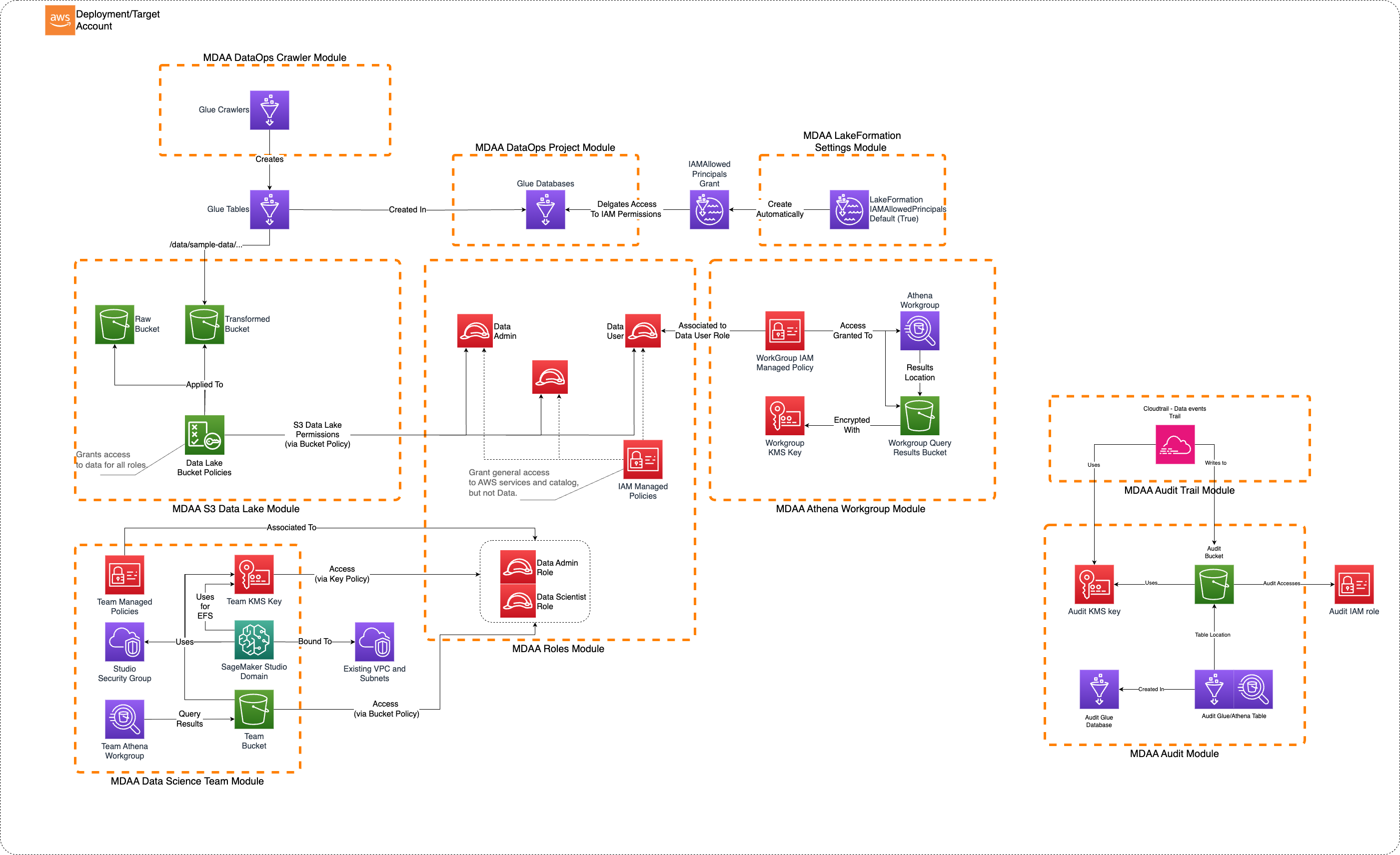
Deployment
Prerequisites and Predeployment
- Authenticate to your target AWS account and region. Ensure the authenticated role has permissions to deploy resources via CDK.
- Bootstrap CDK in your target account and region.
- Provision a VPC with at least 1 private subnet. Subnets must have connectivity to AWS service endpoints, either via:
- NAT Gateway for outbound internet access, OR
- VPC Endpoints for:
- SageMaker API
- SageMaker Runtime
- S3
- STS
- CloudWatch Logs
Additional info: PREDEPLOYMENT
Configure MDAA
-
Address all TODOs in
mdaa.yaml, specifically:- Set
organizationto a globally unique name (used in S3 bucket names and all resource prefixes) - Set
contextvalues:vpc_id— your VPC IDsubnet_id— a private subnet ID with AWS service connectivitydatascience_team_name— name for your data science team
- Set
-
Address all TODOs in module configs, specifically:
- CDK Nag suppressions in
roles.yaml. Uncomment each suppression only after reviewing the associated permissions and confirming they are acceptable for your environment.
- CDK Nag suppressions in
Deploy MDAA
Run the following from the starter kit directory (containing mdaa.yaml):
-
Optionally, run
npx @aws-mdaa/cli lsto understand what stacks will be deployed. -
Optionally, run
npx @aws-mdaa/cli synthand review the produced templates. -
Run
npx @aws-mdaa/cli deployto deploy all modules.
Additional info: DEPLOYMENT
Next Steps
See USAGE for post-deployment instructions.
Modules Deployed
| Module | Purpose |
|---|---|
@aws-mdaa/roles |
IAM roles and policies for all personas |
@aws-mdaa/datalake |
KMS keys, S3 buckets, and bucket policies |
@aws-mdaa/glue-catalog |
Glue Catalog KMS encryption (account-level) |
@aws-mdaa/lakeformation-settings |
Lake Formation settings (account-level) |
@aws-mdaa/athena-workgroup |
Athena workgroup with KMS encryption |
@aws-mdaa/audit |
S3 audit bucket for CloudTrail/Inventory |
@aws-mdaa/audit-trail |
CloudTrail audit trail |
@aws-mdaa/dataops-project |
Glue databases with access control |
@aws-mdaa/dataops-crawler |
Glue crawlers for schema discovery |
@aws-mdaa/datascience-team |
SageMaker Studio Domain, team bucket, Athena workgroup |
Troubleshooting
-
SageMaker Studio fails to launch: Verify the VPC subnet has connectivity to SageMaker API endpoints (via NAT Gateway or VPC Endpoint). Check that the subnet ID in
mdaa.yamlis a private subnet. -
User profile not accessible: The user profile's
useridtag must match the session name of the IAM role being assumed. Verify the role session name matches the configured userid. -
Athena query returns Access Denied: Verify you are using the correct IAM role. Lake Formation permissions govern data access even if S3 bucket policy allows it.