MLOps Platform Starter Kit
End-to-end ML lifecycle platform covering model training, deployment, and monitoring — deployed and governed through MDAA with CDK Nag compliance (AWS Solutions, NIST 800-53, HIPAA, PCI-DSS).
⚠️ Deprecation Notice: The model-quality monitoring step in this starter kit uses the
@aws-mdaa/sagemaker-model-monitoringmodule, which is built on SageMaker Model Monitor — a service that entered maintenance mode on 2026-07-30 (no new customer onboarding, no new features; existing deployments keep working). The MDAA team is targeting a replacement solution in the next release; adopt it when it ships. See the module README for details.
Use Cases
- Automated ML model training pipelines with versioned model registry
- Multi-stage model deployment (dev → pre-prod → prod) with manual approval gates
- Real-time inference endpoints with model quality monitoring
- CI/CD for ML with CodePipeline and CodeBuild
- Cross-account model deployment for environment isolation
- Network-isolated training and inference for compliance
Capabilities
- Unified training + deployment CI/CD pipelines via
@aws-mdaa/sagemaker-mlops - SageMaker Pipeline (preprocess → train → register) with automatic execution
- SageMaker Endpoint with model quality monitoring schedule
- Model Package Group for versioned model registry
- EventBridge-triggered deployment on model approval
- KMS-encrypted S3 bucket for model artifacts
- CodeCommit repositories seeded with ML scripts and MDAA configs
- Optional cross-account deployment (dev → pre-prod → prod)
Architecture
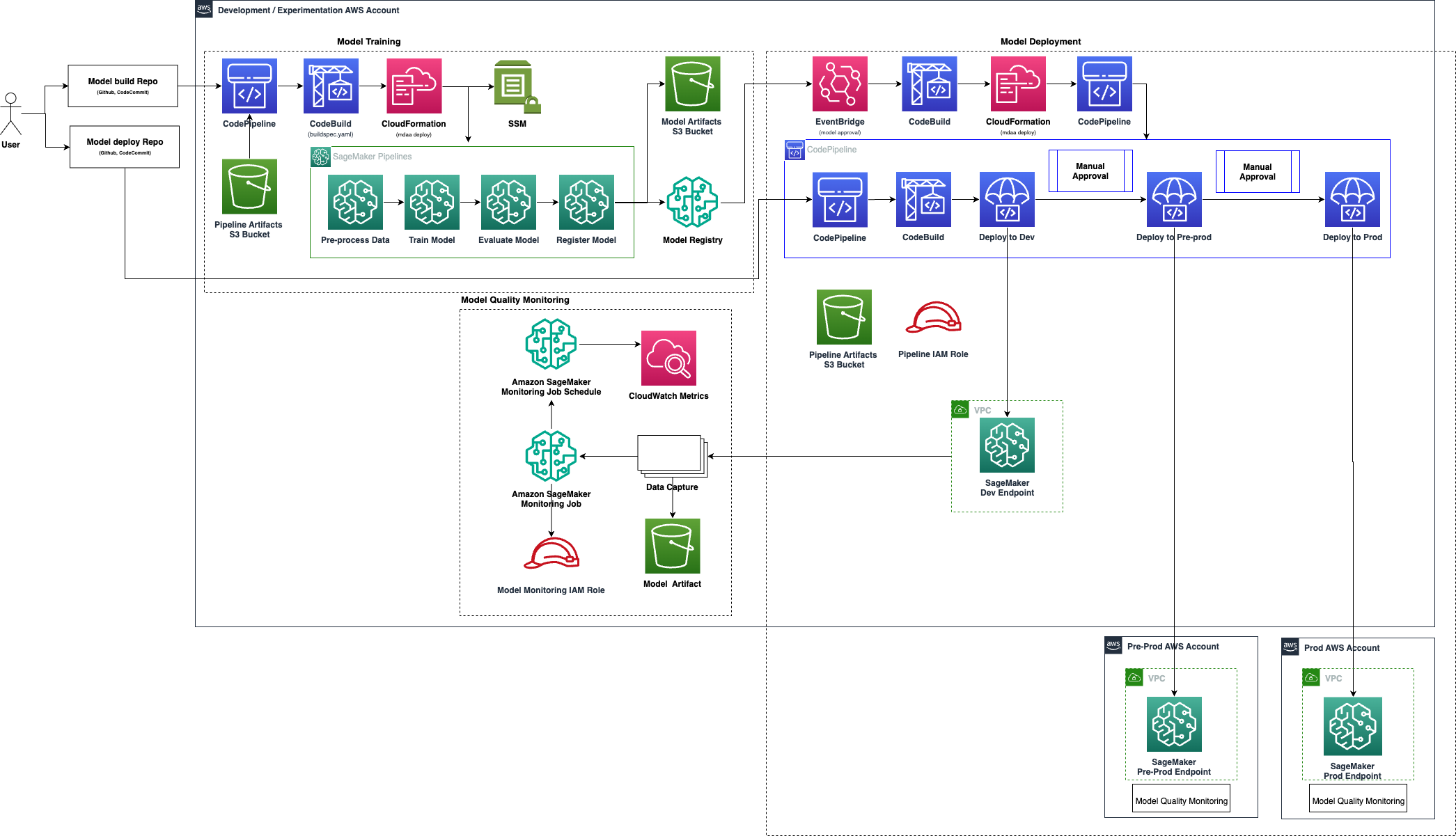
Deployment
Prerequisites and Predeployment
- Authenticate to your target AWS account and region. Ensure the authenticated role has permissions to deploy resources via CDK.
- Bootstrap CDK in your target account and region. For cross-account deployment, also bootstrap target accounts with trust.
-
Provision a VPC with at least 2 private subnets and security groups. Subnets must have connectivity to AWS service endpoints, either via:
- NAT Gateway for outbound internet access, OR
- VPC Endpoints for:
- Gateway:
com.amazonaws.<region>.s3 - Interface:
com.amazonaws.<region>.sagemaker.api - Interface:
com.amazonaws.<region>.sagemaker.runtime - Interface:
com.amazonaws.<region>.sts - Interface:
com.amazonaws.<region>.logs
- Gateway:
-
Download the sample Abalone training dataset into the
data/directory:
Additional info: PREDEPLOYMENT
Configure MDAA
-
Address all TODOs in
mdaa.yaml, specifically:- Set
organizationto a globally unique name - Set
contextvalues:sagemaker_project_name— identifier for your ML projectvpc_id— VPC IDsubnet_ids— list of private subnet IDssecurity_group_ids— list of security group IDs
- Set
-
(Optional) If using cross-account deployment, configure
preProdEnvironmentandprodEnvironmentinmlops/mlops.yaml. -
(Optional) Review CDK Nag suppressions in
mlops/mlops.yaml. Uncomment each suppression only after reviewing the associated permissions and confirming they are acceptable for your environment.
Deploy MDAA
Run the following from the starter kit directory (containing mdaa.yaml):
-
Optionally, run
npx @aws-mdaa/cli lsto understand what stacks will be deployed. -
Optionally, run
npx @aws-mdaa/cli synthand review the produced templates. -
Run
npx @aws-mdaa/cli deployto deploy all modules.
Additional info: DEPLOYMENT
Next Steps
See USAGE for post-deployment instructions.
Modules Deployed
| Module | Purpose |
|---|---|
@aws-mdaa/sagemaker-mlops |
Unified training + deploy CI/CD pipelines |
@aws-mdaa/sagemaker-pipeline |
SageMaker Pipeline (deployed by seed code) |
@aws-mdaa/sagemaker-endpoint |
SageMaker Endpoint (deployed by seed code) |
@aws-mdaa/sagemaker-model-monitoring |
Model quality monitoring (deployed by seed code) — deprecated (see notice above) |
Troubleshooting
-
Training pipeline fails with network errors: Verify VPC subnets have routes to a NAT Gateway or the required VPC Endpoints (S3, SageMaker API, SageMaker Runtime, STS, CloudWatch Logs).
-
Model not triggering deploy pipeline: EventBridge triggers on model package status change to "Approved". Verify the model was registered with
ModelApprovalStatus: Approvedin the model package group. -
Endpoint deployment fails in cross-account: Ensure the target account is CDK bootstrapped with
--trustreferencing the deployment account, and that the model artifact bucket grants cross-account read access. -
Seed code changes not taking effect: Seed code is pushed to CodeCommit only on initial deploy. Push updates manually via
aws codecommit put-fileor clone and push to the repository.