DataOps MWAA Module
Deploys compliant Amazon Managed Workflows for Apache Airflow (MWAA) environments with enterprise security controls, auto-scaling workers, VPC isolation, and DataOps project integration. Use this module for workflow orchestration that requires Python-native DAG authoring, the full Airflow operator ecosystem, and a managed web UI for pipeline visualization and monitoring.
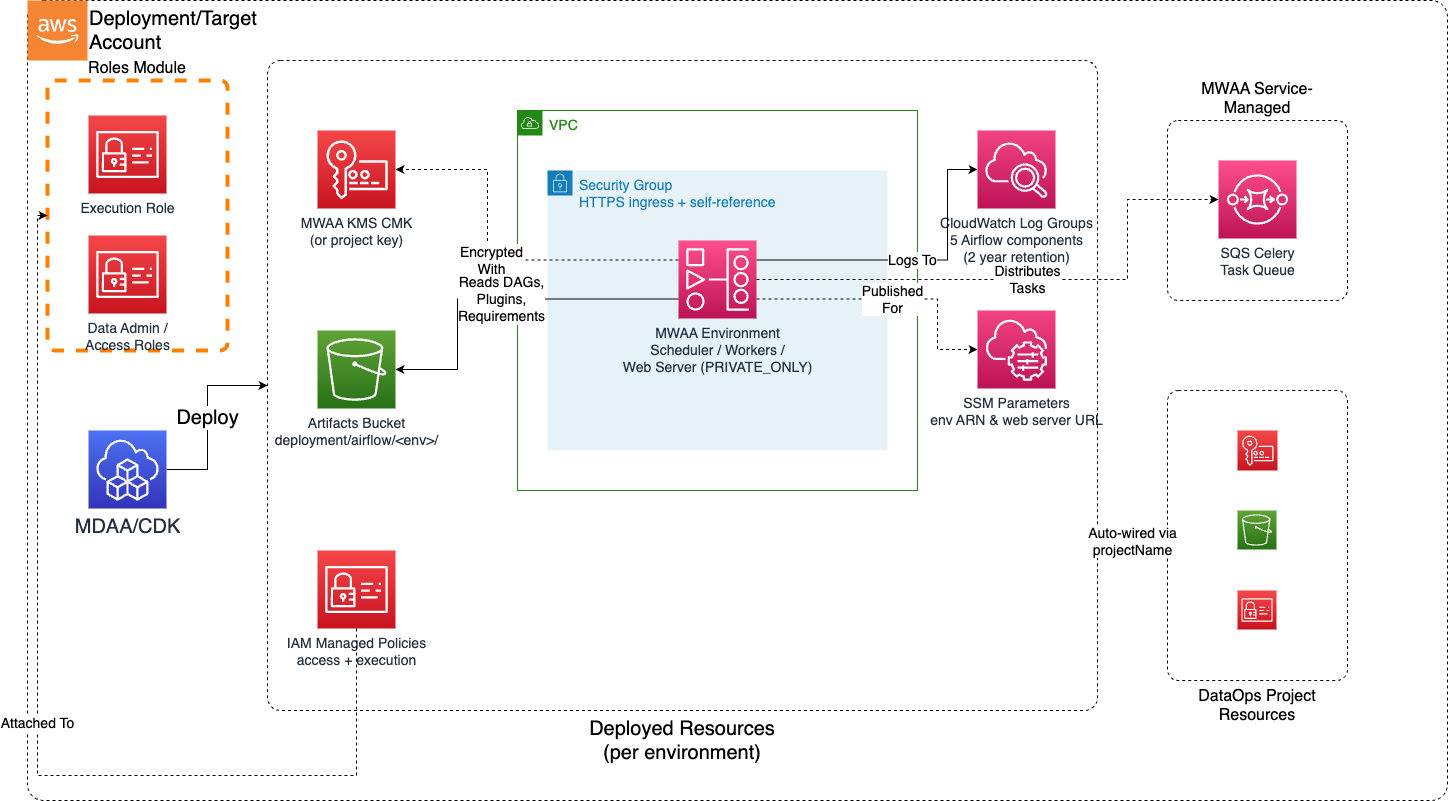
Deployed Resources (per environment)
MWAA Environment - Managed Apache Airflow service with configurable environment class, auto-scaling Celery workers, and Airflow version selection
S3 Bucket (DAGs) - Versioned, KMS-encrypted bucket for DAG files, plugins, requirements, and startup scripts (shared across environments, or user-provided)
KMS CMK (or project key) - Customer-managed encryption key for environment metadata database, S3 DAG storage, and CloudWatch logs
VPC Security Group - Per-environment network access control with configurable HTTPS ingress rules and self-referencing rule for worker communication
IAM Execution Role - Per-environment Airflow execution role with scoped S3, KMS, CloudWatch Logs, SQS (Celery), and airflow:PublishMetrics permissions
IAM Managed Policy - Per-environment access policy granting airflow:CreateWebLoginToken, airflow:CreateCliToken, and airflow:GetEnvironment to specified roles
SSM Parameters - Environment ARN and web server URL published for cross-module references
Related Modules
- DataOps Project — Provides shared KMS key via
projectNameauto-wiring - Roles — Creates IAM roles referenced by
dataAdminRolesandairflowAccessRoles - DataOps Job (Glue) — Glue ETL jobs orchestrated by Airflow DAGs via the AwsGlueJobOperator
- DataOps Crawler — Glue crawlers triggered by Airflow DAGs for catalog maintenance
- Data Lake — S3 data lake buckets that Airflow DAGs read from and write to
- DataOps Step Functions — Alternative orchestration; MWAA can invoke Step Functions via the StepFunctionStartExecutionOperator
- DataOps Workflow — Alternative Glue-native orchestration using Glue Workflows with triggers
Security/Compliance Details
This module is designed in alignment with MDAA security/compliance principles and CDK Nag rulesets (AwsSolutions, NIST 800-53 R5, HIPAA Security, PCI DSS 3.2.1).
- Encryption at Rest: KMS CMK encryption enforced on environment metadata database, S3 DAG/plugin storage, and CloudWatch log groups. Project key auto-wired when available, dedicated key created otherwise.
- Encryption in Transit: TLS enforced on all web server, scheduler, and worker communication. HTTPS-only web server access.
- Network Isolation: VPC-bound deployment with private subnets. Web server access mode defaults to
PRIVATE_ONLY. Per-environment security group with no public ingress by default. Self-referencing rule for Airflow component communication. - Least Privilege: Per-environment execution role scoped to specific S3 bucket paths, KMS key ARN, CloudWatch log group prefixes (
airflow-*), and SQS queues (airflow-celery-*). No*resource permissions on sensitive services. - Access Control: Per-environment IAM managed policy for Airflow web login (
airflow:CreateWebLoginToken) and CLI access (airflow:CreateCliToken), scoped to the specific environment ARN. - Logging & Audit: All five Airflow component logs (scheduler, worker, web server, DAG processing, task) enabled by default at INFO level minimum. Each component ships to its own CloudWatch Log Group.
- Data Protection: S3 bucket versioning enabled for DAG version history. Removal policy set to RETAIN on all resources.
Configuration
MDAA Config
domains:
  shared:
    environments:
      dev:
        modules:
          mwaa:
            module_path: '@aws-mdaa/dataops-mwaa'
            module_configs:
              - ./mwaa.yaml
Module Config Samples and Variants
Minimal Configuration
Deploys a single MWAA environment using the project KMS key with private web server access and default scaling. Use this as a starting point for a basic Airflow deployment within an existing DataOps project.
# Minimal config for the DataOps MWAA module.
# Deploys a single MWAA environment with project integration, private web
# server, and default scaling. Uses the project KMS key and project S3 bucket
# for Airflow artifacts (DAGs, plugins, requirements).
# A default placeholder DAG is deployed automatically when no dagPath is specified.

# DataOps project name for shared resource autowiring (KMS key, S3 bucket)
projectName: dataops-project-sample

# MWAA environment configurations
environments:
  # Environment name (becomes the environment identifier after MDAA naming)
  pipeline:
    # Apache Airflow version in major.minor.patch format
    airflowVersion: '2.10.3'

    # IAM execution role ARN for the MWAA environment.
    # Created in the Roles module with airflow-env.amazonaws.com trust policy.
    # Must also be configured as an execution role in the DataOps Project module
    # (so it receives project bucket and KMS key access).
    # Example SSM: ssm:/{{org}}/{{domain}}/<roles_module>/role/<role_name>/arn
    executionRoleArn: arn:{{partition}}:iam::{{account}}:role/airflow-execution

    # VPC ID for MWAA environment deployment
    # Often created by your VPC/networking stack.
    # Example SSM: ssm:/path/to/vpc/id
    vpcId: vpc-a1b2c3d4

    # Subnet IDs for the MWAA environment (minimum 2, different AZs)
    # Often created by your VPC/networking stack.
    # Example SSM: ssm:/path/to/subnet/id
    subnets:
      - subnet-1a2b3c4d
      - subnet-5e6f7g8h
Comprehensive Configuration
Deploys multiple MWAA environments with custom scaling, logging levels, Airflow configuration overrides, plugins/requirements/startup script paths, security group ingress rules, environment class sizing, weekly maintenance window, and role-based access control.
sample-config-comprehensive.yaml
# Comprehensive config for the DataOps MWAA module.
# Deploys multiple MWAA environments exercising all available configuration
# options including custom scaling, logging levels, Airflow config overrides,
# plugins/requirements paths, security group ingress, environment class
# sizing, weekly maintenance window, and role-based access control.

# (Optional) DataOps project name for shared resource autowiring (KMS key, S3 bucket)
projectName: dataops-project-sample

# See CONFIGURATION.md for role reference options (name, arn, id).
# Data admin roles granted Airflow access for ALL environments
dataAdminRoles:
  - arn: arn:{{partition}}:iam::{{account}}:role/data-admin
  - id: generated-role-id:platform-admin

# MWAA environment configurations
environments:
  # Production pipeline environment with full configuration
  production-pipeline:
    # Apache Airflow version in major.minor.patch format
    airflowVersion: '2.10.3'

    # Environment class determining container and database sizing
    # (enum: mw1.small, mw1.medium, mw1.large, mw1.xlarge, mw1.2xlarge)
    # (default: mw1.small)
    environmentClass: mw1.medium

    # IAM execution role ARN for the MWAA environment.
    # Created in the Roles module with airflow-env.amazonaws.com trust policy.
    # Must also be configured as an execution role in the DataOps Project module
    # (so it receives project bucket and KMS key access).
    # Example SSM: ssm:/{{org}}/{{domain}}/<roles_module>/role/<role_name>/arn
    executionRoleArn: arn:{{partition}}:iam::{{account}}:role/airflow-prod-execution

    # (Optional) Local path to a directory containing DAG files to deploy.
    # All .py files in this directory are uploaded to deployment/airflow/<env>/dags/.
    # When omitted, a default placeholder DAG is deployed.
    dagPath: ./dags/production

    # VPC ID for MWAA environment deployment
    # Often created by your VPC/networking stack.
    # Example SSM: ssm:/path/to/vpc/id
    vpcId: vpc-a1b2c3d4

    # Subnet IDs for the MWAA environment (minimum 2, different AZs)
    # Often created by your VPC/networking stack.
    # Example SSM: ssm:/path/to/subnet/id
    subnets:
      - subnet-1a2b3c4d
      - subnet-5e6f7g8h

    # (Optional) Web server access mode controlling how the Airflow UI is accessed
    # (enum: PRIVATE_ONLY, PUBLIC_ONLY)
    # (default: PRIVATE_ONLY)
    webserverAccessMode: PRIVATE_ONLY

    # (Optional) Relative path to the DAGs folder under deployment/airflow/<env-name>/ in the project bucket
    # (default: dags)
    dagS3Path: dags

    # (Optional) Relative path to the plugins ZIP file under deployment/airflow/<env-name>/
    pluginsS3Path: plugins/plugins.zip

    # (Optional) Relative path to the requirements.txt file under deployment/airflow/<env-name>/
    requirementsS3Path: requirements/requirements.txt

    # (Optional) Relative path to the startup shell script under deployment/airflow/<env-name>/
    startupScriptS3Path: scripts/startup.sh

    # (Optional) Minimum number of workers for auto-scaling
    # (default: 1)
    minWorkers: 2

    # (Optional) Maximum number of workers for auto-scaling
    # (default: 10)
    maxWorkers: 25

    # (Optional) Minimum number of web servers (Airflow 2.10+)
    minWebservers: 2

    # (Optional) Maximum number of web servers (Airflow 2.10+)
    maxWebservers: 5

    # (Optional) Number of Airflow schedulers to run
    # (default: 2)
    schedulers: 3

    # (Optional) Logging configuration for each Airflow component
    # (enum per level: INFO, WARNING, ERROR, CRITICAL, DEBUG)
    # (default per level: INFO)
    logging:
      schedulerLogLevel: WARNING
      workerLogLevel: INFO
      webserverLogLevel: INFO
      dagProcessingLogLevel: INFO
      taskLogLevel: INFO

    # (Optional) Airflow configuration overrides (section.option format)
    airflowConfigurationOptions:
      core.default_timezone: 'utc'
      celery.worker_autoscale: '10,2'
      webserver.default_ui_timezone: 'utc'

    # (Optional) Security group ingress rules for web server access
    securityGroupIngress:
      # IPv4 CIDR blocks allowed to connect to the environment
      ipv4:
        - 10.0.0.0/16
        - 172.16.0.0/12
      # (Optional) Security group IDs allowed to connect to the environment
      sg:
        - sg-0abc1234def56789a

    # See CONFIGURATION.md for role reference options (name, arn, id).
    # (Optional) Per-environment roles granted Airflow web login and CLI access
    airflowAccessRoles:
      - name: pipeline-operator-role
      - arn: arn:{{partition}}:iam::{{account}}:role/etl-developer

    # (Optional) Weekly maintenance window start in 'DAY:HH:MM' format (UTC)
    weeklyMaintenanceWindowStart: 'SUN:03:00'

  # Dev sandbox environment with minimal resources
  dev-sandbox:
    airflowVersion: '2.10.3'

    # Smaller environment class for development workloads
    environmentClass: mw1.small

    # Separate execution role for dev environment with limited permissions
    # Must also be configured as an execution role in the DataOps Project module.
    executionRoleArn: arn:{{partition}}:iam::{{account}}:role/airflow-dev-execution

    vpcId: vpc-a1b2c3d4

    subnets:
      - subnet-1a2b3c4d
      - subnet-5e6f7g8h

    # Minimal scaling for cost optimization
    minWorkers: 1
    maxWorkers: 5
    schedulers: 2

    # Debug logging for development troubleshooting
    logging:
      schedulerLogLevel: DEBUG
      workerLogLevel: DEBUG
      webserverLogLevel: INFO
      dagProcessingLogLevel: DEBUG
      taskLogLevel: DEBUG

    airflowConfigurationOptions:
      core.default_timezone: 'utc'

    securityGroupIngress:
      ipv4:
        - 10.0.0.0/16
No-Project Configuration
Deploys an MWAA environment without DataOps project integration, using a directly specified KMS key ARN. Because neither projectName nor bucketName is set, a dedicated S3 bucket is created for Airflow artifacts. Use this when deploying MWAA independently of a DataOps project. To reuse an existing bucket instead, set bucketName.
# Standalone config for the DataOps MWAA module (no project integration).
# Deploys a single MWAA environment with explicit KMS key ARN. When no
# projectName or bucketName is provided, a dedicated S3 bucket is created
# for Airflow artifacts.

# KMS key ARN for encrypting MWAA environment data at rest.
# Encrypts metadata database, S3 DAG storage, and CloudWatch logs.
kmsArn: arn:{{partition}}:kms:{{region}}:{{account}}:key/mrk-1234abcd5678efgh

# MWAA environment configurations
environments:
  # Environment name (becomes the environment identifier after MDAA naming)
  standalone:
    # Apache Airflow version in major.minor.patch format
    airflowVersion: '2.10.3'

    # Environment class determining container and database sizing
    # (enum: mw1.small, mw1.medium, mw1.large, mw1.xlarge, mw1.2xlarge)
    environmentClass: mw1.small

    # IAM execution role ARN for the MWAA environment.
    # Created in the Roles module with airflow-env.amazonaws.com trust policy.
    # Example SSM: ssm:/{{org}}/{{domain}}/<roles_module>/role/<role_name>/arn
    executionRoleArn: arn:{{partition}}:iam::{{account}}:role/airflow-execution

    # VPC ID for MWAA environment deployment
    # Often created by your VPC/networking stack.
    # Example SSM: ssm:/path/to/vpc/id
    vpcId: vpc-a1b2c3d4

    # Subnet IDs for the MWAA environment (minimum 2, different AZs)
    # Often created by your VPC/networking stack.
    # Example SSM: ssm:/path/to/subnet/id
    subnets:
      - subnet-1a2b3c4d
      - subnet-5e6f7g8h

    # Relative path to the DAGs folder under deployment/airflow/<env-name>/ in the bucket
    dagS3Path: dags

    # Security group ingress rules for web server access
    securityGroupIngress:
      ipv4:
        - 10.0.0.0/16